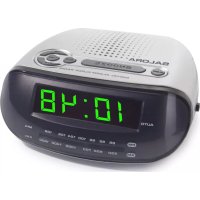
CR610 - Alarm Clock SALORA - Free user manual and instructions
Find the device manual for free CR610 SALORA in PDF.


| Product type | Clock radio |
| Brand | Salora |
| Model | CR610 |
| Power supply | 230 V ~ 50 Hz |
| Power consumption | 5 W |
| Wave bands | AM 530-1600 kHz, FM 88-108 MHz |
| Antenna | Telescopic FM antenna, built-in AM antenna |
| Display | LED display |
| Main functions | AM/FM radio, alarm (buzzer or radio), snooze, sleep, time setting |
| Sleep mode | Adjustable sleep function up to 59 minutes |
| Backup power | 9 V battery (not included) for saving settings |
| Approximate dimensions | 150 x 80 x 80 mm |
| Approximate weight | 0.5 kg |
| Maintenance and cleaning | Soft dry cloth; disconnect before cleaning |
| Safety | Indoor use only; do not expose to water or heat |
| Spare parts and repairability | Contact an authorized service center for any repairs |
Frequently Asked Questions - CR610 SALORA
User questions about CR610 SALORA
0 question about this device. Answer the ones you know or ask your own.
Ask a new question about this device
Download the instructions for your Alarm Clock in PDF format for free! Find your manual CR610 - SALORA and take your electronic device back in hand. On this page are published all the documents necessary for the use of your device. CR610 by SALORA.
USER MANUAL CR610 SALORA
Power consumption 5W
Radio AM 530-1600kHz
FM 88-108MHz
Please read these instructions before use and retain for future reference


1. SAFETY
FOR HOUSEHOLD AND INDOOR USE ONLY
- PLACE THE APPLIANCE ON A FLAT, STABLE SURFACE WITH ADEQUATE VENTILATION AND AWAY FROM OTHER SOURCES OF HEAT. MINIMUM DISTANCES AROUND THE APPLIANCE FOR ADEQUATE VENTILATION IS 5CM. DO NOT COVER OR RESTRICT VENTILATION OPENINGS.
- CHILDREN SHOULD BE SUPERVISED TO ENSURE THEY DO NOT PLAY WITH THE APPLIANCE, AND THE APPLIANCE AND CABLE SHOULD BE KEPT COMPLETELY OUT OF REACH OF YOUNG CHILDREN.
- THIS APPLIANCE IS NOT DESIGNED FOR USE BY CHILDREN, OR PERSONS WITH REDUCED PHYSICAL, SENSORY OR MENTAL CAPABILITIES, AND SHOULD NOT BE USED BY SUCH PERSONS UNLESS THEY CAN DO SO SAFELY. WHERE NECESSARY, SUCH PERSONS (OR ANYONE WITH LACK OF EXPERIENCE OR KNOWLEDGE) SHOULD FIRST BE GIVEN SUPERVISION OR INSTRUCTION CONCERNING USE OF THE APPLIANCE BY A PERSON RESPONSIBLE FOR THEIR SAFETY.
- FULLY UNWIND THE CABLE BEFORE PLugging IN AND ENSURE THE CABLE IS POSITIONED AWAY FROM AREAS WHERE IT IS LIKELY TO GET DAMAGED OR CAUSE A TRIP HAZARD.
- DO NOT OPERATE THE APPLIANCE IF DAMAGED OR AFTER IT MALFUNCTIONS. IN THE EVENT THE SUPPLY CORD IS DAMAGED, IT MUST ONLY BE REPLACED BY A QUALIFIED SERVICE ENGINEER, WITH A SUITABLY APPROVED PART.
- DO NOT PULL ON CABLE TO DISCONNECT FROM MAINS SUPPLY.
- KEEP APPLIANCE, CABLE AND PLUG DRY AND AWAY FROM AREAS WHERE IT IS LIKELY TO GET SPLASHED. AVOID USING IN HOT, HUMID ENVIRONMENTS.
- SWITCH OFF AND UNPLUG WHEN NOT IN USE AND BEFORE CLEANING OR SERVICING THE APPLIANCE. SERVICING OF THIS APPLIANCE MUST ONLY BE CARRIED OUT BY A QUALIFIED ELECTRICIAN.
- ALWAYS ENSURE THE MAINS PLUG IS READILY UNPLUGGABLE - DO NOT USE WITH 'LOCKABLE' SOCKETS OR PERMANENTLY WIRE TO MAINS.
CAUTION
The ventilation should not be impeded by covering the ventilation openings with items, such as newspapers, table -cloths, curtains, etc.
No naked flame sources, such as lighted candles, should be placed on the apparatus.
It shall not be exposed to dripping or splashing and that no objects filled with liquids, such as vases, shall be placed on the apparatus.
- Do not place the product in closed bookcases or racks without proper ventilation.
- Where the mains plug or an appliance coupler is used as the disconnect device, the disconnect device shall remain readily operable.
Battery shall not be exposed to excessive heat such as sunshine, fire or the like.
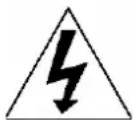
The lightning flash with arrow-head symbol, within an equilateral triangle, is intended to alert the user to the presence of uninsulated "dangerous voltage" within the product's enclosure that may be of sufficient magnitude to constitute a risk of electric shock.
CAUTION
RISK OF ELECTRIC SHOCK DO NOT OPEN
WARNING: TO REDUCE THE RISK OF ELECTRIC SHOCK, DO NOT REMOVE COVER (OR BACK). NO USER SERVICEABLE PARTS INSIDE, REFER SERVICING TO QUALIFIED SERVICE PERSONNEL.
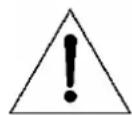
The exclamation point within an equilateral triangle is intended to alert the user to presence of important operating and maintenance (servicing) instructions in the literature accompanying the appliance
2. PARTS
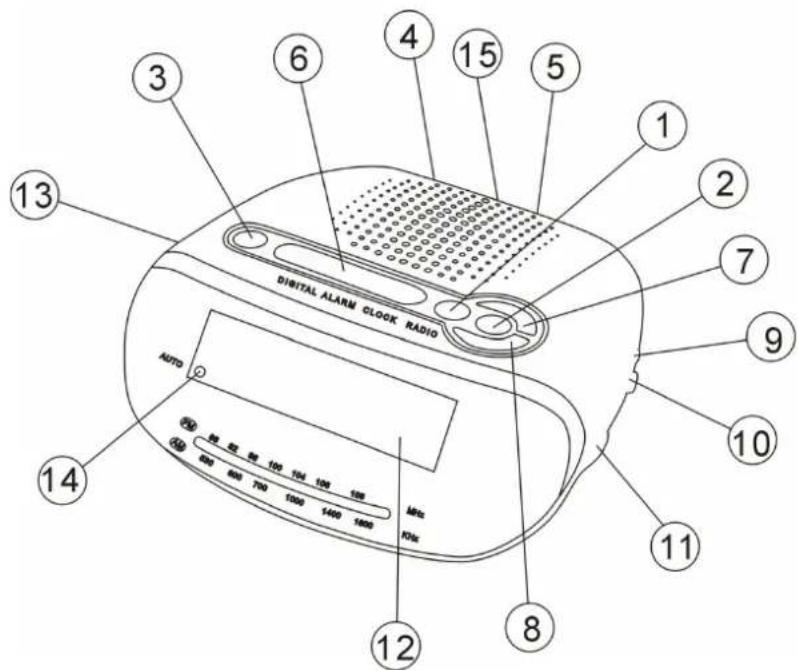
- Alarm Set Button
- Time Set Button
- Sleep Set Button
- Mains Lead
- FM Antenna
- Snooze Button
- Hour Set Button
-
Minute Set Button
-
Volume Control
- Band Selector
- Tuning Control
- LED Display
- Function Selector
- Auto Indicator
- Battery Door
3. FITTING THE BACK UP BATTERY
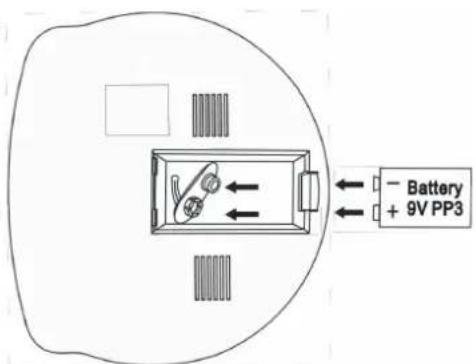
It is advisable to fit a battery (not supplied) in the battery compartment to prevent the loss of the display time and settings during a power failure.
To install the battery,
3.1 Slide off the battery compartment cover from the underside of the unit.
3.2 Insert 1 × 9V heavy-duty alkaline battery. Insert the positive (+) round terminal of the battery into the negative connector. Fit the round connector into the negative (-) terminal of the battery. Take care to observe the correct polarity (+/-).
3.3 Refit the battery compartment cover.
3.4 Do not expose the batteries or the installed batteries to excessive heat (e.g. fire, sunshine or position close to radiators etc.).
Note
- Dispos of used batteries responsibly at local authority household waste recycling facility.
DO NOT dispose of batteries in a fire as the batteries may explode. - Only use 9V batteries in this appliance.
- Be sure to insert correctly taking care to observe the correct polarity (+ and -).
- Use only batteries of the same or equivalent type as recommended.
- Do not recharge non-rechargeable batteries.
- Never mix old and new batteries (replace all batteries at the same time).
- Never try to dismantle batteries.
- Do not short-circuit the supply terminals.
Always remove exhausted or dead batteries from the product, do not dispose of in fire. - Remove batteries from the product before extended storage.
4. SETTING THE TIME
4.1 Move the function switch to OFF and plug the mains power cable into the household socket. '12:00' will flash in the display.
4.2 Press and hold the TIME button and at the same time press the HOUR button until the correct hour is displayed. If setting the time in the afternoon and evening cycle through the hours until the correct hour is displayed and the pm indicator is illuminated.
4.3 After setting the hour, press the MIN button until the correct minute is displayed.
4.4 Once the time has been set, release the TIME button.
5. USING THE RADIO
5.1 Plug the mains power cable into the household socket and switch on.
5.2 Slide the FUNCTION switch to the 'ON' position.
5.3 Select the waveband by sliding the BAND switch to the desired waveband (AM or FM).
5.4 Turn the TUNING knob to select the station of choice. The radio frequency scale will show the wavelength selected.
5.5 Adjust the volume to the desired level by rotating the VOLUME control knob.
5.6 To turn off the radio, slide the FUNCTION switch to 'OFF'.
Note
The built in AM and the external FM antennas are directional. If tuning into an FM station extend or move the antenna for a better reception. If tuning into an AM station rotate the whole unit after tuning to obtain the best reception.
6. SETTING AND USING THE ALARM
6.1 Press and hold the ALARM button and at the same time press the HOUR button repeatedly until the correct alarm hour is displayed.
6.2 After setting the hour, press the MIN button repeatedly until the correct alarm minute is displayed.
6.3 Once the time has been set, release the ALARM button.
6.4 To activate the alarm, slide the FUNCTION switch to the position marked 'BUZZ' to wake up to a buzzer or 'AUTO' to wake up to the radio.
6.5 Once the alarm has been activated, the AUTO indicator will illuminate in the display.
6.6 When the time on the clock is the same as the alarm time that has been set, the alarm will sound.
6.7 The alarm will continue to sound and stop automatically after 1 hour 59 minutes. To silence the alarm, press the ALARM button. The alarm indicator will remain illuminated and the alarm will sound again the same time the following day unless the FUNCTION switch is moved to 'OFF'.
6.8 To activate the snooze function, press the SNOOZE button when the alarm sounds. The alarm will silence and the alarm will sound again after approximately nine minutes.
6.9 To turn off the alarm permanently, slide the FUNCTION switch to the 'OFF' position.
Note The snooze button can be used repeatedly in the 1 hour 59 minute interval after the set alarm time.
7. SETTING AND USING THE SLEEP FUNCTION
This function will switch off the unit automatically after a preset time interval up to 59 minutes.
7.1 Move the FUNCTION switch to 'OFF', 'BUZZ' or 'AUTO' position.
7.2 Press and hold the SLEEP button, the radio will start to play and '0:59' will be shown in the display. Release the button and the display will show the clock and the radio will switch off after 59 minutes.
7.3 To set a shorter time interval, press and hold the SLEEP button and at the same time press the MIN button until the desired switch off time interval is displayed.
7.4 The unit will switch off after the time interval selected has lapsed.
7.5 To turn off the sleep function, press the SNOOZE button and the radio will stop immediately.
Note If the function switch is moved to 'BUZZ' or 'AUTO' the alarm is also activated. Before setting the sleep interval, ensure the alarm is set to the desired wake up time.
8. CARE AND MAINTENANCE
Wipe external surfaces with a soft cloth. If the cabinet is very dirty, unplug from the mains supply and use a damp cloth soaked in a weak solution of washing up liquid and water. Allow to dry thoroughly before reusing.
ENGLISH
P.4
- TROUBLESHOOTING GUIDE
| Observation Potential cause / solution | |
| The unit does not work Does the socket that is being used have power? Is the unit switched on at the plug? | |
| No sound Is the volume control set at minimum? | |
| Radio reception weak Extend or adjust the position of FM antenna to help improve FM reception Adjust the position of the radio to help improve AM reception | |
| Alarm function does not work | Has the alarm been activated by moving the FUNCTION switch to ‘AUTO’ or ‘BUZZ'? |
| Sleep function does not work | Has the sleep function been activated by pressing the SLEEP button and moving the FUNCTION switch to the ‘OFF’, ‘BUZZ’ or ‘AUTO’ position? |
10. TECHNICAL SPECIFICATION
Rated voltage AC 230V 50Hz
Power consumption 5W
Radio AM 530-1600kHz
FM 88-108MHz
Operating conditions Temperature: 5^ to 35^
Humidity 5% to 90%
Operating position Horizontal
Disposal of old electrical appliances
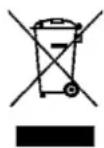
The European Directive 2002/96/EC on Waste Electrical and Electronic Equipment (WEEE), requires that old household electrical appliances must not be disposed of in the normal unsorted municipal waste stream. Old appliances must be collected separately in order to optimise the recovery and recycling of the materials they contain and reduce the impact on human health and the environment.
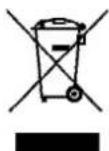
The crossed out "wheeled bin" symbol on the product reminds you of your obligation, that when you dispose of the appliance it must be separately collected.
Consumers should contact their local authority or retailer for information concerning the correct disposal of their old appliance.


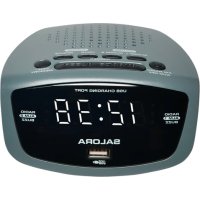
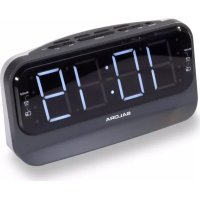
Brand : SALORA
Model : CR610
Category : Alarm Clock