Road Rider - Speaker ION - Free user manual and instructions
Find the device manual for free Road Rider ION in PDF.


| Product type | Amplified portable speaker |
| Brand | ION |
| Model | Road Rider |
| Dimensions (D x W x H) | 248 mm x 394 mm x 330 mm |
| Weight | 9.9 kg |
| Power supply | Rechargeable lead-acid battery 12V 5.0Ah |
| Battery life | Up to 25 hours (lights off) |
| Charging time | Approximately 8 hours |
| Output power | 120 W (peak) |
| Frequency response | 70 Hz - 20 kHz (+/-3 dB) |
| Tweeter | 1" (25.4 mm) |
| Woofer | 10" (254 mm) |
| Bluetooth connectivity | Bluetooth A2DP, range up to 30.5 m |
| NFC | Yes, touch pairing |
| FM radio | Yes, range 87.5 - 108 MHz |
| Auxiliary input | 3.5 mm (1/8 in) stereo |
| Microphone input | 6.35 mm (1/4 in) mono |
| USB charging port | USB 5V, 2.1A for charging devices |
| LED lighting | Yes, on, flashing, or off modes |
| Maintenance | Clean with a dry cloth, do not use solvents |
| Spare parts | Battery and fuse replaceable (see specifications) |
Frequently Asked Questions - Road Rider ION
User questions about Road Rider ION
0 question about this device. Answer the ones you know or ask your own.
Ask a new question about this device
Download the instructions for your Speaker in PDF format for free! Find your manual Road Rider - ION and take your electronic device back in hand. On this page are published all the documents necessary for the use of your device. Road Rider by ION.
USER MANUAL Road Rider ION
Quickstart Guide English (3-6)
Guía de inizio=rápido Espanol (7-10)
Snelstartgids Netherlands (23-26)
Appendix English (27)
Quickstart Guide (English)
Introduction
- Make sure all items listed in the Box Contents are included in the box.
- READ THE SAFETY & WARRANTY MANUAL BEFORE USING THE PRODUCT.
- MAKE SURE THE BATTERY IS COMPLETELY CHARGED PRIOR TO FIRST USE FOR MAXIMUM BATTERY LIFE.
- Study the connection diagram.
Box Contents
Road Rider
3.5mm (1/8") to 3.5mm (1/8") cable
Power Cable (AC) (standard IEC)
13,5V Power Cable (DC)
Quickstart Guide
Safety & Warranty Manual
Support
This unit has flashing lights. If utilized in a motor vehicle, please obey local laws and regulations regarding allowed lighting configurations.
For the latest information about this product (system requirements, compatibility information, etc.) and product registration, visit ionaudio.com.
Rechargeable Batteries
Rechargeable lead-acid batteries are the same type used in automobiles. As with your car battery, how you use this battery has a significant impact on its lifespan. With proper use and treatment, a lead-acid battery can last for years. Here are some recommendations for getting the longest life from the internal battery.
General Usage
Charge fully before use.
Charge fully before storing.
Storage
For best product longevity, do not store at exceedingly hot (greater than 90^ / 32^ ) or exceedingly cold (less than 32^ / 0^ ) temperatures.
It is acceptable to leave your sound system plugged in. This will not overcharge the battery.
If you leave the battery level low and do not charge it for 6 months, it may permanently lose capacity.
Repair
If the battery fails to charge, check the fuse near the power cable input. If the fuse is not intact, please replace it.
The battery can be replaced (details in the Technical Specifications).
For Warranty and Parts, contact the Parts Dept. at 401-658-3743 or by visiting jonaudio.com.
Disposal
Bring the unit to a recycling center or dispose of in accordance with local ordinances.
Quick Setup
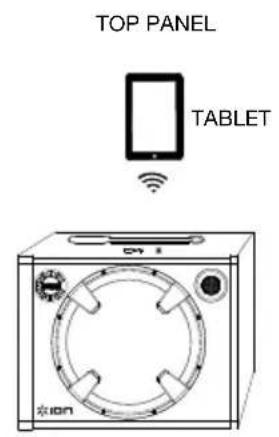
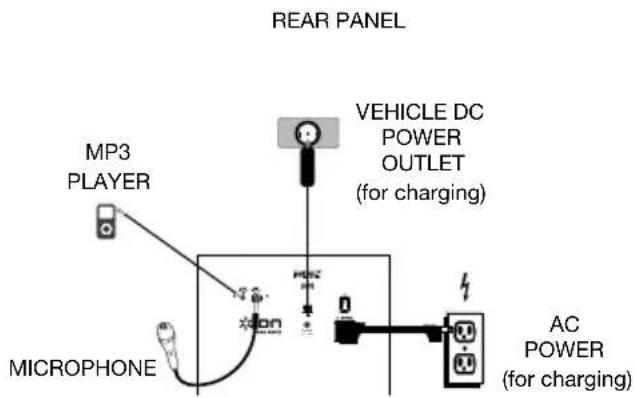
Connection Diagram
Items not listed under the Box Contents are sold separately.
Features
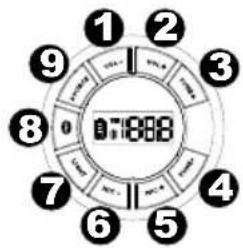
- Volume -: Decreases the speaker volume on Road Rider.
- Volume +: Increases the speaker volume on Road Rider.
- Tune+: Press and release this button to go to the next FM radio station.
- Tune -- Press and release this button to select a previous FM radio station.
- Mic+: Press and release this button to increase the level of a connected microphone.
- Mic -: Press and release this button to decrease the level of a connected microphone.
- Light: Press and release this button to cycle through the speaker light mode. The lights can be set to illuminate solid, pulsate, or turn off.
- Bluetooth Button: Press the Bluetooth button to disconnect a paired Bluetooth device.
- Source: Press and release this button to change the listening source between FM and Bluetooth.
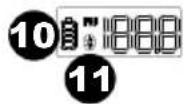
- Charging Indicator: With the battery charging indicator, when the power cable is connected, movement of the top battery segment shows the battery is charging. When the power cable is disconnected, the battery segment shows the level of the battery.
- Bluetooth Icon: The Bluetooth icon will be lit solid when a device is paired to Road Rider.
- Antenna: Adjust this FM antenna to get the best radio reception. Fold this down when not using the radio and when moving the unit.
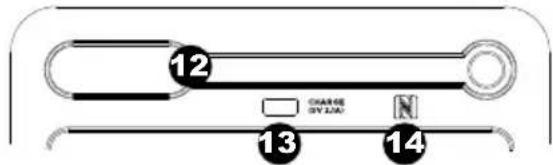
- USB Charging Port: Connect your device's charge cable here to charge it. USB charging only functions when the unit's power is turned on.
Note: To charge smartphones and tablets faster, put the device's screen to sleep.
- NFC (near-field communication): Touch and briefly hold your supported and enabled device to the NFC logo to pair the device.
- Auxiliary input: This stereo 3.5mm (1/8") input can be used to connect a CD player, MP3 player, or other audio source.
- Microphone Input: This mono input accepts a 1/4" input such as a microphone, guitar, or other musical instrument.
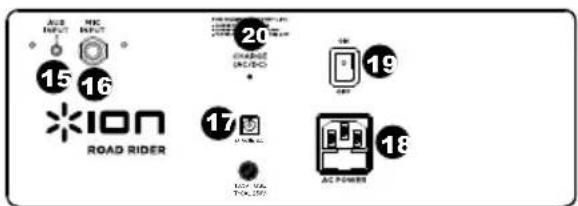
- Power Cable Input (DC): Insert the included power cable here to power Road Rider from a vehicle's 13,5V power outlet.
- Power Cable Input (IEC): Insert the included power cable here to charge the unit. Note that the Road Rider can be used with the power cable while it simultaneously charges the battery.
- Power ON/OFF Switch: Turns Road Rider on or off. Please note that while Road Rider is connected to a power source, it does not need to be powered on to charge the battery.
- Charge LED: This illuminates when the unit is charging and goes out once charging is completed.
Pairing a Bluetooth Device
- Turn on your Bluetooth device.
- Power on Road Rider and press the Source button to switch to Bluetooth mode, shown on the display as - - - to search for Bluetooth devices.
- Navigate to your Bluetooth device's setup screen, find "Road Rider" and connect.
Note: If your Bluetooth device prompts for a pairing code, enter "0000".
- The Bluetooth icon will be lit solid when a device is "paired" to Road Rider.
Note: Users should consider updating their OS if experiencing trouble with pairing or playing music. - Press the Bluetooth button to disconnect a paired Bluetooth device.
Pairing a Bluetooth Device Using NFC
NFC (near-field communication) allows data exchange from devices, such as pairing, by gently bumping them together. Check in your device's manual to see if this feature is supported.
To use NFC to pair with Road Rider:
- In order to use NFC, your device must be turned on and unlocked.
-
Enter your device's Settings menu and check that NFC is turned On (one time step).
-
Power on Road Rider.
-
Put Road Rider in Bluetooth mode, shown on the display as - - - with either a flashing or solid Bluetooth icon.
- Touch and briefly hold your device to the NFC logo.
- Follow the pairing instructions that appear on your phone. If a passcode is required, enter "0000".
- To unpair, gently bump your device against the NFC logo located on Road Rider's top panel.
Troubleshooting
If the sound is distorted: Try lowering the volume control of your sound source, musical instrument, or microphone. Also, try to reduce the overall volume of Road Rider using the Master Volume knob.
If there is too much bass: Try adjusting the tone or EQ control on your sound source to lower the bass level. This will allow you to play the music louder before clipping (distortion) occurs.
If there is a high-pitched whistling noise when using microphones: This is probably feedback. Point the microphone away from the speaker.
If you can't hear the microphone over the music volume: Turn down the music volume from your source.
Technical Specifications
| Dimensions (Depth x Width x Height) | 9.75" x 15.5" x 13" 248 mm x 394 mm x 330 mm |
| Weight | 21.8 lbs. 9.9 kg |
| Tweeter 1" | |
| Woofer | 10" |
| Output Power | 120 W (Peak) |
| Frequency Response 70 Hz - 20 kHz (+/-3dB) | -3dB |
| Supported Bluetooth Profile | A2DP |
| Bluetooth Range | Up to 100' / 30.5 m * |
| Microphone Type Dynamic microphone | |
| Aux Input | 3.5 mm (1/8") line-level |
| Battery Type | 12V 5.0Ah |
| Battery Dimensions (Depth x Width x Height) | 2.8" x 3.5" x 4" 70 mm x 96 mm x 101 mm |
| Charge Time | Up to 8 hours |
| Battery Life | Up to 25 hours (no lights) ** |
| Power Cable (AC) | Standard IEC (10A) |
| Power Cable (DC) 13.5V, 10A DC car adapter charger. Barrel size: 5.5 mm | |
| USB Charge Port | USB; 5V, 2.1A |
| Radio Frequency Range | US: FM 87.5 - 108 MHz EUROPE: FM 87.5 - 108 MHz JAPAN: FM 75.5 - 90.5 MHz |
Specifications are subject to change without notice.
Bluetooth range is affected by walls, obstructions, and movement. For optimal performance, place the product in your room at line of sight, so it is unaffected by walls, furniture, etc.
* Battery life may vary based on temperature, age, and volume usage of product.
Trademarks and Licenses
ION Audio is a trademark of ION Audio, LLC, registered in the U.S. and other countries.
The Bluetooth word mark and logos are owned by the Bluetooth SIG, Inc. and any use of such marks by ION Audio is under license.
The N Mark is a trademark or registered trademark of NFC Forum, Inc. in the United States and in other countries.
All other product or company names are trademarks or registered trademarks of their respective owners.
Cargar completeness before the utilization
Assistance technique
Batteries rechargeable
Specifications techniques
- Quickstart Guide (English)
- Introduction
- Box Contents
- Support
- Rechargeable Batteries
- General Usage
- Storage
- Repair
- Disposal
- Quick Setup
- Connection Diagram
- Features
- Pairing a Bluetooth Device
- Pairing a Bluetooth Device Using NFC
- To use NFC to pair with Road Rider:
- Troubleshooting
- Trademarks and Licenses
- Assistance technique
- Batteries rechargeable
Brand : ION
Model : Road Rider
Category : Speaker