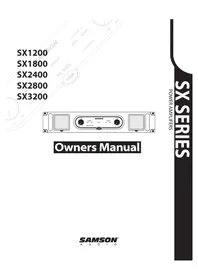
SX3200 - Receiver SAMSON - Free user manual and instructions
Find the device manual for free SX3200 SAMSON in PDF.



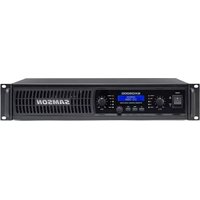
| Product Type | Professional Stereo Power Amplifier |
| Brand | Samson |
| Model | SX3200 |
| Output Power (stereo, 8 Ω) | 2 x 800 W |
| Output Power (stereo, 4 Ω) | 2 x 1100 W |
| Output Power (bridge mono, 8 Ω) | 2200 W |
| Total Harmonic Distortion (THD) | 0.04 % |
| Frequency Response | 10 Hz to 55 kHz |
| Signal-to-Noise Ratio | 104 dB |
| Input Impedance | 15 kΩ (unbalanced), 30 kΩ (balanced) |
| Input Connectors | Combination XLR and 6.35 mm balanced jacks |
| Output Connectors | 5-way binding post and Speakon™ |
| Operating Modes | Stereo, Parallel, Bridge (rear panel selector) |
| Controls | Power switch, channel 1 and 2 volume controls (21 detents) |
| LED Indicators | Power on (blue), Protection (yellow), Signal (green), Peak (red) |
| Protection | Short circuit, overheating, current limiting, DC output, over-current, HF protection, power-up delay |
| Cooling | Variable speed fans with removable filters |
| Power Supply | 100/115/220/230/240 VAC, 50/60 Hz |
| Power Consumption (1/8 power, 4 Ω) | 8.5 A (115 VAC) |
| Dimensions (W x H x D) | 483 mm x 89 mm (2U) x 408 mm |
| Net Weight | 21.72 kg |
| Construction | Steel chassis, gray finish, aluminum heat sinks |
| Warranty | 3 years |
| Maintenance and Cleaning | Clean ventilation filters with lukewarm water and let them dry completely |
| Safety | Do not expose to rain or moisture; do not remove the cover; refer servicing to qualified personnel |
| Spare Parts and Repairability | User-resettable fuse; replaceable ventilation filters; parts available via after-sales service |
Frequently Asked Questions - SX3200 SAMSON
User questions about SX3200 SAMSON
0 question about this device. Answer the ones you know or ask your own.
Ask a new question about this device
Download the instructions for your Receiver in PDF format for free! Find your manual SX3200 - SAMSON and take your electronic device back in hand. On this page are published all the documents necessary for the use of your device. SX3200 by SAMSON.
USER MANUAL SX3200 SAMSON
TO PREVENT FIRE OR SHOCK HAZARD. DO NOT USE THIS PLUG WITH AN EXTENON CORD, RECEPTACLE OR OTHER OUTLET UNLESS THE BLADES CAN BE FULLY INSERTED TO PRESENT BLADE EXPOSURE. TO PREVENT FIRE OR SHOCK HAZARD. DO NOT EXPOSE THIS APPLIANCE TO RAIN OR MOISTURE. TO PRVENT ELECTRICAL SHOCK, MATCH WIDE BLADE PLUG TO WIDE SLOT FULLY INSERT.
This lightning flash with arrowhead symbol, within an equi-lateral triangle, is intended to alert the user to the presence of uninsulated "dangerous voltage" within the product's enclosure that may be of sufficient magnitude to constitute a risk of electric shock to persons.
CAUTION
RISK OF ELECTRIC SHOCK DO NOT OPEN
Warning: To reduce the risk of electric shock, do not rem cover (or back) no user serviceable parts inside. Refer serving to qualified service personnel.

The exclamation point within an equilateral triangle is intended to alert the user to the presence of important operating and maintenance (servicing) instructions in the literature accompanying the appliance.
IMPORTANT SAFETY INSTRUCTIONS

- Read these instructions.
- Keep these instructions.
- Heed all warnings.
- Follow all instructions.
- Do not use this apparatus near water.
- Clean only with dry cloth.
- Do not block any ventilation openings. Install in accordance with the manufacture's instructions.
- Do not install near any heat sources such as radiators, heat registers, stoves, (including amplifiers) that produce heat.
- Do not defeat the safety purpose of the polarized or grounding type plug. A polarized plug blades with one wider than the other. A grounding type plug has two blades and a third grounding prong. The wide blade or the third prong are provided for your safety. If the provided plug does not fit into your outlet, consult an electrician for replacement of the obsolete outlet.
- Protest the power cord from being walked on or pinched particularly at the plugs, convenience receptacles, and at the point where they exit from the apparatus.
- Only use attachments/accessories specified by the manufacturer.
-
Use only with the cart, stand, tripod, bracket, or table specified by the manufacturer, or sold with the apparatus. When a cart is used, moving the cart/apparatus combination to avoid injury from tip-over.
-
Unplug the apparatus during lightening sort or when unused for long periods of time.
Refer all servicing to qualified personnel. Serving is required when the apparatus has been damaged in any way, such as power supply cord or plug is damaged, liquid has been spilled or objects have fallen into the apparatus has been exposed to rain or moisture, does not operate
- dropped.
This appliance shall not be exposed to dripping or splashing water and that no object filled with liquid - such as vases shall be placed on the apparatus.
- Caution-to prevent electrical shock, match wide blade plug wide slot fully insert.
- Please keep a good ventilation environment around the entire unit.
Safety Instructions/Consignes de sécurité/Sicherheitsvorkehrungen/Instrucciones de seguridad
WARNING
DO NOT EXPOSE THIS EQUIPMENT
TO RAIN OR MOISTURE
AVIS
RISQUE DE CHOC ELECTRONIQUE
NE PAS OUVRIR
CAUTION
FOR CONTINUED PROTECTION AGAINST RISK
ATTEN
ATTENTION
ON FOSIBLE DE
RECHANGE DE MEMETYPE

CAUTION
D1CK OF ELECTROPLOCK
OF ELECTRIC SHOCK
DO NOT OPEN

WARNING: To reduce the risk of fire or electric shock, do not expose this unit to rain or moisture. To reduce the hazard of electrical shock, do not remove cover or back. No user serviceable parts inside. Please refer all servicing to qualified personnel. The lightning flash with an arrowhead symbol within an equilateral triangle, is intended to alert the user to the presence of uninsulated "dangerous voltage" within the products enclosure that may be of sufficient magnitude to constitute a risk of electric shock to persons. The exclamation point within an equilateral triangle is intended to alert the user to the presence of important operating and maintenance (servicing) instructions in the literature accompanying the product.
Important Safety Instructions
- Please read all instructions before operating the unit.
- Keep these instructions for future reference.
- Please heed all safety warnings.
- Follow manufacturers instructions.
- Do not use this unit near water or moisture.
- Clean only with a damp cloth.
- Do not block any of the ventilation openings. Install in accordance with the manufacturer instructions.
- Do not install near any heat sources such as radiators, heat registers, stoves, or other apparatus (including amplifiers) that produce heat.
- Do not defeat the safety purpose of the polarized or grounding-type plug. A polarized plug has two blades with one wider than the other. A grounding type plug has two blades and a third grounding prong. The wide blade or third prong is provided for your safety. When the provided plug does not fit your outlet, consult an electrician for replacement of the obsolete outlet.
- Protect the power cord from being walked on and pinched particularly at plugs, convenience receptacles and at the point at which they exit from the unit.
- Unplug this unit during lightning storms or when unused for long periods of time.
- Refer all servicing to qualified personnel. Servicing is required when the unit has been damaged in any way, such as power supply cord or plug damage, or if liquid has been spilled or objects have fallen into the unit, the unit has been exposed to rain or moisture, does not operate normally, or has been dropped.
SX Series Features 4
Guided Tour - Front Panel 5
Guided Tour - Rear Panel 6
Setting Up and Using Your SX Series. 7
The SX Series Protection Circuitry 8
Bridge and Parallel Modes 9
SX Series Connections 10
SX Series Connections 11
Cleaning the Fan Filters 12
Specifications 53
FRANCAIS
Introduction 13
SX Series Connections 20
Printed April, 2006 v5.3
Samson Technologies Corp.
Phone: 1-800-3-SAMSON (1-800-372-6766)
Fax: 516-364-3888
Introduction
We know you don't like reading owners manuals, but you've just purchased one of the finest sound reinforcement power amplifiers around, and we want to tell you about it! So, before you plug in, we'd like to suggest you take just a few moments out to scan these pages. We'll make it as painless as possible, we promise—and, who knows, you might just pick up a tip or two.
The Samson SX Series stereo power amplifiers have been designed to provide robust, clean output with low distortion and wide dynamic range, along with the dependability demanded by the most professional audio engineers and installers.
Their convenient 2 rack-space design is compact, and yet there's plenty of power available, with 2 × 300 Watts at 8 , 2 × 450 Watts at 4 for the SX1200, 2 × 400 Watts at 8 , 2 × 600 Watts at 4 for the SX1800, 2 × 550 Watts at 8 , 2 × 750 Watts at 4 for the SX2400, 2 × 700 Watts at 8 , 2 × 900 Watts at 4 for the SX2800 and a massive 2 × 800 Watts at 8 , 2 × 1100 Watts at 4 for the SX3200. That power rating is over the full frequency spectrum, from 10Hz to 55kHz which helps give the SX amps their natural and open sound quality.
For mono applications, a Bridge mode links both channels of the amplifiers, thus providing even more power, with power ratings of 900 watts for the SX1200, 1200 watts for the SX1800, 1500 watts for the SX2400, 1800 watts for the SX2800 and a massive 2200 watts for the SX3200 into 8 ohms load.
Input connections are made via Combination connectors allowing for both balanced XLR and balanced 1/4'' TRS connections. For the outputs, the SX series amplifiers provide standard 5-way binding posts, as well as a Speakon™ connectors. Front-panel controls and displays include a power switch with LED indicator, as well as independent left and right channel input level controls. To help you set the correct operating levels, the SX amplifiers include front panel Signal, Peak and Protection LED indicators.
Like all serious power amplifiers, the SX Series internal electronics are based around a serious power-core, with over-sized toroid al transformers and large extruded heat sinks. To keep the SX amplifiers running cool, their designs employ twin internal wind tunnels with forced-air cooling via two temperature-sensitive, variable speed fans, which greatly reduces the chance of thermal and overheating problems. Multi-stage protection for power-up, over-heating, over-current, short circuit, low output impedance and DC voltage, assures high reliability under the most demanding situations.
The SX amps are road tough with their all steel chassis, 19-inch rack mount design and convenient carry handles, the SX amplifiers are ready for a life of travel, or to make home in a nice fixed installation.
Optimized for live sound venues, houses of worship, commercial installations, and for driving small and medium-sized live PA systems, the SX amplifiers will deliver reliable power from gig-to-gig, venue-to-venue and day-to-night.
In these pages, you'll find a detailed description of the many features of the SX Series power amplifier, as well as a guided tour through its front and rear panels, step-by-step instructions for its setup and use, and full specifications. You'll also find a warranty card enclosed—please don't forget to fill it out and mail it in so that you can receive online technical support and so we can send you updated information about these and other Samson products in the future. SPECIAL NOTE: Should your SX Series ever require servicing, a Return Authorization number (RA) is necessary. Without this number, the unit will not be accepted. If purchased in the United States, please call Samson at 1-800-372-6766 for a Return Authorization number prior to shipping the unit. If purchased outside the United States, contact your local Samson dealer for details. Please retain the original packing materials and, if possible, return the unit in its original carton and packing materials.
SX Series Features

The Samson SX Series power amplifier utilizes the latest technology in professional power amplifier design. Here are some of its main features:
- Power to spare - The SX Series, each amplifier delivers the following power ratings.
SX1200 2 x 300 Watts at 8Ω and 2 x 450 Watts at 4Ω
SX1800 2 x 400 Watts at 8Ω and 2 x 600 Watts at 4Ω
SX2400 2 x 550 Watts at 8Ω and 2 x 750 Watts at 4Ω
SX2800 2 x 700 Watts at 8Ω and 2 x 900 Watts at 4Ω
SX3200 2 x 800 Watts at 8Ω and 2 x 1100 Watts at 4Ω - For mono applications, a Bridge mode links both channels of the amplifiers, thus providing even more power, with power ratings of 900 watts for the SX1200, 1200 watts for the SX1800, 1500 watts for the SX2400, 1800 watts for the SX2800 and a massive 2200 watts for the SX3200 into 8 ohms load.
- Clean, crisp sound - Impressive audio specifications such as 0.04% THD, dynamic range of 105 dB, crosstalk of 80 dB, and frequency response of 10Hz to 55kHz guarantee ultra-clean sound quality.
- Independent input level controls for each channel allow precision adjustments.
LED signal indicators for each channel continuously display power output levels and allow you to correct for overloading (clipping) conditions. - Unique stable bipolar circuit design that continuously keeps DC output during idling at or near zero volts (thus keeping idle speakers at their zero point). This serves to minimize heat overload problems by effectively preventing the SX Series from applying power when unnecessary.
- Forced air cooling via two temperature-sensitive, variable speed fans provides reliable performance without thermal and overheating problems.
Protection relay circuitry (with dedicated LEDs for each channel) that guards against overheating or faulty wiring conditions and also prevents "thumps" when powering on or off. This means that you can use the SX Series with a single power strip into which a mixer or other audio devices are connected, without danger of damage to connected speakers. - Combination input connectors for each channel accommodate both balanced XLR or balanced 1/4-inch TRS plugs.
- Output connections are made via 5-way binding posts and Speakon™ connectors.
- Toroidal transformer power supply for high current and low profile.
- User-resettable circuit breaker for fast, easy startup following a power supply overload.
The SX Series can be mounted in any standard 19" rack (taking just two rack spaces), making it easy to integrate the amp into any fixed or traveling PA rig.
Rugged construction (an all-steel chassis with a cool gray finish and a lightweight anodized aluminum heat sink) makes the SX Series eminently roadworthy. - Extended three-year warranty.
- Last but certainly not least, value. The Samson SX Series has been designed from the ground up to deliver excellent yet affordable sound quality.
Guided Tour - Front Panel
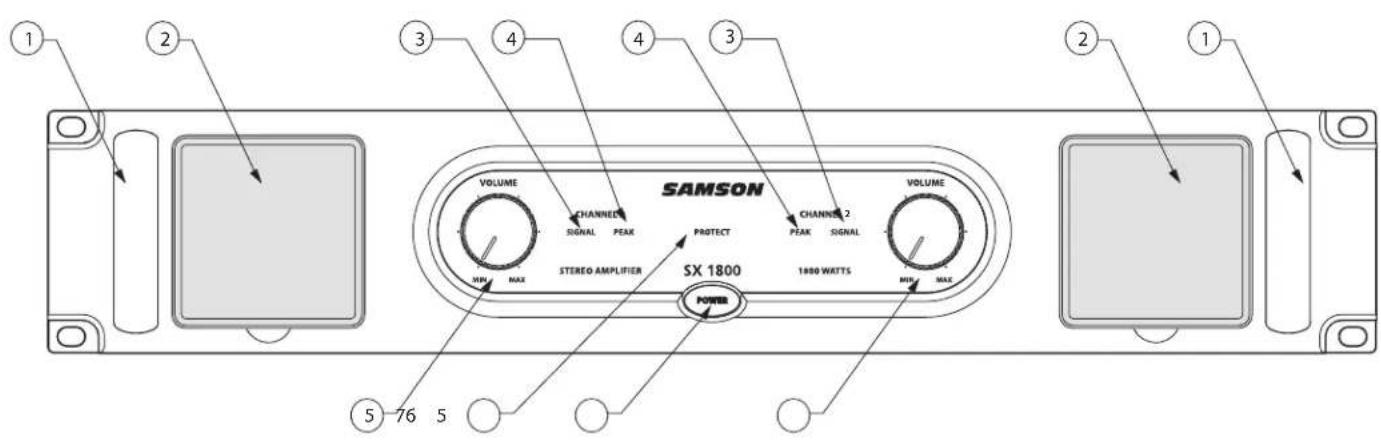
1: Handle - For easy transport while carrying, or while rack mounting, the SX amplifier features two steel handles located conveniently on the left and right side of the front panel.
2: Fan Vent - The SX amplifiers stay cool thanks to their twin, forced-air cooling tunnels. Cool air is drawn through the front panel fan filters, reducing the temperature of the internal components while forcing the heat out the rear vents. The fans will actually sense the internal temperature and adjust their speed to maintain the optimum cooling conditions.
3: Signal LED - The front panel LED indicators continuously monitor the power output level for the corresponding channel. The SIGNAL LED lights whenever output signal is present.
4: Peak LED - The PEAK segment lights whenever the channel is outputting signal at full strength. For the best signal-to-noise ratio, the right (PEAK) segment should light occasionally during peak levels; if it lights frequently, you may be overloading the SX Series and a distorted ("clipped") signal is probably being output. If this occurs and backing off the Input Level control delivers too low an output level for your application, consider using Bridge mode (see the "Bridge and Parallel Modes" section on page 8 in this manual for more information).
5: Channel input level controls - These 42-position detented controls allow you to precisely adjust the input level of the signal arriving at the rear-panel input jacks (see #2 on the following page). At their fully counterclockwise position (labeled "MIN"), the signal is attenuated by 80 dB (essentially completely off). At their fully clockwise position (labeled "MAX"), the signal is at unity gain (that is, no attenuation). When +4 dBu of signal arrives at the input jacks and the Channel input level controls are set to their fully clockwise "0 dB" position, the SX Series delivers full power output.
6: Protection LED - This goes on for approximately five seconds whenever the SX Series is powered on and then turns off (you'll hear a "click" when it does so). The Protection LED will also light when overheating or other severe problems occur (see page 7 in this manual for more information). It is normal for the Protection LED to fade slowly when the amp is powered off. When lit, no signal is provided to any connected speakers, thus muting them and preventing any "thump" from occurring. For a complete description of the conditions under which this light goes on, see the section entitled "The SX Series Protection Circuitry" on page 7 of this manual.
7: Power switch - Use this to power the SX Series on or off. The internal LED lights whenever the SX Series is powered on.
Guided Tour - Rear Panel

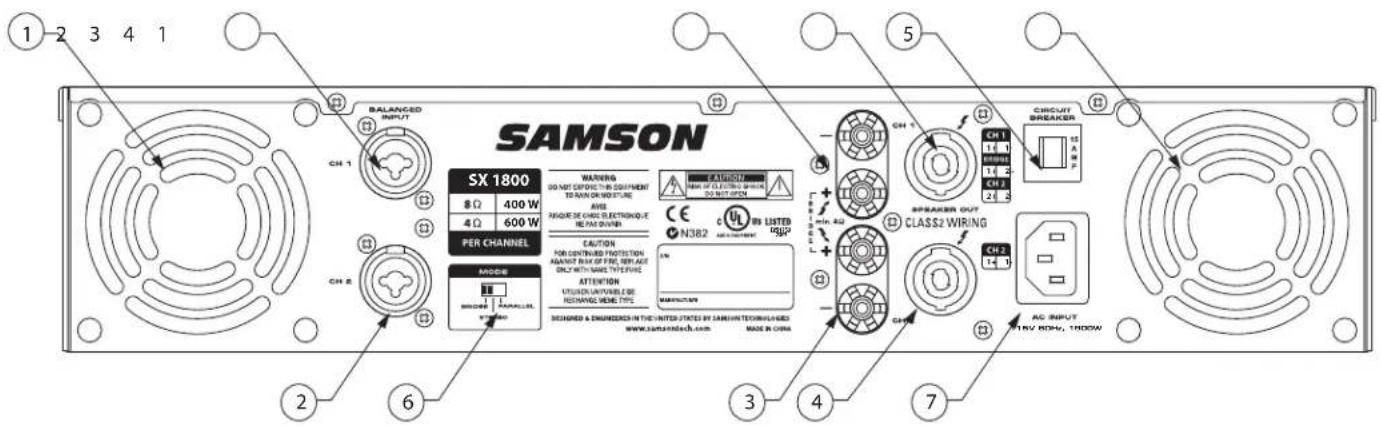
1: Fan - This variable-speed fan provides vital cooling to your SX Series (the hotter the amp gets, the faster the fan blows!). Make sure that both the front and rear panels are kept free of all obstructions and that cool, fresh air is accessible at all times. Also, try to ensure that the SX Series is used in a dust-free environment.
2: Input connectors - Connect incoming signals to these electronically balanced Combination connectors, using either XLR or 1/4"TRS (Tip/Ring/Sleeve) plugs, wired as follows: Pin 2 (or Tip) hot, Pin 3 (or Ring) cold, and Pin 1 (or Sleeve) ground. We recommend the use of balanced three-conductor cabling wherever possible (unbalanced two-conductor 1/4 " plugs can also be inserted into these inputs, but you'll get better signal quality and less outside noise and hum if you use balanced lines). The SX Series accepts input levels of any strength but needs at least +4 dBu to achieve maximum power. Stereo signals should be connected to both the Channel 1 and Channel 2 input jacks; however, when operating the SX Series in Bridge or Parallel modes, use the Channel 1 input jack only. See page 8 in this manual for more information about Parallel mode and pages 9 and 10 in this manual for full interconnection instructions.
3: 5-way Binding Post - Use these to connect each channel of the SX Series to 4-ohm or 8-ohm loudspeakers. Be sure to connect the loudspeaker correctly, with the red (+) terminal normally connected to the positive input of the speaker and the black (ground) terminal normally connected to the negative input of the speaker. See page 8 in this manual for more information about Bridge mode and pages 9 and 10 in this manual for full speaker connection instructions.
4: Speakon™ output connectors - Alternatively, you can use these to connect each channel of the SX Series to 4- or 4-ohm loudspeakers. See page 8 in this manual for more information about Bridge mode and pages 9 and 10 in this manual for full Speakon™ connector wiring and interconnection instructions.
5: Circuit Breaker - This circuit breaker will trip if there is a fault with the mains voltage or if maximum output is exceeded (very highly distorted). Push it in (once only!) to restart the amplifier after a short rest period.
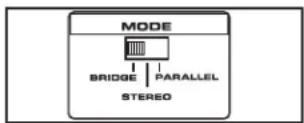
6: Bridge / Stereo / Parallel switch - For normal operation, place this three-way switch in its center ("STEREO") position. When placed in its right ("PARALLEL") position, the signal arriving at the Channel 1 input only is routed to the power amplifiers of both Channel 1 and Channel 2 (the Channel 2 input is ignored). When placed in its left ("BRIDGE") position, the signal arriving at the Channel 1 input only is again routed to both power amplifiers (again, the Channel 2 input is ignored), but the two power amplifiers are bridged together. For more information, see the "Bridge and Parallel Modes" section on page 8 in this manual and the "SX Series Connections" section on pages 9-10 in this manual. WARNING: Due to the extremely high power output of the SX Series when used in Bridge mode, be sure to use only loudspeakers sufficiently rated to handle the resultant wattage (in Bridge mode, these must be 4 or 8-ohm speakers).
7: AC input - Connect the supplied heavy-gauge 3-pin "IEC" power cable here.
Setting Up and Using Your SX Series
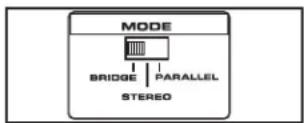
Bridge / Stereo / Parallel switch
Setting up your SX Series is a simple procedure which takes only a few minutes:
- Remove all packing materials (save them in case of need for future service) and decide where the amplifier is to be physically placed—it can be used free-standing or mounted in a standard 19'' rack, requiring only two rack spaces. When installed, make sure that both the front and rear panels are unobstructed and that there is good ventilation around the entire unit (we recommend the use of spacer panels, especially if multiple amplifiers are used in a rack.
- Set the rear panel Bridge/ Stereo / Parallel switch as desired (see the "Bridge and Parallel Modes" section on page 8 in this manual for more information).
- Make the speaker connections, using the banana, or Speakon™ output connectors on the rear panel. It is never a good idea to power up any amplifier that is not connected to loudspeakers. When operating in Stereo or Parallel mode, any loudspeakers with a minimum impedance load of 4 ohms (that is, 4 ohms or greater) can be used; however, in Bridge mode, 8 or 16 ohm speakers must be used. Be sure to connect the loudspeaker correctly. In Stereo or Parallel mode, make sure the red (+) terminal is connected to the positive input of the speaker and the black (ground) terminal is connected to the negative input of the speaker. See page 8 in this manual for more information about Bridge mode and pages 9 - 10 in this manual for full speaker interconnection instructions.
- Next, make the signal input connections, using the Combination input connectors on the rear panel (if operating the SX Series in Bridge or Parallel mode, use the Channel 1 input only—see page 8 in this manual for more information). If your mixer or crossover network has balanced outputs, we recommend the use of three-conductor cabling and connectors (unbalanced two-conductor plugs can also be inserted into the Combo inputs, but you'll get better signal quality and less outside noise and hum if you use balanced lines).
- On the front panel of the SX Series, turn both Channel input controls fully counterclockwise (to their "MIN" setting). Then connect the supplied heavy-gauge 3-pin "IEC" cable to the rear panel IEC connector and to any grounded AC socket.
Because of the relay protection circuitry built into the SX Series, you can even plug it into the same power strip that other audio devices (such as a mixing console) are connected to. You can then turn on all devices at once with the single power strip on-off switch, with no danger of damaging connected speakers by generating "thumps."
- Press the front panel Power switch in order to turn on the SX Series. The Power LED will light and the Protection LED will go on. After approximately five seconds, the Protection LED will go off (you'll hear a click when this occurs).
- Apply an input signal to the SX Series at or about +4dBu (if sending signal from a mixer, drive the output meters at approximately 0 vu). While the input signal is present, slowly raise the Channel Input controls until the desired sound level is achieved. The SIGNAL and PEAK LED indicators next to each Channel input control will show you the continuous power output of the SX Series as signal is being passed. For the best signal-to-noise ratio, the SX Series should normally be run with the Channel Input controls at or near maximum (fully clockwise, at the "MAX" position) and the PEAK segments should light occasionally (but not frequently) during peak levels. If you are using a mixer that has a master output level control (sometimes called "control room level"), use it to attenuate the signal as necessary to achieve the desired speaker level.
NOTE: If you are operating the SX amplifier at high power levels for long durations in fixed installations, you may consider switching the operating voltage to 220 volts. A licensed and insured electrician and/or technician should perform this modification.
Three-segment LED meter
If you encounter difficulty with any aspect of setting up or using your SX Series, contact your local Samson dealer. If purchased in the United States, you can call Samson Technical Support (1-800-372-6766) between 9 AM and 5 PM EST.
The SX Series Protection Circuitry
As noted in the "Guided Tour" section of this manual, the SX Series front-panel Protection LED indicates the activity of the relay speaker connection circuitry. When the Protection LED is lit, this circuitry is active, and all connected speakers are muted (provided with no signal), thus protecting them and preventing any audible "thump" from occurring.
The following conditions will cause the Protection LED to go on:
- Initial power-up: For approximately five seconds after initial power-up, the protection circuitry is activated and the speaker outputs are muted. If everything is operating normally, you will hear an audible click at the conclusion of this brief period, as the protection circuitry is deactivated and the SX Series begins delivering signal to connected speakers (at which point you'll hear a click). It is normal for the Protection LED to fade gradually after the amplifier is powered off.
WARNING: If the Protection LED fails to go out (and you fail to hear the accompanying audible click) approximately five seconds after power-up, turn the SX Series off immediately and check all external devices and wiring for possible shorts or other defects.
Overheating: A temperature sensing device in the SX Series will cause the protection circuitry to be activated (and the Protection LED to go on) whenever the operating temperature of the unit rises above a safe level. To guard against this problem, make sure the SX Series receives adequate ventilation on all sides and that both the front and rear panels are unobstructed.
- Severe overcurrent conditions: This occurs whenever the signal being input to the SX Series rises to a level above 20% THD (Total Harmonic Distortion).
- Shorted speaker cables: This will occur if, due to faulty wiring, the hot and ground signals being output by the SX Series are shorted to one another.
- Output impedance drops below 2 ohms: This can occur if the SX Series is connected to inappropriate speaker systems (see the "Setting Up and Using Your SX Series" section on page 6 in this manual for more information).
- DC voltage detected at speaker output: The most likely cause of this is an internal failure.
In general, any time the Protection LED lights up (other than during the approximately five seconds following initial power-up), there is reason to be concerned. If this occurs, turn the SX Series off immediately and carefully check all wiring and external devices in order to locate and correct the condition that caused the LED to light up in the first place.
For further assistance, contact your local Samson dealer. If purchased in the United States, you can call Samson Technical Support (1-800-372-6766) between 9 AM and 5 PM EST.
SAMSON
PROTECT
SX 1800
Bridge and Parallel Modes
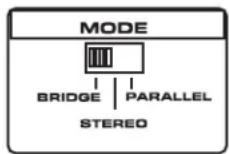
The SX Series provides a rear-panel switch that allows it to be used in either a Bridge or Parallel mode. When this switch is placed in the "STEREO" (center) position, the SX Series functions as a true stereo amplifier, where both of the two independent amplifier channels (Channel 1 and Channel 2) can receive different input signals and produce independent output signals. However, when the switch is placed in the "Bridge" (left) position, the Channel 1 inputs signal is routed to both power amplifiers bridged together, producing a single output signal with 900 watts for the SX1200, 1200 watts for the SX1800, 1500 watts for the SX2400, 1800 watts for the SX2800 and a massive 2200 watts for the SX3200 into 8 ohms load.
WARNING: Bridge mode is to be used only when the SX Series is connected to an 8 or 16 ohm speaker load. Use of Bridge mode with speaker loads of less than 8 ohms can result in severe damage to the unit due to excessive heat and current limiting and will void your warranty!
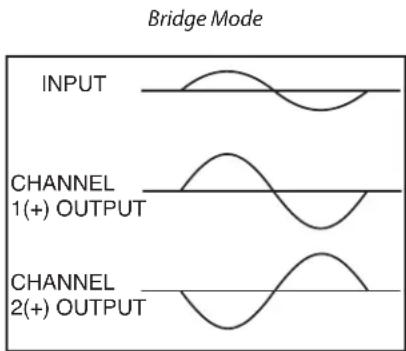
The illustration on the right shows how this works. In Bridge mode, the polarity (phase) of the Channel 2 output signal is reversed relative to that of the Channel 1 output signal. Both channels then process the same input signal, with the speaker load connected so that power is derived from both channels. The effective voltage swing seen by the load is thus doubled, so that the power output is multiplied by more four.
When using the SX Series in Bridge mode, be sure to connect your loudspeaker as shown in the illustrations on page 9 (and as silkscreened on the rear panel), with the red (+) terminal of the Channel 1 output connected to the positive input of the speaker and the red (+) terminal of the Channel 2 output connected to the negative input of the speaker.
Do not use the black ground (-) output terminal of either channel (the speaker load must "float" away from the amplifier chassis).
When the rear panel switch is placed in the right "PARALLEL" position, the SX Series operates in a unique Parallel mode. In this mode, only the signal present at the Channel 1 input is used. This signal is then routed to both the Channel 1 and Channel 2 power amplifiers, thus producing a dual mono output, with the following power ratings:
SX1200 2 x 300 Watts at 8Ω and 2 x 450 Watts at 4Ω
SX1800 2 x 400 Watts at 8 and 2 x 600 Watts at 4
SX2400 2 x 550 Watts at 8Ω and 2 x 750 Watts at 4Ω
SX2800 2 x 700 Watts at 8Ω and 2 x 900 Watts at 4Ω
SX3200 2 x 800 Watts at 8Ω and 2 x 1100 Watts at 4Ω
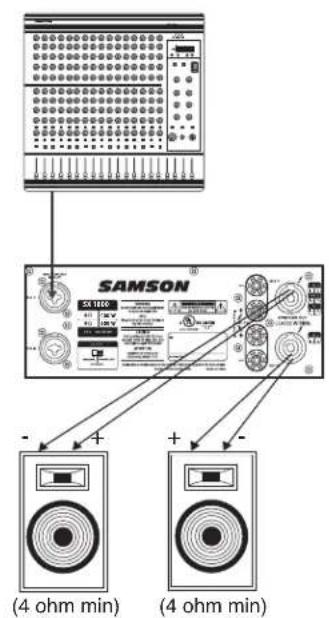
See pages 9 - 10 in this manual for interconnection diagrams when using the SX Series in Bridge or Parallel modes.
SX Series Connections
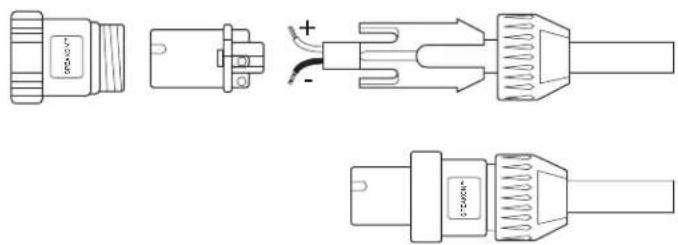
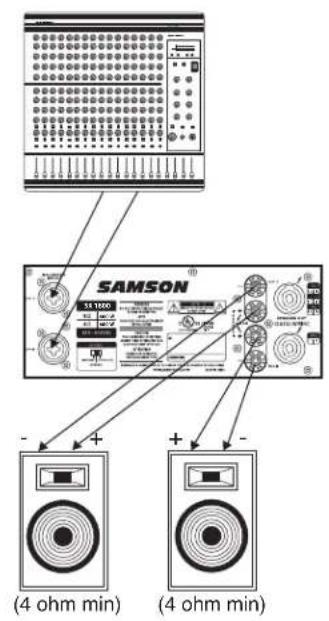
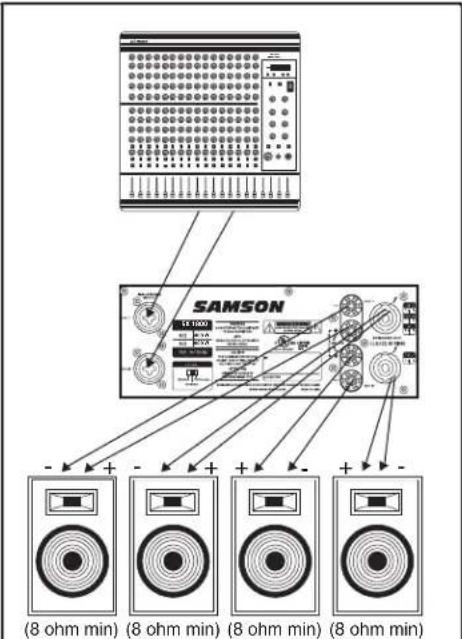
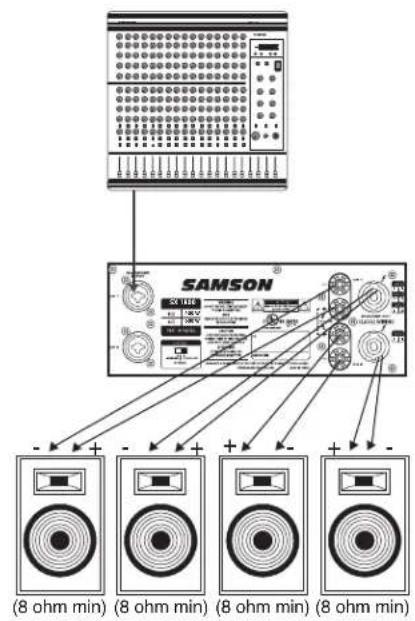
The illustrations on these two pages show the required interconnections when using the SX Series in Stereo, Bridge and Parallel modes. Wiring for Speakon™ connectors (shown on the right) is indicated where appropriate.
Stereo Mode: (two or four speakers)
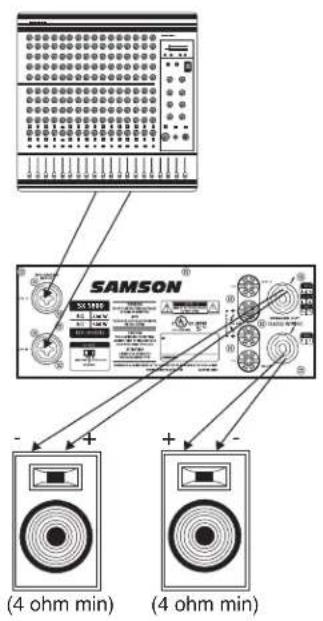
Bridge Mode: (single speaker only)
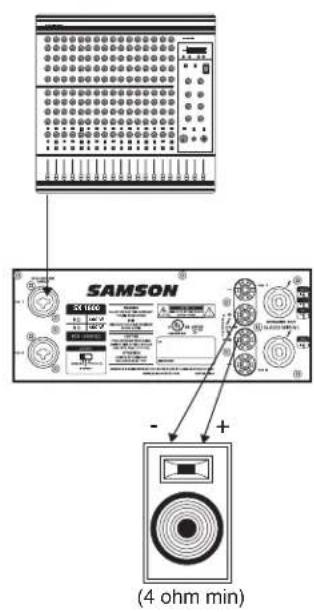
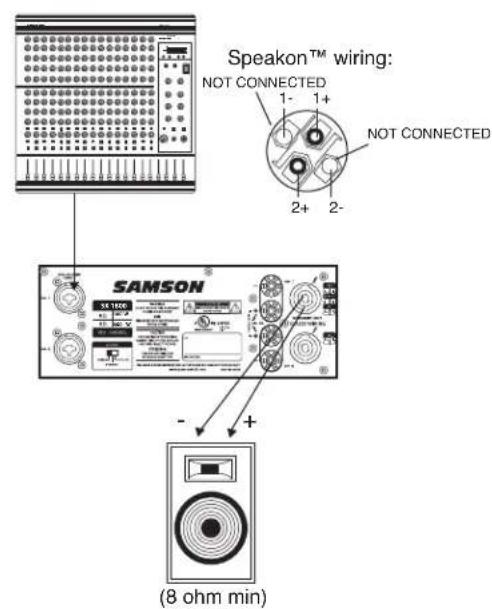
SX Series Connections
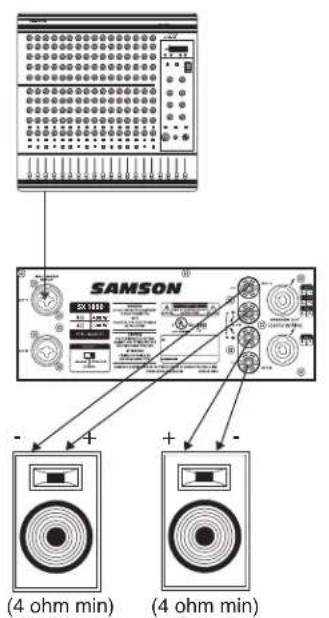
Parallel Mode: (two or four speakers)
Cleaning the Fan Filters
Cleaning the Fan Filters
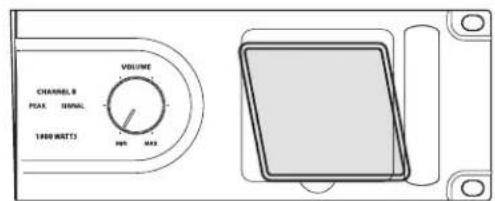
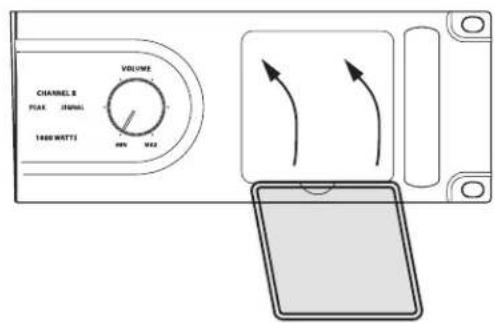
From time to time, it may become necessary to clean the fan filters. It's a good idea to keep the fan filters clean to ensure maximum airflow, and cooling, through your SX Series amplifier. To clean the fan filters follow these simple steps.
1/ Remove the fan filter by placing your finger in the depressed area under the fan filter frame.
2/ Clean the filter with warm water and let the filter dry thoroughly before replacing.
3/ Replace the fan filter by aligning the frame to the top of the panel knock-out, and then, snap the frame back in place.
Introduction
SX Series Connections
Interruptor Bridge / Stereo / Parallel
| SX1200 SX1800 SX2400 SX2800 SX3200 | |||||
| Rated Output Power | |||||
| Stereo both channel driven | |||||
| 8 ohms 300 Watts | 400 Watts | 500 Watts | 700 Watts | 800 Watts | |
| 4 ohms 450 Watts | 600 Watts | 750 Watts | 900 Watts | 1100 Watts | |
| Bridged mono | |||||
| 8 ohms 900 Watts | 1200 Watts | 1500 Watts | 1800 Watts | 2200 Watts | |
| Signal to Noise Ratio (20Hz-20k) | 102dB | 102dB | 104dB | 104dB | |
| Distortion(SMPTE-IM) | 0.05% | 0.01% | 0.04% | 0.04% | |
| Input sensitivity @8ohms | 1.24V(4dBu) | 1.24V(4dBu) | 1.24V(4dBu) | 1.24V(4dBu) | |
| Voltage Gain | 32dB | 33dB | 34dB | 35dB | |
| Output Circuitry | AB | AB | H | H | |
| Current Consumption(115VAC) | |||||
| @1/8 rated power 4ohms | 6.3A | 7.2A | 7A | 8.5A | |
| @1/3 rated power 4ohms | 9.5A | 12A | 14.5A | 17A | |
| @ rated power 4ohms, max. | 15.5A | 19.5A | 26A | 32A | |
| Distortion(typical @4 ohms) | |||||
| 20Hz-20kHz,10dB below rated power | 0.01% | 0.01% | 0.03% | 0.03% | |
| IkHz,rated power | 0.1% | 0.1% | 0.1% | 0.1% | |
| Frequency Response @8ohms 1Watt | 0/-0.5dB:20Hz-20kHz,0/-3dB:5Hz-60kHz | ||||
| Damping Factor(400Hz) | 280 | 280 | 350 | 350 | |
| Input Impedance | 15kohm Unbalanced,30kohm Balanced | ||||
| Input Clipping | 10Vrms(22dBu) | ||||
| Cooling | Continuously variable speed, fan forced air | ||||
| Connectors (each channel) | |||||
| Input: | Active balanced combo and1/4"(6.3mm)TRS | ||||
| Output: | 5-way Binding post and Speakons | ||||
| Controls | AC power switch,Channel 1 and 2 volume | ||||
| Indicators | Power on(blue),Protection(amber) | ||||
| Signal(green) for each Ch.,Peak(red) for each Ch. | |||||
| Protection | Short circuit,Thermal,Current limit,DC offset,Current inrush,RF protection,Turn on/Turn off muting | ||||
| Power Requirements | 100/115/220/230/240 VAC, 50/60 Hz | ||||
| Dimensions(WXHXD) support | 19"(483mm)X3.5"(89mm)X16"(408mm)rack mounting to rear | ||||
| Net Weight | 33lb.(14.8kg) | 37lb.(16.5kg) | 40lb.(18kg) | 47lb.(21.1kg) | |
Specifications are subject to change without notice.
\section*{Caracteristiques techniques}




- CAUTION
- RISK OF ELECTRIC SHOCK DO NOT OPEN
- IMPORTANT SAFETY INSTRUCTIONS
- Safety Instructions/Consignes de sécurité/Sicherheitsvorkehrungen/Instrucciones de seguridad
- WARNING
- AVIS
- ATTEN
- FRANCAIS
- Introduction
- SX Series Features
- Guided Tour - Front Panel
- Guided Tour - Rear Panel
- Setting Up and Using Your SX Series
- The SX Series Protection Circuitry
- Bridge and Parallel Modes
- WARNING: Bridge mode is to be used only when the SX Series is connected to an 8 or 16 ohm speaker load. Use of Bridge mode with speaker loads of less than 8 ohms can result in severe damage to the unit due to excessive heat and current limiting and will void your warranty!
- Do not use the black ground (-) output terminal of either channel (the speaker load must "float" away from the amplifier chassis).
- SX Series Connections
- Stereo Mode: (two or four speakers)
- Bridge Mode: (single speaker only)
- Cleaning the Fan Filters
- \section*{Caracteristiques techniques}
Brand : SAMSON
Model : SX3200
Category : Receiver