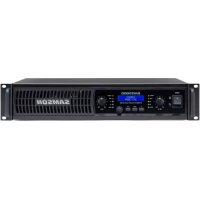
SXD3000 - Receiver SAMSON - Free user manual and instructions
Find the device manual for free SXD3000 SAMSON in PDF.



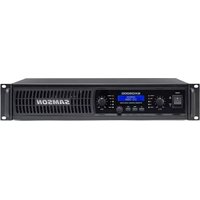
| Product Type | Stereo power amplifier |
| Brand | Samson |
| Model | SXD3000 |
| Dimensions (W x D x H) | 482 x 330 x 88 mm (19 x 13 x 3.5 inches) |
| Net Weight | 12 kg (26.4 lb) |
| Power Supply | 230 V AC, 50/60 Hz |
| Rated Output Power (stereo, 2 channels) | 2 x 300 W at 8 Ω, 2 x 450 W at 4 Ω |
| Signal-to-Noise Ratio | 100 dB |
| Total Harmonic Distortion (THD) | 0.02% |
| Frequency Response | 20 Hz - 20 kHz (+0/-1 dB) |
| Damping Factor | 120 (400 Hz) |
| Input Impedance | 20 kΩ (balanced) |
| Input Connectors | XLR 3-pin and TRS 1/4" (balanced) |
| Output Connectors | Binding posts and Speakon® |
| DSP Functions | High-pass/low-pass filters, 3-band EQ, limiter, delay (up to 20 ms), digital lock, 4 presets |
| Display | Backlit LCD screen 2x16 characters |
| LED Indicators | Signal, -20 dB, -10 dB, Limit, Thermal |
| Cooling | Variable speed fan, temperature-sensitive |
| Protection | Short circuit, open circuit, thermal, RF, DC fault |
| Maintenance and Cleaning | Clean with a dry cloth; do not obstruct openings; maintenance by qualified personnel |
| Safety | Do not open; use only with specified accessories; unplug during storms; follow the instruction manual |
| Spare Parts and Repairability | Fuse replaceable by an identical type; for any other repairs, contact a qualified service center |
Frequently Asked Questions - SXD3000 SAMSON
User questions about SXD3000 SAMSON
0 question about this device. Answer the ones you know or ask your own.
Ask a new question about this device
Download the instructions for your Receiver in PDF format for free! Find your manual SXD3000 - SAMSON and take your electronic device back in hand. On this page are published all the documents necessary for the use of your device. SXD3000 by SAMSON.
USER MANUAL SXD3000 SAMSON
This lightning flash with arrowhead symbol within an equilateral triangle is intended to alert the user to the presence of non-insulated “dangerous voltage” within the product’s enclosure that may be of sufficient magnitude to constitute a risk of electric shock.

The exclamation point within an equilateral triangle is intended to alert the user to the presence of important operating and maintenance instructions in the literature accompanying the appliance.
-
Read these instructions.
-
Keep these instructions.
-
Heed all warnings.
-
Follow all instructions.
-
This apparatus shall not be exposed to dripping or splashing liquid and no object filled with liquid, such as a vase, should be placed on the apparatus.
-
Clean only with a dry cloth.
-
Do not block any of the ventilation openings. Install in accordance with the manufacturer's instructions.
-
Do not install near any heat sources such as radiators, heat registers, stoves, or other apparatuses (including amplifiers) that produce heat.
-
Only use attachments/accessories specified by the manufacturer.
-
Unplug this apparatus during lightning storms or when not in use for long periods of time.
-
Do not override the intended purpose of the polarized or grounding-type plug. A polarized plug has two blades, with one wider than the other. A grounding-type plug has two blades and a third grounding prong. The wide blade, or third prong, is provided for your safety. If the provided plug does not fit your outlet, consult an electrician to replace the obsolete outlet.
-
Protect the power cord from being walked on or pinched, particularly at the prongs, convenience receptacles, the point where they exit from the apparatus.
-
Use only with the cart stand, tripod bracket, or table specified by the manufacture, or sold with the apparatus. When a cart is used, utilize caution when moving the cart/apparatus combination to avoid injury from tip-over.
-
Refer all servicing to qualified service personnel. Servicing is required if the apparatus has been damaged in any way, such as power-supply cord or plug breakage, damage due to liquid or objects falling onto the apparatus, exposure to rain or moisture, or if the apparatus does not operate normally, or has been dropped.
-
MAINS DISCONNECT: The plug should remain readily operable. For rack-mount or installation where plug is not accessible, an all-pole mains switch with a contact separation of at least 3 mm in each pole shall be incorporated into the electrical installation of the rack or building.
-
FOR UNITS EQUIPPED WITH EXTERNALLY ACCESSIBLE FUSE RECEPTACLE: Replace fuse with same type and rating only.
-
MULTIPLE-INPUT VOLTAGE: This equipment may require the use of a different line cord, attachment plug, or both, depending on the available power source at installation. Connect this equipment only to the power source indicated on the equipment rear panel. To reduce the risk of fire or electric shock, refer servicing to qualified service personnel or equivalent.

If you want to dispose this product, do not mix it with general household waste. There is a separate collection system for used electronic products in accordance with legislation that requires proper treatment, recovery and recycling.
Private household in the 28 member states of the EU, in Switzerland and Norway may return their used electronic products free of charge to designated collection facilities or to a retailer (if you purchase a similar new one).
For Countries not mentioned above, please contact your local authorities for a correct method of disposal.
By doing so you will ensure that your disposed product undergoes the necessary treatment, recovery and recycling and thus prevent potential negative effects on the environment and human health.


THIS DEVICE COMPLIES WITH PART 15 OF THE FCC RULES CLASS B. OPERATION IS SUBJECT TO THE FOLLOWING TWO CONDITIONS:
(1) THIS DEVICE MUST NOT CAUSE HARMFUL INTERFERENCE, AND (2) THIS DEVICE MUST ACCEPT ANY INTERFERENCE RECEIVED INCLUDING INTERFERENCE THAT MAY CAUSE UNDESIRED OPERATION. SUITABLE FOR HOME OR OFFICE USE.
Table of Contents
Introduction 4
Getting Started with the SXD Power Amplifier . . . . . . . . . . . . . . . . . . . 6
Front Panel Callouts 7
Rear Callouts 8
Getting Started - DSP 9
Presets 11
System Setup Examples 12
Wiring Guide 14
Specifications 15
Copyright 2015
v2
Samson Technologies Corp.
45 Gilpin Avenue
Hauppauge, New York 11788-8816
Phone: 1-800-3-SAMSON (1-800-372-6766)
Fax: 631-784-2201
www.samsontech.com
Introduction
The Samson SXD Series stereo power amplifiers have been designed to provide robust, clean output with low distortion and wide dynamic range, along with the dependability demanded by professional front-of-house engineers and installers.
The convenient two rack-space design is compact, and yet there's plenty of power available, with 2 x 450 Watts at 4Ω for the SXD3000, 2 x 750 Watts at 4Ω for the SXD5000, and 2 x 1000 Watts at 4Ω for the SXD7000 over the full frequency spectrum, from 20 Hz to 20 kHz.
The SXD has a full-featured DSP and front panel LCD display with settings for high- and low-pass filters, three-band equalizer, output limiter, delay time for speaker alignment, and digital pass-code security lock to ensure settings are not changed accidentally. There are also four presets designed for typical speaker configurations. These presets will allow you to quickly get up and running with your system by displaying the parameters that are essential to the speaker arrangement.
Input connections are made via both balanced XLR and balanced 14 " TRS connections. For the outputs, the SXD Series provides standard binding posts as well as a Speakon® connectors. To help you set the correct operating levels, the SXD amplifiers include front panel Signal, Output Level, Limiter and Protection LED indicators.
Like all Samson power amplifiers, the SXD Series' internal electronics are based around a serious power-core, with oversized toroidal transformers and large heat sinks. To keep the SXD amplifiers running cool, the design employs forced-air cooling via a temperature-sensitive, variable speed fan, which greatly reduces the chance of thermal and overheating problems. Multi-stage protection for power-up, over-heating, over-current, short circuit, low output impedance and DC voltage, assures high reliability under the most demanding situations.
The SXD amps are designed for the rigors of either portable PA system or a fixed installation system with all-steel chassis, 19-inch rack mount design, and convenient carry handles.
Optimized for live sound venues, houses of worship, commercial installations, and for driving live PA systems, the SXD amplifiers will deliver reliable power from gig-to-gig and venue-to-venue. In the following pages, you'll find a detailed description of the many features of the SXD Series power amplifier, as well as a guided tour through its front and rear panels, step-by-step instructions for its setup and use, and full specifications.
We recommend you keep the following records for reference, as well as a copy of your sales receipt.
Serial number:
Date of purchase:
Dealer name:
With proper care and maintenance, your SXD amplifier will operate trouble-free for many years. Should your amplifier ever require servicing, a Return Authorization (RA) number must be obtained before shipping your unit to Samson. Without this number, the unit will not be accepted. Please call Samson at 1-800-3SAMSON (1-800-372-6766) for an RA number prior to shipping your unit. Please retain the original packing materials and, if possible, return the unit in its original carton. If your SXD amplifier was purchased outside of the United States, contact your local distributor for warranty details and service information.
Features

- High power for performance and installation speaker configurations: SXD3000 2 x 300 Watts at 8Ω and 2 x 450 Watts at 4Ω SXD5000 2 x 400 Watts at 8Ω and 2 x 750 Watts at 4Ω SXD7000 2 x 550 Watts at 8Ω and 2 x 1000 Watts at 4Ω
- High performance DSP technology offers complete control over many performance features
• Digital Security Lock prevents unwanted changes to the DSP settings - Front panel LCD for navigating DSP settings, including Filters, EQ, Limiter, Delay, and more
- Clean, crisp sound, 0.02% THD, dynamic range of 100 dB, and frequency response of 20 Hz to 20 kHz, guarantee ultra-clean sound quality
- Independent level controls for each channel allow precision adjustments
• LED signal indicators for each channel continuously display input signals and output levels - Temperature-sensitive, variable speed fan provides reliable performance without thermal and overheating problems
- Protection relay circuitry that guards against overheating or faulty wiring conditions and also prevents “thumps” when powering on or off
- Input connectors for each channel accommodate both balanced XLR or balanced 14 -inch TRS plugs
- Output connections are made via binding posts and Speakon® connectors
- The SXD Series can be mounted in any standard 19" rack, making it easy to integrate the amp into any fixed or traveling PA rig
- Rugged construction makes the SXD Series completely roadworthy
Getting Started with the SXD Power Amplifier
Setting up your SXD Series is a simple procedure which takes only a few minutes:
Remove all packing materials (save them in case your units needs future service) and decide where the amplifier is to be physically placed—it can be used free-standing or mounted in a standard 19" rack, requiring two rack spaces. When installed, make sure that both the front and rear panels are unobstructed and that there is good ventilation around the entire unit.
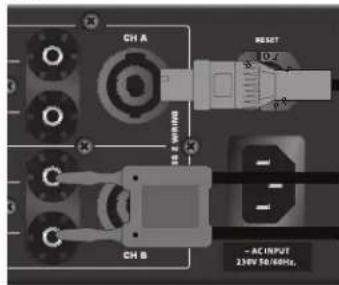
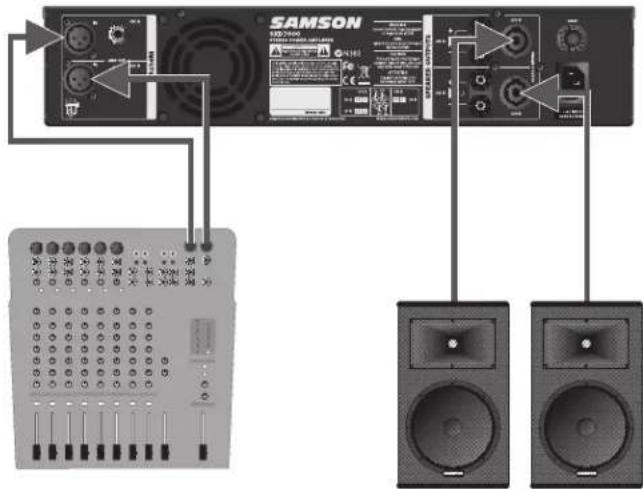
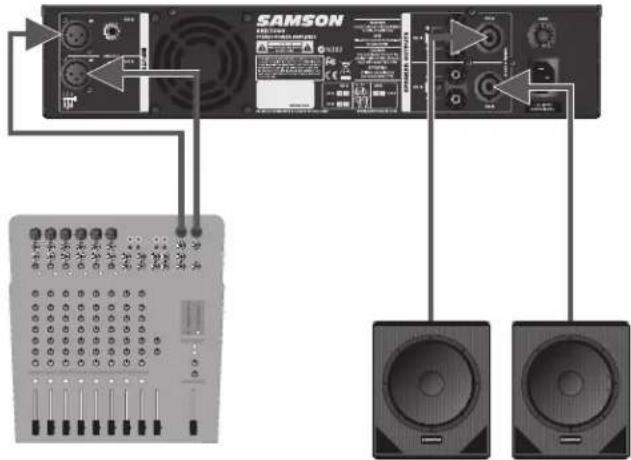
Make the speaker connections, using the binding posts, or Speakon® output connectors on the rear panel. It is never a good idea to power up any amplifier that is not connected to loudspeakers.
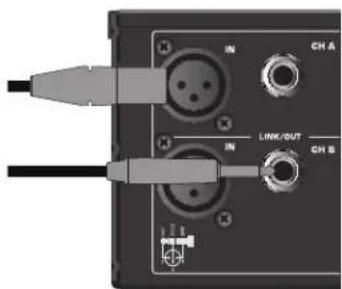
Next, make the signal input connections, using the input connectors on the rear panel (if operating the SXD Series in Ch A Parallel mode, use the Ch A input only). If your mixer has balanced outputs, we recommend the use of three-conductor cabling and connectors.
On the front panel of the SXD Series, turn both Channel level controls fully counterclockwise (to their "MIN" setting). Then connect the supplied heavy-gauge 3-pin "IEC" cable to the rear panel IEC connector and to any grounded AC socket.
Turn the Power switch ON.
Apply an input signal to the SXD Series at or about +4dBu (if sending signal from a mixer, drive the output meters at approximately 0 vu). While the input signal is present, slowly raise the Channel level controls until the desired sound level is achieved. The SIGNAL and Limiter LED indicators next to each Channel input control will show you the continuous power output of the SXD Series as signal is being passed. For the best signal-to-noise ratio, the SXD Series should normally be run with the Channel Input controls at or near maximum (fully clockwise, at the "MAX" position) and the LIMITER segments should light occasionally (but not frequently) during peak levels. If you are using a mixer that has a master output level control, use it to attenuate the signal as necessary to achieve the desired speaker level.
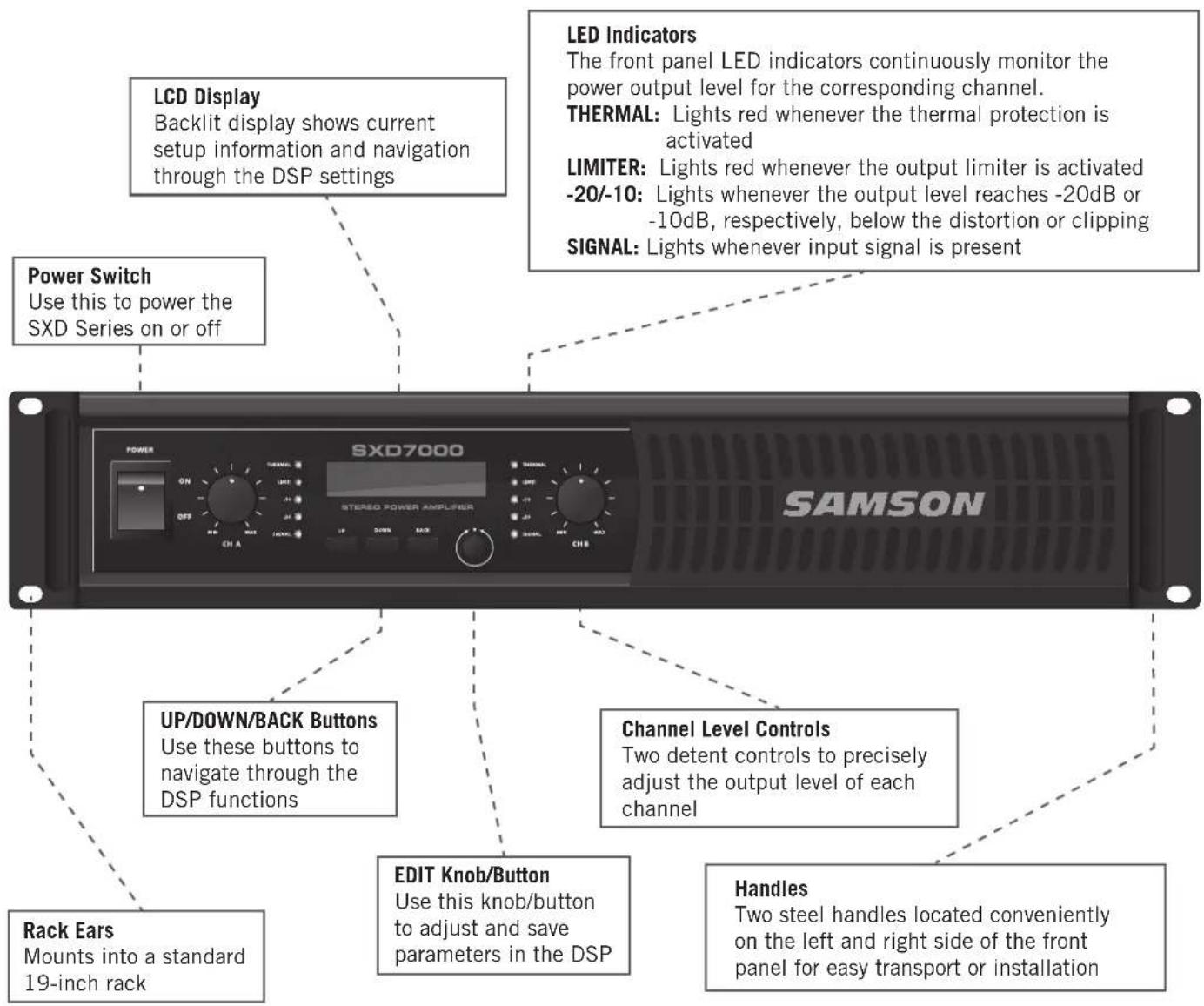
Front Panel Callouts
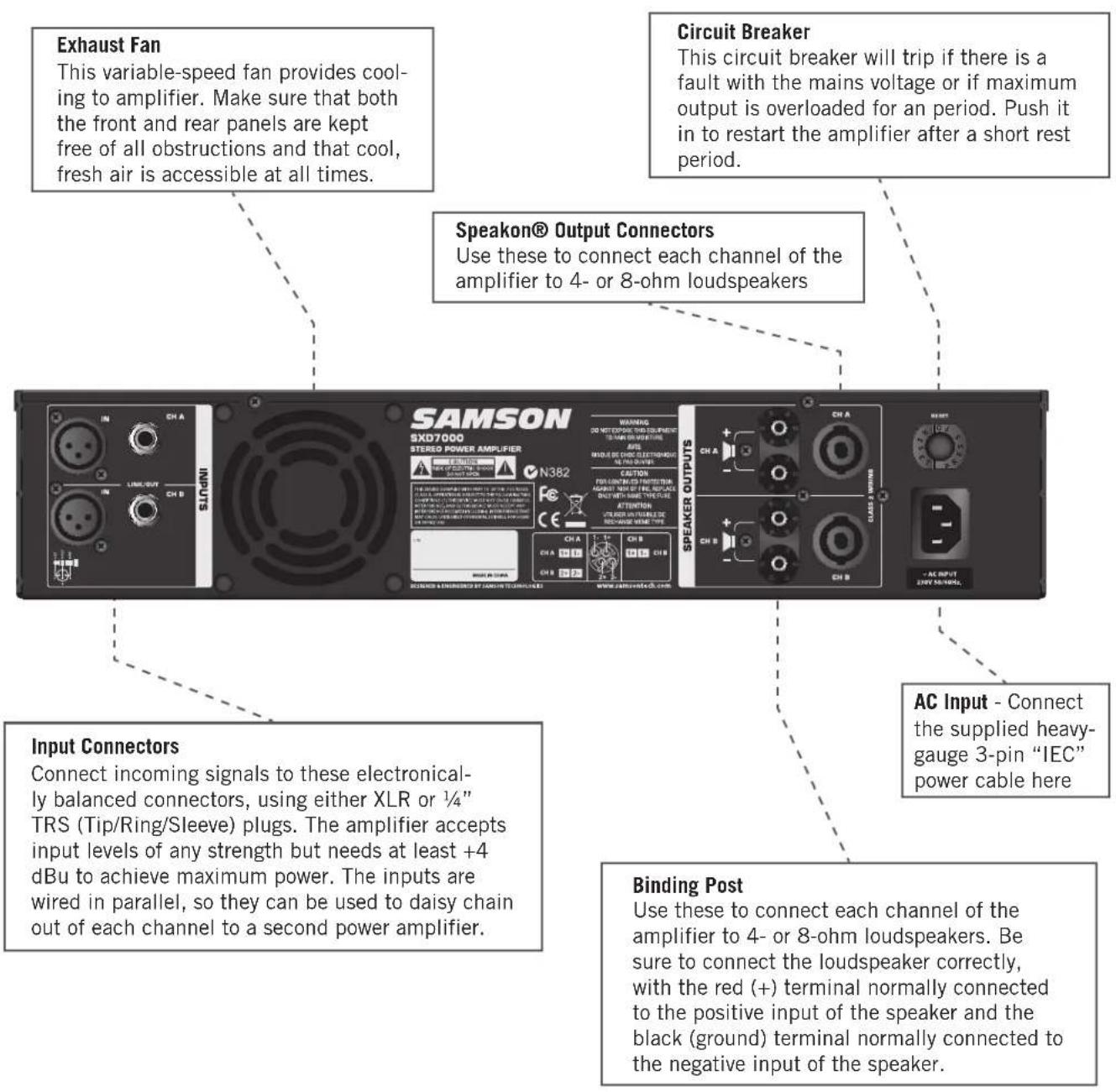
Rear Callouts
flowchart
graph TD
    A["Input Connectors"] --> B["Speaker Outputs"]
    B --> C["Circuit Breaker"]
    C --> D["Circuit Breaker"]
    D --> E["Exhaust Fan"]
    E --> F["SAMSON SXD7000 STEREO POWER AMPLIFIER"]
    F --> G["AC Input - Connect the supplied heavy-gauge 3-pin "IEC" power cable here"]
    B --> H["Binding Post"]
    H --> I["Output Connectors"]
    I --> J["Circuit Breaker"]
    J --> K["Circuit Breaker"]
    K --> L["Exhaust Fan"]
Getting Started - DSP
The SXD power amplifier features sophisticated high-performance DSP with control for the input and output routing, filter network, EQ, limiter, and time alignment delay. Follow these steps to navigate through the SXD internal DSP settings:
- Turn the SXD power ON. The startup screen will be displayed (figure 1).
- Press the UP & DOWN buttons to step through the DSP parameters (figure 2).
- Rotate the EDIT knob to adjust settings. A box will flash in the upper right corner when a setting has been changed (figure 3).
- Press the EDIT button to confirm and set the changes. Press any other button to cancel the adjustment.
- Press the BACK button to exit out of a parameter and return to the top level of the menu.
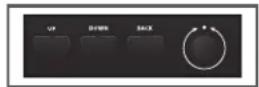
figure 2

figure 3
DSP Flowchart

flowchart
graph LR
    A["PRESET"] --> B["A"]
    B --> C["B"]
    C --> D["Ratio"]
    D --> E["GAIN OFFSET EQ LIMTERFILTER DELAY SETUP/O"]
    E --> F["Signal Input"]
    F --> G["Output"]
DSP Settings
Preset - Choose either Manual Mode, which provides access to the full set of adjustable parameters, or from the four speaker presets: 2 full range, Mono 2-way, Sub/Sat, or 2 subs.
I/O - The I/O screen adjusts the settings for how the inputs will be routed through the DSP to the output connectors.
Stereo: Ch A Input -> Ch A Output & Ch B Input -> Ch B Output
Mono A+B dual: Ch A and Ch B inputs are mixed together, each level control adjusts the corresponding output level
Mono A+B link: Ch A and Ch B inputs are mixed together, Ch A level control adjusts both Ch A and Ch B output levels
Parallel A dual: Ch A input is sent to both Ch A and Ch B outputs, each level control adjust the corresponding output level Parallel A link: Ch A input is sent to both Ch A and Ch B outputs, CH A level control adjusts the output level for both channels.
Filter (Manual mode) - The filter section allows you to build you own crossover or add speaker protection by stetting the filters to remove the upper and lower limits of the audio bandwidth.
Filter Ch A - Press the Edit button to enter the filter parameters for channel A.
Filter Ch B - Press the Edit button to enter the filter parameters for channel B. If the Ch A filter is On, then the Ch B filter can be set to the same settings by choosing A=B
LPF Freq - Rotate the EDIT knob to adjust the low pass filter frequency.
LPF Slope - Rotate the EDIT knob to adjust the filter type and slope roll off in dB per octave.
HPF Freq - Rotate the EDIT knob to adjust the high pass filter frequency.
HPF Slope - Rotate the EDIT knob to adjust the filter type and slope roll off in dB per octave.
X-Over (speaker preset) - When using a speaker preset, the filters are already configured for a crossover. This allows you to easily set the crossover frequency for your speaker configuration.
Gain Offset (Manual mode) - This adjustment allows you to set an overall balance between the outputs of the amplifier. This allows you to match the difference of output level of the speakers in a system without needing to constantly adjust the front panel level controls.
Getting Started - DSP
EQ - In Manual mode there are three EQ filters per channel. The Low frequency adjustment can be set to a Low Frequency Shelf or to a parametric equalizer (PEQ) with Frequency, Q, and Gain adjustments. The mid band is a parametric equalizer (PEQ) with Frequency, Q, and Gain adjustments. The high frequency band can be set to a High Frequency shelf or to a parametric (PEQ) band. Press the Edit button to enter the EQ parameters. If Ch A EQ is set ON, Ch B can be set to the same settings by choosing A=B. If using a speaker preset, the SXD offers seven EQ preset frequency curves to match your performance setting: DJ, Vocal, Live Sound, Install, Rock, Dance, Jazz.
Limiter - The limiter provides additional protection to your speakers from overload. Press the EDIT button to adjust. The Limiter can be set to -1dB, -3dB, and -9dB.
Delay - The delay time can be used to align speakers in a system. This is useful when using a subwoofer and satellite speaker for front of house to ensure the speakers are in phase for optimal performance. Click the Edit button to adjust. The Delay settings are displayed in milliseconds, inches/feet, and centimeters/meters.
Setup - In the Setup mode the amplifier can be locked and the user can create a four-digit code so settings are not accidentally changed. Click to set Lock Code. Rotate the EDIT knob to adjust the code number, and press the DOWN and UP buttons to move through each digit. Click the EDIT button to set the lock code.
If you have forgotten your Lock Code, you can reset it by turning off the amplifier, then while holding the UP and DOWN buttons turn the power back on.
Factory Reset - This sets all parameters and presets back to the original factory default settings.
Presets
The SXD DSP features four speaker presets that will allow you to quickly have your amplifier up and running with your speaker configuration. The presets only display the parameters that are essential to the speaker arrangement. If you require additional adjustments, all parameter adjustments are available in Manual mode. Below are typical wiring configurations for the four presets.
2 full range
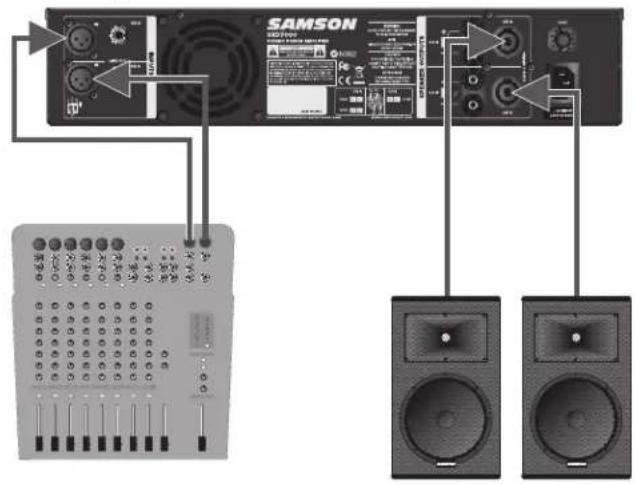
Sub/Sat 2 subs (Input Mono A+B Dual)
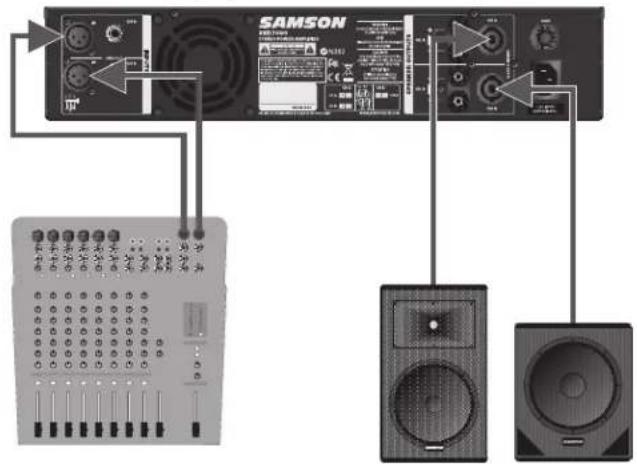
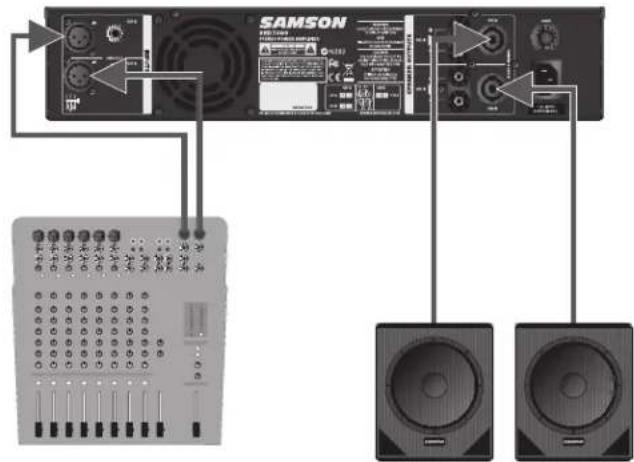
Typical SXD amplifier and speaker configurations for each Input and Output (I/O) setting in the DSP
Ch A level control adjusts Ch 1 Output Ch B level control adjusts Ch 2 Output
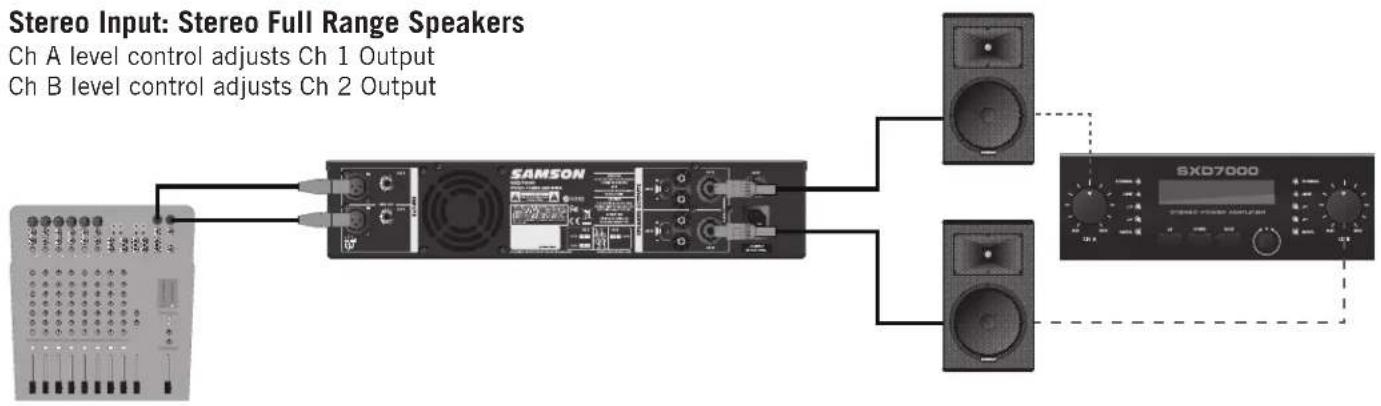
flowchart
graph LR
    A["Audio Input"] --> B["Ch A Level Control Adjusts Ch 1 Output"]
    A --> C["Ch B Level Control Adjusts Ch 2 Output"]
    B --> D["SAMSON"]
    C --> E["SXD7000"]
    D --> F["Output"]
    E --> F
Ch A level control adjusts Ch 1 Output Ch B level control adjusts Ch 2 Output
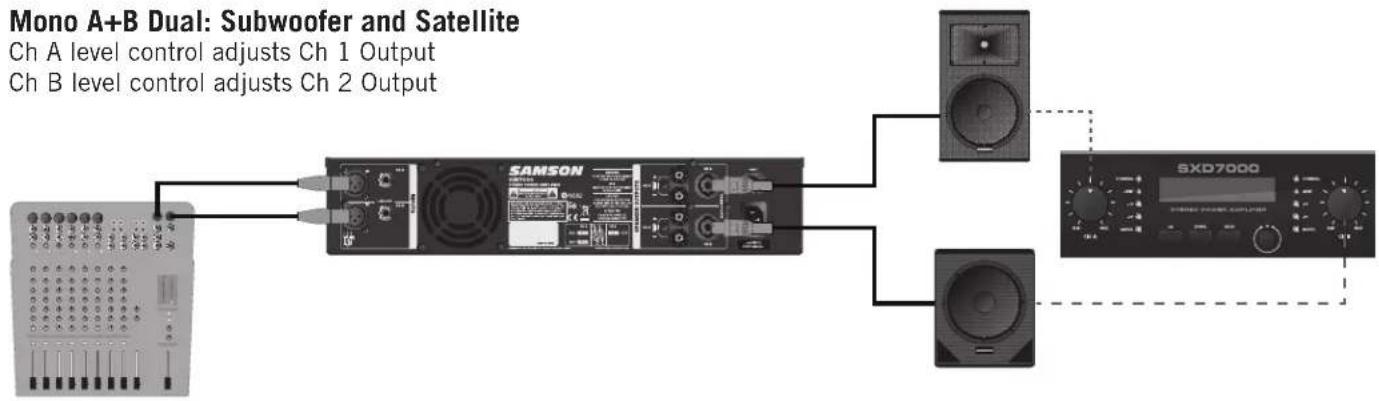
flowchart
graph LR
    A["Ch A level control adjusts Ch 1 Output"] --> B["SAMSON"]
    C["Ch B level control adjusts Ch 2 Output"] --> B
    B --> D["Speaker"]
    B --> E["Speaker"]
    D --> F["SXD7000"]
    E --> F
Ch A level control adjusts Ch 1 and Ch 2 Output
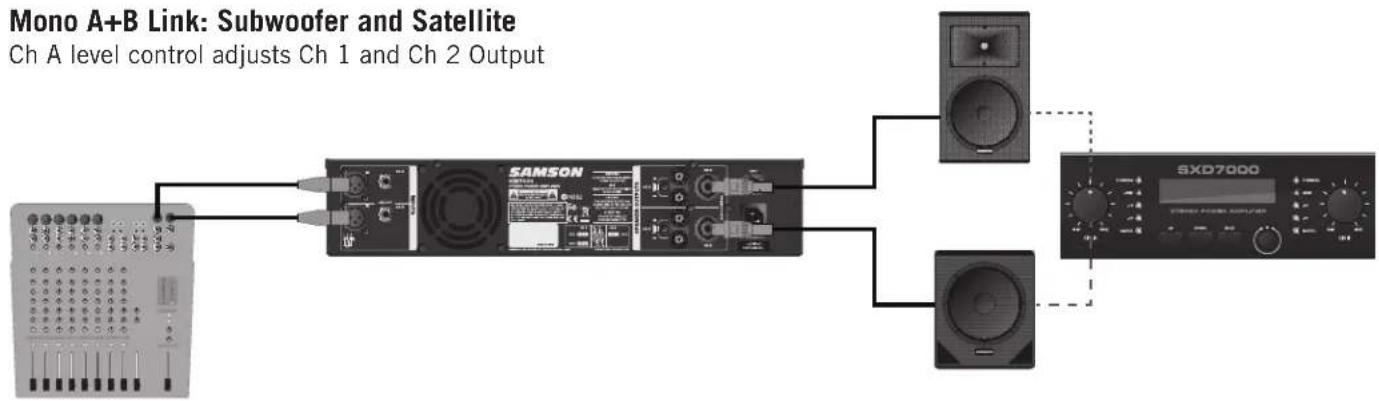
flowchart
graph LR
    A["Microcontroller"] --> B["SAMSON"]
    B --> C["Output Switch"]
    D["SXD7000"] --> C
    E["Ch A level control adjusts Ch 1 and Ch 2 Output"] --> B
System Setup Examples
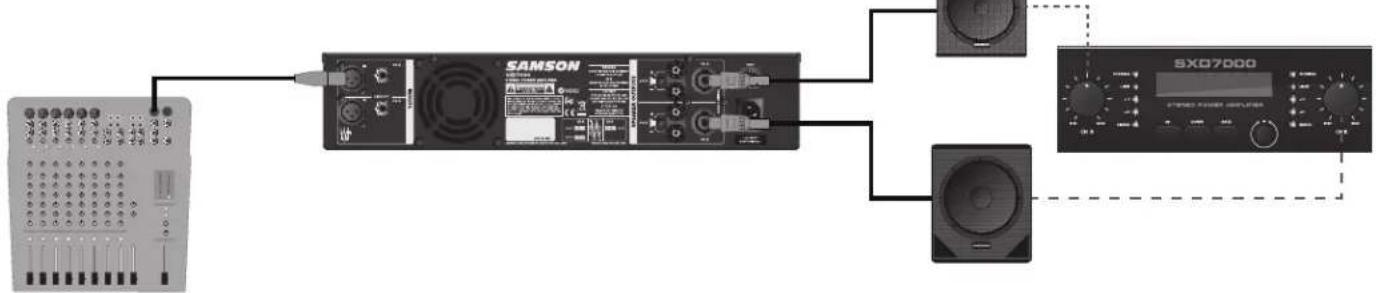
Parallel A Link: Mono 2-Way Cabinet
Ch A level control adjusts Ch 1 and Ch 2 Output
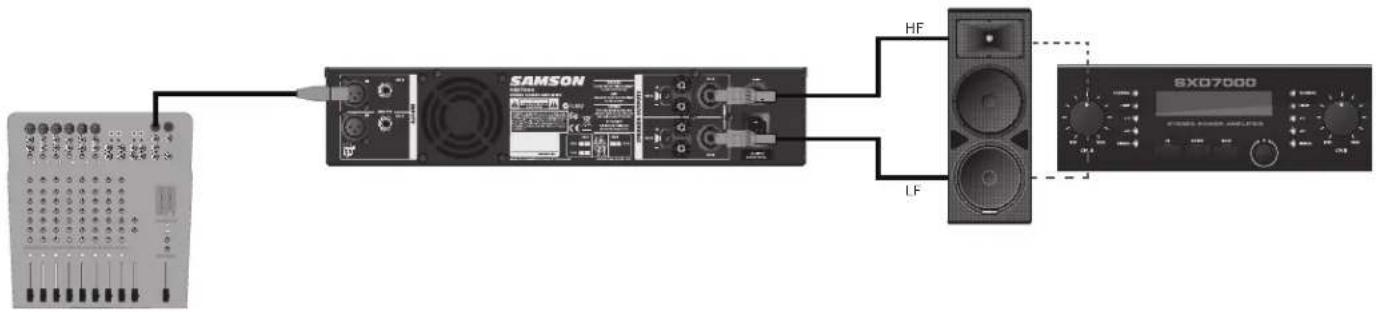
flowchart
graph LR
    A["Device 1"] --> B["Switch"]
    B --> C["SAMSON"]
    C --> D["Speaker 1"]
    C --> E["Speaker 2"]
    C --> F["HF"]
    C --> G["LF"]
    D --> H["Box 1"]
    E --> I["Box 2"]
    F --> J["Box 3"]
    G --> K["Box 4"]
Parallel A Dual: Subwoofer and Satellite
Ch A level control adjusts Ch 1 Output
Ch B level control adjusts Ch 2 Output
flowchart
graph LR
    A["Audio System"] --> B["SAMSON Module"]
    B --> C["Speaker"]
    C --> D["SXC07000 Display"]
Wiring Guide
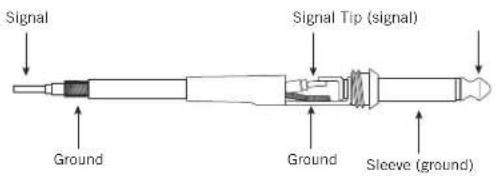
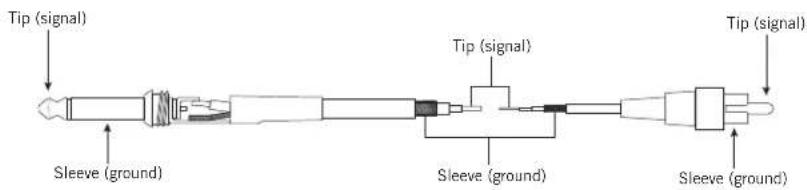
Unbalanced 14 " Connector
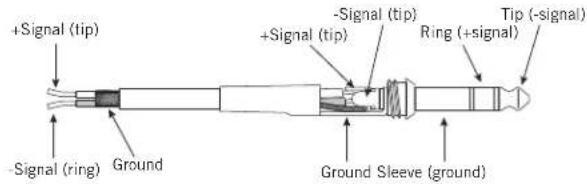
Balanced TRS 14 " Connector
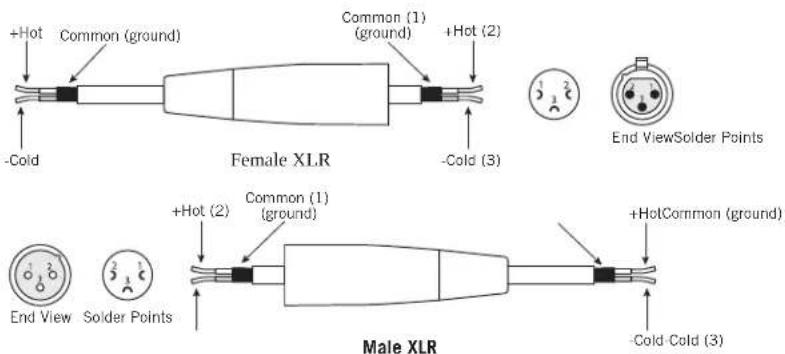
XLR Balanced Connector
RCA Connector
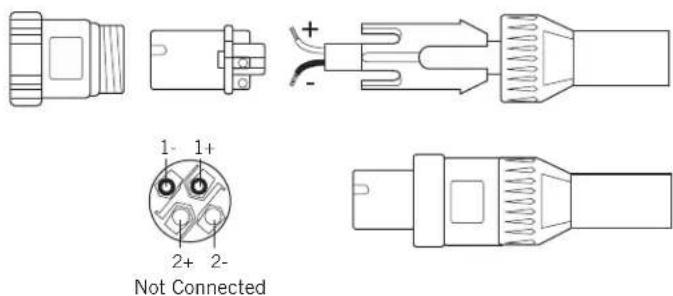
Speakon® Wiring Guide
Specifications
| Model SXD3000 SXD5000 SXD7000 | |||||
| Rated Output Power | |||||
| Stereo both channel driven | 8 ohms 300W 500W 700W | ||||
| 4 ohms 450W 750W 1000W | |||||
| Signal to Noise Ratio (20Hz-20k) 100dB | |||||
| Distortion (SMPTE-IM) 0.02% | |||||
| Input sensitivity @8ohms Voltage Gain 5dBu | |||||
| Voltage Gain @ 8 ohm 30dB 32dB 34dB | |||||
| Output Circuitry AB 2-Tier Class H | 2-Tier Class H | ||||
| Current Consumption (115VAC/230VAC) | |||||
| @1/8 rated power 4ohms | 4.5A / 6.6A | 3.8A / 5.36A | 5.5A / 7.96A | ||
| @1/3 rated power 4ohms | 7.2A / 10A | 10A / 13.6A | 9.2A / 16.4A | ||
| @ rated power 4ohms, max. | 10A / 15.9A | 13.6A / 23.8A | 16A / 35.2A | ||
| Distortion (typical @4 ohms) | |||||
| 20Hz-20kHz,10dB below rated power | 0.02% | ||||
| 1kHz,rated power | 1% | ||||
| Frequency Response @8ohms 1Watt | 0/-1dB: 20Hz-20kHz | ||||
| Damping Factor (400Hz) | 120 | ||||
| Input Impedance | 20K ohm (balanced) | ||||
| Input Clipping | 10Vrms (22dBu) | ||||
| Cooling | Continuously variable speed fan cooling | ||||
| Connectors (each channel) | Inputs | 3-pin XLR and 1⁄4" TRS, balanced | |||
| Outputs | Binding post and Speakon® | ||||
| Controls | Power switch, CH A & CH B volumeDSP Controls: UP, DOWN, BACK buttons & EDIT encoder/button | ||||
| Indicators | Signal, -20dB, -10dB, Limit, Thermal | ||||
| Protection | Short Circuit, Open Circuit, Thermal, RF protection Load protected against DC faults | ||||
| DSP | Display | 2x16 Character LCD | |||
| Modes | Manual mode, 2 Full Range, Mono 2-Way, Sub/Sat, 2 Subs | ||||
| I/O Settings | Stereo, Mono A+B Dual, Mono A+B Link, Parallel A Dual, Parallel A Link | ||||
| Digital Dynamics function | Filter, Crossover, Gain Offset, EQ, Limiter | ||||
| Digital Delay Function | Max 20ms per channel | ||||
| Digital EQ function per channel | f0: 1/12 Octave at 20~20kHz, Gain: +/- 12dB, Q: 0.5~5.0Presets: DJ, Vocal, Live Sound, Install, Rock, Dance and Jazz | ||||
| Setup | Lock Controls with Code, Factory Reset | ||||
| Dimensions (LxWxH) | 19" x 13" x 3.5" (482mm x 330mm x 88mm) | ||||
| Net Weight | 26.4lbs / 12kg | 28.6lbs / 13kg | 33lb / 15kg | ||
(1) THIS DEVICE MUST NOT CAUSE HARMFUL INTERFERENCE, AND
(2) THIS DEVICE MUST ACCEPT ANY INTERFERENCE RECEIVED INCLUDING INTERFERENCE THAT MAY CAUSE UNDESIRED OPERATION. CONVIENT POUR UNE UTILISATION A DOMICILE OU DANS UN BUREAU.
Sommaire
Introduction 18
figure 3
Organigramme DSP

flowchart
graph LR
    A["PRESET"] --> B["A"]
    B --> C["B"]
    C --> D["×"]
    D --> E["×"]
    E --> F["GAIN OFFSET EQ LIMETERFILTER DELAY SETUP/O"]
    F --> G["×"]
    G --> H["×"]
    H --> I[" gears"]
Réglages DSP
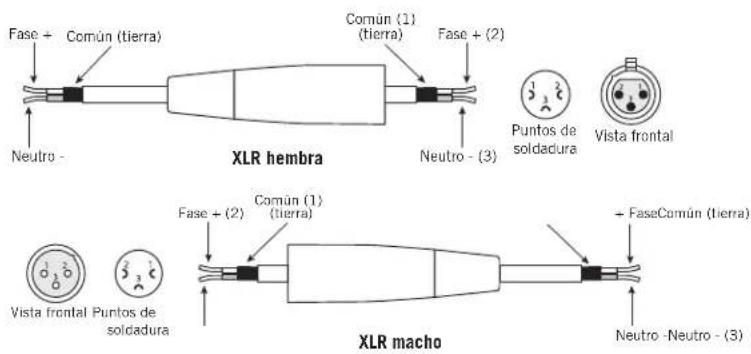
Conector XLR (cannon) balanceado




Brand : SAMSON
Model : SXD3000
Category : Receiver