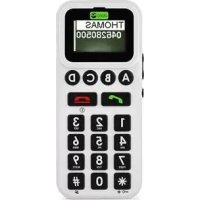
326i gsm - Smartphone DORO - Free user manual and instructions
Find the device manual for free 326i gsm DORO in PDF.



| Product type | Doro 326i GSM smartphone |
| Network | GSM 850/1800/1900 tri-band |
| Dimensions | 135 mm x 58.5 mm x 16 mm |
| Weight (with battery) | 111 g |
| Battery | Lithium-ion 700 mAh, removable |
| Standby time | Up to several days (estimated) |
| Phonebook capacity | 20 contacts |
| Speed dial | 4 keys (A to D) |
| Hands-free function | Yes, with built-in speaker |
| Vibrator | Yes, ring, vibrate, or both |
| Keypad lock | Yes, by holding the # key |
| Call log | Last 15 calls (received, dialed, missed) |
| Headset | 3.5 mm jack (with talk button) |
| Charger | Power adapter included, charges in about 5 hours |
| Maintenance | Keep dry, avoid dust and extreme temperatures |
| Safety | Follow FCC guidelines, avoid medical interference |
| Spare parts | Removable battery, SIM card, back cover |
| Repairability | Contact retailer or Doro support |
| Warranty | 12 months from date of purchase |
| User manual | 92 pages, available for download |
Frequently Asked Questions - 326i gsm DORO
User questions about 326i gsm DORO
0 question about this device. Answer the ones you know or ask your own.
Ask a new question about this device
Download the instructions for your Smartphone in PDF format for free! Find your manual 326i gsm - DORO and take your electronic device back in hand. On this page are published all the documents necessary for the use of your device. 326i gsm by DORO.
USER MANUAL 326i gsm DORO
and ring setup/vibrator
7 Disconnect (ON/OFF)
8 One-touch keys
9 Charging/headset socket
Espanol
Disclaimer and limitation of liability
Doro AB and its affiliates or licensees assume no responsibility for any damage or loss resulting from the use of this guide. Doro AB and its affiliates or licensees assume no responsibility for any loss or claims by third parties that may arise through the use of this software. Doro AB and its affiliates or licensees assume no responsibility for any damage or loss caused by deletion of data as a result of malfunction, dead battery, or repairs. Be sure to make backup copies of all important data on other media to protect against data loss.
TO THE MAXIMUM EXTENT PERMITTED BY APPLICABLE LAW, UNDER NO CIRCUMSTANCES SHALL DORO AB OR ANY OF ITS AFFILIATES OR LICENSEES BE RESPONSIBLE FOR ANY LOSS OF DATA OR INCOME OR ANY SPECIAL, INCIDENTAL, CONSEQUENTIAL OR INDIRECT DAMAGES HOWSOEVER CAUSED. THE CONTENTS OF THIS DOCUMENT ARE PROVIDED "AS IS." EXCEPT AS REQUIRED BY APPLICABLE LAW, NO WARRANTYES OF ANY KIND, EITHER EXPRESS OR IMPLIED, INCLUDING, BUT NOT LIMITED TO, THE IMPLIED WARRANTYES OF MERCHANTABILITY AND FITNESS FOR A PARTICULAR PURPOSE, ARE MADE IN RELATION TO THE ACCURACY, RELIABILITY, OR CONTENTS OF THIS DOCUMENT. DORO AB RESERVES THE RIGHT TO REVISE THIS DOCUMENT OR WITHDRAW IT AT ANY TIME WITHOUT PRIOR NOTICE.
FCC Notice
Your unit may cause TV or radio interference (for example, when using a telephone in close proximity to receiving equipment). The Federal Communications Commission (FCC) of the United States can require you to stop using your phone if such interference cannot be eliminated. If you require assistance, contact your local service facility. This device complies with part 15 of the FCC rules. Operation is subject to the following two conditions: (1) this device may not cause harmful interference, and (2) this device must accept any interference received, including interference that may cause undesired operation. Any changes or modifications not expressly approved by Doro AB could void the user's authority to operate this device.
© 2008 Doro AB. All rights reserved.
Battery Disposal and Recycling Information
When the battery in this unit has reached the end of its useful life, please dispose of it according to your local environmental laws and regulations. For information about recycling cell phone batteries, go to: http://www.rbrc.org/
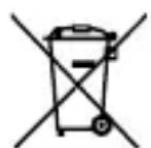
The symbol above means that according to local laws and regulations your product should be disposed of separately from household waste. When the battery in this unit has reached the end of its useful life, take it to a collection point designated by local authorities. Some collection points accept products for free. The separate collection and recycling of your unit will help conserve natural resources and ensure that it is recycled in a manner that protects human health and the environment.
English
Installation
Note!
Always turn off the telephone before removing the battery cover.
Battery cover
To remove the battery cover, carefully press the cover and slide it downwards.
To replace the battery cover, slide it from below and up along the telephone.
Installation/removal of SIM card
The SIM card holder is located behind the battery.
Make sure that the SIM card's contacts are facing inwards and that the cut-off corner is pointing upwards. Take care not to scratch or bend the contacts on the SIM card.
If the SIM card is missing or incorrectly inserted, is shown in the display.
If the SIM card is damaged, [ ] shown in the display.
Installation/removal of battery
Place the top of the battery in the battery slot with the battery contacts facing the contacts in the slot. Then carefully press the bottom of the battery until it locks into place.
To remove the battery, carefully press and lift the bottom of the battery in the "finger-shaped" groove.
Charging
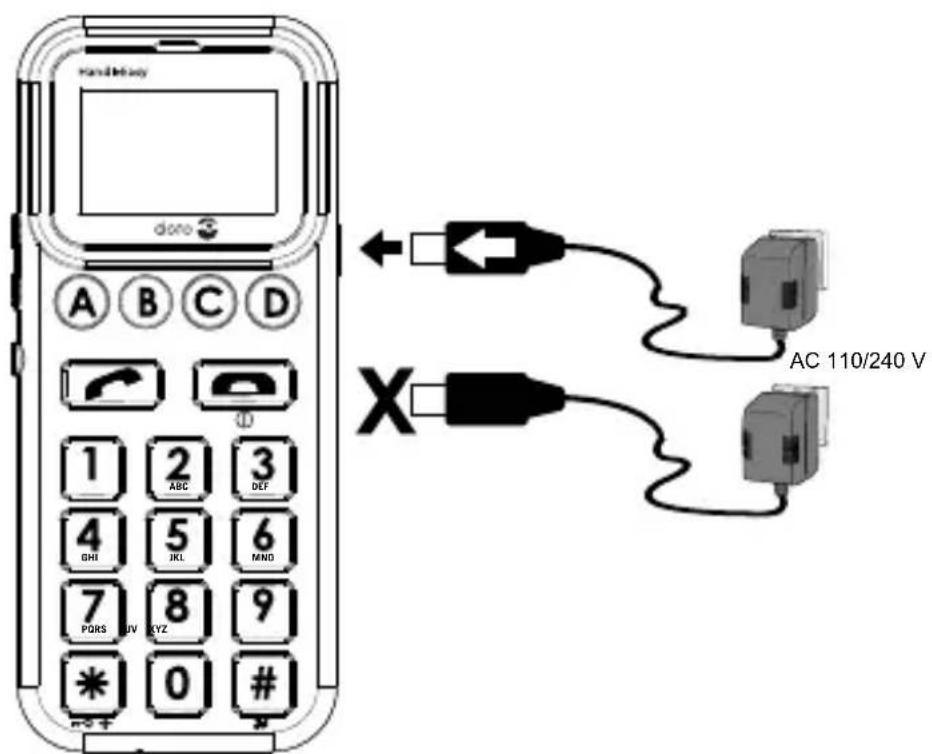
Insert the power adapter into the wall socket and into the socket on the telephone. Charge the telephone for 24 hours the first time. After that, it takes approximately 5 hours to fully charge the battery.
Battery
Full battery capacity will not be reached until the batteries have been charged 4-5 times. Batteries degrade over time, which means that call time and standby time will normally decrease with regular use.
The automatic charging mechanism prevents the batteries from being overcharged or damaged due to prolonged charging.
When the battery is running low, 1 is displayed and a warning signal is heard.
Warning!
Only use batteries, charger and accessories that have been approved for use with this particular model. Connecting other accessories may be dangerous and may invalidate the telephone's type approval and guarantee.
Connecting this telephone to a USB port on a computer may damage the telephone or the computer.
Display symbols
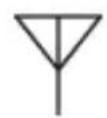
Searching for networks

No SIM card

SIM card error

General error indication

Charger connected

Charging completed

Signal strength

Line 1 (some operators have 2 lines)

Battery indicator

Keylock active

Roaming (connected to other network)

Headset connected

Ring only

Vibrator only

Vibrator + Ring

Missed call

Incoming call

Outgoing call
Operation
Activating the telephone
Press /① 4-5 seconds until the ON signal is heard and the display lights up.
If the SIM card is locked with a PIN code (Personal Identification Number), enter your PIN code now and confirm with .
The SIM card will only accept a certain number of incorrect PIN code attempts. The display shows how many attempts you have left with "Remain: #", where # is the number of attempts left.
When no attempts remain, you need the PUK code (Personal Unblocking Key) that came with your SIM card to unlock the card and enter a new PIN code.
Enter the PUK code, confirm with , then enter a new PIN code and confirm it.
If PIN and PUK codes did not come with the SIM card, contact your network operator.
To turn off the telephone, press /① until the OFF signal is heard.
Making a call
- Enter the telephone number using the keypad. Skip backwards with .
- Press to dial. A signal will be heard as the number is dialed.
- Press to end the call.
Note!
When making international calls, press twice for the international prefix "+"
Dialing with the one-touch keys
-
Press one of the one-touch keys A-D followed by . A signal will be heard as the number is dialed. Or, press and hold the one-touch key until the signal is heard.
-
Press to end the call.
Dialing from the phonebook
- Press , then scroll through the list of entries with / or press a keypad key to jump to the entries beginning with that character.
- Press to view the details for the selected entry. Press briefly to go back to the list, or press and hold then to delete the entry.
- Press to dial the number shown on the display. A signal will be heard as the number is dialed.
- Press to end the call.
Receiving a call
- Press to answer, or to reject the call without answering.
- Press to end the call.
Caller ID
The telephone number of an incoming call is shown on the display. If no information is available, ???? is displayed.
Call memory
The 15 most recent calls are saved in the call memory. For multiple calls related to the same number, only the most recent of call is saved.
Retrieving and dialing
- Press
- Scroll through the call list using
= Incoming call
=Outgoing call
Missed call
- Press to view the details for the selected call.
- Press to dial the number, or press briefly to go back to the call list. To delete the call, press and hold then acknowledge with .
- Press to end the call.
Missed calls
When an incoming call is unanswered, is shown on the display. The most recent missed call(s) can then be retrieved by immediately pressing .
- Press
- Scroll through the missed calls list using / .
- Press to view the details for the selected call.
- Press to dial the number, or press briefly to go back to the call list. To delete the call, press and hold then acknowledge with .
- Press to end the call.
Note!
This only works immediately after the call has been received. After that, missed calls can be retrieved from the call list (see page 10).
Speakerphone function
The speakerphone function allows you to use the telephone without holding it, for instance, placed on a table in front of you.
- Place a call in the usual way. When the call is connected, press again.
- Speak into the microphone on the lower front edge of the telephone (max. 1 yard away).
- The volume can be adjusted during a call using / .
- To change between speakerphone and normal function, press .
- Press to end the call.
Note!
The speakerphone function allows only one person at a time to talk. Switching between talk/listen is automatic and triggered by the sound of the person talking. Loud noises (music, etc.) in the background may interfere with the speakerphone function.
Volume control
The volume can be adjusted during a call using the / buttons on the side of the telephone.
Redial
Press and scroll between the 15 most recently dialed/incoming numbers using /
Press to review the details. Then press to dial the number or to end.
Press and hold to delete the entry.
Emergency calls
When the telephone is switched on, it is possible to place an emergency call by entering 911 / 112 followed by
Most mobile networks accept emergency calls even when the SIM card is not in the telephone.
Keylock
Press and hold × / 0 for 2 seconds to lock/ unlock the keypad. As shown in the display when the keylock is active.
Headset
When a headset is connected, the internal microphone in the telephone is automatically disconnected.
When receiving a call, you can use the answer key on the headset cable instead of
Warning!
Using a headset at high volume can damage your hearing. Adjust the sound volume carefully when using a headset.
English
Settings
Saving telephone numbers
One-touch numbers
Four numbers can be stored under the one-touch keys A-D.
- Enter the number, including the area code. Skip backwards with .
- Press and hold one of the one-touch buttons A-D until the text cursor appears.
- Enter a name or description for the number using the keypad (see page 17).
- Press twice to save or to end.
Phone book numbers
20 numbers can be stored in the phone book.
- Enter the number, including the area code. Skip backwards with .
- Press
- Enter a name or description for the number using the keypad (see page 17).
- Press twice to save or to end.
Sending additional numbers
Additional numbers can be saved with an entry and sent after the call is connected.
- Enter the telephone number.
- Press 4 times until w is shown.
- Enter the additional number.
- Save the entry (see page 15).
After dialing, wait until the call is connected, and then press to send the additional number.
Inserting a pause in a number
A short pause (3 seconds) can be inserted anywhere in the saved number.
- Enter the first part of the telephone number (before the pause).
- Press 3 times until p is shown.
- Enter the last part of the number.
- Save the entry (see page 15).
International numbers
To save an international number, press twice for the international prefix (+), then enter the country code, area code (possibly leaving out the first digit) and telephone number.
Deleting phonebook entries
- Press and scroll through the list to select the phonebook entry to be deleted.
- Press to show the details for the selected entry.
- Press and hold until is shown on the display.
- Press to delete the entry or to cancel.
Keypad characters
1 1Γ△Θ∧ΞΠ
2 ABC2abcAaAaAeAaCcCc
3DEF3defEe
4 GH14ghi
5 JKL5jkI1
6 MNO6mnoNnNnOooOoO
7 PQRS7pqrsSs
8 TUV8tuVUüU
9 WXYZ9wxyzZzZz
*|/μ
0 space 0
# Σ Φ Ψ Ω
Ring setup
Selecting ring signal
- Press . The phone book numbers will be displayed.
- Press and hold for 2 seconds. The ring signals will be displayed.
- Scroll between ring signals using / .
- Press to select a signal.
- Press to end.
Adjusting ring volume
- In standby mode, press and hold for 2 seconds.
- Press / to adjust the ring volume.
Vibrator
Press and hold for 2 seconds to change the signalling mode:

Ring only

Vibrator only

Ring and vibrator
Time/date
Setting the time and date
- Press The phone book numbers will be displayed.
- Press again. The ring signals will be displayed.
- Press and hold for approx. 2 seconds.
- Press to enter time (HH:MM).
- Press to save.
- Scroll to the date using / .
- Press and enter the date (YYYY.MM.DD).
- Press to save.
- Press to end.
English
Care and maintenance
Your unit is a technically advanced product and should be treated with the greatest care. By following the advice below, you can ensure that the guarantee will cover any damage.
- Protect the unit from moisture. Rain/snowfall, moisture and all types of liquid can contain substances that corrode the electronic circuits. If the unit gets wet, you should remove the battery and allow the unit to dry completely before reinserting the battery.
- Do not use or keep the unit in dusty, dirty environments. The moving parts and electronic components in the unit can become damaged.
- Do not keep the unit in warm places. High temperatures can reduce the lifespan of electronic equipment, damage batteries and distort or melt certain plastics.
- Do not keep the unit in cold places. When the unit warms up to normal temperature, condensation can form on the inside which can damage the electronic circuits.
- Do not try to open the unit in any other way than the ways described in this manual.
- Do not drop the unit. Do not knock or shake it either. If it is treated roughly, the circuits and precision mechanics can become damaged.
- Do not use strong chemicals to clean the unit.
- Use the charger indoors.
The advice above applies to the unit, battery, charger and other accessories. If the telephone is not working as it should, please contact the place where you purchased the unit to inquire about service. Be sure to have the receipt or a copy of the invoice on hand.
English
Additional safety information
The unit and the accessories can contain small parts. Keep all of the equipment out of the reach of small children.
Operating environment
Follow the rules and laws that apply wherever you are, and always turn off the unit whenever its use is prohibited or can cause interference or hazards. Only use the unit in its normal user position.
This unit complies with guidelines for radiation when it is used either in a normal position against your ear, or when it is at least 2.2 cm (7/8 inch) from your body. If the unit is carried close to your body in a case, belt holder or other holder, these holders should not contain any metal, and the product should be placed at the distance from your body specified above. Make sure that the distance instructions above are followed until the transfer is complete.
Parts of the unit are magnetic. The unit can attract metal objects. Do not keep credit cards or other magnetic media near the unit. There is a risk that information stored on them can be erased.
Medical units
The use of equipment that transmits radio signals, for example, mobile phones, can interfere with insufficiently protected medical equipment. Consult a doctor or the manufacturer of the equipment to determine if it has adequate protection against external radio signals, or if you have any questions. If notices have been put up at health care facilities instructing you to turn off the unit while you are there, you should comply. Hospitals and other health care facilities sometimes use equipment that can be sensitive to external radio signals.
Pacemakers
The Health Industry Manufacturers Association recommends that a minimum separation of 15 cm (6 inches) be maintained between a handheld wireless phone and a pacemaker to avoid potential interference with the pacemaker. Persons with pacemakers:
- Should always keep the HandlePlus 326i gsm more than 15 cm (6 inches) from their pacemaker when the phone is turned on
- Should not carry the HandlePlus 326i gsm in a breast pocket
- Should use the ear opposite the pacemaker to minimize the potential for interference
If you have any reason to suspect that interference is taking place, turn the HandlePlus 326i gsm off immediately.
Areas with explosion risk
Always turn off the unit when you are in an area where there is a risk of explosion. Follow all signs and instructions. There is a risk of explosion in places that include areas where you are normally requested to turn off your car engine. In these areas, sparks can cause explosion or fire which can lead to personal injury or even death.
Turn off the unit at filling stations, and any other place that has gas pumps and auto repair facilities.
Follow the restrictions that apply to the use of radio equipment near places where fuel is stored and sold, chemical factories and places where blasting is in progress.
Areas with risk for explosion are often – but not always – clearly marked. This also applies to below decks on ships; the transport or storage of chemicals; vehicles that use liquid fuel (such as propane or butane); areas where the air contains chemicals or particles, such as grain, dust or metal powder.
Emergency calls
Important!
Mobile phones such as this unit use radio signals, the mobile phone network, the terrestrial network and user-programmed functions. This means that connection cannot be guaranteed in all circumstances. Therefore, you should never rely solely on a mobile phone for very important calls such as medical emergencies.
Vehicles
Radio signals can affect electronic systems in motor vehicles (for example, electronic fuel injection, ABS brakes, automatic cruise control, air bag systems) that have been incorrectly installed or are inadequately protected. Contact the manufacturer or its representative for more information about your vehicle or any additional equipment.
Do not keep or transport flammable liquids, gases or explosives together with the unit or its accessories. For vehicles equipped with air bags: Remember that air bags fill with air with considerable force.
Do not place objects, including fixed or portable radio equipment in the area above the airbag or the area where it might expand. Serious injuries may be caused if the mobile phone equipment is incorrectly installed and the airbag fills with air.
It is prohibited to use the unit while in flight. Turn off the unit before you board a plane. Using wireless telecom units inside a plane can pose risks to air safety and interfere with telecommunications. It may also be illegal.
Driving Safely
Use of this unit alone or with headphones (even if used only in one ear) while driving a motor vehicle or riding a bicycle is not recommended and is illegal in some areas. Check and obey the laws and regulations on the use of mobile devices like this unit in the areas where you drive. Be careful and attentive while driving. If you decide to use this unit while driving or riding a bicycle, keep in mind the following guidelines:
- Give full attention to driving and to the road.
Using a mobile device while driving may be distracting. If you find it disruptive or distracting while operating any type of vehicle, riding a bicycle, or performing any activity that requires your full attention, pull off the road and park before making or answering a call if driving conditions require.
- Get to know your phone and its features such as phone book, call memory, and speakerphone.
These features help you to place your call without taking your attention off the road. See the applicable portion of this user's guide for more information.
- Use a hands-free device.
Add an extra layer of convenience and safety to your unit with one of the many hands-free accessories available.
- Use of a headset or other hands-free device may be legally required.
Several states have in recent years passed laws making it unlawful to operate a motor vehicle while talking on a wireless phone without use of a headset, speakerphone, or other hands-free device. County and municipal ordinances may also limit or ban wireless conversations for automobile drivers. You should therefore check the status of such laws in your area and in locations to which you travel by car, whether or not you otherwise follow the preferred safety practice of routinely using a hands-free device.
For SMS text messaging, it is a recommended safety practice that you never send or view received text messages while driving; in California, and likely other states in the future, SMS messaging by a driver is also a legal violation.
- Position phone within easy reach.
Keep your eyes on the road. If you get an incoming call at an inconvenient time, let your voicemail answer it for you.
- Assess the traffic before dialing, or place calls when you are not moving or before pulling into traffic.
Try to plan calls when your car will be stationary. Never dial, send SMS text messages, or enter other text while you are driving.
- Let the person you are speaking with know you are driving.
If necessary, suspend the call in heavy traffic or hazardous weather conditions. Driving in rain, sleet, snow, ice, fog, and even heavy traffic can be hazardous.
- Do not take notes, look up phone numbers, or perform any other activities that require your attention while driving. Jotting down a to-do list or flipping through your address book takes attention away from your primary responsibility, driving safely.
- Do not engage in stressful or emotional conversations that may be distracting.
Make people you are talking with aware you are driving and suspend conversations that have the potential to divert your attention from the road.
Exposure to Radio Frequency Energy
THIS WIRELESS DEVICE MEETS GOVERNMENT REQUIREMENTS FOR EXPOSURE TO RADIO WAVES.
Your unit contains radio transmitters and receivers. When on, your phone receives and sends out radio frequency (RF) energy through its antenna. Your unit is designed and manufactured not to exceed limits for exposure to RF energy set by the Federal Communications Commission (FCC). The exposure standard employs a unit of measurement known as the specific absorption rate, or SAR. The SAR limit applicable to the HandlePlus 326i gsm set by the FCC is 1.6 watts per kilogram (W/kg) . Tests for SAR are conducted using standard operating positions (i.e., at the ear and worn on the body) specified by the FCC, with the HandlePlus 326i gsm transmitting at its highest certified power level in all tested frequency bands. Although SAR is determined at the highest certified power level, the actual SAR level of the HandlePlus 326i gsm while in operation can be well below the maximum value because the HandlePlus 326i gsm adjusts its cellular transmitting power based in part on proximity to the wireless network. In general, the closer you are to a cellular base station, the lower the cellular transmitting power level. The HandlePlus 326i gsm has been tested, and meets, the FCC's RF exposure guidelines for cellular operation.
When tested for use at the ear, the HandlePlus 326i gsm highest SAR value is 0.69W / kg . When tested for body-worn operation, with the HandlePlus 326i gsm positioned 2.2cm (0.87 inch) from the body, the HandlePlus 326i gsm highest SAR value is 0.64W / kg . For body-worn operation, the HandlePlus 326i gsm's SAR measurement may exceed the FCC exposure guidelines if positioned less than 2.2cm (0.87 inch) from the body.
For optimal mobile device performance and to be sure that human exposure to RF energy does not exceed the FCC guidelines, always follow these instructions and precautions:
English
When on a call using the built-in audio receiver in the unit, hold the unit pointed down toward your shoulder to increase separation from the antenna. For body-worn operation, keep the HandlePlus 326i gsm at least 2.2cm (0.87 inch) away from the body, and only use carrying cases, belt clips, or holders that do not have metal parts and that maintain at least 2.2cm (0.87 inch) separation between HandlePlus 326i gsm and the body.
If you are still concerned about exposure to RF energy, you can further limit your exposure by limiting the amount of time using the HandlePlus 326i gsm, since time is a factor in how much exposure a person receives, and by placing more distance between your body and the unit, since exposure level drops off dramatically with distance.
Hearing Aid Compatibility
The Hearing Aid Compatibility Act of 1988 and FCC regulations promulgated under the Act provide minimum requirements for hearing aid compatibility for wireless GSM phones sold in the United States. FCC regulations require that beginning June 6, 2008, each handset manufacturer that distributes more than two models of cellular telephones in the United States must meet at least an "M3" rating (asset forth in set forth in American National Standard Institute (ANSI) standard C63.19) for one third of the handsets that it offers to service providers per digital air interface. For inductive coupling, each handset manufacturer must offer to service providers at least two "T3"-rated handset models per digital air interface.
The HandlePlus 326i gsm is not hearing aid compatible under the ANSI standard or FCC regulations and may cause interference with some hearing aid equipment. Doro AB, manufacturer of this unit, is exempt from the FCC's hearing aid compatibility regulations at this time.
Using the Doro HearPlus eh346m EarHook can eliminate this for hearing aids with a "T" position. If any other interference occurs, please contact your operator.
FCC ID: WS5DORO326328G
Guarantee
This product is guaranteed for a period of 12 months from the date of purchase. In the unlikely event of a malfunction during this period, please contact the place of purchase. Proof of purchase is required for any service or support needed during the guarantee period.
This guarantee does not apply to malfunctions caused by an accident or a similar incident or damage, liquid penetrating the casing, negligence, abnormal usage, insufficient maintenance or any other circumstances due to the user's negligence. Furthermore, this guarantee does not apply to any malfunction caused by a thunderstorm or any other voltage fluctuations. As a matter of precaution, we recommend disconnecting the device during a thunderstorm.
Batteries are consumables and are not included in any guarantee.
This guarantee does not apply if batteries other than DORO original batteries are used.
NOTE!
This guarantee does not affect your legal (statutory) rights under your applicable national laws relating to the sale of consumer products.
Support
For assistance, please contact:
Telephone: 1-888-551-doro (1-888-551-3676)
TTY/TDD: 1-888-561-doro (1-888-561-3676)
E-Mail: support.usa@doro.com
Further information are available on our website: www.doro.com
Specifications
Network: GSM 850/1800/1900 Triple Band
Size: 5.2'' × 2.3'' × 0.6'' (135mm x 58.5mm x 16mm)
Weight: 3.9 oz (111g) (incl. battery)
Battery: 700 mAh Li-ion battery