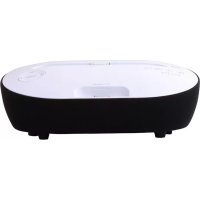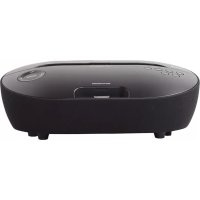
VHIS112BK - Docking station Vieta Audio - Free user manual and instructions
Find the device manual for free VHIS112BK Vieta Audio in PDF.


| Product type | Docking station |
| Brand | Vieta Audio |
| Model | VHIS112BK |
| Compatibility | iPod, iPhone, iPad (certified Made for iPod/iPhone/iPad) |
| Radio | FM with 20 presets |
| Alarm | Dual alarm with snooze (9 min) |
| Display | Screen with brightness adjustment (DIMMER) |
| Auxiliary input | LINE IN jack (3.5 mm) |
| Remote control | Infrared, CR2025 battery included |
| Power supply | AC mains (built-in adapter) |
| Warranty | 24 months |
| Maintenance | Clean with a dry cloth |
| Safety | Class II (double insulation), do not expose to water |
| Included accessories | Remote control, power cable, user manual |
| Additional functions | EQ (Classic, Rock, Jazz, Pop, FLAT), auto-off (SLEEP), track repeat, clock |
Frequently Asked Questions - VHIS112BK Vieta Audio
User questions about VHIS112BK Vieta Audio
0 question about this device. Answer the ones you know or ask your own.
Ask a new question about this device
Download the instructions for your Docking station in PDF format for free! Find your manual VHIS112BK - Vieta Audio and take your electronic device back in hand. On this page are published all the documents necessary for the use of your device. VHIS112BK by Vieta Audio.
USER MANUAL VHIS112BK Vieta Audio
Dual Alarm Clock Speaker Docking iPad/iPhone/iPod

Manual de utiliser
A工程技术 of this device is a 3D digital image of the audio external.
A工程技术 of this device, it is a unique device that can be used to control the amount of data in the system. It is also a device that can be used to control the amount of data in the system.
ViE AIO S.A. gauanee its products for a period of 24 months. The guarantee period starts on the date of purchase of brand new products that have never been used by the first end user.
This guarantee covers any possible manufacturing flaws for any Vieta products sold on Spanish territory by authorised distributors. Vieta products acquired in other countries will be covered by the guarantee supplied by the local distributor.
This guarantee will only be valid when accompanied by an invoice for the product that includes the client's name, the distributor and the date of purchase. VIETA AUDIO S.A. agrees to repair any product with a problem occurring during normal use as detailed in the user's manual and when being used for the purpose for which it was designed.
The guarantee will not be extended because a component is changed or the product is replaced.
INCIDENTS THAT ARE EXCEPT FROM GUARANTEE:
-
The guarantee period exceeds the stipulated time.
-
When the product has been handled by centres or personnel that are not authorised by VIETA AUDIO S.A.
-
When the product has been damaged by incorrect handling or use for purposes other than those it is intended for and that are not contemplated in the user's manual, or when it has broken pieces, scratches, cracks, wear and tear, damage produced by particles of paint, sand, water or food within the unit..
-
This guarantee does not cover expenses or damages caused by transport.
-
Loss, robbery or accidents produced by fire, liquid, chemical substances, excessive heat, inadequate ventilation, vandalism, electrical storms, incorrect or excessive power supply, lightening, impact, other external forces, radiation.
-
Any additional cost related to installing or uninstalling the product.
-
Products purchased outside Spanish territory or from distributors that are not authorised.
-
The data contained on our products (photo files, music, digital support, etc.) are not covered by the guarantee under any circumstance; it is the client's responsibility to make back-up files before giving us the product. Likewise, any incorrect configuration or installation of software or incompatibility issues with hardware belonging to other equipment, including drivers and controllers.
-
Maintenance, repairs or parts replacement due to use and wear and tear.
-
Rechargeable and/or disposable batteries (life cycle depends on usage frequency).
-
Small faults or variations in the quality of the product that do not affect its value or the purpose for which it was created.
-
Negligence.
-
Accessories:
-
Plugs and cases.
- Connector cables.
- Headband.
- Eartip and sleeve kits.
-
Decorative finishes.
-
Any issue detected on receipt of the goods must be notified to customer care 902.367.607 or sat@vieta.es. In accordance with article 366 of trade law, VIETA AUDIO S.A. will not accept any claims regarding broken goods, impacts or missing packages 24 hours after the goods have been delivered.
Contents
Important Safety Instructions 14-15
Product Overview 16
Battery Safety Guidelines 17
Basic Operation 18
Listening to the FM Radio 19
Troubleshooting 20
Specifications 21
Important Safety Instructions
WARNING
RISK OF ELECTRIC SHOCK DO NOT OPEN

CAUTION: TO REDUCE THE RISK OF ELECTRIC SHOCK, DO NOT REMOVE COVER (OR BACK). NO USER-SERVICEABLE PARTS INSIDE. REFER SERVICING TO QUALIFIED SERVICE PERSONNEL.
The lightning flash with arrowhead symbol, within an equilateral triangle, is intended to alert the user to the presence of uninsulated "dangerous voltage" within the product's enclosure that may be of sufficient magnitude to constitute a risk of electric shock to persons.

The exclamation point within an equilateral triangle is intended to alert the user to the presence of important operating and maintenance (servicing) instructions in the literature accompanying the appliance.
Safety
- Read these instructions.
- Keep these instructions.
- Heed all warnings.
- Follow all instructions.
- Do not use this apparatus near water.
- Clean only with dry cloth.
- Do not block any ventilation openings. Install in accordance with the manufacturer's instructions.
- Do not install near any heat sources such as radiators, heat registers, stoves, or other apparatus (including amplifiers) that produce heat.
-
Protect the power cord from being walked on or pinched particularly at plugs, convenience receptacles, and the point where they exit from the apparatus.
-
Unplug this apparatus during lightning storms or when unused for long periods of time.
- Refer all servicing to qualified service personnel. Servicing is required when the apparatus has been damaged in any way, such as power-supply cord or plug is damaged, liquid has been spilled or objects have fallen into the apparatus, the apparatus has been exposed to rain or moisture, does not operate normally, or has been dropped.
- Unit shall not be exposed to dripping or splashing.
- Do not place any sources of danger on the apparatus (e.g. liquid filled objects, lighted candles).
- Only use attachments/accessories specified by the manufacturer.
- Do not defeat the safety purpose of the polarized or grounding plug. A polarized plug has two blades with one wider than the other. A grounding plug has two blades and a third grounding prong. The wide blade or the third prong is provided for your safety. If the provided plug does not fit into your outlet, consult an electrician for replacement of the obsolete outlet.
- Use only with the cart, stand, tripod, bracket, or table specified by the manufacturer, or sold with the apparatus. When a cart or rack is used, use caution when moving the cart / apparatus combination to avoid injury from tip-over.

- WARNING: The battery (battery or batteries or battery pack) shall not be exposed to excessive heat such as sunshine, fire or the like.
- When the appliance coupler is used as the disconnect device, the appliance coupler shall remain readily operable.
- This equipment is a Class II or double insulated electrical appliance. It has been designed in such a way that it does not require a safety connection to electrical earth.
- Do not expose the apparatus to any dripping or splashing and make sure no object filled with liquids. such as vases, etc., are placed on them.
- To reduce the risk of fire or electric shock, do not expose this apparatus to rain or moisture.

Use of controls or adjustments or performance of procedures other than here in may result in hazardous radiation exposure or other unsafe operation.
- When removing the power plug from the wall outlet, always pull directly on the plug, never yank on the cord.
- Depending on the electromagnetic waves used by a television broadcast, if a TV is turned on near this unit while it is also on, lines might appear on the TV screen. Neither this unit nor the TV are malfunctioning. If you see such lines, keep this unit well away from the TV set.
- Depending on the electromagnetic waves used by a television broadcast, if a TV is turned on near this unit while it is also on, lines might appear on the TV screen. Neither this unit nor the TV are malfunctioning. If you see such lines, keep this unit well away from the TV set.
Warning
- Before operating this system, check the voltage of this system to see if it is identical with the voltage of your local power supply.
- The ventilation should not be impeded by covering the ventilation openings with items such as newspaper, table-cloths, curtains etc. Make sure there is at least 20~cm of space above and at least 5cm of space on each side of the unit.
- Do not place this unit close to strong magnetic field.
- Do not place the unit on the amplifier or receiver.
- Should any solid object or liquid fall into the system, unplug the system and have it checked by qualified personnel before operating it any further.
- Do not attempt to clean the unit with chemical solvents as this might damage the finish. Use a clean, dry or slightly damp cloth.
Product Overview
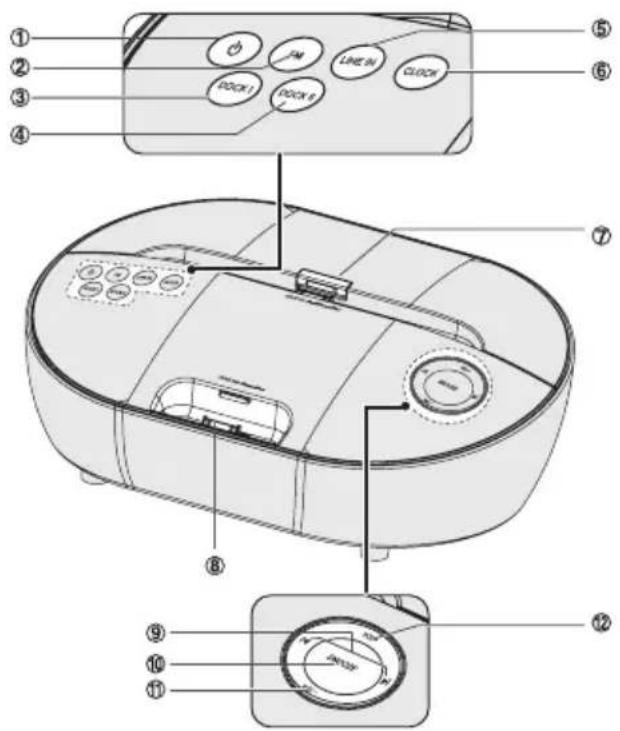
Top view
1.
Select DOCK I function.
- Dock II
Select DOCK II function.
- LINE IN
Connect to an external audio device.
- CLOCK
Set the clock.
-
Dock I for iPad/iPhone/iPod
-
Dock II for iPhone/iPod
9.1
-
Skip to previous /next audio file.
-
Search radio stations manually.
-
Press and hold this button to search radio stations automatically.
-
SNOOZE
Repeat the alarm.
- VOL - Buttons
Decreases the volume.
- VOL + Buttons
Increases the volume.
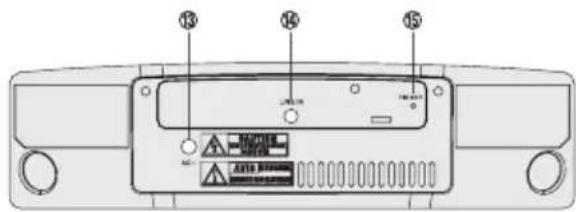
Rear view
- AC~ Socket
- LINE IN Socket
- FM Aerial Socket
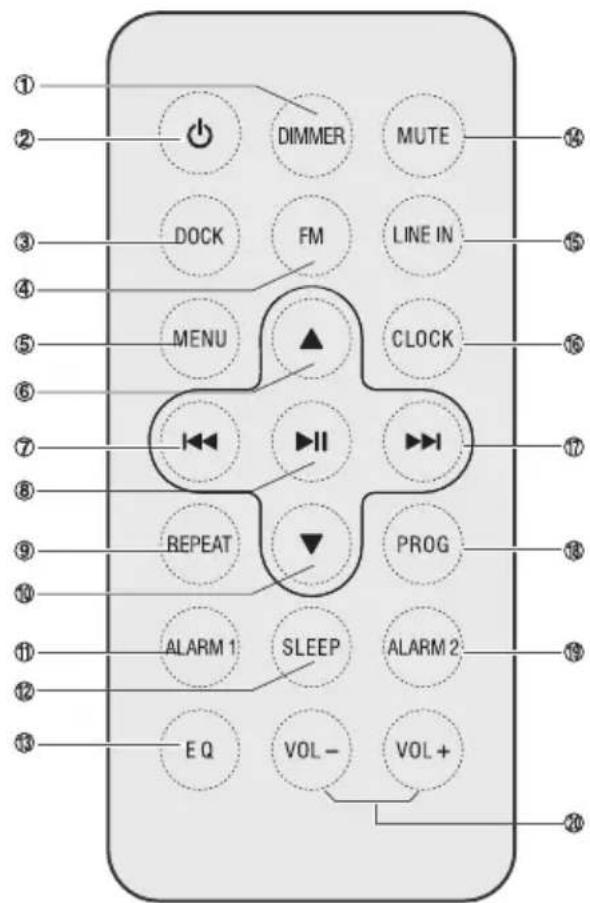
Mando a distancia
- DIMMER
Adjust display brightness.
2.
Turn on or turn off unit.
- DOCK
Select DOCK I/DOCK II function.
- FM
Select FM function.
- MENU
Switch between the folder list and the file list for iPod/ iPhone.
Battery Safety Guidelines
Prepare the Remote Control
The provided Remote Control allows the unit to be operated from a distance.
- Even if the Remote Control is operated within the effective range (6m), remote control operation may be impossible if there are any obstacles between the unit and the remote control.
- If the Remote Control is operated near other products which generate infrared rays, or if other remote control devices using infrared rays are used near the unit, it may operate incorrectly. Conversely, the other products may operate incorrectly.
For First-time use
The unit has a pre-installed lithium CR2025 battery. Remove the protective tab to activate the remote control battery.
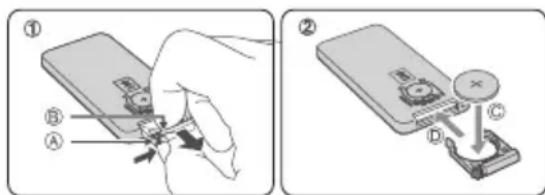
To Replace the Remote Control Battery
- Pull out the battery tray and remove the old battery.
- Place a new CR2025 battery into the battery tray with correct polarity (+/-) as indicated.
- Insert the battery tray back into the slot
Precautions Concerning Batteries
- When the Remote Control is not to be used for a long time (more than a month), remove the battery from the Remote Control to prevent it from leaking.
- If the batteries leak, wipe away the leakage inside the battery compartment and replace the batteries with new ones.
- Do not use any batteries other than those specified.
- Do not heat or disassemble batteries. Never throw them in fire or water.
- Do not carry or store batteries with other metallic objects. Doing so could cause batteries to short circuit, leak or explode.
- Never recharge a battery unless it is confirmed to be a rechargeable type.
6.▲/PRESET
- Navigate through iPod/iPhone menu.
- Select a next preset station.
- Adjust time.
7.
- Skip to previous audio file.
- Search radio stations manually.
- Press and hold this button to search radio stations automatically.
8.
- Start or pause play.
- Confirms the selection on a menu screen.
9. REPEAT
- Select repeat play modes.
10.
- Navigate through iPod/iPhone menu.
- Select a previous preset station.
- Adjust time.
11. ALARM 1
- Set the alarm 1 timer.
- View alarm 1 settings.
12. SLEEP
Set the sleep timer.
13.EQ
Select a preset sound effect:
Classic, Rock, Jazz, Pop, FLAT.
14. MUTE
Mute or resume the sound.
15. LINE IN
Select LINE IN function.
16. CLOCK
Press and hold this button in the standby
mode to set the clock.
17.
- Skip to next audio file.
- Search radio stations manually.
- Press and hold this button to search radio stations automatically.
18.PROG
Preset stations for tuner.
19.ALARM2
- Set the alarm 2 timer.
- View alarm 2 settings.
20. VOL+ /VOL-
Increases or decreases the volume.
Basic Operation
Connect Power
-
Risk of product damage!
-
Ensure that the power supply voltage corresponds to the voltage printed on the back or the underside of the unit.
- Before connecting the AC power cord, ensure you have completed all other connections.
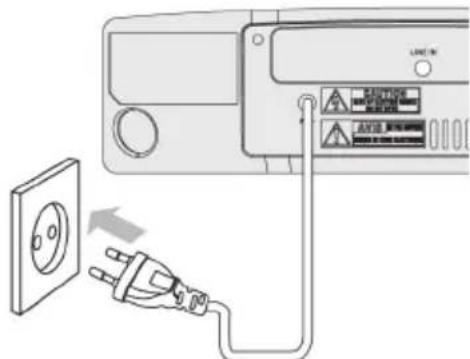
Connect the AC power cord to the wall socket.
Power
You can use all the functions on the top of the unit or the remote control after connecting to power supply (called Standby Mode).
Turn On
Press button to turn the system on from standby mode.

When turning the system on, the system will continue in the mode it was in when it was turned off last time.
Turn Off
Press button again to turn the system off and go to standby mode.

Be sure to unplug the power cord from the outlet when the system is not in use for an extended period of time.
Set Time
The built-in clock shows the correct time in the display.
- In standby mode, press and hold the CLOCK button for some seconds, hour indicator will blink.
- Set the hour with the button or button.
- Press theCLOCK buttons to confirm, minute indicator will blink.
- Repeat steps 2-3 to set the minutes.
Set the Alarm Timer
You can set two alarms which go off at different time.
- Ensure that you have set the clock correctly.
- Press and hold ALARM1 or ALARM2.
- Press / on the remote control to select an alarm sound source: iPod/iPhone/iPad, FM tuner, or buzzer.
- The display will show volume level and flash. Press the / buttons on the remote control to adjust the volume no less than Vol 8.
- Press ALARM 1 or ALARM 2. The hour digits begin to blink.
- Press / repeatedly to set the hour.
- Press ALARM 1 or ALARM 2. The minute digits begin to blink.
- Repeat steps 6-7 to set the minute.
Activate and Deactivate the Alarm Timer
Press ALARM 1 or ALARM 2 repeatedly to activate or deactivate the timer.
Repeat Alarm
You can press to adjust the interval to repeat alarm. When the alarm rings, press SNOOZE/DIMMER. The alarm repeats ringing 9 minutes later.
Stop Alarm Ring
When the alarm rings, press the corresponding ALARM 1 or ALARM 2. The alarm stops but the alarm settings remain.
View the Alarm Settings
Press ALARM 1 or ALARM 2 to view the alarm settings.
Set the sleep timer
This unit can switch to standby automatically after a set period of time. Press SLEEP repeatedly to select a set period of time (in minutes). when selected the "00", then could exit the sleep mode.
Adjust Display Brightness
Press DIMMER repeatedly to select different levels of display brightness.
Adjust Volume Level
During play, press the VOL+/- buttons to increase/decrease the volume level.
Select a Preset Sound Effect
During play, press the EQ button repeatedly to select: [FLAT], [Pop], [Classic], [Rock], [Jazz].
Mute Sound
During play, press the MUTE button to mute or restore sound. Press this button again to cancel the effect.
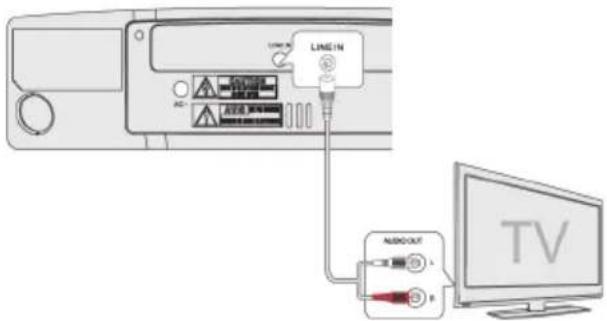
Play from an External Audio Device
You can listen to an external audio device through this unit.
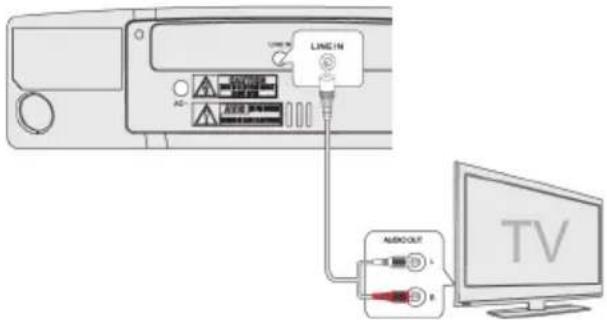
- Connect the audio player.
- The LINE IN sockets on this unit.
- The audio output sockets on TV set.
(e.g. MP3 player,cell phone). - Press the LINE IN button to select the LINE IN source.
- Start to play on the audio player.
Play from iPod/iPhone/iPad
Listen to the iPod/iPhone/iPad
You can enjoy audio from iPod/iPhone/iPad through this unit.
- Press the "Push" silk-screen of DOCK I to raise the backboard for iPad.
- Place the iPod/iPhone/iPad into the DOCK I or place the iPod/iPhone into the DOCK II.
-
Press the DOCK button on remote control or DOCK I or DOCK II button on top panel to select the corresponding iPod/iPhone/iPad source. Start to play the connected iPod/iPhone/iPad.
-
To pause/resume play, press the▶按钮.
- To skip to a track, press the | / | buttons.
- To search during play: press and hold buttons, then release to resume normal play.
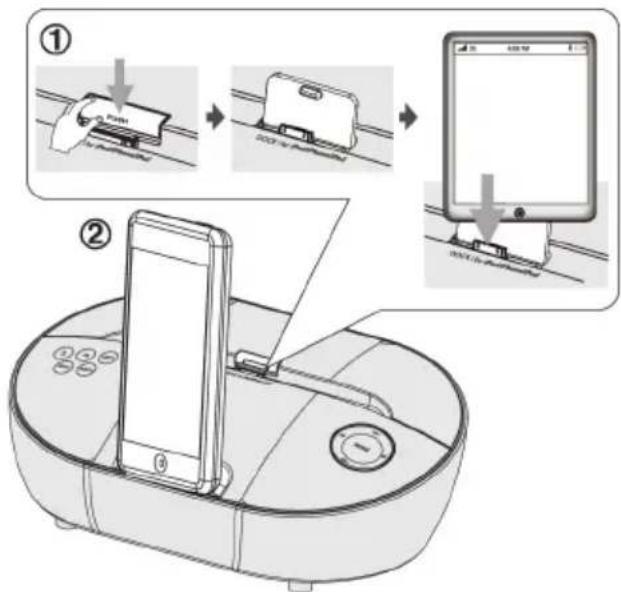
- During play iPod/iPhone, to navigate the menu: press MENU button, then press , to select, and press to confirm.
- To select repeat play options: press the REPEAT button repeatedly to select a repeat option play mode.
Charge the iPod/iPhone/iPad
The docked iPod/iPhone/iPad begins to charge as soon as the unit is connected to AC power.
Listening to the FM Radio
Tuning in a Station
- Tune in radio stations automatically
- Tap the FM button repeatedly on the
unit or press the FM button on the remote control to select FM mode.
- Press and hold the || buttons, the frequency changes down or up automatically until a station is found.
-
Repeat step 2 tune to more stations.
-
Tune in radio stations manually
Press the 144 buttons repeatedly until you find the station you want.
Presetting Stations
You can preset up to 20 FM stations.
- Program radio stations automatically
Press and hold the PROG button for 2 seconds to activate automatic programming.
All available stations are programmed in the order of waveband reception strength.
- The first programmed radio station is played automatically.
Program radio stations manually
- Tune in the desired station, then press the PROG button.
- Press the / buttons to select the preset number.
- Press the PROG button to store the station.
- Repeat above steps 1 to 3 for each station you want to store in memory with a preset number.
Tune to a Preset Radio Station
- Press the or buttons to select a preset number that you want.
Specifications
- Frequency Range FM: 87.5 - 108 MHz
- Power Supply: AC 220-240V ~ 50/60Hz
- Power Consumption: 25W
- Total Harmonic Distortion: 1% (1kHz,1W)
- Output Power: 5W × 2
- Audio Input Sensitivity/Impedance: 500mV/47kΩ
- Frequency Response: 40Hz - 20kHz(+/-3dB)
- Dimensions: 295mm( W) × 187mm( D) × 105mm( H)
Standard Accessories
- Remote Control.
- Owner's Manual.
Made for

iPod

iPhone

iPad
iPod, iPhone and iPad are trademarks of Apple Inc., registered in the U.S. and other countries. "Made for iPod", "Made for iPhone" and "Made for iPad" mean that an electronic accessory has been designed to connect specifically to iPod, iPhone or iPad respectively, and has been certified by the developer to meet Apple performance standards. Apple is not responsible for the operation of this device or its compliance with safety and regulatory standards. Please note that the use of this accessory with iPod, iPhone, or iPad may affect wireless performance..
Troubleshooting
If a problem occurs, it may often be due to something
Menu
- No power
-
The remote control does not function
-
The unit does not respond when pressing any buttons
Radio
- Desired station not found
Clock/Timer
- Timer does not work
- Clock/timer setting erased
iPod/iPhone/iPad
- El iPod/iPhone/iPad does not respond to the speaker system
- The unit doesn't play iPod/iPhone/iPad files or doesn't function as expected
- Using iPhone to play music
If any functional abnormality is encountered, unplug Features and specifications are subject to change
r. The following table contains various tips:
at both ends.
rol near the unit.
unit.
- The unit may freeze up during use. Switch the unit off and then on again at the mains socket
ine function.
e timer.
the power cord has been disconnected.
- iPod/iPhone/iPad may not be docked properly or installed properly.
Remove your iPhone/iPod from the dock and check for obstructions on the connectors in the
before docking. Please refer to your
-
Make sure the iPod/iPhone/iPad is connected properly.
-
Standby mode may be activated; press the button again.
loose from the docking station.
While the iPhone is playing the music through the docking, there may be a chance that the incoming call signal.
the unit from the mains socket and reconnect it again.
without prior notice.
Classic, Rock, Jazz, Pop, FLAT.
14. MUTE
Silenciar ou retomar o som.
15. LINE IN
Selecionar a funcao LINE IN.
16. CLOCK
(i.e. reproductor MP3, telemóvel).