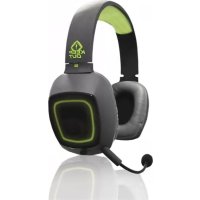
HX5 - Earphones KeepOut - Free user manual and instructions
Find the device manual for free HX5 KeepOut in PDF.



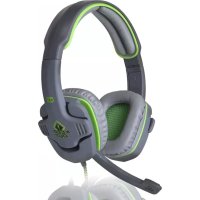
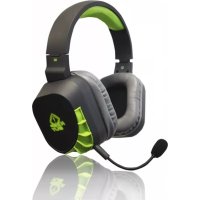
| Product Type | Wired Gaming Headset |
| Brand | KeepOut |
| Model | HX5 |
| Dimensions (approx.) | 200 x 180 x 90 mm |
| Weight (approx.) | 300 g |
| Power Supply | USB (5V) |
| Connection Type | USB-A |
| Cable Length (approx.) | 2 m |
| Audio Technology | Virtual 7.1 Surround Sound |
| Speakers | High-fidelity, 40 mm |
| Microphone | Noise-cancelling, flexible |
| Compatibility | PC, consoles (USB) |
| Included Software | KeepOut 7.1 Gaming Headset Sound Effect |
| Sound Settings | Equalizer, environment, karaoke |
| Ear Cushion Material | Padded, leatherette |
| Care and Cleaning | Soft dry cloth |
| Safety | CE certified |
| Spare Parts and Repairability | Not user-repairable |
| Package Contents | Headset, quick installation guide |
Frequently Asked Questions - HX5 KeepOut
User questions about HX5 KeepOut
0 question about this device. Answer the ones you know or ask your own.
Ask a new question about this device
Download the instructions for your Earphones in PDF format for free! Find your manual HX5 - KeepOut and take your electronic device back in hand. On this page are published all the documents necessary for the use of your device. HX5 by KeepOut.
USER MANUAL HX5 KeepOut
MP3, WMA, AAC, CD, VCD: 2CH
DVD c Dolby Digital nn DTS, WMA-Pro: 6 kaHa
DVD c Dolby Digital iinn DTS ES: 8-kaHaJIeH 3D irpn: 8-kaHaJIeH
3a6eJekka: HenoIxOJaU 136op Ha Tnna Ha
faiNa, 3a da irpae MoKe Da IOBeDe Do loWo
Bb3npOn3BexDaHe.
BG
2.Mode HactpoynDSPnDSPeektn.
3.Ahanorob u3xOu Tn: cnuyankn nn roBOpnten.
4.И3xOJHNo yCTPOnIcTBo, moXeTe da peryIuPaTe deun6eJI Na BnCOKOrOBOpUteJIInTe
EeKT
- Okonha cpea: 23 pexmm 3a Baunna n36op:
- Pa3mep: mankn, cpeHn, ronem 3a n36opnte
- EKbana3ep: 12 BnOBe 3a Baunu n36Op n deHnnpaHn OT notpe6nten.
MnKcep
- Perynipahe Ha cnilata Ha 3Byka
2.BkIIOUbaHe NnN N3KIOUbaHe Ha 3ByKa - KoHTpOHa 3ByKa Ha MMKpofoHa
- Bkliounte MnkpofoHa Nn N3KlIOUBaHe Ha
5.3aHnC.KoHTpoJHa 3Byka Ha MmKpOfoHa
6.3aHNC.BKIOUOHTe MMKPOoHOHa NIN N3KIOUHTe. - Pa3upeHn HacTpoKn Ha MKNpOfoHa.
1

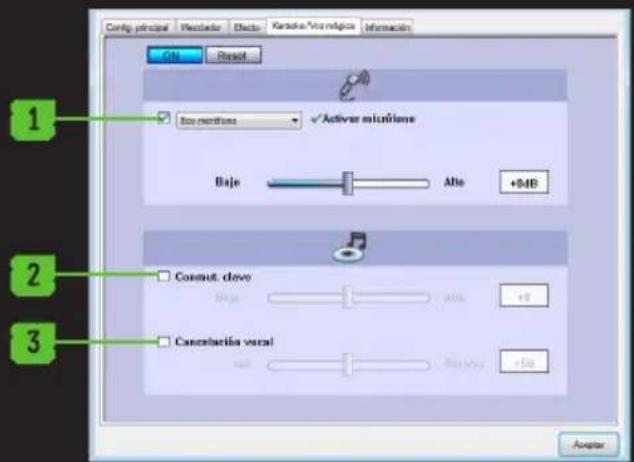
Kapaoke / Magic Voice
- PazpeшаBaHe / 3a6paHЯBaHe n KOHФИгурпаHe exOTO Ha MKNpOΦoHa
- Pa3peuBaHe / 3a6paHЯBaHe n KOHΦnIpypHaHe Ha cKOpOCTTa Ha Bb3nPOn3BExJaHe
- Pa3peuBaHe / 3a6paHЯBaHe n KOHΦnIpypHaHe Ha BOKaJIHaTa OTKa3.
INΦopmaua
Ioka3Ba HΦopMaζη 3a coΦTyep u BN I03BOLЯBa Da NOKa3BaTe nH He coΦTyep IKOHaTa Ha pa6OTnIπOT.

TEXHUYECKA NOIDPbXKA
3a NOBueHnΦOpMaζηN OTHOCHO NHCtAIIpaHeTo N KOHfIgypuHaTe HoTOn IpOdyKT B HaIiHa cnT www.Keepout.eu nIi HAnIWeTe IMeJl Ha cIeHNHaDpeC:
support@keep-out.eu.


UVOD
INSTALACE A KONFIGURACE
MP3, WMA, AAC, CD, VCD: 2CH
Thank you for choosing the Keep out Gaming Headset.
PRODUCT DESCRIPTION
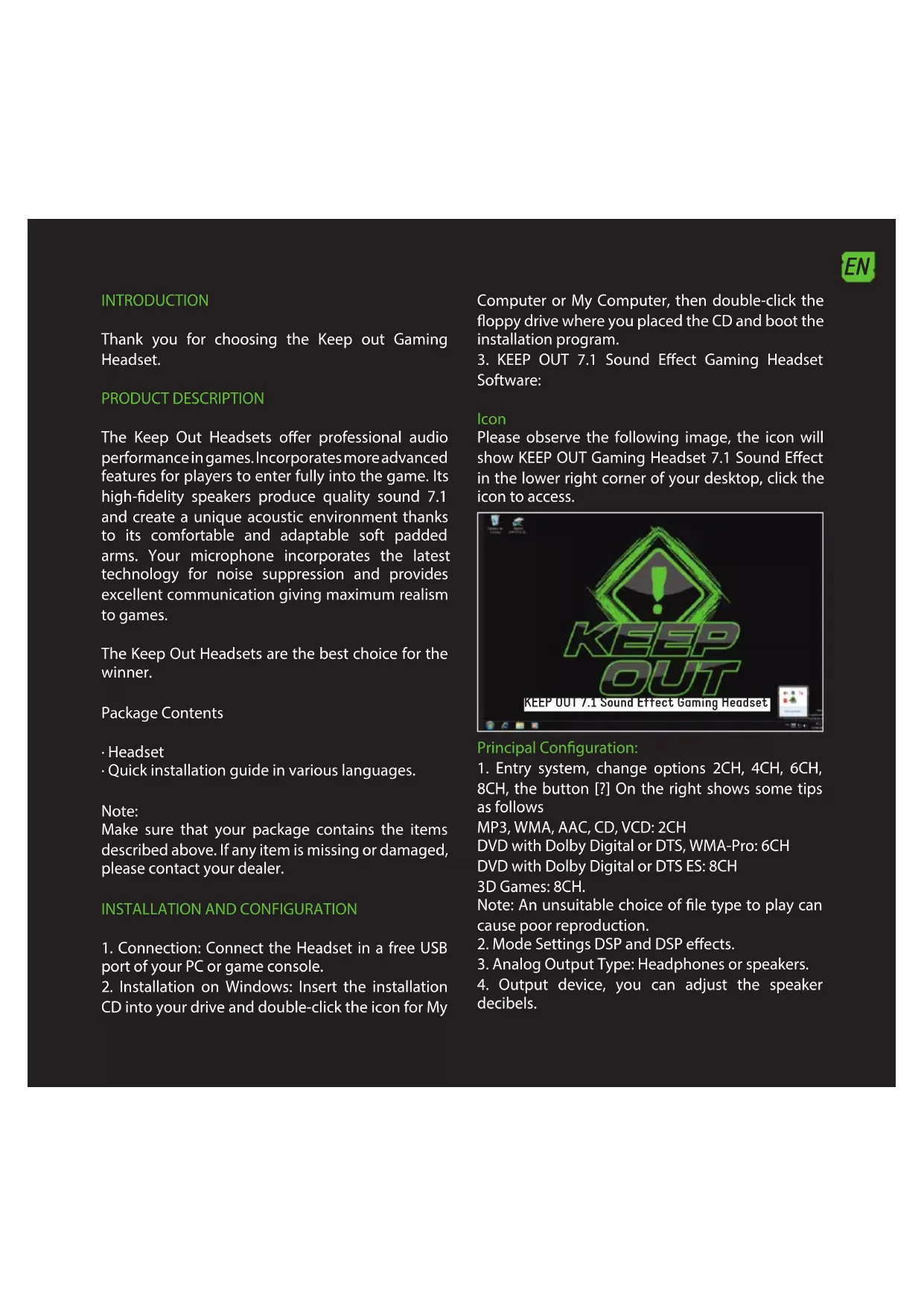
The Keep Out Headsets offer professional audio performance in games. Incorporates more advanced features for players to enter fully into the game. Its high-fidelity speakers produce quality sound 7.1 and create a unique acoustic environment thanks to its comfortable and adaptable soft padded arms. Your microphone incorporates the latest technology for noise suppression and provides excellent communication giving maximum realism to games.
The Keep Out Headsets are the best choice for the winner.
Package Contents
- Headset
- Quick installation guide in various languages.
Note:
Make sure that your package contains the items described above. If any item is missing or damaged, please contact your dealer.
INSTALLATION AND CONFIGURATION
- Connection: Connect the Headset in a free USB port of your PC or game console.
- Installation on Windows: Insert the installation CD into your drive and double-click the icon for My
Computer or My Computer, then double-click the floppy drive where you placed the CD and boot the installation program.
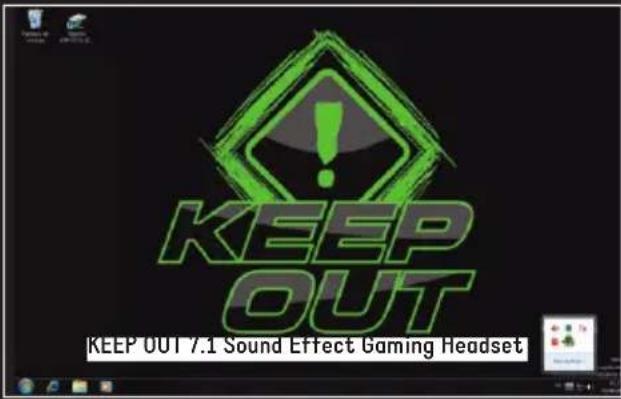
3. KEEP OUT 7.1 Sound Effect Gaming Headset Software:
Icon
Please observe the following image, the icon will show KEEP OUT Gaming Headset 7.1 Sound Effect in the lower right corner of your desktop, click the icon to access.
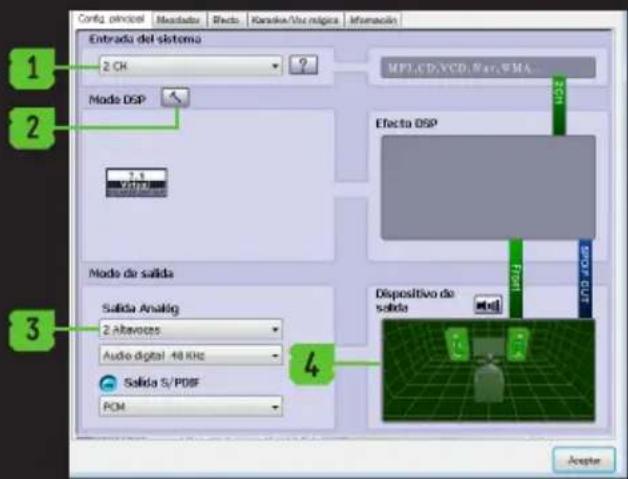
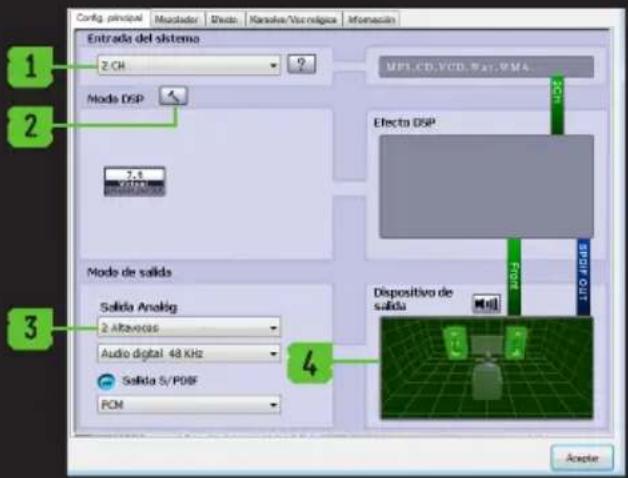
Principal Configuration:
- Entry system, change options 2CH, 4CH, 6CH, 8CH, the button [?] On the right shows some tips as follows
MP3, WMA, AAC, CD, VCD: 2CH
DVD with Dolby Digital or DTS, WMA-Pro: 6CH
DVD with Dolby Digital or DTS ES: 8CH
3D Games: 8CH.
Note: An unsuitable choice of file type to play can cause poor reproduction. - Mode Settings DSP and DSP effects.
- Analog Output Type: Headphones or speakers.
- Output device, you can adjust the speaker decibels.
EN

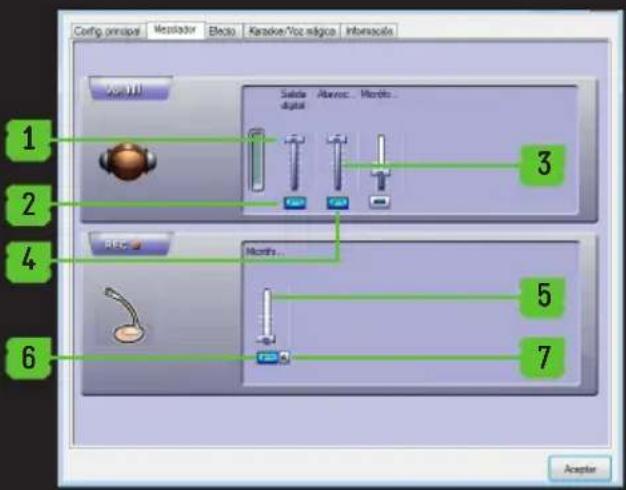
Mixer:
- Volume Control
- Switch on or off the sound
- Microphone Volume Control
- Switch the microphone on or off
- Recording. Microphone Volume Control
- Recording. Switch the microphone on or off.
- Advanced settings of the microphone

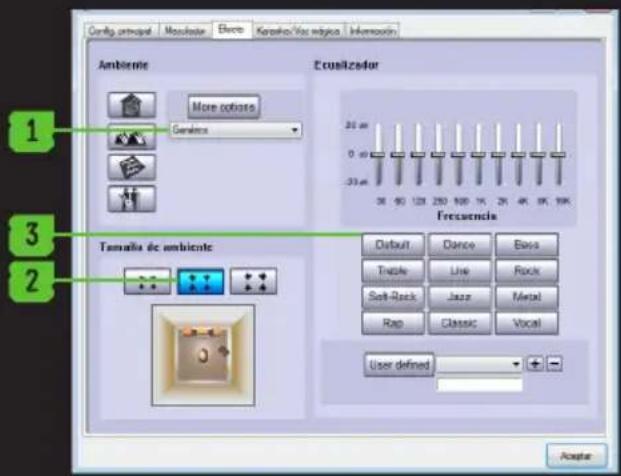
Effect:
- Environment: 23 modes for your choice:
- Size: Small, Medium, Large for election
- Equalizer: 12 kinds for your choice and defined by the user.
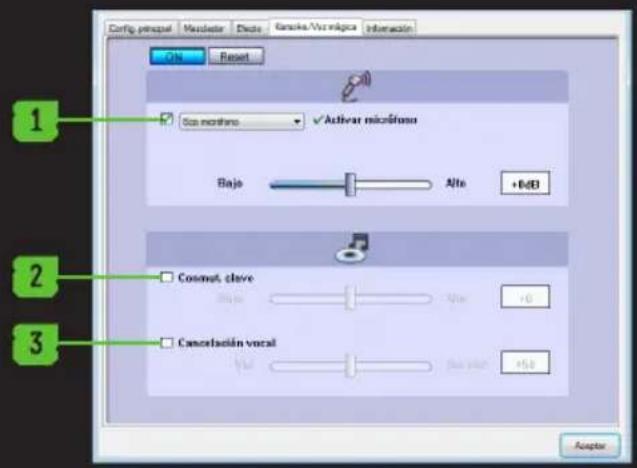
Karaoke / Magic Voice
- Enable / disable and configure the microphone echo
- Enable / disable and configure the playback speed
- Enable / disable and configure the vocal cancel.
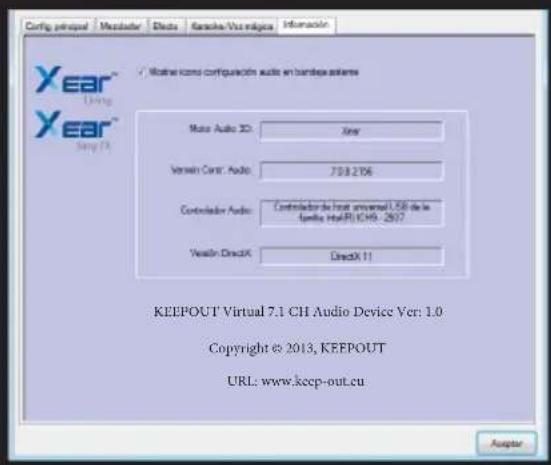
Information
Displays information about the software and allows you to display or not the software icon on the desktop.
TECHNICAL SUPPORT
For more information on installing and configuring this product go to our website www.KEEPout.eu or write an email to the following address: support@keep-out.eu.



INTRODUICION
- KEEP OUT 7.1 Sound Effect Gaming Headset Software:
Icono
support@keep-out.eu.
Information
MP3, WMA, AAC, CD, VCD: 2CH
- KEEP OUT 7,1 Sound Effect Software Gaming Headset:
Icona
MP3, WMA, AAC, CD, VCD: 2CH
INSTALLATIE EN SETUP
support@keep-out.eu.

WSTEP
INSTALACJA I KONFIGURACJA
MP3, WMA, AAC, CD, VCD: 2CH
DVD z Dolby Digital lub DTS, WMA-Pro: 6CH
DVD z Dolby Digital lub DTS ES: 8CH
Gry 3D:8CH
MP3, WMA, AAC, CD, VCD: 2CH
DVD com Dolby Digital ou DTS, WMA-Pro: 6CH DVD com Dolby Digital ou DTS ES: 8CH
Jogos 3D:8CH
support@keep-out.eu.

INTRODUCE
MP3, WMA, AAC, CD-uri, VCD: 2CH
DVD-ul cu Dolby Digital tau DTS, WMA-Pro: 6CH
DVD cu Dolby Digital tau DTS ES: 8CH
Jocuri 3D:8CH
- KEEP OUT 7.1 Sound Effect Gaming Headset Software:
Ikona
Prosim, pozorujte nasledujuci obrazok, zobraí sa ikona KEEP OUT 7.1 Sound Effect Gaming Headset v pravom dolnom rohu pracovnej plochy, kliknite na ikonu pre pristup

Hlavne nastavenie:
MP3, WMA, AAC, CD, VCD: 2CH
DVD s Dolby Digital alebo DTS, WMA-Pro: 6CH
DVD s Dolby Digital alebo DTS ES: 8k
3D hry: 8CH
Poznamka: Nevhodné volba typu SUBoru na prehravanie moze sposobit zlu reproducciu.
-
Nastavenie režimu DSP a DSP efekty.
-
Analógovy vystup typu: Sluchadla alebo reprodukty.
-
Vystupné zariadenia, možete nastavit decibely reproduktorov.
Mixpult
Importado por/Imported by:
APPROX IBERIA S. L.
CIF:B-91202499
Soporte专业技术/Technical support:
support@keep-out.eu
The content of this guide is
subject to typographical errors.


48H NON STOP

NO SHARING

FEEL SUPERIOR
www. keep-out.eu
- BG
- EeKT
- MnKcep
- 1
- Kapaoke / Magic Voice
- INΦopmaua
- TEXHUYECKA NOIDPbXKA
- UVOD
- INSTALACE A KONFIGURACE
- PRODUCT DESCRIPTION
- Package Contents
- Note:
- INSTALLATION AND CONFIGURATION
- Icon
- Principal Configuration:
- EN
- Mixer:
- Effect:
- Karaoke / Magic Voice
- Information
- TECHNICAL SUPPORT
- INTRODUICION
- Icono
- Icona
- INSTALLATIE EN SETUP
- WSTEP
- INSTALACJA I KONFIGURACJA
- INTRODUCE
- Ikona
- Hlavne nastavenie:
- Mixpult
Brand : KeepOut
Model : HX5
Category : Earphones