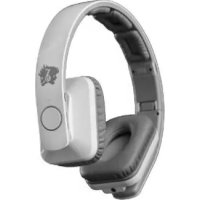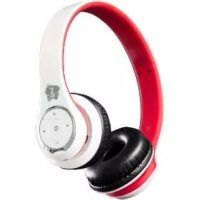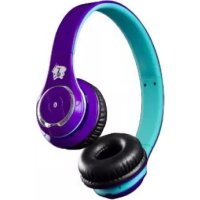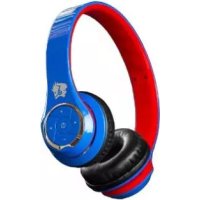
BN301PKB - Earphones Life N Soul - Free user manual and instructions
Find the device manual for free BN301PKB Life N Soul in PDF.


| Product Type | Wireless Bluetooth Headset |
| Brand | Life N Soul |
| Model | BN301PKB |
| Connection Technology | Bluetooth |
| Multi-device Connection | Yes, up to 2 devices simultaneously |
| Power | Rechargeable lithium-ion battery |
| Charging Time | Approximately 4 hours for a full charge |
| Charging Port | Micro USB |
| LED Indicator | Indicates status (power on, pairing, low battery, charging) |
| Voice Guide | Available in English |
| Built-in Microphone | Yes |
| Controls | On/Off button, Volume +/-, Next/Previous track |
| Main Functions | Automatic music/call switching, automatic connection, voice dialing, call rejection, play/pause |
| Maintenance and Cleaning | Clean without harsh chemicals; recharge every 3 months if unused |
| Usage Precautions | Do not expose to heat, humidity; do not repair yourself |
| Hearing Safety | Excessive pressure may cause hearing loss |
| Battery Recycling | Do not throw in trash, recycle at an appropriate center |
| Warranty | Not specified |
Frequently Asked Questions - BN301PKB Life N Soul
User questions about BN301PKB Life N Soul
0 question about this device. Answer the ones you know or ask your own.
Ask a new question about this device
Download the instructions for your Earphones in PDF format for free! Find your manual BN301PKB - Life N Soul and take your electronic device back in hand. On this page are published all the documents necessary for the use of your device. BN301PKB by Life N Soul.
USER MANUAL BN301PKB Life N Soul
BLUETOOTH STEREO HEADSET
MODEL NO.: BN301
USER MANUAL
AURICULAR BLUETOOTH
MODEL NO.: BN301
BLUETOOTH STEREO HEADSET
MODEL NO.: BN301
USER MANUAL
SPECIFICATIONS
- Bluetooth Version: V3.0+EDR
- Bluetooth Profiles: A2DP, AVRCP, HSP, HFP
A2DP - Advanced Audio Distribution Profile
AVRCP - Audio/Video Remote Control Profile
HSP-Headset Profile
HFP - Hands-free Profile
3. Operating range: 10 meters
- Operating Time: Up to 10 hours
- Microphone: Omni-directional
- Frequency Response: 20Hz 20kHz
- Battery: Li-ion Polymer battery 320mAh
- Charge input voltage: DC5V
- Dimensions (L^H^W) .. 170^175^70mm
10.Net Weight: 130g
FEATURES
- Automatic switching in between conversations and music, you will not miss any incoming calls while listening to music.
- Automatic connecting with the last paired device when headset is turned on.
- Battery life is displayed on iOS devices.
- Multilink technology allows simultaneous connection to two different devices. Simply repeat the pairing process on both devices. If you are pairing this headset with another type of smart phone or tablet, you may need to consult that device's user manual for specific pairing instructions.
- Voice prompt is in English. The voice notice comes directly through the headset and tells what the current status is about.
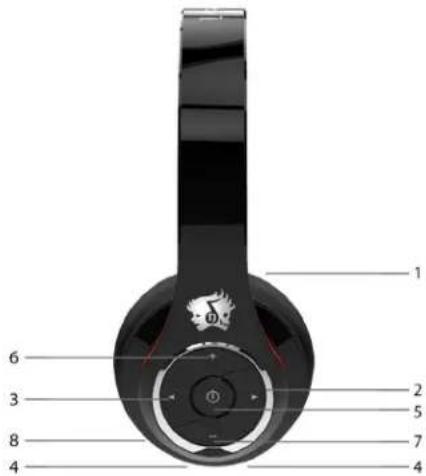
PRODUCT OVERVIEW
- Retractable string
-
Next track
- < Previous track
- LED indicator for different states
- Power On or Off/ Answer or end of phone calls/ Voice dial/ Redial last number/ Play or Pause music
-
- Volume up
-
- Volume down
- Build-in microphone
PRODUCT SETUP
- Please press and hold the button for 3 seconds to power up. Continue to hold the button for another 6 seconds to enter Bluetooth pairing mode. LED light will blink red and blue while in this mode. You will hear a voice prompt saying "Pairing".
- On the Bluetooth enabled devices go to SETTINGS > BLUETOOTH. And then search for new Bluetooth devices.
- After search is made, select "LnS-BN301" and connect. You will hear a voice prompt saying "Pairing complete". After connected, the LED light will keep blinking blue.
Note:
- Specific pairing procedures may vary with different mobile phones. Please refer to your device's user manual for specific pairing instructions.
- If the pairing is not successful, please turn off the headset and turn on the headset to enter the pairing mode again.
- Device will automatically connect to the last connected Bluetooth device.
CHARGING
- Plug the Micro USB cable into the charging port. It takes about 4 hours to fully charge from an empty battery. When the battery is full, LED light will turn blue.
- First time charging battery, please be sure the battery has been charged fully before use.
Note: When you plug the charger cable please turn off the Bluetooth Headset.
LED INDICATOR
- LED off > Power off
- BLUE > Power on
- Flashing Blue/Red > Pairing mode
- RED > Low Battery
- Flashing Red > Battery almost drained
- Flashing Blue > Battery is recharging
HOW TO TAKING PHONE CALLS / PLAYING MUSIC
You can use this headset to receive and make phone calls. When you receive an incoming call, the music will automatically pause. Press the On/Off button to answer phone calls. Your voice will be picked up through the built-in microphone.
- Power on/off: Press the On/Off button for 3 seconds.
- Answer/end call: Press the On/Off button to answer or end call.
- Make a call: Use your phone to dial as usual. Listen and talk through this headset.
- Reject a call: Hold the On/Off button for 1 second.
- Voice dial: Press and hold the On/Off button, release it till hearing indication sound, and then speak the Number or name of call you want to make.
- Redial last number: Short press the On/Off button twice quickly.
- Play/Pause: Press the On/Off button.
- Next track: Press the > button to skip to the next track.
- Previous track: Press the < button to skip back to the previous track.
- Volume: Press + button to volume up and press - button to decrease volume.
Note:
- The built-in microphone only works when connected to a Bluetooth device supporting HFP, HSP profiles.
- The media controls only work when connected to a Bluetooth device supporting AVRCP profile.
- When the volume is adjusted to maximum or minimum, you will hear an indication tone.
Warning: Excessive pressure from headphones can cause hearing loss.
WARNING / MAINTENANCE
Read all instructions and warnings prior to using this headset. Improper use of this product may result in product damage, excessive heat, fire or explosion, for which damage you ("Purchaser"), and not BH-530 or Manufacturer are responsible.
- Do not store headset in high temperature environment, including intense sunlight heat. Do not place headset in fire or other excessively hot environments.
- Do not expose this headset to moisture or submerge it in liquid. Keep battery dry at all times.
- Do not attempt to repair the product on your own.
- For extended storage, first charge your battery for about 4~5 hours until the LED light turns blue.
- Never dispose of batteries in the garbage. Always take used batteries to your local battery recycling center.
- Do not use this product near water or swimming pool.
- Do not wash the headset with harsh chemicals, soaps or detergents.
- Re-charge your headset once every three months when it is not in use.
- Close supervision is necessary when used near children.

www.lifensoul.com
Life soul
AURICULAR BLUETOOTH
MODEL NO.: BN301