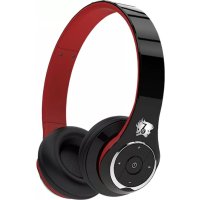
BE501 - Earphones Life N Soul - Free user manual and instructions
Find the device manual for free BE501 Life N Soul in PDF.


| Product Type | Bluetooth Stereo Headset |
| Brand | Life N Soul |
| Model | BE501 |
| Bluetooth Technology | Bluetooth 4.0 |
| Music Playtime (Bluetooth) | Up to 25 hours |
| Music Playtime (Wired) | Up to 16 hours |
| Talk Time | Up to 28 hours |
| Standby Time | Up to 1300 hours (50 days) |
| Battery | Rechargeable Li-polymer 650 mAh |
| Charging Time | Approximately 5 hours |
| Charging Voltage | 5V, current ≥400mA |
| Operating Distance | Up to 20 m (open space) |
| Impedance | 32Ω and 16Ω |
| Frequency Response | 10 - 22000 Hz |
| Supported Bluetooth Profiles | aptX, A2DP, AVRCP, HSP, HFP |
| Driver Unit | 50 mm x2 and 13 mm x6 neodymium drivers |
| Connectivity | Bluetooth + wired (3.5mm jack) + USB (PC audio playback) |
| Safety | Do not use at high volume; avoid use while driving |
| Operating Temperature | -10°C to 50°C |
| Storage Temperature | -15°C to 55°C |
| Box Contents | Headset, USB cable, leather pouch, user guide |
| Care and Cleaning | Avoid immersion in water; clean with a soft cloth |
Frequently Asked Questions - BE501 Life N Soul
User questions about BE501 Life N Soul
0 question about this device. Answer the ones you know or ask your own.
Ask a new question about this device
Download the instructions for your Earphones in PDF format for free! Find your manual BE501 - Life N Soul and take your electronic device back in hand. On this page are published all the documents necessary for the use of your device. BE501 by Life N Soul.
USER MANUAL BE501 Life N Soul
Security Precautions:
In order to have a proper and safety use of the headset, please read this user manual in detail and save it.
Be sure to aware the following guidelines when using your headset.
• To avoid long time exposure to high volume, leading to noise-induced hearing damage.
- Should use caution or temporarily discontinue use in potentially hazardous situations.
- Should adjust reasonable volume and time when listening to music.
- Be careful not to turn the volume too high, as you do not hear anything around you.
- Do not recommend using a headset while driving.
- Driving on the way or in a potential dangerous environment, please avoid using headset to listen to the music, make or receive calls, in order to avoid dispersion attention.
- Should avoid continuing to increase the headset volume, as your hearing need adaptation.
- Keep this product and its accessories out of the reach of children, in order to avoid inappropriate use by children which may pose a fatal danger.
- Should avoid immerse in water during grooming, which may cause damage to the sound quality or the headset.
- Stop using headset if feel significant discomfort, irritation or other adverse reactions.
• The headset should not be stored or use at temperatures below -15°C (5°F) or above 55°C (131°F) it may shorten battery life.
BE501 Bluetooth stereo headset in the box:
- BE501 Bluetooth headset 1pc - USB charging cable 1pc
- Leather pouch 1pc - User's guide 1pc
Overview of BE501 Bluetooth stereo headset:
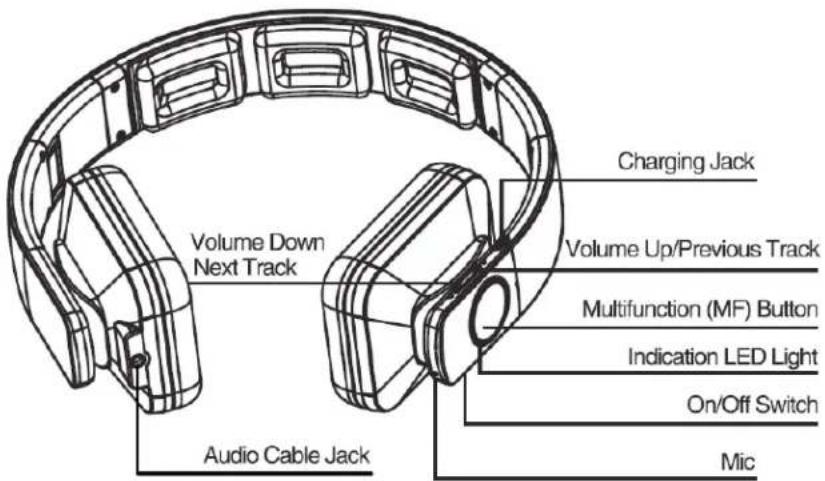
Charger and battery: Please check the charging cable is original or not before charging the Bluetooth headset.
Warning: Must use original charge cable to charge for the Bluetooth headset, otherwise it may damage the Bluetooth headset.
Thus, voltage of charger must be 5V, electric current exceed 400mA.
Charging: This headset uses a non detachable built-in rechargeable battery.
- Before charging, make sure the headset has switched off.
- Plug USB cable into the charging port of headset; plug other side of USB cable into the USB charger or other charging device.
Charging will start and the red light remains bright on the headset. - The headset takes approximately 5 hours for fully charged, blue light remains bright or red light switch off after charging completed.
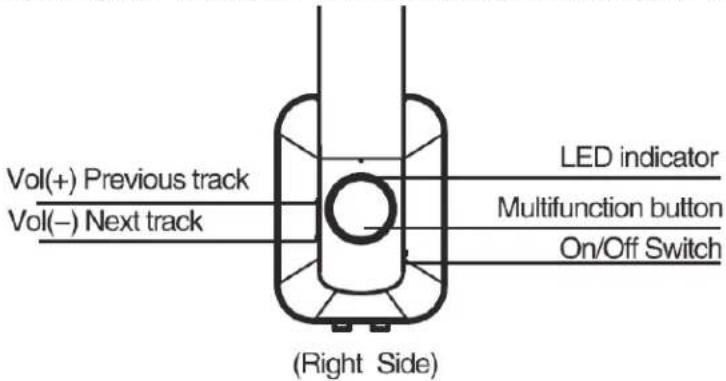
Switch on: 1. Gently push the "On/Off Button" to switch the headset. Keep press the "MF Button" for around 2 seconds entered to pairing mode, red light and blue lights blinks alternately, Or; When the headset was switched on, keep press the "MF Button" for around 5 seconds, then, restart the headset, entered to pairing mode, red and blue lights blinks alternately.
Switch off: Gently push the "On/Off Button" to switch off the headset, it will issue the beep sound, blue light and red light switch off.
Pairing your headset with your mobile phone:
- Keep distance of the headset and mobile phone (or other device need to be connected) within 1 meter when pairing.
- Switch on the headset, make sure entered to pairing mode, red and blue lights blinks alternately.
- Switch on Bluetooth search function of your mobile phone or other device need to be connected, the mobile phone will display has found the "LnS-BE501";
- Select "LnS- BE501", your headset will be automatically connected to your mobile phone (Parts of mobile needs pairing password"0000"), the blue light blinks.
IMPORTANT: The pairing time is limited, generally takes 300 seconds. If blue light disappeared, the Bluetooth pairing mode has stopped. If pairing is unsuccessful, please retry step 1 to 4 again.
Connect the headset with two mobile phones:
- Keep distance of the headset and mobile phone (or other device need to be connected) within 1 meter when pairing. The closer the better.
- Switch on the headset and ensure that the headset enters into pairing mode, red and blue lights blinks alternately, turn on Bluetooth function of phone 1 and pair it with the Bluetooth headset
- Turn off the Bluetooth of mobile phone 1 and switch off the headset.
- Switch on the headset and ensure that it enters to pairing mode again. Then turn on phone 2 and pair it with the Bluetooth headset "LnS- BE501";
- Turn on the Bluetooth of mobile phone 1, connecting the paired headset "LnS-BE501". The headset connects with two mobiles at the same time.
Disconnect the headset from the mobile phone:
Switch off the headset; Or
Switch off Bluetooth function of the mobile phone; Or
Move the headset away from the mobile phone for 20m (66ft) or further position.
Reconnect the paired headset with the mobile phone:
- Keep distance between the headset and mobile phone (or other device needed to be connected) within 1 meter when pairing.
- Switch on the headset, the headset will be entered to reconnection mode, red light blinks.
- Switch on Bluetooth search function in the mobile phone or other device needed to be connected, your mobile phone will automatically connect with your headset. The blue light will blink after reconnection. (Some mobile phone's Bluetooth turns on the headset automatically to establish a connection with the mobile phone)
Answer incoming call:
- When Bluetooth headset has connected to your mobile phone, the headset will issue a call tone or a ring tone when there is an incoming call.
- Press the "MF Button" once to answer incoming calls or use the answer button of your mobile phone.
Drop call: Press the "MF Button" once or use your mobile phone button to drop the call.
Reject call:
- During an incoming call, the headset will issue a call tone or a ringtone. 2. Keep pressing the "MF Button" for around 2 seconds, then release to reject the call, or directly use your mobile phone's hang up button.
Last call redialing: Press the "MF Button" two times.
Play/Pause Bluetooth music: When music is playing through the headset, press the "MF Button" once to stop the music; press the "MF Button" once to resume the music.
Select tracks and volume control:
During calling or playing music, hold down the "Vol(+) Button" to increase volume, and hold down the "Vol(-) Button" to decrease volume. Tap the "Vol(-) Button" once to select next track; Or tap the "Vol(+) Button" once to select previous track.
LINE\_IN music playing and call:
- Connect the headset with your mobile phone by 3.5mm audio cable.
- Switch on your headset by holding down the MF Button for around 4 seconds until the blue light blinks. Then you can listen to music or make a call.
USB music playing:
- Make sure your headset is switched off.
- Connect the headset with your computer through the USB charging cable. The computer will automatically install a virtual sound card. You will hear sound from your computer. Make sure your computer control setting as the output channel is USB Audio Device.
- Switch on your headset, blue light will blink. Switch on the Bluetooth function of your mobile phone, if your headset was paired with your mobile phone before, then it will re-connect with your mobile phone via Bluetooth automatically.
- While you are hearing a sound from your computer, if there is an incoming call of your mobile phone, you may answer to the call via Bluetooth.*Under USB connection mode, microphone does not function.
Technical Specification:
-Drive Unit: 50mm x 2pcs and 13mm x 6pcs Neodymium Drivers
-Standby Time: Up To 1300hrs(50days)
-Bluetooth Version: V4.0
-Battery: 650mAh Li-Polymer Rechargeable Battery
-RF Frequency Response: 2.4GHz-2.48GHz
-Support Profile: aptX®, A2DP, AVRCP, HSP, HFP
-Operating Distance: Up To 20m(free space)
-Impedance: 32Ω and 16 Ω
-Bluetooth Music Playtime: Up To 25hrs
-Frequency Range: 10-22000Hz
-Wired Music Playtime: Up To 16hrs
-Operating Environment: -10 to 50°C
-Talk Time: Up To 28hrs
Attention: According to the Ministry of Transport of the People's Republic of China's regulations about Low Power Management:
Article XII of the law: Non-licensed, company/firm or user are not allowed to change frequency, enhance transmitting power or alter original characteristic and functions of the low-power RF electric machinery which had been through type test certification.
Article XIV of the law: The use of the low-power RF electric machinery shall not influence aircraft security and interfere legal communications; if interference phenomena are found, immediately stop use. The said legal communications refer to the operation of Radio-communication according to the provisions of the Telecommunications Act. The low-power RF electric machinery must endure the interference of legal communication or industrial, scientific and medical radio wave radiated interference of electrical equipment. Technical specifications are subject to change without notice, we apologize for any inconvenience.