VIBE Z2 Pro - Smartphone LENOVO - Free user manual and instructions
Find the device manual for free VIBE Z2 Pro LENOVO in PDF.


User questions about VIBE Z2 Pro LENOVO
0 question about this device. Answer the ones you know or ask your own.
Ask a new question about this device
Download the instructions for your Smartphone in PDF format for free! Find your manual VIBE Z2 Pro - LENOVO and take your electronic device back in hand. On this page are published all the documents necessary for the use of your device. VIBE Z2 Pro by LENOVO.
USER MANUAL VIBE Z2 Pro LENOVO
Read first-Regulatory information
Be sure to read the Regulatory Notice for your country or region before using the wireless devices contained in your VIBE. To obtain a PDF version of the Regulatory Notice, refer to the “Downloading publications” section below.
Downloading publications
To download the publications for your VIBE, go to: http://support.lenovo.com and follow the instructions on the screen.
Getting support
For support on network service and billing, contact your wireless network operator. For instructions on how to use your VIBE, go to: http://support.lenovo.com.
Legal notices
Lenovo and the Lenovo logo are trademarks of Lenovo in the United States, other countries, or both.
Other company, product, or service names may be trademarks or service marks of others.
Contents
First glance.... 1
Installing the Micro SIM card.... 2
Charging the battery.... 3
Technical specifications 4
Important safety and handling information 5
Service and Support information.... 13
Warranty information.... 14
Environmental, recycling, and disposal information 16
Restriction of Hazardous Substances Directive (RoHS).... 17
Specific Absorption Rate information.... 18
Precautionary Guidelines for mobile users.... 19

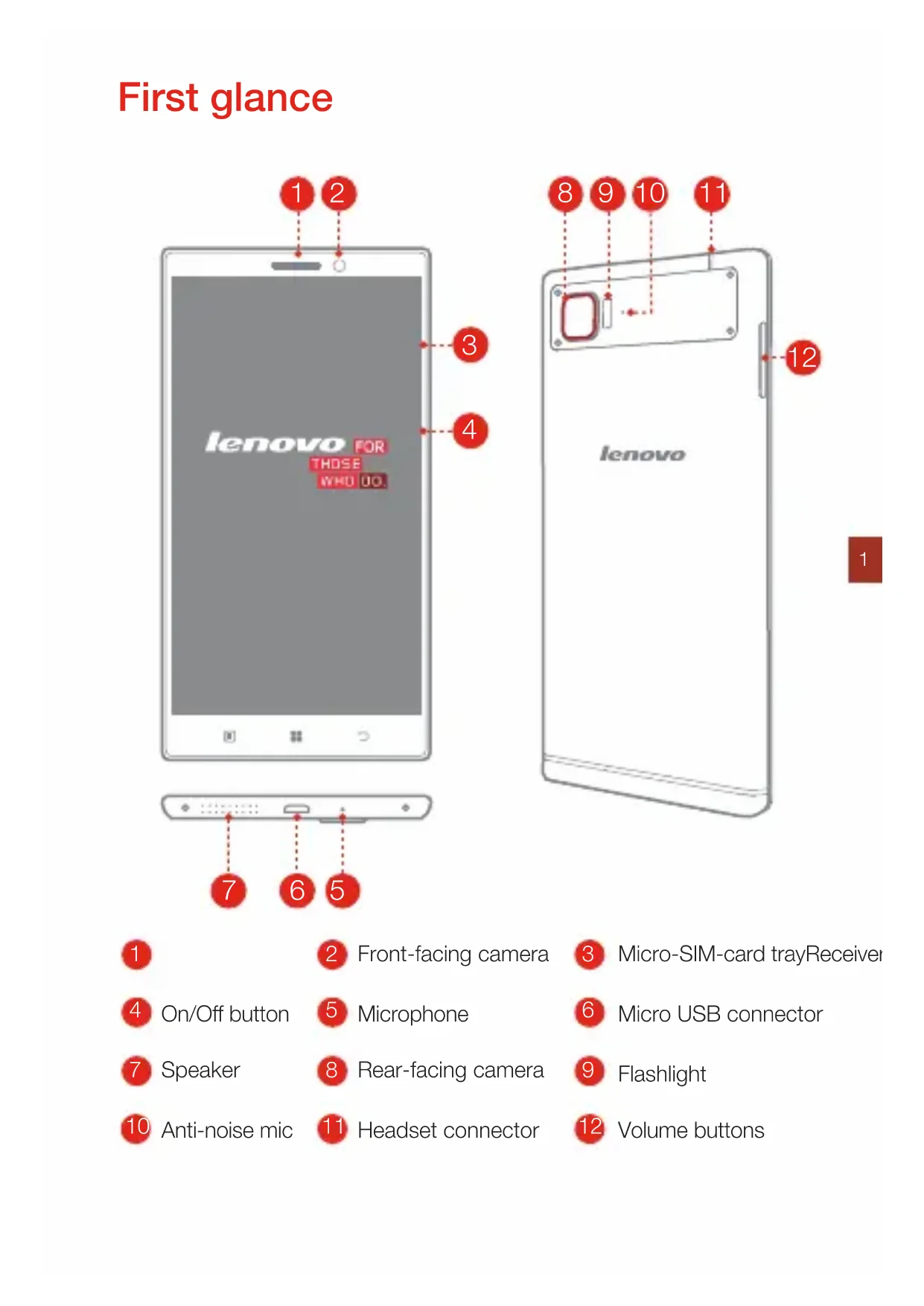
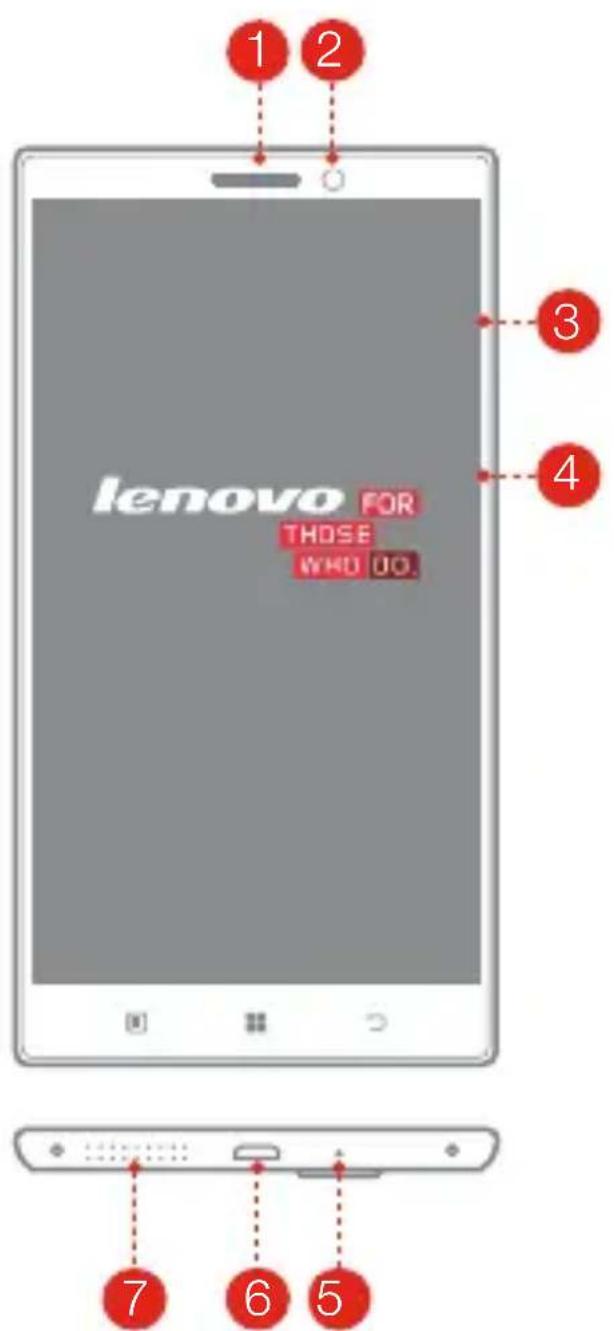
First glance
text_image
lenovo FOR THOSE WHO JO.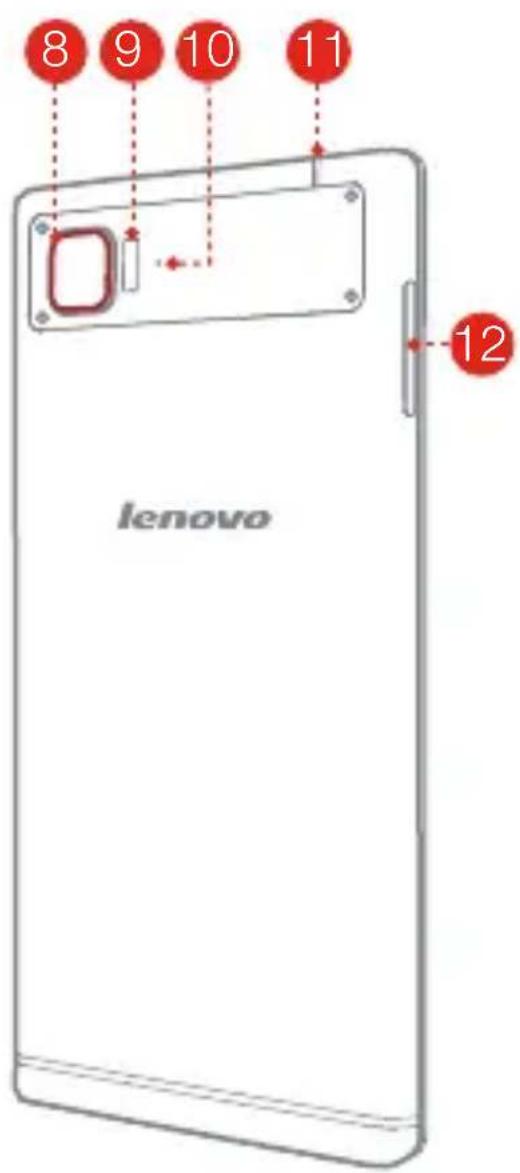
text_image
8 9 10 11 lenovo 121
2 Front-facing camera
3 Micro-SIM-card trayReceiver
4 On/Off button
5 Microphone
6 Micro USB connector
7 Speaker
8 Rear-facing camera
9 Flashlight
10 Anti-noise mic
11 Headset connector
12 Volume buttons
Installing the Micro SIM card
A Micro SIM card provided by your carrier is required in order to use cellular services. Install the Micro SIM card as shown.
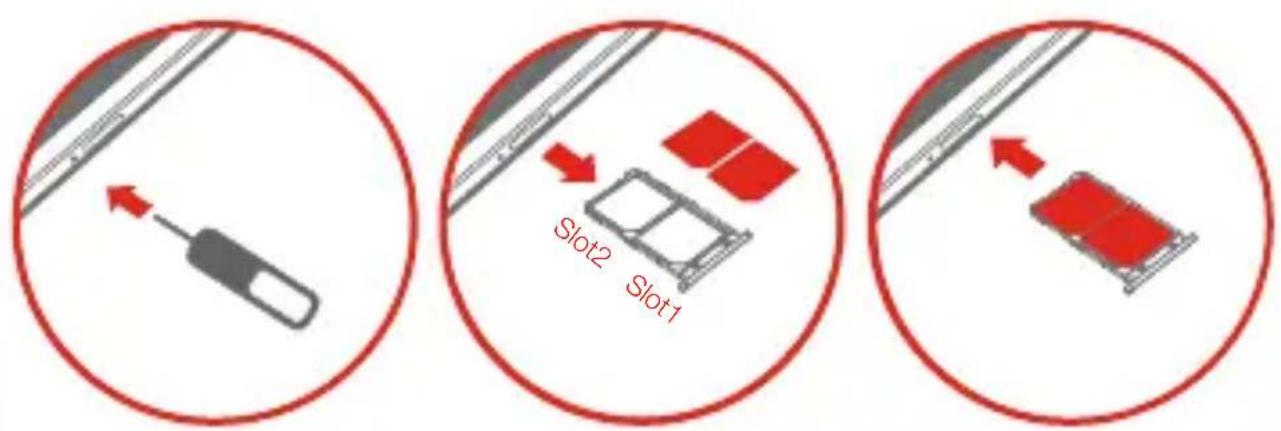
Slot 1. Support WCDMA/GSM
Slot 2. Only support GSM
Step 1. Insert the SIM eject tool that comes with your VIBE into the hole in the Micro-SIM-card tray.
Step 2. Pull out the Micro-SIM-card tray and position the Micro SIM card into the tray in correct orientation.
Step 3. Carefully insert the tray with the installed Micro SIM card back into the slot.

Only Micro SIM cards work with your VIBE.
Always turn off your VIBE first before you insert or remove a Micro SIM card. Insert or remove a Micro SIM card with your VIBE on may damage your Micro SIM card or VIBE permanently.
Charging the battery
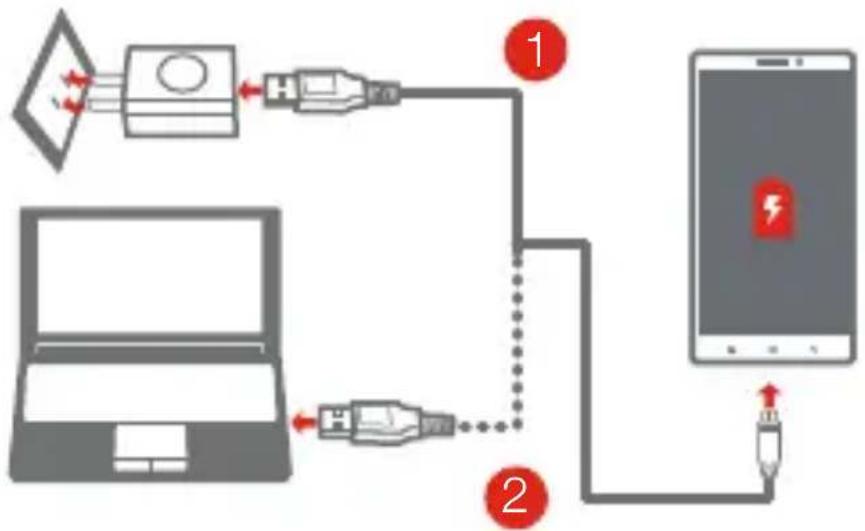
Charge the battery as shown.
flowchart
graph TD
    A["Laptop"] -->|1| B["Plug-in Device"]
    A -->|2| C["Plug-in Device"]
    B --> D["Smartphone"]
    C --> D
    D --> E["Battery charging"]
Method 1. Connect your VIBE to a power outlet using the cable and USB power adapter that come with your VIBE.
Method 2. Connect your VIBE to a computer using the cable that comes with your VIBE.

Low battery power

Fully charged

Charging
Turn on
Press and hold the On/Off button for a few seconds.
Turn off
Press and hold the On/Off button for a few seconds, then tap Power off.
Restart
Press and hold the On/Off button for a few seconds, then tap Restart.

Your VIBE has a built-in rechargeable battery. For more information about battery safety, see the "Built-in rechargeable battery notice". The battery of your VIBE isn't user replaceable; it can be replaced only by an authorized service provider.
Technical specifications

Name and model
Name: Lenovo VIBE Z2 Pro Model: Lenovo K920
① Dimensions and weight
Height: 156 mm (6.14 inches) Width: 81.3 mm (3.20 inches)
Depth: 7.7 mm (0.30 inch) Weight: 179 g (0.39 lb)

Processor
Processor: Qualcomm MSM8974AC, quad-core, 2.5 GHz

Camera
Type: CMOS
Pixels: 16 megapixels (back) + 5 megapixels (front)
Battery
Battery: 4000 mAh
Display
Size: 6 inches Screen: multi-touch
Resolution: 2560 × 1440 pixels LCD type: IPS

Wireless Communication
Bluetooth 4.0
WLAN 802.11 a/b/g/n/ac
DC-HSPA+, WCDMA, EDGE/GPRS/GSM
GPS

* Depending on the measuring method, the dimensions and weight might vary slightly.
Important safety and handling information
Important safety information

CAUTION
To avoid personal injury, property damage, or accidental damage to the product, read all of the information in this section before using the product.
Handling
● Handle Lenovo Phone with care
Do not drop, bend, or puncture Lenovo Phone; do not insert foreign objects into or place heavy objects on Lenovo Phone. Sensitive components inside might become damaged.
● Prevent Lenovo Phone and adapter from getting wet
Do not immerse Lenovo Phone in water or leave Lenovo Phone in a location where it can get saturated with water or other liquids.
Repairing
Do not disassemble or modify Lenovo Phone. Lenovo Phone is a sealed unit.
There are no end-user serviceable parts inside. All internal repairs must be done by a Lenovo-authorized repair facility or a Lenovo-authorized technician.
Attempting to open or modify Lenovo Phone will void the warranty.
Lenovo Phone screen is made of glass. The glass might break if Lenovo Phone is dropped on a hard surface, is the subject of a high impact, or is crushed by a heavy object. If the glass chips or cracks, do not touch the broken glass or attempt to remove it from Lenovo Phone. Stop using Lenovo Phone immediately and contact Lenovo technical support for repair, replacement, or disposal information.
Battery
Batteries supplied by Lenovo for use with your product have been tested for compatibility and should only be replaced with approved parts.
Dispose of used batteries according to the instructions.

CAUTION
Risk of explosion if the battery is replaced with an incorrect type.
When replacing the lithium battery, use only the same or an equivalent type that is recommended by the manufacturer. The battery contains lithium and can explode if not properly used, handled, or disposed of.
Dispose of used batteries according to the instructions
Do not:
- Throw or immerse into water
● Heat to more than 100^ C ( 212^ F)
- Repair or disassemble
Built-in rechargeable battery notice

CAUTION
Do not attempt to replace the internal rechargeable lithium ion battery. Contact Lenovo Support for factory replacement.
Charging
Charge Lenovo Phone in the temperature range of 0^ C ( 32^ F)— 45^ C ( 113^ F). You can use any of the following charging methods to safely recharge the internal battery of Lenovo Phone:
| Charging method Display | on Display off | |
| ac adapter | Supported, but the battery will charge slowly. | Supported |
| USB connection between the dc-in connector on Lenovo Phone and a USB connector on a personal computer or other devices that comply with the USB 2.0 standards. | Supported, but will compensate power consumption and the battery will charge more slowly than usual. | Supported, but the battery will charge slowly. |

NOTES
Display on: Lenovo Phone on
Display off: Lenovo Phone off or in screen lock mode
Charging devices might become warm during normal use. Ensure that you have adequate ventilation around the charging device. Unplug the charging device if any of the following occurs:
- The charging device has been exposed to rain, liquid, or excessive moisture.
● The charging device shows signs of physical damage. - You want to clean the charging device.
Lenovo is not responsible for the performance or safety of products not manufactured or approved by Lenovo. Use only approved Lenovo ac adapters and batteries.

NOTE
Adapter shall be installed near the equipment and shall be easily accessible. Users have to use the connection to USB interfaces with USB 2.0 version or higher.
Distraction
Take care when using Lenovo Phone in a motor vehicle or on a bicycle. Always prioritize your safety and the safety of others. Follow the law. Local laws and regulations might govern how you can use mobile electronic devices, such as Lenovo Phone, while you drive a motor vehicle or ride a bicycle.
Choking hazard
Keep Lenovo Phone and accessories away from small children. Lenovo Phone contains small parts that can be a choking hazard to small children.
Additionally, the glass screen can break or crack if dropped on or thrown against a hard surface.

DANGER
Plastic bags can be dangerous. Keep plastic bags away from babies and children to avoid danger of suffocation.
Prevent hearing damage
Lenovo Phone has a headphone connector. Always use the headphone connector for headphones (also called a headset) or earphones.

CAUTION
Excessive sound pressure from earphones and headphones can cause hearing loss. Adjustment of the equalizer to maximum increases the earphone and headphone output voltage and the sound pressure level. Therefore, to protect your hearing, adjust the equalizer to an appropriate level.
Excessive use of headphones or earphones for a long period of time at high volume can be dangerous if the output of the headphone or earphone connectors do not comply with specifications of EN 50332-2.
The headphone output connector of Lenovo Phone complies with EN 50332-2 Sub clause 7. This specification limits Lenovo Phone's maximum wide band true RMS output voltage to 150 mV. To help protect against hearing loss, ensure that the headphones or earphones you use also comply with EN 50332-2 (Clause 7 limits) for a wide band characteristic voltage of 75 mV.
Using headphones that do not comply with EN 50332-2 can be dangerous due to excessive sound pressure levels.
If Lenovo Phone came with headphones or earphones in the package, as a set, the combination of the headphones or earphones and Lenovo Phone already complies with the specifications of EN 50332-1. If different headphones or earphones are used, ensure that they comply with EN 50332-1 (Clause 6.5 Limitation Values). Using headphones that do not comply with EN 50332-1 can be dangerous due to excessive sound pressure levels.
Sound pressure warning statement
For the device that is tested in accordance with EN 60950-1:
2006+A11:2009:+A1:2010+A12:2011, it is mandatory to perform audio tests for EN50332.
This device has been tested to comply with the Sound Pressure Level
requirement in the applicable EN 50332-1 and/or EN 50332-2 standards.
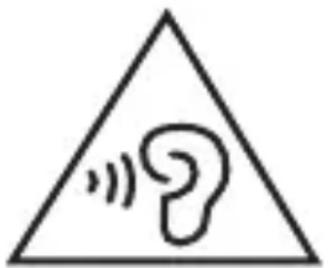
Permanent hearing loss may occur if earphones or headphones are used at high volume for prolonged periods of time.
natural_image
Warning symbol with a triangle containing a stylized ear and sound waves (no text or numbers)Warning statement:
To prevent possible hearing damage, do not listen at high volume levels for long periods.
Explosive atmospheres
Do not charge or use Lenovo Phone in any area with a potentially explosive atmosphere, such as at a fueling area, or in areas where the air contains chemicals or particles (such as grain, dust, or metal powders). Obey all signs and instructions.
Radio frequency interference
Observe signs and notices that prohibit or restrict the use of mobile phones (for example, in healthcare facilities or blasting areas). Although Lenovo Phone is designed, tested, and manufactured to comply with regulations governing radio frequency emissions, such emissions from Lenovo Phone can negatively affect the operation of other electronic equipment, causing them to malfunction. Turn off Lenovo Phone or use Airplane Mode to turn off Lenovo Phone wireless transmitters when use is prohibited, such as while traveling in aircraft, or when asked to do so by authorities.
The device is going on be operated in 5150\~5350 frequency range.
It is restricted in indoor environment only.
Medical devices
Lenovo Phone contains radios that emit electromagnetic fields. These electromagnetic fields may interfere with pacemakers or other medical devices. If you wear a pacemaker, maintain at least 15 cm (6 inches) of separation between your pacemaker and Lenovo Phone. If you suspect Lenovo Phone is interfering with your pacemaker or any other medical device, stop using Lenovo Phone and consult your physician for information specific to your medical device.
Important handling information
Cleaning
Clean Lenovo Phone immediately if it comes in contact with anything that may cause stains, such as dirt, ink, makeup, or lotions. To clean:
- Disconnect all cables and turn off Lenovo Phone (press and hold the Sleep/Wake button, then slide the on-screen slider).
- Use a soft, lint-free cloth.
- Avoid getting moisture in openings.
- Do not use cleaning products or compressed air.
Operating temperature
Be aware of heat generated by Lenovo Phone. When using Lenovo Phone, keep it away from hot or high-voltage environments, such as electric appliances, electric heating equipment, or electric cooking equipment. Use Lenovo Phone only in the temperature range of -10^ ( 14^ )— 45^ ( 113^ ) to avoid damage.
When Lenovo Phone is turned on or the battery is charging, some parts might become hot. The temperature that they reach depends on the amount of system activity and the battery charge level. Extended contact with your body, even through clothing, could cause discomfort or even a skin burn. Avoid
keeping your hands, your lap, or any other part of your body in contact with a hot section of Lenovo Phone for any extended time.
Protecting your data and software
Do not delete unknown files or change the name of files or directories that were not created by you; otherwise, Lenovo Phone software might fail to work.
Be aware that accessing network resources can leave Lenovo Phone vulnerable to computer viruses, hackers, spyware, and other malicious activities that might damage Lenovo Phone, software, or data. It is your responsibility to ensure that you have adequate protection in the form of firewalls, antivirus software, and anti-spyware software and keep such software up to date.
Keep electrical appliances away from Lenovo Phone, such as an electric fan, a radio, high-powered speakers, an air conditioner, and a microwave oven. The strong magnetic fields generated by electrical appliances can damage the screen and the data on Lenovo Phone.
Polyvinyl Chloride (PVC) cable and cord notice

WARNING
Handling the cord on this product or cords associated with accessories sold with this product will expose you to lead, a chemical known to the State of California to cause cancer, and birth defects or other reproductive harm. Wash hands after handling.
Disposing according to local laws and regulations
When Lenovo Phone reaches the end of its useful life, do not crush, incinerate, immerse in water, or dispose of Lenovo Phone in any manner contrary to local laws and regulations. Some internal parts contain substances that can explode, leak, or have an adverse environmental effect if disposed of incorrectly.
See “Environmental, recycling, and disposal information” for additional information.
Eurasian compliance mark
EAC
Service and Support information
The following information describes the technical support that is available for your product, during the warranty period or throughout the life of your product. Refer to the Lenovo Limited Warranty for a full explanation of Lenovo warranty terms. See “Lenovo Limited Warranty notice” later in this document for details on accessing the full warranty.
Online technical support
Online technical support is available during the lifetime of a product at http://www.lenovo.com/support.
Telephone technical support
Where applicable, you can get help and information from the Customer
Support Center by telephone. Before contacting a Lenovo technical support representative, please have the following information available: model and serial number, the exact wording of any error message, and a description of the problem.
Your technical support representative might want to walk you through the problem while you are at your phone during the call.
Worldwide Lenovo Support telephone list

IMPORTANT
Telephone numbers are subject to change without notice. The most up-to-date telephone list for the Customer Support Center is always available at http://support.lenovo.com/serviceproviders.
If the telephone number for your country or region is not listed, contact your Lenovo reseller or Lenovo marketing representative.
Warranty information
Lenovo Limited Warranty notice
Read the full Lenovo Limited Warranty (LLW) at
http://support.lenovo.com/smartphone-IIw. You can view the LLW in a number of languages from this Web site. If you cannot view the LLW either from the Web site or from your phone, contact your local Lenovo office or reseller to obtain a printed version of the full LLW.

IMPORTANT
Lenovo Smartphone Products do not have International Warranty Services.
Warranty period and type of Warranty service
| Country or Region of Purchase | Warranty Period Type of Warranty Service | |
| India Product / Charger - 1 | 4 | |
| Indonesia | 4 | |
| Philippines | 4 | |
| Vietnam | 4 | |
| Russia | 4 | |
| Malaysia | 4 | |
| Thailand | 4 | |
| Egypt Product - 1 year | 4 | |
| Pakistan | 4 | |
| Saudi Arabia 4 | 4 | |
| United Arab Emirates 4 | 4 | |
| Nigeria | 4 | |
| Taiwan | 4 | |
| Turkey Product - 2 years | 3 | |
| Czech | 3 | |
| Country or Region of Purchase | Warranty Period Type of Warranty Service | |
| Battery pack - 6 months | ||
| Singapore Product - 1 year | Charger/Battery pack- 6 monthsEarphone - 3 months | 4 |
| Hong Kong 4 | ||
Types of Warranty Service
1 Customer Replaceable Unit ("CRU") Service
2 On-site Service
3 Courier or Depot Service
4 Customer Carry-In Service
5 Mail-in Service
6 Customer Two-Way Mail-in Service
7 Product Exchange Service
For a full explanation of the types of warranty service, refer to the full warranty. See “Lenovo Limited Warranty notice” for details on accessing the full warranty.
Environmental, recycling, and disposal information
General recycling statement
Lenovo encourages owners of information technology (IT) equipment to responsibly recycle their equipment when it is no longer needed. Lenovo offers a variety of programs and services to assist equipment owners in recycling their IT products. For information on recycling Lenovo products, go to: http://www.lenovo.com/recycling.
Important WEEE information
natural_image
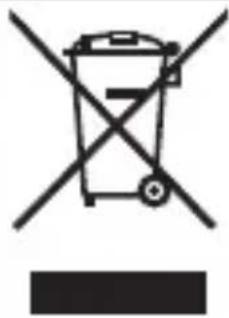
Symbol of a trash bin crossed with no text or numbers, representing waste sorting or restriction (no text present)Electrical and electronic equipment marked with the symbol of a crossed-out wheeled bin may not be disposed as unsorted municipal waste. Waste of electrical and electronic equipment (WEEE) shall be treated separately using the collection framework available to customers for the return, recycling, and treatment of WEEE. Country-specific information is available at: http://www.lenovo.com/recycling
Recycling information for China
Recycling information for India
Recycling and disposal information for India is available at: http://www.lenovo.com/social_responsibility/us/en/sustainability/ptb_india.html.
Restriction of Hazardous Substances Directive (RoHS)
Turkish
The Lenovo product meets the requirements of the Republic of Turkey Directive on the Restriction of the Use of Certain Hazardous Substances in Electrical and Electronic Equipment (EEE).
RoHS compliant as per E-Waste (Management & Handling) Rules, 2011.
Specific Absorption Rate information
This mobile device meets the government's requirements for exposure to radio waves.
Your mobile device is a radio transmitter and receiver.
The exposure standard for mobile devices employs a unit of measurement known as the Specific Absorption Rate, or SAR. The India SAR limit for mobile devices is 1.6 W/kg averaged over 1 gram of tissue. Tests for SAR are conducted using standard operating positions with the device transmitting at its highest certified power level in all tested frequency bands.
The highest SAR value for your Lenovo device when tested for use at the head and body is outlined as follows:
| Position The highest SAR value Regulation | |
| Head 1.192 India 1g SAR Limit(1.6W/kg) | |
| Body-worn 0.215 India 1g SAR Limit(1.6W/kg) | |
During use, the actual SAR values for this device are usually well below the values stated above. This is because, for purposes of system efficiency and to minimize interference on the network, the operating power of your mobile devices is automatically decreased when full power is not needed for the call. The lower the power output of the device, the lower its SAR value.
To meet RF exposure guidelines during body-worn operation, the device must be positioned at least 1.5cm away from your body.
Precautionary Guidelines for mobile users
Mobile users are advised to take precautionary measures while using a mobile handset as:
- Keep distance – Hold the cell phone away from body to the extent possible.
- Use a headset (wired or Bluetooth) to keep the handset away from your head.
- Do not press the phone handset against your head. Radio Frequency (RF) energy is inversely proportional to the square of the distance from the source -- being very close increases energy absorption much more.
- Limit the length of mobile calls.
- Use text as compared to voice wherever possible.
- Put the cell phone on speaker mode.
- If the radio signal is weak, a mobile phone will increase its transmission power. Find a strong signal and avoid movement – Use your phone where reception is good.
- Metal & water are good conductors of radio waves so avoid using a mobile phone while wearing metal-framed glasses or having wet hair.
- Let the call connect before putting the handset on your ear or start speaking and listening – A mobile phone first makes the communication at higher power and then reduces power to an adequate level. More power is radiated during call connecting time.
- If you have a choice, use a landline (wired) phone, not a mobile phone.
- When your phone is ON, don't carry it in chest/breast or pants pocket. When a mobile phone is ON, it automatically transmits at high power every one or two minutes to check (poll) the network.
- Reduce mobile phone use by children as a younger person will likely have a longer lifetime exposure to radiation from cell phones.
- People having active medical implants should preferably keep the cell phone at least 15 cm away from the implant.

FRANÇAIS
text_image
lenovo FOR THOSE WHO UO 1 2 3 4 7 6 5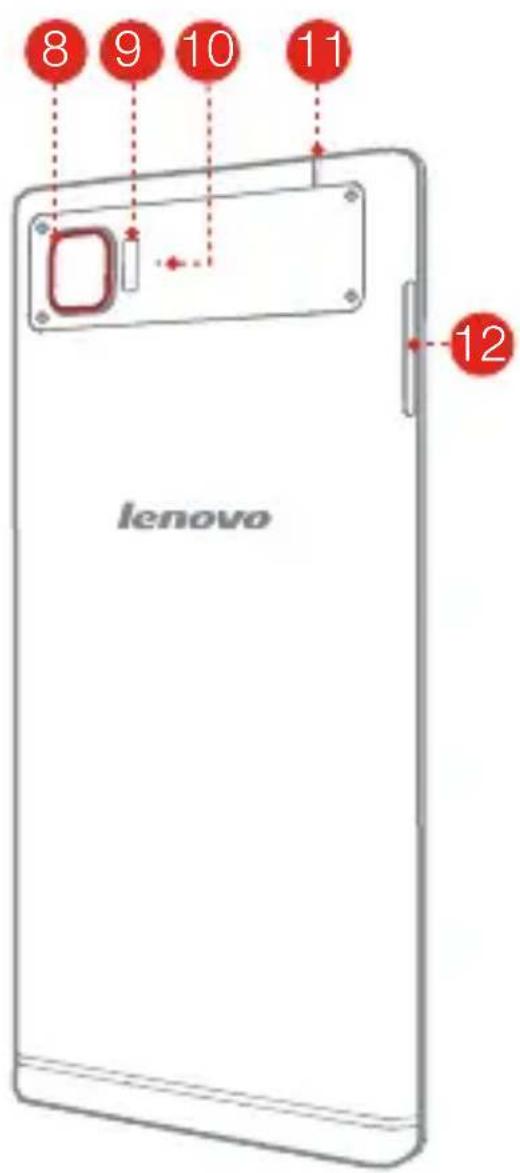
text_image
8 9 10 11 lenovo 121
2 Caméra frontale
natural_image
Warning symbol with a triangle containing a stylized ear and sound waves (no text or numbers)Avertissement :
text_image
Symbol of a trash bin crossed out by a diagonal line, indicating no waste or dischargeRecycling and disposal information for India is available at:
http://www.lenovo.com/social_responsibility/us/en/sustainability/ptb_india.html.
Directive européenne RoHS (Restriction of Hazardous Substances)
Turquie
- Confidence Southwest Academy for the United States, Canada.
The Lenovo product meets the requirements of the Republic of Turkey Directive on the Restriction of the Use of Certain Hazardous Substances in Electrical and Electronic Equipment (EEE).
RoHS compliant as per E-Waste (Management & Handling) Rules, 2011.
natural_image
Symbol of a trash bin with crossed lines and a blank rectangular base (no text or numbers)text_image
Warning symbol with a triangle containing a stylized 'e' and sound waves, indicating noise or sound pressure.بيان التحذير:
natural_image
Diagram showing a screwdriver inserted into a cable, enclosed in a red circle (no text or symbols)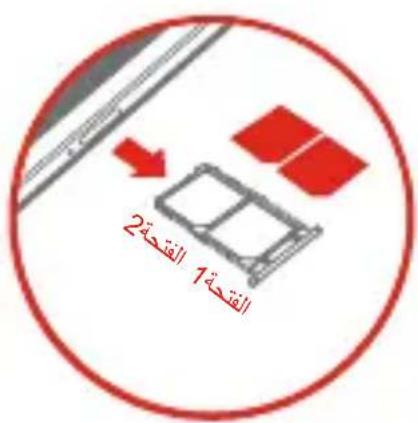
natural_image
Diagram showing a red rectangular object with an arrow pointing to it, enclosed in a red circle (no text or symbols)text_image
lenovo FOR THOSE WHO UO 1 2 3 4 7 6 5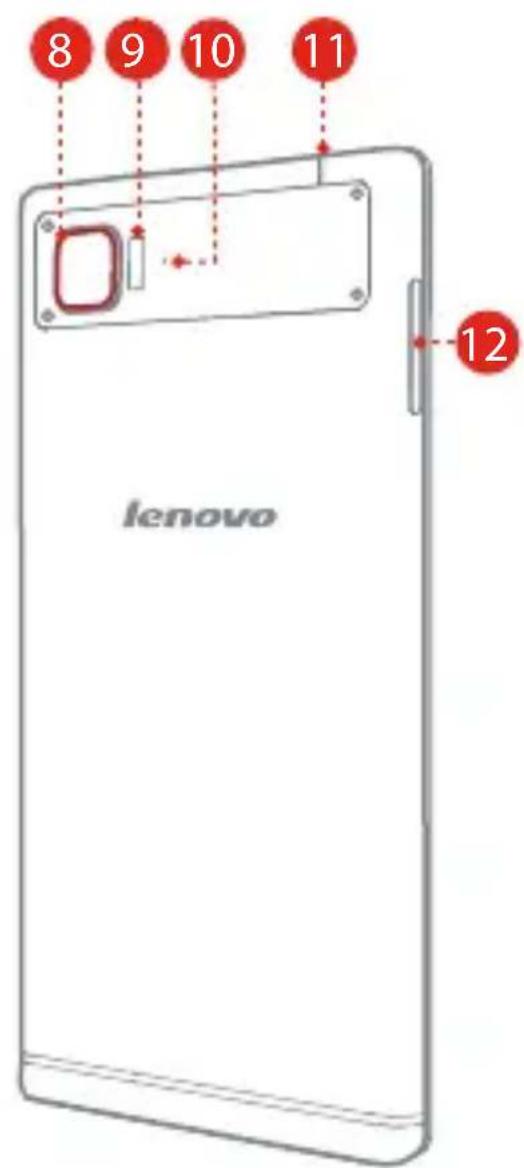
text_image
8 9 10 11 lenovo 1208/2014_V1.0 © Copyright Lenovo
text_image
5SC9A6MXAEPrinted in China