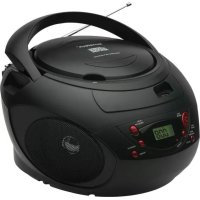
CRUM385 - Cd player/recorder Sunstech - Free user manual and instructions
Find the device manual for free CRUM385 Sunstech in PDF.



| Product type | CD player/recorder with FM radio and USB player |
| Brand | Sunstech |
| Model | CRUM385 |
| Dimensions (approx.) | 400 x 250 x 200 mm |
| Weight (approx.) | 3 kg |
| Power supply | AC/DC mains adapter 230V or 8 C-type batteries (UM-2) |
| Supported formats | CD, CD-R, CD-RW, MP3 (on CD and USB) |
| FM radio | Yes, with auto search and 20 presets |
| USB port | Yes, for MP3 playback |
| AUX input | Yes, 3.5 mm jack socket |
| Speaker | Built-in |
| Display | LCD |
| Playback functions | Play, pause, skip, search, repeat (1 track, all, intro, random), programming |
| Auto standby | Yes, after 10 minutes without audio signal (except FM radio) |
| FM antenna | Directional telescopic |
| Handle | Foldable for transport |
| Care and cleaning | Wipe with a soft dry cloth; for discs, wipe from center to edge with a soft cloth |
| Safety | Do not expose to humidity, drips or splashes; do not place flammable objects on the device; maintain a distance of 2 cm for ventilation |
| Batteries | Do not mix battery types; remove if not used for a long time; do not throw into fire |
| Warranty | 2 years from date of purchase (excluding misuse) |
| Recycling (WEEE) | Do not dispose with household waste; take to collection point |
Frequently Asked Questions - CRUM385 Sunstech
User questions about CRUM385 Sunstech
0 question about this device. Answer the ones you know or ask your own.
Ask a new question about this device
Download the instructions for your Cd player/recorder in PDF format for free! Find your manual CRUM385 - Sunstech and take your electronic device back in hand. On this page are published all the documents necessary for the use of your device. CRUM385 by Sunstech.
USER MANUAL CRUM385 Sunstech
Please read and follow these instructions before using your unit.
OVERVIEW OF THE PLAYER
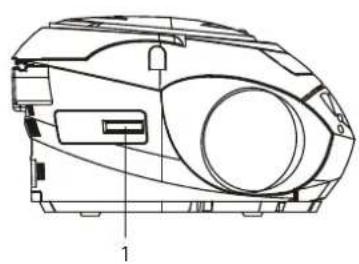
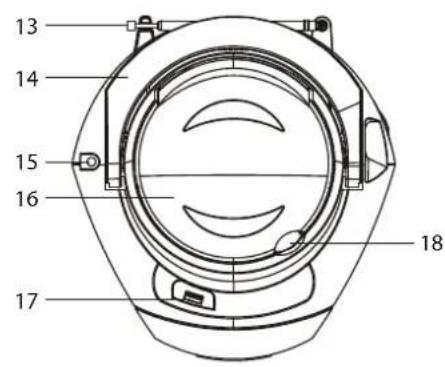
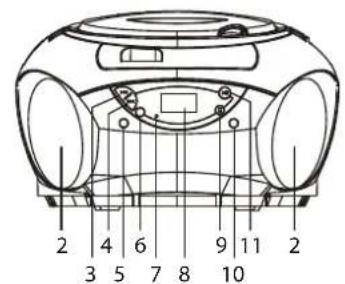
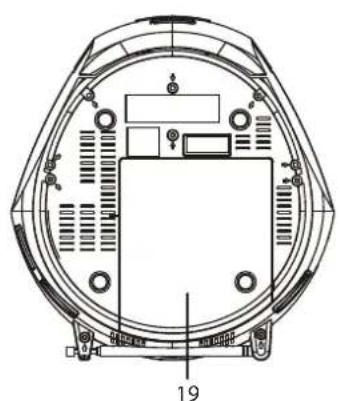
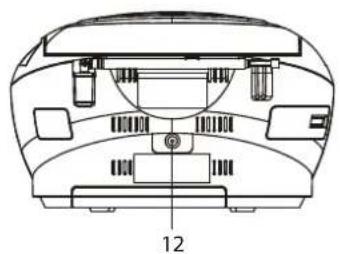
LOCATION OF CONTROLS
- VOLUME CONTROL
- SPEAKER
- SKIP DN/TUN-B BUTTON
- SKIP UP/TUN+ BUTTON
- SOURCE BUTTON
- MODE/PROG/MEM BUTTON
- STANDBY INDICATOR
- LCD DISPLAY
-
STOP/CH-BUTION
-
POWER BUTTON
- PLAY/PAUSE/CH+ BUTTON
- DC IN JACK
- FM TELESCOPIC ANTENNA
- FOLDING HANDLE
15.AUX IN JACK
16.CDDOOR - USB PORT
18.CDDOOROPENAREA - BATTERY COMPARTMENT
POWER SUPPLY
BATTERY OPERATION
- Remove the battery compartment cover gently.
- Install 8 x 'C' size batteries (UM-2 or equivalent) while observing the correct polarities.
- Replace the battery compartment cover.
NOTE:
- The AC/DC adapter must be detached from the DC IN jack of the player for battery operation.
- Leaking batteries may damage the battery cabinet and the player as a whole, so they should be removed from the cabinet when becoming flat or when the player is not to be played on batteries for some time.
DC INPUT OPERATION
Plug the supplied adapter to the DC IN jack on the unit and to the main power.
NOTE: If not any audio signal inputs to the unit in about 10 minutes, the unit will enter to standby mode automatically (except at FM radio mode).
FM RADIO
TUNING THE FM RADIO
- The standby indicator will light once connect the main unit to the main power. Press the POWER button to turn the unit on (the standby indicator will be off).
- Press the SOURCE button repeatedly to switch the unit to the FM radio mode.
- To launch the auto-searching, press and hold the SKIP DN/TUN- button or SKIP UP/TUN+ button several seconds and then release it.
- Press the SKIP DN/TUN- button or SKIP UP/TUN+ button to tune the radio stations manually.
- Adjust the volume level to a comfortable listening level.
- Press the POWER button to turn off the unit.
NOTE:
- When FM (stereo) station is received, the FM stereo icon will be displayed on the screen.
- The FM TELESCOPIC ANTENNA is directional. When you are receiving an FM broadcast, fully extend the TELESCOPIC ANTENNA and rotate it for the best reception.
STORING YOUR FAVORITE RADIO STATION
- Tune to your favorite station first; press the MODE/PROG/MEM button for storing the current station until memory cell number flashes on the screen.
- Use the STOP/CH- button or the PLAY/PAUSE/CH+ button to select the corresponding memory cell among P01-P20 for storing the station.
- Confirm your selection by pressing the MODE/PROG/MEM button.
- During radio playback, press the STOP/CH- button or the PLAY/PAUSE/CH+ button repeatedly to recall the preset stations.
HANDLING AND MAINTENANCE OF A DISC
Follow the instructions below to handle and maintain your disc in order that long time and trouble free performance can possibly be obtained:
- Ensure not to caress the rain bow side of the disc; handle the disc by the edge.
- Long time exposure to sunshine, high temperatures and humidity will damage the disc. And keep storage area clean.
- Avoid sticking labels on both sides of a disc. Writing with pointed articles on the disc should be strictly avoided.
- Clean the disc wiping the centre and then working out to the edge with a dry & soft cloth or a disc brush. Avoid any cleansing lotion or chemical eradicator.
- Store them in their cases when they are not to be used.
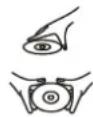

HANDLE DISC ONLY AS SHOWN
CLEAN FROM CENTER TO EDGE
- Open the CD door by the Door open area.
- Load a disc on the disc tray with the label side facing up.
- Close the CD door.
PLAY A DISC (CD/MP3)
- Press the POWER button to turn the unit on (the standby indicator will be off).
- Press the SOURCE button repeatedly to switch to CD mode.
- Follow the steps above to load a disc.
- The player begins reading disc immediately.
- When the disc is successfully read, the total number of the tracks shows in the LCD and playback follows with the first track.
- Press the PLAY/PAUSE/CH+ button once to halt music playback, the elapsed time flashes to indicate the player in Pause mode; press the STOP/CH- button to cease music playback, the LCD shows the total number of the tracks again.
EXTERNAL MEMORY MEDIA OPERATION (USB)
- Press the POWER button to turn the unit on (the standby indicator will be off).
- Insert an USB to the USB port.
- Press the SOURCE button repeatedly to switch to USB mode.
- When the inserted USB is detected and read, the first track will be played automatically.
- Press the PLAY/PAUSE/CH+ button to pause or resume the playback.
- Press the STOP/CH- button to cease the playback.
SKIP TRACKS AND SEARCH FOR A SPECIFIC POINT TO PLAY (CD/MP3/USB)
- Press once the SKIP UP/TUN+ button in music play to skip to the next track; press once the SKIP DN/TUN- button in music play to go back to beginning of the current track, press the button twice continuously to skip to the previous track.
- Press and hold the SKIP UP/TUN+ button or the SKIP DN/TUN- button in music play to search at quick rate for a specific point to play.
REPEAT PLAYBACK (CD/MP3/USB)
During playback, press the MODE/PROG/MEM button to repeat play a single track; press the button twice to repeat play all tracks; press the button three times to enter the introduction play mode; press the button four times to enter the random play mode; press the button five times to exit.
PROGRAMMED PLAY (CD/MP3 DISC/USB)
- At stop mode, press the MODE/PROG/MEM button once, the program's icon shows with a program sequence indication "P01" first, then a track number flickers on the LCD with the program's icon;
- Select the first track to be programmed using the SKP UP/TUN+ button or the SKIP DN/TUN button, and then press the MODE/PROG/MEM button again to store and advance to the next programming step (If there are several folders on the MP3 disc or USB, it is necessary to program folders first and then the tracks. The method of the folders programming is the same as the tracks programming.).
- Repeat the above steps to program more tracks. A maximum of 20 tracks for CD and 99 tracks for MP3/USB can be programmed in memory in a preferred order. If the memory is full, the screen will show "FUL" for indicating.
- Press the PLAY/PAUSE/CH+ button to begin programmed play in the preferred order after you are done with programming. The player stops automatically after all programmed tracks are played.
- You may press the STOP/CH- button to terminate programmed playback. In program stop mode, press the PLAY/PAUSE/CH+ button to begin the programmed playback with the programming order identical with the previous one done; press the STOP/CH- button again to clear the programming.
AUX IN
- Connect the Aux in jack on the unit to an audio source, for example, MP3 player with an audio cable.
- Power on the unit following the corresponding instructions.
- Press the SOURCE button repeatedly to switch to AUX mode.
- Use the native controls on the connected audio device to begin playing music through the connected unit.
IMPORTANT SAFETY INSTRUCTIONS
- The apparatus shall not be exposed to dripping or splashing and that no objects filled with liquids, such as vases, shall be placed on the apparatus.
- When the AC/DC adapter is used as the disconnect device, the disconnect device shall remain readily operable. To be completely disconnected the power input, the AC/DC adapter shall be disconnected from the mains completely.
- No naked flame sources, such as lighted candles, should be placed on the apparatus.
- Minimum distances 2.0cm around the apparatus for sufficient ventilation. The ventilation should not be impeded by covering the ventilation openings with items, such as newspapers, table-cloths, curtains, etc.
- The use of apparatus is in tropical and/or moderate climates.
- Attention should be drawn to the environmental aspects of battery disposal.
- CAUTION: Danger of explosion if battery is incorrectly replaced. Replace only with the same or equivalent type.
- Battery shall not be exposed to excessive heat such as sunshine, fire or the like.
- The marking plate is located at the back of the apparatus.
Warranty conditions
- The warranty of this product is for 2 years since the purchase date.
- The warranty will exclude breakdowns caused by bad use of the product, wrong installation or installation in not desirable places for a proper maintenance of the product, rips, updates of the products that are not the supplied by the brand, pieces wore away for its use or for not domestic or inappropriate use. Also are excluded breakdowns caused for manipulations of the products by people or companies alien to our company.
- For any request regarding the warranty terms, the purchase receipt must be attached.
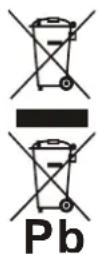
Correct disposal of this Product
Waste Electrical & Electronic Equipment (WEEE)
Your product is designed and manufactured with high quality materials and components which can be recycled and reused.
This symbol means that electrical and electronic equipment, at their end-of-life should be disposed of separately from your household waste.
Please dispose of this equipment at your local community waste collection/recycling centre.
In the European Union there are separate collection systems for used electrical and electronic products. Please help us to conserve the environment we live in!
sunstech
MANUSEIE O DISCO APENAS COMO
INDICADO

LIMPAR DO CENTRO PARA A BORDA

NAO ARMAZENAR PERTO DE CALOR
CARREGAR UM DISCO

- OVERVIEW OF THE PLAYER
- LOCATION OF CONTROLS
- POWER SUPPLY
- BATTERY OPERATION
- NOTE:
- DC INPUT OPERATION
- FM RADIO
- TUNING THE FM RADIO
- STORING YOUR FAVORITE RADIO STATION
- HANDLING AND MAINTENANCE OF A DISC
- PLAY A DISC (CD/MP3)
- EXTERNAL MEMORY MEDIA OPERATION (USB)
- SKIP TRACKS AND SEARCH FOR A SPECIFIC POINT TO PLAY (CD/MP3/USB)
- REPEAT PLAYBACK (CD/MP3/USB)
- PROGRAMMED PLAY (CD/MP3 DISC/USB)
- AUX IN
- IMPORTANT SAFETY INSTRUCTIONS
- Warranty conditions
- Correct disposal of this Product
- sunstech
- CARREGAR UM DISCO
Brand : Sunstech
Model : CRUM385
Category : Cd player/recorder