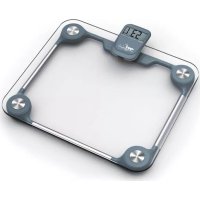
Glass - Scale Melchioni - Free user manual and instructions
Find the device manual for free Glass Melchioni in PDF.


User questions about Glass Melchioni
0 question about this device. Answer the ones you know or ask your own.
Ask a new question about this device
Download the instructions for your Scale in PDF format for free! Find your manual Glass - Melchioni and take your electronic device back in hand. On this page are published all the documents necessary for the use of your device. Glass by Melchioni.
USER MANUAL Glass Melchioni
Electronic kitchen scale
Balanza de cucina electronica
- Indicate volume of water and milk.
- Time display
- Two weight unit systems (g / lb:oz) convertible.
- Two volume unit systems (ml / fl:oz) convertible
- Low battery power / Overload indication.
- With high precision strain gauge sensor.
- With zero / tare function.
- Auto Off.
TO INSTALL OR REPLACE BATTERY
The battery type of scale depends on the product structure. Find the battery type of your scale according to the following pictures, then install and replace battery as described.
- 1x3V CR2032 lithium battery (included). Remove isolation sheet before use.
- 2x1.5V (AA/AAA) batteries (excluded). Remove package foil before use.
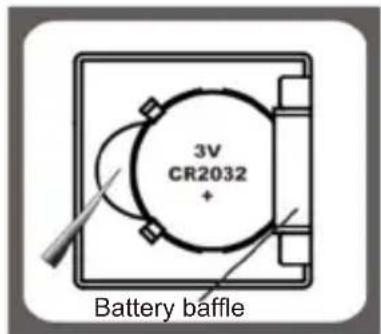
a) Open the battery case cover at the bottom of scale.
b) Take out the used battery with the aid of a sharp object, as shown in picture.
c) Install new battery by putting one side of the battery beneath the battery baffle and then pressing down the other side.
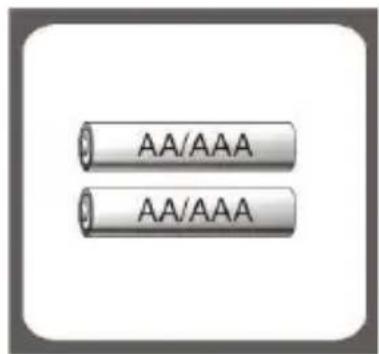
a) Aprire il vano batteria che si trova sul fondo della bilancia.
b) Take out used batteries, with the aid of a sharp object if needed.
c) Install new batteries by putting one side of the battery down first and pressing down the other side. (Please observe the polarity).
SETTING THE TIME
- After installing the batteries, the time displays 00:00
- Press the MODE button for 3 seconds to select the time mode.
Set the hour first and then the minutes. Press the button set the
time and then press MODE to confirm (by holding down the key zeyou will reach the desired time more quickly).
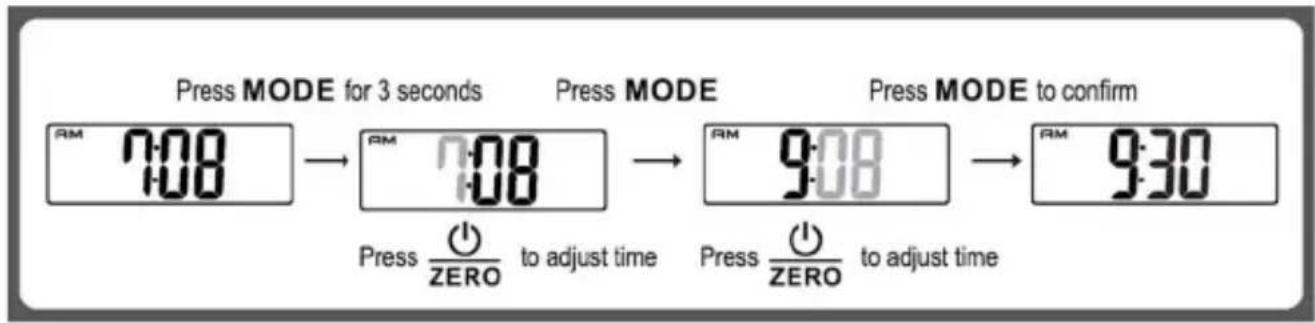
NOTE: In time setting mode, if no button is pressed for 60 seconds, the display automatically returns to the time.
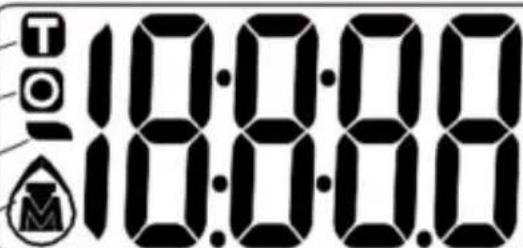
LCD
Tare Weight
Zero Weight
Negative Value
Mode
kg
Weight unit (Kg)
Volume unit (ml)
Volume unit (fl'oz)
Weight unit (lb:oz)


Milk volume mode

Water volume mode Weight mode
BUTTON FUNCTION
| WIDE End | unit conversion |
| Turn on/Zero | turn off/Zero/Tare |
| Convert unit systems of Metric or Imperial. (Conversion button at the bottom of scale) | |
MODECONVERSION
After turning on scale, press MODE button to select mode and unit, as shown below.
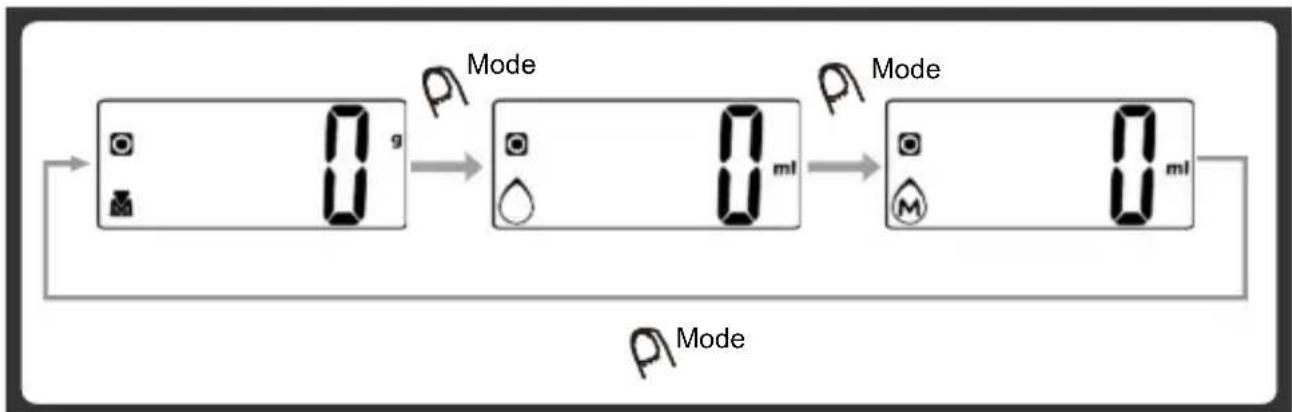
Remark: The unit system of scale depends on sales destination or the requirement of distributor.
TOCONVERTWEIGHTUNIT
If the scale with both unit systems of Metric (g, ml) or Imperial (lb:oz, fl'oz), press MODE button to choose working mode (weight, milk volume, water volume) then press UNIT conversion button to convert between two systems. Take the conversion of weight unit for example:
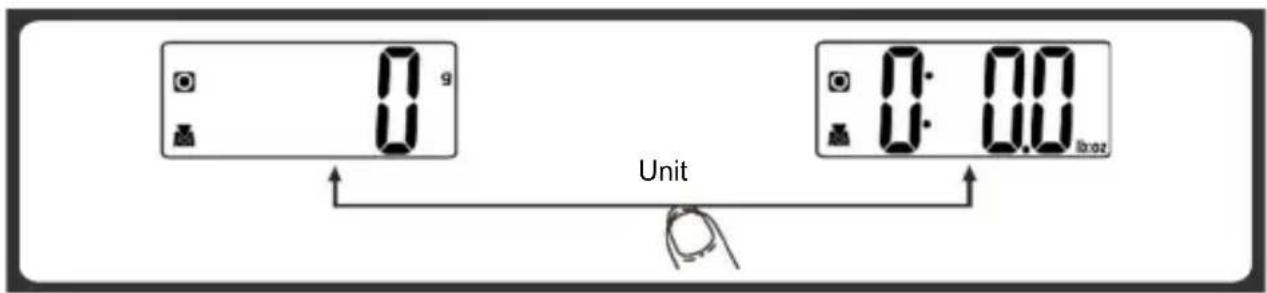
- When setting g as weight unit, the default volume unit is ml.
- When setting lb:oz as weight unit, the default volume unit is fl'oz.
Remark - The unit system of scale depends on scale destination or the requirement of distributor.
TO START WEIGHING
1. Weighing mode
A. Place the scale on a solid and flat surface.
B. Place bowl (if used) on the scale.
C. Press to turn on the scale.
D. Wait until LCD shows "0".
Press MODE button to convert to weighing mode.
E. Load weighing object on scale (or bowl) to start weighing. LCD will show the weight reading.
F. If the weighing object is water or milk, press MODE button to choose volume mode and view the volume of weighing object.
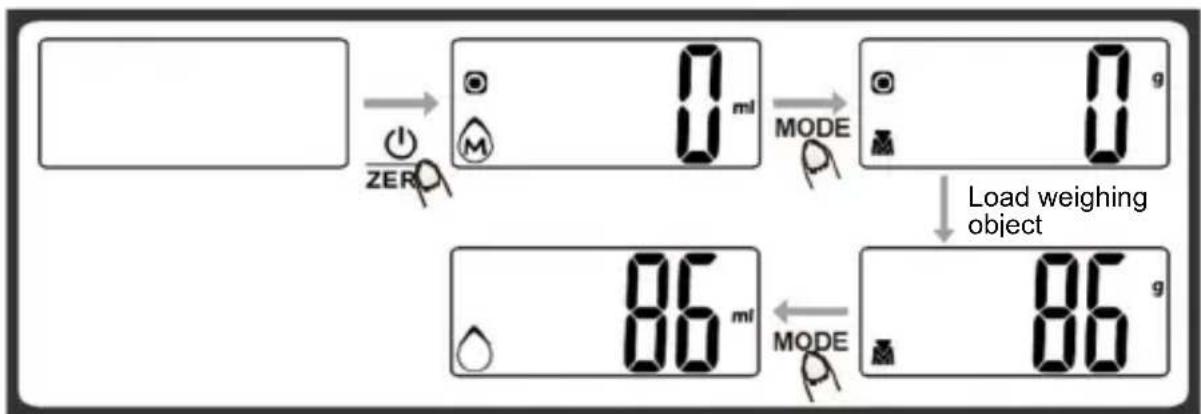
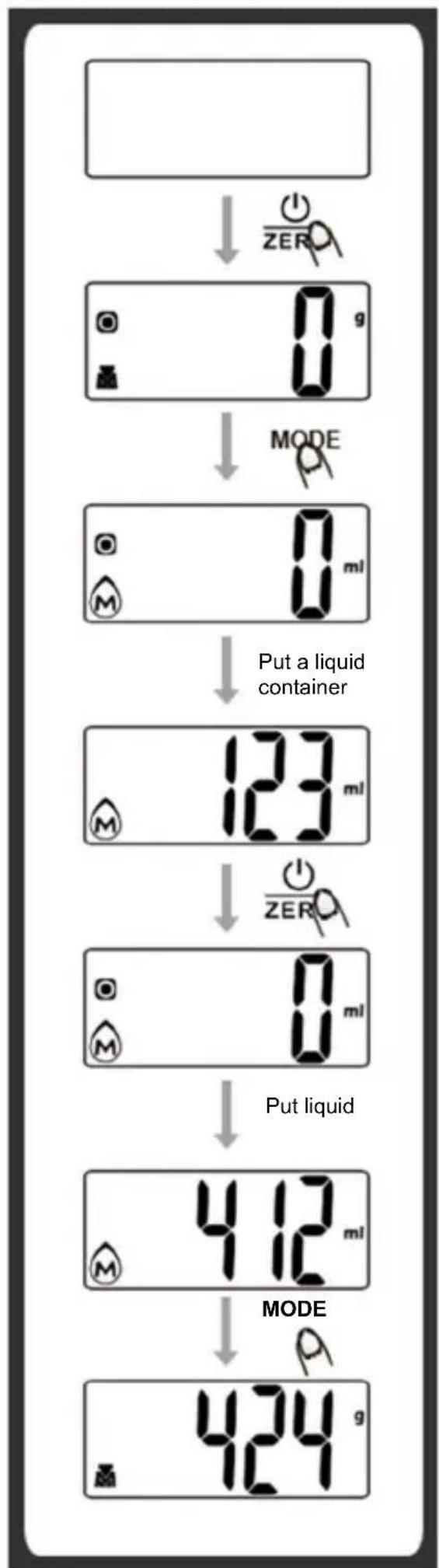
2. Volume indication mode
A. Place the scale on a solid and flat surface.
B. Press to turn on zero the scale.
C. Wait until LCD shows "0", and press MODE button to choose.
D. Put a liquid container onto the scale platform. LCD shows weight of container.
E. Press button to zero or tare weight.
F. Pour liquid (water or milk) into the container, LCD shows the volume of the liquid.
G. Press MODE button to choose "Weight" mode and view the weight of liquid.
"ZERO" OR "TARE" FUNCTION
To weigh different loads consecutively without removing loads from the scale. Put first Load on the scale, get weight reading. Press 1ZERO button to reset the LCD reading to "0" before adding next load. You can repeat this operation.
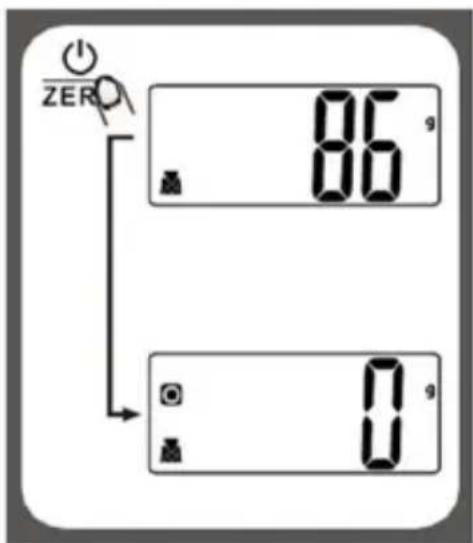
Condition 1: "ZERO" function When total sum of all loads on scale ≤ 4% of scale's max.weight capacity. (4% = 80g when capacity is 2000g . 200g when capacity is 5000g
LCD will show ---- or Og each time 1ZERO is pressed. ---- means not stable, please wait for a moment. Og and meanwhile an icon o on the left side of LCD mean ZERO function is activated. Max. weight capacity remains unchanged.
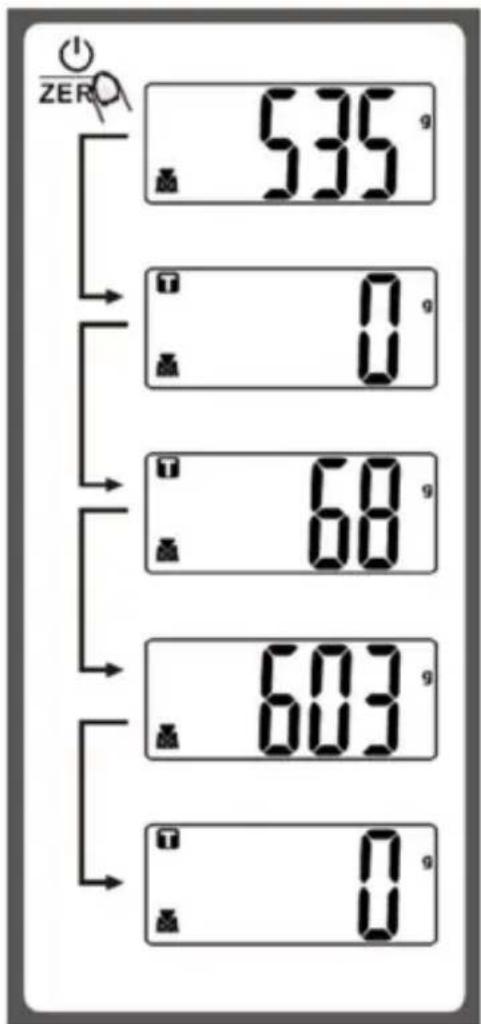
Condition 2: "TARE" function When total sum of all loads on scale >4% of scale's max.weight capacity. (4% = 80g when capacity is 2000g; 200g when capacity is 5000g)
LCD will show ---- or Og each time 1ZERO is pressed. ---- means not stable, please wait for a moment. Og and meanwhile an icon T on the left corner of LCD mean TARE function is activated. Max. weight capacity is reduced by total weight of all loads.
Under this condition
By pressing zero you can see the total weight of all loads on the scale. If you want to weigh more loads, just press zero to reset LCD reading to '0' again.
AUTO SHUT OFF
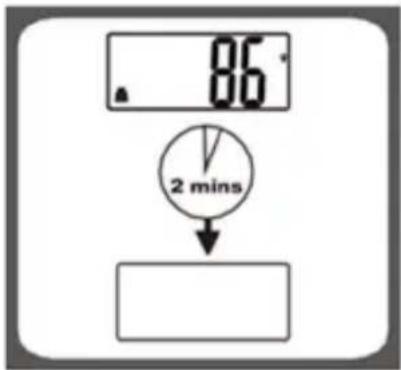
Auto shut-off occurs if display shows '0' or shows the same weight reading for 2 minutes.
■ MANUAL SHUT OFF
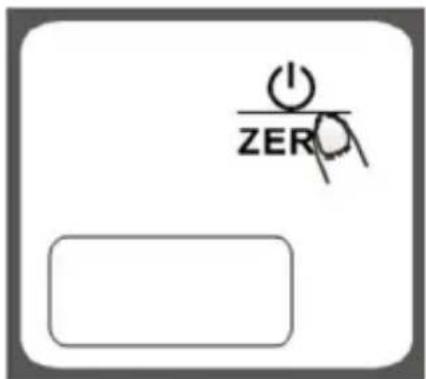
To maximize battery life, always press zero again to turn off the scale after using.
Note: when display shows "0", press ZERO
to turn off the scale; when display shows weight reading, press for 3 seconds to turn off the scale.
WARNING INDICATORS
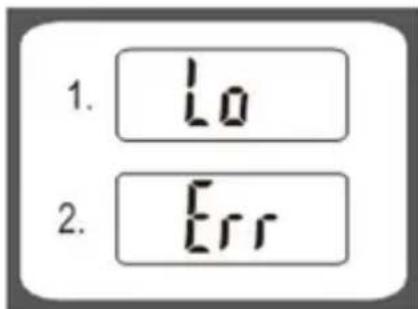
- Replace new battery.
- Scale overload. Remove item to avoid damage. Max. weight capacity is indicated on the scale.
CLEANING AND MAINTENANCE
- To clean the scale, use a soft, slightly damp cloth. Do not immerse the scale in water or other liquids, and do not use chemical solvents or abrasive detergents.
- All plastic parts must be cleaned immediately after any contact with fats, spices or foods that tend to release the color. Avoid contact with lemon juice and other acidic liquids.
- The scale must always be placed on a rigid, stable and level surface. Do not place it on soft or compliant surfaces.
■ WARNINGS REGARDING BATTERIES
- Indications for safely removing / replacing the battery:
- Do not expose batteries to excessive humidity or heat.
- Do not allow batteries to come into contact with liquids.
- Keep batteries at a safe distance from magnetic fields, heat sources and open flames.
- Do not reverse the polarity of the batteries or short-circuit them.
- Replace the batteries only with others of the same type or equivalent.
CONFORMITY OF THE PRODUCT
The producer Melchioni Spa declares that the product Kitchen scale Mod. GLASS (cod. 11821026) is in compliance with Directive 2014/30/EU of the European Parliament and of the Council, of 26 february 2014, on the harmonisation of the laws of the Member States relating to electromagnetic compatibility.
The producer Melchioni Spa declares that the product Kitchen scale Mod. GLASS (cod. 11821026)is in compliance with Directive 2011/65/EU of the European Parliament and of the Council, of 8 June 2011 and subsequent Commission Delegated Directive 2015/863, on the restriction of the use of certain hazardous substances in electrical and electronic equipment.
According to Directive 2012/19/EU of the European Parliament and of the Council, of 4 july 2012, on waste electrical and electronic equipment (WEEE), the presence of the crossed-out bin symbol indicates that this appliance is not to be considered as urban waste: its disposal must therefore be carried out by separate
collection. Disposal in a non-separate manner may constitute a potential harm to the environment and health. This product can be returned to the distributor when purchasing a new device. Improper disposal of the appliance constitutes misconduct and is subject to sanctions by the Public Security Authority. For further information, contact the local administration responsible for environmental matters.
PRODUCT WARRANTY
Melchioni Spa, based in Milan (Italy), via Colletta 37, recognizes a conventional guarantee on the product for a period of two years from the date of the first purchase by the consumer. This guarantee does not affect the validity of the legislation in force concerning consumer goods (Legislative Decree 6 September 2005 n. 206 art. 128 and following), of which the consumer remains the owner. This guarantee applies to the entire territory of the European Union. The components or parts that are found to be defective for ascertained manufacturing causes will be repaired or replaced free of charge through the dealer, during the above warranty period. Melchioni Spa reserves the right to make a complete replacement of the device, if repairability is impossible or excessively expensive, with another device of similar characteristics (Legislative Decree 6 September 2005 no. 206 art. 130) during the warranty period. In this case, the validity of the warranty remains that of the original purchase: the service provided under warranty does not extend the warranty period.
In any case, this appliance will not be considered defective in terms of materials or manufacture should it be adapted, changed or adjusted, in order to comply with national or local safety and / or technical standards, in force in a country other than that for which it is was originally designed and manufactured. This appliance has been designed and built for domestic use only: any other use will invalidate the benefits of the guarantee.
The warranty does not cover:
- parts subject to wear or tear, nor those parts that require periodic replacement and / or maintenance
- professional use of the product
- malfunctions or any defects due to incorrect installation, configuration, software / BIOS / firmware update not performed by authorized Melchioni Spa
- repairs or interventions carried out by persons not authorized by Melchioni Spa
-
manipulation of assembly components or, where applicable, of the software
-
defects caused by fall or transport, lightning, voltage fluctuations, liquid infiltration, opening of the appliance, bad weather, fire, public disturbances, inadequate ventilation or incorrect power supply
- any accessories, for example: boxes, bags, batteries, etc. used with this product
- home interventions for convenience checks or presumed defects
The recognition of the guarantee by Melchioni Ready S.r.l. is subject to the presentation of a tax document that proves the actual date of purchase. The same must not show any tampering or deletions, in the presence of which Melchioni Spa reserves the right to refuse the provision of treatment under warranty.
The warranty will not be recognized if the serial number or model of the appliance is non-existent, abraded or modified.
This warranty does not include any right to compensation for direct or indirect damage, of any nature, to people or things, caused by any inefficiency of the appliance. Any extensions, promises or services in this regard, insured by the retailer, will be borne by the latter.
CHARACTERISTICAS PRINCIPALES
LCD will show ---- or Og each time is pressed 0 means not stable, please wait for a moment. Og and meanwhile an icon T on the left corner of LCD mean TARE function is activated. Max. weight capacity is reduced by total weight of all loads.