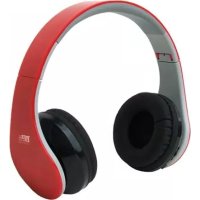
Easy Sound BT - Earphones Best Buy - Free user manual and instructions
Find the device manual for free Easy Sound BT Best Buy in PDF.



| Product Type | Wireless Bluetooth Headset |
| Brand | Best Buy |
| Model | Easy Sound BT |
| Dimensions (L x W x H) | 170 × 200 × 75 mm |
| Weight (without packaging) | 189 g |
| Battery Type | Lithium-ion 3.7 V / 250 mAh |
| Power Supply | 5 V / 1.0 A via Micro USB |
| Talk Time | Up to 8 hours |
| Standby Time | Over 100 hours |
| Charging Time | 2 to 3 hours |
| Bluetooth Version | CSR 3.0 |
| Supported Bluetooth Profiles | HSP 1.2 / HFP 1.6 |
| Pairing Code | 0000 |
| Connectors | Micro USB (charging), 3.5 mm jack (wired audio) |
| Volume Control | 16 levels, 3 dB increments |
| Frequency Response | 100 Hz - 9,000 Hz |
| Sensitivity | 110 dB S.P.L. at 1 kHz |
| Microphone Type | Condenser Microphone |
| Microphone Sensitivity | -42 ± 3 dB |
| Care and Cleaning | Soft dry cloth; avoid chemical products |
| Safety Precautions | Do not open the case; avoid moisture; use original accessories |
| Warranty | 2 years (24 months) parts and labor |
| Repairability | Repair by authorized technical service only; battery replaceable by a professional |
Frequently Asked Questions - Easy Sound BT Best Buy
User questions about Easy Sound BT Best Buy
0 question about this device. Answer the ones you know or ask your own.
Ask a new question about this device
Download the instructions for your Earphones in PDF format for free! Find your manual Easy Sound BT - Best Buy and take your electronic device back in hand. On this page are published all the documents necessary for the use of your device. Easy Sound BT by Best Buy.
USER MANUAL Easy Sound BT Best Buy
Transmission RF: +4dBm(Max)
Low Voltage Directive 2006/95/EC
EMC Directive 2004/108/EC
CE Marking Directive 95/68/EEC
EN60950-1:2006+A11:2009+A1:2010+A12:2011
ETSI EN 301 489-1 V1.9.2 (2011-09)
ETSI EN 301 489-17 V2.2.1 (2012-09)
ETSI EN 300 328 V1.8.1 (2012-06)
99/5/EC
Fecha y lugar
11/07/2013
Best Buy Asia Limited
Grand Tower, 625 Nathan Rd.,
Mongkok, Kowloon, Hong Kong
Firmado: Patty Zheng, Lab Inspector
Garantía
CONDICIONES DE GARANTIA DE PRODUCTOS BEST BUY
Please read through this manual before making connections and operating this product. Retain this manual for future reference.
Don't open the cabinet of this unit. No user-serviceable parts inside. Refer servicing to qualified personnel only.
Switch off the unit when you don't use it. Switch off the unit and disconnect it from the AC power supply when it is not being used for a long time.
Don't install the unit in a place exposed to heating sources or direct sunshine.
Don't install the unit in a place exposed to moisture or rain.
The apparatus shall not be exposed to dripping or splashing and any object filled with liquids, such as vases shall not be placed on it.
Install the unit on a horizontal, flat and firm surface with good ventilation.
Never block the vents which will cause malfunction resulted from overheating.
Use a soft and clean rag to clean the outside of the unit. Never clean it with chemicals or detergent.
This book is only a guide for user's operation, not a criterion for configuration.
Only use attachments/accessories specified by the manufacturer.
Where the Mains plug is used as the disconnect device, the disconnect device shall remain readily operable.
WARNING: The batteries shall not be exposed to excessive heat such as sunshine, fire or the like.
CAUTION: Danger of explosion if battery is incorrectly replaced. Replace only with the same or equivalent type.

The lightning flash is intended to alert the user to the presence of dangerous voltage within the product's enclosure, and touching the internal components may result in a risk of electric shock to persons.

The exclamatory mark is intended to alert the user to the presence of important operating instructions.

To reduce the risk of electric shock or fire, do not open the cover. Refer servicing to qualified service personnel.
Accessories
- User Manual
- Warranty Card

Please read carefully the manual before using and keep it as a record.
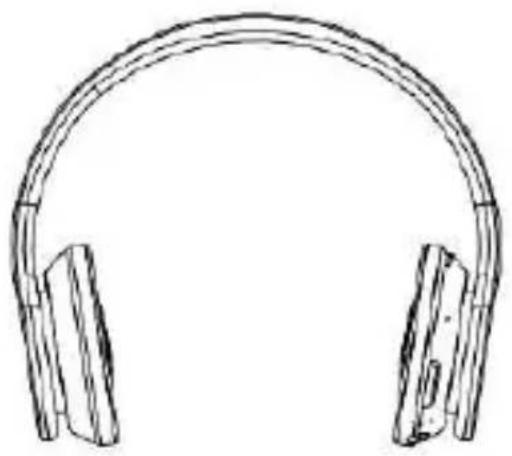
Know your headphone
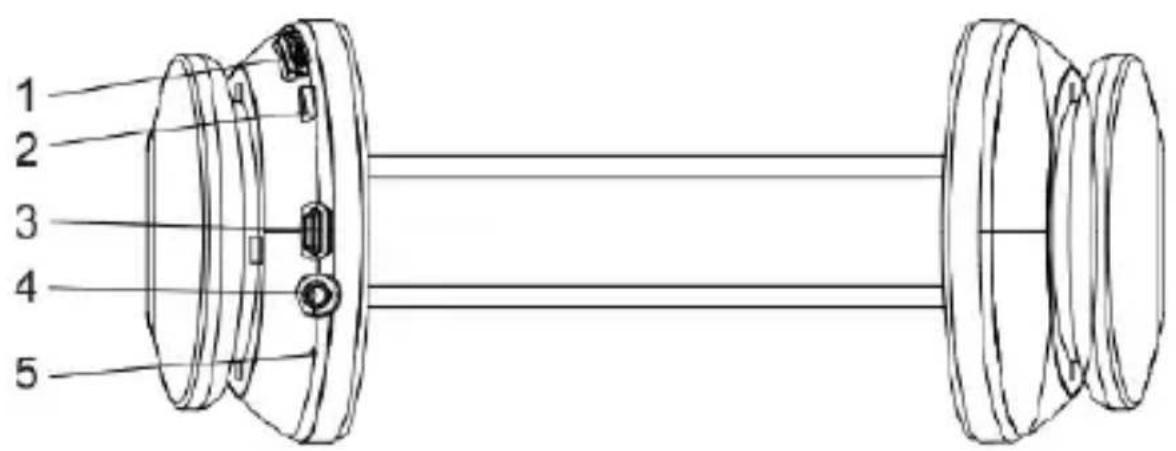
- Volume button:
a. Move Upwards: Volume +
b. Move Downwards: Volume -
- power button / Bluetooth power button
- Micro USB slot
- Line in slot
- Mic
Operation
Turn ON
In the state of power-off, press and hold the power button for 1, the headset will send out two prompt tones and blue LED will be on.
Turn OFF
In the state of power-on, press and hold power button for 5 seconds till the red LED light glitters three times. There will be four voices from loud to low. Now the unit is turned off.
Pairing
In the state of power-off, press and hold power button for 10s until red and blue LED light glitters in turn, the headphone enters into pairing mode. In this case, the headset can be paired with the Bluetooth enabled devices.
Usually, setup procedure relates to the "setup", "connection" or "Bluetooth" menu in your cellphone, click "search for Bluetooth device", your cell phone will find out headphone pairing name and ask if you want to connect, then click "confirm" or "yes". Password (if necessary) for the pairing is 0000, and click "yes" or "confirm". The headphone will connect with your Bluetooth device successfully.
The headphone will enter in power-on mode if releasing power button before red and blue LED light glitters in turn. In this case, please turn off the power and operate it once again.
Handsfree function (Smartphones or compatible phones)
Answering calls
Press the power button once to answer the incoming calls.
Dialing calls
If the headset is paired with the cell phone, dialing the numbers on the cell phone will enable the conversation on the headset automatically.
Ending calls
Ongoing conversation on cell phone can be ended by pressing the power key once.
Redial latest number
The cell phone will automatically dial the last dialed phone number by double pressing power key on the Bluetooth headset. We can hear the prompt tone from the headset.
Volume control
In the state of music or calls, move volume button upwards to increase the sound and move it downwards to decrease the sound.
Wired headphone Function
The headphone can be used as the wired headphone. Just simply attach 3.5mm audio cable.
In the state of power off: It can be used as the wired stereo headphone by inserting the 3.5mm audio cable. Please adjust the volume of sound sources when it is as the wired headphone. In this case, the volume control of the headphone can't be workable.
Symbol of LED Light
Charging: The red light is on. The red light will turn off when it is full of power after charging.
Standby: Blue light quickly glitters once per 5 seconds
Conversation / Music: Blue light glitters once per 5 seconds
Power Shortage: Red light glitters (with prompt tone)
Pairing: Red and blue light glitters in turn
Specifications
TECHNICAL FEATURES
Dimension: 170 × 200 × 75(mm)
Charging interface Micro USB
Press buttons
Battery: 3.7V/250mAh
Charging specification Micro USB
Charging input: 5V/1.0A
Charging indication: Red LED light is continuously on
Please use standard charging accessory to charge for this headphone, the normal charging time is about 2 to 3 hours.
Standby time: more than 100 hours
Successive talking time about 8 hours
Volume control 16 ranks, 3dB variation in each rank
Storage temperature
SPEAKER AND MIC
Speaker diameter: 40mm
Impedance 32Ω
Sensitivity S.P.L:110dB S.P.L.at 1KHz
Rated power: 100mW
Frequency Response: 100Hz-9000Hz
MIC Type: Capacitance
Microphone Unit: 4*1.5mm
Directivity: Full direction
S.P.L: -42±3dB
Impedance: ≤ 2.2KΩ
Frequency Response: 30-16,000HZ
Operating voltage: 4.5V
BLUETOOTH MODE
Bluetooth Protocol version CSR Ver 3.0
Profile HSP1.2/HFP1.6
Remote control to the player Volume up and down
Matching code: 0000
RF transmit +4dBm(Max)
Receiving sensitivity -90dBm
Transmission Range (Hz): 20 - 20,000
Antenna Gain above -3.5dB
Human Gain above -6.5dB
Communication distance: 10m
WARNING
The battery has a specific number of charging and discharging cycles. When these cycles have been exceeded, the battery may need to be changed. A battery that has completed its life cycle is not covered by the guarantee.

www.boschbuyacia.com
DECLARATION OF CONFORMITY

BCTC-13072381
Best Buy Asia Limited declares that the product Easy Sound Headphones BT from Best Buy Consumer Products brand with CE from year 2013 is a headphone unit that complies with:
ERP Directive 2009/125/EC
Low Voltage Directive 2006/95/EC
EMC Directive 2004/108/EC
CE Marking Directive 95/68/EEC
EN60950-1:2006+A11:2009+A1:2010+A12:2011
ETSI EN 301 489-1 V1.9.2 (2011-09)
ETSI EN 301 489-17 V2.2.1 (2012-09)
ETSI EN 300 328 V1.8.1 (2012-06)
99/5/EC
Date and place
11/07/2013
Best Buy Asia Limited
To Grand Tower, 625 Nathan Rd.,
Mongkok, Kowloon, Hong Kong
Signed: Patty Zheng, Lab Inspector
Warranty
BEST BUY PRODUCT GUARANTEE CONDITIONS
- HARDWARE UNITS: Best Buy offers a 2 year guarantee (24 months) in materials and workmanship from the date of purchase. It is therefore necessary to present a document proving the date of delivery or purchase, whether the invoice, receipt or delivery note. Documents that have been manipulated will not be accepted.
- SOFTWARE ACCESSORIES: (only if included in the product) Product software accessories will be sent via a download link or email within 30 days of the date of purchase.
- REQUEST FOR TECHNICAL ASSISTANCE: Connect online to the Best Buy website (www :/ / bestbuy-int.com) and see if you can find the solution to the problem. If not, contact the Best Buy technical service (specified below) to request repair of the product.
- REPLACEMENT: Within the first 15 days from the date of purchase, if it cannot be easily repaired, the product will be replaced by another (only the defective item will be replaced and not the other elements that go with it).
- REPAIR: Repair of a product is free (both labour and materials) within the two years of the guarantee provided that there is no reason for the cancellation of the guarantee. For repair of the product you must previously contact the technical service and obtain a repair number (RMA); otherwise the product will be returned to sender and shipping costs will be charged.
- CANCELLATION OF GUARANTEE: The guarantee will be automatically cancelled in the following cases:
- Deficiencies of product use in countries other than the country of sale.
- Handling of the product or its identification elements (serial numbers) by anyone other than the official technical service staff.
- Deficiencies caused by improper installation of the product.
- Problems arising from use of unofficial product accessories.
- Breakage caused by manipulation of the components of the unit.
- Damage caused fortuitously by accidents, falls or natural disasters.
-
The guarantee does not include consumables and parts used and worn by normal use (remote control keys, batteries, bulbs, connectors scratched by multiple connections and disconnections, etc.).y desconexiones, etc.).
-
ADDITIONAL NOTES: Batteries that have reached the end of their useful life will not be covered by the guarantee. Replacement of damaged equipment or any part thereof shall not involve extension of the guarantee.
- USER COMPENSATION: The liability and SOLE compensation will be to change or repair the defective product (or defective part thereof), provided they fall within the aforementioned cases.
- GENERAL: Best Buy International or its representatives shall in no case be liable for any damages, including those resulting from lost profits or any other pecuniary loss, arising as a result of the use or inability to use the product in question, even assuming that Best Buy International has reported that they may arise.
How to benefit from being a registered user.
Register on our website http://www.bestbuy-int.com
How to request technical assistance.
Once registered, you can request technical assistance at any time as follows:
BEST BUY INTERNATIONAL

sat@bestbuy-int.com
Just easy

24 MONTH WARRANTY!
Transmission RF: +4dBm(Max)
Distance de communication: 10m
AVERTISSEMENT
Low Voltage Directive 2006/95/EC
EMC Directive 2004/108/EC
CE Marking Directive 95/68/EEC
EN60950-1:2006+A11:2009+A1:2010+A12:2011
ETSI EN 301 489-1 V1.9.2 (2011-09)
ETSI EN 301 489-17 V2.2.1 (2012-09)
ETSI EN 300 328 V1.8.1 (2012-06)
99/5/EC
Date et lieu
11/07/2013
Best Buy Asia Limited
906, 9/F, Two Grand Tower, 625 Nathan Rd.,
Mongkok, Kowloon, Hong Kong
Signature: Patty Zheng, Lab Inspector
Garantie
CONDITIONS DE GARANTIE DES PRODUITS BEST BUY
Transmission RF: +4dBm(Max)
Low Voltage Directive 2006/95/EC
EMC Directive 2004/108/EC
CE Marking Directive 95/68/EEC
EN60950-1:2006+A11:2009+A1:2010+A12:2011
ETSI EN 301 489-1 V1.9.2 (2011-09)
ETSI EN 301 489-17 V2.2.1 (2012-09)
ETSI EN 300 328 V1.8.1 (2012-06)
99/5/EC
Data e luogo
11/07/2013
Best Buy Asia Limited
906, 9/F, Two Grand Tower, 625 Nathan Rd.,
Mongkok, Kowloon, Hong Kong
Firmato: Patty Zheng, Lab Inspector
Garantía
CONDITIONI DI GARANZIA DEI PRODOTTI BEST BUY
Low Voltage Directive 2006/95/EC
Data e lugar
11/07/2013
EMC Directive 2004/108/EC
CE Marking Directive 95/68/EEC
EN 55013:2001+A1:2003+A2:2006
Best Buy Asia Limited
906, 9/F, Two Grand Tower, 625 Nathan Rd.,
Mongkok, Kowloon, Hong Kong
Assinado: Patty Zheng, Lab Inspector
Garantia
CONDIÇOÉS DE GARANTIA DE PRODutos BEST BUY
Low Voltage Directive 2006/95/EC
EMC Directive 2004/108/EC
CE Marking Directive 95/68/EEC
EN60950-1:2006+A11:2009+A1:2010+A12:2011
ETSI EN 301 489-1 V1.9.2 (2011-09)
ETSI EN 301 489-17 V2.2.1 (2012-09)
ETSI EN 300 328 V1.8.1 (2012-06)
99/5/EC
Data i.),
11/07/2013
Best Buy Asia Limited
906, 9/F, Two Grand Tower, 625 Nathan Rd.,
Mongkok, Kowloon, Hong Kong
Podpis: Patty Zheng, Lab Inspector
Gwarancji
WARUNKI GWARANCJI PRODUKTÓW BEST BUY
Low Voltage Directive 2006/95/EC
EMC Directive 2004/108/EC
CE Marking Directive 95/68/EEC
EN60950-1:2006+A11:2009+A1:2010+A12:2011
ETSIEN301489-1V1.9.2 (2011-09)
ETSI EN 301 489-17 V2.2.1 (2012-09)
ETSI EN 300 328 V1.8.1 (2012-06)
99/5/EC
Kelt
11/07/2013
Best Buy Asia Limited
906, 9/F, Two Grand Tower, 625 Nathan Rd.,
Mongkok, Kowloon, Hong Kong
Aláirás: Patty Zheng, Lab Inspector
Garanciális
A BEST BUY GARANCIÁLIS FELTÉTELEI
Environment protection first!
Your appliance contains valuable materials which can be recovered or recycled. Leave it at a local civic waste collection point.
- GARANTÍA
- CONDICIONES DE GARANTIA DE PRODUCTOS BEST BUY
- ACCESSORIES
- KNOW YOUR HEADPHONE
- OPERATION
- TURN ON
- TURN OFF
- PAIRING
- ANSWERING CALLS
- DIALING CALLS
- ENDING CALLS
- REDIAL LATEST NUMBER
- VOLUME CONTROL
- WIRED HEADPHONE FUNCTION
- SYMBOL OF LED LIGHT
- SPECIFICATIONS
- STORAGE TEMPERATURE
- WARNING
- DECLARATION OF CONFORMITY
- WARRANTY
- BEST BUY PRODUCT GUARANTEE CONDITIONS
- BEST BUY INTERNATIONAL
- AVERTISSEMENT
- GARANTIE
- CONDITIONS DE GARANTIE DES PRODUITS BEST BUY
- CONDITIONI DI GARANZIA DEI PRODOTTI BEST BUY
- GARANTIA
- CONDIÇOÉS DE GARANTIA DE PRODUTOS BEST BUY
- GWARANCJI
- WARUNKI GWARANCJI PRODUKTÓW BEST BUY
- GARANCIÁLIS
- A BEST BUY GARANCIÁLIS FELTÉTELEI
- ENVIRONMENT PROTECTION FIRST
Brand : Best Buy
Model : Easy Sound BT
Category : Earphones