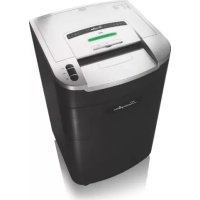
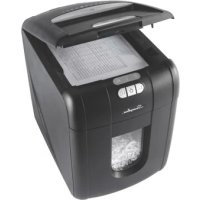
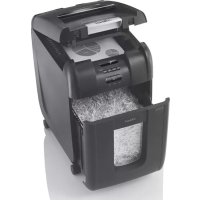
USER MANUAL LX2030 Swingline
text_image
LM12-30
LSM09-30
Document Shredders
Déchiqueteuses
LS32-30
LX20-30
Document Shredders Déchiqueteuses Destructoras de documentos
Instruction Manual
| Models | LS32-30 | LX20-30 |
| Sheet Capacity - (TKOT) | 28-32 sheets | 20 sheets |
| Continuous Cycle - | Continuous operation |
| Volts / Hz | 120V AC / 60Hz | 120V AC / 60Hz |
| Amperage | 11.0A | 10.0A |
| CDs and Credit Cards | Yes | Yes |
| Models | LM12-30 | LSM09-30 |
| Sheet Capacity - [8506] | 11 sheets | 9 sheets |
| Duty Cycle - | Continuous operation | Continuous operation |
| Volts / Hz | 120V AC / 60Hz | 120V AC / 60Hz |
| Amperage | 10.0A | 8.0A |
| CDs and Credit Cards | Yes | Yes |

IMPORTANT: ONLY INSERT ONE CD OR ONE CREDIT CARD AT A TIME.
Sheet capacity may vary with voltage.
Spécifications :
text_image
I
J
A
D
H
E
F
G
B
C
Models: LS32-30, LX20-30 Models: LM12-30, LSM09-30
text_image
I
J
A
D
H
E
F
G
B
C
text_image
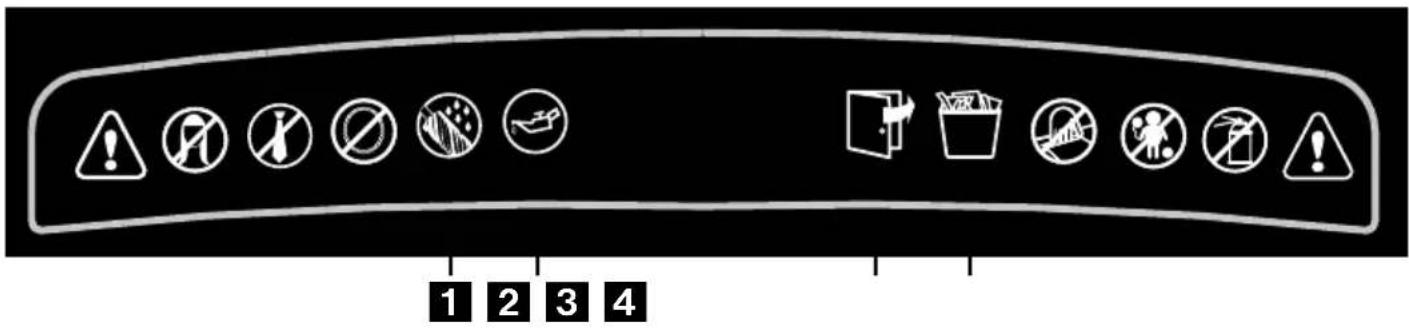
1 2 3 4
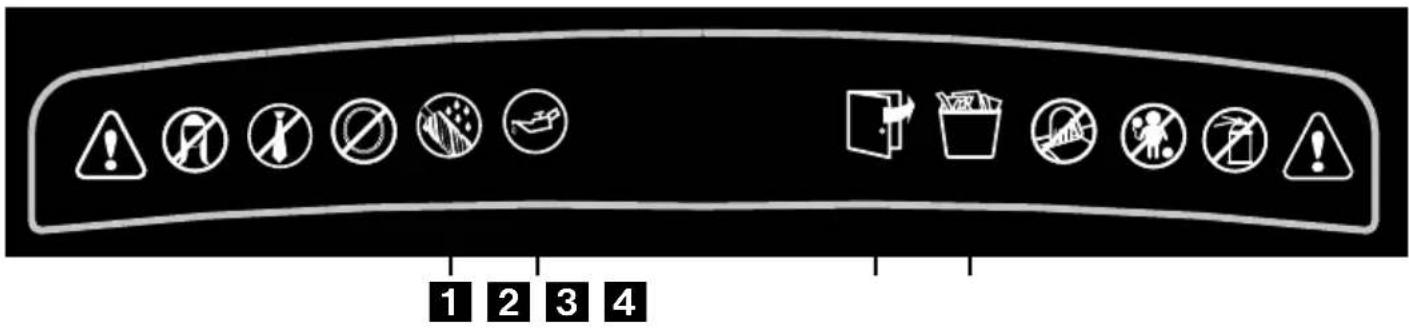
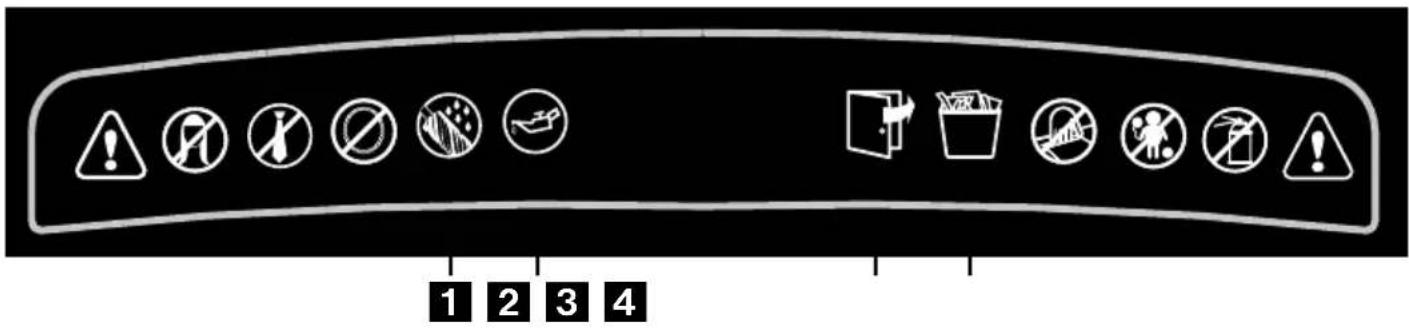
Indicator Panel
Lights and Icons Explained
|  | |  |  |  |  |  |
| Color of LED | Anti-Jam Indicator | AutoBlue | Bin FullRed | Door OpenRed | Oil LevelRed | Oiling/AutoGreen | |
| Red | Green | |
| Power On/Off Switch | | | | | | | | |
| Auto Mode | | light | light | | | | | |
| Forward Mode | | light | light | | | | | |
| Reverse Mode | light | | light | | | | | |
| Jam-free Technology | light | | light | | | | | |
| Bin Full | light | | light | light | | | | |
| Door/Bin Open | light | | light | | light | | | |
| Self Cleaning of Cutters | light | | light | | | | | |
| Sleep Mode | | | | | | | | |
| Auto Oiling in Operation | | | light | | | | | light |
| Oil Level Indicator | | | light | | | light | | |
Introduction
Thank you for choosing this shredder from ACCO. We are sure it will serve you well, but please take a little time to study these instructions to ensure you get the best out of your machine.
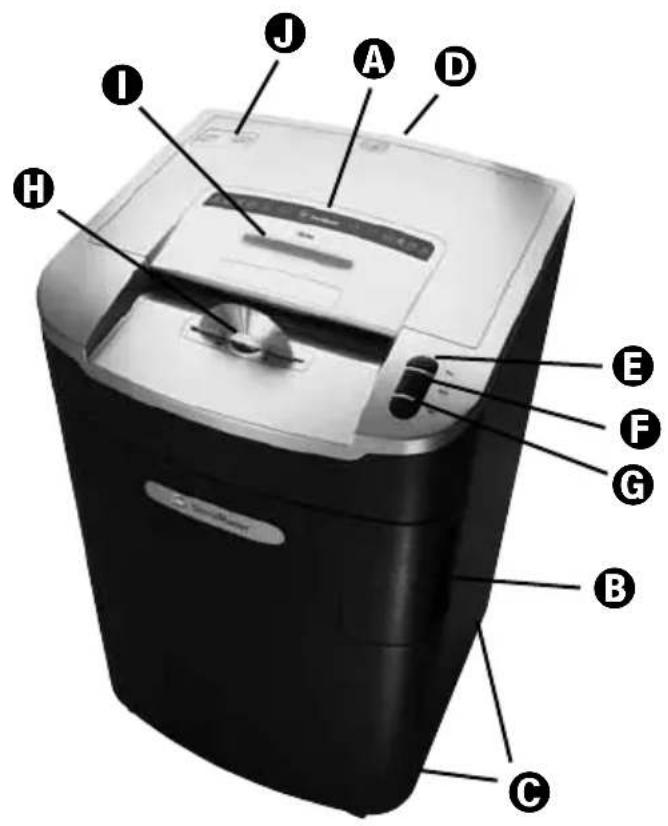
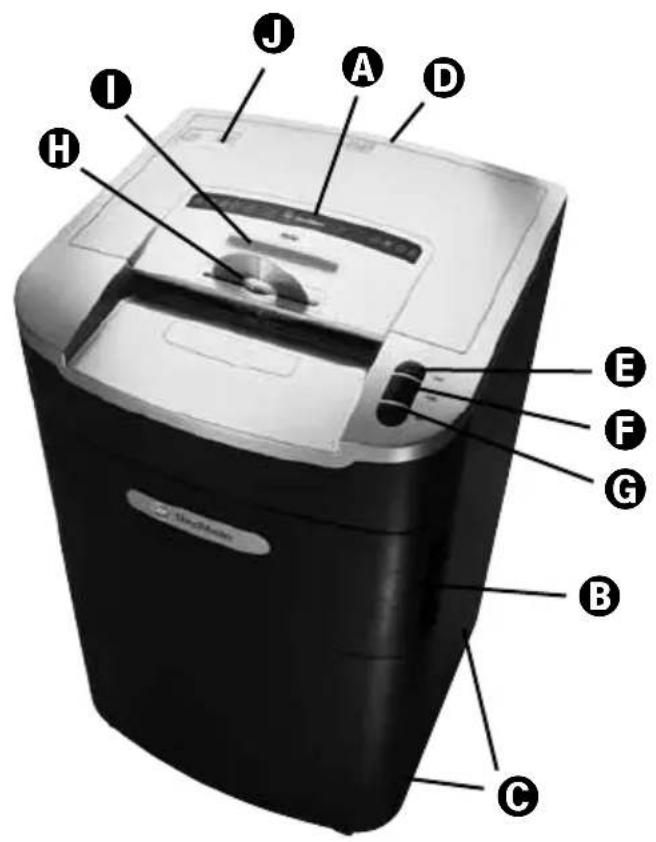
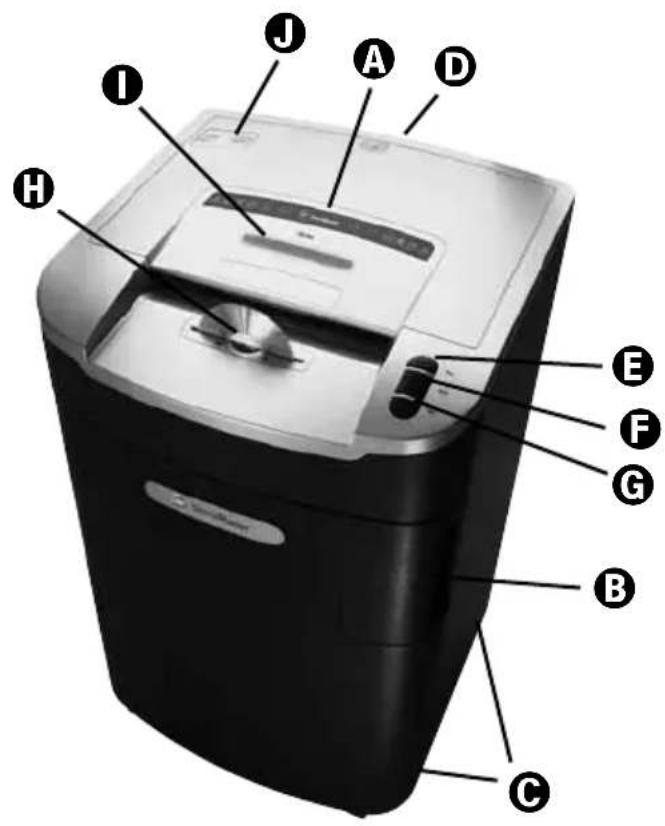
A Indicator Panel
B Door for Bin
© Wheels
Power On/Off Button
E Reverse Button
F Auto Button
G Forward Button
CD Slot
Anti-jam Indicator
Oil Reservoir Cap
1 Oiling in Operation
2 Oil Level
3 Door Open
4 Bin Full
Safety First

Shredders are safe to use as long as you take a few safety precautions.
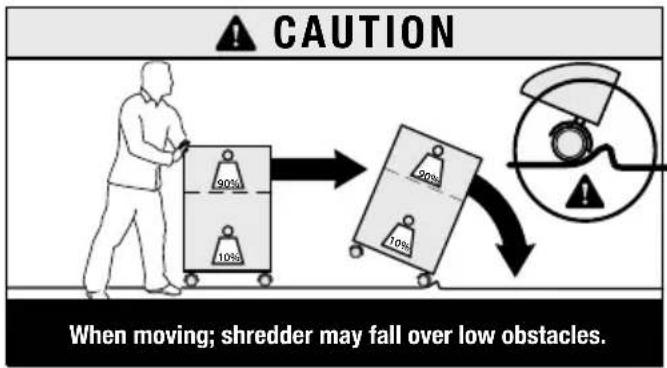
text_image
CAUTION
90%
10%
20%
10%
When moving; shredder may fall over low obstacles.
Shredder Control Panel


ReverseForwardAuto

Safety First - Read instructions before use.

This means you should be careful because long hair can become entangled in the cutting head. This could hurt you.

This means don't reach into the feed opening of the cutting head. This could hurt you.

This means be careful of ties and other loose clothing which could become entangled in the cutting head. This could hurt you.

This means keep children away from shredder.

This means be careful of loose jewelry which could become entangled in the cutting head.

This means do not shred CD's.

This means do not shred credit cards.

This means oil level.

This means oiling in operation.
Door Open Protection
If the door is opened during shredding, as a precaution the shredder will instantly stop, and the door open symbol on the indicator panel will flash red. To turn back to auto mode simply press the auto button again (F).
Non-Stop Jam Free Anti-Jam Technology
Swingline Shredders will only shred stacks of paper that are within the shredders sheet capacity. For example, a shredder with a capacity of 22 sheets will not allow the shredding of more sheets than this.
Sensors in the paper feed area measure the thickness of paper about to be shredded. The ability to shred or not is communicated through red and green lighting. Green means that the stack of paper is within the shredders sheet capacity and OK to shred. Red means that you have too much paper, remove some sheets in order to shred.
Given that you are unable to shred more sheets of paper than the shredder is capable of shredding, paper jams are prevented.
This prevents time wasted through reversing paper and unblocking jams not to mention the mess it can create.
Rare Occasions of Jamming
In the unlikely event of the shredder jamming, use the reverse function to unblock the shredder.
Alternating between the reverse and forward functions will help unblock the feed area.
Initial Setup of SelfOil™
The shredder is designed to automatically lubricate the cutting mechanism as required to ensure the product continues to work to its maximum performance and to extend the product life. Before turning on the machine for the first time, please open the oil reservoir cap on the head of the shredder (①) and pour in the 60ml bottle of oil provided as standard. This is sufficient to allow the shredder to start for the first time and to operate continuously for approximately one hour of shredding before the reservoir will need refilling. Press and hold down the Auto button (⑤) for 5 seconds to start the pump and prime the system. This operation is only required the very first time the shredder is used. When the 'Oil Refill' indicator is illuminated ⚙, flip up the oil reservoir cap (⑥) and refill the oil reservoir using a bottle of standard Swingline oil (1760049). The automatic oiling operation lasts approximately 2 seconds and you will hear the distribution pump during this time. Auto-oiling operates after 15 minutes of shredding.

CAUTION
We only recommend the use of Swingline shredder lubricant to maintain optimum performance and safety. ACCO accepts no liability for product performance or safety if anything other than Swingline branded shredder lubricant is used (Order Code 1760049).
WARNING
Do not use flammable oil.
Only Swingline part number 1760049 is recommended.
Operation
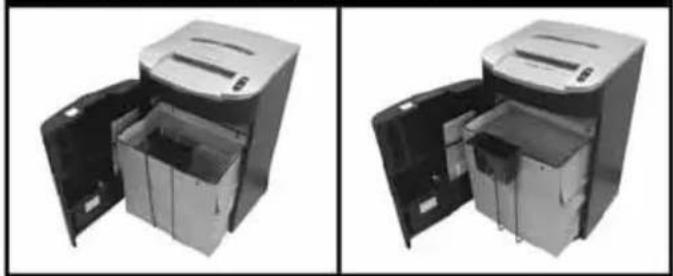
- LS32-30 & LX20-30 only. After unpacking the product, pull out the shredder bag frame and remove the CD shard tray, which sits on top of the bag frame. Store this tray on the bag frame as shown and use when you shred CD's or credit cards to separate waste for recycling. On the LM12-30 and LSM09-30 high security models, the CD tray can be left permanently in position in the shredder.
- Flip up the oil cap and fill up the reservoir using the 60ml bottle of oil provided*. Close the cap.
- Connect shredder to mains supply.
- Check that the on/off switch at the back of the machine is switched to the 'ON' position.
- Press and hold down the Auto button (F) for 5 seconds to start the pump and prime the system. Only required when the product is used for the first time.
- To commence shredding, press the auto feed button. This sets the shredder into auto mode.
- Insert paper to be shredded into the feed area. The shredder will detect the paper and start automatically.
- If the shredder is left in auto mode for more than 2 minutes without being used, the shredder will automatically turn back to standby mode in order to save power.
- The shredder will automatically 'wake up' from sleep mode when paper is inserted into the shredder mouth. There is no need to press the Auto button (F).
CD and Credit Card Shredding
- A separate CD tray is provided to collect the shredded CD shards. On the LS32-30 and LX20-30, ensure that this is correctly mounted onto the standard shredder bag frame before shredding CD's or credit cards. The LM12-30 & LSM09-30 models are supplied with a separate CD bin, which fits on the front of the bag frame. CD and credit card shards should be disposed of separately from paper.
LS32-30/LX20-30 LM12-30/LSM09-30
natural_image
Two views of a mechanical device with open doors, showing internal compartments (no text or symbols visible)
- Always shred CD's and credit cards through the safety guard slot (H). Only shred 1 credit card or 1 CD at a time.
- Empty the CD tray or CD bin after 8 credit cards or CD's to avoid waste spilling over into the paper waste bin.
LS32-30 & LX20-30 only. Remove the CD tray before starting to shred paper again and store on the bag frame.
Bin Full
When the bin is full the shredder will not function and the bin full symbol will illuminate red.
When this happens you must empty the bin.
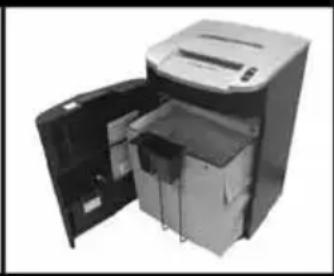
- Open the door and slide out the shredder bag support frame. Carefully remove the shredder bag from the frame.
Once the shredder bag has been disposed of and replaced, close the door and press the auto button to resume shredding.
Note: LX20-30, LM12-30, LSM09-30 Models - Once the shredder bag has been reinserted and/or cabinet door has been closed, the shredder will run in reverse for two seconds, stop for two seconds and then forward for two seconds to clear away any remaining paper from the cutter mechanism. This ‘self-cleaning’ mechanism is additional jam prevention technology from ACCO.
Shredder Accessories
Use Swingline shredder bags to recycle shredded paper (1765021) or plastic shredder bag (1765015). There are instructions on the paper shredder bag on how to fit it to the internal bag support frame. A complimentary oil bottle and shredder bag is included with the shredder.
Service
We recommend these machines are serviced every 6-12 months by an ACCO service engineer - see the back of this booklet for the contact details of your local service center.
Limited Warranty:
LIMITED LIFETIME CUTTING BLADE WARRANTY AND LIMITED TWO YEAR WARRANTY FOR ALL OTHER PARTS
ACCO Brands, 300 Tower Parkway, Lincolnshire IL, 60069, ACCO Brands Canada Inc., 5 Precidio Court, Brampton, ON L6S-6B7, ACCO MEXICANA S.A. DE C.V Circuito de la Industria Norte No. 6 Parque Industria Lerma, Lerma Edo. de México C.P. 52000 México. (each, respectively, "ACCO Brands") warrants to the original purchaser that: (a) the cutting blades on LS32-30 & LX20-30 are free from defects in material and workmanship under normal use and service for as long as the original purchaser owns the product; and/ or that the cutting blades on LM12-30 and LSM09-30 are free from defects in material and workmanship under normal use and service for a period of one (1) year after the purchase. (b) all other parts of LS32-30, LX20-30, LM12-30, LSM09-30 are free from defects in material and workmanship under normal use and service for two (2) years.
ACCO Brands' obligation under this warranty is limited to replacement or repair, at ACCO Brands' option, of any warranted part found defective by ACCO Brands without charge for material or labor. Any replacement, at ACCO Brands' option, may be the same product or a substantially similar product that may contain remanufactured or refurbished parts. This warranty shall be void in the following circumstances:
(i) if the product has been misused,
(ii) if the product has been damaged by negligence or accident, or
(iii) if the product has been altered by anyone other than ACCO Brands or ACCO Brands' authorized agents.
For warranty execution, please call:
1-800-541-0094 in the USA
1-800-263-1063 in Canada
1-800-758-6825 in Mexico
Or go to www.swingline.com.
TO THE EXTENT ALLOWED BY APPLICABLE LAW, THIS WARRANTY IS IN LIEU OF ALL OTHER EXPRESSED WARRANTIES. REPRESENTATIONS OR PROMISES INCONSISTENT WITH OR IN ADDITION TO THIS WARRANTY ARE UNAUTHORIZED AND SHALL NOT BE BINDING ON ACCO BRANDS. TO THE EXTENT PERMITTED BY APPLICABLE LAWS, ANY IMPLIED WARRANTIES (IF APPLICABLE) ARE LIMITED IN DURATION TO THE DURATION OF THIS WARRANTY. SOME STATES AND JURISDICTIONS DO NOT ALLOW LIMITATIONS ON HOW LONG AN IMPLIED WARRANTY LASTS, SO THE ABOVE LIMITATION MAY NOT APPLY TO YOU. TO THE EXTENT PERMITTED BY APPLICABLE LAW, IN NO EVENT SHALL ACCO BRANDS BE LIABLE FOR ANY SPECIAL, INCIDENTAL, PUNITIVE, EXEMPLARY, CONSEQUENTIAL OR SIMILAR DAMAGES, WHETHER OR NOT FORSEEABLE. SOME STATES AND JURISDICTIONS DO NOT ALLOW THE EXCLUSION OR LIMITATION OF SPECIAL, INCIDENTAL, PUNITIVE, EXEMPLARY, CONSEQUENTIAL, OR SIMILAR DAMAGES, SO THE ABOVE EXCLUSION OR LIMITATION MAY NOT APPLY TO YOU.
FOR CONSUMERS WHO HAVE THE BENEFIT OF CONSUMER PROTECTION LAWS OR REGULATIONS IN THEIR JURISDICTION OF PURCHASE OR, IF DIFFERENT, IN THEIR JURISDICTION OF RESIDENCE, THE BENEFITS CONFERRED BY THIS WARRANTY ARE IN ADDITION TO ALL RIGHTS AND REMEDIES CONVEYED BY SUCH CONSUMER PROTECTION LAWS AND REGULATIONS.
To the extent permitted by law, this warranty is not transferable and will automatically terminate if the original product purchaser sells or otherwise disposes of the product.
This warranty gives you specific legal rights. Other rights, which vary from jurisdiction to jurisdiction, may exist. In addition some jurisdictions do not allow (i) the exclusion of certain warranties, (ii) limitations on how long an implied warranty lasts and/or (iii) the exclusion or limitation of certain types of costs and/or damages, so the above limitations may not apply.
IMPORTANT To quickly and easily confirm your warranty, register your new shredder at www.swingline.com
Fill in this information for your own machine record.
Purchased from
Model
Assembly No. Serial No.
Please indicate your model and serial number for prompt and accurate service when calling or writing for information
text_image
I
J
A
D
H
E
F
G
B
C
text_image
I
J
A
D
H
E
F
G
B
C
text_image
1 2 3 4
Panneau indicateur
natural_image
Two views of a mechanical device with open doors, showing internal compartments (no text or symbols visible)
text_image
I
J
A
D
H
E
F
G
B
C
Modelos: LS32-30, LX20-30 Modelos: LM12-30, LSM09-30
text_image
I
J
A
D
H
E
F
G
B
C
text_image
1 2 3 4
Panel indicador
natural_image
Exterior view of a file organizer with open door (no visible text or labels)
LM12-30/LSM09-30
natural_image
Exterior view of a file organizer with open door and internal compartments (no visible text or labels)
If none of the above mentioned methods helped to solve the problem: Contact Service Team:
UNITED STATES
ACCO Brands USA
300 Quartet Avenue,
Booneville, MS 38829
Phone: 800-541-0094
Website: www.GBC.com
Website: www.GBCcanada.com
Website: www.GBC.com.mx
Note: This equipment has been tested and found to comply with the limits for a Class B digital device, pursuant to part 15 of the FCC Rules. These limits are designed to provide reasonable protection against harmful interference in a residential installation. This equipment generates, uses and can radiate radio frequency energy and, if not installed and used in accordance with the instructions, may cause harmful interference to radio communications. However, there is no guarantee that interference will not occur in a particular installation. If this equipment does cause harmful interference to radio or television reception, which can be determined by turning the equipment off and on, the user is encouraged to try to correct the interference by one or more of the following measures:
• Reorient or relocate the receiving antenna.
- Increase the separation between the equipment and receiver.
- Connect the equipment into an outlet on a circuit different from that to which the receiver is connected.
- Consult the dealer or an experienced radio/TV technician for help.
Canada Class B Notice - Avis Canada, Classe B
This Class B digital apparatus complies with Canadian ICES-003.
Any modifications made to this device that are not approved by ACCO Brands Corporation may void the authority granted to the user by the FCC and/or by Industry Canada to operate this equipment.
Congratulations on your purchase of a new Swingline™ shredder!
You may have been expecting a GBC® shredder, but noticed that instead you have received a Swingline shredder. This is not a mistake as GBC shredders will now be sold under the Swingline brand name.
Both GBC and Swingline are brands within the ACCO Brands portfolio so you can expect the same exceptional performance, durability and ease of use from both.
In the U.S., if you have any questions, please call us at 1-800-820-6220.
Thank you.
Enjoy your new shredder!
Register your new shredder@ Swingline.com
All rights reserved. ©2011
ACCO ^® is a registered trademark of ACCO Brands Swingline ^TM/MC is a trademark of ACCO Brands.
Jam Free when used in accordance with manufacturer instruction manual.

Imported in USA by
ACCO Brands USA
300 Quartet Avenue,
Booneville, MS 38829
(800) 541-0094
www.accobrands.com
www.swingline.com