Clip Sport - Mp3 player SANDISK - Free user manual and instructions
Find the device manual for free Clip Sport SANDISK in PDF.



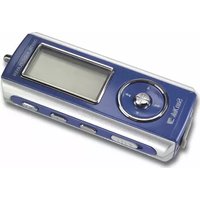
| Product type | MP3 player with clip |
| Brand | SanDisk |
| Model | Clip Sport |
| Power supply | Built-in rechargeable lithium-ion battery |
| Charge time | Approximately 3 hours |
| Connectivity | USB port |
| Memory card support | microSD / microSDHC (sold separately) |
| Audio formats | MP3, WMA (assumed) |
| Main functions | Music playback, menu navigation, volume adjustment, reset |
| Compatible operating systems | Windows, Mac |
| Usage | Personal and household use only |
| Cleaning | Soft lint-free cloth |
| Safety | Avoid moisture, do not use while driving, respect sound levels |
| Warranty | Manufacturer warranty (contact SanDisk) |
| Reset | Press and hold the power button for 10 seconds |
| Box contents (estimated) | Player, earphones, USB cable |
| Manual | Available as free PDF download |
Frequently Asked Questions - Clip Sport SANDISK
User questions about Clip Sport SANDISK
0 question about this device. Answer the ones you know or ask your own.
Ask a new question about this device
Download the instructions for your Mp3 player in PDF format for free! Find your manual Clip Sport - SANDISK and take your electronic device back in hand. On this page are published all the documents necessary for the use of your device. Clip Sport by SANDISK.
USER MANUAL Clip Sport SANDISK
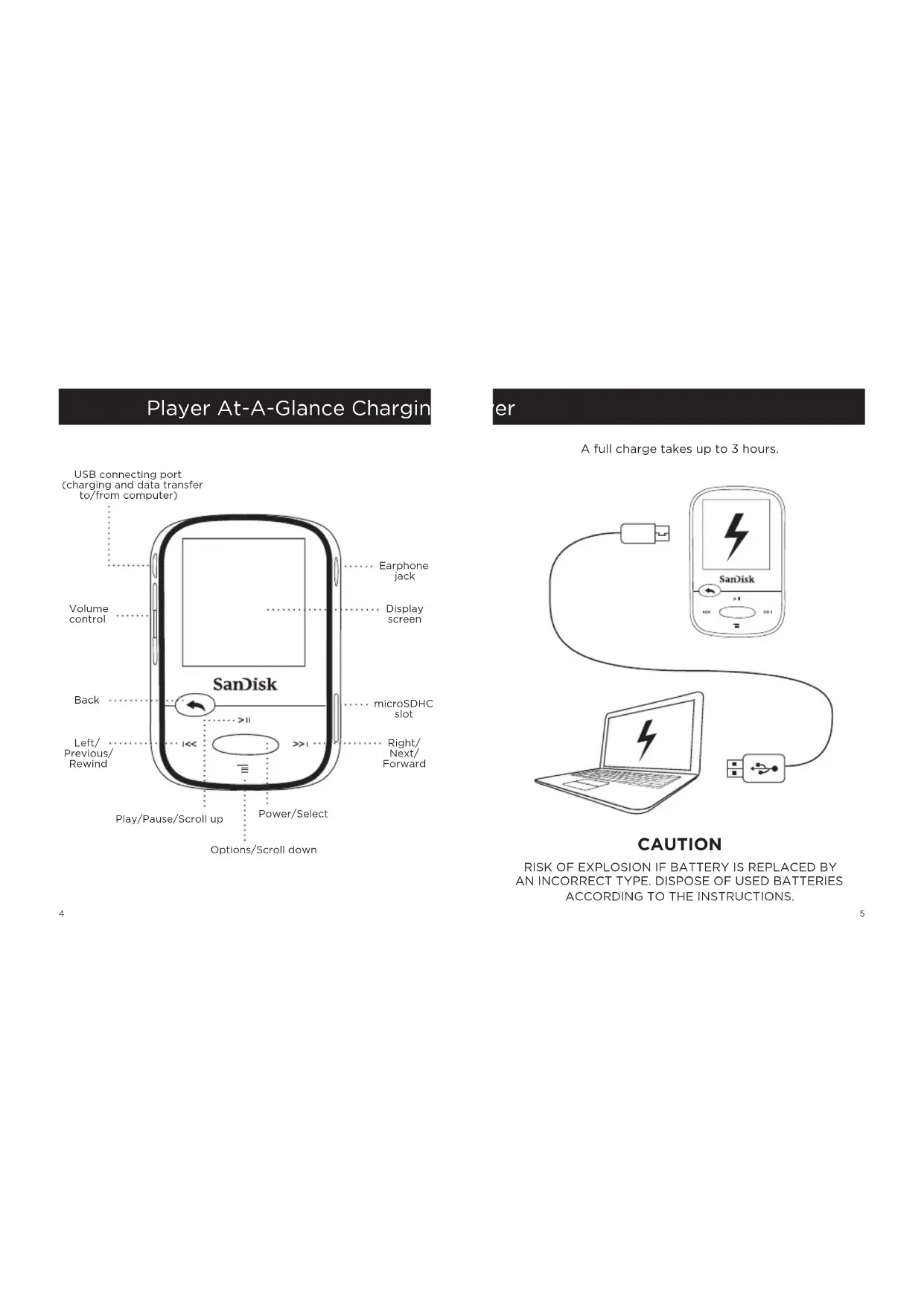
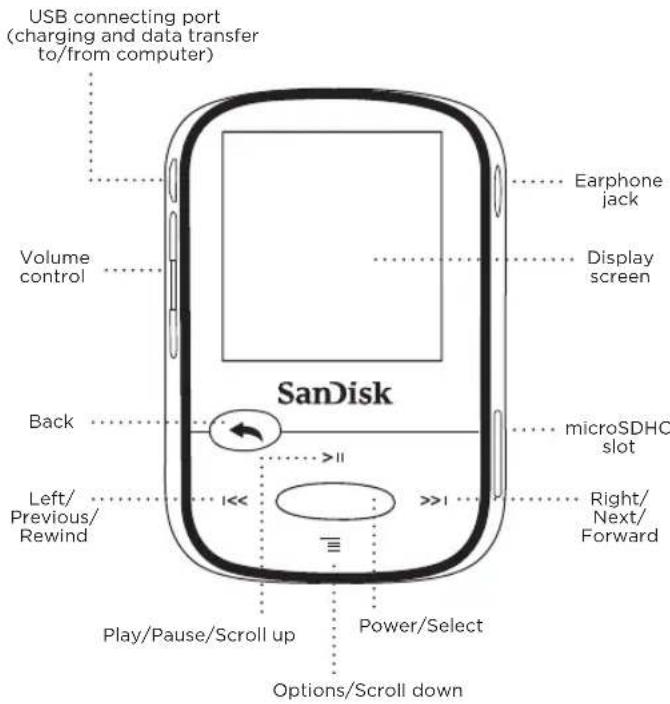
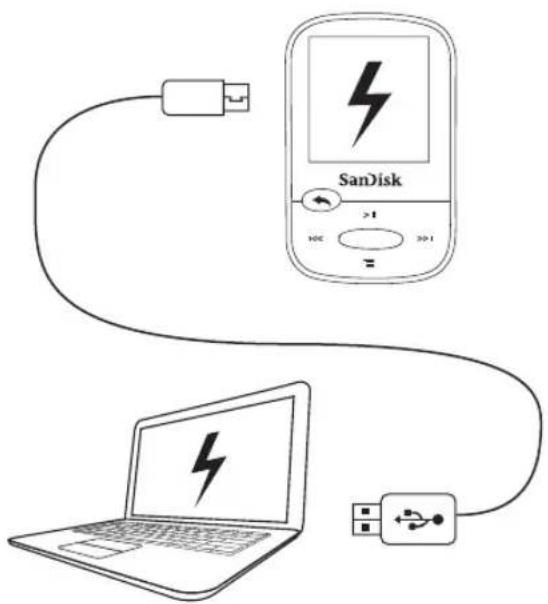
Player At-A-Glance Chargin
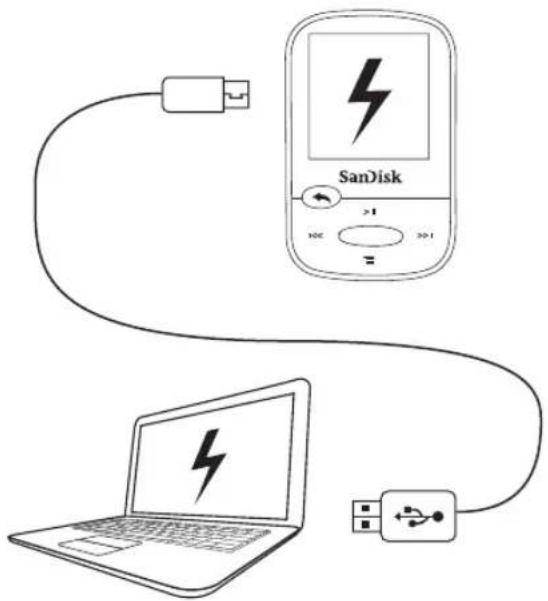
er
A full charge takes up to 3 hours.
CAUTION
RISK OF EXPLOSION IF BATTERY IS REPLACED BY AN INCORRECT TYPE. DISPOSE OF USED BATTERIES ACCORDING TO THE INSTRUCTIONS.
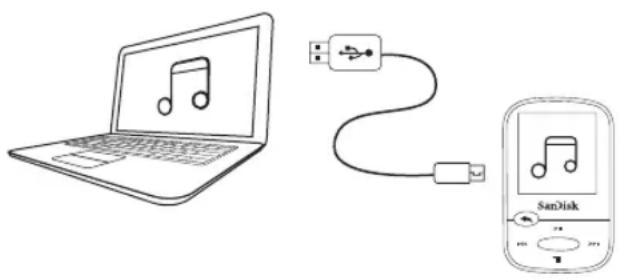
Downloading Files
Windows Users
- Connect player to PC using the USB connector.
- Open "My Computer" on your PC.
- Double click on the "Clip Sport" icon.
- Drag and drop files to the player's desired folder.
Mac Users
Visit the following link for step-by-step instructions:
http://kb.sandisk.com/
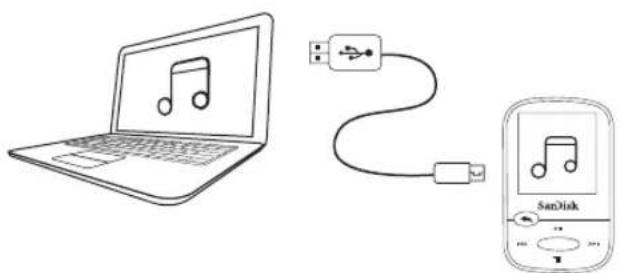
Enjoying Music
- Attach correct size earbud cups to earphones and connect to player.
- Press center button to turn on player.
- Press left or right buttons to scroll through options and select Music from the Main Menu by pressing the center button.
- Press top or bottom buttons to browse music options and press center button to select desired choice. (If needed, repeat step until songs are displayed.)
- Press top or bottom buttons to browse songs and press center button to play desired choice.
- Press left or right buttons to skip a song.
- Press top button to pause or restart a song.
- Press the Back button to return to the previous menu level.
Using a Memory Card
An optional microSD™ or microSDHC™ card* provides extra storage space.
Simply insert the card in the memory card slot on the side of the player.
Note: Your card content will show up under the CARD menu.
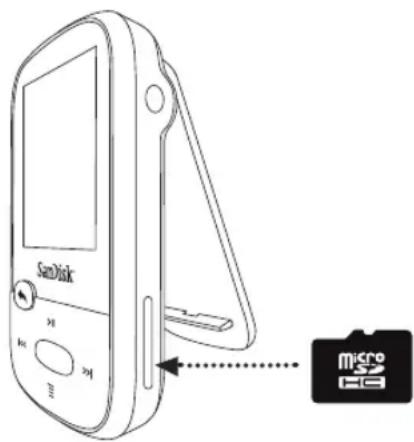
- Card not included; sold separately.
8
Tips and Troubleshooting
For best performance, download the latest firmware from:
http://kb.sandisk.com/clipsport
- Press and hold on/off button for 10 seconds to reset the device to unlock it from any temporary condition such as freezing or failing to connect to the computer.
- If the device fails to turn on, perform a reset (see step 2) and connect to the computer. Check the battery level and recharge if needed.
- If the device fails to be detected by the computer, verify that your computer meets the minimum system requirements.
- For support information or to learn more about player functions, visit:
http://kb.sandisk.com/clipsport
9
STOP!
IMPORTANT INFORMATION
YOU MUST READ THIS BEFORE
USING THE MP3 PLAYER
Safety Instructions
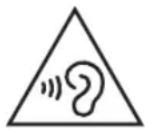
Your MP3 player is equipped with a variety of features. To help you maximize your listening pleasure, SanDisk would like to advise you that it is important to use the headphones with your MP3 player at a safe hearing level.
- Exposure or repeated exposure for an extended period of time to music and other sounds that are too loud can cause damage to your hearing resulting in temporary or even permanent "noise induced hearing loss".
- Symptoms of hearing loss increase gradually with prolonged exposure at high levels of loudness.
- Initially, you may not even be aware of the loss unless detected with a hearing test.
- Your hearing may adapt to higher volumes of sound. In order to prevent any harmful impact to your hearing, you must control the sound emanating from your headphones and set the MP3 player's volume to a low setting where you can hear it clearly and comfortably.
Studies, including one from NIDCD indicate that sounds of less than 80 decibels, even after long exposure, are unlikely to cause a hearing loss. - Listen to your MP3 player at such a level that you can still hear conversation and other people in your environment without shouting when you attempt to converse.
- It can also be dangerous to play your music with headphones/earphones at high volume while walking or engaged in other activities. You should exercise extreme caution and discontinue use in potentially hazardous situations.
- Do not use headphones or earphones while driving, cycling, or operating any motorized vehicle. This may create a traffic hazard and may be illegal in some areas.
HEARING LEVELS
To help you understand what may be considered a safe hearing level, the following examples are included for your reference:
Examples of Typical Sound Levels
Approximate Sound Level in Decibels (dB)*
Refrigerator humming 40
Normal conversation 60
City traffic 80
Motorcycles/lawnmowers 90**
Rock concerts 110-120**
Firearms 120-140**
* dB - A decibel (dB) is a unit of relative measurement of the strength sound wave. In decibels (dB), a measured signal level doubles with every additional 3 dB.
** These sound decibel levels are considered harmful under extended exposure. The above information is courtesy of the National Institute of Deafness and Other Communication Disorders (NIDCD): www.nidcd.nih.gov/health/hearing/noise.asp
DISPOSAL INSTRUCTIONS
Do not dispose of this device with unsorted waste. Improper disposal may be harmful to the environment and human health. Please refer to your local waste authority for information on return and collection systems in your area.
READ THE FOLLOWING ADDITIONAL SAFETY GUIDELINES CAREFULLY BEFORE USING YOUR MP3 player:
- Keep your MP3 player away from sinks, bathtubs, showers, drinks, rain, and other sources of moisture. Moisture can cause electric shocks with any electronic device.
- Clean your MP3 with a soft, lint-free cloth used on glass lenses
- Do not allow young children to use your MP3 player unsupervised.
- Never force any connector into the ports of your MP3 player or your computer. Ensure that your connectors are the identical shape and size before you connect.
- Do not disassemble, crush, short circuit, or incinerate the battery as it may cause fire, injury, burns, or other hazards.
NOTE: FOR HOME AND PERSONAL USE
This product is intended to be used for recording and playback for your home and personal enjoyment. Copying and commercial use of copyrighted material without permission of the copyright owner may be prohibited by law. Use of your MP3 player, in compliance with all copyright and applicable intellectual property laws, is the responsibility of the user of the product.
THIRD PARTY INTELLECTUAL PROPERTY NOTICE
This product is protected by certain intellectual property rights of Microsoft Corporation. Use or distribution of such technology outside of this product is prohibited without a license from Microsoft or an authorized Microsoft subsidiary. Content providers are using the digital rights management technology for Windows Media contained in this device ("WM-DRM") to protect the integrity of their content ("Secure Content") so that their intellectual property, including copyright, in such content is not misappropriated. This device uses WM-DRM software to play Secure Content ("WM-DRM Software"). If the security of the WM-DRM Software in this device has been compromised, owners of Secure Content ("Secure Content Owners") may request that Microsoft revoke the WM-DRM Software's rights to acquire new licenses to copy, display and/or play Secure Content. Revocation does not alter the WM-DRM Software's ability to play unprotected content. A list of revoked WM-DRM Software is sent to your device whenever you download a license for Secure Content from the Internet or from a PC. Microsoft, may, in conjunction with such license, also download revocation lists onto your device on behalf of Secure Content Owners.
THIS PRODUCT IS LICENSED UNDER THE MPEG-4 VISUAL PATENT PORTFOLIO LICENSE FOR THE PERSONAL AND ON-COMMERCIAL USE OF A CONSUMER FOR (i) ENCODING VIDEO IN COMPLIANCE WITH THE MPEG-4 VISUAL STANDARD ("MPEG-4 VIDEO") AND/OR (ii) DECODING MPEG-4 VIDEO THAT WAS ENCODED BY A CONSUMER ENGAGED IN A PERSONAL AND NON COMMERCIAL ACTIVITY AND/OR WAS OBTAINED FROM A VIDEO PROVIDER LICENSED BY MPEG LA TO PROVIDE MPEG-4 VIDEO. NO LICENSE IS GRanted OR SHALL BE IMplied FOR ANY OTHER USE. ADDITIONAL INFORMATION INCLUDING THAT RELATING TO PROMOTIONAL, INTERNAL AND COMMERCIAL USES AND LICENSING MAY BE OBTAINED FROM MPEGLA, LLC. SEE HTTP://WWW.MPEGLA.COM.
MPEG Layer-3 audio coding technology licensed from Fraunhofer IIS and Thompson.
Online User Manual and End-User License Agreement
Please go to www.sandisk.com/support to retrieve your online User Manual and End User License Agreement.
SanDisk Manufacturer's Retail Products Warranty
SanDisk warrants to the end user, that this product, excluding content and or software supplied with or on the product, will be free from material defects in manufacture, will conform to SanDisk's published product specifications and be fit for normal use during the Warranty Period specified in the table commencing on the date of purchase provided that the product is legally placed on the market. To make a warranty claim please contact SanDisk at 1-866 SanDisk or support@SanDisk.com within the Warranty Period and provide proof of purchase (showing date and place of purchase and name of the reseller) and product name, type and number. You may return the product after first obtaining a Return Material Authorization number and following any other guidelines listed. For further information, see www.sandisk.com and select "support".
SanDisk may at its option repair this product or provide you with an equivalent product; and if unable to repair or replace the product, will refund the purchase price. SanDisk will not be liable for indirect or consequential damage (including loss of data), or for damage caused by improper use (including use in an incompatible device and use not in accordance with the instructions), or by improper installation, unprofessional repair, modification or accident. This constitutes SanDisk's entire liability which will never exceed the price you paid for it, plus the necessary costs you made for the warranty claim. SanDisk products must not be used in applications where failure could threaten injury or life, such as life support systems. SANDISK DISCLAIMS ALL EXPRESS AND IMPLIED WARRANTY TO THE FULLEST EXTENT PERMITTED BY LAW. IF SANDISK CANNOT DISCLAIM IMplied WARRANTY UNDER APPLICABLE LAW, THEN TO THE EXTENT POSSIBLE, SUCH IMPLIED WARRANTY ARE LIMITED TO THE DURATION OF THE EXPRESS WARRANTY. THE WARRANTY DURATION ON ANY REPLACED PRODUCT WILL BE THAT PORTION OF THE WARRANTY PERIOD REMAINING ON YOUR ORIGINAL PRODUCT.
National, state and local laws may grant you other rights that are not affected by this warranty.
SanDisk is a trademark of SanDisk Corporation, registered in the United States and other countries. microSD and microSDHC marks and logos are trademarks of SD-3C, LLC. All other trademarks are the property of their respective owners.
© 2014 SanDisk Corporation. All rights reserved. Made in China.
End-User License Agreement
http://mp3support.sandisk.com/smm/en-smm-eula.pdf
FCC REGULATION
This device complies with part 15 of the FCC Rules. Operation is subject to the following two conditions:
- This device may not cause harmful interference, and
- This device must accept any interference received, including interference that may cause undesired operation.
This equipment has been tested and found to comply with the limits for a Class B digital device, pursuant to Part 15 of the FCC Rules. These limits are designed to provide reasonable protection against harmful interference in a residential installation. This equipment generates, uses, and can radiate radio frequency energy and, if not installed and used in accordance with the instructions, may cause harmful interference to radio communications. However, there is no guarantee that interference will not occur in a particular installation. If this equipment does cause interference to radio or television reception, which can be determined by turning the equipment off and then on, the user is encouraged to try to correct the interference by one or more of the following measures: - Increase the separation between the equipment and receiver.
- Correct the equipment to a different outlet so that the equipment and receiver are on different branch circuits.
- Consult the dealer or an experienced radio / TV technician for help.
Français
www.nidcd.nih.gov/health/hearing/noise.asp
CONSIGNES DE MISE AU REBUT
KpaTkoe pyKOBOdCTBO NOJIb3OBATeJIa
HCTpykunnoTexnke 6e3onachoctn
rapaHTn
CorglaeHne KOHeuHoro NOb30BaTeIa
KpaTkno63op nIeepa
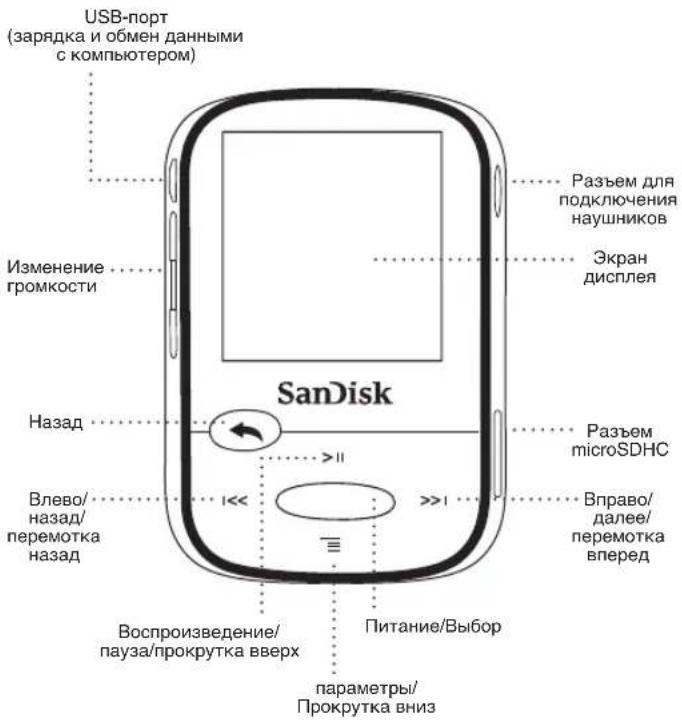
3apka npeepa
ДлгплногиЗардкIMожETNotpe6OBaTbCЯdo3acob.
PNEyPENKDEHNE
NCHOJIb3OBAHHE AKKYMЛrTOPA HENPABUNHOrTO TINAMoKET INPBECTN KB3PbIBYAKKYMJIrTOPA YTNJIN3NPYITE NCIOJIb3OBAHHbIE AKKYMJIrTOPbIB COOTBETCTBnC NHCHTPYLIMN.
3arpy3ka paJIOB
Повьател Windows
- NoidKIOHnTE nIeep K USB-pa3bemy KOMNBoTepa.
- Ha komnbiotepe oKpOte naKy "MoI kombiTeP".
3.ДвждьшелкнгteЗачok"Clip Sport". - Nepetaune paJIb B HxKyIO nAnky nIeepa.
PoiIb3OBaTeJIi Mac
IowarOBbIe IHCTpyKcunm.CHa CnEynuoei CcbInke:
http://kb.sandisk.com/
Bocnpon3BeJeHne My3bIKN
IcnoJb3ObaHne KapTbi NaMaTn
DonoHnTeBna KapTa* microSDTM nIn microSDHC TnpoOCTaBnIeT npocTaHCTBO dAn XpaHeHHaX.
PpocTo BCTaBbTe KapTy B COOTBeTCTByUoNi pa3beM Ha 6OKOBn naHei nIeepa.
YPOBHITPOMKOCTN3BYKOB
TbObl NMOb, OnpedEnBtK, KAKOTyPOBEBrPOMKoCTM NOKET CTATCBsB 6e3onabChm, npdeIaReTaCt 03hAKOMTbCSO CnoDeyuQIMMn PnimeMpa
PIMpeBpSTaHApTbXbYpOBHeN pRKOKCTNYBOK
** UbyOBHn rPOMKCTN, CHTAMOUINEC BPEDhIMN PNI DIIITeHbON BO3EJECTBNN. PrpBeDEHNA BIIIE NHHoFpaMuaN ppeOCTaBNeA HmCTHTyTOM National Institute of Deafness and Other Communication Disorders (NIDCD): www.nidcd.nih.gov/health/hearing/noise.asp
INHCTPYKUNIPOYTNIM3AUIN
YeHTYNIINPYPYTA DAAHNOE YCTPOBCTBO COBMCTHO C HOGTCOPNHOBAHHM BIBTOBIMM OTXODAMN. HApuyneHn PABINY TYTNIA3aUMoKET nPiBEcTHN KPiYNHEHIN BOpeA OKyPAaOH CpeE INI 3OPOBbU YoNEBaK.DIJI NOLYeHNNI DOONHNTENBHO INHOFMOAHNIO NOPEHOAHbIMCIN CIEOMAMC6Oba,OB3pATA NYYTIN3aUNOTXDOB OOBATmecB C BoOTBCTAYOUE MEChTBie OpaHb IBACTN.
NEPED NCHONJI3OBAHMMP3-PIJEEPAIPOUHTAITE BHIMATEJIBHO PNIBEDEHUYHXHE INHOPOMALUMI.
He noDBeprAte MP3-1npeB 0aBd8TbHb BnAarr (nonaDahnbe BpokAHy, BAHNy, nOu Ddu, OdoJbE npDyIe NcTOCHNk BnAarr). NpOaDHne BnAarr HnIO6e 3NeKTPoHHoe yCTPOINCTBO MOKeT pNpMAEeT KnpaKHeHn 3NeKTPmHECKM TOKOM.
BbIOnHnHTe NCTKY MP3-11pea C nMOuO B MTRKo 6E3OBOPOB TKAHn HaprIMPe, pNPMHeREMn DnA NCTKcTKeJIANHbXnIH3.
- He donnyckaIte nCOnl3oBaHnIa MP3-nIeepa dTeBm 6e3 coOTBeTcByIOUero Hnd3oPa.
He npmEneHne ype3meepoe ycnHne npn oekKIOueHn IIOb6x pa3beMOB K npotam MP3-npeepa kon kmoBtope. Ipepe nokKIOeHnem pa3beMOB 0y6BeTcB,TOO NHN MeHNE HNDKeJauMe paoMepn fOmyP
HeDnyckAIOCTa3bOpKa,JeOpMaUHn,3AmbKaHHe NmHarpBkKMyIITopA. 3TO MOKET pIMBeCTN K B3OTpaHnIO,TPaBMAM,OxKoRAM NmBO3HNKHOBEHNO DYTRXN OANChbIX CNTyauIN.
PIMMEUAHNE.ДЛДOMAUHErOиЛИHOrO NOJIb3OBAHN
DAnHHe Nanepe NnepdHaNeHO mnn 3aNnHcBNCPOPMBDEHEA HnO BnNNbHx CENPbB DOMAUHEM OKPYKJEHM. KORIOPOBAHE N KOIMPEYCECKOE NCNOI3OBAHHE MATEpAmNoB, 3aauHHeHHbX 3aKOHAMn 6oXpAHe ABTOPCkIX npaB, 663 COOTBETCTBYUoEro paopeHMeBnBnAedBuA bAtOPCKINpAB MOKET 6bIT 3anpeHeno 3aKOHOM. PInb3OBATEb MP-3nneepa HeceT OTBEcTBEHNOCTb 3a NCNOI3OBAHHE DaHnHO NnepBa COOTBETCTBN CnMbIMn 3aKOHAMn DECTBYOUIMn B cPepe OXPaBH ABTOPCKnX npAB INHeJIKeTKyANBOH CoCBTEBHOCTm.
N3BEUHNE O6 NHTENLEKTYAJbHOI COBCTBEHHOCTn TPETBX JILU
Данhoeидение зашийно р nabама на Ителлктуалыку собстбговсь Корпор�аши Microsoft. Исльковая Ии паспостразец дених тхлогин OTEDБОТ DTАн�НOrO ИЗДЕСЕЗ COБТСТВУОЛ MИLEHENI KORРОПАSH Microsoft IYNPOHOMOCHNO DOчЕР� KMONHIMSOМСТЗршEO TOCTABUKKO CODEPZKIMORO ICNOLB3YOT TEXHONORIO UФСРОВО ГУРВANH правама Дд phailno Windows Media, CODEPZAUXOICHA DAHNOM YCTPOUIBE ("WM- DRM), B.YCNEA XZSUNTCHD TO CDEDPZKIMO ("3aUHINHOBODC ODEPZKIMOE), YOTO NO3BOHNET 3aHTTNITb INTELLEKTOYALNBHYO CO6TBEHHOCTB (BKNLOYAN AUBTOPCKE праba) AT HeCAHKMOHINPOBAHBOI HONO C30BANH.ДИ RA BOCPN23EDEDHI 3aUHINOWO HOCOPEZKIMORO Ha DAHNON YCTPOIBECT NOCN3bSEYTCI rpoGRAMMHOO OBECENEHnE WM-DRM.В CNYAE NaHUPYEHNIA ZAHTNHIIrpoPRAMMHRO OBECENEHIN WM-DRM Ha dAHON YCTPOIBECT BNADELEUE 3aUHINHEDORO IMMEET правоHaPANPBNTB B KOPONAPAUHIO Microsoft 3anpoc HA AnHyINPOBAHIN. HA rpoRAMMHOSE OBECENEHIN WM-DRM NOLYENHE MOnIePENHEH KONIPROBAMHe, PNOCMOTI N BCPON23EDEDHI 3aUHINHEDORO ODEPZKIMO. ПИ AnHyINPOBAHIN. B NA BPOPMAMHOM OBECENEHIN WM-DRM COXPAHNETC BO3MOKHOCTB BOCPN23EDEDHI H3aUHINHEDORO CODEPZKIMO.ССССС AnHyINPOBAHHBx IINUEH3N INPOPRAMMHOO OBECENEHIN WM-DRM NEpeDAETC HA YCTPOICTB pRn C3ARpyKEKaJdONI INUEH3N Ha 3aUHINHEDORO CODEPZKIMOE n3 ИnteHTERTEЯ ИС ComMbToTeРa.COBmecTHO C NOd6OBHIMU INUEH3N KORPOPAPI Microsoft MOKET TAKKHe 3aRpyKATb HA YCTPOICTB CnSCNKI ANHyINPOBAHHBx IINUEH3N OT LIVc HbAneBJeB 3aUHINHEDORO CODEPZKIMO.
3TOT PNOYKT NLIIEH3NPOBAH B PAMKAX NOPTDEJN LIUEHE3NIOHHbIX
PATEHTOB H A MPEG-4 VISUAL B LIEJIANSPECOHAIBHOI
HEKOMMPEECKO I NCTIOJIIB3OBAHNI TOTPEBITELEM JILR (i)
KOIMPOBAHNI BIDEO B COOTBTCTBNI CO CTAHADPTOM MPEG-4
VISUAL "MPEG-4 VIDEO" IMIMIN (ii) DEKOIMPOBAHNI MPEG-4 VIDEO,
3AKOIMPOBAHNO IOTPESBEITEEM B PAMKX IEPCOHAIBJHOI
I HEKOMMPEECKO I DETEJBHOCTN IMIMIN IOJYEHHOIOT
IOCTABUIMKA BIDEO, NLIIEH3NPOBAHBOHAGO IA5OPATOPMEI MPEG LAB
DII R I PEDIOCTABJIENI BIDEO MPEG-4. NLIIEH3IAI HE IOJPA3YMEBAHE
I HE IPEIOCTABIETIPAB HA KAKOE-JLIMO IJPYTOE MCIOJIb3OBAHME.
IIOJOJIHTIEBHYIO IHOFOPMALIO, OTHOCAUVOCR K PEKIAMHOMY,
BHYTPHENHEMY, KOMMPEECOKMY IOJIOJI3OBAHIOI NLIIEH3NPOBAHIOI
MOXHOIIOJIVHTB KOMITIAHNI MPEGLA, LLC. CM. HTTP://WWW.MPEGLA. COM.
TexHONJORN KODIPOBANIH 3bYka MPEG Layer-3 MIIeHNIOPOBA H y NHTyTA Fraunhofer IIS n Thompson.
HHTeKTHBHOye KPOBOCTBOIb3OBATeJI N IINUEH3NHOHoe CoRNaHEMe HOKEHORO POJIb3OBATeJI
Ipeynta Hc TnAeHcyuWw/soortdIraegy3KINIEHAPKTHOBHO pykoBCTDBa Np3b08atEnrN IJIUEHNIHOHOO CORNAUEHIN KOHEHOHO NOHNIOBATEJN.
TapaHTHa pO3HnHbIe npOdyKtbl OT npOn3BOInTeI - KOMnAHn SanDisk
KOMNAHINANDisk rapaHTpyET KOHEHOMY NOIb3OBATeIO, YTO daHHN IPOyKT, 3A NcKIOHO HEM cOpdAMMO InporpaAMMBOO6eBHeHNE, NOCTaJIHBMORO BMECTe CpOyDKTOM INI HEM, B HeDyt COpEPAKtaB DeEeKToB MATEPAnOB, 6yEDOTCOBTETCBOBaTOn Oy6NIkOBAHBM KOMNAHIN EANSDK CnueAdPKauWMN IONDXoNTI Dn HAJNeKaUeO NcNOB3OBAHN B TceEHNE PepnoA rapaTmHIHO OOcLyKBAHN, Yka3AHORO B Ta5Inue, MaHVHrC aDTbI NOKyKN, ppi yCNoBN, YTO DAHHN IPOyDKB BYAKOHNO npOaN. Ppi npEeBLeHNPipeTHMn no rapaHTN o6pATITcE B KOMNAHIN SAnDisk No TeneFOH 1-866 SanDisk nin no Adepcy 3eKTPoHOH NOHTB support@SanDisk.com B nepNO dEmCTBN rapaTmH m npDeOCTABBe DOK43aTEbCTBO NKynIK (cDATOn, MeCTOM NKyKN, H3aBAAHBM TOPROBO ONopeDHaNKa), A TokeK INM, TNH IN HOMEP NDPOyKT, PpOyKT MOxHO BepHTB NOCE NOLYHIN HOMepa Pa3peuHIN HA BO3BPAT MATEpHANOB, 3aTEM CneDyTIe NEpeHCNEHbIM hNtCPyHM. DnI NOLYHIN ONONHTBEhIX CBeDEHN NOCETNIE CTPAHNY www.sandisk.com N bBcEpTe PA3dEN NOpdePckN.
KOMAHAHANSDiak,NO CBOEMYCMOTPENIO,POIN3B4EETPEMOHTIINN PNEOCTABNT 3KNBAJIeHTbI NPOyKT; ECNIH HET BO3MOKHOCTN OTPMOENTNPOBaTbI IN 06MBHnTBoTobAP, BYET BO3BPAUeHa ERO CTMOCTb. KOMAHAHANSDiak He HcetETOBCTBOHOCHT3a KOCBHNHUYuePb (BKJIOAHOTNEIOHANBHIX) INu yuePb, BB3BAHHbHnHEnpABnBbHmICN0N3BOAHMeB (KJIOAHNCN0N3BOAHMeBMECte HECOBMECTMUMbYCTPOINCTBOM IN HE COOTBECTCYUOeH INCHPTKYUAMNCN0L3BOAHMe), HEPABnBHOYCTAOHBOKH, INPODECCN0HAHbIMPEMOHTOM, MOIDPKAAuJeIN IINHCACTMbYChUAE.M3Be2NIOXHeE EHNCTBHeHNR HAPARTAN KOMAHAHANSDiak, KOtOPARHKORDA HE BdTpeBOCXODITbc HbTOBaPc A CYETOM 3ATPAT HA npEDbRAHnpeTeHN3nIO npaHTHM, INDEnIaSDiK SanDisk HE DOnKbHbPiPMEHArbCB Y cONbYMAKQBA10H INI3cPOARNTPOBc TcPMAEETCNK TpAEBTN IINIEAHOH NCOYDO, HAPIMPE, HEPONLOINOLONBOBATCB BY CNTEMEX HE3neObe6CNeYHNAKOMTAHNSANDISKOTKA3bIAEANTCBOTCEXBPXTNAPAHTM, RBBHbINI NOIPDA3VMEBAEMbIX, B MAKTCMAJIbHOH CTENHEPA, PA3PELIUEHHOJ DEYNCTBYIOUM 3AKOHODATECBOM. ECIN KOMAHAHAN SANDISK HE MOKETOTKA3AtCBHA3AKOHDMOCOBAHMI, NOIPA3VMEBAEMbIX TAPAHTMN, TOI DA B MAKCMMAJIbHO DOTCYMTOI CTEHENI NOIPA3VMEBAEMbIE TAPAHTMIM OPAPAHMHBAOTCR CPOKOM JECTCBMI PRPMON TAPAHTMN.CPOK DEYNCTBNI TAPAHTMIA H JIKIOSE 3AMEHREMOE IN3DNEVE BVET PABEHCACTN INEPVODA TAPAHTM, OCTABUJECSI JIN PEPBOHAUHBOI N3DNEVI.
HaouohansbHoe 3aokohDatbCToM oKet HaeDenrB Bac dpyHMn npabAMn, HA KOTOpE daHann rapTaTHN He bIeRt.
SanDisk nBnRETC TOBapHbIM 3aKOM KOpnpaMn SanDisk, 3apeuCTpnpoBaHbIM B CUSA nApyrnx cTpaHax. TOBapHbIM 3aKMcROSD microSDHC nJorotmbln ABnHOTcA TOBapHbIMn 3aKAMn Kompanh SD-3C, LLC. Bce octanbHbe TOBapHbIe 3aKAn npnHaNeXat COOTBETCTBYouMnBnaJeIbUam.
© 2014 SanDisk Corporation. Bce npaba 3aunuhebI. CdeJanoB Kntae.
Hnueh3noHHoe cornaeHne KOeHOro noIb3ObaTea
http://mp3support.sandisk.com/smm/en-smm-eula.pdf
Tpe6oBaHua FCC
DaHHe yCTPOCTBO COOTBETCTBYET Tpe6oBaHNMa pa3aena 15 npabnFCC. 3Kcnnyataun yCTPOCTBA 3ABNCNT OT cneyuux DByx ycnoBn:
- DAnHoe yCTpOcTBO MOXeT He ABnTbCn pNCHHO BpeDhBx NOMEX.
2.ДаимhoeycyTbOДлжхOdnyckayIbOJIe pNHHMaembeNoMEXH,BlKHOaJIaNoMEXH,KOTOpBE MYOT BSYB3BaTb HHexENATEbHOHe RApHyEneHapOBoYcTPOCTBA.
DAnHOHcYCTPOBCTBO 6bIIO PNOBEPHO INN3HAOO COOTBECTCYOUMM ORPANHENHAR
dnn IuHDPoBbX YCtPOCTBKnACCA B C OOTBECTBNi CpaAaONM 15 npAunl FCC.3Tn
ORPAHUNHINPA3pAOtaHbI c ceIbO oEbcNEHnra 3auITbTo BPedHO nOJHyENH
PnIKCNPLATAaONY CYTOPTDB A JmJIbIX NOMeUHN HANHOyCTPOCTBO
rERHEpyET,ICN0L3EyET MOKOT IJNAYHTb JIeKTPOMAHNTHBle BOHNb B PH-
DnANA3OHe N, CByNAeYCTAOHBK C OTKJIOHEHM OTpeBOABNI, IIOJNOEHBX B
PyOBOKCTBNe NO YCTAHOBKe,MOKOT CTaB hCTOUYHKOM PAIDOMONF. TEM He MeHee,
OTCYCTBNE NOMEX Pnri KOHKPTbHb BAIPAHTAX YCTAOHBKn HE rapaHTNPVTcR. Ecmn
DAHHOcYCTPOBCTBO TCAHOBTTCN ICTOUYHKOM NOMEX PaIONo -NII TEENB3IOHOMY
CnHNY, ONPeDENREMbX NTyEM BKIOIOHENH N BiKIOIOHENH DAHOHOYCTPOCTBA
Ha NOL3OBATEB O3N3aERaTCB O83aHHOCTb PnIHRTB COOTBECTCYBOUme MEpbl No
ycpAteHNO NOMEX, B TOM CIno:
- YBENHHTb pacCTOHHNE MEKJy yCTPOYCTBOM IN pNEMHKOM CURHana
2.ДФКИСТВЕТРОБТСТВЕТСТВЕТСТВЕТСТВЕТСТВЕТСТВЕТСТВЕТСТВЕТСТВЕТСТВЕТСТВЕТСТВЕТСТВЕТСТВЕТСТВEV - 6OpaTHTbTa 3a NOMOUBIO K TOPOBOMY DcCTABETIENIO INN KBALINHIOPOBAHOMY CneuHIAHNTy NO pAOHO- INTEeBnHOHOMY OOBpyDobAHIO.
SanDisk®

- PLAYER AT-A-GLANCE CHARGIN
- ER
- CAUTION
- DOWNLOADING FILES
- WINDOWS USERS
- MAC USERS
- ENJOYING MUSIC
- USING A MEMORY CARD
- TIPS AND TROUBLESHOOTING
- STOP
- IMPORTANT INFORMATION
- YOU MUST READ THIS BEFORE
- USING THE MP3 PLAYER
- SAFETY INSTRUCTIONS
- HEARING LEVELS
- DISPOSAL INSTRUCTIONS
- READ THE FOLLOWING ADDITIONAL SAFETY GUIDELINES CAREFULLY BEFORE USING YOUR MP3 PLAYER
- NOTE: FOR HOME AND PERSONAL USE
- THIRD PARTY INTELLECTUAL PROPERTY NOTICE
- ONLINE USER MANUAL AND END-USER LICENSE AGREEMENT
- SANDISK MANUFACTURER'S RETAIL PRODUCTS WARRANTY
- END-USER LICENSE AGREEMENT
- FCC REGULATION
- FRANÇAIS
- CONSIGNES DE MISE AU REBUT
- KPATKNO63OP NIEEPA
- 3APKA NPEEPA
- PNEYPENKDEHNE
- 3ARPY3KA PAJIOB
- ПОВЬАТЕЛ WINDOWS
- POIIB3OBATEJII MAC
- BOCNPON3BEJEHNE MY3BIKN
- ICNOJB3OBAHNE KAPTBI NAMATN
- YPOBHITPOMKOCTN3BYKOB
- INHCTPYKUNIPOYTNIM3AUIN
- NEPED NCHONJI3OBAHMMP3-PIJEEPAIPOUHTAITE BHIMATEJIBHO PNIBEDEHUYHXHE INHOPOMALUMI
- PIMMEUAHNE.ДЛДOMAUHEROИЛИHORO NOJIB3OBAHN
- N3BEUHNE O6 NHTENLEKTYAJBHOI COBCTBEHHOCTN TPETBX JILU
- HHTEKTHBHOYE KPOBOCTBOIB3OBATEJI N IINUEH3NHOHOE CORNAHEME HOKEHORO POJIB3OBATEJI
- TAPAHTHA PO3HNHBIE NPODYKTBL OT NPON3BOINTEI - KOMNAHN SANDISK
- HNUEH3NOHHOE CORNAEHNE KOEHORO NOIB3OBATEA
- TPE6OBAHUA FCC
- SANDISK®
Brand : SANDISK
Model : Clip Sport
Category : Mp3 player