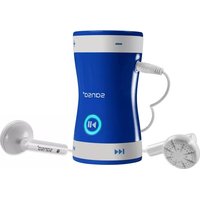
Sansa Clip Zip Sport - Mp3 player SANDISK - Free user manual and instructions
Find the device manual for free Sansa Clip Zip Sport SANDISK in PDF.



| Product Type | MP3 Player |
| Brand | SanDisk |
| Model | Sansa Clip Zip Sport |
| Power | Built-in rechargeable lithium-ion battery, USB charging |
| Battery Life | Up to 12 hours of music playback |
| Connectivity | USB 2.0 port (charging and data transfer) |
| Supported Audio Formats | MP3, WMA, WAV, Audible |
| Built-in Storage | 4 GB (base model) |
| Expandable Storage | microSD/microSDHC card up to 32 GB (not included) |
| Display | Color LCD screen (1.9 cm) |
| Dimensions | 52.8 x 33.5 x 12.5 mm |
| Weight | 25 grams |
| Main Functions | Music playback, FM radio, photo display, stopwatch, music folder |
| Control Buttons | Directional navigation, volume, play/pause, back, power |
| Audio Jack | 3.5 mm headphone jack |
| Care and Cleaning | Clean with a soft lint-free cloth, avoid moisture |
| Safety | Do not expose to water, do not use while driving, adhere to safe sound levels |
| Spare Parts | Earphones, USB cable (standard included) |
| Repairability | No user-serviceable parts; contact SanDisk support |
| General Information | 1-year manufacturer warranty, made in China, compatible with Windows and Mac |
Frequently Asked Questions - Sansa Clip Zip Sport SANDISK
User questions about Sansa Clip Zip Sport SANDISK
0 question about this device. Answer the ones you know or ask your own.
Ask a new question about this device
Download the instructions for your Mp3 player in PDF format for free! Find your manual Sansa Clip Zip Sport - SANDISK and take your electronic device back in hand. On this page are published all the documents necessary for the use of your device. Sansa Clip Zip Sport by SANDISK.
USER MANUAL Sansa Clip Zip Sport SANDISK
SanDisk®
Clip Sport
MP3 Player
Baladeur MP3
MP3-Player
Lettore MP3
Reproductor MP3
MP3-плеер
Quick Start Guide
Safety Instructions
Warranty
End-User Agreement
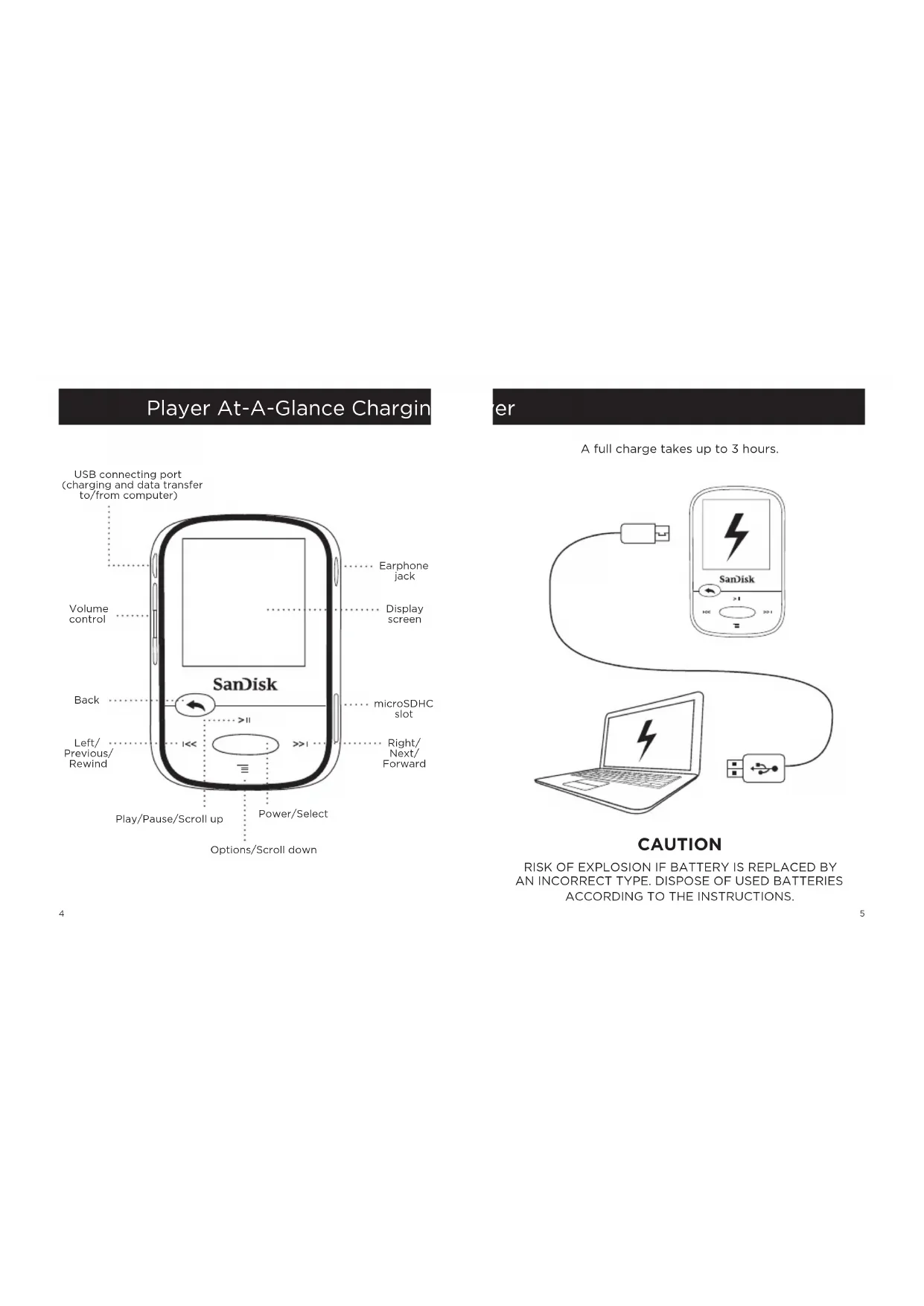
Player At-A-Glance Chargin
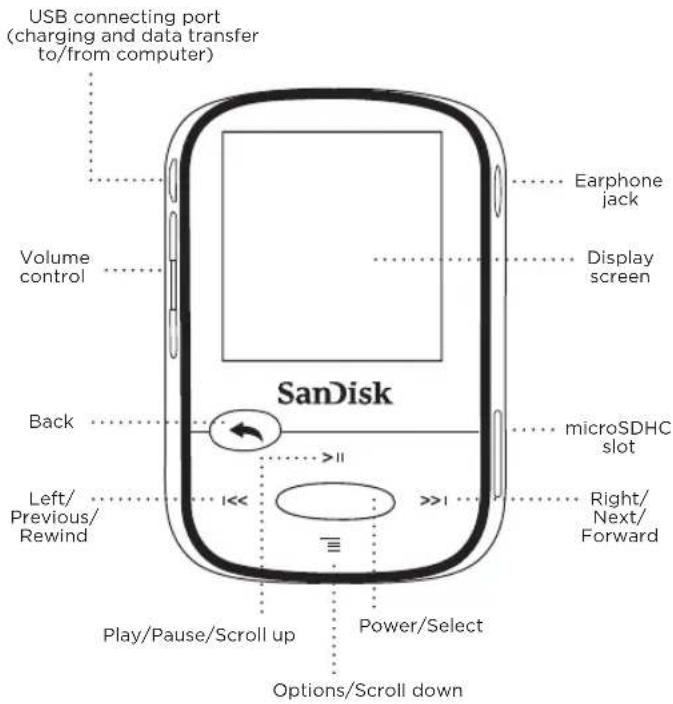
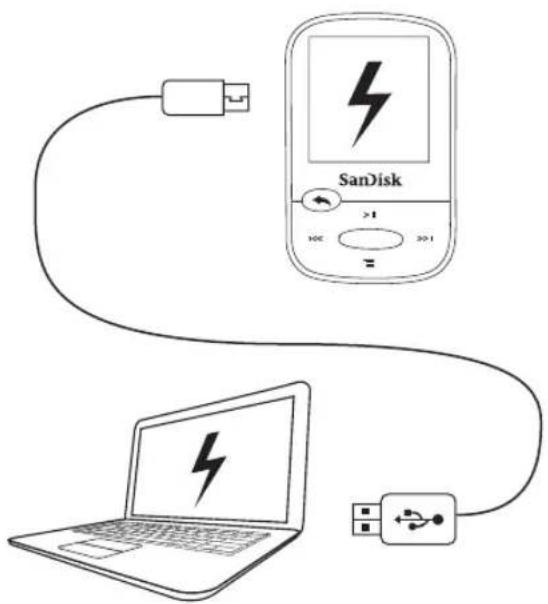
er
A full charge takes up to 3 hours.
CAUTION
RISK OF EXPLOSION IF BATTERY IS REPLACED BY AN INCORRECT TYPE. DISPOSE OF USED BATTERIES ACCORDING TO THE INSTRUCTIONS.
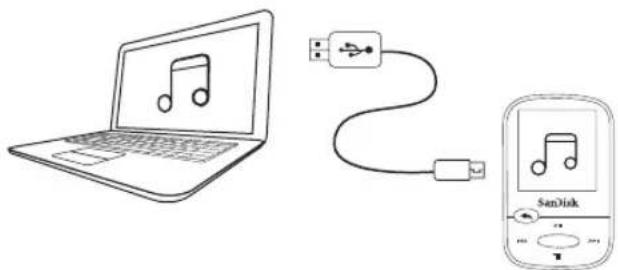
Downloading Files
Windows Users
- Connect player to PC using the USB connector.
- Open "My Computer" on your PC.
- Double click on the "Clip Sport" icon.
- Drag and drop files to the player's desired folder.
Mac Users
Visit the following link for step-by-step instructions:
http://kb.sandisk.com/
Enjoying Music
- Attach correct size earbud cups to earphones and connect to player.
- Press center button to turn on player.
- Press left or right buttons to scroll through options and select Music from the Main Menu by pressing the center button.
- Press top or bottom buttons to browse music options and press center button to select desired choice. (If needed, repeat step until songs are displayed.)
- Press top or bottom buttons to browse songs and press center button to play desired choice.
- Press left or right buttons to skip a song.
- Press top button to pause or restart a song.
- Press the Back button to return to the previous menu level.
Using a Memory Card
An optional microSD ™ or microSDHC ™ card* provides extra storage space.
Simply insert the card in the memory card slot on the side of the player.
Note: Your card content will show up under the CARD menu.
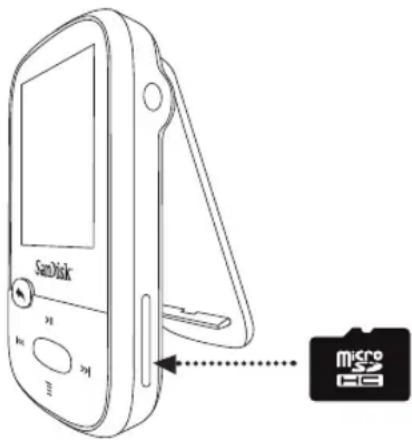
* Card not included; sold separately.
Tips and Troubleshooting
For best performance, download the latest firmware from:
http://kb.sandisk.com/clipsport
- Press and hold on/off button for 10 seconds to reset the device to unlock it from any temporary condition such as freezing or failing to connect to the computer.
- If the device fails to turn on, perform a reset (see step 2) and connect to the computer. Check the battery level and recharge if needed.
- If the device fails to be detected by the computer, verify that your computer meets the minimum system requirements.
- For support information or to learn more about player functions, visit:
http://kb.sandisk.com/clipsport
STOP!
IMPORTANT INFORMATION
YOU MUST READ THIS BEFORE
USING THE MP3 PLAYER
Safety Instructions
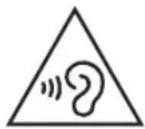
Your MP3 player is equipped with a variety of features. To help you maximize your listening pleasure, SanDisk would like to advise you that it is important to use the headphones with your MP3 player at a safe hearing level.
- Exposure or repeated exposure for an extended period of time to music and other sounds that are too loud can cause damage to your hearing resulting in temporary or even permanent “noise induced hearing loss”.
- Symptoms of hearing loss increase gradually with prolonged exposure at high levels of loudness.
- Initially, you may not even be aware of the loss unless detected with a hearing test.
- Your hearing may adapt to higher volumes of sound. In order to prevent any harmful impact to your hearing, you must control the sound emanating from your headphones and set the MP3 player's volume to a low setting where you can hear it clearly and comfortably.
• Studies, including one from NIDCD indicate that sounds of less than 80 decibels, even after long exposure, are unlikely to cause a hearing loss. - Listen to your MP3 player at such a level that you can still hear conversation and other people in your environment without shouting when you attempt to converse.
- It can also be dangerous to play your music with headphones/earphones at high volume while walking or engaged in other activities. You should exercise extreme caution and discontinue use in potentially hazardous situations.
- Do not use headphones or earphones while driving, cycling, or operating any motorized vehicle. This may create a traffic hazard and may be illegal in some areas.
HEARING LEVELS
To help you understand what may be considered a safe hearing level, the following examples are included for your reference:
Examples of Typical Sound Levels
Approximate Sound Level in Decibels (dB) *
Refrigerator humming 40
Normal conversation 60
City traffic 80
Motorcycles/lawnmowers 90**
Rock concerts 110-120**
Firearms 120-140**
* dB - A decibel (dB) is a unit of relative measurement of the strength sound wave. In decibels (dB), a measured signal level doubles with every additional 3 dB.
** These sound decibel levels are considered harmful under extended exposure. The above information is courtesy of the National Institute of Deafness and Other Communication Disorders (NIDCD): www.nidcd.nih.gov/health/hearing/noise.asp
DISPOSAL INSTRUCTIONS
Do not dispose of this device with unsorted waste. Improper disposal may be harmful to the environment and human health. Please refer to your local waste authority for information on return and collection systems in your area.
READ THE FOLLOWING ADDITIONAL SAFETY GUIDELINES CAREFULLY BEFORE USING YOUR MP3 player:
- Keep your MP3 player away from sinks, bathtubs, showers, drinks, rain, and other sources of moisture. Moisture can cause electric shocks with any electronic device.
- Clean your MP3 with a soft, lint-free cloth used on glass lenses
- Do not allow young children to use your MP3 player unsupervised.
- Never force any connector into the ports of your MP3 player or your computer. Ensure that your connectors are the identical shape and size before you connect.
- Do not disassemble, crush, short circuit, or incinerate the battery as it may cause fire, injury, burns, or other hazards.
NOTE: FOR HOME AND PERSONAL USE
This product is intended to be used for recording and playback for your home and personal enjoyment. Copying and commercial use of copyrighted material without permission of the copyright owner may be prohibited by law. Use of your MP3 player, in compliance with all copyright and applicable intellectual property laws, is the responsibility of the user of the product.
THIRD PARTY INTELLECTUAL PROPERTY NOTICE
This product is protected by certain intellectual property rights of Microsoft Corporation. Use or distribution of such technology outside of this product is prohibited without a license from Microsoft or an authorized Microsoft subsidiary. Content providers are using the digital rights management technology for Windows Media contained in this device ("WM-DRM") to protect the integrity of their content ("Secure Content") so that their intellectual property, including copyright, in such content is not misappropriated. This device uses WM-DRM software to play Secure Content ("WM-DRM Software"). If the security of the WM-DRM Software in this device has been compromised, owners of Secure Content ("Secure Content Owners") may request that Microsoft revoke the WM-DRM Software's rights to acquire new licenses to copy, display and/or play Secure Content. Revocation does not alter the WM-DRM Software's ability to play unprotected content. A list of revoked WM-DRM Software is sent to your device whenever you download a license for Secure Content from the Internet or from a PC. Microsoft, may, in conjunction with such license, also download revocation lists onto your device on behalf of Secure Content Owners.
THIS PRODUCT IS LICENSED UNDER THE MPEG-4 VISUAL PATENT PORTFOLIO LICENSE FOR THE PERSONAL AND ON-COMMERCIAL USE OF A CONSUMER FOR (i) ENCODING VIDEO IN COMPLIANCE WITH THE MPEG-4 VISUAL STANDARD ("MPEG-4 VIDEO") AND/OR (ii) DECODING MPEG-4 VIDEO THAT WAS ENCODED BY A CONSUMER ENGAGED IN A PERSONAL AND NON COMMERCIAL ACTIVITY AND/OR WAS OBTAINED FROM A VIDEO PROVIDER LICENSED BY MPEG LA TO PROVIDE MPEG-4 VIDEO. NO LICENSE IS GRANTED OR SHALL BE IMPLIED FOR ANY OTHER USE. ADDITIONAL INFORMATION INCLUDING THAT RELATING TO PROMOTIONAL, INTERNAL AND COMMERCIAL USES AND LICENSING MAY BE OBTAINED FROM MPEGLA, LLC. SEE HTTP://WWW.MPEGLA.COM.
MPEG Layer-3 audio coding technology licensed from Fraunhofer IIS and Thompson.
Online User Manual and End-User License Agreement
Please go to www.sandisk.com/support to retrieve your online User Manual and End User License Agreement.
SanDisk Manufacturer's Retail Products Warranty
SanDisk warrants to the end user, that this product, excluding content and or software supplied with or on the product, will be free from material defects in manufacture, will conform to SanDisk's published product specifications and be fit for normal use during the Warranty Period specified in the table commencing on the date of purchase provided that the product is legally placed on the market. To make a warranty claim please contact SanDisk at 1-866 SanDisk or support@SanDisk.com within the Warranty Period and provide proof of purchase (showing date and place of purchase and name of the reseller) and product name, type and number. You may return the product after first obtaining a Return Material Authorization number and following any other guidelines listed. For further Information, see www.sandisk.com and select "support".
SanDisk may at its option repair this product or provide you with an equivalent product; and if unable to repair or replace the product, will refund the purchase price. SanDisk will not be liable for indirect or consequential damage (including loss of data), or for damage caused by improper use (including use in an incompatible device and use not in accordance with the instructions), or by improper installation, unprofessional repair, modification or accident. This constitutes SanDisk's entire liability which will never exceed the price you paid for it, plus the necessary costs you made for the warranty claim. SanDisk products must not be used in applications where failure could threaten injury or life, such as life support systems. SANDISK DISCLAIMS ALL EXPRESS AND IMPLIED WARRANTIES TO THE FULLEST EXTENT PERMITTED BY LAW. IF SANDISK CANNOT DISCLAIM IMPLIED WARRANTIES UNDER APPLICABLE LAW, THEN TO THE EXTENT POSSIBLE, SUCH IMPLIED WARRANTIES ARE LIMITED TO THE DURATION OF THE EXPRESS WARRANTY. THE WARRANTY DURATION ON ANY REPLACED PRODUCT WILL BE THAT PORTION OF THE WARRANTY PERIOD REMAINING ON YOUR ORIGINAL PRODUCT.
National, state and local laws may grant you other rights that are not affected by this warranty.
SanDisk is a trademark of SanDisk Corporation, registered in the United States and other countries. microSD and microSDHC marks and logos are trademarks of SD-3C, LLC. All other trademarks are the property of their respective owners.
© 2014 SanDisk Corporation. All rights reserved. Made in China.
End-User License Agreement
http://mp3support.sandisk.com/smm/en-smm-eula.pdf
FCC REGULATION
This device complies with part 15 of the FCC Rules. Operation is subject to the following two conditions:
- This device may not cause harmful interference, and
- This device must accept any interference received, including interference that may cause undesired operation.
This equipment has been tested and found to comply with the limits for a Class B digital device, pursuant to Part 15 of the FCC Rules. These limits are designed to provide reasonable protection against harmful interference in a residential installation. This equipment generates, uses, and can radiate radio frequency energy and, if not installed and used in accordance with the instructions, may cause harmful interference to radio communications. However, there is no guarantee that interference will not occur in a particular installation. If this equipment does cause interference to radio or television reception, which can be determined by turning the equipment off and then on, the user is encouraged to try to correct the interference by one or more of the following measures: - Increase the separation between the equipment and receiver.
- Correct the equipment to a different outlet so that the equipment and receiver are on different branch circuits.
- Consult the dealer or an experienced radio / TV technician for help.
Français
- SANDISK®
- CLIP SPORT
- PLAYER AT-A-GLANCE CHARGIN
- ER
- CAUTION
- DOWNLOADING FILES
- WINDOWS USERS
- MAC USERS
- ENJOYING MUSIC
- USING A MEMORY CARD
- TIPS AND TROUBLESHOOTING
- STOP
- IMPORTANT INFORMATION
- YOU MUST READ THIS BEFORE
- USING THE MP3 PLAYER
- SAFETY INSTRUCTIONS
- HEARING LEVELS
- DISPOSAL INSTRUCTIONS
- READ THE FOLLOWING ADDITIONAL SAFETY GUIDELINES CAREFULLY BEFORE USING YOUR MP3 PLAYER
- NOTE: FOR HOME AND PERSONAL USE
- THIRD PARTY INTELLECTUAL PROPERTY NOTICE
- ONLINE USER MANUAL AND END-USER LICENSE AGREEMENT
- SANDISK MANUFACTURER'S RETAIL PRODUCTS WARRANTY
- END-USER LICENSE AGREEMENT
- FCC REGULATION
- FRANÇAIS
Brand : SANDISK
Model : Sansa Clip Zip Sport
Category : Mp3 player