332928 - Vacuum Cleaner PRINCESS - Free user manual and instructions
Find the device manual for free 332928 PRINCESS in PDF.



| Brand | Princess |
| Model | 332928 |
| Product type | Vacuum cleaner with bag |
| Usage | Indoor, domestic, dry substances |
| Suction power | Adjustable via speed control (button 3) |
| Airflow adjustment | Airflow control button (11) on the hose |
| Bag full indicator | Indicator light (4) |
| Tube length | Telescopic, adjustable via locking button (20) |
| Surface selector | Suction nozzle with selector (13) for hard floors/carpets |
| Included accessories | Crevice tool, upholstery tool, parquet floor tool |
| Accessory storage | Storage compartment (22) |
| Cord rewinding | Automatic with button (2) |
| Motor filter | Cleanable (do not rinse), regular replacement |
| Exhaust filter | Cleanable (do not rinse), regular replacement |
| Dust bag | Replacement available via service center |
| Maintenance | Clean ventilation slots, check for damage |
| Safety | Do not vacuum liquids, flammable materials; unplug before maintenance |
| Storage | Dry place, out of reach of children |
| Repairability | Parts replaced by manufacturer or authorized repairer |
| General information | Instructions available in multiple languages; model subject to changes |
Frequently Asked Questions - 332928 PRINCESS
User questions about 332928 PRINCESS
0 question about this device. Answer the ones you know or ask your own.
Ask a new question about this device
Download the instructions for your Vacuum Cleaner in PDF format for free! Find your manual 332928 - PRINCESS and take your electronic device back in hand. On this page are published all the documents necessary for the use of your device. 332928 by PRINCESS.
USER MANUAL 332928 PRINCESS
natural_image
Line drawing of a vacuum cleaner with attached tubing (no text or symbols)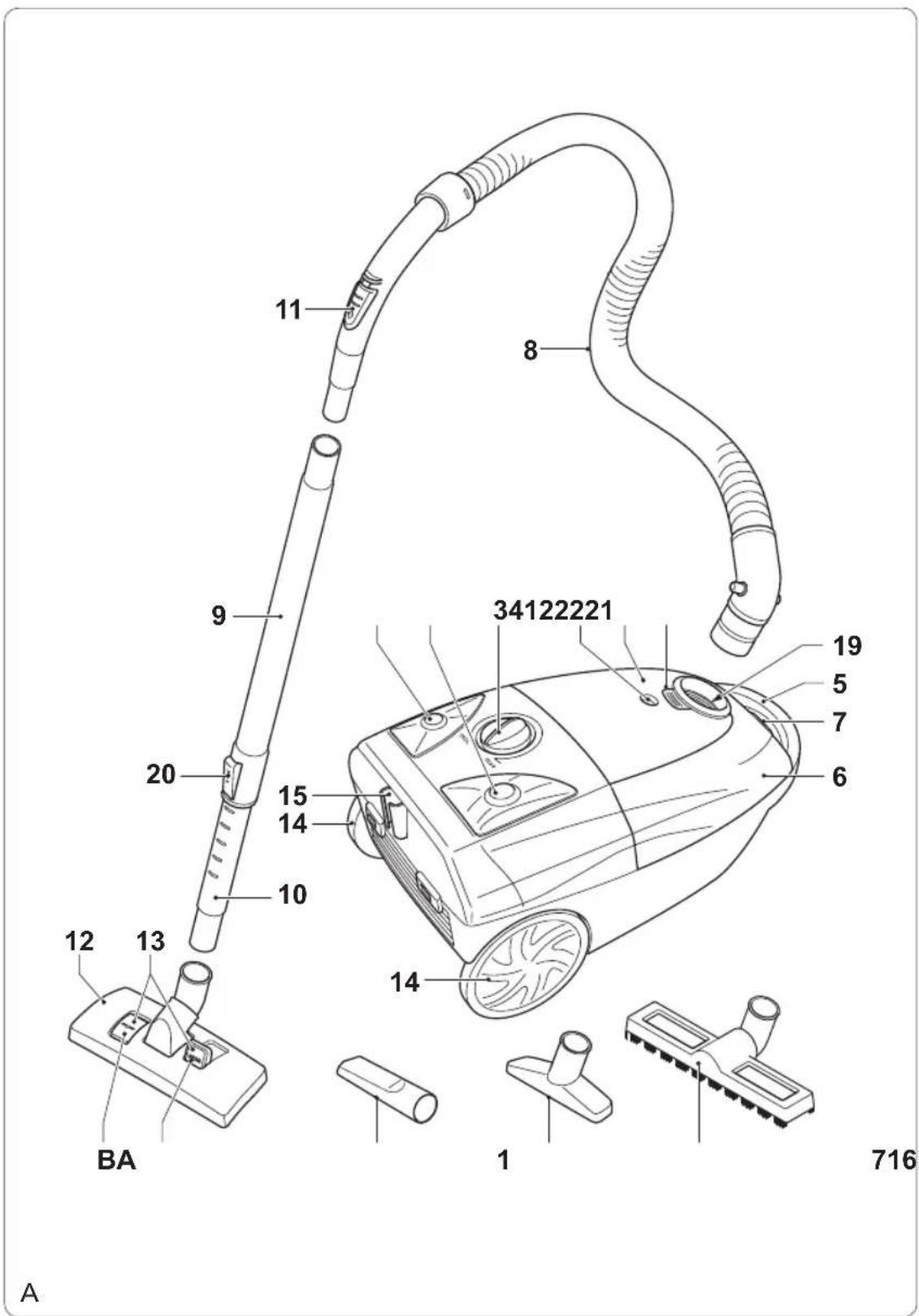

Gefeliciteerd!
You have purchased a Princess product. Our aim is to provide quality products with a tasteful design and at an affordable price. We hope that you will enjoy this product for many years.
Description (fig. A)
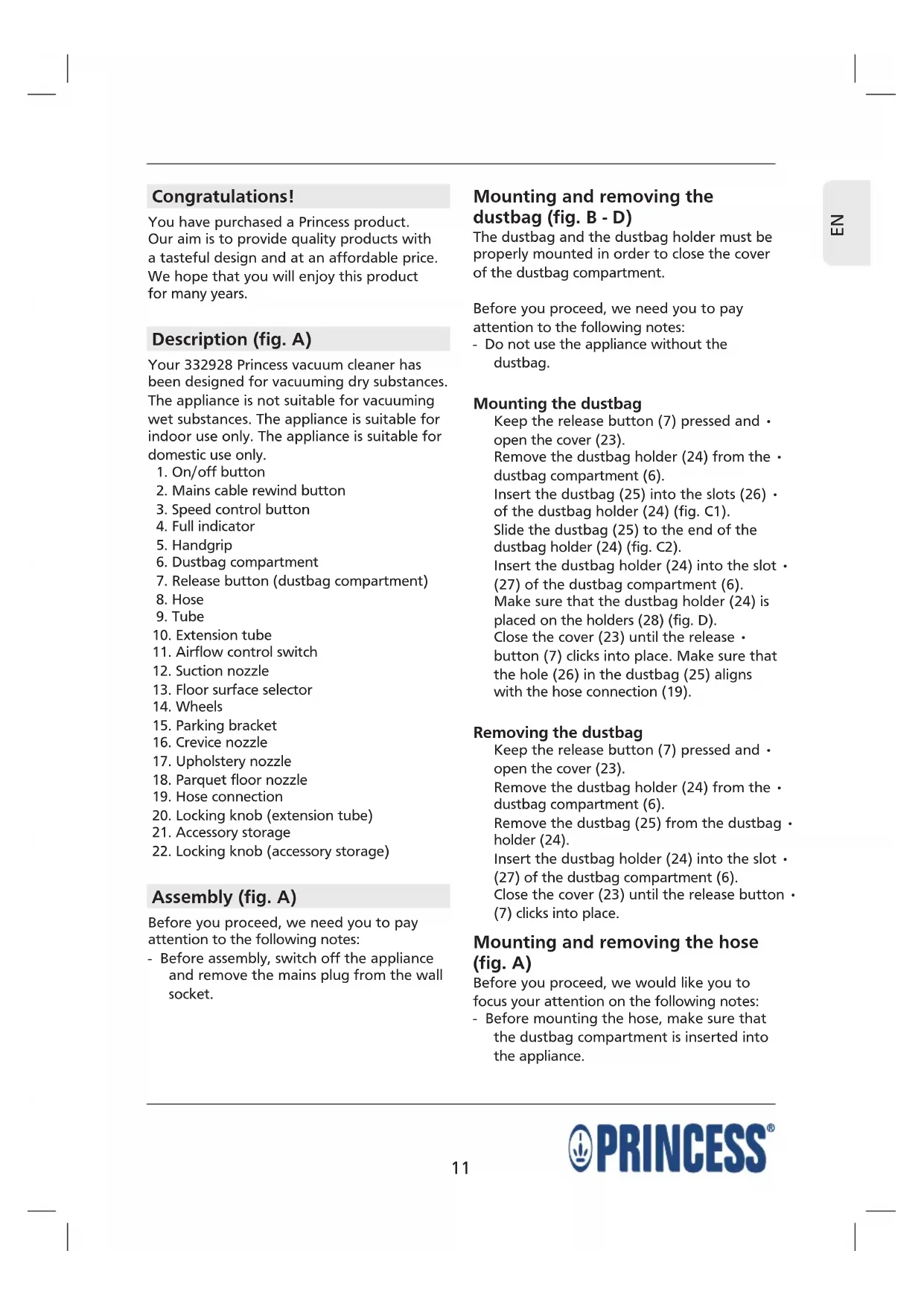
Your 332928 Princess vacuum cleaner has been designed for vacuuming dry substances. The appliance is not suitable for vacuuming wet substances. The appliance is suitable for indoor use only. The appliance is suitable for domestic use only.
- On/off button
- Mains cable rewind button
- Speed control button
- Full indicator
- Handgrip
- Dustbag compartment
- Release button (dustbag compartment)
- Hose
- Tube
- Extension tube
- Airflow control switch
- Suction nozzle
- Floor surface selector
- Wheels
- Parking bracket
- Crevice nozzle
- Upholstery nozzle
- Parquet floor nozzle
- Hose connection
- Locking knob (extension tube)
- Accessory storage
- Locking knob (accessory storage)
Assembly (fig. A)
Before you proceed, we need you to pay attention to the following notes:
- Before assembly, switch off the appliance and remove the mains plug from the wall socket.
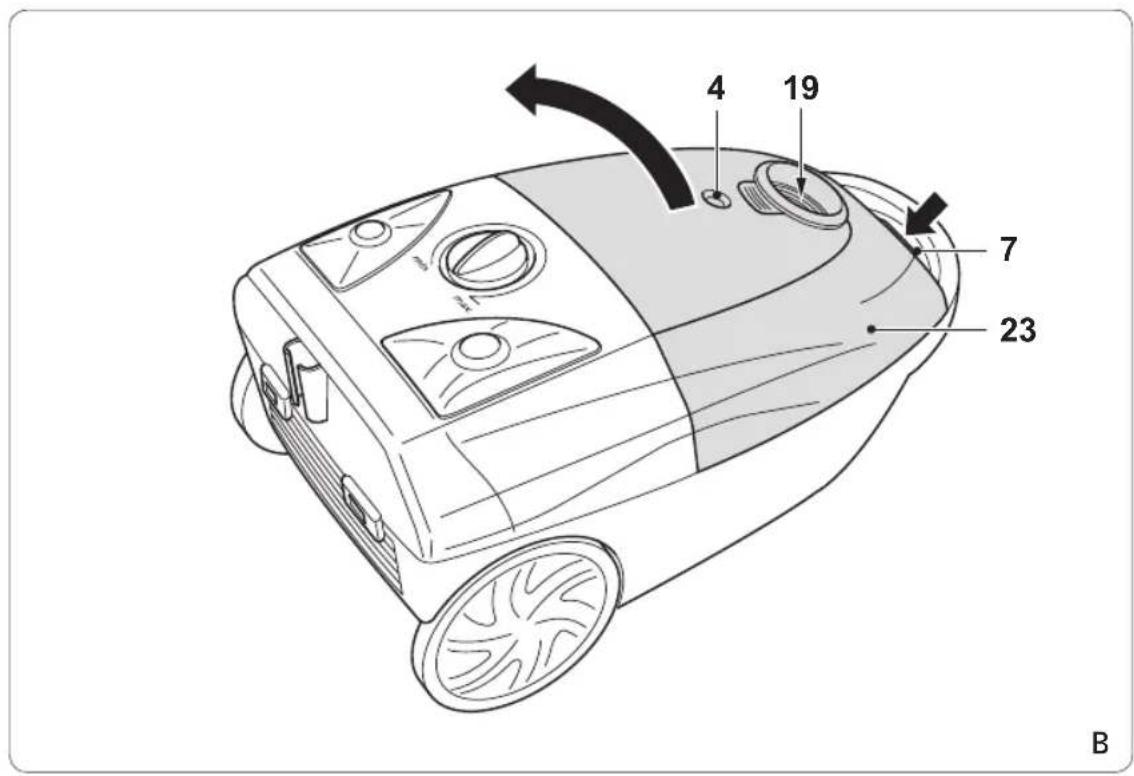
Mounting and removing the dustbag (fig. B - D)
The dustbag and the dustbag holder must be properly mounted in order to close the cover of the dustbag compartment.
Before you proceed, we need you to pay attention to the following notes:
- Do not use the appliance without the dustbag.
Mounting the dustbag
Keep the release button (7) pressed and open the cover (23).
Remove the dustbag holder (24) from the • dustbag compartment (6).
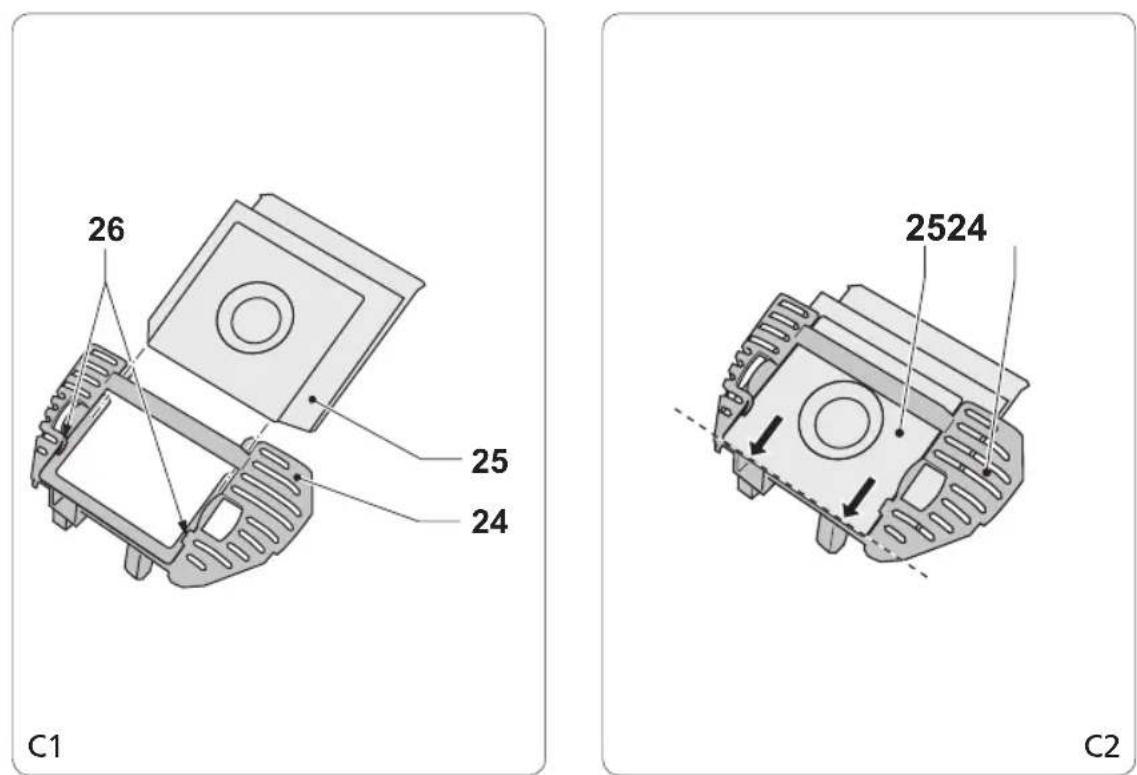
Insert the dustbag (25) into the slots (26) of the dustbag holder (24) (fig. C1).
Slide the dustbag (25) to the end of the dustbag holder (24) (fig. C2).
Insert the dustbag holder (24) into the slot • (27) of the dustbag compartment (6).
Make sure that the dustbag holder (24) is placed on the holders (28) (fig. D).
Close the cover (23) until the release • button (7) clicks into place. Make sure that the hole (26) in the dustbag (25) aligns with the hose connection (19).
Removing the dustbag
Keep the release button (7) pressed and open the cover (23).
Remove the dustbag holder (24) from the • dustbag compartment (6).
Remove the dustbag (25) from the dustbag · holder (24).
Insert the dustbag holder (24) into the slot • (27) of the dustbag compartment (6).
Close the cover (23) until the release button • (7) clicks into place.
Mounting and removing the hose (fig. A)
Before you proceed, we would like you to focus your attention on the following notes:
- Before mounting the hose, make sure that the dustbag compartment is inserted into the appliance.
To mount the hose (8), insert the hose • outlet into the hose connection (19) until the release buttons click into place.
To remove the hose (8), keep the release · buttons pressed and pull the hose outlet from the hose connection (19).
Mounting and removing the tube (fig. A)
To mount the tube, insert the hose (8) into the tube (9).
To remove the tube, pull the hose (8) from the tube (9).
Mounting and removing the accessories (fig. A)
Mounting and removing the suction nozzle (fig. A)
The suction nozzle (12) can be mounted to the extension tube (10).
To mount the suction nozzle, insert the • extension tube (10) into the suction nozzle (12).
To remove the suction nozzle, pull the • extension tube (10) from the suction nozzle (12).
Mounting and removing the crevice nozzle (fig. A)
The crevice nozzle (16) can be used for vacuuming in narrow and hard-to-reach places. The crevice nozzle (16) can be mounted to the hose (8) or to the extension tube (10).
To mount the crevice nozzle to the hose, insert the hose (8) into the crevice nozzle (16).
To mount the crevice nozzle to the • extension tube, insert the extension tube (10) into the crevice nozzle (16).
To remove the crevice nozzle, pull the crevice nozzle (16) from the hose (8) or the extension tube (10).
Mounting and removing the upholstery nozzle (fig. A)
The upholstery nozzle (17) can be used for vacuuming upholstery, curtains and other items made of fabric. The upholstery nozzle (17) can be mounted to the hose (8) or to the extension tube (10).
To mount the upholstery nozzle to the • hose, insert the hose (8) into the upholstery nozzle (17).
To mount the upholstery nozzle to the • extension tube, insert the extension tube (10) into the upholstery nozzle (17).
To remove the upholstery nozzle, pull the • upholstery nozzle (17) from the hose (8) or the extension tube (10).
Mounting and removing the parquet floor nozzle (fig. A)
The parquet floor nozzle (18) can be used for vacuuming on wooden and polished surfaces. The parquet floor nozzle (18) can be mounted to the hose (8) or to the extension tube (10).
To mount the parquet floor nozzle to the hose, insert the hose (8) into the parquet floor nozzle (18).
To mount the parquet floor nozzle to the extension tube, insert the extension tube (10) into the parquet floor nozzle (18).
To remove the parquet floor nozzle, pull the parquet floor nozzle (18) from the hose (8) or the extension tube (10).
Use
Unwinding and rewinding the mains cable (fig. A)
The mains cable rewind button (2) can be operated by hand or foot.
Before you proceed, we would like you to focus your attention on the following notes:
- Do not unwind or rewind the mains cable while the appliance is switched on.
- Always hold the mains plug to unwind the mains cable. Never pull the mains cable.
Before use, hold the mains plug and • unwind a sufficient length of the mains cable from the back of the appliance.
After use, press the mains cable rewind · button (2) to rewind the mains cable back into the appliance. Manually guide the mains cable to make sure that it does not swing back. Make sure that the mains plug is correctly located.
Adjusting the length of the tube (fig. A)
Keep the locking knob (20) pressed and slide the extension tube (8) to the required position.
Release the locking knob (20).
Adjusting the suction nozzle (fig. A)
The floor surface selector can be set to adjust the suction nozzle to the required floor surface. The floor surface selector can be operated by hand or foot.
For vacuuming on laminates, tiles, etc., press the corresponding part (A) of the floor surface selector (13).
For vacuuming on carpets, press the corresponding part (B) of the floor surface selector (13).
Switching on and off (fig. A)
The on/off button can be operated by hand or foot.
To switch on the appliance, press the • on/off button (1).
To switch off the appliance, press the • on/off button (1) again.
Adjusting the suction force (fig. A)
The speed control button can be used to adjust the suction force.
Set the speed control button (3) to the required position:
- For vacuuming on hard surfaces (e.g. floors), set a high suction force.
- For vacuuming on soft surfaces (e.g. upholstery), set a low suction force.
Adjusting the airflow (fig. A)
The airflow can be adjusted using the airflow control switch.
To adjust the airflow, set the airflow control switch (11) to the required position.
Cleaning and maintenance
Before you proceed, we need you to pay attention to the following notes:
- Before cleaning or maintenance, remove the mains plug from the wall socket and wait until the appliance has cooled down.
- Do not immerse the appliance in water or any other liquids for cleaning.
Before you proceed, we would like you to focus your attention on the following notes:
- Do not use aggressive or abrasive cleaning agents to clean the appliance.
- Do not use sharp objects to clean the appliance.
Regularly check the appliance for possible damage.
Regularly clean the ventilation slots using a soft brush.
- Store the appliance in a dry place, out of the reach of children.
Replacing the dustbag (fig. B - D)
The dustbag (25) must be replaced when the bag-full indicator (4) comes on. Replacement dustbags are available from our service station. If you have questions regarding the dustbag, contact the service station.
- To remove the full dustbag (25), refer to the section "Mounting and removing the dustbag".
- To mount the empty dustbag (25), refer to the section "Mounting and removing the dustbag".
Cleaning and replacing the motor filter (fig. B - E)
Before you proceed, we would like you to focus your attention on the following notes:
- Do not wash or rinse the motor filter.
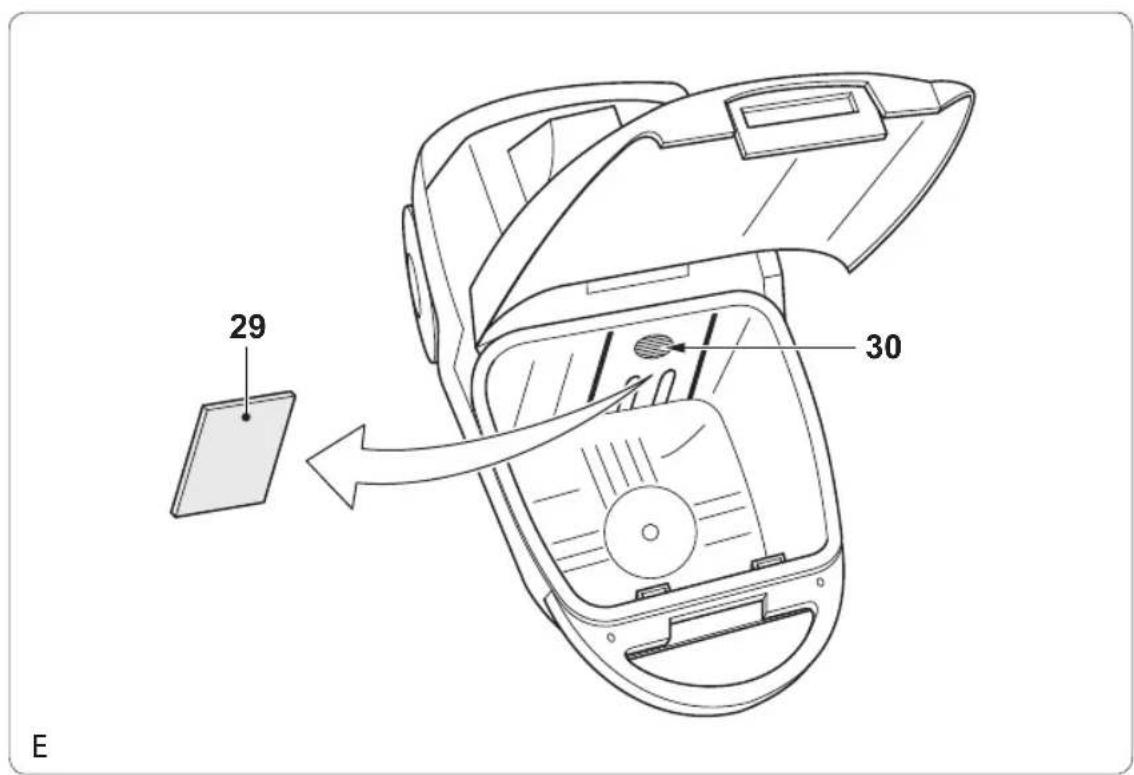
The motor filter (29) reduces the amount of dust entering the motor unit to a minimum. The motor filter must be cleaned regularly. The motor filter must be replaced after several months or whenever worn or damaged.
Replacement motor filters are available from our service station.
Keep the release button (7) pressed and open the cover (23).
If necessary, remove the dustbag (25).
Refer to the section "Mounting and removing the dustbag".
Remove the filter (29) from the filter · holder (30).
Remove the dust from the filter using a soft brush. If the filter is worn, use a new filter. Insert the filter (29) into the filter holder (30).
If necessary, mount the dustbag (25). Refer to the section "Mounting and removing the dustbag".
Close the cover (23) until the release • button (7) clicks into place.
Cleaning and replacing the outlet filter (fig. F)
Before you proceed, we would like you to focus your attention on the following notes:
- Do not wash or rinse the outlet filter.
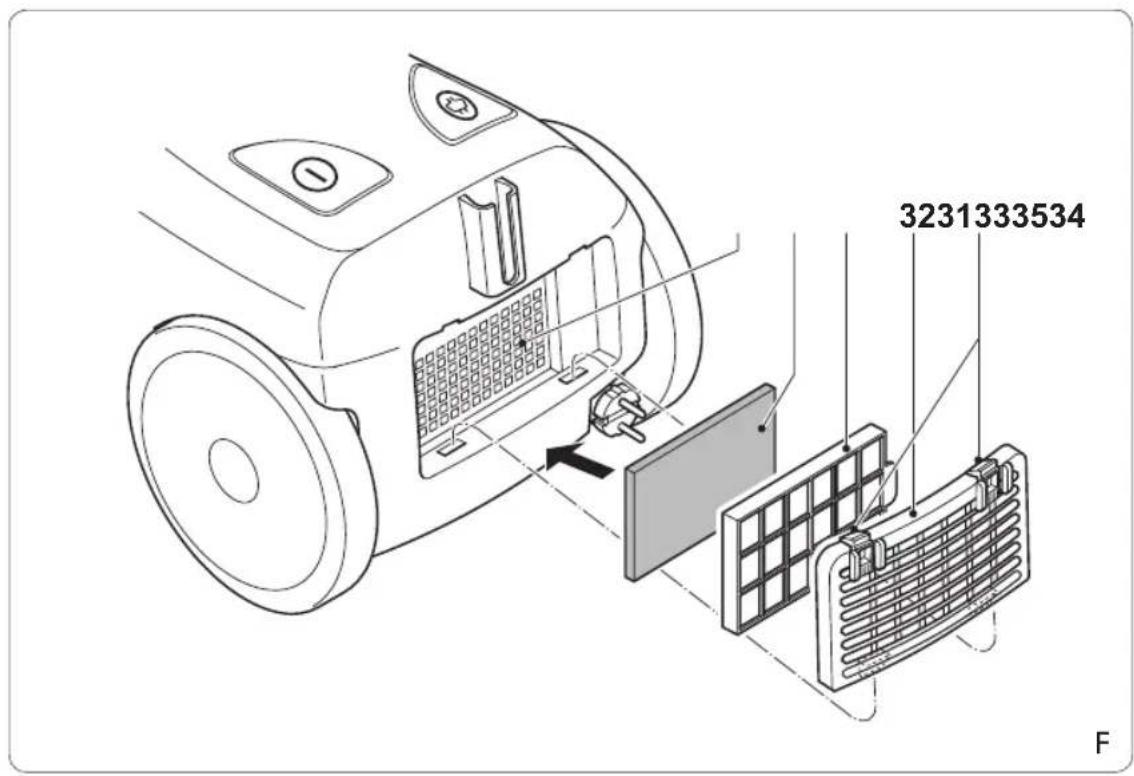
The outlet filter (33) reduces the amount of dust entering the motor unit to a minimum.
The outlet filter must be cleaned regularly.
The outlet filter must be replaced after several months or whenever worn or damaged.
Replacement outlet filters are available from our service station.
Press the tabs (31) and remove the cover • (32).
Remove the wind outlet filter (33).
Remove the outlet filter (34) from the filter • holder (35).
Remove the dust from the filter using • a soft brush. If the filter is worn, use a new filter.
Insert the outlet filter (34) into the filter · holder (35).
Place the wind outlet filter (33).
Mount the cover (32) until the tabs (31) click into place.
Storage (fig. A)
The accessories can be stored in the accessory storage.
Keep the locking knob (21) pressed and open • the cover for the accessory storage (22).
- Put the accessories into the accessory storage (22).
- Close the cover.
Safety instructions
General safety
- Read the manual carefully before use. Keep the manual for future reference.
- Only use the appliance and the accessories for their intended purposes. Do not use the appliance and the accessories for other purposes than described in the manual.
- Do not use the appliance if any part or any accessory is damaged or defective. If a part or an accessory is damaged or defective, it must be replaced by the manufacturer or an authorised repair agent.
• Children should be supervised to ensure that they do not play with the appliance. - The use of this appliance by children or persons with a physical, sensory, mental or motorial disability, or lack of experience and knowledge can give cause to hazards. Persons responsible for their safety should give explicit instructions or supervise the use of the appliance.
- Do not use the appliance near bathtubs, showers, basins or other vessels containing water.
- Do not immerse the appliance in water or other liquids. If the appliance is immersed in water or other liquids, do not remove the appliance with your hands. Immediately remove the mains plug from the wall socket. If the appliance is immersed in water or other liquids, do not use the appliance again.
Electrical safety
Before use, always check that the mains voltage is the same as the voltage on the rating plate of the appliance.
- The appliance is not intended to be operated by means of an external timer or separate remote-control system.
Make sure that water cannot enter the contact plugs of the mains cable.
Always fully unwind the mains cable.
Make sure that the mains cable does not • hang over the edge of a worktop and cannot be caught accidentally or tripped over.
Keep the mains cable away from heat, oil and sharp edges.
Do not use the appliance if the mains cable or the mains plug is damaged or defective.
If the mains cable or the mains plug is damaged or defective, it must be replaced by the manufacturer or an authorised repair agent.
Do not pull the mains cable to disconnect • the mains plug from the mains.
Disconnect the mains plug from the mains • when the appliance is not in use, before assembly or disassembly and before cleaning and maintenance.
Safety instructions for vacuum cleaners
Do not use the appliance outdoors.
Do not use the appliance without the • dustbag compartment.
Do not use the appliance without the motor filter. Do not use the appliance without the outlet filter.
Do not use the appliance to vacuum liquids.
Do not use the appliance to vacuum • flammable materials.
Only hold the appliance by the handgrip.
Keep the motor unit away from your eyes • and face.
Always work from bottom up when using the appliance on stairs.
Store the appliance in a dry place when • not in use. Make sure that children do not have access to stored appliances.
U.K. Wiring instructions
The wires in the mains lead are coloured in accordance with the following code:
BLUE
NEUTRAL
BROWN
LIVE
As the colours of the wire in the mains lead of this appliance may not correspond with the colour markings identifying the terminals on your plug, proceed as follows:
The wire which is coloured BLUE must be connected to the terminal which is marked with the letter N or coloured black.
The wire which is coloured BROWN must be connected to the terminal which is marked with the letter L or coloured red.
If a 13Amp (BS1363) plug is used, a 13Amp (BS1362) fuse must be fitted, or if any other type of plug is used, a 13Amp fuse must be fitted, either in the plug or adaptor, or on the distribution board.
This is a double-insulated appliance and does not need an earth connection.
Warning! On no account should either the live or neutral wires be connected to the earth terminal.
Disclaimer
- Subject to change; specifications can be changed without further notice.
Félicitations!

- Gefeliciteerd!
- Description (fig. A)
- Assembly (fig. A)
- Mounting and removing the dustbag (fig. B - D)
- Mounting the dustbag
- Removing the dustbag
- Mounting and removing the hose (fig. A)
- Mounting and removing the tube (fig. A)
- Mounting and removing the accessories (fig. A)
- Mounting and removing the suction nozzle (fig. A)
- Mounting and removing the crevice nozzle (fig. A)
- Mounting and removing the upholstery nozzle (fig. A)
- Mounting and removing the parquet floor nozzle (fig. A)
- Use
- Unwinding and rewinding the mains cable (fig. A)
- Adjusting the length of the tube (fig. A)
- Adjusting the suction nozzle (fig. A)
- Switching on and off (fig. A)
- Adjusting the suction force (fig. A)
- Adjusting the airflow (fig. A)
- Cleaning and maintenance
- Replacing the dustbag (fig. B - D)
- Cleaning and replacing the motor filter (fig. B - E)
- Cleaning and replacing the outlet filter (fig. F)
- Storage (fig. A)
- Safety instructions
- General safety
- Electrical safety
- Safety instructions for vacuum cleaners
- U.K. Wiring instructions
- Disclaimer
- Félicitations!
Brand : PRINCESS
Model : 332928
Category : Vacuum Cleaner