Aeris 126T - Phone SWISSVOICE - Free user manual and instructions
Find the device manual for free Aeris 126T SWISSVOICE in PDF.



User questions about Aeris 126T SWISSVOICE
0 question about this device. Answer the ones you know or ask your own.
Ask a new question about this device
Download the instructions for your Phone in PDF format for free! Find your manual Aeris 126T - SWISSVOICE and take your electronic device back in hand. On this page are published all the documents necessary for the use of your device. Aeris 126T by SWISSVOICE.
USER MANUAL Aeris 126T SWISSVOICE
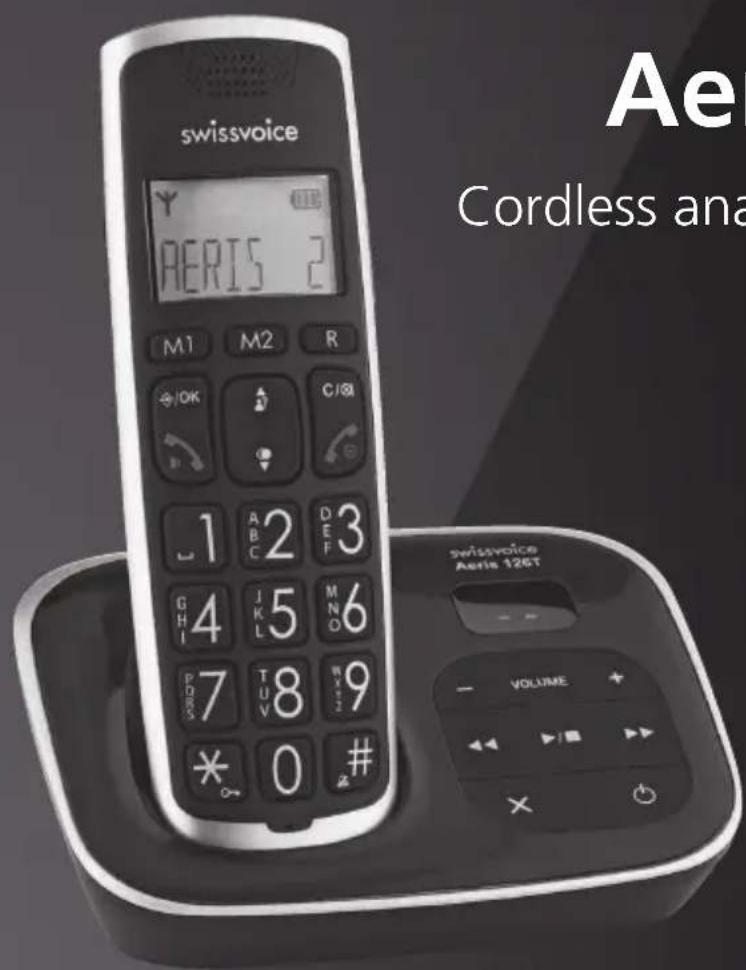
Cordless analogue telephone (DECT)
Bedienungsanleitung
Mode d'emploi
Swissvoice Service Center
Im Frauental 14
92224 Amberg.
Multi Handset Low Radiation Mode
Welcome to Swissvoice
The Aeris 126/126T is a cordless telephone designed for connection to an analog telephone network.
International DECT (GAP)-standard digital technology offers excellent voice quality.
You can register up to 5 handsets to your base and make internal calls free of charge.
The Aeris 126T comes with a built-in digital answer machine.
Please read these operating instructions carefully to familiarise yourself with and take full advantage of the benefits of your new Aeris 126/126T.
Swissvoice fulleco
Your Aeris 126/126T is fitted with the latest innovations in terms of reduction of electromagnetic radiation (so called "electro-smog") as well as electrical power consumption reduction.
The Swissvoice includes three main features:
Multi Handset Low Radiation Mode (ECO Mode)
When in standby, the electromagnetic radiation is automatically shut down between the base station and the handset(s). This works with one ore more handsets declared to the base station. The handset(s) and the base station are waiting for a wake-up signal should a call come in, when you activate one handset or when the system synchronises some data.
In other terms, electromagnetic radiation is generated only when the system is in use!
Radiation reduction in communication
65% radiation reduction of the handset is achieved when it is near the base station. The handset's power transmission are regulated; the power transmitted from the handset is automatically reduced to the lower level, depending on the distance to the base station.
Electrical consumption reduction
The efficiency of the switching power supply reduces the electrical consumption of the telephone.
Combined with the Radiation Reduction and Multi Handset Low Radiation Mode it contributes to save energy and costs.
Contents
Keys 89
Display symbols 91
Range / Location 91
Battery advice 92
Connecting the phone 93
Insert the batteries 93
Set language 94
Set Date and time 94
Telephoning 95
Accepting a call 95
Set speaker/LOUDspeaker volume 95
Audio boost 95
Switch handset on/off 96
Redial 96
Mute the handset microphone 96
Keypad lock 97
97
Contacts (phonebook) 97
Calls list (CID book) 99
Voicebox (network answering machine) 100
Extending the Aeris 126/126T 100
Telephoning with several call partners 101
Setting an alarm 102
Handset settings 103
Base station settings 104
Reset to default 104
Answer machine (Aeris 126T only) 105
Remote access the answer machine from an external telephone 109
Appendix 111
Keys
Handset
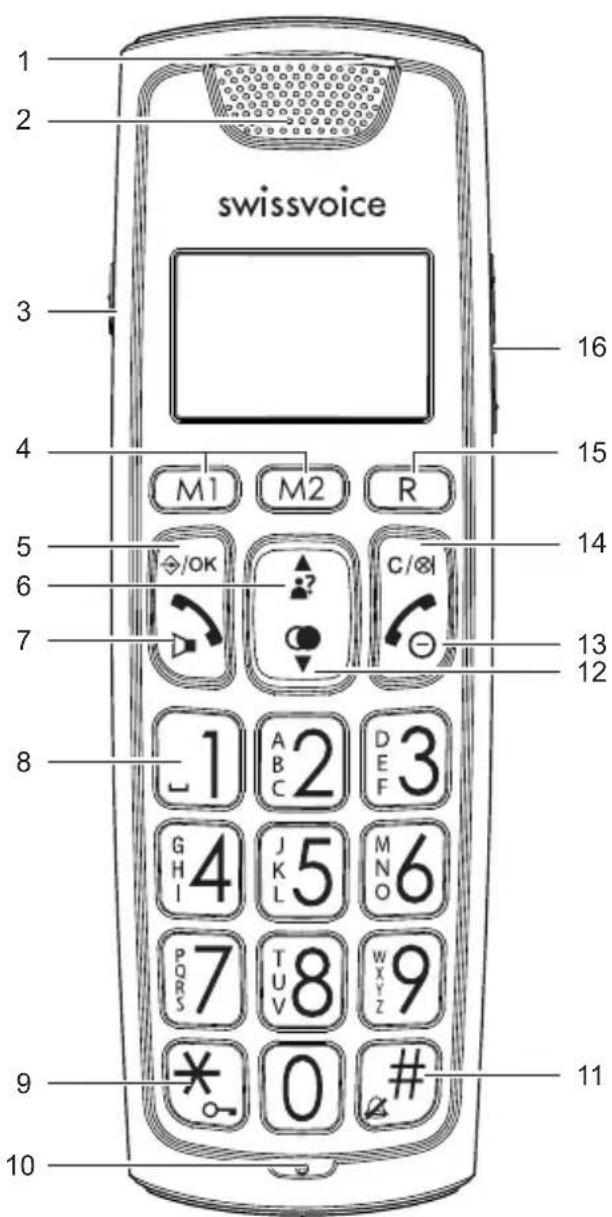
1 LED: Lights up constantly, when audio boost is activated, flashes for incoming calls
2 Receiver
3 Audio boost: Activate/deactivate audio boost during a conversation
4 Direct memory keys
5 Menu key, OK
6 Open calls list / Scroll up in a list or menu
7 Talk key/Loudspeaker key, handsfree speaking
8 Insert a space / Press and hold down for direct access to network answer machine messages
9 Star key / In standby: Long press to activate/deactivate the keypad lock.
10 Microphone
11 Hash key / In standby: Long press to switch handset ringer on/off / In calls list or radial list: show the hidden characters of a truncated number
12 Open radial list / Scroll down in a list or menu
13 End call key / Press and hold down to switch the handset off Press briefly to reactivate the handset.
14 Internal call / Delete characters / Mute handset microphone
15 R key with flash function
16 Adjust volume during conversation
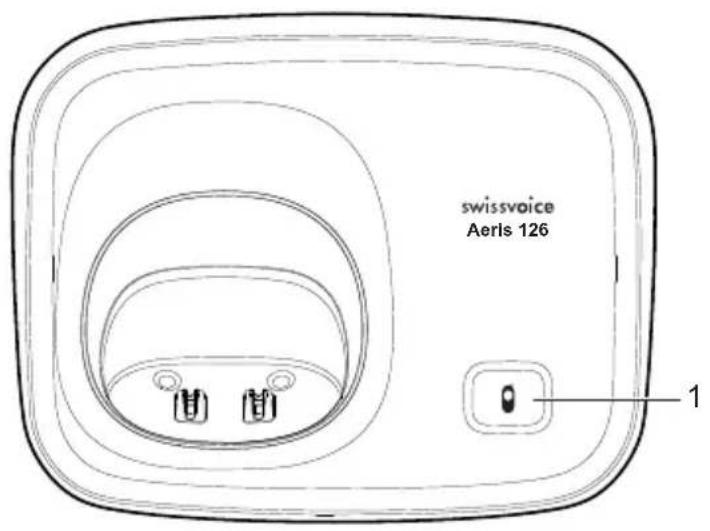
Base station Aeris 126
1 Paging key
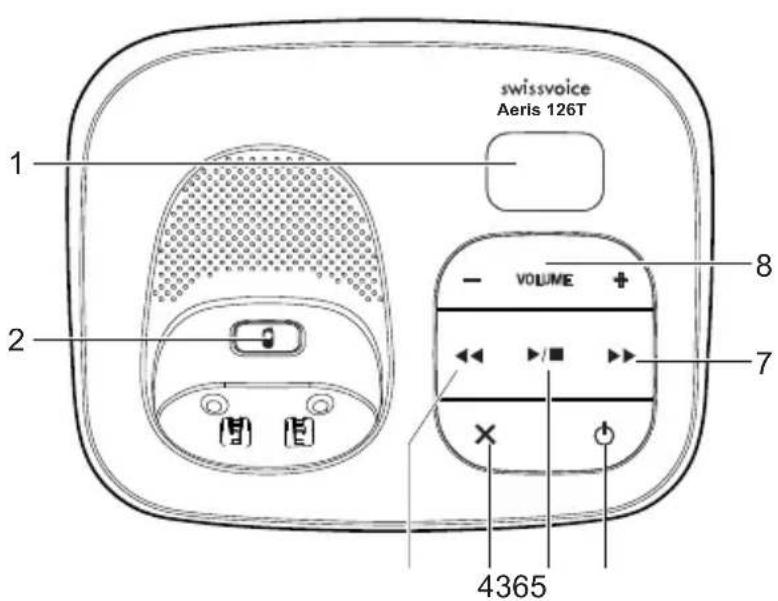
Base station Aeris 126T with answer machine
1 Message counter / Status display
2 Paging key
3 Repeat message/return to previous message
4 Delete message during playback
5 Play messages / stop playback
6 Switch answer machine on/off
7 Skip to next message
8 Volume key
Display symbols

Appears in the calls list, designates new unanswered calls.
You have new messages in your voicebox (network answering machine).
You have pressed the Talk key. Flashes on incoming calls.
You have pressed the handsfree key.
Indicates the battery charge status.
Symbol il displayed when the handset is within range of the base station. Flashes when out of range.
Indicates that the alarm is set.
Indicate that the handset ringer is switched off.
Indicates that the keypad is locked.
Internal call (only available with more than one handset)
Answering machine switched on (only Aeris 126T). Flashes if there are new messages on the answering machine.
Range / Location
To obtain the best possible range, we recommend positioning the telephone in a location central to your sphere of activity. Avoid positioning the telephone in niches, recesses and behind steel doors.
The maximum range between base station and handset is approximately 300 meters outdoors. Depending on the surrounding conditions as well as spatial and structural
factors, the range may be smaller. Silent zones can occur due to the digital transmission in the frequency range used – even within the range, depending on the structural environment. In this case the transmission quality may be reduced through the increased incidence of short breaks in transmission. Normal call quality can be restored if you move slightly out of the silent zone. If the range is exceeded, the call will be disconnected unless you move back into range within ten seconds.
Battery advice
Use only the original batteries (2 x NiMH, AAA, 1,2 V 500 mAh) as well as the original power supply (6 V DC).
The handset operating times (standby 100 hours/active 10 hours) and charging times apply only if the battery is charged to the defined minimum capacity.
Charging is electronically controlled to ensure optimal charging and care of batteries in different charge states. Full capacity is achieved only after several charging cycles.
Note:
Using other rechargeable batteries or non-rechargeable batteries/primary cells can be dangerous and cause malfunctions or damage to the telephone. Do not short-circuit the batteries (danger). In particular, avoid inadvertent short-circuits during storage and transport e.g. bunch of keys, metal panels or similar objects, and make sure the batteries do not come into contact with greasy materials. When not in the handset, therefore, batteries should be stored only in insulating packaging. Ensure also that the contacts do not touch greasy parts.
Rechargeable batteries can become warm while recharging. This is a normal occurrence and is not dangerous.
Connecting the phone
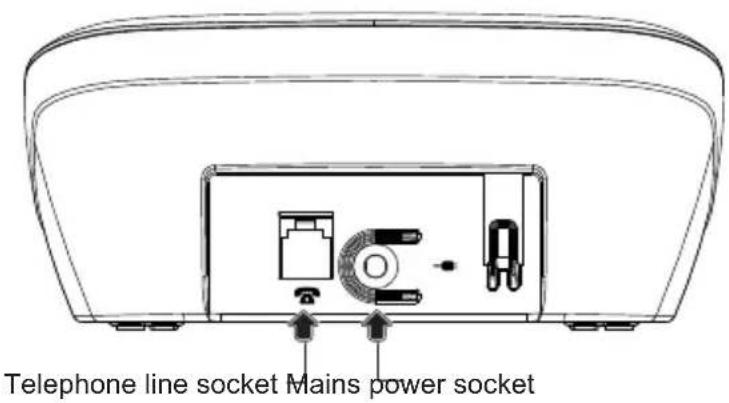
- Before you can start using your telephone you must plug in the telephone connector cable and the mains cable.
Insert the batteries
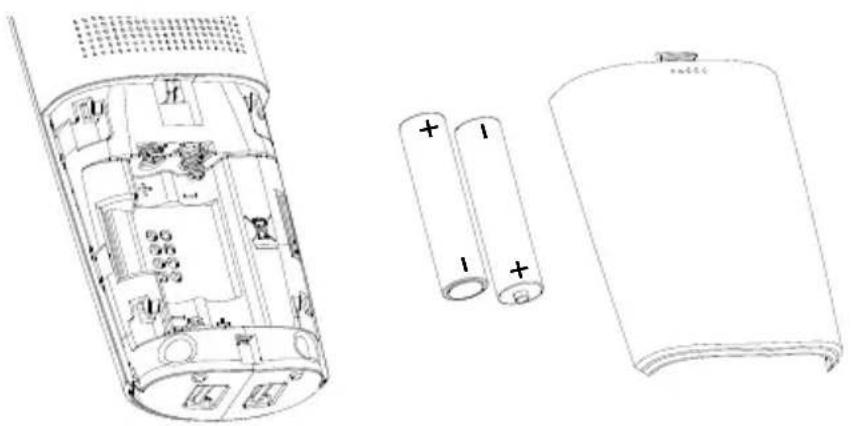
- Slide the battery compartment cover downwards (approx.3 mm) and lift it up.
- Insert the batteries.
Note:
- Make sure the polarity is correct.
- To charge the batteries, insert the handset in the base station. The animated battery symbol on the handset signals the charging procedure. The batteries will take around 14 hours to fully charge (initial charge).
Set language
Press 念 _ 念 , select HS SET or MT EINST / REGL.CB / IMP PORT and press
- Select LANGUAGE or SPRACHE / LANGUE / LINGUA and press OK.
- Choose the desired language from the list, confirm with .
The display texts are now displayed in the selected language.
Set Date and time
- Press ( c 一 / O K ) , select CLOCK and press ( c 一 / O K ) .
- Scroll through the list using the navigation keys.
- Select date and time format. Press .
Enter date and time and press . OK - Press the End call key to return to standby mode.
Telephoning
- Dial the desired number using the keypad.
Press the Talk key.
End the call
Press the End call key.
Accepting a call
- Incoming calls are signalled by a ring tone on the handset.
- Press the Talk key and conduct your conversation.
End the call
Press the End call key.
Calls cannot be made if the battery is almost discharged or the handset is out of range of the base station.
Set speaker/LOUDspeaker volume
You can adjust the speaker/LOUDspeaker volume during a conversation using the volume switch on the right side of the handset.
Audio boost
Audio boost increases the volume of your receiver, which is helpful for persons with a hearing loss.
- To activate audio boost, press the boost key on the left side of your handset.
- Select the desired volume with the volume switch on the right side of your handset.
At the end of a call, audio boost is automatically deactivated.
Switch handset on/off
- Press and hold the End call key (approx. 3 sec).
- Press and hold the End call key to reactivate the handset.
Redial
The Redial list contains up to 5 entries.
- Press and select the desired entry.
- Press the Talk key.
Edit radial list
- Open the Redial list, select the desired entry.
- Select a function from the list:
STORE-Add number to the phonebook.
- DELETE - Delete the entry from the radial ist.
DEL ALL - Delete the entire radial list.
Mute the handset microphone
You can temporarily mute the handset microphone to talk to someone else in the room without the caller hearing. Press
To reactivate the microphone, press again.
Keypad lock
Activate keypad lock
- Press approx. 3 sec. All keys (except the speed dial keys) are locked.
Deactivate keypad lock
- Press approx. 3 sec.
Paging - Locate mislaid handsets
All registered handsets ring for one minute, when the Paging key on the base is pressed. To stop the ring press the Talk key or the End call key on the handset or the Paging key on the base.
Contacts (phonebook)
You can store up to 20 names and numbers in the phonebook on your handset and base.
Digits / Characters
Different characters are printed on each key. The entries in the phonebook are sorted alphabetically.
- Press and hold to insert a dialing pause inside a phone number. "P" appears on the display.
Add new entries in the phonebook
- Press , select CONTACTS and press .
- Select ADD and press OK
- Enter the desired name, number and melody and press
Edit phonebook
- Press , select CONTACTS and press .
-
Select a function from the list:
-
ADD - see above.
- VIEW - View the name, number and melody of an entry.
-EDIT - DELETE/DEL ALL
- CAPACITY - View the number of free space.
- FAST DIAL - see below.
Memory keys
You can assign your 2 most important numbers to the memory keys M1 and M2.
Press OK, select HS SET / MEM KEY and press OK.
- Select a key and press .
- Enter the desired number and press .
- To call a memory number, press and hold the corresponding memory key. The selected number is called.
Fastdial
You can assign the most used numbers to the keys 2 - 9.
- Press OK, select CONTACTS/FASTDIAL and press OK.
- Select a key and press .
- Select the desired number from your contacts and press .
- To call a fastdial number, press and hold the corresponding key. The selected number is called.
Calls list (CID book)
The caller's number is displayed on the handset*. The calls list can contain up to 10 entries. In the calls list new calls are displayed by .★
To use this function, the caller's number must be transmitted (CLIP). Contact your network operator for further information.
Call a number from the calls list
- Press OK, select CALL LOG and press OK (You can also open the calls list by pressing).
- Select the desired entry from the list.
- Press the Talk key and the number is dialled or press and select an edit function from the list.
If the caller's number is suppressed, only NEW CALL is displayed. The call is not entered in the call list.
Edit calls list
- Press to open the calls list (CALL LOG).
-
Select a function from the list:
-
S T O R E - Store number in contacts
-
DELETE - Delete entry
DEL ALL - Delete entire list
-DETAILS - View date and time of a call -
depends on your network operator
Voicebox (network answering machine)
You can forward the incoming calls to your operator's network answering machine (Voicebox).
This function must be available and enabled by your network operator. New Voice-box messages are signalled on your handset display by (dependent on network operator).
- Press and hold key to call your mailbox. You must first enter the voicebox access code (see chapter "Handset settings").
Extending the Aeris 126/126T
The delivered handset is already registered on to base station. In standby the internal number of the handset is displayed.
You can register up to 5 handsets to your base station.
If you register your Aeris 126/126T handset with a "third party" base station or a "third party" handset on your Aeris 126/126T base station (GAP), you may not be able to use some functions or only to a limited extent.
Register new handsets
Accessory handsets must be registered to the base station.
- Before registering a handset to the base, you must press and hold the base unit key for about 5 seconds, a tone is heard on the base. Release the key.
- PressOK, Register and press OK
- Select the desired base station. Press . The handset seeks the base station you have entered (flashing display).
- Once the base station has been found, you are requested to enter the system PIN (0000 on delivery). Press OK
- If the registration is successful you will hear a confirmation signal.
Telephoning with several call partners
During a call you can make a second internal call (enquiry call), switch between call partners (brokering) or simultaneously converse (3-way conference call) without the need for two telephone lines.
Internal conversation / Internal call
Press
- If you have just one additional handset, it will be called automatically. If you have more additional handsets, select the handset you want to call internally.
If you receive an external call while you are on the phone to an internal call partner, you will hear an incoming call alert. End the internal call by pressing the End call key. Press the Talk key. You are connected to the external party.
Call transfer to another handset
You are conducting an external call and you want to transfer it to another handset.
Press OK, HIERCOM and press OK
- Select the handset you want to call and press .
- The external call is put on hold, the called handset rings.
- Press the End call key when the internal party answers.
- The external call is transferred to the other handset.
Conference
You are conducting an external call.
- Call the desired internal party (see above).
- Press the Star key, when the internal party responds. The three call partners are connected.
- Any teleconference partner can press the End call key to leave the conference and end the call.
Setting an alarm
The activated alarm is displayed in standby mode by

The alarm sounds for 45 seconds or can be deactivated immediately by pressing any key.
Press OK, selecR M and press OK
- Select ON or OFF and press OK
- Enter the desired alarm time, activate/deactivate Snooze function and press.
When Snooze is activated, the alarm resounds after 7 minutes.
Handset settings
- Press OK, select HS SET and press OK.
-
Select a function from the following list:
-
RINGER - Select the desired ringer melody and volume for internal and external calls.
- TONE - Activate or deactivate the following options:
KEY TONE - Every time a key is pressed, a brief beep is heard.
LOW BATT - Sounds when the batteries are low. Place handset in the base to charge.
OUTRANGE - A warning beep is sounded if the handset exceeds the maximum range.
- EQLIZER - You can boost treble and bass frequencies. On delivery, no amplification is preset (NATURAL).
- SEL BASE - If your handset is registered with several base stations, you can select the base station on which you want to operate the handset.
- LANGUAGE - Choose the language for the display texts.
- HS NAME - To better distinguish between handsets, you can give each handset a name. Please note: the name is not displayed if you have set TIME in the DISPLAY menu.
- DISPLAY - You can have the time or the handset name displayed.
- AUTO ANS - Just pick up the handset from the base to answer a call (without pressing any key).
- MEM KEY - You can assign two frequently used numbers to the direct memory keys M1 and M2. To call one of these numbers, press the corresponding memory key.
- VOICEBOX - To save or modify the voicebox access number. Press and hold key 1 to call your voicebox.
Base station settings
- Press OK, select BS SET and press OK.
-
Select a function from the following list:
-
RINGER - Select the desired base ringer.
- RING VOL - Select the desired base ringer volume.
- DEL HS - Select the handset you want to deregister. You can use each handset to deregister other handsets (function only active with multiple handsets).
- DIALMODE - Tone: Normal dialling procedure on analog lines. Pulse: May be required for connecting older telephone systems. Please refer to the relevant documentation.
- FLASH - Select the flash time (pression on key R). Flash is used to accept a second call or for sending network codes.
Short = 100 ms
Mid = 300 ms
Long = 600 ms
- MOD PIN - You can modify the PIN code (0000 on delivery).
Reset to default
When resetting the phone, all personal settings are reset, all entries in the call log are deleted. The contacts are not deleted.
- Press OK, select DEFAULT and press OK.
- Enter your PIN code and press .
- Press to validate the confirmation question.
Answer machine (Aeris 126T only)
Your Aeris 126T features an integrated digital answer machine with a max. recording capacity of 15 minutes. You can operate your answer machine from the base and from any handset registered to the base. On delivery a standard outgoing message is pre-recorded for both operating modes. The answer machine is ready to use. You can select the language for standard outgoing messages or record your own outgoing messages. Answer machine settings can be achieved with the registered handset(s).
Switch answer machine on/off
Press key on the base station to switch the answer machine on or off. Two dashes are displayed when the answer machine is switched off. Flashing dashes when answer machine is switched on = date and time are not set.
Switch on the answer machine from the handset
Press OK, selcand press
- Select ON/OFF and press OK
- Select the desired setting using the navigation keys
V/△ and press
Record a personal outgoing message
You can select 2 operating modes:
- Answer & record: Callers can leave a message.
- Answer only: Callers cannot leave a message.
Press OK, selcand press OK - Select SETTINGS and press
- Select OGM SET and press
- Select ANS&REC or ANSONLY and press
- Select RECORD and press
- Speak your outgoing message into the handset microphone.
- Press to end recording. The recorded outgoing message is played back.
Delete the personal outgoing message
- Press OK, select TAM and press.
- Select SETTINGS and press
- Select OGM SET and press
- Select ANS&REC or ANSONLY and press
- Select PLAYBACK and press OK
- When your personal outgoing message is played back, press shortly.
- Your personal outgoing message is deleted and replaced by the standard outgoing message.
Record a memo
You can leave a message behind for other internal users by recording a memo:
Press OK, stelland press OK
- Select MEMO and press
- RECORD'G appears. Speak after the tone.
- Press OK to end recording.
Operating the answer machine on the base station
If you have new messages, the message counter is flashing. The messages are played back beginning with the most recent.
- Press to start playback.
- During playback the following options are available:
Key Function
Repeat message/Press twice to return to previous message
Skip to next message
Start/stop playback
X Delete message during playback
VOLUME + / - Adjust volume
- Delete old messages to have enough memory for recording new messages.
Delete all old messages
impossible during playback. In idle mode, press and hold key X to delete all old messages.
Operating the answer machine from the handset
If you have new messages on your answer machine the icon flashes on the display. The messages are played back beginning with the most recent.
Press OK, selccand press
- Select PLAYBACK and press
- Press the End call key to end playback.
Key Function
5 (■) End playback
4 (Repeat message/Press twice to return to previous message
2 (X) Delete message during playback
6 ( ) Skip to next message

Deactivate/activate loudspeaker
+/- Adjust volume with the volume key on the right side of your telephone.
Delete all old messages
Press OK, selcat and press OK
- Select DEL ALL and press OK
- Press to validate the confirmation question.
Answer machine settings
- Press OK, select TAM and press.
- Select SETTINGS and press OK
-
Select the desired function by pressing the navigation keys / and press
-
ANS MODE - Answer&Record or Answer only mode
- LANGUAGE - Select the language for standard outgoing messages
- OGM SET - Play and record outgoing messages
- ANS DLAY - Select 2, 4, 6, 8 rings or TS (Time saver mode)
- REC TIME - Set the maximum length for incoming messages
- COMPRESS - Set the desired recording quality (low compression=high recording quality)
- SCREEN - When set to on (default setting), incoming messages are played back over the base station
- REMOTE - Switch remote access on or off
- CHG PIN - Change remote access PIN code (see below)
If you set the answer delay to Time Saver, your answer machine will answer after 2 rings if you have new messages. If you do not have new messages it will not answer until 6 rings. This enables you to save costs by hanging up before you are connected.
Memory full
The recording capacity of your answer machine is 15 minutes (including outgoing messages).
If the memory is full, TAM FULL appears on the handset display and F flashes on the base station display. No more messages can be recorded. The answer machine switches to Answer only mode automatically. You must delete old messages.
Setting the remote access PIN code
Remote operation can only be performed after changing the default remote access PIN code before activating the function. Any 4-digit PIN code is allowed apart from 0000.
Press OK, Select SETTINGS and press OK
- Select CHG PIN and press twice.
- Enter the PIN code (0000 on delivery) and press twice.
- Enter the new PIN code and press twice.
- Enter the PIN code again and press . OK
Remote activation of the answer machine
- Dial your number. After 6 rings the TAM automatically answers.
- Enter your remote access PIN code. If the PIN is correct you will hear a confirmation tone.
- All new messages are played back.
Remote access the answer machine from an external telephone
You can remote access your answer machine from any telephone with DTMF or multifrequency dialling function. To be able to remote access your answer machine you must activate the function in the menu TAM / SETTINGS / REMOTE.
- Dial your number.
- Press when you hear your outgoing message.
- Enter your remote access PIN code. If the PIN is correct you will hear a confirmation tone.
- Press key 5. All new messages are played back.
- You can now perform a number of functions by pressing the correspondent key (see the following table).
Key Function
5 Play message
7 Switch answer machine on
9 Switch answer machine off
- Enter remote access PIN
During playback
2 Delete message during playback
4 Repeat message/press twice to return to previous message
5 Stop message playback
6 Skip to next message
- End remote access by ending the call.
Note:
If your answer machine doesn't accept the remote access commands, try to press the numerical keys longer or shorter. Your answer machine is sensitive to tone lengths of 0,5 to 1 second.
Appendix
Using Internet/cable telephone adapters on an analog port
When using an analog telephone on the analog connection of an Internet or cable telephone adapter, not all the described features (in particular calling line display) may function in the same way as with a standard analog telephone line. This does not cause the Aeris 126/126T to malfunction.
Several factors can cause a failure of specific features to function:
- The Internet/cable telephony provider may not provide the function on its Internet/cable telephony connection.
- The adapter used to convert Internet/cable telephony to analog telephony (usually supplied by the provider) may not forward the functions to connected telephones or may forward them in a non-analog format.
If this happens, please check the Aeris 126/126T on an analog fixed line and/or contact your Internet/cable telephony provider.
Care
Your telephone is a sophisticated product in terms of design and construction, and should therefore be handled with care.
To clean the telephone, wipe first with an antistatic cloth or a damp, soft leather cloth and then dry using a dry cloth.
Recycling (environmental protection)

At the end of the product's life cycle, the telephone must not be disposed of in normal domestic waste. Please take it to a collection point for processing electrical and electronic equipment: see symbol on the product, in the user manual and/or packaging.
Some materials used in this product can be recycled if you take it to a recycling depot. By recycling parts or raw materials from used products you will be making an important contribution to environmental protection. Please contact your local authority if you require information about collection points in your neighbourhood.
Disposing of the rechargeable battery
By law, all used batteries and accumulators must be recycled and not disposed of in domestic waste. Please dispose of them according to the official regulations. Take them to a recycling depot. The batteries/accumulators will be recycled since they may, for example, contain nickel cadmium (Ni - Cd), lead (Pb), cadmium (Cd) or mercury (Hg). The batteries and accumulators are labelled with symbols and information on their contents,
e.g.:


NI-CD
NI-MH
Warranty conditions
Your telephone is subject to a guarantee from the date of purchase in accordance with the legal provisions of the country in which the telephone was purchased. As evidence of the date of purchase, please keep the receipt or the warranty card completed by the retailer. All defects attributable to material and manufacturing faults will be corrected free of charge within the warranty period, either by repairing or replacing the defective equipment.
The warranty does not cover expendable materials (battery cells), defects which affect the value or use of the equipment only insignificantly, and damage caused by incorrect use, ordinary wear and tear, or manipulation by third parties.
This warranty does not cover consequential damage caused by the use, failure or defectiveness of the product. In particular, no liability whatsoever is accepted for damage to property and pecuniary loss.
To claim under this warranty, please contact the retailer where you purchased your telephone.
Warranty information for Germany
If the good evinces a defect due to manufacturing or materials faults within 24 months of purchase, please send the entire product including accessories and sales receipt to
Swissvoice Service Center
Im Frauental 14
92224 Amberg.
The Swissvoice Service Center will replace it with and equivalent good or perform a repair. In the case of components subject to wear (e.g. batteries) this period lasts for 6 months from the date of purchase.
Technical Support telephone number (Germany)
For Hotline, repairs, spare parts, technical support and warranty
From Monday to Friday from 09:00 AM to 06:00 PM
Please call 0180 55 82 888 (Euro 0,14 / Minute)
E-mail: support-de@swissvoice.net
Approval and conformity
This analog telephone DECT complies with the basic requirements contained in the R&TTE Directive 1999/5/EC on radio equipment and telecommunications terminal equipment and is suitable for connection and operation in the member state indicated on the base station and/or packaging.
The declaration of conformity may be viewed at: www.swissvoice.net.

The CE symbol confirms the conformity of the telephone with the above directive.
Aeris 126/126T
Warranty Certificate
swissvoice Warranty Certificate
Garantieschein, Bon de garantie, Certificato di garanzia, Garantiebewijs, Takuutodistus, Garantibevis, Garantisedel, Garantibevis, Certificado de Garantía, Talão de garantia
| device type: | (Gerätotyp, type d'appareil, tipo di apparecchio, toesteltype, laitetyppi, maskintype, apparattyp, apparattype, modelo del aparato, modelo do aparelho): |
| serial number: (Seriennummer, numero de série, numero di series, serialnumber, seriennummer, serialnumber, numero de series, numero de série): | |
| dealer stamp: | (Händlerstempel, sceau du vendeur, timbro del rivenditore, stempel van de dealer, kauppiaan leima, forhandlerens stempel, fösäljarens stämpel, forhandlerstempel, sello del commerciante. carimbo do vendedor): |
| dealer signature: | (Unterschrift des Händlers, signature du vendeur, firma del rivenditore, handtekening van de dealer, kauppiaan allekirjoitus, forhandlerens underskrift, fösäljarens underskrift, forhandlers underskrift, firma del commerciante, assinatura do vendedor): |
| date of purchase: | (Kaufdatum, date d'achat, data d'acquisto, datum van aankoop, ostopäiväys, kjøpsdato, datum für köpet, salgsdato, fecha de adquisión, data de compra): |
Internet:
www.swissvoice.net
© Swissvoice SA 2011
All rights as well as delivery possibilities and technical changes reserved.
20405811xx ba b0
SV 20405811