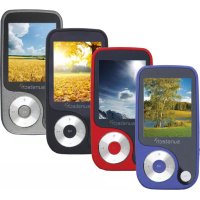
Thorn - Mp3 player Sunstech - Free user manual and instructions
Find the device manual for free Thorn Sunstech in PDF.



| Product type | MP4 Player |
| Brand | Sunstech |
| Model | Thorn |
| Dimensions | 39 x 76 x 9 mm |
| Weight | 25 g |
| Display | 1.8 inch TFT (128 x 160 pixels) |
| Supported audio formats | MP3, WMA, WAV, APE, FLAC |
| Video formats | AMV (160 x 120 pixels) |
| Image formats | JPEG, BMP (max 2400 x 2400 pixels) |
| eBook formats | TXT |
| Internal memory | Not specified (typical capacity 8 GB) |
| Memory expansion | microSD / microSDHC card |
| FM radio | Yes (requires earphones as antenna) |
| Voice recording | Yes (format not specified, probably WAV) |
| Connectivity | USB Type-C (USB 2.0 high-speed) |
| Power supply | Rechargeable battery via USB 5 V 0.5 A |
| Charging time | Approximately 5 hours |
| Audio output | 3.5 mm earphone jack |
| PC compatibility | Windows and Mac |
| Maintenance | Clean with a soft, slightly damp cloth |
| Repairability | No user-serviceable parts – consult a qualified technician |
Frequently Asked Questions - Thorn Sunstech
User questions about Thorn Sunstech
0 question about this device. Answer the ones you know or ask your own.
Ask a new question about this device
Download the instructions for your Mp3 player in PDF format for free! Find your manual Thorn - Sunstech and take your electronic device back in hand. On this page are published all the documents necessary for the use of your device. Thorn by Sunstech.
USER MANUAL Thorn Sunstech
Tum on device. 5
Reset. 5
Battery level. 5
4.MUSIC 5
Song selection. 5
Play music. 6
Music submenu. 6
A-B replay. 7
1.SAFETY&PRECAUTIONS
WARNING
Toppreventfireorshockhazard, donotusethisplugwithanextensioncord, receptacle, orotheroutletunlessthebladescanbefullyinsertedtopreventblade exposure. Toppreventfireorshockhazard, donotexposethisappliancetorainormoisture.

Warning:toreducetheiskofelecricshock,donotremovecover(orback).Nouser serviceablepartsinside,referservicingtoqualifiedservicepersonnel.
READINSTRUCTIONS-Allthesafetyandoperatinginstructionsshouldberead beforetheproductisoperated.
RETAILINSTRUCTIONS-Thesafetyandoperatinginstructionsshouldberetained forfuturereference.
HEEDWARNINGs-All warnings on the product and the operating instructions should be adhered to.
FOLLOWINSTRUCTIONS-Allooperatinganduseinstructionsshouldbefollowed. CLEANING-Unplugthisproductfromthewalloutletbeforecleaning.Donotuse liquidcleanersoraerosolcleaners.Useadampclothforcleaning.
ATTACHMENTS-Donotuseattachmentsnotrecommendedbytheproduct manufacturerastheymaycausehazards.
WATERANDMOISTURE- Donotusethisproductnearwater-foreample, neara bathtub, washbowl, kitchensink, or laundrytub; inawetbasement; ornearas swimmingpool; and the like. This applianceshallnotbeexposedtodrippingor splashingwaterandnoobjectfilledwithliquidssuchasvasessshallbeplacedonthe apparatus.
Donotplacethisproductanonunstablecart,stand,tripod,bracket,ortable.The productmayfall,causingseriousinjurytoachildoradultsardseriousdamagetotheproduct.Useonlywithacart,stand,tripod,bracket,ortablerecommendedbythemanufacturer,orsoldwiththeproduct.Anymountingoftheproductshouldfollowthemanufacturerinstructions,andshoulduseamountingaccessoryrecommendedbythemanufacturer.
ENGLISH
Userguide
THORN
POWERSOURCES-Thisproductshouldbeoperatedonlyfromthetypeofpower sourceindicatedonthememarkinglabel.Ifyouarenotsoureofthetypeofpowersupply toyourhome,consultyourproductdealerorlocalpowercompany.Forproducts intendedto operatefrombatterypower,orothersources,refertotheoperating instructions.
POWER-CORDPROTECTION-Power-supplycordssshouldberoutedsothatthey are notlikelytobewalkedonorpinchedbyitemsplaceduponoragainstthem,paying particularattentionocordsatplugs,conveniencereceptacles,andthepointofexit fromtheproduct.
NON-USEPERIODS-Thepowercordoftheproductshouldbeunpluggedfromthe outletwhenleftunusedforlongperiodsoftime.
OVERLOADING-Donotoverloadwalloutlets,extensioncords,orintegral conveniencereceptaclesasthiscanresultinariskoffireorelectricshock.
SAFETYINFORMATION
SAFETYCHECK-Uponcompletionofanyserviceorrepairtothisproduct,asktheservicetechnicianoperformsafetycheckstodeterminethattheproductisinproperoperatingcondition.
HEAT-Theproductshouldbesituatedawayfromheatsourcessuchasradiators,heat registers,stoves,orotherproducts(includingamplifiers)thatproduceheat.
Changesormodificationnotexpresslyapprovedbythepartyresponsible for compliancecouldvoidtheuser'sauthoritytooperatetheequipment.Changesormodificationsmadewithoutwrittenapprovalmayvoidtheuser'sauthoritytooperatethisequipment.
Excessoundpressurefromearphonesandheadphonescausehearingloss.
Markingplatelocatedonthebottomofappliance.
Onlyuseattachments/accessoriespecifiedorprovidedbythemanufacturer(such as theexclusivesupplyadapter,batteryetc).
Toreducetheriskoffirelectricshock, donotexposethisapparatusorainormoisture. The apparatus shall not be exposed to drippingorsplashingandthatobjectsfilledwithliquids, such as vases, shall be placed on apparatus.
Thebatteriesshallnotbeexposedtoexcessiveheatsuchassunshineorfire.
The direct plug-in adapter/powercordisusedasdisconnect device, the disconnect devices shall remain readily operable.
Donotopen.Nouserreplaceablepartsinside,referservicingtoqualifiedtechnician.
Userguide
THORN
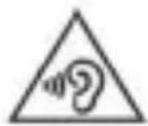
Topreventpossiblehearingdamage,donotlistenathighvolumelevelsforlong periods.

Classllconstructiondoubleinsulated.
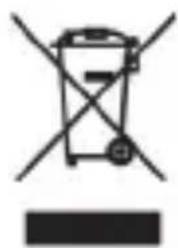
Wasteelectraceuticalandelectronicproductsmustnotbedisposedofwithhousehold waste. Pleaserefertotheretailerfromwhomyoupurchasedthisitemfordisposal instructions.Batteriesandpackagingmaterialsscanberecycledusingyourlocal collectionfacilities.Allelectricalandelectronicproductsincludingbatteriesshould bedisposedofseparatelyfromthemunicipalwastestreamviadesignedcollectedecution facilitiesapp pointedbythegovernmentorthelocalauthorities.
2.PRODUCTOVERVIEW
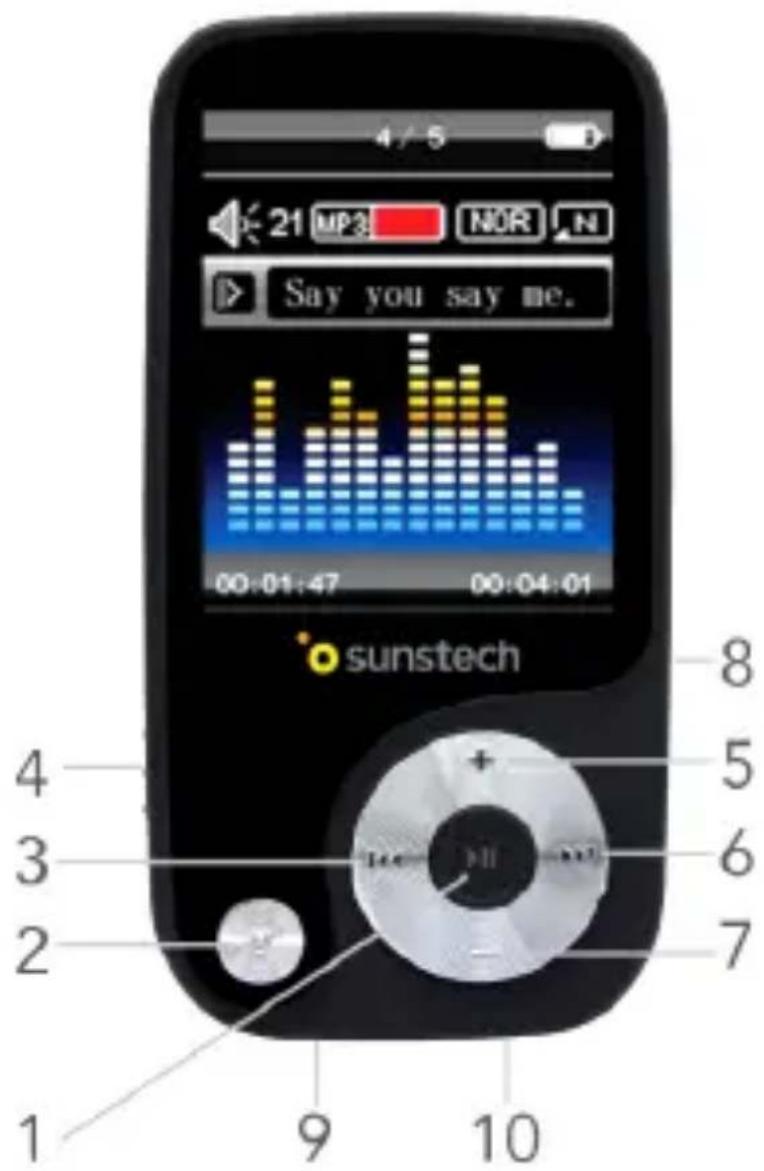
1.PLAY/PAUSE:Selectoption/Confirm/Play/Pause.
2.MODE:Shortpress:returntopreviousmenu/Longpress:returntomainmenu.
3.PREVIOUSButton:PreviousSong/Rewind.
4.PowerON/OFFSwitch.
5.+Button:Volumeincrease.
6.NEXTButton:Nextsong/Fast-Forward.
7.-Button:Volumedecrease.
8. MemoryCardSlot(TFCard).
9.EarphoneJackConnection.
10.USBport(Type-C).
3.BASICOPERATIONS
Turnondevic
WhenthePowerON/OFFSwitchisturnedON,longpressPLAY/PAUSEbutton to turnthedevicinStandbymode.
Afterfinishingusingtheplayer, besuretoswitchthedevicetoOFFposition. Then thedevicewillbecompletelyswitchedoffwithnobatterydrain.
Reset
You can press and hold PLAY/PAUSE button for at least 8 seconds and then release it to reset and restart the player.
Batterylevel
Thepowerdisplaysfull. Themorethedeviceisused,themorethebatterylevel willberduced.
- Whenthebatteryhasalmost/completelyrunout, the devices should be charged through its USB port.
Warning: Inordernottoaffect the battery life, whennot using the device more than 6 months, please remember to charge again.
4.MUSIC
ThisplayersupportsMP3,WMA,APE,FLACandothermusicformat.
Songselection
Select"Music"intheMainMenuandpressPLAY/PAUSEtoentertothesong selectionmenu.
ENGLISH
Userguide
THORN
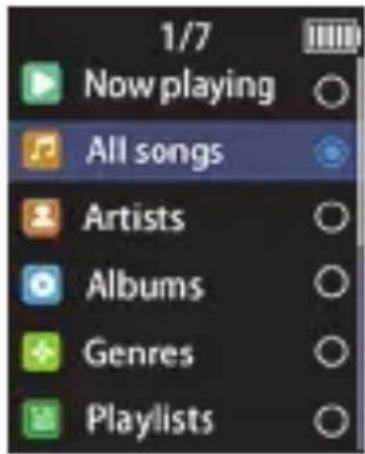
Whatwillyoufindthere?
- Allsongs:Showallsong.
- Artists: Show songs in alphabetical order by artist name.
- Albums: Showsongsinalphabeticalorderbyalbumname.
- Genres:Showsongsbysonggenre.
- Playlist: Create Playlist
Inthesongselectionmenu,pressPLAY/PAUSEbuttontoentertothedesired option.Conversely,pressMODEbuttontoreturntothepreviousmenu.
Playmusic
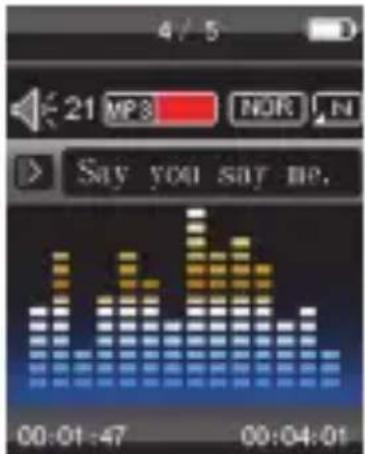
Afterselectingasonginthesongselectionmenu,PressPLAY/PAUSEbuttonostart playingmusic.
PressPLAY/PAUSEbuttonagaintopauseorresumetheplayback.
PressPRVIOUS/NEXTbuttonstoplaytheprevious/nextsong.
LongpressPREVIOUS/NEXTbuttonstoFastforward/rewindthesongtoadesired partofit.
PressMODEbuttontoreturntothesongselectionmenu.
PressandholdcontinuouslyMODEbuttontoreturntothemainmenu.
LongpressMODEbuttontoentertotheMusicsubmenu.
Musicsubmenu
WhichplaybacksettingsallowstheMusicssubmenu?
- Play mode: Repeat, Replay (Replay Mode, Replay Times, Replay Interval).
Sound settings: Equalizer, Variable Speed Playback. - Addtoptlaylist.
ENGLISH
Userguide
THORN
- Removefromplaylist.
- Delete.
- Bookmarks:Markanyfavouritepartofasong.
A-Breplay
Havingchosen"ReplayMode"inthesubmenu,pressPLAY/PAUSEbuttontoenter to"ReplayStatus".
ThereyoucanpressNEXTbuttoncreateasongsegmentbyselectingpoint"A" andpoint"B"inasong.
ThiswillcreatealoopplaybackofthesongsegmentbetweenkpointAandpointB.
6.VIDEO
Forothersvideoofformat,youcanchangetheformatstoAMVbyusinganonline videoconversiontool.OncetheyareconvertedtoAMVformat,theywill be compatibleandabletobebplayed.

ThisplayeronlyallowsAMVvideofiles.
Select"Video"inthemainmenuandpressPLAY/PAUSEbuttontoenterto the videoselectionmenu.PressPLAY/PAUSEbuttonagaintostartplayinganydesired video.
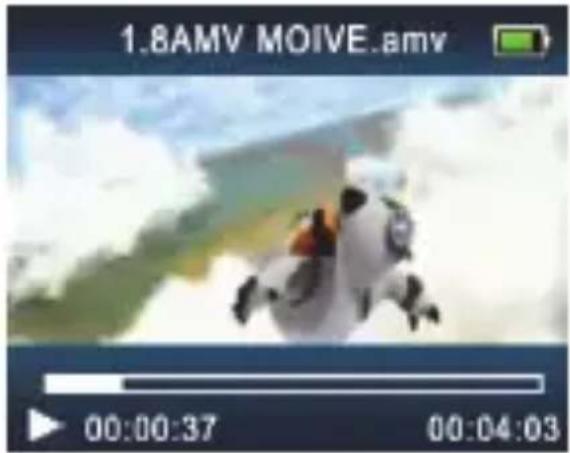
Long press MODE to enter to "Video Submenu". There you will have access to the followingsettings:Brightness,Repeat,DeletevideoandCreatePlaylist.
7.RECORDINGS
Select"Recordings"inthemainmenuandpressPLAY/PAUSEbuttontoentertherecordingmenu,select"Startvoicerecording"andpressPLAY/PAUSEbuttonagaintostartrecordingyourvoice
Oncethevoicerecordinghasstarted,pressPLAY/PAUSEbuttontoPause/Resumetherecording.
PressMODEbuttonstopandfinishrecordingandpopuptheinterfacetoask whetherosaveitasarecordingfileornot.
Recordingmenu
Whichoptionswillyoufindinthe"Recordingmenu"?
- Startvoicerecording.
- Recordingslibrary:Viewandplayrecordedfiles.
- Setrec.bitrate:512kbps,768kbps,1024kbps,1536kbps.
8.FMRADIO
TousetheFMRadiofunction,youmustconnectearphonestothedevic.
OntheMainMenupressPREVIOUS/NEXTbuttonscrolluntil"FMradio"function appears.PressPLAY/PAUSEbuttontoenter.
PressPLAY/PAUSEbuttonoswitchbetweenexistingradiostation.
ShortpressPREVIOUS/NEXTbuttontochangatheradiostationbychangingthe frequencyby0.1MHZ.
LongpressPREVIOUS/NEXTbuttonsearchautomaticallyforradiostationsuntil thedevicedetectsthem.
LongpressMODEbuttontoentertoFMRadiosubmenu.
FMRadioSubmenu
WhichoptionswillyoufindonthefMRadioSubmenu?
StartFMRadiorecording.
- Savetopreset: SavetheexistingRadiofrequencyasapresetradiostation.
Userguide
THORN
- Clearpreset:Clearsavedradiostations.
- Auto tune: Search radio stations automatically.
- TunerRegion:Setradioband.
FM Recording: View and play the FM recorded files.
9 SETTINGS
Youcansethefollowingparametersofthisdevice:
Language.
- Displaysettings:Brightness,Backlighttimer.
- Sleep timer: off, set sleep timer to 1min~99mins.
- Power off timer: 0~99mins. When set to 0, the device will not be able to be switchedoff.
Informationofthedevic.
- Formatdevice.
- Factorysetting: Reset the factory settings of this device. This may cause a completely lossof all the configuration done and the file saved on device's memory.
10.PICTURES
Select"Pictures"intheMainMenuandpressPLAY/PAUSEbuttontoenterto the picturegallery.
SelectapictureandpressPLAY/PAUSEbuttonstostartbrowsing.
PressPREVIOUS/NEXTbuttonswitchingbetweendifferentpictures.
LongpressMODEbuttontoenterthepicturesubmenu
PictureSubmenu
Thereyouwillbeableto:SetBrightnessparametters,SetSlideshowettings,Delete picturesandCreatePlaylist.
11.EBOOK
Thisdevicehasmulti-taskingfunctions.Youcanlistentomusicorradiowhilereading
ENGLISH
Userguide
THORN
aneBookorbrowsingpictures.

Only.txtfilesaresupportedforthisfunction.
Select" eBook"inthemainmenuandpressPLAY/PAUSEbuttontoentertheTXT filelist.
There,selectatxtfileandpressPLAY/PAUSEbuttonstostartreadingit.
PressPREVIOUS/NEXTbuttonturnaprevious/newpage,longpressthebuttontoquicklyturnpages.
LongpressMODEbuttontoentertheeBooksubmenu.
EBookSubmenu
Thereyouwillbeableto:SetPlaybacksettings,DeleteaneBook,CreateandSelect savedBookmarkards,DeleteBookmarkards,SelectPages,SetaneBookBackground.
12.OTHER SETTINGS
MicroSDCard
ThisMP4playersupportmicroSD/microSDHC(TF)Cardreading.
Whenamemorycardisinsertedintothecardslot,eachmenu(fooreample:music, videoorpicture)willshowLocalFolder/CardFolderoptions.Selecttheappropriate menuandpressPLAY/PAUSEbuttontoconfirm.(Ifyouwanttoplayanyfileslocated inyourmemorycard,theoptionyouwillhavetochooseis"CardFolder").
Folderview
Thiaoptiondisplaysallthedirectionsandfiles.
Select"Folderview"intheMainMenuandpressPLAY/Pausebuttontoenterthe fileslist,pressPLAY/Pausebuttonagaintoentertherefolder,pressMODEbuttonto returntothepreviousdirectory.
ConnecttoaPC
ThisdeviceisalsoastandardUSBdiskandacardreader.SupportedbyWindows/
Userguide
THORN
Mac
UseUSBcabletoconnectthedevicetoaPC.Onceconnectedyouwillbeableto choosebetween"Charge&TransferMode"and"Charge&PlayMode".
Aftersuccessfullyconnectingthroughthe"Charge&TransferMode",youwill be abletomanagethefilessavedinthedevicememoryandinthememorycard. So, youwill be abletoaddnewsongs, videosandpicturesordeleoldones.
13.TECHNICALSPECIFICATIONS
| Dimension39x76x9mm | ||
| Weight25g | ||
| Screen1.8TFT(128x160pixel) | ||
| ConnectingtoPCHighSpeed | USB2.0(Type-C) | |
| MusicFormatsMP3,WMA,WAV,APE,FLAC | ||
| MP3,WMA | Max.Output(L)10mW+(R)10mW(32Ohm) | |
| MP3Bitrate8Kbps-320Kbps | ||
| WMABitrate5Kbps-384Kbps | ||
| VideoFormats | AMV,160x120pixel | |
| Picturesformat | JPG,BMPMax/about2400x2400pixel | |
| OperateTemperature5to40°C | ||
| Chargingvoltage | 5.0V=0.5A | |
| Chargingtime | 1.5hours | |
| SupportedSystems | Windows/Mac,etc. | |
Please note: Design and characters may changewhout priornotice.
14. WARNINGS
| Pb | CorrectdisposalofthisProduct (WasteElectrical&ElectronicEquipment)(WEEE) Yourproductisdesignedandmanufacturedwithhighquality materialsandcomponentswhichcanberecycledandreused. Thissymbolmeansthatelectricalandelectronicequipment,at theirendof-lifeshouldbedispersedofseparatelyfromyour householdwaste. Please disposeofthisequipmentatyourlocalcommunitywaste collection/recyclingcentre. IntheEuropeanUnionthereareseparatecollectionsystemsfors usedelectricalandelectroniceproducts.Pleasehelpustoconservetheenvironmentwelvein! |
| X↓ | DONOTplaceobjectsontopofthedevice,asobjectsmay scratchthedetevice. |
| X↓ | DONOTexposethedevicetodirtyordustyenvironments. |
| X↓ | DONOTplacedevicemonunevenorunstablesurface. |
| X1 | DONOTinsertanyforeignobjectsintothedevice. |
| X | DONOTexposethedevicetostrongmagneticorelectricalfield. |
| X | DONOTexposethedevicetodirectsunlightasitcandamagethe device.Kepitawayfromheatsources. |
| ↑ | DONOTstoreyourdeviceintemperatureshighherthan 40°C(104°F).Theinternaloperatingtemperatureforthisdeviceis from20°C(68°F)to60°C(140°F). |
Userguide
THORN
| DONOTusethedevicewiththerain. | |
| PleasecheckwithyourLocalAuthorityretailerforproper disposalofelectronicproducts. | |
| Thedeviceandadaptormayproductsomeheatduringnormal operationofcharging.Toppreventdiscomfortinjuryfromheat exposure,DONOTleavethedevicewithyourlap. | |
| POWERINPUTRATING:Refertotheratinglabelthedevic andbesurethatthepoweradaptorcomplieswiththerating.Only useaccessoriespecifiedbythemanufacurer. | |
| Cleanthedevicewithasoftcloth.Ifneeded,dampenthecloth slightlybeforecleaning.Neveruseabrasivesorcleaningsolutions. | |
| Alwayspoweroffthedeviceinstallorremoveexternaldevices thatdonotsupporthot Plug. | |
| Disconnectthedevicefromanelectricaloutletandpoweroff beforecleaningthedevice. | |
| DONOTdisassemblethedevice.Onlycertifiedservice techniciansshouldperformrepair. | |
| Thedevicehasaperturestodisperseheat.DONOTblockthe deviceventilation,thedevicemaybecomehotandmalfunctionas aresult. | |
| Riskofexplosionifbatteryreplacedbyanincorrecttype.Dispos ofusedbatteriesaccordngtotheinstruction. |
Userguide
THORN
| PLUGGABLEEQUIPMENT:thesocket-outletshallbeinstallednear theequipmentandshallbeeasilyaccessible. | |
| EuropeanUnion:DisposallInformation. Thissymbolmeansthataccordinglyocallawsandregulations yourproductand/oritsbatteryshallbedisposedofseparately fromhouseholdwaste.Whenthisproductreachesitsendoflife, takeittoacollectionpointdesignatedbylocalauthorities.The separatecollectionandrecyclingofyourproductand/oritsbattery atthetimeofdisposalwillhelpconservenaturalresourcesand ensurethatitisrecycledinamannerthatprotectshumanhealth andtheenvironment. | |
| MADEINCHINA |

THORN
REPRODUCTORMP4
GUIADEUSUARIO
Guiadelusername
THORN
CONTENIDO
- SEGURIDAD Y PRECAUCIONES 1
2.DESCRIPTION DEL PRODUCTO 4 - OPERACIONES BASICAS 5
Encenderdispositivo. 5
Reiniciar. 5
Nivel de bateria. 5
- MUSICA 5
Indicateurdechargedepile
Batteriecompletementcharge.Aucoursdel'utilisationdel'appareilleniveau dechargesdebatteriediminuera.
Quandlabatterieestpresque/completementdecharge,l'appareildoitetrecharge parleport USB.
For you. For everyone.

- 1.SAFETY&PRECAUTIONS
- WARNING
- ENGLISH
- Userguide
- THORN
- SAFETYINFORMATION
- 2.PRODUCTOVERVIEW
- 3.BASICOPERATIONS
- Turnondevic
- Reset
- Batterylevel
- 4.MUSIC
- Songselection
- Playmusic
- Musicsubmenu
- A-Breplay
- 6.VIDEO
- 7.RECORDINGS
- Recordingmenu
- 8.FMRADIO
- FMRadioSubmenu
- SETTINGS
- 10.PICTURES
- PictureSubmenu
- 11.EBOOK
- EBookSubmenu
- 12.OTHER SETTINGS
- MicroSDCard
- Folderview
- ConnecttoaPC
- Mac
- 13.TECHNICALSPECIFICATIONS
- WARNINGS
- Guiadelusername
- CONTENIDO
- Indicateurdechargedepile
Brand : Sunstech
Model : Thorn
Category : Mp3 player