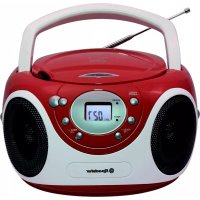
CDR4230MP - Cd player/recorder ROADSTAR - Free user manual and instructions
Find the device manual for free CDR4230MP ROADSTAR in PDF.



| Product type | Portable stereo radio-recorder |
| Brand | Roadstar |
| Model | CDR4230MP |
| Main power supply | 230 V ~ 50 Hz (mains) or 6 UM-2 (type C) batteries |
| Power consumption | Approximately 15 W |
| Readable audio formats | CD audio, CD-R, CD-RW, MP3 |
| Radio bands | FM (87.5 - 108 MHz) and MW (540 - 1600 kHz) |
| Output power | 2 × 5 W RMS (estimated) |
| Dimensions (approx.) | 395 × 205 × 145 mm |
| Weight (approx.) | 2.2 kg |
| CD/MP3 playback functions | Play, pause, stop, skip, search, repeat (track/disc), programming (up to 20 CD tracks / 99 MP3), MP3 folder navigation, anti-shock (5 s CD / 50 s MP3) |
| Connectivity | 3.5 mm stereo headphone jack (8-32 ohms), telescopic FM antenna |
| Safety | Double insulation class II, laser protection (class 1), do not expose to moisture or rain |
| Maintenance | Clean the device with a dry cloth; for discs, use a soft cloth from the center outward; do not use solvents |
| General information | Designed for domestic use; battery life: approximately 10 hours (estimated); spare parts not listed, contact after-sales service |
Frequently Asked Questions - CDR4230MP ROADSTAR
User questions about CDR4230MP ROADSTAR
0 question about this device. Answer the ones you know or ask your own.
Ask a new question about this device
Download the instructions for your Cd player/recorder in PDF format for free! Find your manual CDR4230MP - ROADSTAR and take your electronic device back in hand. On this page are published all the documents necessary for the use of your device. CDR4230MP by ROADSTAR.
USER MANUAL CDR4230MP ROADSTAR
- Your new unit was manufactured and assembled under strict ROADSTAR quality control. Thank-you for purchasing our product for your music enjoyment. Before operating the unit, please read this instruction manual carefully. Keep it also handy for further future references.
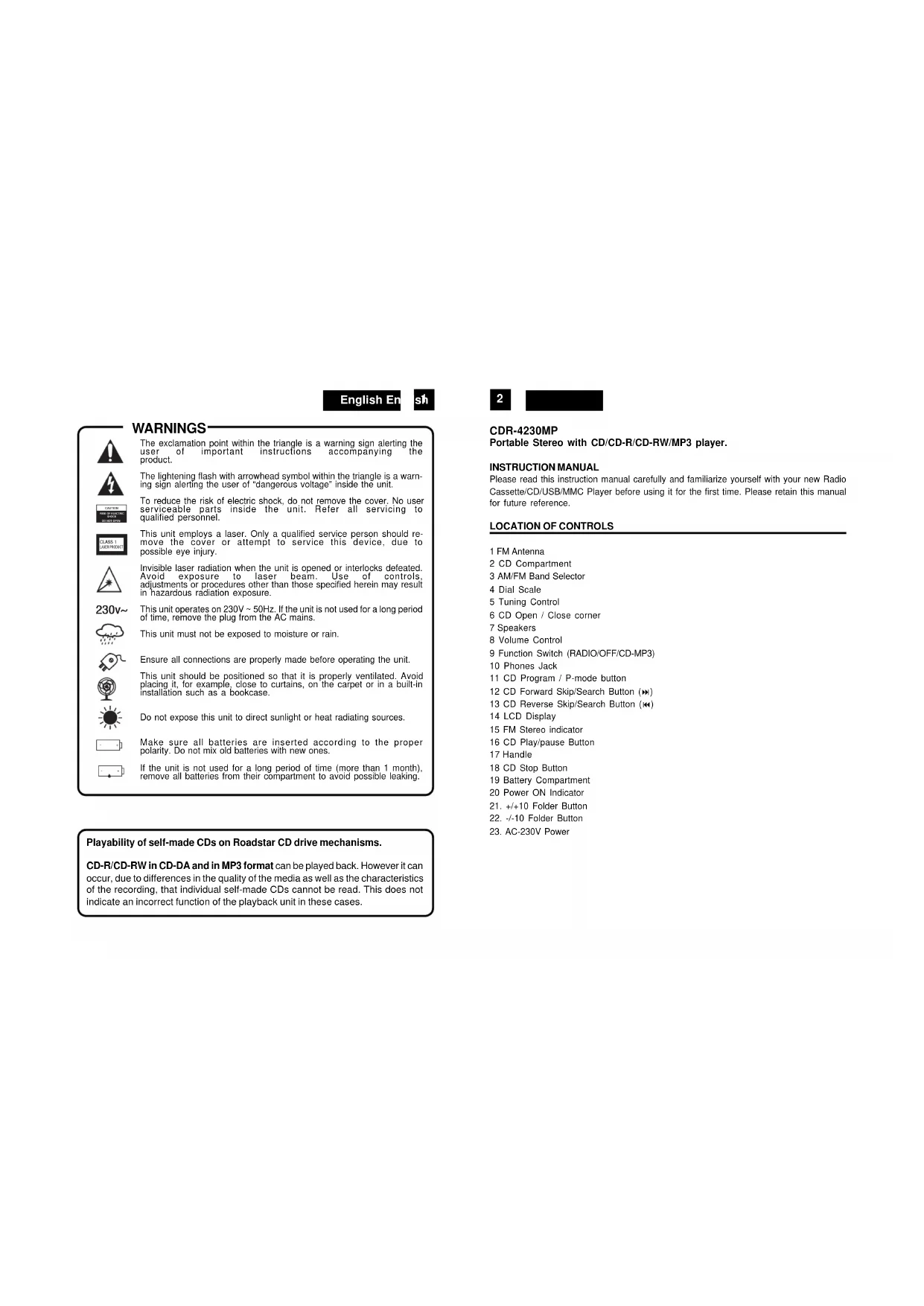
The exclamation point within the triangle is a warning sign alerting the user of important instructions accompanying the product.
The lightening flash with arrowhead symbol within the triangle is a warning sign alerting the user of "dangerous voltage" inside the unit.
To reduce the risk of electric shock, do not remove the cover. No user serviceable parts inside the unit. Refer all servicing to qualified personnel.
This unit employs a laser. Only a qualified service person should remove the cover or attempt to service this device, due to possible eye injury.
Invisible laser radiation when the unit is opened or interlocks defeated. Avoid exposure to laser beam. Use of controls, adjustments or procedures other than those specified herein may result in hazardous radiation exposure.
This unit operates on 230V \~ 50Hz. If the unit is not used for a long period of time, remove the plug from the AC mains.
This unit must not be exposed to moisture or rain.
Ensure all connections are properly made before operating the unit.
This unit should be positioned so that it is properly ventilated. Avoid placing it, for example, close to curtains, on the carpet or in a built-in installation such as a bookcase.
Do not expose this unit to direct sunlight or heat radiating sources.
Make sure all batteries are inserted according to the proper polarity. Do not mix old batteries with new ones.
If the unit is not used for a long period of time (more than 1 month), remove all batteries from their compartment to avoid possible leaking.
Playability of self-made CDs on Roadstar CD drive mechanisms.
CD-R/CD-RW in CD-DA and in MP3 format can be played back. However it can occur, due to differences in the quality of the media as well as the characteristics of the recording, that individual self-made CDs cannot be read. This does not indicate an incorrect function of the playback unit in these cases.
2
CDR-4230MP
Portable Stereo with CD/CD-R/CD-RW/MP3 player.
INSTRUCTION MANUAL
Please read this instruction manual carefully and familiarize yourself with your new Radio Cassette/CD/USB/MMC Player before using it for the first time. Please retain this manual for future reference.
LOCATION OF CONTROLS
1 FM Antenna
2 CD Compartment
3 AM/FM Band Selector
4 Dial Scale
5 Tuning Control
6 CD Open / Close corner
7 Speakers
8 Volume Control
9 Function Switch (RADIO/OFF/CD-MP3)
10 Phones Jack
11 CD Program / P-mode button
12 CD Forward Skip/Search Button (▶)
13 CD Reverse Skip/Search Button (◀)
14 LCD Display
15 FM Stereo indicator
16 CD Play/pause Button
17 Handle
18 CD Stop Button
19 Battery Compartment
20 Power ON Indicator
-
+/+10 Folder Button
-
-/-10 Folder Button
-
AC-230V Power
English En

CONNECTING TO POWER
Before switching on make sure that the voltage of your electricity supply is the same as that indicated on the rating plate.
For your own safety read the following instructions carefully before attempting to connect this unit to the mains.
This unit is designed to operate on AC 230V 50Hz current only. Connecting it to other power sources may damage the unit.
Caution
To prevent electric shock disconnect from the mains before removing cover. No user serviceable parts inside. Refer servicing to qualified service personnel.
Safety Precaution
Do not allow this unit to be exposed to rain or moisture.
Mains Supply: AC230Volts / 50Hz - AC only

This symbol means that this unit is double insulated. An earth connection is not required.
POWER SUPPLY
- Remove the stereo carefully from the box, retaining the packaging for future use.
- Please read this instruction book carefully before operating this unit.
AC Power Operation
- Plug the supplied AC power cord into the AC power socket on the back of this portable stereo. Connect the AC Power Cord to your AC household mains outlet and switch on the mains supply. Make sure the voltage is compatible.
Battery Operation
- Remove mains lead from the unit for battery operation.
- Open the Battery Compartment (20) at the back of the stereo and insert six UM-2 batteries following the polarity diagram shown inside the battery compartment.
- Batteries should be removed from the compartment if the unit is not to be used for some time.
- Flat batteries should be removed from the unit to avoid leakage.

RADIO OPERATION
- Set the Function Selector (9) to AM or FM RADIO position.
- Tune to the desired radio station by turning the Tuning control (5).
- Adjust the Volume (8) control to the desired level.
- To turn off the radio, set the Function Selector (9) to the OFF position.
Antenna
For FM reception there is a built-in telescopic FM antenna (1) at the rear of the unit. Extend the antenna and move it around to obtain the best reception.
For MW reception the signals are picked up through a built-in ferrite antenna. Your may have to orient the unit to obtain the best reception.
FM Stereo and Mono Reception
When an FM signal is tuned in, setting the BAND selector (4) to the FM position will enable the broadcasting to be received in stereo sound. The FM Stereo indicator (16) will light up.
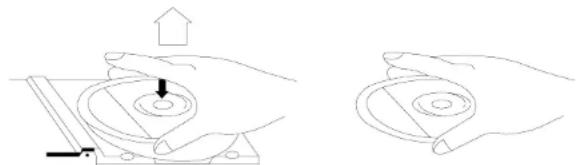
- To remove a disc from its storage case, press down on the centre of the case and lift the disc out, holding it carefully by the edges.
natural_image
Two hand-drawn diagrams showing a mechanical press or clamping mechanism, with no text or symbols present.- Fingerprints and dust should be carefully wiped off the disc's recorded surface with a soft cloth. Unlike conventional records, compact discs have no grooves to collect dust and microscopic debris so gently wiping with a soft cloth should remove most particles. Wipe in a straight line from the inside to the outside of the disc. Small dust particles and light stains will have absolutely no effect on reproduction quality.
- Never use chemicals such as record sprays, antistatic sprays, benzine, or thinners to clean compact discs. These chemicals can irreparably damage the disc's surface.
- Discs should be returned to their cases after use. This avoids serious scratches that could cause the Laser pickup to skip.
- Do not expose discs to direct sunlight, high humidity, or high temperatures for extended
English En
s5
periods. Long exposure to high temperatures can warp the disc.
- Do not stick paper or write anything with a ballpoint pen on the label side of the disc.
CD/MP3 PLAYBACK
Loading and Unloading Compact Discs
- Set the Function Selector (9) to the CD/MP3 Position.
- Open the disc compartment by lifting the CD OPEN/CLOSE corner (6).
- When the door has opened, remove a disc from its case and place it carefully in the compartment with the label side facing up. Locate 3" discs, on the central spindle in the compartment.
- Close the door by pressing on the corner of the CD door.
The total number of tracks appears on the display: Playback starts.
During playback, the actual track appears.
- Adjust the VOLUME control to your desired listening level.
- To stop playback temporarily, press the PLAY/PAUSE (▶ II) button (17) once. The Play indicator will flash on the display. Press the PLAY/PAUSE (▶ II) button again to resume playback.
- To stop playback, press the STOP (<) (19) button once.
- To switch OFF the unit select OFF with the Function Selector (9).
Notes:
- When the CD door is accidentally opened during playback, "OP" will appear on the display.
- Wait until the disc is fully stopped before opening the CD (2) compartment.
- This unit can play 3" (8cm) single CDs without an adaptor.
LOCATING A PARTICULAR TRACK OR POINT OF THE TRACK
- Press the SKIP DN (9)(14) button once to go back to the beginning of the current track.
- Press the SKIP DN button repeatedly to go back to previous tracks.
- Press the SKIP UP (13) button repeatedly to go to next tracks.
- Press and hold either SKIP UP or SKIP DN button to search backwards or forwards, at high speed, a particular point of track.
Note: Low level audio will be heard during the search process to assist in locating the correct point in the track.
6
REPEAT PLAYBACK WITH CD
- Press the PLAY/PAUSE button (17).
- To repeat the same track, press the PROG/P-MODE button (11) once. The indicator 'REPEAT' symbol flash on the display. The CD will start single repeat playback until STOP button (19) is pressed. Press the REPEAT button 3 times more to cancel single repeat. The indicator 'REPEAT' disappears from the display.
- To repeat the entire disc, press the PROG/P-MODE button (11) twice. REPEAT will appear on the display. Press the PROG/P-MODE button (11) button 3 times more to cancel all disc repeat. The indicator REPEAT disappears from the display.
REPEAT PLAYBACK WITH MP3
- Press the PLAY/PAUSE button (17).
- To repeat the same track, press the PROG/P-MODE button (11) once. The indicator 'REPEAT' flash on the display. The CD will start single repeat playback until STOP button (19) is pressed. Press the REPEAT button 3 times more to cancel single repeat. The indicator 'REP' disappears from the display.
- To repeat the entire disc, press the PROG/P-MODE button (11) three times. REP ALL will appear on the display.
- Press the PROG/P-MODE button (11) button 1 time more to cancel all disc repeat. The indicator disappears from the display.
PROGRAMMED PLAYBACK FOR CD/MP3
IN CD
- Press the PLAY/PAUSE button (17) and after 5 seconds the STOP button (19).
- Press the PROG/P-MODE button (11). The track number "P-01" will appear and "PROG" will appear on the display indicating the first selection.
- Press SKIP DN (9) or SKIP UP (:) button to select the desired track to be programmed. The track number which will be programmed will appears on the display.
- Press once the PROG/P-MODE button (11) to enter the track into memory. "P-02" will appear.
- Repeat the steps 3 and 4 to program up to 20 CD tracks or 99 MP3.
- Press PLAY/PAUSE (▶ II) button (10) once to start programmed playback.
English En
sħ
- To cancel programmed playback, press the STOP button (19) twice.
Note: During program playback, if you wish to repeat the entire programmed playback, press the PROG/P-MODE button (11) repeatedly until the "REP" indicator appears on the display.
FOLDER FUNCTION IN MP3 MODE
Note: You can use the FOLD+/ + 10 or FOLD-/- 10 Button (22/23) to jump 10 tracks up or down.
ANTI-SHOCK FUNCTION
- If in use, the player is likely to receive shocks or vibrations (i.e. whilst walking or in a moving vehicle), The ANTI-SHOCK function is active to provide uninterrupted playback when power on.
- Should the player receive shocks for more than 5 seconds continuously in CD playback or 50 seconds in MP3 playback, the sound can mute for a very short while and will resume once the player has stabilised from the shock.
Notes:
- The Anti-shock function will not correct the errors arising from the use of defective scratched or dirty discs.
- IMPORTANT! During CD/MP3 playback, the ANTI-SHOCK function is always ON and this function can not be disactivated.
IMPORTANT
Since movement of the CD mechanism and the sensitive circuitry may cause interference to a radio tuner nearby switch this unit off while operating other radio devices.
This product utilizes a laser
Danger - Invisible laser radiation when opened and interlock failed or defeated. Avoid direct exposure to the beam.
Caution - Use of controls, adjustments, or procedures not listed in this manual may result in hazardous radiation exposure.
8
Concerning Compact Discs
Only compact discs identified with this mark can be used with this player.

SPECIFICATIONS
Power Supply
AC: 230V \~ 50Hz
Batteries: 6 x UM-2
Radio Frequency Coverage
FM: 87.5 - 108 MHz
MW: 540 - 1600 kHz
General
Headphones: 3.5mm stereo jack plug, 8-32 Ohm
CD Player
Pick Up: 3-Beam. Semiconductor Laser
Encoding: 16-Bit Linear
Note: Specifications and the design are subject to possible modifications without notice due to improvement.
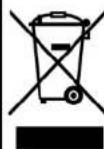
Correct Disposal of This Product
(Waste Electrical & Electronic Equipment)
This marking shown on the product or its literature, indicates that it should not be disposed with other household wastes at the end of its working life. To prevent possible harm to the environment or human health from uncontrolled waste disposal, please separate this from other types of wastes and recycle it responsibly to promote the sustainable reuse of material resources.
Household users should contact either the retailer where they purchased this product, or their local government office, for details of where and how they can take this item for environmentally safe recycling.
Business users should contact their supplier and check the terms and conditions of the purchase contract. This product should not be mixed with other commercial wastes for disposal.
SICHERHEITSHINWEISE

natural_image
Line drawing showing two hands performing a circular tool manipulation task (no text or symbols present)WIEDERHOLTE WIEDERGABE IN CD
natural_image
Line drawing showing two hands operating a mechanical device with a circular component and an upward arrow (no text or symbols)natural_image
Two hand-drawn diagrams showing a mechanical or electrical component with an upward arrow and a pointer, no text or symbols present.Riguardo I Compact Discs
natural_image
Two-step illustration showing hands holding a circular object with a pointer and a magnified view of the ring (no text or symbols)natural_image
Line drawing showing two hands operating a mechanical device with a circular component and an upward arrow (no text or symbols)Alcance: 3-Raios, Laser Semi-conductor Encoding: 16-Bit Linear


- Playability of self-made CDs on Roadstar CD drive mechanisms.
- 2
- CDR-4230MP
- INSTRUCTION MANUAL
- LOCATION OF CONTROLS
- English En
- CONNECTING TO POWER
- Caution
- Safety Precaution
- POWER SUPPLY
- AC Power Operation
- Battery Operation
- RADIO OPERATION
- Antenna
- FM Stereo and Mono Reception
- s5
- CD/MP3 PLAYBACK
- Loading and Unloading Compact Discs
- Notes:
- LOCATING A PARTICULAR TRACK OR POINT OF THE TRACK
- 6
- REPEAT PLAYBACK WITH CD
- REPEAT PLAYBACK WITH MP3
- PROGRAMMED PLAYBACK FOR CD/MP3
- IN CD
- sħ
- FOLDER FUNCTION IN MP3 MODE
- ANTI-SHOCK FUNCTION
- IMPORTANT
- 8
- Concerning Compact Discs
- SPECIFICATIONS
- Radio Frequency Coverage
- General
- CD Player
- Correct Disposal of This Product
- (Waste Electrical & Electronic Equipment)
- SICHERHEITSHINWEISE
- WIEDERHOLTE WIEDERGABE IN CD
- Riguardo I Compact Discs
Brand : ROADSTAR
Model : CDR4230MP
Category : Cd player/recorder