
Cavallino G150 - Earphones Ferrari by Logic3 - Free user manual and instructions
Find the device manual for free Cavallino G150 Ferrari by Logic3 in PDF.


| Product type | In-ear headphones |
| Brand | Ferrari by Logic3 |
| Model | Cavallino G150 (G150i model with 3-button remote) |
| Compatibility | Apple devices (iPod, iPhone, iPad) for 3-button remote; BlackBerry, Windows, Android for 1-button remote |
| Box contents | Earphones, ear tips of different sizes, carrying case |
| Remote control | 1 button (play/pause) and 3 buttons (play/pause, volume +/-, track control) |
| Microphone | Built into the 3-button remote |
| Cable length | Approximately 1.2 m |
| Weight | Approximately 15 g |
| Connector | 3.5 mm jack |
| Audio format | Stereo |
| Frequency response | 20 Hz - 20 kHz |
| Impedance | 16 ohms |
| Power | Passive, no battery required |
| Maintenance | Clean with a dry cloth, do not use water |
| Safety | Do not use at high volume; keep out of reach of children under 3 years |
| Warranty | 2 years (standard) |
| Included accessories | Replacement ear tips |
| Additional features | Playback control, call answering, fast forward/rewind, playlist selection (iPod shuffle) |
| Product registration | Recommended on the Ferrari-by-Logic3.com website |
Frequently Asked Questions - Cavallino G150 Ferrari by Logic3
User questions about Cavallino G150 Ferrari by Logic3
0 question about this device. Answer the ones you know or ask your own.
Ask a new question about this device
Download the instructions for your Earphones in PDF format for free! Find your manual Cavallino G150 - Ferrari by Logic3 and take your electronic device back in hand. On this page are published all the documents necessary for the use of your device. Cavallino G150 by Ferrari by Logic3.
USER MANUAL Cavallino G150 Ferrari by Logic3
Thank you for purchasing the Ferrari by Logic3 Cavallino G150i/G150 Earphones. As with all Ferrari by Logic3 products it has been built to the highest manufacturing standards and tested throughout its development, to ensure you get the best possible product.
Please read through and familiarize yourself with this manual before you use the Ferrari by Logic3 Cavallino G150i/G150 Earphones.
PRODUCT REGISTRATION:
For your benefit, Logic3 recommends that You register Your Product online to record Your Product serial number and date of purchase, as this information will allow us to better serve Your needs. Please visit http://www.ferrari-bylogic3.com/register
COMPATIBILITY
*3 button remote works with:
Made for

iPod

Phone

iPad
The remote is supported only by iPod nano (4 th/ 5th/ 6th generation), iPod classic (120GB/160GB), iPod touch (2nd/3rd/4th generation) and iPod shuffle (3rd generation), iPhone, iPhone3 / 3GS, 4 / 4S, iPad / iPad 2 / new iPad
Audio is supported by all iPod models.
- Requires software version 1.0.3 for iPod nano (4th generation), 2.0.4 for iPod classic (120GB), and 2.2 or later for iPod touch (2nd generation)
- 1 button remote works with:
BlackBerry

Windows
phone

and
The remote is supported by most Blackberry, Windows and Android smart phones.
CONTENTS
Check the packaging for the items shown below.
Please retain the packing materials, as this will provide the safest way to transport this product.
If any part of the product appears to be damaged, do not attempt to use it. Please contact Ferrari by Logic3 immediately via e-mail: support@ferrari-by-logic3.com or via telephone: +44 (0) 1923 471 010
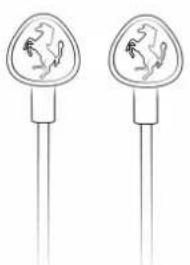
Cavallino G150i/G150
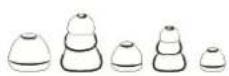
X5 Eartips
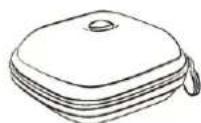
Carry Case
WARNING: To avoid danger of suffocation, keep plastic bags out of the reach of children.
Setup of G150
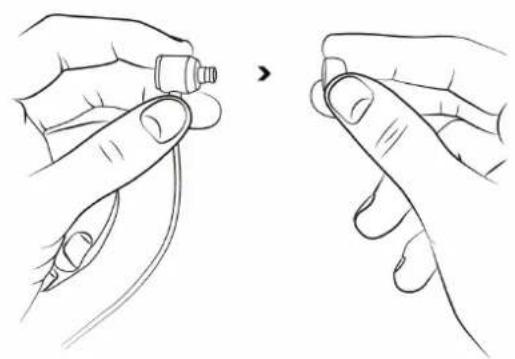
3
4
Important Logic3 Performance and safety tips listen responsibly
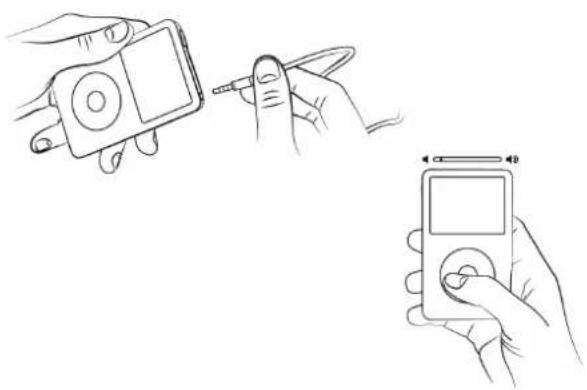
To avoid hearing damage, make sure that the volume on your music player is turned down before connecting your earphones. After placing earphones in your ears, gradually turn up the volume until you reach a comfortable listening level.
Get the most out of your equipment and enjoy great audio performance even at safe levels. Our earphones will allow you to hear more details at lower volume levels than ever before.
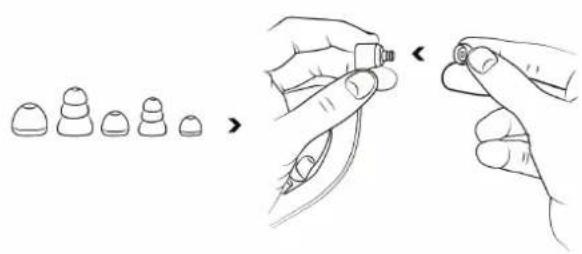
Ear tip selection
The tips on the ends of your Cavallino G150i/G150 make the difference between good sound and great sound. With the right fit, you'll get better isolation from unwanted outside noise, increased bass response, better tonal balance and the earphones will stay in your ears better. Of course, the right fit will also feel more comfortable. We supply several sizes and designs of ear tips. Getting the perfect fit with the correct tip is a matter of experimentation.
Listen
Turn down the volume on your music player before inserting Cavallino G150 earphones.
IMPORTANT: Left and Right Earphone: Having the correct earphone side in the correct ear does affect the listening experience.
Note the "L" and "R" markings on the side of each earphone. "L" is for the left ear, "R" is for the right ear.
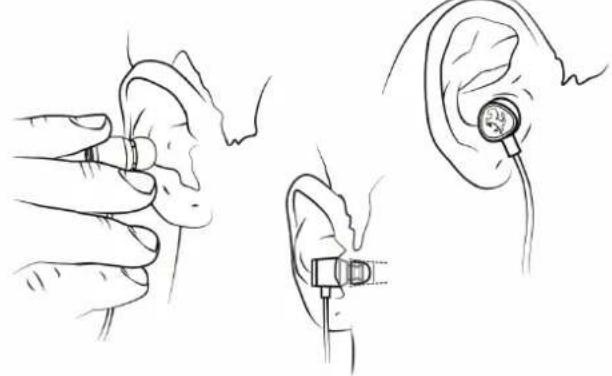
Proper insertion and removal of ear tips
- You may wish to lightly moisten your ear tips for easier insertion.
- Using your right hand, grasp the right earphone.
- With your left hand, pull up and back on your right ear to straighten your ear canal.
- Carefully insert your right earphone, rubber ear tip first, so that it seals completely and comfortably in your ear.
DO NOT insert the ear tip so deeply that your ear canal feels completely "plugged."
- Repeat this procedure for your left ear.
- When you've finished your listening session, remove your in-ear earphones slowly with a twisting motion to gradually break the seal.
REMOTES
Using the 1 Button remote
| Command | Action |
| Play/Pause | Press the Play/Pause Button once |
*3 Button Remote (Applicable to G150i)
Cavallino G150i has a built-in 3 button remote feature for use with music phones and newer iPod. The 3 button remote has a call answer button and microphone so you can easily switch between listening to music and talking on your phone. It also features music and video playback control for iPod, iPhone and iPad.
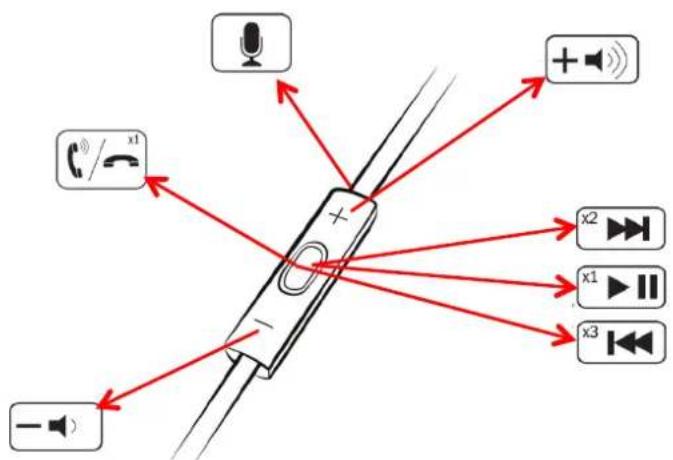
| Command | Action |
| Play/Pause | Press the Play/Pause Button once |
| Volume Controls | Press the Volume Up (+) or Volume Down (-) |
| Next Track | Double Press the Play/Pause Button |
| Previous Track | Triple Press the Play/Pause Button within 10 seconds of the track starting. To restart the current track, Triple Press the Play/Pause Button after 10 seconds |
| Search Fast Forward | Double Press and Hold the Play/Pause Button |
| Search Rewind | Triple Press and Hold the Play/Pause Button |
| *Hear song Title/Artist | Press and Hold the Play/Pause Button |
| *Hear playlist menu | Press the Play/Pause Button until you hear a beep; release the button to hear the playlist menu. When you hear the then name of the playlist you want, press the Play/Pause button to select it. To move quickly through the playlist menu press + or - (when you are in the playlist menu) |
| *Exit Playlist menu | Press and Hold the Play/Pause Button |
- Applicable to iPod 3G Shuffle
SAFETY INFORMATION
- Read these instructions - for all components before using this product.
- Keep these instructions - for future reference.
- Heed all warnings - on the product and in the owner's guide.
- Follow all instructions.
- Do not use this apparatus near water or moisture - Do not use this product near a bathtub, washbowl, kitchen sink, laundry tub, in a wet basement, near a swimming pool or anywhere else that water is present.
- Clean only with a dry cloth. Unplug this product from the wall outlet before cleaning.
- Only use attachments/accessories specified by the manufacturer.
- Make no modifications to the product or accessories. Unauthorized alterations may compromise safety, regulatory compliance, and system performance, and will void the warranty.
- Unplug this apparatus when unused for long periods of time.
- Do not place any naked flame sources, such as lighted candles, on or near the apparatus.
- Contains small parts that may be a choking hazard. Not suitable for children under age 3.
- To prevent risk of fire or electric shock, avoid overloading wall outlets and using extension cords.
- Do not let objects or liquids enter the product - as they may touch dangerous voltage points or short-out parts that could result in a fire or electric shock.
support@ferrari-by-logic3.com
www.ferrari-by-logic3.com
Logic3 plc, Rhodes Way, Watford, WD24 4YW, UK
Logic3 plc & Logic3 International Ltd. of Watford UK are the owners of the Logic3 registered trademark. Logic3 own registered and unregistered design rights and copyright subsisting in various
products within its range.
FERRARI, the PRANCING HORSE device, all associated logos and distinctive designs are trademarks of Ferrari S.p.A. The body designs of the Ferrari cars are protected as Ferrari property under design, trademark and trade dress regulations.
All other trademarks, copyrights and trade names are registered properties of their respective owners. Logic3 are continually updating their products in the interest of improving the quality and design. Copyright in this manual is owned by Logic3 International Ltd. Rhodes Way.