USER MANUAL ZeroCalc Eco IMETEC
IMETEC wwy.imetec.com
Tenaca Group S.p.A. Via Piemonte 5/11 24052 Azzano S. Paolo (BG) ITALY
Tel. +39.035.688.111 Fax +39.035.320.149
TYPE EA501
IMETEC
IT pagina 1
GB page 11
FR page 21
HR stranica 31
SO tape 41
SL stran 51
EL oskisga 61
istruzioni per Iuso
Operating instructions
Mode d'emploi
Upute za uporabu
Uhizime per periodm
Navodila za uporabo
Observing Xphons

IMETEC ZEROCALC
![Max Ø [D]](/content/2026/02/358750/images/d44b64228538aa4d75358f810594e592f59302a03e94246707999eb6c38ca1f5.jpg)
natural_image
Close-up of a hand holding a small mechanical device with a circular component, possibly a tool or sensor (no visible text or symbols)
![Max Ø [B]](/content/2026/02/358750/images/f6472f1a47742bf626a4792afbf337edcbcbfb3a1acddd30d7fde8d07b2331af.jpg)
natural_image
Electric iron with attached screwdriver and magnified view showing disassembled parts (no text or symbols)
natural_image
Illustration of a showerhead with smokestacks emitting vapor, showing internal air flow and a small inset icon labeled [3] (no text or symbols on main diagram)
natural_image
Close-up illustration of a device's tip and internal components with light rays, no text or symbols present
DATA TECHNICI
TECHNICAI DATA
DONNÉES TECHNIQUES
TEHNICKI PODACI
THE DENNA TEKNIKE
TECHNICI PODATKI
TEXNKA STOEXIA
(No text)
The Ground Truth image displays a single, solid horizontal line. According to Rule 2 (UNDERSCORE & LINE RULES), this is a stylistic or background line, not a placeholder underscore. Therefore, the OCR result must ignore it. The provided OCR content is "____", which consists of four underscores. This is an incorrect interpretation of the line as a placeholder, violating the rule that stylistic lines must be ignored. The OCR has hallucinated text (underscores) where none should exist, violating the rule to ignore such lines. Hence, the OCR result is inconsistent with the Ground Truth.
TYPB E4501
230-240 V 50
004017007
© 55
① 20
The Ground Truth image displays a single, solid horizontal line. According to Rule 2 (UNDERSCORE & LINE RULES), if the GT contains lines used for stylistic emphasis or as background (like ruled paper), the OCR result must ignore them. The line in the GT is clearly a stylistic or background line, not a placeholder for text. Therefore, the OCR should not have output any underscores. Outputting `____` constitutes an error under Rule 2, as it hallucinates placeholder symbols where none are semantically intended. Hence, the OCR result is inconsistent with the Ground Truth.
(No text)
The Ground Truth image displays a single, solid horizontal line. According to Rule 2 (UNDERSCORE & LINE RULES), this is a stylistic or background line, not a placeholder underscore. Therefore, the OCR result must ignore it and output nothing or only meaningful text. The provided OCR content is "____", which consists of four underscores. This is an incorrect interpretation of the line as a placeholder, violating the rule that stylistic lines must be ignored. The OCR has hallucinated placeholder underscores where none exist in the GT. Hence, the result is inconsistent with the Ground Truth.




IT
ISTRUZIONI PER L'USO DEL FERRO A VAPORE
- Sistema Self Clean/Calc-Clean
pagina 8
- Pulizia
pagina 8
SISTEMA SELF CLEAN/CALC CLEAN (OVE PRESENTE)
Tel. +39.035.688.111 Fax +39.035.320.149
0611(MM)1190
M1000401

OPERATING INSTRUCTIONS
FOR THE STEAM IRON
GB
Dear customer, IMETEC thanks you for having purchased this product. We are certain you will appreciate the quality and reliability of this appliance, designed and manufactured with customer satisfaction in mind. These instructions for use have been drawn up in compliance with the European Standard EN 62079.

ATTENTION!
Instructions and warnings for a safe use.
Please read the use and safety instructions before using the appliance and follow these at all times. Keep this manual and illustrative guide with the appliance for future consultation. Should you pass the appliance on to another user, make sure to also include this documentation.
Should certain parts of this user manual be difficult to understand or should doubts arise, contact the company before using the product, at the address indicated on the last page.
INDEX
OPERATING INSTRUCTIONS page 11
SAFETY WARNINGS page 12
DESCRIPTION OF THE APPLIANCE AND ACCESSORIES page 14
PREPARATIONS page 15
TIPS ON IRONING page 15
USE page 16
• Filling the reservoir page 16
- Selecting the temperature page 16
- ECO function page 16
- Ironing without steam (dry) page 16
- Ironing with steam page 16
• Super-steam and vertical steam page 17
- Spray function page 17
- Anti-drip system page 17
AFTER IRONING page 17
- Emptying the iron page 17
MAINTENANCE
• Zero-Calc anti-scale system page 18
- Self Clean/Calc-Clean system page 18
- Cleaning page 18
PROBLEMS AND SOLUTIONS page 18
DISPOSAL page 20
ASSISTANCE AND WARRANTY page 20
Illustrative guide I-II
Technical data
III
GB
SAFETY WARNINGS
- The appliance may be used by children below 12 years of age, by persons with reduced physical, sensorial or mental abilities or persons lacking experience only if they have received prior instructions concerning its safe use and if they are informed as to the dangers related to use of the appliance. Children may not play with the appliance. Appliance cleaning and maintenance cannot be completed by children without adult supervision.
Keep the appliance and power supply cord away from children under 12 when the appliance is on or cooling down.

NEVER leave the iron unattended when connected to the power supply.

ATTENTION!
surface
- Always disconnect the appliance from the mains supply before cleaning or performing maintenance, before filling the water reservoir and when the appliance is not in use.
- The iron must be used on a stable surface. When the iron is placed on the iron rest make sure the support is stable. The iron must not be used if
GB
it has been dropped, if it is visibly damaged or it leaks water.
- After having removed the appliance from its packaging, check the integrity of the supply based on the drawing and any presence of transport damages. If in doubt, do not use the appliance and contact the authorised assistance service.
- Do not let children play with the packaging! Keep the plastic wrapping out of the reach of children; risk of suffocation!
- Before connecting the appliance, check that the mains voltage data reported on the identification plate corresponds to that of the available electric mains. The identification plate is attached to the appliance.
- This appliance must be used solely for the purpose for which it was designed, namely, as a boiler iron for home use. Any other use is improper and potentially dangerous.
- In case of fault or malfunctioning of the appliance, switch it off and do not tamper with it. If the appliance needs to be repaired, contact an authorised technical assistance centre.

DO NOT use the appliance with wet hands, damp feet or barefoot.

DO NOT pull the power cord or the appliance itself to remove the plug from the socket.

DO NOT expose the appliance to humidity or weather conditions (rain, sun, etc.).
- If the power cord is damaged it must be replaced by an authorised technical service centre, so as to prevent all risks.
- The electrical safety of this appliance is only guaranteed when it is connected correctly to an effective earthing system as required by applicable electrical safety standards. This important safety requirement must be verified and if in doubt, request a thorough check of the system by a skilled technician.

DO NOT immerse the iron, the power cord or the plug in any kind of liquid.

DO NOT leave the hot iron in contact with easily flammable fabric.

DO NOT press the steam button when the iron is resting on its mat.

DO NOT use chemical additives, scented substances or descaling agents.
- This iron is not equipped with a pressure boiler and has been designed to be used for brief periods of time in order to prevent stress related to this chore. For this reason it is recommended not to iron for more than an hour.
GB
IMPORTANT GUIDELINES
The appliance is designed to work with tap water, however, if the water in your residence area is very hard, mix the tap water (50%) with distilled and/or demineralised water (50%). Salt concentration in water in certain seaside areas is very high, in which case, demineralised water for steam irons (available on the market) must be used. In which case, demineralised water for steam irons (available on the market) must be used.
Do not introduce diluting agents, scented liquids or descaling agents. These can damage the product. Do not use water from dryers, air-conditioners and rain water.
The boiler may contain some water as each product is tested before being put on the market.
It is recommended to place a cloth between the iron and the fabric when using the iron for the first time.
It is recommended to direct a jet of steam into the air before starting to iron, for any residual condensation to be let out.
SYMBOLS:

WARNING

HIBITION
DESCRIPTION OF THE APPLIANCE AND ACCESSORIES
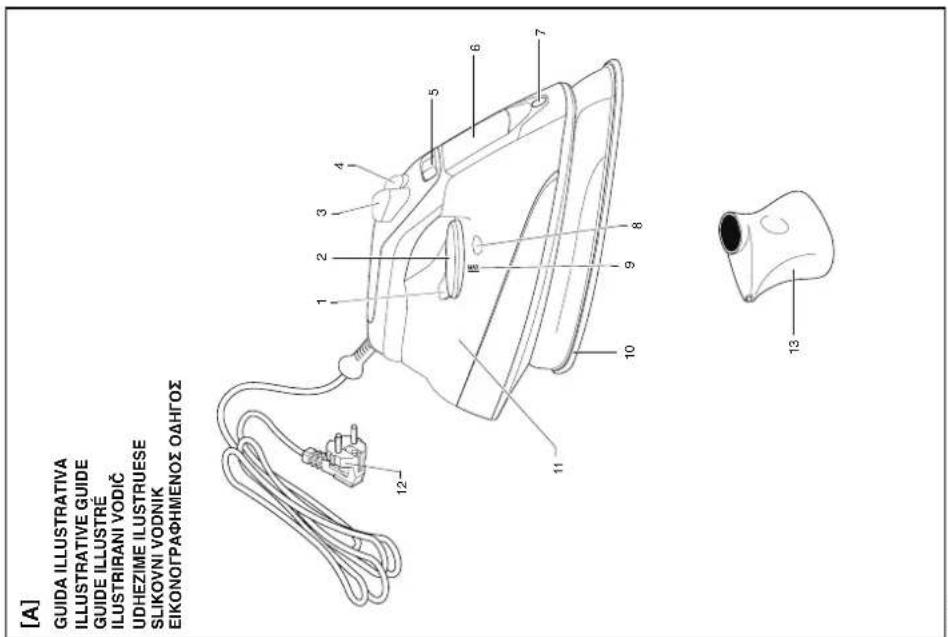
Refer to the illustrative diagram at the beginning of this user manual to verify your appliance equipment. All the figures are at the front of this instruction manual.

ATTENTION!
The accessories and features vary according to the models. Identify your model by referring to the illustrative diagrams at the beginning of the user manual and that shown on the product package.
- Plate temperature LED
- Temperature adjustment knob
- Spray button
- Super-steam button
- Steam selector
- Water fill-up opening
- Spray
- Calc clean button

GB
- Max fill-up level Max
- Plate with steam holes
- Water reservoir
- Plug
- Water cup
PREPARATIONS
Sort the laundry according to the international symbols shown on the labels; if these are missing, sort according to the type of material.
Start to iron the garments that require a lower temperature so as to reduce idle time (the iron requires less time to warm up than to cool down) and eliminate the risk of burning the fabric.

synthetic, acrylic, nylon, polyester: low temperatures;

wool, silk: medium temperatures;

cotton, linen: high temperatures;

do not iron.
TIPS ON IRONING
It is recommended to use the lowest temperatures on fabric with particular details (sequins, embroidery, satin, etc.). In the case of mixed fabric, (e.g. 40% cotton 60% synthetic), set the temperature knob to the lowest.
To determine the temperature of a fabric with an unknown composition, first test a hidden corner, starting with a low temperature and gradually increase it to the ideal temperature. Never iron perspiration or other marks: the heat of the plate sets the stains on the fabric, making them become indelible. Starch helps all the more when a dry iron is used at a low temperature: excessive heat burns it and a yellow stain may appear. Prevent shine effects from forming on silk, wool or synthetics, iron on reverse side. Prevent shine effects from forming on velvet, iron in one direction (following the fabric) and do not press on the iron.
The more the washing machine is loaded, the more creased the garments will be. The same applies when the spin speed is high. Many fabrics are ironed more easily when not completely dry. Silk should always be ironed while damp.
GB
USE
FILLING THE RESERVOIR
Verify that the plug (12) is disconnected from the socket.
Set the steam selector (5) to 0 [Fig. B].
Open the water fill cover (6).
Set the iron in a position that facilitates filling the water and prevents it from overflowing.
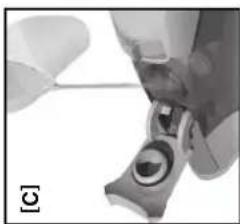
Slowly pour the water into the reservoir using the special cup (13) [Fig. C].
Do not exceed the maximum (MAX) level indicated on the reservoir (9).
Close the water fill cover (6).
SELECTING THE TEMPERATURE
Set the iron upright.
Insert the plug (12) in the socket.
Set the temperature according to the type of fabric in line with the international symbols shown on the labels; using the adjustment knob (2) [Fig. D].
Consult the table below for the correct temperatures.
The plate temperature LED (1) indicates that the iron is warming up.
Wait for the plate temperature LED (1) to go off before starting to iron.
| Label on clothing | Type of fabric | Temperature knob |
 | syntheticse.g. viscose, polyester | ● |
 | silk, wool | ● ● |
 | cotton, linen | ● ● ● |
ECO FUNCTION
The appliance is equipped with technology that optimises the steam production, thereby reducing energy consumption.
Set the steam selector (5) to ECO to activate the function.
It is recommended to use the ECO function for delicate garments (silk, wool and light cotton).
IRONING WITHOUT STEAM (DRY)
Follow the instructions in the "steam ironing" section, leaving the steam selector (5) set to 0.
IRONING WITH STEAM
Select the amount of steam via the steam selector (5).
Move the steam selector (5) to any position between minimum and maximum according to the desired amount.
Continuous steam will only be dispensed when the iron is in a horizontal position.
This stops when the iron is set upright or the steam selector (5) is set to 0.
GB
Steam can only be used at the highest temperatures, as indicated by the symbol on the temperature adjustment knob (2) [Fig. D].
If the selected temperature is too low, water droplets may drip from the plate.
Warnings: the plate temperature LED (1) goes on intermittently while ironing, thereby indicating that the selected temperature is maintained.
SUPER-STEAM AND VERTICAL STEAM
Press the super-steam button (4) to generate a strong shot of steam that penetrates the fabric and eliminates the most difficult creases.
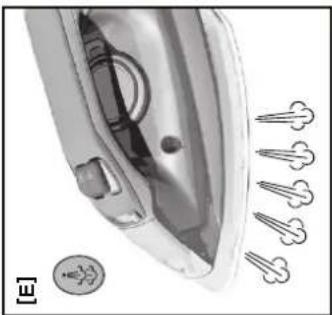
Wait a few seconds between each pressing action of the iron [Fig. E].
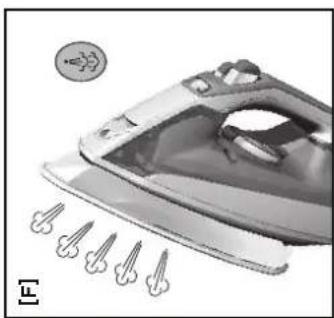
Press the super-steam button (4) intermittently to iron in an upright direction (curtains, hung clothes, etc.) [Fig. F].
Warnings: The super-steam function can only be used at high temperatures.
Stop the steam when the plate temperature LED (1) lights up and start ironing when this goes off.
SPRAY FUNCTION
Verify that there is water in the reservoir (11).
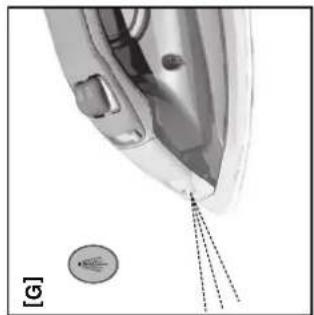
Press the spray button (3): slowly for dense spray or fast for mist [Fig. G].
Warnings: first dampen the fabric lightly using the spray function (3) or alternatively, lay a damp cloth between the fabric and the iron.
Do not use the spray on silk or synthetics.
ANTI-DRIP SYSTEM (IF PRESENT)
The anti-drip system allows the more delicate garments to be ironed at low temperatures. If the plate cools down enough for no steam to be produced, the hot water droplets can dr on the fabric, leaving stains.
In this case, the Anti-drip System intervenes automatically by blocking the steam function, thereby allowing the more delicate garments to be ironed without the risk of ruining or staining them.
AFTER IRONING
EMPTYING THE IRON
Disconnect the plug (12) from the socket.
Empty the reservoir (11) by turning the iron upside down and shaking it lightly.
Let the iron cool down completely.
Always set the iron upright.
GB
MAINTENANCE
ZERO-CALC ANTI-DRIP SYSTEM (IF PRESENT)
A special resin filter inside the water reservoir decreases the water hardness and limits the formation of lime scale in the plate. The resin filter is permanent and cannot be replaced.
SELF CLEAN/CALC-CLEAN SYSTEM (IF PRESENT)
The function allows the internal part of the plate to be cleaned from lime scale residue or other impurities.
It is recommended to implement this function every 5 - 10 times it is used.
Fill the water reservoir (11) up to the maximum (MAX) level (9).
Set the steam selector (5) to 0.
Adjust the temperature knob (2) to maximum and wait for the plate temperature control LED (1) to go off.
Disconnect the plug (12) from the socket and immediately place the iron in a horizontal position over a wash basin.
Press the Calc-Clean (8) button until hot water, steam and any impurities or lime scale come out of the plate.
Once the iron plate has cooled down (10), clean it with a damp cloth.
CLEANING

ATTENTION!
Make sure the plug of the appliance (12) is disconnected from the socket and the plate has cooled down completely before cleaning the iron.
Any starch deposits or residue on the surface of the plate can be removed with a damp cloth and non-abrasive liquid detergent.
Avoid scratching the plate with steel wool or metal objects.
The plastic parts can be cleaned with a damp cloth and then wiped with a dry cloth.
PROBLEMS AND SOLUTIONS
This chapter describes the most common problems related to appliance use. If the problems cannot be resolved with the information below, please contact the Authorised Assistance Centre.
GB
| Problem Possible cause Solution | |
| The plate remains cold or does not heat up. | There is no power supply. | Verify whether the plug is inserted correctly or try inserting it in another socket. |
| Verify whether the temperature adjustment knob (2) is set to the minimum temperature ∅ (Fig D). |
| The plate temperature LED goes on and off. | Normal procedure. | This indicates the heating phase of the iron. The LED goes off once the set temperature is reached. |
| Only a little steam or none at all is dispensed. | The steam selector (5) is set to ∅ . | Set the steam selector (5) to the desired field [Fig. B]. |
| There is not enough water in the reservoir. | Fill the reservoir. |
| The anti-drip system is activated (if present). | Wait for the plate to reach the correct temperature once again. |
| The impurities that come out from the steam holes stain the garments. | Possible residue in the steam chamber/plate. | Carry out the Self Clean procedure (see paragraph Seal Clean/Calc-Clean System). |
| Chemical additives, scented liquids or descaling agents are being used. | These damage the product: do not add additives to the water in the reservoir. |
| Pure distilled water or softened water is being used. | Mix tap water (50%) with distilled and or demineralised (50%) water. |
| Starch is being used. | Always spray the starch on the reverse side of the fabric. |
| Water escapes from the plate. | The plate temperature is too cold due to the Super-steam button being pressed too often (4). | Allow slightly longer intervals between the jets of steam. |
| The temperature adjustment knob (2) is set to minimum ∅ (Fig D). | Turn the temperature adjustment knob (2) to a higher setting. |
GB DISPOSAL

The product is packaged in recyclable materials. Dispose of it in compliance with the environmental protection standards.

The product must be disposed of properly, in accordance with the provisions of European standard 2002/96/EC. The recyclable materials contained in the appliance must be recovered so as to prevent environmental pollution. For further information, contact the local disposal body or the appliance dealer.
ASSISTANCE AND WARRANTY
To request repairs or purchase spare parts, please contact IMETEC's authorised customer assistance service on the Toll-Free Number below or via the website. The appliance is covered by the manufacturer's warranty. For details, read the attached warranty sheet. Failure to comply with the instructions for use and maintenance provided in this manual will render the manufacturer's warranty null and void.
IMETEC
www.imetec.com
Tenacta Group S.p.A. Via Piemonte 5/11 24052 Azzano S. Paolo (BG) ITALY
Tel. +39.035.688.111 Fax +39.035.320.149
0611 (MMY) 1190
MLOOD401

ATTENTION!
surface chaude
INDICATIONS IMPORTANTES
REPASSAGE AVEC VAPEUR
SYSTÈME SELF CLEAN/CALC-CLEAN (SI PRÉSENT)
Tel. +39.035.688.111 Fax +39.035.320.149
0611 (MINN) 1190
M1000401

UPUTE ZA UPORABU GLAČALA NA PARU
Štovani kliente, poduzeće IMETEC Vam zahvaljuje što ste kupili ovaj proizvod. Sigurni smo da ćete znati cijeniti kvalietu i pouzdanost ovog aparata jer je on projektiran i proizveden stavljajući u prvi plan klijentovo zadovoljstvo. Ovaj priručnik s uputama je sastavljen u skladu s europskim propisom EN 62079.

POZOR!
Upute i upozorenja u svezi sa sigurnim korištenjem.
pamuk, Ian: visoke temperature;

FUNKCIJA SELF CLEAN/CALC-CLEAN
Ova funkcija omogućuje da se očisti unutrašnja strana ploče od ostataka kamenca i drugih nečistoća.
Savjetujemo Vam da je obavite savko 5 - 10 korištenja.
Napunite spremnik (11) sve do maksimalne razine označene "MAX" (9).
Postavite selektor za paru (5) u položaj "0".
Tel. +39.035.688.111 Fax +39.035.320.149
0611(MM/Y) 1190
M1000401

UDHEZIME PER PERDORIMIN E HEKURIT ME AVULL
SQ
HEKUROSJE PA AVULL (NE TE THATE)
Per hekurosje pa avull ndiqni udhezimet e seksionit “hekurosje me avull” duke lene percaktuesin e avullit (5) ne pozicionin “0”.
HEKUROSJE ME AVULL
Seleksiononi sasine e avullit me ane te percaktuesit te tij (5).
Spostoni percaktuesin e avullit (5) ne nje pozicion midis minimales dhe maksimales ne
SQ
baze te sasise se avullit qe deshironi.
Avulli del ne menyre te vazhdueshme vetem ne qofte se hekuri vendoset ne pozicion orizontal.
Ndalimi i avullit te vazhdueshem mund te ndalohet duke mbeshtetur hekurin ne pozicion vertikal ose duke spostuar perzgjedhesin e avullit (5) ne pozicionin "0".
Perdorimi i avullit eshte i mundur vetem me temperaturat me te larta, sic indikon simboli mbi celesin rrotullues per rregullimin e temperatures (2) [Fig.D].
Ne qofte se temperatura e percaktuar eshte teper e ulet, nga piastra mund te rrjedhin pika te vogla uji.
Kujdes: gjate hekurosjes drita llambes se kontrollit te temperaures se piastres (1) ndizet me intervale dhe tregon qe temperatura eshte ajo e percaktuar.
AVULL ME PRESION DHE AVULL NE POZICION VERTIKAL
SISTEMI ZERO-CALC ANTIKALKAR (KUR ESHTE I PRANISHEM)
SISTEMI SELF CLEAN/CALC CLEAN VETEPASTRUES NGA GELQERJA (KUR ESHTE I PRANISHEM)
Tel. +39.035.688.111 Fax +39.035.320.149
0611 (MMY) 1190
M1000401

NAVODILA ZA UPORABO PARNEGA LIKALNIKA
SISTEM S ČISTILNO FUNKCIJO SELF CLEAN/CALC CLEAN (KJER JE PRISOTEN)
Tel. +39.035.688.111 Fax +39.035.320.149
0611(MM/Y) 1190
M1000401

EL
Tel. +39.035.688.111 Fax +39.035.320.149
0611 (MMYH) 1190
MI000401