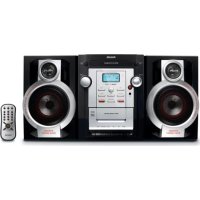
FWM143 - Hi-Fi System PHILIPS - Free user manual and instructions
Find the device manual for free FWM143 PHILIPS in PDF.


| Product type | Hi-Fi system |
| Brand | Philips |
| Model | FWM143 |
| Dimensions (main unit) | 220 × 292 × 285 mm |
| Dimensions (speakers) | 190 × 292 × 183 mm |
| Total weight (including speakers) | Approximately 7.7 kg |
| Weight (main unit) | Approximately 3.8 kg |
| Power supply | 120 V ~ 60 Hz |
| Standby power consumption | < 0.8 W |
| Output power | 2 × 20 W RMS |
| Speaker impedance | 8 Ω |
| CD player | CD, CD-R, CD-RW, MP3-CD |
| Max number of programmable tracks | 20 |
| Cassette deck | Type I (Normal) |
| Radio reception | FM 87.5-108 MHz / AM 522-1710 kHz |
| Audio functions | DBB (bass boost), DSC (Classic, Jazz, Pop, Rock) |
| Timer/Sleep | Timer with CD/Tuner source, Sleep 15-120 min |
| Auxiliary input | AUX IN (RCA jack) |
| Remote control | Infrared, AAA batteries (2x) |
| Supplied accessories | 2 speakers, remote control |
| Maintenance | Clean cabinet with a soft cloth, clean disc from center to edge, clean cassette head every 50 hours |
| Safety | Double insulation, do not expose to water, do not open the cabinet |
Frequently Asked Questions - FWM143 PHILIPS
User questions about FWM143 PHILIPS
0 question about this device. Answer the ones you know or ask your own.
Ask a new question about this device
Download the instructions for your Hi-Fi System in PDF format for free! Find your manual FWM143 - PHILIPS and take your electronic device back in hand. On this page are published all the documents necessary for the use of your device. FWM143 by PHILIPS.
USER MANUAL FWM143 PHILIPS
Register your product and get support at www.philips.com/welcome

Thank you for choosing Philips.
Need help fast?
Read your Quick Start Guide and/or User Manual first for quick tips that make using your Philips product more enjoyable. If you have read your instructions and still need assistance, you may access our online help at
www.philips.com/welcome or call
I-888-PHILIPS (744-5477)
while with your product.
(and Model / Serial number)

I-888-PHILIPS (744-5477) (English speaking)
natural_image
Black Philips 2-WAY BASS REFLEX SYSTEM with dynamic bass boost and control panel (no visible text beyond branding)PHILIPS
Note : This equipment has been tested and found to comply with the limits for a Class B digital device, pursuant to part 15 of the FCC Rules. These limits are designed to provide reasonable protection against harmful interference in a residential installation. This equipment generates, uses, and can radiate radio frequency energy and, if not installed and used in accordance with the instruction manual, may cause harmful interference to radio communications. However, there is no guarantee that interference will not occur in a particular installation. If this equipment does cause harmful interference to radio or television reception, which can be determined by turning the equipment off and on, the user is encouraged to try to correct the interference by one or more of the following measures :
- Relocate the receiving antenna.
— Increase the separation between the equipment and receiver - Connect the equipment into an outlet on a circuit different from that to which the receiver is connected.
- Consult the dealer or an experienced radio/TV technician for help.
IMPORTANT!
modifications not authorized by the manufacturer may void users authority to operate this device.
Return your Product Registration Card or register online at
www.philips.com/welcome today to get the very most from your purchase.
Registering your model with PHILIPS makes you eligible for all of the valuable benefits listed below, so don't miss out. Complete and return your Product Registration Card at once, or register online at www.philips.com/welcometo ensure:
\*Proof of Purchase
Returning the enclosed card guarantees that your date of purchase will be on file, so no additional paperwork will be required from you to obtain warranty service.
\*Product Safety Notification
By registering your product, you'll receive notification - directly from the manufacturer - in the rare case of a product recall or safety defect.
\*Additional Benefits
Registering your product guarantees that you'll receive all of the privileges to which you're entitled, including special money-saving offers.
PHILIPS
Congratulations on your purchase, and welcome to the "family!"
Dear PHILIPS product owner:
Thank you for your confidence in PHILIPS. You've selected one of the best-built, best-backed products available today. We'll do everything in our power to keep you happy with your purchase for many years to come. As a member of the PHILIPS "family," you're entitled to protection by one of the most comprehensive warranties and outstanding service networks in the industry. What's more, your purchase guarantees you'll receive all the information and special offers for which you qualify, plus easy access to accessories from our convenient home shopping network.
Most importantly, you can count on our uncompromising commitment to your total satisfaction.
All of this is our way of saying welcome - and thanks for investing in a PHILIPS product.
PS. To get the most from your PHILIPS purchase, be sure to complete and return your Product Registration Card at once, or register online at:
www.philips.com/welcome
Know these
safety symbols

CAUTION
RISK OF ELECTRIC SHOCK DO NOT OPEN

CAUTION: TO REDUCE THE RISK OF ELECTRIC SHOCK, DO NOT REMOVE COVER (OR BACK). NO USER-SERVICEABLE PARTS INSIDE. REFER SERVICING TO QUALIFIED SERVICE PERSONNEL.
This “bolt of lightning” indicates uninsulated material within your unit may cause an electrical shock. For the safety of everyone in your household, please do not remove product covering.
The “exclamation point” calls attention to features for which you should read the enclosed literature closely to prevent operating and maintenance problems.
WARNING: To reduce the risk of fire or electric shock, this apparatus should not be exposed to rain or moisture and objects filled with liquids, such as vases, should not be placed on this apparatus.
CAUTION: To prevent electric shock, match wide blade of plug to wide slot, fully insert.
Enter below the Serial No. which is located on the rear of the cabinet. Retain this information for future reference.
Model No. ____ Serial No. ____
PHILIPS
Visit our World Wide Web Site at http://www.philips.com/welcome
- Read these instructions.
- Keep these instructions.
- Heed all warnings.
- Follow all instructions.
- Do not use this apparatus near water.
- Clean only with dry cloth.
- Do not block any ventilation openings. Install in accordance with the manufacturer's instructions.
- Do not install near any heat sources such as radiators, heat registers, stoves, or other apparatus (including amplifiers) that produce heat.
- Do not defeat the safety
purpose of the polarized or
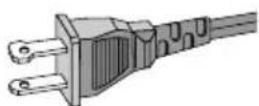
AC Polarized Plug
grounding-type plug. A polarized plug has two blades with one wider than the other. A grounding type plug has two blades and a third grounding prong. The wide blade or the third prong are provided for your safety. If the provided plug does not fit into your outlet, consult an electrician for replacement of the obsolete outlet.
-
Protect the power cord from being walked on or pinched, particularly at plugs, convenience receptacles, and the point where they exit from the apparatus.
-
Only use attachments/accessories specified by the manufacturer.
12.

Use only with the cart, stand tripod, bracket, or table specified by the manufacturer or sold with the apparatus. When a cart is used, use caution when moving the cart /apparatus combination to avoid injury from tip-over.
- Unplug this apparatus during lightning storms or when unused for long periods of time.
- Refer all servicing to qualified service personnel. Servicing is required when the apparatus has been damaged in any way, such as power-supply cord or plug is damaged, liquid has been spilled or objects have fallen into the apparatus, the apparatus has been exposed to rain or moisture, does not operate normally, or has been dropped.
- Where the MAINS plug or an appliance coupler is used as the disconnet device, the disconnet device shall remain readily operable.
- Battery usage CAUTION – To prevent battery leakage which may result in bodily injury, property damage, or damage to the unit:
Install all batteries correctly, + and - as marked on the unit.
Do not mix batteries (old and new or carbon and alkaline, etc.).
Remove batteries when the unit is not used for a long time.
- Apparatus shall not be exposed to dripping or splashing.
- Do not place any sources of danger on the apparatus (e.g. liquid filled objects, lighted candles).
- This product may contain lead and mercury. Disposal of these materials may be regulated due to environment considerations.
For disposal or recycling information, please contact your local authorities or the Electronic Industries Alliance: www.eiae.org.
EL 6475-S004: 03/12
Class II equipment symbol

This symbol indicates that the unit has a double insulation system
Canada
English:
This digital apparatus does not exceed the Class B limits for radio noise emissions from digital apparatus as set out in the Radio Interference Regulations of the Canadian Department of Communications.
Français:
Windows Media is a trademark of Microsoft Corporation.
CAUTION
Use of controls or adjustments or performance of procedures other than herein may result in hazardous radiation exposure or other unsafe operation.
ATTENTION
Listen at a moderate volume.
● Using headphones at a high volume can impair your hearing. This product can produce sounds in decibel ranges that may cause hearing loss for a normal person, even for exposure less than a minute. The higher decibel ranges are offered for those that may have already experienced some hearing loss.
●Sound can be deceiving. Over time your hearing "comfort level" adapts to higher volumes of sound. So after prolonged listening, what sounds "normal" can actually be loud and harmful to your hearing. To guard against this, set your volume to a safe level before your hearing adapts and leave it there.
To establish a safe volume level:
- Set your volume control at a low setting.
●Slowly increase the sound until you can hear it comfortably and clearly, without distortion.
Listen for reasonable periods of time:
●Prolonged exposure to sound, even at normally "safe" levels, can also cause hearing loss.
- Be sure to use your equipment reasonably and take appropriate breaks.
Be sure to observe the following guidelines when using your headphones.
●Listen at reasonable volumes for reasonable periods of time.
●Be careful not to adjust the volume as your hearing adapts.
- Do not turn up the volume so high that you can't hear what's around you.
●You should use caution or temporarily discontinue use in potentially hazardous situations.
- Do not use headphones while operating a motorized vehicle, cycling, skateboarding, etc.; it may create a traffic hazard and is illegal in many areas.
English 8
Français 24
Español 43
CAUTION : To prevent electric shock, match wide blade of plug to wide slot, fully insert.
Be responsible Respect copyrights
Remarque:
ATTENTION!
⑭ DBB(Dynamic Bass Boost)
Lecture d'un CD
natural_image
Illustration of hands holding a disc with a knife, no text or symbols presentnatural_image
Pure electrical circuit lines without any symbolsAABC
Meet Philips at the Internet
http://www.philips.com/welcome

FWM143
CLASS 1 LASER PRODUCT


- Need help fast?
- IMPORTANT!
- Return your Product Registration Card or register online at
- www.philips.com/welcome today to get the very most from your purchase.
- \*Proof of Purchase
- \*Product Safety Notification
- \*Additional Benefits
- PHILIPS
- Congratulations on your purchase, and welcome to the "family!"
- Dear PHILIPS product owner:
- To get the most from your PHILIPS purchase, be sure to complete and return your Product Registration Card at once, or register online at:
- safety symbols
- CAUTION
- Canada
- English:
- Français:
- ATTENTION
- Listen at a moderate volume.
- To establish a safe volume level:
- Listen for reasonable periods of time:
- Be sure to observe the following guidelines when using your headphones.
- Remarque:
- ATTENTION!
- Lecture d'un CD
Brand : PHILIPS
Model : FWM143
Category : Hi-Fi System