
BD1550 - DJ Equipment Omnitronic - Free user manual and instructions
Find the device manual for free BD1550 Omnitronic in PDF.


| Product Type | Manual belt-drive turntable |
| Brand | Omnitronic |
| Model | BD1550 |
| Dimensions (W x D x H) | 450 x 352 x 148 mm |
| Weight | 9 kg |
| Power Supply | 230 V/50 Hz or 115 V/60 Hz (selectable) |
| Speeds | 33 1/3 and 45 rpm |
| Speed Adjustment | ±10% via fader |
| Motor | DC motor |
| Drive | Belt |
| Startup Time | < 1 second |
| Stop Time | < 1 second |
| Wow and Flutter | 0.25% WRMS |
| Signal-to-Noise Ratio | 50 dB (DIN B) |
| Stylus Force | 0 – 4 g (adjustable) |
| Anti-skating | 0 – 7 g (adjustable) |
| Outputs | RCA (phono), 6.35 mm jack for remote start |
| Lighting | Strobe lamp, retractable target light |
| Supplied Accessories | Removable acrylic dust cover, 45 rpm adapter, slipmat, counterweight, cartridge (system) |
| Maintenance and Cleaning | Disconnect before cleaning. Use a damp, lint-free cloth. Do not use alcohol or detergents. |
| Safety | Double insulation. Do not open the housing. Keep away from moisture and heat sources. Disconnect when not in use. |
| Spare Parts and Reparability | Use only original parts. Repairs by qualified personnel only. |
| General Information | Ambient temperature: -5°C to +45°C. Max humidity 50% at 45°C. Max altitude 2000 m. |
Frequently Asked Questions - BD1550 Omnitronic
User questions about BD1550 Omnitronic
0 question about this device. Answer the ones you know or ask your own.
Ask a new question about this device
Download the instructions for your DJ Equipment in PDF format for free! Find your manual BD1550 - Omnitronic and take your electronic device back in hand. On this page are published all the documents necessary for the use of your device. BD1550 by Omnitronic.
USER MANUAL BD1550 Omnitronic
Belt-drive turntable
MULTI-LANGUAGE-INSTRUCTIONS
Adjusting the overhang: 15
CLEANING AND MAINTENANCE 15
- TECHNICAL SPECIFICATIONS 16
Français
- INTRODUCTION 17
1.1 FEATURES 17 - INSTRUCTIONS DE SECURITE 17
- EMPLOI SELON LES PRESCRIPIONS 18
- MISE EN SERVICE 19
5.DESCRIPTION 20 - CONNEXIONS 20
7.AJUSTMENT 21
8.MANIEMENT 21 - REMPLACER LE SYSTEME 22
Ajuster la saillie: 22
NETTOYAGE ET MAINTENANCE 22
11.CHARACTERISTIQUESTECHNIQUES 23
Das neueste Update dieser Bedienungsanleitung finden Sie im Internet unter: You can find the latest update of this user manual in the Internet under: Vous pouvez trouvez la derniere version de ce mode d'emploi dans l'Internet sous: Vd. pourrait encontrar la version másrecente de este manual en el Internet bajo:
www.omnitronic.com
Belt-drive Turntable
CAUTION!!
Keep this device away from rain and moisture!
Never open the housing!
For your own safety, please read this user manual carefully
before you initial start-up.
Every person involved with the installation, operation and maintenance of this device has to
- be qualified
- follow the instructions of this manual
- consider this manual to be part of the total product
- keep this manual for the entire service life of the product
- pass this manual on to every further owner or user of the product
- include every supplementay update with the original manual
1. INTRODUCTION
Thank you for having chosen an OMNITRONIC BD-1520/1550 turntable. If you follow the instructions given in this manual, we can assure you that you will enjoy this device for many years.
Unpack your BD-1520/1550.
Please make sure that there are no obvious transport damages. Should you notice any damages on the A/C connection cable or on the casing, do not take the device into operation and immediately consult your local dealer.
1.1 Features
Belt-drive DJ-turntable
With professional belt-drive · Delivery includes high-quality pick-up system qualified for back-cueing · Adjustable +/- 10% speed control · Large Start/Stop-button · Instant start due to a powerful motor; short stop time via belt · Remote start possible via 1 / 4 connection on the rear panel · Strobe lamp for exact speed adjustment · Target lamp · Delivery includes removable dustcover · Adjustable anti-skating · Shock-absorbing feet
2. SAFETY INSTRUCTIONS

CAUTION!
Be careful with your operations. With a dangerous voltage you can suffer a dangerous electric shock when touching the wires!
This device has left our premises in absolutely perfect condition. In order to maintain this condition and to ensure a safe operation, it is absolutely necessary for the user to follow the safety instructions and warning notes written in this user manual.

Important:
Damages caused by the disregard of this user manual are not subject to warranty. The dealer will not accept liability for any resulting defects or problems.
Always plug in the power plug least. Make sure that the power-switch is set to OFF position before you connect the device to the mains.
Keep away from heaters and other heating sources!
If the device has been exposed to drastic temperature fluctuation (e.g. after transportation), do not switch it on immediately. The arising condensation water might damage your device. Leave the device switched off until it has reached room temperature.
Never put any liquids on the device or close to it. Should any liquid enter the device nevertheless, disconnect from mains immediately. Please let the device be checked by a qualified service technician before you operate it again. Any damages caused by liquids having entered the device are not subject to warranty!
This device falls under protection-class II and features a protective insulation.
Never let the power-cord come into contact with other cables! Handle the power-cord and all connections with the mains with particular caution!
Make sure that the available voltage is not higher than stated on the AC voltage selector.
Make sure that the power-cord is never crimped or damaged by sharp edges. Check the device and the power-cord from time to time.
Always disconnect from the mains, when the device is not in use or before cleaning it. Only handle the power-cord by the plug. Never pull out the plug by tugging the power-cord.
CAUTION: Turn the amplifier on last and off first!
Please note that damages caused by manual modifications on the device or unauthorized operation by unqualified persons are not subject to warranty.
Keep away children and amateurs!
CAUTION: High volumes can cause hearing damage!
There are no serviceable parts inside the device. Maintenance and service operations are only to be carried out by authorized dealers.
3. OPERATING DETERMINATIONS
This device is a professional turntable for playing standard LPs or Singles. This product is allowed to be operated with an alternating current of 115/230V , 50/60Hz and was designed for indoor use only.
Do not shake the device. Avoid brute force when installing or operating the device.
When choosing the installation-spot, please make sure that the device is not exposed to extreme heat, moisture or dust. There should not be any cables lying around. You endanger your own and the safety of others!
The ambient temperature must always be between -5^ and +45^ .
The relative humidity must not exceed 50% with an ambient temperature of 45^
This device must only be operated in an altitude between -20 and 2000m over NN.
Operate the device only after having familiarized with its functions. Do not permit operation by persons not qualified for operating the device. Most damages are the result of unprofessional operation!
Never use solvents or aggressive detergents in order to clean the device! Rather use a soft and damp cloth.
Please use the original packaging if the device is to be transported.
Never remove the serial barcode from the device as this would make the guarantee void.
If this device will be operated in any way different to the one described in this manual, the product may suffer damages and the guarantee becomes void. Furthermore, any other operation may lead to dangers like short-circuit, burns, electric shock, etc.
4. INSTALLATION
Install the turntable on a plane, stable ground.
Place the platter on the holder.
Turn the platter until the rectangular whole is at approx. 20^ . Connect the belt with the driving pinion.
Place the slipmat on the platter.
Remove the hinges from the bottom side of the styrofoam. Install the dust-cover on the two hinges.
Remove the pickup-system from the cartridge holder and screw it on the tonearm
5. GENERAL DESCRIPTION
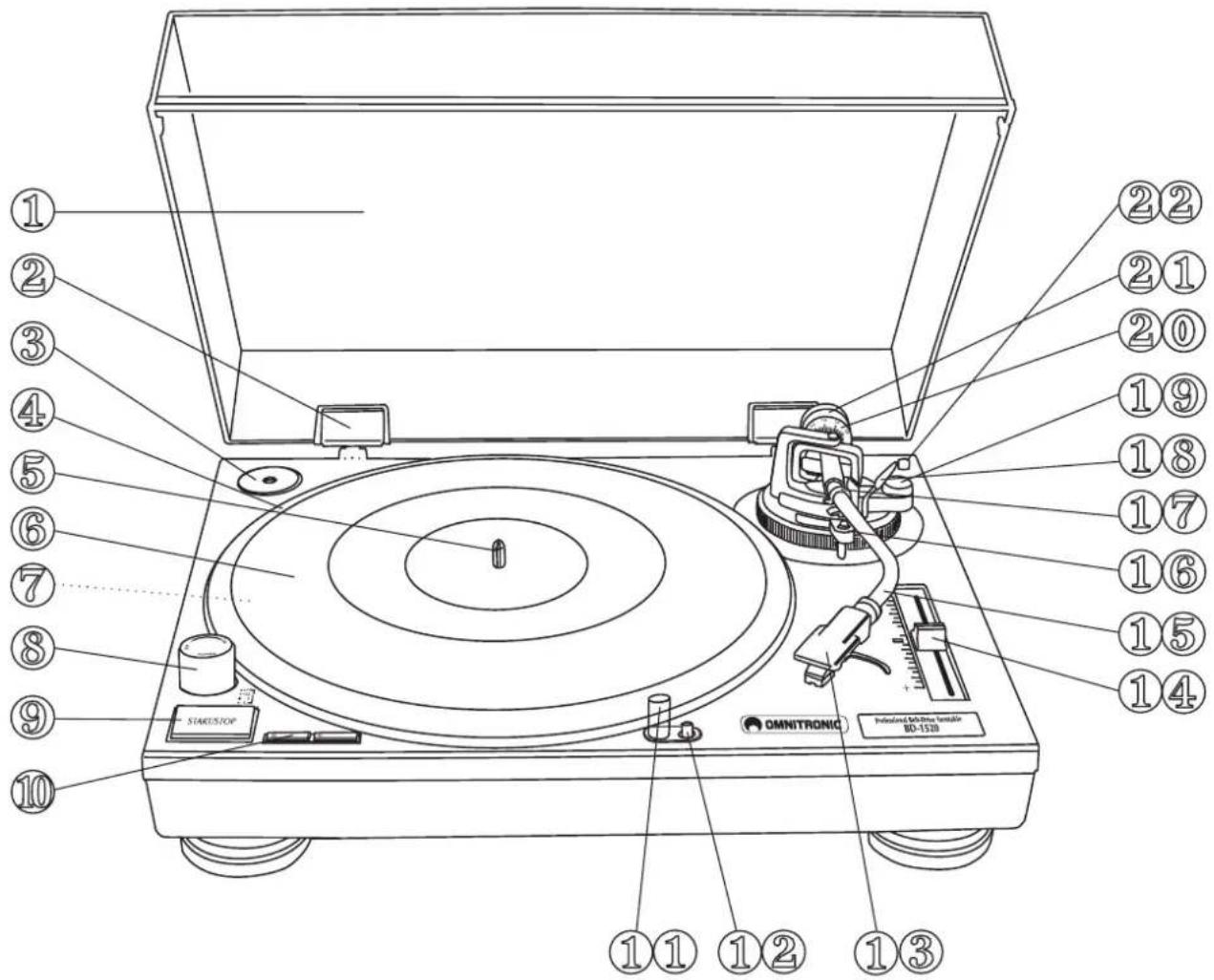
- Dustcover
- Hinge
- Puck
- Platter
- Center
- Slipmat
-
Voltage selector (underneath the platter)
-
Power switch with strobelamp
-
START/STOP-button
-
Speed selector
-
Target light
- Lamp switch
- Headshell
-
Pitchfader
-
Tonearm
- Armrest
- Tonearm-clamp
- Tonarm-lift
- Anti-Skating-wheel
- Counterweight-scale
- Counterweight
- Cartridge holder
6. CONNECTIONS
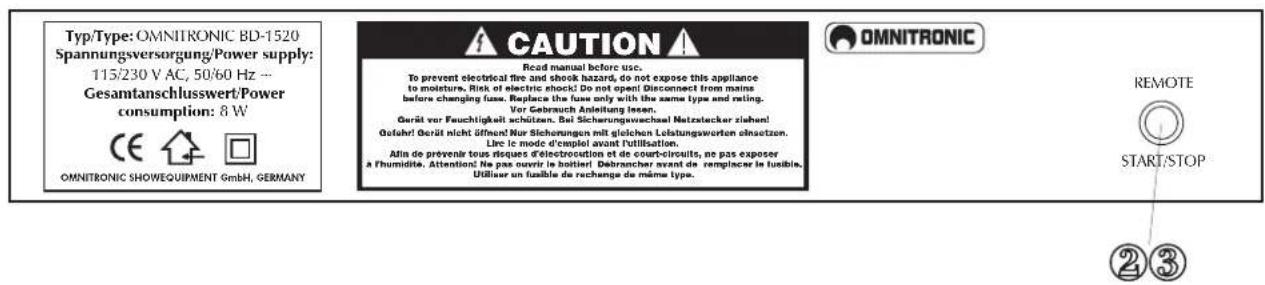
Connect the RCA-cables (white=left channel, red=right channel) with the PHONO IN-sockets of your amplifier or mixer. Connect the ground lead with the ground terminal of your amplifier or mixer.
English
You can connect a footswitch etc. with the REMOTE START/STOP socket.
Connect the turntable to the mains.
7. ADJUSTING
A) Adjusting the counterweight
- Remove the stylus cover.
- Set the Anti-skating-wheel to the 0 position.
- Set the tonearm lift to the down position
- Release the tonearm from the armrest and move it to a position between the turntable and the armrest. Make sure that you do not damage the stylus.
- Carefully hold the tonearm and adjust the counterweight by turning it clockwise or anti-clockwise respectively. The tonearm should be balanced to a horizontal position.
- Move the tonearm back to the armrest and clamp it.
- Set the scale on the counterweight to the 0 position without turning the counterweight.
- Turn the counterweight clockwise until the scale shows the value corresponding to the pressure of the used stylus. The stylus pressure of the pick-up system included in the delivery is 1.5g . Should you use a separate pick-up system, please follow the manufacturer's instructions.
B) Adjusting the tracking force
Set the Anti-skating-wheel to the value equivalent to the pressure of the used stylus. The stylus pressure of the pick-up system included in the delivery is 1.5g . Should you use a separate pick-up system, please follow the manufacturer's instructions.
C) Adjusting the playback-speed
- Set the speed to 33 rpm
- Press the START/STOP-button and the turntable begins to rotate.
- Watch the dotted lines on the platter's edge. The numbers next to the strobe-lamp correspond to the playback-speed adjusted via the Pitchfader.
Should the dots of the upper line seem to be standing still, the playback-speed is +7.2% , should the dots of the second line seem to be standing still, the playback-speed is +3.3% , should the dots of the third line seem to be standing still, the playback-speed is 0% , should the dots of the lowest line seem to be standing still, the playback-speed is -3.3% .
8. OPERATION
- Select the speed required for the record you want to play.
- Put the record on the platter. Use the puck if needed (e.g. for singles).
- Remove the the stylus cover and release the tonearm.
- Press the START/STOP-button and the turntable begins to rotate.
- Set the tonearm lift to the up position and move the tonearm to the desired starting position. Under insufficient lighting conditions use the target light for spotting the exact starting position.
- Set the tonearm lift to the down position and the tonearm slowly lowers to the record.
- Should you desire to stop the turntable without removing the tonearm from the record, simply press the START/STOP-button.
- Should you desire to interrupt playback for a short period, set the tonearm lift to the up position. When you wish to continue playback, set the tonearm lift back to the down position.
- When you do not need the tonearm lift at all, leave it in the down positon.
9. EXCHANGING THE PICK-UP SYSTEM
Loosen the tightening screws on the headshell and remove the connection-cables of the pick-up system. Remove the old pick-up system from the Headshell.
Read the user manual of the new pick-up system.
Put the stylus cover on the stylus.
English
Connect the Headshell's connection cables with the terminals of the pickup-system and make sure that the occupation of the cables is correct.
The different colours mean:
| Used colour: Channel and poles: |
| White (L+) Left, plus-pole |
| Blue (L-) Left, minus-pole |
| Red (R+) Right, plus-pole |
| Green (L-) Right, minus-pole |
Tighten the screws on the Headshell.
Adjusting the overhang:
The overhang is the distance between the stylus and the center of the turntable.
For optimized pick-up, the overhang should be set to 16mm
Loosen the tightening screws on the headshell and move the system forwards or backwards until you reach the desired position.
Make sure that you tighten the screws before you operate the device again.
CLEANING AND MAINTENANCE

DANGER TO LIFE! Disconnect from mains before starting maintenance operation!
We recommend a frequent cleaning of the device. Please use a soft lint-free and moistened cloth. Never use alcohol or solvents!
There are no servicable parts inside the device. Maintenance and service operations are only to be carried out by authorized dealers.
Should you need any spare parts, please use genuine parts.
If the power supply cable of this device becomes damaged, it has to be replaced by authorized dealers only in order to avoid hazards.
Should you have further questions, please contact your dealer.
11. TECHNICAL SPECIFICATIONS
| Type: Manual turntable | |
| Drive-method: Belt-drive | |
| Motor: DC-motor | |
| Speed: 33 1/3 RPM and 45 RPM | |
| Change-time between the speeds: | |
| 33 -> 45 RPM in < 1 sec. | |
| 45 -> 33 RPM in < 5 sec. | |
| Pitch adjustment: ± 10 % via fader | |
| Initial torque: > 650 g/cm | |
| Wow & Flutter: < 0.25 % WRMS | |
| Start time: < 1 sec. | |
| Brake: via belt | |
| Stop time: < 1 sec. | |
| Rumble: 50 dB DIN B | |
| Platter: Outer diameter 320 mm | |
| Weight 682 g | |
| Tonearm: S-shape with Cardan's suspension | |
| Tonearm-length: | 234 mm |
| Overhang: | 16 mm |
| Adjustable stylus-pressure: | 0-4 g |
| Anti-Skating-range: | 0-7 g |
| Power supply: 230 V/50 Hz | |
| 115 V/60 Hz | |
| Maximum starting-current: | 260 mA |
| Power consumption: | 8 W |
| Connectors: | 1 6.3-mm-remote-start-jack |
| Dimensions: | 450 x 352 x 148 mm |
| Weight: | 9 kg |
Please note: Every information is subject to change without prior notice. 02.02.2004 ©
MODE D'EMPLOI

OMNITRONIC
BD-1520/1550
A) Ajustment du contrepoids
- Belt-drive turntable
- MULTI-LANGUAGE-INSTRUCTIONS
- Français
- CAUTION!!
- INTRODUCTION
- Features
- Belt-drive DJ-turntable
- SAFETY INSTRUCTIONS
- CAUTION!
- Important:
- OPERATING DETERMINATIONS
- INSTALLATION
- GENERAL DESCRIPTION
- CONNECTIONS
- English
- ADJUSTING
- A) Adjusting the counterweight
- B) Adjusting the tracking force
- C) Adjusting the playback-speed
- OPERATION
- EXCHANGING THE PICK-UP SYSTEM
- Adjusting the overhang:
- CLEANING AND MAINTENANCE
- DANGER TO LIFE! Disconnect from mains before starting maintenance operation!
- TECHNICAL SPECIFICATIONS
- MODE D'EMPLOI
- OMNITRONIC
- BD-1520/1550
- A) Ajustment du contrepoids
Brand : Omnitronic
Model : BD1550
Category : DJ Equipment