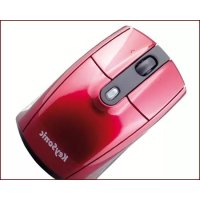
KSM1000RFM - Mouse KeySonic - Free user manual and instructions
Find the device manual for free KSM1000RFM KeySonic in PDF.



| Product Type | Wireless Laser Mouse |
| Color | Lacquered metallic red with matte black, SoftSkin coating |
| Design | Ergonomic, compact, for right- and left-handed users |
| Buttons | 3 buttons (including a 4-direction scroll wheel) + DPI shift button |
| Sensor | Pixart PAW3603 laser, resolution 800/1200/1600 dpi |
| Precision | 30x more precise than a standard optical mouse |
| Technology | 2.4 GHz wireless |
| Range | Up to 10 m (optimal conditions) |
| Power Supply | 2 AAA or AA batteries (1.5 V each) |
| Power Consumption | 9.3 mA in use, 0.10 mA at rest |
| Interface | USB 2.0 (Nano receiver) |
| Compatibility | Windows 98SE/ME/2000/XP/Vista, Mac OS X 10.2 and later |
| Certifications | CE, FCC, WEEE/RoHS |
| Package Contents | Mouse, USB adapter, 1 set of batteries, user manual, installation CD |
| Maintenance and Cleaning | Clean with a soft, dry cloth. Do not use chemical products. |
| Safety | Class 1 laser product. Do not direct the beam into eyes. No user-serviceable parts. |
| Weight (approx.) | Approximately 80 g |
| Dimensions (approx.) | Approximately 100 x 60 x 35 mm |
Frequently Asked Questions - KSM1000RFM KeySonic
User questions about KSM1000RFM KeySonic
0 question about this device. Answer the ones you know or ask your own.
Ask a new question about this device
Download the instructions for your Mouse in PDF format for free! Find your manual KSM1000RFM - KeySonic and take your electronic device back in hand. On this page are published all the documents necessary for the use of your device. KSM1000RFM by KeySonic.
USER MANUAL KSM1000RFM KeySonic
Federal Communication Commission Interference Statement
This equipment has been tested and found to comply with the limits for a Class B digital device, pursuant to Part 15 of the FCC Rules. These limits are designed to provide reasonable protection against harmful interference in a residential installation. This equipment generates, uses and can radiate radio frequency energy and, if not installed and used in accordance with the instructions, may cause harmful interference to radio communications. However, there is no guarantee that interference will not occur in a particular installation. If this equipment does cause harmful interference to radio or television reception, which can be determined by turning the equipment off and on, the user is encouraged to try to correct the interference by one of the following measures:
- Reorient or relocate the receiving antenna.
- Increase the separation between the equipment and receiver.
- Connect the equipment into an outlet on a circuit different from that to which the receiver is connected.
- Consult the dealer or an experienced radio/TV technician for help.
FCC Caution: Any changes or modifications not expressly approved by the party responsible for compliance could void the user's authority to operate this equipment.
This device complies with Part 15 of the FCC Rules. Operation is subject to the following two conditions: (1) This device may not cause harmful interference, and (2) this device must accept any interference received, including interference that may cause undesired operation.
KeySonic™
... touch the difference

Bedienungsanleitung

natural_image
Black-and-white photo of a computer mouse with a small USB flash drive shown beside it (no text or symbols visible)
Redhurtle (KSM-1000 RFM)
natural_image
Technical line drawing of a computer mouse with a separate 3D component shown as an inset (no text or symbols)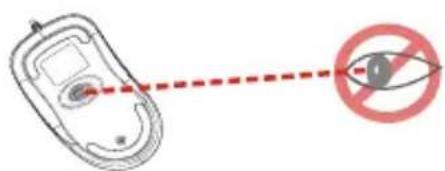
Sicherheitshinweise
chemical
Three labeled chemical compounds (Cd¹, Hg², Pb³) showing cross-shaped molecular representations with central wheelsnatural_image
Illustration of a desktop computer with a keyboard and an open hard drive (no text or symbols)1.1 Special Features
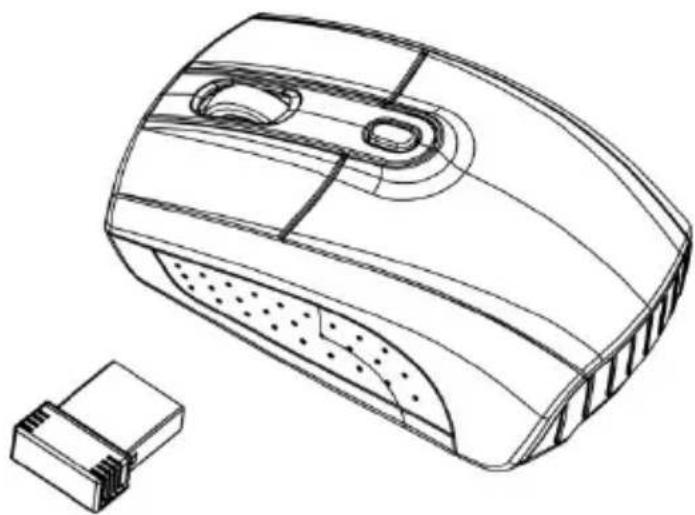
• Wireless 2.4 GHz laser mini mouse in sporty design
- Dramatically metallic-red coating with matt black, noticeably gentle SoftSkin coating on both sides
- Ergonomic compact universal construction for right and left handers with 3 keys functionality (incl. 4 ways scroll wheel)
- Far-ranging & reliable radio-frequency transmission at 2.4 GHz up to max. 10 m away from the PC
• Excellent precision and full speed – 30× exacter than optical standard mice
- 1600 dpi laser sensor with shift key between 1200 dpi and 800 dpi during operation (on the fly)
- Multicoloured LED in the middle button indicating the set dpi resolution, low battery capacity as well as the synchronisation process
- Practical transport clip for the super mini USB adapter – in locked position the battery is
switched off simultaneously
- Plug & Play installation without any special driver
• Exclusive gift box as appealing retail packaging
- Optimal for mobile use respectively for office and home users with a preference for a minimal overall size








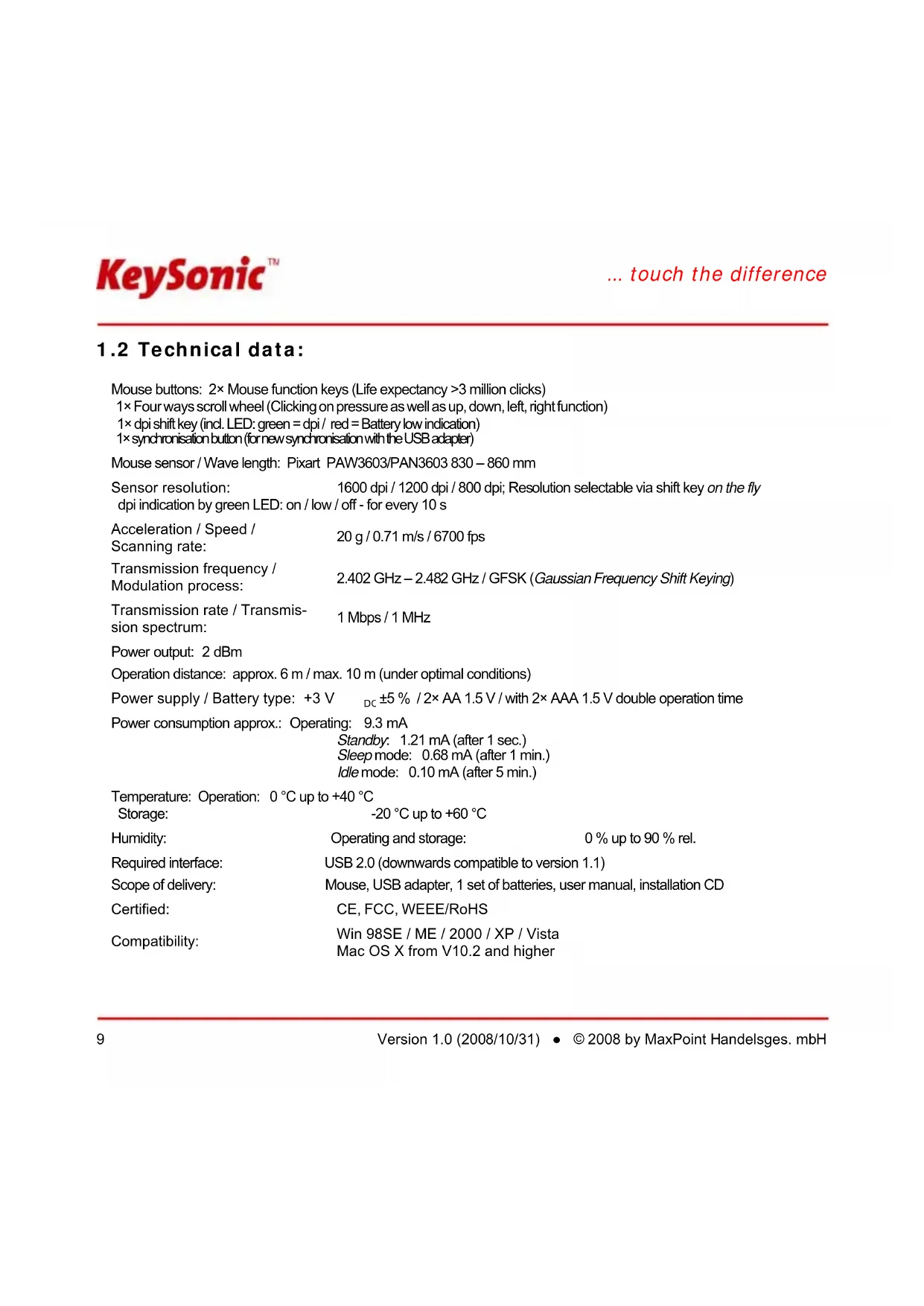
1.2 Technical data:
Mouse buttons: 2× Mouse function keys (Life expectancy >3 million clicks)
1× Four ways scroll wheel (Clicking on pressure as well as up, down, left, right function)
1× dpi shift key (incl. LED: green = dpi / red = Battery low indication)
1× synchronisation button (for new synchronisation with the USB adapter)
Mouse sensor / Wave length: Pixart PAW3603/PAN3603 830 - 860 mm
Sensor resolution: 1600 dpi / 1200 dpi / 800 dpi; Resolution selectable via shift key on the fly dpi indication by green LED: on / low / off - for every 10 s
Acceleration / Speed /
Scanning rate:
Transmission frequency /
Modulation process:
Transmission rate / Transmission spectrum:
20 g / 0.71 m/s / 6700 fps
2.402 GHz - 2.482 GHz / GFSK (Gaussian Frequency Shift Keying)
1 Mbps / 1 MHz
Power output: 2 dBm
Operation distance: approx. 6 m / max. 10 m (under optimal conditions)
Power supply / Battery type: +3 V _DC ±5 % / 2× AA 1.5 V / with 2× AAA 1.5 V double operation time
Power consumption approx.: Operating: 9.3 mA
Standby: 1.21 mA (after 1 sec.)
Sleep mode: 0.68 mA (after 1 min.)
Idle mode: 0.10 mA (after 5 min.)
Temperature: Operation: 0 °C up to +40 °C
Storage:
-20 °C up to +60 °C
Humidity:
Operating and storage:
0% up to 90% rel.
Required interface:
USB 2.0 (downwards compatible to version 1.1)
Scope of delivery:
Mouse, USB adapter, 1 set of batteries, user manual, installation CD
Certified:
CE, FCC, WEEE/RoHS
Compatibility:
Win 98SE / ME / 2000 / XP / Vista
Mac OS X from V10.2 and higher
Safety notice
natural_image
Technical line drawing of a computer mouse with a separate 3D component shown as an inset (no text or symbols)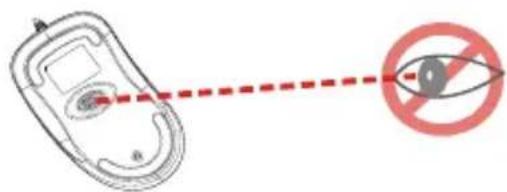
Safety Notice
- This product complies with IEC 60825-1, class 1 laser product.
- Your product complies with FCC and CE rules.
- This product has no serviceable parts. Use of controls or adjustments of procedures other than the user guide may result in danger.

Please DO NOT direct the laser beam at anyone's eye.
Functional Introduction
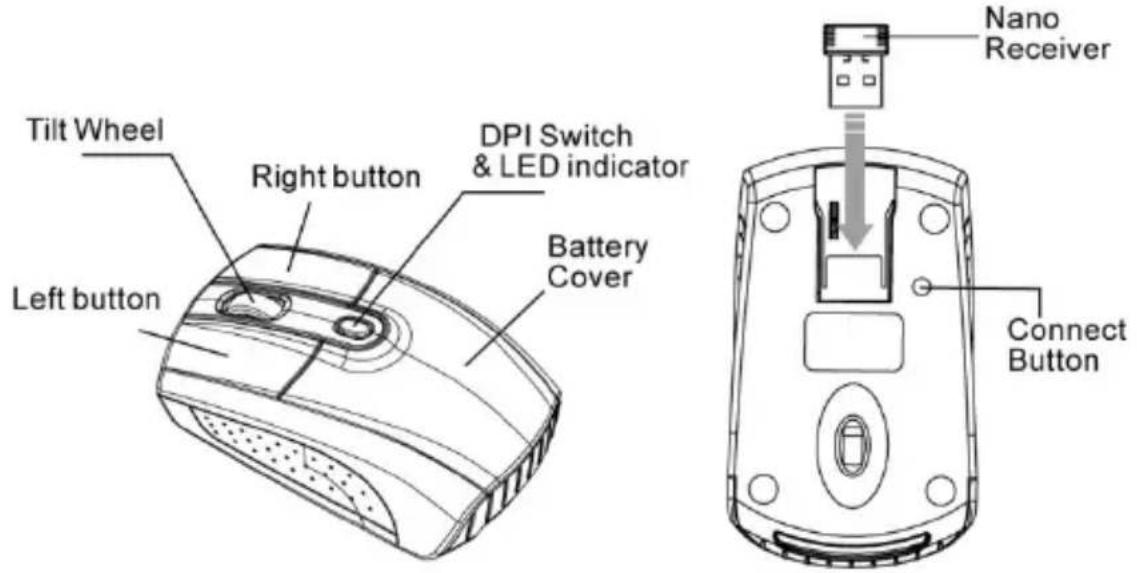
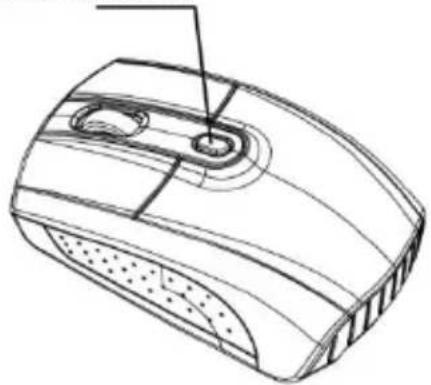
DPI Switch
The brightness of LED indicator on the scrolling wheel indicates the DPI setting in use. There are three different settings:
● Bright: 1600 DPI
- Dim: 1200 DPI
● No light: 800 DPI
The default setting is 1600 DPI. You can easily switch between DPI settings. In order to save power, the LED display will only last for 10 seconds.
Installing the batteries
Step 1: Pull the battery cover backward.
Step 2: Insert the batteries as shown inside the battery compartment.
Step 3: Replace the cover.
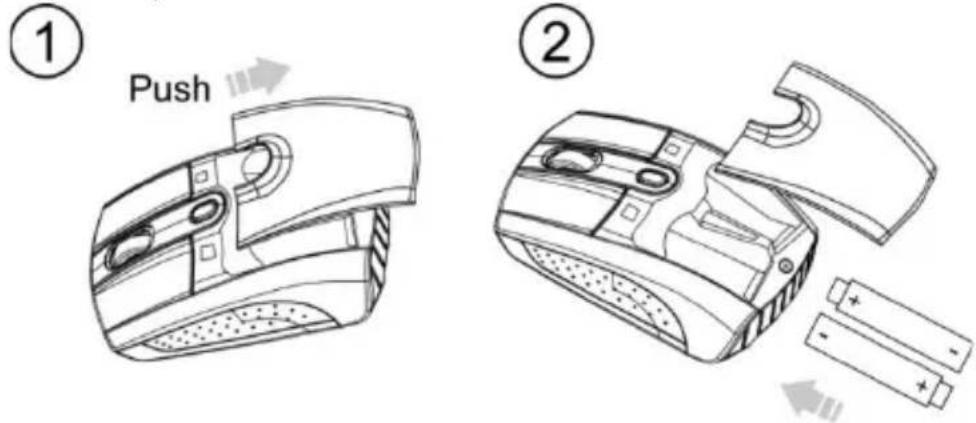
For extra usage hours, use two AA batteries instead of two AAA batteries.
Information on disposal of old batteries (Battery Regulation)
The new Regulation obliges battery manufacturers and importers to take back, sort and dispose all old batteries. The consumer is obliged to give back used batteries in retail stores or in municipal collection points. The disposal in municipal waste is explicitly prohibited according to Battery Regulation. You can send batteries purchased from us after consumption to the following address via sufficient stamped mail:
MaxPoint Handelsgesellschaft mbH, Kurt-Fischer-Straße 50, D-22926 Ahrensburg Batteries, which contain pollutants, are marked with the symbol of a crossed-out dustbin, similar
to the symbol in the illustration. The chemical description of the pollutant is situated below the symbol of the dustbin. "Cd" stands for Cadmium, "Pb" for Lead, "Hg" for Mercury.

Cd ^1

Hg²

Pb ^3
Setup the Connection between the Receiver and the Mouse
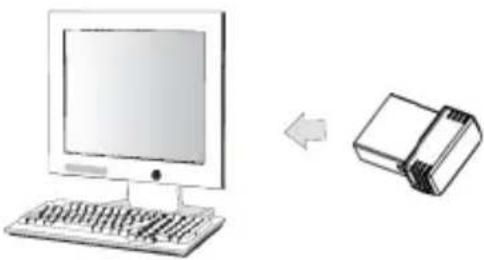
- Plug the Nano receiver into the USB port of your computer.
natural_image
Illustration of a desktop computer with a keyboard and an open hard drive (no text or symbols)- Insert the batteries into the mouse, then follow the steps below.
- If the mouse is not working, please put it into pairing mode.
- Pairing: Re-plug the Nano receiver into the USB port of your computer. If the mouse does not work after 10 seconds, then press the connect buttons on the mouse. (Nano receiver has auto pairing function).
- The LED indicator on mouse flashes steadily when it is in pairing mode and stops blinking when it is successfully paired with the receiver. The mouse remains off afterwards.
- When the battery is low, the Low Power indicator blinking.
- Please see the included software on CD for details.
During pairing
DPI Switch & LED indicator
natural_image
Line drawing of a computer mouse with control buttons and ventilation slots (no text or symbols)Red LED On 10 Sec.
Power On
Green LED Blinking 10 Sec. Paired Link
Green LED Off Connected OK
Red LED Blinking Low Battery
Manufacturer's Disclaimer Statement
The information in this document is subject to change without notice and does not represent a commitment on the part of the vendor. No warranty or representation, either expressed or implied, is made with respect to the quality, accuracy or fitness for any particular purpose of this document. The manufacturer reserves the right to make changes to the content of this document and/or the products associated with it at any time without obligation to notify any person or organization of such changes. In no event will the manufacturer be liable for direct, indirect, special, incidental or consequential damages arising out of the use or inability to use this product or documentation, even if advised of the possibility of such damages. This document contains materials protected by copyright. All rights are reserved. No part of this manual may be reproduced or transmitted in any form, by any means or for any purpose without expressed written consent of its authors. Product names appearing in this document are mentioned for identification purchases only. All trademarks, product names or brand names appearing in this document are registered property of their respective owner.
1. Introduction Redhurtle
natural_image
Technical line drawing of a computer mouse with a separate 3D component shown as an inset (no text or symbols)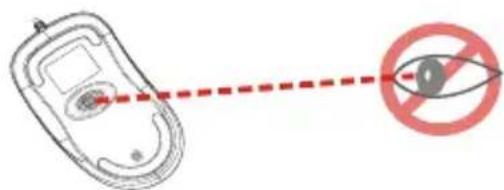
Information de conformité
chemical
Three chemical reaction diagrams labeled Ca¹, Hg², and Pb³ with crossed arrows indicating electron movement or interactionnatural_image
Illustration of a desktop computer with a keyboard and an open hard drive (no text or symbols)Declaration of Conformity
CE
We, MaxPoint Handelsges. mbH, declare under our sole responsibility, that the product
Type:
Mouse
Brand Name:
KeySonic
Model Name:
Redhurtle KSM-1000 FM
is herewith confirmed to comply with the requirements set out in the European Council Directive 89/338/EEC.
This declaration is based on the full compliance of the product with the following European standards:
EN 300 440-1 V1.3.1 (2001-09)
EN 300 440-2 V1.1.2 (2004-07)
EN 301 489-1 V1.6.1 (2005-09)
EN 301 489-3 V1.4.1 (2002-08)
EN 66022: 2006, Class B
EN 61000-3-2. 2006 (Not Applicable)
EN 61000-3-3: 1995+A1: 2001+A2: 2005 (Not Applicable)
EN 61000-4-2: 1995+A1: 1998+A2: 2001
EN 61000-4-3:2002+A1:2002
EN 61003-4-4:2004
EN 61000-4-5: 2006 (Not Applicable)
EN 61009-4-6: 1998-A1: 2001 (Not Applicable)
EN 61000-4-11:2004 | Not Applicable Max Point Handelsges. mbH

Ahrensburg, 17, 11, 2007: +49-(0)4102/468-800 Fax: +49-(0)4102/468-801
Place and Date
Signature of responsible Person