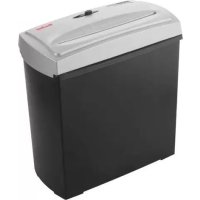
Home & Office X5 - Shredder GEHA - Free user manual and instructions
Find the device manual for free Home & Office X5 GEHA in PDF.



| Brand | Geha |
| Model | Home & Office X5 |
| Product type | Document shredder |
| Cut size | Particles of 4 x 40 mm |
| Sheet capacity | 5 sheets (A4, 70 g/m²) |
| Insertion slot width | 220 mm |
| Duty cycle | 2 minutes on, 15 minutes off |
| Power supply | 220–240 V, 50 Hz, 0.8 A |
| Switch positions | AUTO, OFF, REV (reverse) |
| Motor protection | Automatic overload protection |
| Safety | Safety switch on the cutting tool |
| Warranty | 24 months |
| Maintenance | Clean with a dry cloth, avoid solvents and sprays |
| Recommendation | Remove staples and paper clips before use |
| Installation | Stable and flat surface, near an accessible power outlet |
Frequently Asked Questions - Home & Office X5 GEHA
User questions about Home & Office X5 GEHA
0 question about this device. Answer the ones you know or ask your own.
Ask a new question about this device
Download the instructions for your Shredder in PDF format for free! Find your manual Home & Office X5 - GEHA and take your electronic device back in hand. On this page are published all the documents necessary for the use of your device. Home & Office X5 by GEHA.
USER MANUAL Home & Office X5 GEHA
Thank you for choosing this Geha quality product. Before using the device for the first time, carefully read this manual. Please pay special attention to the safety instructions.
IMPORTANT SAFETY NOTES
Before using the document shredder for the first time, please read the operating instructions. When operating an electrical device, you should always take basic safety measures to eliminate the risk of injury from electric shock. Therefore please follow the following basic rules.
- When the shredder is not in operation, before emptying the bin, clearing a paper jam or cleaning the device, always disconnect its plug from the power mains.
- Proceed with extreme care when operating the shredder near children or people with an intellectual disability!
- Protect yourself against damage from electric shock. Never immerse the power cord, the power plug or the device in water or any other liquid.
- Do not operate the device in the vicinity of water (shredder suitable only for use in dry rooms).
- Never insert metal objects, jewellery, hair, fingers, cloths, etc. into the paper feeder of the shredder.
- Before shredding a document, remove paper clips and staples.
- Regularly empty the paper bin to prevent paper jams.
- Do not switch on the device if its plug or power cord is damaged or if the shredder does not work properly or is otherwise damaged.
- In the event of an emergency, disconnect the shredder from the power supply by pulling the plug.
- Where possible, install the device near a power socket and ensure that the socket remains freely accessible.
- Do not clean the shredder with cloth or detergents containing aerosols or solvents.
- Do not spray the device with liquids. Do not treat with oil spray.
INSTALLING SHREDDER
- Operate the device only if it stands on a level floor.
- Check the cutting unit to ensure that it is properly placed on the bin. The shredder is equipped with a safety switch interrupting the power supply as soon as the cutting unit is removed from the bin or when it is not correctly placed on it.
- Insert the plug of the power cord into a standard power socket.
STARTING SHREDDER
The X5 is operated by means of a sliding switch located at the top of the shredder. This switch can be set to three positions: AUTO, OFF, REV.
Set the sliding switch to AUTO to activate automatic paper intake as soon as a document is placed in the feeder slot, triggering the release switch in the feeder opening.
If the sliding switch is set to OFF, the shredder does not automatically start up when a document is placed in the feeder opening. We recommend setting the switch to this position when the shredder is not in use. Set the sliding switch to REV, if you wish to operate the shredder continuously in reverse mode. This is required to clear a paper jam in the feeder.
PREVENTING PAPER JAMS AND OVERLOADING
The X5 can shred up to 5 sheets (DIN A4, 70 g/m²) at a time and can handle documents of up to 220 mm in width.
If you wish to shred smaller pieces of paper such as envelopes and sales receipts, insert them at the centre of the feeder slot to ensure that the switching sensor is triggered.
The X5 is equipped with a motor overload circuit breaker. A normal operating cycle for shredding at maximum load takes 2 minutes, which must be followed by a break in operation. The power supply to the shredder motor is automatically interrupted in the following cases:
- Continuous operation of the document shredder at maximum capacity over a prolonged period of time, i.e. for more than 2 minutes without interruption.
- Simultaneous insertion of more than 5 sheets of paper (DIN A4, 70 g/m²) or feeding of paper in a direction other than longitudinal.
Under the above conditions, the automatic overload circuit breaker of the motor might be triggered, interrupting the power supply to the device. If this occurs, proceed as follows:
- Disconnect the power plug from the mains socket and wait for a minimum of 60 minutes until the overload circuit breaker is automatically reset. Remove the paper by pulling it upwards out of the cutting unit and tear off any excess paper.
- Reconnect the power plug to the mains socket and set the sliding switch to REV. Remove the remaining paper from the shredder blades. Set the sliding switch to AUTO. If necessary, repeat this procedure.
- When the feeder slot is again unblocked, continue shredding by setting the sliding switch to AUTO.
In the event of a minor short paper jam, the power supply is interrupted only temporarily. This means that the device can be restarted as soon as the jam is removed.
TECHNICAL DATA
Model: Shredder X5
Shredding performance: cross-cutting: 4 x 40 mm
Shredder capacity: 5 sheets of paper [A4, 70g/m²]
Feeder slot width: 220mm (paper feed)
Operating cycle: 2 minutes ON, 15 minutes OFF
Power supply: 220~240V AC, 50Hz, 0.8A
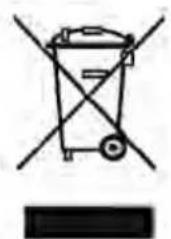
DISPOSAL
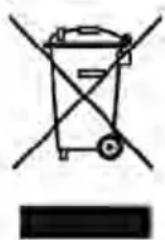
The waste bin symbol indicates that electrical devices must not be disposed of with normal household waste. Please take your device to a collection centre for electrical appliances for recycling and proper disposal.
WARRANTY
The warranty period for your device is 24 months.
For warranty claims, you need your sales receipt. Please also keep the original packaging. If you encounter any problems with your document shredder, please contact your dealer.
INTRODUCTION
INSTALLING THE DEVICE
3.
1
(AUTO) (REV) (OFF) (AUTO) (REV) (OFF) (REV)
111 1
1 22
y 5
70A4 2
j 1
60 60 60
(REV) g 2
(AUTO) 3
ShredderX5
(1/2 70 · 4 A) · 5
OFF 2000 (J) ON
1 5 (一)
50 240 220
0.8
无
:
biil
:cbail jie
yj11s2g jie y
Therefore, the area of triangle OBC equals the area of triangle COD plus the area of triangle BOC.
Therefore, the area of the trapezoid COBD equals the area of triangle COD plus the area of triangle BDO, which equals the area of triangle BOC plus
jie 111 100
y
Therefore m = 3/11 ;
Before putting this quality product of the brand "Geha" into operation, please read this manual carefully. Pay special attention to the safety instructions.
IMPORTANT SAFETY INSTRUCTIONS
Before operating the machine for shredding paper, read this user manual. When using electrical appliances, basic precautions should always be followed to reduce the risk of electric shock. Therefore, always follow these basic rules.
- When the device is not in use, always unplug the power cord when emptying the paper container, and also before cleaning the device (e.g., when paper jams).
- Be extremely careful when operating the device near children or disabled persons!
- Provide protection against possible risk of electric shock. Never immerse the power cord, plug, or device in water or other liquids.
- Do not use the device near water (it is intended for use only in dry rooms).
- Do not allow metal objects or other foreign objects such as jewelry, hair, nails, or fabric items to enter the paper feed mechanism. Remove staples from documents before shredding.
- Regularly empty the paper container to avoid jams when feeding paper.
- The device is put into operation when the power cord is damaged or the device's functions are disrupted due to any other damage. To disconnect from the network in case of emergency, you can pull the power cord out of the device.
- The device must be installed near a power outlet, ensuring free access to it.
- Do not use cloths soaked in aerosols or solvents, as well as cleaning agents.
- Do not spray liquids into the device. Do not treat it with sprayed oil.
DEVICE SETUP
- Place the device on a flat surface with a level surface.
- Make sure that the shredding mechanism is correctly installed on the paper receiving container. The device has a safety switch that interrupts the power supply as soon as the shredding mechanism is removed from the paper receiving container or is incorrectly installed on it.
- Insert the plug part of the power cord into a standard power outlet.
STARTING THE PAPER SHREDDER
The paper shredder X5 is controlled by a rocker switch located on top of the machine. There are three positions: AUTO, OFF, REV (AUTO, OFF, REVERSE). When set to AUTO, the paper shredder automatically starts feeding the paper, thereby activating the rocker switch in the paper feed slot. Setting the rocker switch to OFF prevents the paper shredder from operating. This position is recommended when the paper shredder is not in use. When selecting REV (REVERSE), the paper shredder operates in reverse. This mode is necessary to clear jams in the feed slot when feeding paper.
JAM PROTECTION WHEN FEEDING PAPER
The X5 machine shreds up to 5 sheets in folded state (DIN A4, 70 g/m2) and crumpled sheets up to 220 mm wide. If you need to destroy small-format materials, such as envelopes or cash register documents, feed them into the center of the paper feed slot to activate the start switch sensor.
The X5 machine is equipped with motor overload protection. The normal shredding process at maximum load lasts about 2 minutes, after which a correspondingly long pause must be observed. The power supply to the device's motor is interrupted under the following conditions:
- Continuous operation of the paper shredder at maximum capacity for an extended period, for example, more than 2 minutes without a break.
- Exceeding the shredding duration, for example, feeding more than 5 sheets of paper (DIN A4, 70 g/m2) in one cycle, or if paper is fed into the feed slot not along its length.
Under abnormal conditions, the overload protection of the motor may trip, and the power supply to the device is interrupted. In this case, the following measures must be taken:
- Unplug the power cord from the AC power outlet and wait at least 60 minutes until the overload protection returns to its original state. Then, remove the paper from the cutting mechanism or clear it.
- Plug the power cord back into the AC power outlet and switch the switch to the REV position. Remove the paper remaining on the cutting surfaces. After that, switch the switch back to the AUTO position. If necessary, repeat this process.
- After switching to the AUTO position and clearing the paper feed slot, you can continue the normal cutting process.
A brief paper jam during paper feed temporarily interrupts the power supply. After clearing the jam, you can immediately restart the device.
TECHNICAL DATA
Model designation: Shredder X5
Cutting capacity: Cross-cut 4 x 40 mm
CAPACITY
Paper shredder: 5 sheets of paper (DIN A4, 70 g/m²)
Feed opening width: 220 mm (paper feed slot)
Operating cycle: 2 min ON, 15 min OFF.
Power supply: 220–240 V AC, 50 Hz, 0.8 A
DISPOSAL
The symbol with a crossed-out waste bin indicates that electrical devices must not be disposed of with normal household waste. For environmentally friendly disposal, please take this device to a designated collection point for recyclable materials.
The warranty period for your device is 24 months.
Be sure to keep the purchase receipt and the manufacturer's packaging.
If you have problems with the device, contact your dealer.
INTRODUCTION
We thank you for purchasing this quality product from Geha. Please read the instructions carefully before using the device. Pay particular attention to the safety instructions.
IMPORTANT SAFETY INSTRUCTIONS
Current electric: 220~240 Volt current alternative, 50Hz, 0.8A
DISPOSAL
The symbol of a crossed-out wheeled bin indicates that electrical appliances must not be disposed of with household waste. Please hand this appliance over to an authorized collection point for recycling.
WARRANTY


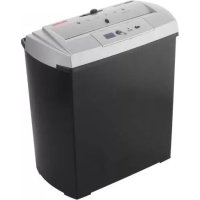
Brand : GEHA
Model : Home & Office X5
Category : Shredder