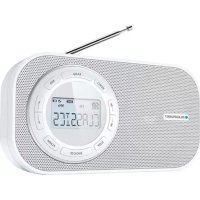
BTD7001 - Radio BLAUPUNKT - Free user manual and instructions
Find the device manual for free BTD7001 BLAUPUNKT in PDF.



| Product Type | PLL digital radio receiver AC/DC tabletop/portable |
| Brand | Blaupunkt |
| Model | BTD7001 |
| Frequency Bands | FM: 87.5 - 108 MHz, MW: 530 - 1600 kHz |
| Station Memory | Up to 40 presets (20 FM + 20 MW) |
| Display | LCD screen with brightness control (DIMMER) |
| Power Supply | 230 V AC ~ 50 Hz (detachable mains cord) or 4 x 1.5 V type R14/UM2/C batteries (not included) |
| Main Functions | FM/MW radio, alarm, snooze (9 min), sleep (5-120 min), RDS, LINE IN, headphones |
| Sound Settings | Modes VOICE, MUSIC, NORMAL (AUDIO button) |
| Antenna | Telescopic FM antenna; MW by rotating the device |
| Connectors | AC mains socket (AC IN), headphone jack (3.5 mm), LINE IN jack (3.5 mm) |
| Dimensions (approx.) | 260 x 160 x 90 mm (estimate) |
| Weight (approx.) | 0.9 kg (estimate) |
| Safety Instructions | Do not expose to water, flames; minimum ventilation 5 cm; do not obstruct the mains socket |
| Maintenance | Clean with a soft, dry cloth. Do not use solvents. |
| Repairability | No user-serviceable parts inside. Refer to qualified personnel. |
| Batteries | Do not mix types or ages; remove if unused for long; observe polarities |
Frequently Asked Questions - BTD7001 BLAUPUNKT
User questions about BTD7001 BLAUPUNKT
0 question about this device. Answer the ones you know or ask your own.
Ask a new question about this device
Download the instructions for your Radio in PDF format for free! Find your manual BTD7001 - BLAUPUNKT and take your electronic device back in hand. On this page are published all the documents necessary for the use of your device. BTD7001 by BLAUPUNKT.
USER MANUAL BTD7001 BLAUPUNKT
USER MANUALS
Models: BTD-7000 / BTD-7001
| Page 2 | German |
| Page 5 | English |
| Page 8 | French |
| Page 11 | Italian |
| Page 14 | Spanish |
| Page 17 | Portuguese |
| Page 20 | Dutch |
| Page 23 | Swedish |
| Page 26 | Danish |
| Page 29 | Finnish |
| Page 32 | Norwegian |
| Page 35 | Russian |
| Page 38 | Greek |
| Page 41 | Turkish |
| Page 44 | Polish |
| Page 47 | Bulgarian |
| Page 50 | Romanian |
| Page 53 | Czech |
| Page 56 | Hungarian |
| Page 59 | Japanese |
| Page 62 | Chinese |
| Page 65 | Arabic |
Please read the instrucon carefully before operaon the unit.
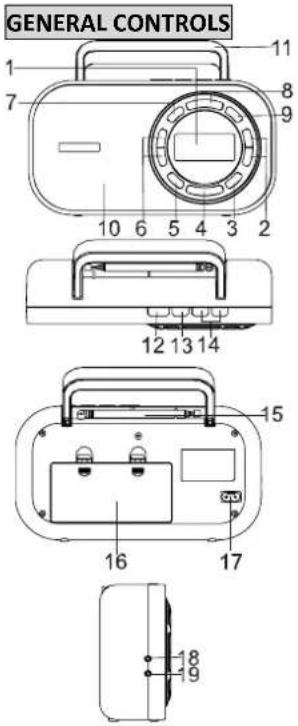
- LCD display
- PRESETS buons
- ALARM buon
- SNOOZE/DIMMER buon
- SLEEP buon
- TUNING Buons
- MEMO buon
- FUNCTION buon
- RDS buon
- Speaker
- Carrying handle
- ON/OFF buon
- AUDIO buon
- VOLUME+/- buons
- FM telescopic antenna
- Baery compartment
- AC socket (\~ AC IN)
- Earphone jack
- LINE IN jack
POWER SUPPLY
This set operates on AC 230\~50Hz or 4 x 1.5 V R14/UM2/"C" size baeries (not provided).
AC operaon
Connect the detachable AC cord (included) to the AC socket on the rear of the unit, Insert the AC power cord into a convenient AC wall outlet.
DC operaon
- Remove the lid of the baery compartment.
- Insert 4 R14/UM2/"C"size batteries into the compartment. Make sure to match their polaries (+/-) to the markings inside the compartment.
- Put the lid back in place.
Note:
-The AC cord must be unplugged from both the socket on the unit and the power outlet for the unit to run on the baeries.
- When the set is connected to the mains, the power source automacally switches to AC.
- The appearance of baery icon “ 📋 on display indicates that the baeries are low. Replace them with new baeries.
Notes on baeries (not supplied)
- Do not mix dierent types of baeries or old baeries with new ones.
- Never recharge the baeries, apply heat to them or take them apart.
- Baeries shall not be exposed to excessive heat such as sunshine, re or the like.
·Do not throw the baeries in re!
·Aenon should be drawn to the environmental aspects of baery disposal.
The baeries need to be replaced when: The volume decreases, or sound is distorted during operaon.
·In order to avoid leakage, remove the baeries when unit will not be used for a long period of me.
- Please respect the environment. Before throwing any baeries away, consult your distributor who may be able to take them back for specific recycling.
CAUTION:
Danger of explosion if baeries are incorrectly replaced. Replace only with the same or equivalent type.
SETTING TIME
- In standby mode, press MEMO for two seconds and the display will show "24 HOURS".
- Press on to select "24 HOURS" or "12 HOURS" me format.
- Press MEMO to conrm and the hour digits ash.
- Press on to set the hour value. Press MEMO to conrm and minute digits ash.
- Repeat Step 4 unl minute, year, month, day are set.
SETTING THE ALARM
Set alarm me and wake source
- In Standby mode, long press ALARM buon unl "ALARM OFF" appears on display.
- Press ◀◀ or ▶▶ to select “ALARM ON” and press ALARM to conrm. “ALM” icon appears and the hour digits ash on display.
- Press 61 to adjust hour value. Then press ALARM to conrm and minute digits ash.
- Press on to adjust minute value and press ALARM to conrm.
- Press ◀◀ or ▶▶ to select the wake source among “FM”, “BUZZER” and “MW”. Then press ALARM to conrm. (When “FM” or “MW” is selected. press ◀◀ or ▶▶ to select a preset number and press ALARM to conrm.)
- Press ◀ or ▶ to select alarm frequency among "WEEKENDS", WEEKDAYS", "ONCE" and "DAILY". Then press ALARM to conrm.
WEEKENDS: The alarm is acvated only on weekends.
WEEKDAYS: The alarm is acvated only on weekdays.
ONCE: The alarm is acvated only one me.
DAILY: The alarm is acvated everyday.
- Press ◀◀ or ▶▶ to adjust the alarm volume level and press ALARM again to conrm the alarm seng. The "ALM" icon remains on the display.
Silence the alarm momentarily
Press SNOOZE/DIMMER to turn the alarm o temporarily. The alarm will sound again when the snooze period is over.
Note: snooze me is 9 minutes.
Stop the alarm
Press ON/OFF. The alarm will turn on at the same me tomorrow except followings situaons:
-
"ONCE" is selected. The alarm is cancelled and "ALM" icon disappears from the display.
-
"WEEKDAYS" is selected and tomorrow is Saturday. The "ALM" icon remains on the display.
* The alarm will turn on again at the same me next Monday.
- "WEEKENDS" is selected and tomorrow is Monday. The "ALM" icon remains on the display.
* The alarm will turn on again at the same me next Saturday.
Cancel alarm sengs
In Standby mode, long press ALARM buon unl "ALARM OFF" appears on display. Press ALARM again to conrm and "ALM" icon disappears from display. The alarm is cancelled.
SLEEP TO THE RADIO
In sleep mode, the radio will turn o automacally aer a specied me.
- Press SLEEP buon repeatedly to set the sleep me: OFF> 5> 10>15>30>45>60>90>120> OFF...
- Release SLEEP buon. After 5 seconds the radio is turned on. "SLEEP" icon remains on the display.
- Press SLEEP buon to check the remaining sleep me.
- If you want to switch o the radio before sleep ends, press ON/OFF buon.
DIMMER
Press SNOOZE/DIMMER repeatedly in standby mode to set the brightness of LCD display.
RADIO
Listening to the Radio
- Press ON/OFF switch to turn on the radio.
- Press FUNCTION buon to select FM or MW band.
- Press ◀ to tune to your desired radio staon.
- Adjust the volume to desired level.
- Press AUDIO buon repeatedly to select desired sound preset: VOICE, MUSIC or NORMAL.
- Press ON/OFF buon again to turn o the radio.
To enhance radio recepon ability:
FM: Extend the telescopic antenna.
MW: Rotate the unit horizontally for opmum recepon.
Preseng radio staons
- Tune to a staon.
- Press MEMO once and the display will show ashing "1".
- Press or to select a preset number.
- Press MEMO again to save staon as selected preset number.
- Repeat above steps to preset a maximum of 40 staons (20 MW / 20 FM).
Retrieving the preset staons
-Press or to access a preset staon.
RDS FUNCTION
When FM staon with RDS is received, the staon name (PS) is displayed. Press RDS buon repeatedly to display the program type (PTY), the radio text (RT), the frequency and the staon name (PS).
CONNECTING AUXILIARY SOURCE
- Connect your auxiliary source (e.g. mp3 player) to the LINE IN jack on the le side of the unit.
- Press FUNCTION buon to select LINE IN mode.
- Start playback from your auxiliary source.
- Adjust the volume to desired level.
- To stop playback, disconnect your auxiliary source from the LINE IN jack.
PRODUCT INFORMATION
Power consumpon: 5W
Frequency Range:
FM 87.5-108.0 MHz
MW 530-1600 KHz
LISTENING WITH EARPHONES
Connect earphones (not included) to the earphone jack on unit.

Connuous use of earphones at high volume can damage the user's hearing.
SAFETY INSTRUCTION

CAUTION: To reduce the risk of electric shock, do not remove the cover (or back). There are no
user serviceable parts inside the unit. Refer all servicing to qualify personnel.

The lightening ash with arrowhead symbol within the triangle is a warning sign alerting the user of "dangerous age" inside the unit.

The exclamaon point within the triangle is a warning sign alerng the user of important instrucons accompanying product.
IMPORTANT!
- The venlaon should not be impeded by covering the venlaon openings with items such as newspapers, tablecloths, curtains, etc.
- No naked ame sources, such as lighted candles, should be placed on the apparatus.
- The use of apparatus in moderate climates.
- The apparatus should not be exposed to dripping or splashing.
- Ensure a minimum distance of 5cm around the apparatus for sucient venlaon.
- Do not place objects lled with liquids, such as vases, on the apparatus.
- The rang plate is located at back of unit.
-Excessive sound pressure from earphones and headphones can cause hearing loss. - Mains plug is used as the disconnect device and it shall remain readily operable. To be completely disconnected the power input, the mains plug of the apparatus shall be disconnected from the mains completely. The mains plug should not be obstructed or should be easily accessed during intended use.
- Under the inuence of electrical fast transient or/and electrostac phenomenon, the product may malfuncon and require user to power reset.

If at any me in the future you should need to dispose of this product please note that Waste electrical products d not be disposed of with household waste. Please recycle where facilities exist. Check with your Local Authority or er for recycling advice. (Waste Electrical and Electronic Equipment Directive)
Note: Design and specicaon are subject to change without noce.
© 2011 All rights reserved by Blaupunkt. This material may be reproduced, copied or distributed for personal use only.
INFORMATIONS PRODUIT
Consommaon : 5W
Listening to the Radio
Notes on baeries (not supplied)
- LCD-skjerm
- PRESETS knapper
- ALARM knapp
- SNOOZE/DIMMER knapp
- SLEEP knapp
- TUNING knapper
- MEMO knapp
- FUNCTION knapp
- RDS knapp
- Høyaler
- Bærehåndtak
- ON/OFF bryter
- AUDIO knapp
- VOLUME +/- knapper
- FM utrekkbar antenne
- Baerirom
- Strømlkobling (\~ AC IN)
- ∅retelefonkontakt
- LINE IN kontakt
STR∅MFORSYNING
INFORMACJA O PRODUKCIE
Pobór mocy: 5W
- Aşaj LCD
- Butoane PRESETS (PRESETĂRI)
- Buton ALARM (ALARMĂ)
- Buton SNOOZE / DIMMER (AMÂNARE / SCĂDERE LUMINOZITATE)
- Buton SLEEP (OPRIRE TEMPORIZATÄ)
- Butoane TUNING (ACORD)
- Buton MEMO (MEMORIE)
- Buton FUNCTION (FUNCTIE)
- Buton RDS (Sistem de date radio)
- Difuzor
- Mâner de transport
- Buton ON / OFF (PORNIT / OPRIT)
- Buton AUDIO
- Butoane VOLUME+/- (VOLUM +/-)
- Antenă telescopică FM
- Comparment pentru baterii
- Priză CA (\~ AC IN)
- Mufă căş
- Mufă LINE IN (INTRARE LINIE)
ALIMENTARE
INFORMATII DESPRE PRODUS
INFORMACE O PRODUKTU
Přikon: 5W
Rozsah frekvenční:
FM 87.5-108.0 MHz
MW 530-1600 KHz
POSLECH SE SLUCHÁTKY
LCD شاشة .1
PRESETS ◀▶ آزرار .2
ALARM 3
SNOOZE/DIMMER 4
SLEEP 5
TUNING ←→ أزرار .6
MEMO ۲.7
FUNCTION 28.8
RDS 9
- م Break الصوت
.11. مقبض الحمل
ON/OFF 12
AUDIO 13
+/- VOLUME 14
.15 هواني FM


- POWER SUPPLY
- AC operaon
- DC operaon
- Note:
- Notes on baeries (not supplied)
- CAUTION:
- SETTING TIME
- SETTING THE ALARM
- Set alarm me and wake source
- Silence the alarm momentarily
- Stop the alarm
- Cancel alarm sengs
- SLEEP TO THE RADIO
- DIMMER
- RADIO
- Listening to the Radio
- Preseng radio staons
- Retrieving the preset staons
- RDS FUNCTION
- CONNECTING AUXILIARY SOURCE
- PRODUCT INFORMATION
- LISTENING WITH EARPHONES
- SAFETY INSTRUCTION
- IMPORTANT!
- INFORMATIONS PRODUIT
- STR∅MFORSYNING
- INFORMACJA O PRODUKCIE
- ALIMENTARE
- INFORMATII DESPRE PRODUS
- INFORMACE O PRODUKTU
- POSLECH SE SLUCHÁTKY
Brand : BLAUPUNKT
Model : BTD7001
Category : Radio