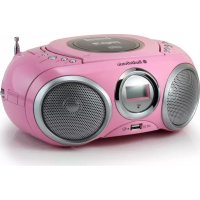
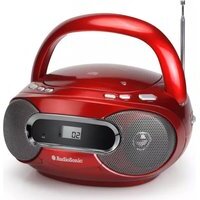
CD1572 - Radio AudioSonic - Free user manual and instructions
Find the device manual for free CD1572 AudioSonic in PDF.


| Product Type | Portable stereo radio with CD/MP3/USB player |
| Brand | AudioSonic |
| Model | CD1572 |
| Power Supply | Mains 230V~50Hz or 8 R14 batteries (not included) |
| Radio Bands | MW, FM, FM stereo |
| Supported Audio Formats | Audio CD, CD-R, CD-RW, MP3 (on CD and USB drive) |
| USB Port | Compatible with USB 1.1 and 2.0 |
| Headphone Jack | 3.5 mm stereo jack |
| Antenna | Telescopic FM antenna, built-in MW antenna |
| Display | Digital screen with FM stereo indicator |
| Playback Functions | Play, pause, next, previous, fast search, repeat, random, program up to 20 tracks |
| Radio Functions | Band selector, manual tuning |
| Laser Safety | Laser safety switch, automatic stop when CD compartment is opened |
| Cabinet Maintenance | Soft dry cloth, no chemicals |
| CD Cleaning | From center to edge with a soft cloth |
| Safety Instructions | Do not expose to water, do not open, unplug before cleaning |
| Laser Class | Class 1 |
| Supplied Accessories | Power cord, user manual |
| Operating Temperature | Household use, avoid extremes |
Frequently Asked Questions - CD1572 AudioSonic
User questions about CD1572 AudioSonic
0 question about this device. Answer the ones you know or ask your own.
Ask a new question about this device
Download the instructions for your Radio in PDF format for free! Find your manual CD1572 - AudioSonic and take your electronic device back in hand. On this page are published all the documents necessary for the use of your device. CD1572 by AudioSonic.
USER MANUAL CD1572 AudioSonic
CD-1572

AudioSonic
SAFETY PRECAUTIONS
Read this instruction and safety manual carefully before use. Keep this manual in a safe place for further reference.
WARNINGS
| HAZARD WARNING | |
| RISK OF ELECTRIC SHOCK DO NOT OPEN | |
| CAUTION: TO MINIMISE THE RISK OF ELECTRIC SHOCK, NEVER REMOVE THE COVER. THIS PRODUCT CONTAINS NO USER-SERVICEABLE PARTS. ONLY QUALIFIED REPAIR TECHNICIANS SHOULD WORK ON THIS EQUIPMENTS. | |
| THE LIGHTNING SYMBOL IN SIDE AN EQUILATERAL TRIANGLE WARNS THE USER OF THE PRESENCE INSIDE THE PRODUCT OF UNINSULATED HAZARDOUS ELECTRIC VOLTAGES POWERFUL ENOUGH TO REPRESENT AN ELECTROCUTION RISK. | |
| THE EXCLAMATION MARK SYMBOL INSIDE AN EQUILATERAL TRIANGLE WARNS THE USER THAT IMPORTANT OPERA TING AND SERVICING (TROUBLESHOOTING) INSTRUCTIONS ARE CONTAINED IN THE DOCUMENTATION ACCOMPANYING THE PRODUCT. | |
HAZARD WARNING: TO REDUCE THE RISK OFFIRE OR ELECTRIC SHOCK, DO NOT EXPOSE THIS PRODUCT TO RAIN OR MOISTURE.
CLASS 1 LASER PRODUCT
CAUTIONS
INVISIBLE LASER RADIATION WHEN OPEN AND INTERLOCKS DEFEATED, AVOID EXPOSURE TO BEAM.

This product contains a low-power emitter.
PRECAUTIONS FOR USE
To ensure safe use of this product, please follow the advice below:
Positioning
- Do not use the product in extremely hot, cold, dusty or damp condition.
- Place the product on a smooth, flat surface.
- Do not obstruct the flow of air through the product. Place it on a well-ventilated position; do not cover with fabric or stand on a rug or carpet.
Power supply
- Before using this product, check that its rated voltage matches your mains power supply voltage.
Safety instructions
- Never pull on the power cord when plugging in or un-plugging the product: always use the plug pulling the cord could damage it and create a risk of electric shock.
- Unplug the product from the mains socket if you do not intend to use it for an extended period.
- The On/Off button does not isolate the product from the power supply. To disconnect the product from the mains power supply, you must unp lug the power cord.
• This product should only be used in a horizontal position.
Condensation
- Water droplets or condensation may from inside it is moved into a very warm, humid atmosphere.
- Condensation can cause the product to malfunction.
- Leave the set in a warm room for 1 to 2 hours to allow the condensation to evaporate.
- In the event of a problem, unplug the power cord and contact a qualified repair technician.
Ventilation precautions
- Never obstruct the product's ventilation holes.
Warning concerning liquids
- Do not allow liquids to splash or spill onto the product, and never stand a liquid-filled container (vase, jar, etc.) on the top of it.
Warning concerning excessive sound levels
- Owing to this product's extremely low noise output and extended dynamic range, the user may be tempted to turn up the volume louder than necessary.
- The sound output may be excessively high, to the point of damaging the product's headphones or loudspeaker. Always keep the volume within reasonable limits.
SAFETY PRECAUTIONS
IMPORTANT INFORMATION
- This product is designed for use in moderate climate. Do not use or install this unit where it would be exposed to direct sunlight or in extremely hot temperatures, or near a radiator, stove or appliance that produces heat.
- Do not take this unit into the bathroom, or near a swimming pool. Do not use it where it would be exposed to water, moisture, dripping or splashing.
- No objects filled with liquids, such as vases, placed on the product.
- No naked flame sources, such as lighted candies on the product.
- If water gets inside the unit, Unplug the power cord from the supply socket and consult your dealer.
- Do not handle the power cord with wet hands. To avoid electric shock, NEVER touch any internal parts. Repairs/servicing should be left to qualified service personnel.
- When connecting or disconnecting from the mains supply, hold the plug but not the cord. Pulling the cord may damage it and is dangerous.
- Do not drop the unit, spill liquid into it or allow objects to fall in it.
- When plugged in, a very small current will flow. To save electricity and for safe, it is recommended that the product is completely disconnected with the AC mains socket after the unit not used for a long time.
- Consult your nearest dealer when damage, disconnection or contact failure is found with the cord.
- Do not bend the cord sharply, pull or twist it.
- Do not modify the power cord in any manner.
- Do not insert any metallic object in the unit.
- Unplug the power cord when there is the possibility of lighting.
- Mains plug is used as the disconnecting device. It shall remain readily operable and should not be obstructed during intended used.
• To be completely disconnected the apparatus from supply mains, the mains plug of the apparatus shall be disconnected from the mains socket outlet completely.
- In case of malfunction due to electrostatic discharge, just reset the product reconnect of power source may be required to resume normal operation.
POSITIONING THE UNIT
- A minimum distance of 6 INCHES must be kept to provide sufficient ventilation.
- Do not place the product in closed bookcases or racks without proper ventilation.
- Allow adequate ventilation for the unit ventilation. It should not be impeded by covering the ventilation openings with items such as newspapers, table cloths, curtains etc.
- Do not stand it on a thick pile carpet, install it in a thick pile carpet, or install it in a place with inadequate air flow. Place the unit on a flat even surface.
- Do not use the unit in excessively hot, cold, dusty, damp or humid place.
- Condensation may form inside the CD player if the unit is left anywhere warm and damp, or if you move the unit from somewhere cold to a warm room. In this case, let the unit stand for 1-2 hours or gradually increase the room temperature that the unit will be dry before use.
SAFETY PRECAUTIONS
- Do not place it where it could be subject to vibration.
- Do not place it where it could be magnetised by a magnet or speaker. Since there are magnets, do not place tapes as recorded data could be erased.
- When this unit is used near a TV, the TV picture could be distorted. If this happens, move the unit away from the TV. If the situation could not be solved, avoid using the unit when the TV is turned on.
- Keep the CD door closed so the lens is not contaminated by dust. Do not ouch the lens.
- Mains plug is used as the disconnect device. It shall remain readily operable and should not be obstructed during intended use. To be completely disconnected the apparatus from supply mains, the main plug of the apparatus shall be disconnected from the mams socket outlet completely.
- Batteries shall not be exposed to excessive heat such as sunshine, fire or the like.
- Warning: excessive sound pressure from earphones and headphones can cause hearing loss.
- Attention should be drawn to the environmental aspects of battery disposal.
SAFETY MECHANISM
- This unit incorporates a safety interlock mechanism that switches the laser beam on and off, when the disc holder is open, the laser baser beam stops automatically.
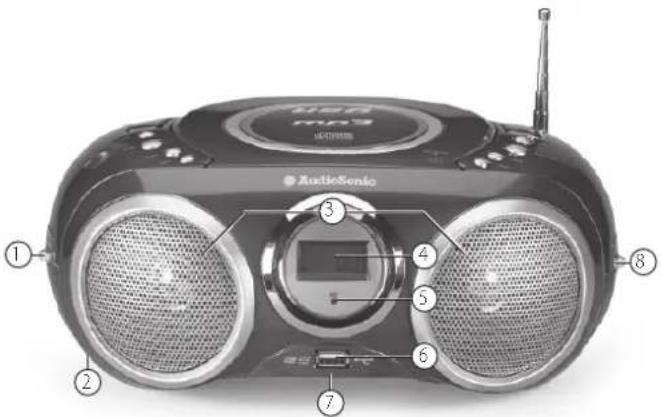
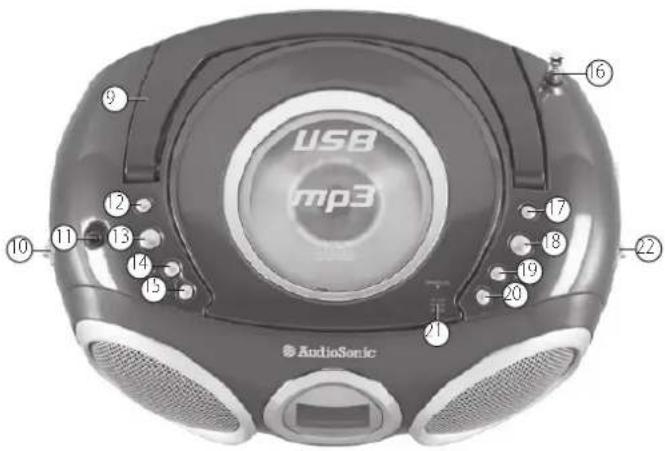
FUNCTIONS AND CONTROLS
- FUNCTION SELECTOR
- AC POWER SUPPLY
- SPEAKER
- DISPLAY
- FMSTEREO INDICATOR
- USB JACK
- BATTERY COMPARTMENT
- BAND SELECTOR (MW'FM'FM ST.)
- HANDLE
- VOLUME CONTROL
- STEREO HEADPHONE JACK
- MODE
- PROgRAM
- FOLDER UP
- FOLDER DOWN
- TELESCOPIC ANTENNA
- NExT
- PLAY/PAUSE
- BACK
- STOP
- CD DOOR
- TUNING KNOB
POWER SUPPLY
If you would like, the electrical power supply can be used to save the batteries. Make sure that the unit is unplugged from the wall outlet before inserting the batteries.
USING THE DC POWER SUPPLY
Batteries (not included)
Open the battery compartment and insert 8 R14 batteries with respect to the "+" and "-" polarity indications in the compartment.
Important:
When replacing the batteries, make sure you dispose of the old batteries in accordance with applicable regulations. They should be disposed of in a location specifically designated for that purpose so they can be recycled safely and without posing any risk for the environment. Do not burn or bury them. Incorrect use of the batteries may result in electrolyte leakage having a corrosive effect in the compartment.
- Do not mix different types of batteries: do not use alkaline batteries with saline batteries, for example, only use batteries of the type recommended by the manufacturer.
- Do not mix old and new batteries when inserting new ones.
- If the unit is not to be used for an extended period of time, remove the batteries from the unit.
- Batteries shall not be exposed to excessive heat such as sunshine, fire or the like.
- Warning: excessive sound pressure from earphones and headphones can cause hearing loss.
USING THE AC POWER SUPPLY
- Make sure that the voltage indicated on the manufacturer's nameplate in the battery compartment corresponds to the voltage supplied by your electrical installation. If this is not the case, consult your dealer or service center.
-
Connect the electrical power cable the unit then plug it into the wall outlet. The wall outlet must be located near the product and be easily accessible.
-
To turn power to the apparatus off, unplug the power supply cable from the wall outlet.
- To protect the unit during violent thunderstorms, unplug the power supply cable from the wall outlet.
GENERAL OPERATION
GENERAL OPERATION
- Select the source by setting the FUNCTION SELECTOR to CD/MP3/USB, OFF or RADIO.
- Set the desired volume level using the VOLUME KNOB.
- To turn off the unit, set the FUNCTION SELECTOR to OFF.
RADIO
- To listen to the FM radio, extend the telescopic antenna and orient it for optimum reception. Reduce the length of the antenna if the signal is too strong (if you are very near the transmitter, for example).
- As the unit is equipped with a built-in antenna, the telescopic antenna does not have to be used to listen to MW stations. Move the entire unit to orient the built-in antenna.
RADIO RECEPTION
- Set the FUNCTION SELECTOR to RADIO.
- Position the FREQUENCY BAND SELECTOR on the desired band: MW, FM or FM ST.
- Turn the TUNING CONTROL to search for the desired station. NOTE: The FM stereo indicator comes on if the FREQUENCY BAND SELECTOR is set on FM stereo and you have tuned the radio to an FM stereo station.
- Adjust VOLUME CONTROL for the desired volume level.
- When you have finished listening to the radio, position the FUNCTION SELECTOR to OFF to turn the unit off.
STEREO HEADPHONE JACK
- Plug stereo headphones (not included), equipped with a 3.5mm mini-plug, into the PHONES jack (on top of the unit, left-hand side) for private listening, without disturbing those around you.
- Reduce the VOLUME to a low level before putting on the headphones. You can then adjust the VOLUME progressively to a comfortable level.
CD/MP3/USB PLAYER OPERATION
CD/MP3 FILE PLAYBA CK
The CD player supports audio discs, CD-R, CD-RW, MP3 and USB files. Do not attempt to read CD-ROM, CDi, VCDs, DVDs or data CDs.
Note: Even if this portable radio-CD player is able to read CD-R and CD-RW discs, in addition to conventional compact discs, it is not possible to offer a 100% guarantee that all CD-R/RW discs can be read, playback depends on the quality and condition of the blank discs that you use, among other things. A play back failure does not necessarily indicate that the unit is malfunctioning.
-
Position the FUNCTION SELECTOR on CD/MP3/USB (the display unit briefly displays --).
-
To open the CD player door, raise it by the corner marked OPEN/CLOSE.
-
Insert a CD, CD-R, CD-RW or MP3 disc, printed surface facing upwards and gently press the CD player door to close it.
-
Start playback by pressing PLAY/PAUSE.
- Press PLAY/PA USE for 2 seconds to switch from CD/MP3 to USB mode. Press PLAY/PAUSE again for 2 seconds to return to CD/MP3 mode.
-
Press PLAY/PA USE to interrupt or resume playback.
-
To stop CD playback, press STOP.
NOTE: CD playback stops automatically when:
• the CD compartment is opened;
• the radio function is selected;
• the CD/MP3/USB is finished.
SELECTING A DIFFERENT TRACK
During playback, press NEXT or BACK on the unit or remote control unit to select a track.
- If you have selected a track number in Stop or Pause mode, press PLAY/PAUSE to resume playback.
- Briefly press NEXT to pass to the next track or press NEXT several times until the desired track number appears in the display.
- Briefly press BACK to return tot he start of the current track.
- Press BA CK several times to find a previous track.
SELECTING A DIFFERENT FOLDER
- Press FOLDER UP for 2 seconds. When the display unit flashes, press NEXT or BACK to select the desired folder.
• To select the previous files, press FOLDER DOWN.
(Comment: the FOLDER UP/DOWN function can only be activated if the disc contains at least 2 files)
SEARCHING FOR A PASSAGE ON A TRACK
- Press and hold BACK or NEXT to read the track in fast forward mode at reduced volume.
- When you have found the desired passage, release the BACK or NEXT button(normal playback resumes automatically).
MODE
Repeat: play back of the current track continuously. Repeat all: play back of the entire CD continuously.
Album: playback of selected folder continuously.
Random: playback in random order continuously.
PROGRAMMING OF TRACK NUMBERS
Up to 20 tracks can be programmed in any order. If desired, a given track can be programmed more than once.
- In STOP mode, press BACK or NEXT to select a track.
- When the desired track number appears press the PROG button once to record the track (the display unit displays "prog", briefly followed by the track number selected).
- Repeat steps 1 and 2 to select and program the desired tracks.
- To start playback of your programmed tracks, press PLAY/PAUSE.
PROGRAM CHECK
In STOP mode, press the PROG, button, (the display unit displays the track numbers in the order programmed).
DELETING A PROGRAM
Perform the following operations to delete the memory:
- Open the CD door;
- Select the RADIO source;
- Press STOP once.
USE WITH A USB KEY
- Slide the FUNCTION SELECTOR to CD/MP3/USB.
- Insert your USB key into the USB socket.
- Press and hold PLAY/PAUSE for 2 seconds to switch from CD/MP3 mode to USB mode
The display unit shows:
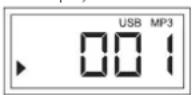
(USB MODE)
- Start playback by pressing PLAY/PAUSE.
- To stop playback, press STOP
Press PLAY/PAUSE again for 2 seconds to return to CD/MP3 mode.
The display unit shows:
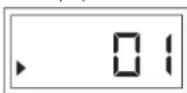
(CD MODE)
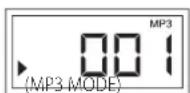
NOTE: Before removing your USB key, press STOP then press and hold PLAY/PAUSE for 2 seconds to return to CD/MP3 mode.
- Place the unit on a hard and plane surface to ensure that it does not tip over.
- Do not expose the unit, batteries or the CDs to humidity, rain, sand or an excessive source of heat from a heater or direct sunlight.
- No not open the apparatus. A gap of at least 15 cm must be kept between the ventilation openings and the surrounding surfaces in order to ensure sufficient ventilation and avoid all accumulation of heat.
- The unit's mechanism features self-lubricating bearings and thus do not require grease or lubrication.
- Use a soft and dry cloth to clean the unit. Never use cleaning agents containing alcohol, ammonia, benzene or abrasives, which may damage the cabinet.
CLEANING CDs
- Use a soft and clean cloth to wipe away fingerprints or dust from the surface of the disc.
- Wipe in a straight motion from the center to the edge. Very small dust particles and slight smudges have absolutely no effect on the sound quality.
- Never use chemical products such as sprays for conventional (vinyl) records, anti-static aerosols, benzene or thinners to clean your CDs.
• To reduce the risk of scratches, always store CDs in their case when not used. - Do not expose CDs to direct sunlight, high humidity or excessively high temperatures for long periods of time.
- Never write or affix labels to the CD's surfaces.
CLEANING THE LENS
If the lens is dirty, the sound may skip and the CD may not be read correctly. Open the CD door and clean the lens as follows:
- Unplug the power cord.
- Dust or dry particles:
Blow on the lens several times using a camera lens brush, then wipe it gently with the brush to remove the dust. Then blow again on the lens.
Fingerprints:
If you are unable to clean the lens with the camera lens brush, use a dry cotton swab to clean the surface, from the center to the outside.
TROUBLESHOOTING
TROUBLESHOOTING
If a problem occurs, check the points below before taking the apparatus in for repair. Do not open the apparatus to prevent all risk of electrocution. If you are unable to solve a problem using the indications provided below, contact your dealer or after-sales service center.
WARNING: Under no circumstances should you attempt to repair the apparatus yourself; doing so will void the guarantee.
| The volume is not properly set. Adjust the volume. | |
| The electrical power cord is not plugged in correctly. | Check the power cord connections. |
| The batteries are dead/not inserted correctly. | Check the installation and charge of the batteries. |
| THE DISPLAY UNIT DOES NOT FUNCTION CORRECTLY / THE BUTTONS DO NOT FUNCTION | |
| Electrostatic discharge. | Turn the unit off and disconnect it. Plug it back in a few seconds later. |
| NO INFORMATION DISPLAYED ABOUT THE DISC | |
No CD in the player. Insert a CD, CD-R or CD-RW in the player.
The CD is scratched or very dirty. Replace/clean CD. See Maintenance.
The laser lens is covered with condensation.
The CD-R is blank or the disc is not finalized.
Wait until condensation disappears from the lens.
Use a finalized CD-R.
THE CD IS NOT READ
| The CD is scratched or very dirty. Replace/clean CD. See Maintenance. | |
| The laser lens is covered with condensation. | Wait until condensation disappears from the lens. |
THE CD SKIP TRACKS
The CD is scratched or dirty. Replace/clean CD. See Maintenance.
A program sequence us activated. Exit the programming mode(s).
IMPORTANT
Note: Although this CD player can read CD-R, CD-RW and MP3 discs - in addition to normal CD's - the playability of CD-R, CD-RW and MP3 discs may be affected by the type of software that was used to create the discs, as well as the quality and condition of the blank media you are using. 100% playability cannot be guaranteed. This is not an indication of a problem with the player.
Important
• The USB port of this product is fully compatible with the USB 1.1 and 2.0 standard.
- If MP3 players connected to this port are not written in compliance with the official USB 1.1 or 2.0 standard it may occur that those MP3 players do not work on this port.
• This is not a defective of this product.
• The MP3 player does not comply with the official USB 1.1 or 2.0 standard.
- AUDIOSONIC
- SAFETY PRECAUTIONS
- WARNINGS
- CLASS 1 LASER PRODUCT
- CAUTIONS
- PRECAUTIONS FOR USE
- POSITIONING
- POWER SUPPLY
- SAFETY INSTRUCTIONS
- CONDENSATION
- VENTILATION PRECAUTIONS
- WARNING CONCERNING LIQUIDS
- WARNING CONCERNING EXCESSIVE SOUND LEVELS
- IMPORTANT INFORMATION
- POSITIONING THE UNIT
- SAFETY MECHANISM
- FUNCTIONS AND CONTROLS
- USING THE DC POWER SUPPLY
- BATTERIES (NOT INCLUDED)
- IMPORTANT
- USING THE AC POWER SUPPLY
- GENERAL OPERATION
- RADIO
- RADIO RECEPTION
- STEREO HEADPHONE JACK
- CD/MP3/USB PLAYER OPERATION
- CD/MP3 FILE PLAYBA CK
- SELECTING A DIFFERENT TRACK
- SELECTING A DIFFERENT FOLDER
- SEARCHING FOR A PASSAGE ON A TRACK
- MODE
- PROGRAMMING OF TRACK NUMBERS
- PROGRAM CHECK
- DELETING A PROGRAM
- USE WITH A USB KEY
- CLEANING CDS
- CLEANING THE LENS
- FINGERPRINTS
- TROUBLESHOOTING
Brand : AudioSonic
Model : CD1572
Category : Radio