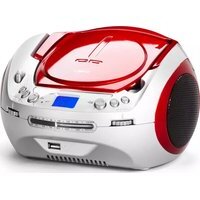
CD-1584 - Radio AudioSonic - Free user manual and instructions
Find the device manual for free CD-1584 AudioSonic in PDF.


| Brand | AudioSonic |
| Model | CD-1584 |
| Product type | Radio alarm clock with CD/MP3 player and USB port |
| Power supply | 6 UM-2/R14 batteries (1.5 V, C size) or mains 230 V~ (AC cord supplied) |
| Radio bands | AM and FM |
| Supported audio formats | Audio CD, CD-R, CD-RW, MP3 on CD, MP3 on USB flash drive |
| USB port | Yes (compatible with USB 1.1 and 2.0) |
| Playback functions | Play, pause, stop, previous/next track, fast forward/rewind, repeat (track, album, all), program (21 CD tracks, 99 MP3 tracks) |
| Antenna | FM telescopic antenna, AM ferrite rod |
| Maintenance | Clean with a soft cloth, unplug before cleaning. Do not use solvents. |
| Safety | Do not open the casing (risk of electric shock). Do not expose to moisture. Have repairs carried out by qualified personnel. |
| Laser compatibility | Class 1 laser player |
| Dimensions (W x H x D) | Not specified |
| Weight | Not specified |
Frequently Asked Questions - CD-1584 AudioSonic
User questions about CD-1584 AudioSonic
0 question about this device. Answer the ones you know or ask your own.
Ask a new question about this device
Download the instructions for your Radio in PDF format for free! Find your manual CD-1584 - AudioSonic and take your electronic device back in hand. On this page are published all the documents necessary for the use of your device. CD-1584 by AudioSonic.
USER MANUAL CD-1584 AudioSonic
natural_image
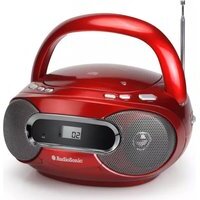
Red and silver portable electronic device with CD/DVD front panel, no visible text or symbols on bodyINSTRUCTION MANUAL GEBRUIKERSHANDLEIDING BEDIENUNGSANLEITUNG MODE D'EMPLOI MANUAL DE INSTRUCCIONES MANUAL DE INSTRUÇÕES
WARNING
Please carefully read these precautions and instruction before operating this unit.
Keep the manual for future reference.
To prevent fire or shock hazard, do not expose this appliance to rain or moisture.
To inform users of possible dangers on the apparatus or on its components the
Following symbols can be applied:
CAUTION
RISK OF ELECTRIC SHOCK DO NOT OPE
ATTENTION
To reduce the risk of electric shock, do not remove the cover. There are no user serviceable parts inside the unit. Refer all servicing to qualified personnel.
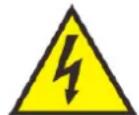
The lightning flash with arrowhead symbol within the triangle is a warning sign alerting the user of dangerous voltage inside the unit.

The exclamation point within the triangle is a warning sign alerting the user of important instructions accompanying the product.
The following label has been affixed to the unit, listing the proper procedure for working with the laser beam:


CLASS 1 LASER PRODUCT LABEL-
This label is attached to the place as illustrated to inform that the apparatus contains a laser component.
WARNING LABEL INFORMING OF RADIATION-
This label is placed inside the unit. As shown in the illustration. To warn against further measures on the unit. The equipment contains a laser radiating laser rays according to the limit of laser product of class 1
SAFETY INSTRUCTIONS
- READ INSTUCTIONS-All the safety and operation instructions should be read before the appliance is operated.
- RETAIN INSTRUCTIONS-The safety and operating instruction should be retained for future reference.
- HEED WARNINGS-All warnings on the appliance and in the operating instructions should be adhered to.
- FOLLOW AND MOISTURE-. All operating instructions should be followed.
- WATER AND MOISTURE-The appliance should not be used near water, for example, near a bathtub, washbowl, kitchen sink, laundrytub, swimming pool or in a wet basement.
- VENTILATION-The appliance should be situated away form heat sources such as radiators, stoves, or other appliances.
- HEAT-The appliance should be situated away from heat sources such as radiators, stoves, or other appliances (including amplifiers) that produce heat.
- POWER SOURCE-The appliance should be connected to power supply only of the type described in the operating instructions or as marked on the appliance.
- POWER CORD PROTECTION-Power supply cords should be routed so that they are not likely to be walked on or pinched by items placed upon or against them.
-
OBJECT AND LIQUID ENTRY-Care should be taken so that objects do not fall and liquids are not spilled into the enclosure through openings.
-
ESD WARNING-The display does not function properly or no reaction to operation of any the control may due to the electrostatic discharge. Switch off and unplug the set. Reconnect after a few second.
- DAMAGE REQUIRING SERVICE-The appliance should be serviced by qualified service personnel when:
a. The power-supply cord or plug has been damaged.
b. The appliance has been exposed to rain.
c. .The appliance has been dropped, or the enclosure damaged.
d. The appliance does not appear to operate normally.
- SERVICING-The user should not attempt of service the appliance beyond that described in the user operation instructions.
All other servicing should be referred to qualified service personnel.
Notes:
a. Dirty or scratched CD may cause a skipping problem. Clear or replace the CD.
b. If an error display or malfunctions occurs, disconnect the AC cord and remove all the batteries. Then turn the power back on.
BEFORE OPERATION
Notes: CONCERNING COMPACT DISCS.
Since dirty, damaged or warped discs may damage the appliance, care should be taken of the followings items:
a. Usable compact discs. Use only compact disc with the mark shown below.
b. CD compact disc only with digital audio signals.
DISC MAINTENANCE
- Before playback, wipe the disc from the center hole towards the outer edge with a clean cloth.
- Never use benzene, thinner, cleaning fluid, static electricity prevention liquids or any other solvent.
CLEANING THE UNIT
- To prevent fire or shock hazard, disconnect your unit from the AC source when cleaning.
- The finish on your unit may be cleaned with a dust cloth and cared for as other furniture. Use caution when cleaning and wiping the plastic parts.
POWER SOURCES
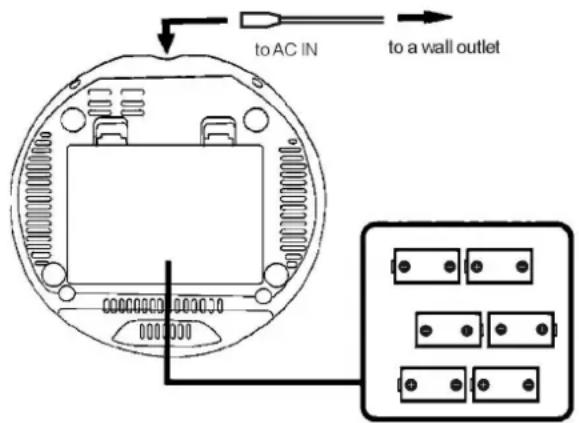
Insert 6X1.5V "C" size/UM-2/R14
batteries into battery compartment
AC POWER
You can power your portable system by plugging the detachable AC power cord into the AC inlet at the back of the unit and into a wall AC power outlet. Check that the rated voltage of your appliance matches your local voltage. Make sure that AC power cord is fully inserted into the appliance.
BATTERY POWER
Insert 6X1.5V "C" size/UM-2/R14 batteries into the compartment. Be sure that the batteries are inserted correctly to avoid damage to the appliance. Always remove the batteries when appliance will not be used of a long period of time, as this will cause leakage to the batteries and subsequently damage to your set.
Notes:
- Use batteries of the same type. Never use different types of batteries together.
- To use the appliance with batteries, disconnect the AC power cord from it.
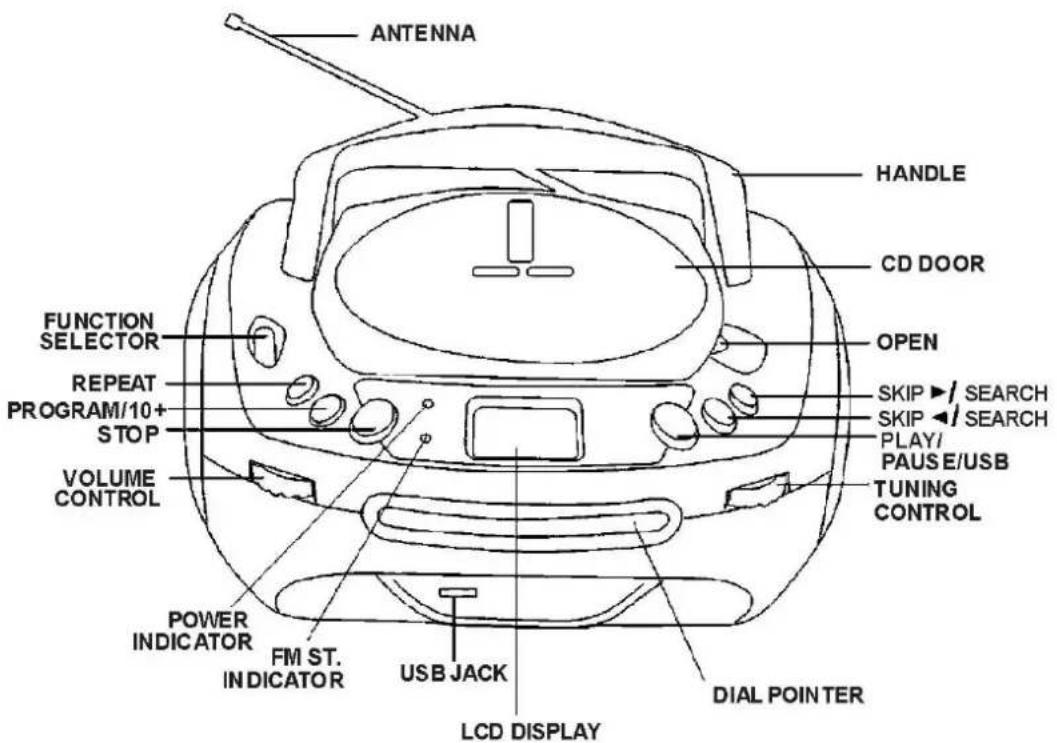

RADIO OPERATION
GENERAL OPERATION
- Set the "FUNCTION" selector to AM or FM mode.
- Adjust radio frequency to your desired station by using the "TUNING control.
- Adjust the "VOLUME" control to the desired level.
FOR BETTER RECEPTION
-Reorient the antenna direction for better FM reception.
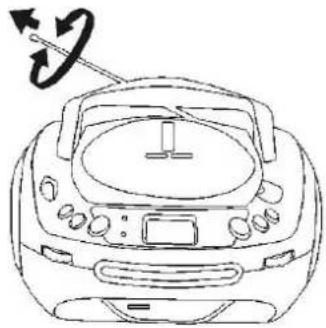
natural_image
Line drawing of a portable electronic device with a circular pointer and scroll wheel (no text or symbols)- Reorient the antenna direction for better AM reception.
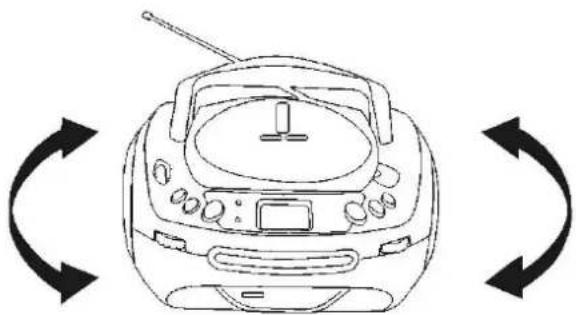
natural_image
Line drawing of a portable radio with two curved arrows indicating bidirectional circulation (no text or symbols)CD/MP3 OPERATION
GENERAL OPERATION
Press to start playing CD/MP3 disc.
PLAY/PAUSE
During play back press to stop playing CD/MP3 operation temporarily.
Press again to resume playback.
SKIP /
/SEARCH
Press to go to the next track or back to the previous track.
Press and hold while playing until you find the point of the sound.
STOP ■
Press to shop all CD/MP3 operation.
PROGRAM/10+ P
While on stop state, it stands for "PROGRRAM" button.
While on display state, it stands for "10+" button
- While CD is playing, press this key
Press once: to repeat current playing song.
Press twice: to repeat all songs in playing disc.
Press 3 times: to exit repeat mode.
- While MP3 is playing, press this key
Press once: to repeat current playing song.
Press twice: to repeat the album.
Press 3 times: to repeat all the songs in playing disc.
Press 4 time: to exit repeat mode.
PLAYBACK
- Set the "FUNCTION" selector to "CD" mode.
- Open the CD door and place a CD/MP3 disc with the label up in the CD compartment.
- Close the CD door.
- Focus search is performed if disc id inside.
For CD disc-“CD” appears n the display
For MP3 disc-"MP3" appears on the display. - The CD/MP3 disc will playback automatically.
- Adjust the "VOLUME" control to the desired level.
- Press the "PLAY/PAUSE" button when you want to stop playback temporarily.
Press the "PLAY/PAUSE" button again to resume playback. - Press the "STOP" button to stop the playback.
CD/MP3 OPERATION
PROGRAM
You can program disc play in any order.
Be sure to press the "STOP" button before use.
- Press the "P" button, the display will show "P01" and "PROG" will light on.
- Select desired track by using the SKIP "<" or SKIP ">" button.
- Press the "P" button again to confirm desired track into the program memory.
- Repeat step 2 and 3 to enter additional tracks into the program memory.
- When all the desired tracks have been programmed, press the "PLAY/PAUSE" button to play the disc in the order you have programmed.
- Press the "STOP" button twice to terminate programmed playback.
- Programming 21 tracks for CD and 99 tracks for MP3.
IMPORTANT
Note: Although this CD player can read CD-R, CD-RW and MP3 discs - in addition to normal CD's - the playability of CD-R, CD-RW and MP3 discs may be affected by the type of software that was used to create the discs, as well as the quality and condition of the blank media you are using. 100% playability cannot be guaranteed. This is not an indication of a problem with the player.
USB OPERATION
- Put "FUNCTION" selector to CD mode.
- When no disc on CD compartment, place USB into jack, the songs in USB can be displayed. The MP3 will playback automatically after read.
- When the disc in CD compartment is displaying, place USB into USB jack, press "PLAY/PAUSE" button and hold at least half second, it can shift to USB display state. The MP3 will playback automatically after read.
Important
The USB port of this product is fully compatible with the USB 1.1 and 2.0 standard.
If MP3 players connected to this port are not written in compliance with the official USB 1.1 or 2.0 standard it may occur that those MP3 players do not work on this port.
This is not a defective of this product.
The MP3 player does not comply with the official USB 1.1 or 2.0 standard.
Instruction on environment protection
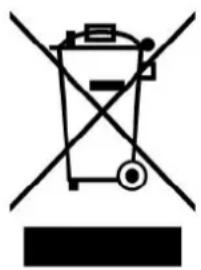
natural_image
Symbol of a trash bin crossed with a diagonal line and a horizontal bar below (no text or labels)Do not dispose of this product in the usual household garbage at the end of its life cycle; hand it over at a collection point for the recycling of electrical and electronic appliances. The symbol on the products, the instructions for use or the packing will inform about the methods for disposal.
The materials are recyclable as mentioned in its marking. By recycling, material recycling or other forms of re-utilization of old appliances, you are making an important contribution to protect our environment.
Please inquire at the community administration for the authorized disposal location
WA A RSC H U W I N G
CLASS 1 LASER PRODUCT
KLASS 1 LASER APPARAT
LUOKEN 1 LAISERLAITE
PRODUCT VAN LASERKLASSE 1
PRODUCT VAN LASERKLASSE 1
WAARSCHUWINGSLABEL OM VOOR STRALING TE WAARSCHUWEN
Opmerking: MET BETREKKING TOT COMPACT DICS.
HET APPARAAT SCHOONMAKEN
natural_image
Line drawing of a portable electronic device with a circular arrow indicating rotation (no text or symbols)natural_image
Line drawing of a portable radio with two circular arrows indicating bidirectional circulation (no text or symbols)BEDIENING VAN DE CD/MP3-SPELER
ALGEMENE BEDIENING
natural_image
Symbol of a trash bin crossed with diagonal lines and a horizontal bar below (no text or labels)WARNSCHILD ZUR INFORMATION ÜBER STRAHLUNG-
natural_image
Line drawing of a CD or DVD driver with a circular arrow indicating rotational motion (no text or symbols)natural_image
Line drawing of a portable electronic device with bidirectional arrows indicating playback or circulation (no text or symbols)CD/MP3 BETRIEB
ALLGEMEINER BETRIEB
natural_image
Symbol of a trash bin crossed with a diagonal line and a horizontal bar below (no text or labels)PRODUIT LASER DE CLASSE 1 KLASS 1 LASER APPARAT LUOKEN 1 LAISERLAITE KLASSE 1 LASER PRODUKT
- ÉTIQUETTE DU PRODUIT LASER DE CLASSE 1 -
natural_image
Warning symbol with a black starburst inside a triangle (no text or numbers)ÉTIQUETTE D'AVERTISSEMENT INFORMANT D'UNE RADIATION-
natural_image
Line drawing of a car's front dashboard with steering wheel and directional arrows (no text or symbols)natural_image
Line drawing of a portable electronic device with two curved arrows indicating rotational or bidirectional motion (no text or symbols)UTILISATION DE CD/MP3
FONCTIONNEMENT GÉNÉRAL
natural_image
Symbol of a trash bin crossed with a diagonal line, no text or numbers presentPRODUCTO LÁSER CLASE 1 KLASS 1 LASER APPARAT LUOKEN 1 LAISERLAITE KLASSE 1 LASER PRODUKT
- ETIQUETA DE PRODUCTO LÁSER CLASE 1-
natural_image
Warning symbol with a black starburst inside a triangle (no text or numbers)natural_image
Line drawing of a CD or DVD driver's front panel with a circular arrow indicating rotational motion (no text or symbols)natural_image
Line drawing of a portable electronic device with bidirectional arrows indicating playback or circulation (no text or symbols)natural_image
Symbol of a trash bin crossed with no text or labels, representing waste sorting or disposal (no text present)KLASSE 1 LASER PRODUKT
ETIQUETA DE PRODUTO LASER DE CLASSE 1
Esta etiqueta está afixada para informar que o aparelho contér um componente laser.

natural_image
Warning symbol with a black starburst inside a triangle (no text or numbers)natural_image
Line drawing of a CD or DVD driver with a circular arrow indicating rotational motion (no text or symbols)natural_image
Line drawing of a portable electronic device with bidirectional arrows indicating playback or circulation (no text or symbols)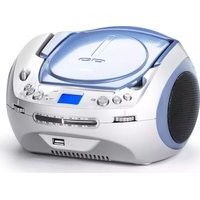
- WARNING
- CAUTION
- RISK OF ELECTRIC SHOCK DO NOT OPE
- ATTENTION
- CLASS 1 LASER PRODUCT LABEL-
- WARNING LABEL INFORMING OF RADIATION-
- SAFETY INSTRUCTIONS
- BEFORE OPERATION
- Notes: CONCERNING COMPACT DISCS.
- DISC MAINTENANCE
- CLEANING THE UNIT
- AC POWER
- BATTERY POWER
- RADIO OPERATION
- GENERAL OPERATION
- FOR BETTER RECEPTION
- CD/MP3 OPERATION
- PLAYBACK
- PROGRAM
- IMPORTANT
- USB OPERATION
- Instruction on environment protection
- WA A RSC H U W I N G
- PRODUCT VAN LASERKLASSE 1
- WAARSCHUWINGSLABEL OM VOOR STRALING TE WAARSCHUWEN
- HET APPARAAT SCHOONMAKEN
- BEDIENING VAN DE CD/MP3-SPELER
- ALGEMENE BEDIENING
- WARNSCHILD ZUR INFORMATION ÜBER STRAHLUNG-
- CD/MP3 BETRIEB
- - ÉTIQUETTE DU PRODUIT LASER DE CLASSE 1 -
- ÉTIQUETTE D'AVERTISSEMENT INFORMANT D'UNE RADIATION-
- UTILISATION DE CD/MP3
- - ETIQUETA DE PRODUCTO LÁSER CLASE 1-
- ETIQUETA DE PRODUTO LASER DE CLASSE 1
Brand : AudioSonic
Model : CD-1584
Category : Radio