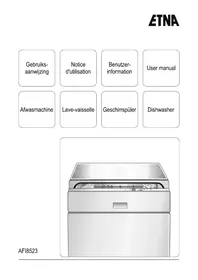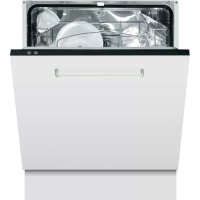
TFI8004ZT - Dishwasher ETNA - Free user manual and instructions
Find the device manual for free TFI8004ZT ETNA in PDF.


User questions about TFI8004ZT ETNA
0 question about this device. Answer the ones you know or ask your own.
Ask a new question about this device
Download the instructions for your Dishwasher in PDF format for free! Find your manual TFI8004ZT - ETNA and take your electronic device back in hand. On this page are published all the documents necessary for the use of your device. TFI8004ZT by ETNA.
USER MANUAL TFI8004ZT ETNA
natural_image
Technical line drawing of a mechanical device with labeled parts (no text or symbols beyond numbers)Inschakelen
TFI8006
text_image
ETNA 1 2 3 4 5 6 7 8 9 TFI8004 2 3 8 9 7'3-in-1' programma selecteren
natural_image
Technical line drawing of a structural framework with internal components and a close-up inset showing detail (no text or symbols)Overstroombeveiliging
natural_image
Line drawing of a hand holding a tool inside a mechanical device with no visible text or symbolsnatural_image
Simple circular diagram with a central arrow and plus/minus symbols, no text or labels present.natural_image
Line drawing of a vintage typewriter with control panel and dial (no text or symbols)natural_image
Diagram of a spacecraft interacting with a device, showing components like satellite, solar panels, and a detector (no text or labels)text_image
Technical diagram of a refrigerator with labeled parts and control panelnatural_image
Mechanical assembly diagram showing internal components and a close-up of a mechanical component (no text or symbols visible)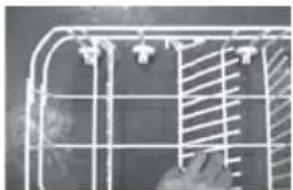
natural_image
Close-up of a wire cage with metal grating and a hatched panel inside (no text or symbols visible)- dessertborden
- ovale schaal
- grote borden
10.soepborden
11.bestekmandje
text_image
Technical diagram of a mechanical assembly with labeled parts 1, 2, and 3text_image
Technical diagram of a mechanical assembly with labeled components and directional arrows indicating motion or forcenatural_image
Simple line drawing of a rectangular container with a circular button and a central knob (no text or symbols)Filtergroep
natural_image
Symbol of a trash bin with crossed diagonals and no text or numbers presentnatural_image
Technical line drawing of a mechanical device with labeled parts (no text or symbols beyond numbers)Mise en marche
TFI8006
text_image
ATMA 1 2 3 4 5 6 7 8 9 TFI8004 2 3 8 9 7natural_image
Technical line drawing of a structural framework with internal components and a close-up inset showing internal details (no text or symbols)natural_image
Line drawing of a mechanical device with a hand holding a tool, no text or symbols presentnatural_image
Simple circular diagram with a central symbol and directional arrows, no text or labels present.natural_image
Technical line drawing of a mechanical device with a dial and knob (no text or symbols)natural_image
Illustration of a hand using a device to press or adjust a component with a circular dial and arrow (no text or symbols)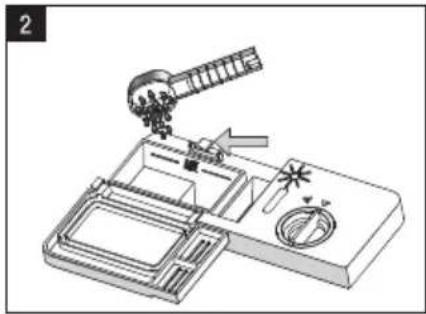
natural_image
Technical line drawing of a mechanical device with no visible text or symbolstext_image
Technical diagram of a microwave oven with labeled parts and control knobnatural_image
Close-up of a mechanical component with a white arrow pointing to a cylindrical part (no visible text or symbols)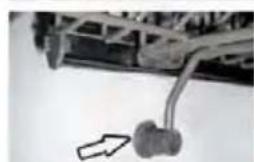
natural_image
Mechanical component with attached rod and bracket, no visible text or symbols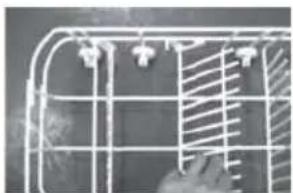
natural_image
Close-up of a wire cage with metal grating and a hand adjusting the panel (no text or symbols visible)text_image
Technical diagram of a mechanical assembly with labeled parts 1, 2, and 3natural_image
Technical diagram of a mechanical assembly with no visible text or symbolsnatural_image
Simple line drawing of a container with a circular opening and handle (no text or symbols)natural_image
Symbol of a trash bin with crossed lines indicating no waste or discharge (no text or numbers present)natural_image
Technical line drawing of a mechanical device with labeled parts (no text or symbols beyond numbers)Einschalten
text_image
TFI8006 1 2 3 4 5 6 7 8 9 ETNA TFI8004 2 3 8 9 7natural_image
Technical line drawing of a structural framework with support structures and a detailed inset showing internal components (no text or symbols)natural_image
Line drawing of a mechanical device with a hand holding a tool, no text or symbols presentnatural_image
Simple circular diagram with a central vertical arrow and two directional arrows, no text or symbols present.natural_image
Line drawing of a kitchen appliance with handle, control panel, and dial (no text or symbols)natural_image
Technical line drawing of a mechanical device with components and no visible text or symbolstext_image
Technical diagram of a microwave oven with labeled parts and control knob
Die Körbe beladen
natural_image
Mechanical assembly diagram showing a multi-layered structure with arrows indicating motion, alongside a close-up of a mechanical component (no text or symbols visible)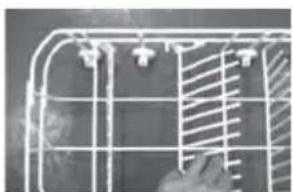
natural_image
Close-up of a wire cage with metal strips and a hand adjusting it (no text or symbols visible)text_image
Technical diagram of a mechanical assembly with labeled parts 1, 2, and 3natural_image
Technical diagram of a mechanical assembly with no visible text or symbolsnatural_image
Line drawing of a mechanical component with a central circular feature (no text or symbols)Filtergruppe
natural_image
Symbol of a trash bin with crossed x-marks and no text or numbers present| Control | panel | |
| Components | 7 |
Operation
| Switching | on | |
| Cycle | selection | table |
| Adding | salt | |
| Rinse | agent | reservoir |
| Dishwasher | detergents | |
| Loading | the | baskets |
| Damage to glassware and other crockery | ||
| Filter | system | 18 |
Maintenance
| Cleaning | the | spray | arms |
| Cleaning | the | filters | |
| Cleaning | the | door |
Errors
| What should I do, if... | 21 | |
| Error | table | 21 |
| Error | codes | 23 |
Appendix
| Disposing of the packaging and appliance | 24 |
Introduction
You have opted to purchase an Etna dishwasher.
Optimum user comfort and easy operation were paramount during the development of this product.
This manual describes how you can get the most out of your dishwasher. It provides you with information on how to operate the appliance, as well as background information about how it works. You will furthermore also find maintenance tips.
The safety instructions that are relevant during the installation are included in the installation guide. This is intended for the installation technician.
Read this manual before using the appliance.
Keep this manual somewhere safe so that subsequent users can also benefit from the information contained within.
Declaration of conformity
We hereby declare that our products satisfy the applicable European directives, orders and regulations, as well as the requirements stated in the referenced standards.
Note!

Contact a registered installer to fit your appliance (see "Installation instructions"). Do not connect the appliance to the electrical mains until the installation is complete.
- Connect up the appliance according to local installation regulations.
- The appliance has been manufactured in compliance with the latest safety standards. Nonetheless, we recommend that persons suffering from psychological or physical disabilities, mental impairment or learning difficulties, do not use the appliance except under the supervision of a competent individual. The same applies to children.
- In order to prevent hazardous situations, a damaged connection cable may only be replaced by the manufacturer, the manufacturer's service department, or by similarly qualified persons.
- This appliance must be earthed! Earthing reduces the risk of an electric shock in the event of errors and faults. This appliance is fitted with an earthed power lead and plug. Only insert the plug into an earthed wall socket that has been fitted in compliance with the local electrical code!
- Incorrect connection of the power lead can result in a life-threatening situation. In case of doubt, contact a qualified electrician or service technician. Do not make any changes to the plug. If the plug does not fit into the wall socket, contact a qualified electrician to change it.
- Improper use of the door and basket of the dishwasher is not recommended.
Do not sit or stand on the door or basket.
- Do not clean unsuitable plastic dishes in the appliance, unless they bear a mark indicating that they are dishwasher-safe. Where dishes do not bear any such marking, always follow the manufacturer's instructions.
- Only use detergent, rinse agent and salt that is intended for use in a dishwasher. Under no circumstances should professional or catering detergents be used. Under no circumstances should normal washing-up liquid or fabric detergents be used.
- Keep detergents out of the reach of children.
Note!

- Keep detergents and rinse agents out of the reach of children. Keep children out of reach of the dishwasher when open. There may still be some cleaning agent present in the appliance. If swallowed, consult a doctor immediately and take the packaging with you.
- Keep the door closed. You can trip over an open door.
- Do not bend the intake and drainage hoses or connection lead excessively during installation. Take care to ensure they do not become trapped.
- The appliance is not intended for use by young children.
- Dishwasher detergents are highly alkaline and are particularly harmful if swallowed. If swallowed, consult a doctor immediately and take the packaging with you.
- Avoid contact with the skin and eyes. Keep children away from the dishwasher when the door is open.
- Make sure that all loose components in the dishwasher have been fitted correctly. Do not open the door during the cycle.
- Do not place heavy objects on the opened door. Do not stand on the door. The appliance may tip over, which can result in damage to the appliance.
- When loading the baskets, place sharp objects so that they cannot damage the rubber seal on the door.
- Packaging materials should be disposed of in a responsible manner and in accordance with government regulations.
- The dishwasher must only be used for its intended purpose. The appliance should only be used in a frost-free room!
- Remove the door or deactivate the lock when disposing of the appliance.
- Do not allow children to play with the appliance.
- Check whether the detergent reservoir is empty following the end of the wash cycle.
- Fill the salt and rinse agent reservoirs prior to first use and when the indicators light up. Set the salt consumption before use.
- Disconnect the appliance from the power supply when cleaning or performing repairs. Remove the plug from the socket or turn off the switch in the fuse box.
Control panel
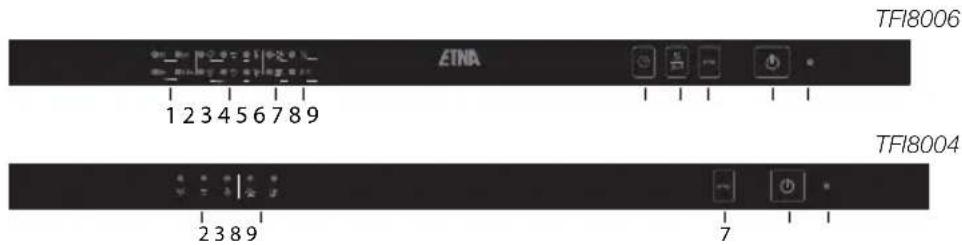
text_image
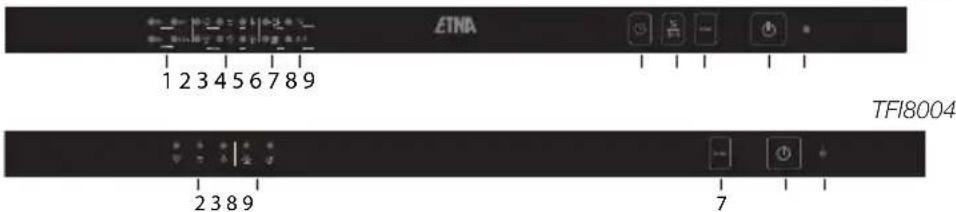
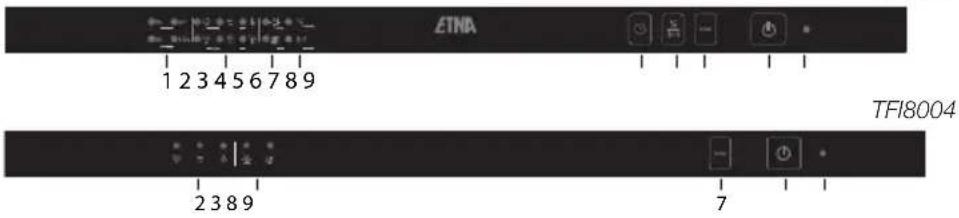
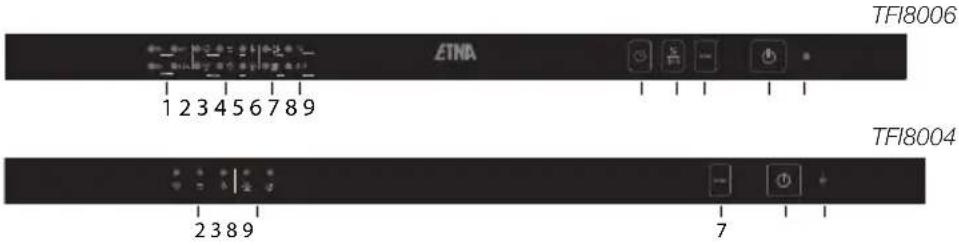
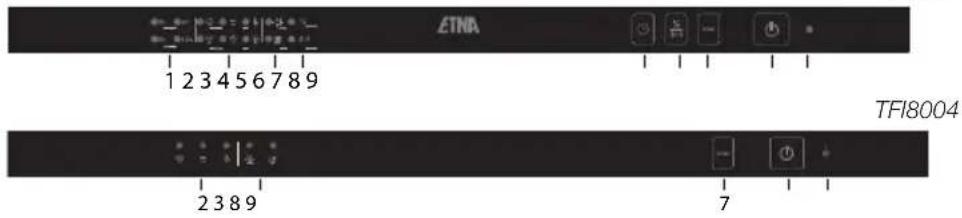
TFI8006 1 2 3 4 5 6 7 8 9 ETNA TFI8004 2 3 8 9 7- "Delayed start" indicators
- "Selected cycle" indicators
- Water softener and rinse agent indicators
- "Half load wash" indicator
- "Delayed start" button
- "Half load" / "3-in-1 tablet cycle" button
- Programming button
- On/Off button
- On/Off indicator
Components
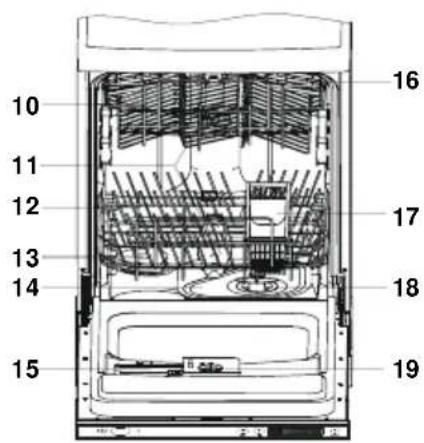
text_image
10 11 12 13 14 15 16 17 18 19- upper basket
- spray arms
- lower basket
- water softener
- coarse filter (flat filter)
- detergent reservoir
- cup rack
- cutlery basket
- coarse filter (beaker filter)
- rinse agent reservoir
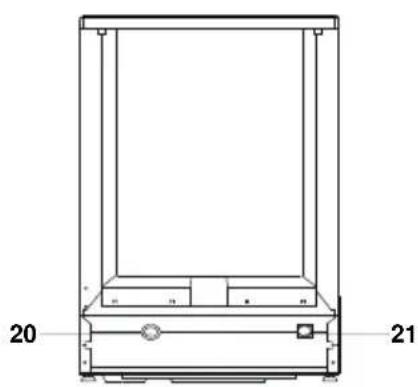
- drainage pipe connection
- water inlet pipe connection
natural_image
Technical line drawing of a mechanical device with labeled parts (no text or symbols beyond numbers)Switching on
TFI8006
text_image
1 2 3 4 5 6 7 8 9 2 3 8 9 TFI8004 7- Open the door to the dishwasher.
- Press the "on/off" button (8) to switch on the appliance.
The indicator (9) will light up when the machine is switched on. - Select the desired cycle (see page 10 "cycle selection table"). Press the programming button (7) repeatedly to select the required cycle. When you select a wash cycle, the corresponding indicator (2) will light up.
- Close the door to the dishwasher. The dishwasher will automatically start running the selected cycle.
Delayed start
If you want the dishwasher to switch on at a later time, you can used the "delayed start" button (5). You can choose to delay the start time by 3, 6, 9 or 12 hours. Each press of the button (5) changes the delay time. The indicators (1) show the delayed start time that has been selected.
Selecting a half load
Press the "half load" button (6) to activate the half load cycle. The lower spray arm is switched off during the half load cycle. This means that you should only load the upper basket.
Selecting the "3-in-1" cycle
The dishwasher features a 3-in-1 cycle. If you select this cycle (button 6), the dishwasher does not need to be filled with salt and rinse agent, but rather you use so-called 3-in-1 dishwasher tablets in their place. A holder for 3-in-1 tablets has been supplied with your dishwasher.

Note: Only use 3-in-1 tablets in combination with the 3-in-1 wash cycle. If you use 3-in-1 tablets with other cycles, this will deliver lower performance in terms of the washing results.
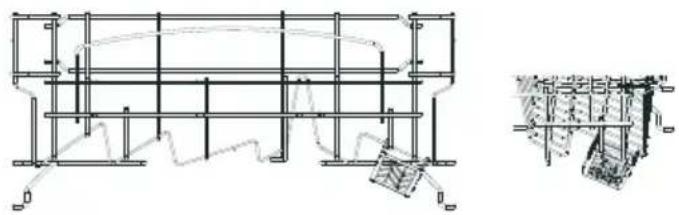
- Hang the tablet holder on the upper basket, as illustrated below.
natural_image
Technical line drawing of a structural framework with internal components and a close-up detail view (no text or symbols)- Check that the upper spray arm can rotate freely and is not obstructed by the tablet holder. If necessary, hang the tablet holder in a different location.
- Insert a 3-in-1 tablet into the holder and start the 3-in-1 cycle.
Stopping or changing a wash cycle
Open the door. Press and hold the programming button (2) for more than 3 seconds. You can now re-select the desired cycle (see page 10 "cycle selection table"). Now close the door.

Note! A cycle that has already begun can only be changed in the start-up phase. After this, the detergent will be sprayed all over the dishes or the machine may have already pumped out the water. In that instance, you must refill the detergent compartment (see section on Dishwasher detergent).
Following the end of the wash cycle
Once the wash cycle has completed, an audible signal will sound for eight seconds. Switch the appliance off using the on/off button.
Open the door to the dishwasher. Wait a few minutes before unloading the dishwasher. The dishes and cutlery will still be very hot immediately following the end of the cycle. There is a chance that dishes may break as a result of the heat. Moreover, the dishes dry better when allowed to stand for a few minutes.
Flood protection switch
Your dishwasher is fitted with a safety switch that prevents too much water from running into the appliance. The safety switch closes the inlet valve and instructs the dishwasher to pump out the surplus water. If there is water in machine (due to too much water being fed in previously, or as a result of a leak), this must first be removed before the appliance is switched on again.

Warning!
Opening the door fully during the wash cycle is dangerous. You may be splashed with hot water from the machine.
Cycle selection table
| Cycle | Symb. | Cycle information | Cycle duration | Detergent pre/main | Rinse agent | TFI 8004ZT | TFI 8006ZT | Time/Energy/ Water (min/KwH/l) |
prewash (50°C);Heavily soil intensive su  pans, casses pans, casses  plates with [AVAX] plates with [AVAX]  leftover fo[O] leftover fo[O] | ||||||||
| Normally sNormal not excessi cycle.dry |  [6XK2][2G3H][YW8][TW0Z][HOT3] [6XK2][2G3H][YW8][TW0Z][HOT3] [4ZWZ] [4ZWZ] | tes, preswash;hes, main wash (65°C) 5/25 g rinse, rinse (55°C) dry | or 3-in-1 tablet | ★ | x | 130/1.4/22 | ||
| *Economy energy-saving cycle dry |   [3A2] [3A2]   [ASAD][8T72][AHW8][T773] [ASAD][8T72][AHW8][T773] | Lightly soiled dishes, such as dishes, plates, glasses, lightly d. Standard rinse; rinse (65°C); | main wash (50°C); or 3-in-1 tablet | 5/25 g | ★ | x | 160/1.2/16 | |
| Rinserinsing and dry | [YO47][2448][BHWH][6502]   | For dishes that only require rinse (70°C); | prewash; main wash (50°C); or 3-in-1 tablet | 5/25 g | ★ | x | 155/1.05/16 | |
| x | 80/0.8/8 | |||||||
| Lightly soil Glassware crystal and rinse (60°) | [SKAW] [DS2W][CE6Y][568D] [DS2W][CE6Y][568D]   [YGD2] [YGD2] | , preswash; such as glasses, porcelain. rinse; | main wash (40°C); | 15 g | ★ | 95/0.8/15 | ||
| Quick crystal and No drying. |    [KC6C] [KC6C] [TWHH][248W] [TWHH][248W]  | Lightly soiled dishes, such as glasses, porcelain. rinse (45°C) | main wash (40°C); rinse; | 15 g | - | x | x | 30/0.45/12 |
*EN 50242: This is a test cycle. The information for a comparison test in accordance with EN 50242 is as follows:
• capacity: 12 place settings
- position of upper basket: wheels on runners / wash setting: 6
Adding salt
natural_image
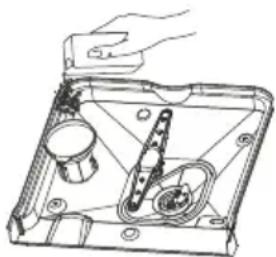
Line drawing of a mechanical device with a handle and internal components (no text or symbols)This machine is equipped with a water softener. To use the water softener, fill the dishwasher with salt.
- Remove the bottom basket and then unscrew the cap from the reservoir.
- Before filling the reservoir for the first time, pour in one litre of water.
- Insert the funnel into the reservoir opening. Pour in approximately 1 kg of salt. It is normal for a little water to flow out of the opening when doing this. Note! Clear up any spilled salt and always run a full cycle immediately afterwards to prevent damage to the bottom.
- Screw the cap back on firmly.

Note! Always fill the salt reservoir and adjust the water hardness setting before using the dishwasher. Refill the salt reservoir when the water softener indicator (3) lights up. It is possible that the light will remain lit for a short while after the salt reservoir is filled. It will go out automatically when enough salt has been dissolved in the water.

Note! Never fill the salt reservoir with dishwasher detergent. This will cause irreparable damage to the water softener.
text_image
Diagram showing a circular component with polarity markings and an internal symbol, likely representing a mechanical or electrical component.Setting the salt consumption
• Unscrew the cap from the salt reservoir.
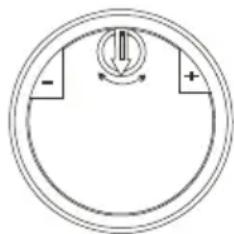
- In de opening of the reservoir, you will find a ring bearing an arrow. Turn the ring towards - or +, depending on the hardness of the water.
Adjust the salt consumption according to the table below:
| WATER HARDNESS | setting | salt consumption (grams/cycle) | autonomy (cycles/1 kg) | ||
| degrees Clark | ^ dH | mmol/l | |||
| 0 - 10 | 0 - 8 | 0 - 1.4 | no salt required | 0 | / |
| 10 - 28 | 8 - 22 | 1.4 - 3.9 | - position | 20 | 50 |
| 28 - 56 | 22 - 45 | 3.9 - 8 | central position | 40 | 25 |
| 56 - 75 | 45 - 60 | 8 - 11 | + position | 60 | 16 |

Your local water authority can inform you how hard your mains water is. Adjustments can then be made according to the above table.
Rinse agent reservoir
Rinse agent is added during the final rinse. Rinse agent prevents traces of water droplets being left behind on the clean dishes. Moreover, it ensures that the dishes dry quicker, since the water drains off more easily.
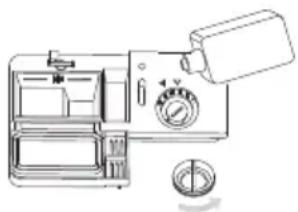
The dishwasher is designed for use with liquid rinse agent. The rinse agent reservoir is located on the inside of the door, alongside the detergent compartment.

Note: refill the rinse agent reservoir when the rinse aid indicator (3) lights up. The reservoir has a capacity of approximately 100 ml. Do not overfill the rinse agent reservoir, as this will cause the rinse agent to overflow.
Rinse agent spillages must be cleaned up, otherwise they may lead to leakages as a result of extreme foaming.
natural_image
Line drawing of a vintage digital camera with control panel and dial (no text or symbols)- Unscrew the cap from the rinse agent reservoir (to the left, toward the arrow with “open”).
- Pour the rinse agent into the reservoir, taking care not to overfill it. The reservoir has a capacity of approximately 100 ml.
- Replace the cap. Make sure that the cap is lined up with the “open” arrow and turn in the direction of the “closed” arrow.
Setting the quantity of rinse agent
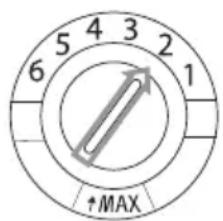
A fixed amount of rinse agent is added during the final rinse. As is the case with detergent, the amount of rinse agent needed is dependent on the hardness of the water in your area. Too much rinse agent can lead to streaks on the dishes.
text_image
5 4 3 2 6 1 ↑MAXThe rinse agent reservoir has 6 settings. To begin with, set the reservoir to setting 2. If this still causes spotting on the dishes and the dishes do not dry well, you can increase the amount of rinse agent added by turning the selector knob on the reservoir to setting 3. If there is still no improvement, turn the selector knob to a higher setting. Repeat this action until the dishes are streak-free when they emerge from the dishwasher.
Dishwasher detergents
The chemical agents in dishwasher detergents remove the dirt, break it down and ensure that it is drained out of the dishwasher. The dishwasher detergents you can buy in most shops are suitable for this purpose.
Warning!
Dishwasher detergent is a corrosive product. It should therefore be kept out of the reach of children. If swallowed, consult a doctor immediately and take the packaging with you.
Concentrated detergent
Based on their chemical composition, 2 different types of concentrated detergent can be distinguished:
- Conventional alkaline detergents with corrosive ingredients.
- Low-alkaline concentrated detergents with natural enzymes.
Using concentrated detergent in combination with “normal” wash cycles produces less pollution and is good for your dishes: these wash cycles are specially tailored to the dirt-dissolving properties of the enzymes contained in concentrated detergent. This means that “normal” wash cycles with concentrated detergent achieve the same results as an intensive wash cycle.

Dishwasher tablets
Dishwasher tablets from different manufacturers dissolve at different rates. This means that, during short wash cycles, certain types of dishwasher tablet do not fully dissolve, as a result of which their cleaning action is reduced. Dishwasher tablets should therefore chiefly be used in combination with long wash cycles, so that the dish washer tablet has time to fully dissolve.
Detergent compartment
Your dishwasher uses less detergent and rinse agent than conventional dishwashers. Generally speaking, just one measuring spoon of detergent powder is needed for a normal wash cycle. Use more detergent if your dishes are more heavily soiled. Fill the soap compartment immediately prior to starting the cycle.
Filling it prior to this may result in the detergent becoming damp and therefore not fully dissolving.

Note! The table on page 10 shows the amount of detergent required for the different cycles. These are averages. A different dosage may be necessary, depending on the hardness of the water and how soiled the dishes are.
Filling
text_image
1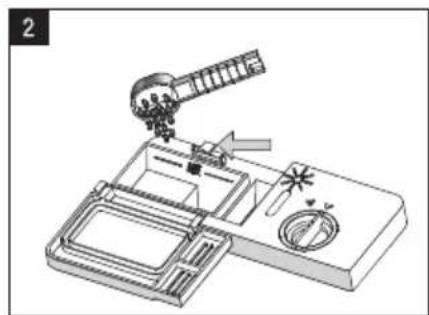
natural_image
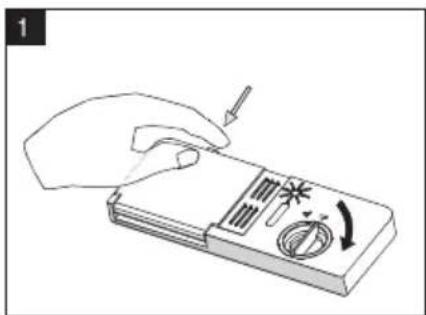
Diagram of a spacecraft interacting with a device, showing components like a satellite, rocket, and solar panels (no text or labels)- Press the release catch if the lid is closed. The lid will spring open.
- Fill the detergent compartment immediately prior to starting a wash cycle. Use only branded detergent in the dishwasher.
text_image
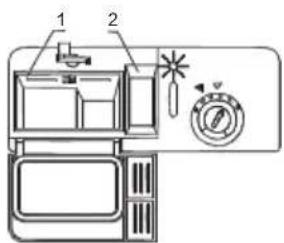
Technical diagram of a refrigerator with labeled parts and control panelThe markings in the detergent compartment indicate the dosage.
- Compartment for main wash cycle detergent (1), "MIN" is approximately equal to 20 grams of detergent.
- Compartment for prewash detergent (2), holds approximately 5 grams of prewash detergent.

Use only detergents that are specifically designed for dishwashers. Store the detergent in a cool and dry place. Only fill the detergent compartment with detergent when you are running a wash cycle immediately afterwards.
Loading the baskets
Using the upper basket
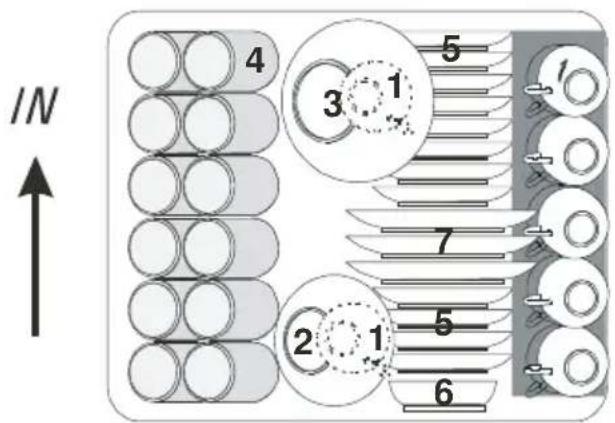
The upper basket is designed for fragile, light dishes, such as glasses, cups and saucers, plates, small bowls and shallow (not particularly dirty) pans.
Place the dishes in the basket in such a way as to ensure they cannot move when sprayed. The height of the upper basket can be adjusted by removing the basket and replacing it in a different position in the runners.
- cups
- small bowl
- large bowl
- glasses
- saucers
- plates
- dessert plates
text_image
IN 4 5 3 1 7 2 1 5 6Adjusting the height of the upper basket
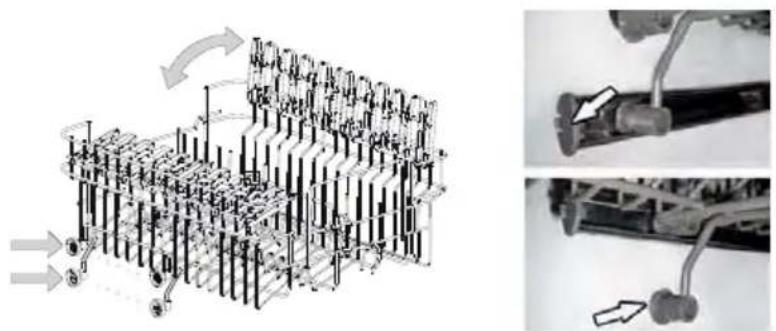
You can adjust the height of the upper basket and thus create more space for large objects in the upper or lower basket. The height of the upper basket can be adjusted by removing the basket and replacing it in a different position in the runners.
natural_image
Mechanical assembly diagram showing a multi-layered structure with arrows indicating motion, alongside a close-up of a mechanical component (no text or symbols visible)Using the lower basket
We recommend that you place large objects that are the most difficult to clean in the lower basket: pots, pans, pan lids, casserole dishes and basins.
Casserole dishes and pan lids should preferably be placed at the side of the basket. This will ensure that they do not obstruct the spray arm when it is turning.
- Saucepans, serving dishes etc. must always be placed upside down in the basket.
- Deep bowls should be tilted, with the opening facing downwards to allow water to escape.
- The lower basket can be adjusted to allow for larger, or more, pots and pans.
natural_image
Close-up of a wire cage with hatched pattern and small protrusions (no text or symbols visible)Folding down the plate racks
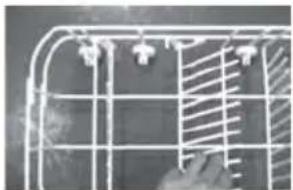
You can fold down the rear plate rack to make it easier to fit pots and pans in the dishwasher.
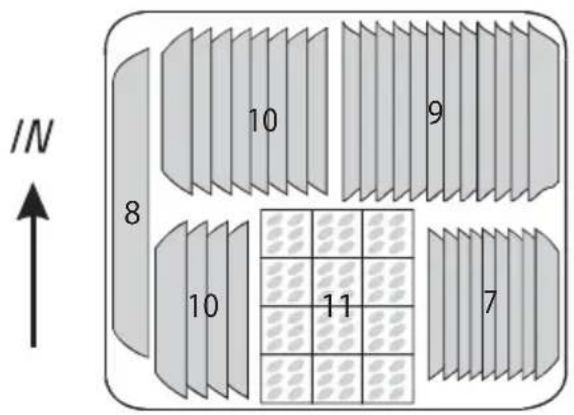
- dessert plates
- oval dish
- large plates
- soup plates
- cutlery basket
text_image
/N 8 10 9 10 11 7Cutlery basket (loading example)
Cutlery should be placed in the cutlery basket with the handles pointing down. If the cutlery basket is equipped with compartments, the cutlery must be placed in the compartments piece by piece. Long cooking utensils, such as wooden spoons, should be placed lying down (horizontal) in the front of the upper basket.
- forks
- soup spoons
- dessert spoons
- teaspoons
- knives
- serving spoons
- gravy spoon
- serving fork
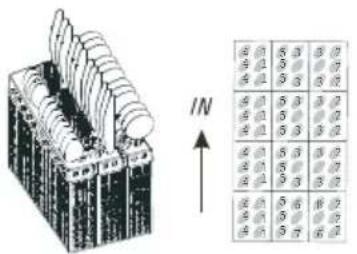
Take care to ensure that no objects are sticking through the bottom of the cutlery basket, as this will obstruct the spray arm.
Cutlery/crockery unsuitable for the dishwasher
- Cutlery with a wooden, porcelain or mother of pearl handle
- Plastic objects that are not heat-resistant
- Cutlery with glued elements that are not heat-resistant
• Glued cutlery or crockery - Pewter or copper objects
- Lead crystal glassware
• Steel objects that are prone to rust - Wooden dishes
- Objects manufactured from synthetic fibres
Cutlery/crockery with limited suitability for use in the dishwasher
- Certain types of glass can become dull after undergoing a large number of wash cycles
• Silver and aluminium may tarnish after use in the dishwasher - Glazed patters may fade as a result of regular washing

Note! Do not place any objects soiled with cigarette ash, candle wax, varnish or paint in the dishwasher. When buying new kitchen utensils, ensure that they are suitable for the dishwasher.
Do not place cutlery containing silver alongside other types of cutlery. This can cause irreparable damage to the cutlery.

Do not overload the dishwasher. There is only room for 12 standard settings. Do not place cooking utensils that are unsuitable for dishwashers inside. This is essential to ensure good washing results and a low energy consumption.
Placing cutlery and crockery in the dishwasher
Before placing the dishes in the dishwasher, you must:
- Remove any large bits of leftover food.
- Leave caked and burnt on leftover food to soak for a while.
When inserting the dishes, take care to ensure that:
- The spray arm is not obstructed by the dishes.
- Hollow objects are placed with the opening facing downwards, to ensure that that cannot hold the water.
Plates and cutlery must not cover each other
- Glassware items must not touch, otherwise damage can occur.
- Place large objects that are difficult to clean in the lower basket.
- The upper basket is specially designed for lighter objects, such as glasses and coffee and tea cups.

Warning!
- Long knives standing upright in the cutlery basket can cause injury!
- Long and/or sharp items of cutlery, such as carving knives, should be laid (placed horizontally) in the upper basket.
Damage to glassware and other crockery
Potential causes:
- Type of glass or manufacturing process. Chemical composition of the dishwasher detergent.
• Water temperature and duration of the wash cycle.
Proposed solution:
- Use glassware and porcelain crockery produced by manufacturers that state that it is suitable for dishwashers.
- Use a milder/less corrosive dishwasher detergent. If needed, ask detergent manufacturers for more information.
- Select a wash cycle with a lower temperature.
- Remove glassware and cutlery from the dishwasher as soon as possible after the cycle has finished, to prevent damage.
Filter system
text_image
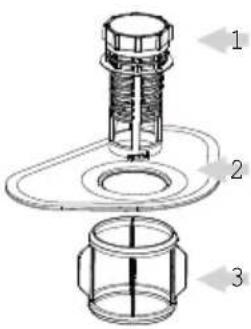
Technical diagram of a mechanical assembly with labeled parts 1, 2, and 3Depending on usage, the filters may require regular rinsing under a tap. The filter system consists of three components: the large filter, the coarse filter and the fine filter.
- Large filter: Leftover food and waste that lands on this filter is rinsed through to the coarse filter by a special jet on the lower spray arm.
- Coarse filter: Larger articles, such as leftover bones or pieces of glass that could block the drain, are trapped in the coarse filter. In order to remove the waste from the filter, you must lightly squeeze the lips on top of the filter together and then pull the filter upwards.
- Fine filter: This filter prevents waste and leftover food from entering the drainage pump and ensures that said leftovers are not spread over the dishes again during the cycle.
Cleaning the spray arms
natural_image
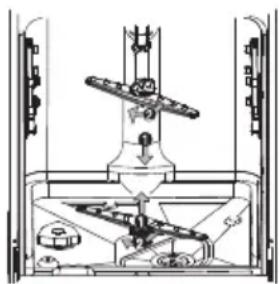
Technical line drawing of a mechanical assembly with no visible text or symbolsIt is essential that you clean the spray arms on a regular basis. In the longer term, waste can block the nozzles and the bearings in the spray arms. Clean the spray arms as follows:
- Unscrew the nut so that you can remove the washer.
- Next remove the spray arm.
- Clean the spray arms in warm, soapy water, using a soft brush to clean the nozzles.
- Rinse the spray arms thoroughly before fixing back in place.
Cleaning the filters
natural_image
Line drawing of a mechanical component with a central circular feature and rectangular housing (no text or symbols)Filter section
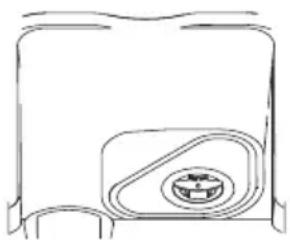
In order to ensure the dishwasher operates at maximum efficiency, the whole filter section must be cleaned.
The filter section efficiently removes food remnants from the water and ensures that the water is able to continue circulating throughout the wash cycle. It is therefore a good idea to remove larger food remnants from the filter section after each wash cycle, by cleaning the half-round filter and filter housing under running water.
- Remove the filter section by grasping the handle and pulling upwards. All components in the filter section must be cleaned at least once per month.
- Use a dishwashing brush to clean the coarse and fine filter. Put the filter section back together again according to the illustration opposite and then re-fit the whole filter section back into the tub of the dishwasher.

Never use the dishwasher without the filter section. Incorrect fitting of the filter section will result in the dishwasher no longer delivering maximum performance. Damage to cutlery and dishes is a further possible consequence.
Cleaning the door
Clean the edge of the door, including the sealing rubber, with a soft, damp cloth. Take care to ensure that water does not enter the door locking mechanism or electrical components. Spray-type cleaning products should not be used, nor aggressive cleaning products such as scourers. These cleaning products can damage the finish.
What should I do, if...
If the appliance is not functioning well, this does not always mean that it is faulty. Try to resolve the fault yourself first. If the recommendations below does not solve your problem, telephone our service department.

Note
Disconnect the appliance from the power supply before beginning repairs. It is preferable if you remove the plug from the socket.
Error table
| Problem | Potential causes | Solution |
| The dishwasher is not working. | Fuse is faulty or the earthing switch has been activated. | Replace the fuse or reset the isolating switch.Remove other appliances that are connected to the same group. |
| The power supply is not switched on | Make sure that the dishwasher is switched on and the door closed.Make sure that the plug is correctly inserted into the socket. | |
| The water pressure is too low. | Check whether the dishwasher is correctly connected to the water mains and that the tap is open. | |
| The drainage pump does not shut off. | The water is running over.Too much water in the dishwasher or leak | The system is designed so that it can automatically detect overflowing water. In that instance, the appliance shuts off the circulation pump and switches on the drainage pump. |
| Noise. | Some noises are normal. | Noise of rotating pump/washing noises; the detergent compartment opening. |
| Cutlery is rattling in cutlery basket or something small has fallen out of the basket. | Ensure that everything is loaded securely in the dishwasher. | |
| The motor makes an unusual noise. | The pump is blocked. Contact an installer. | |
| Contamination of the tub. | Poor quality detergent. | Only use detergent suitable for dishwashers to prevent contamination. |
| Blocked filters | Open the door and clean the filters. Run the pre-wash cycle. | |
| Rinse agent has been spilled. | Always wipe up spilled rinse agent immediately. | |
| Dishes not dry. | The rinse agent reservoir is empty. | Ensure that the rinse agent reservoir is filled. |
| Dishes and flat objects are not clean. | Incorrect cycle. | Select a higher cycle. |
| Baskets are incorrectly loaded. | Make sure that the detergent compartment and spray arms are not obstructed by large dishes/pans. | |
| Spotting and scaling on glasses and flat dishes. | Extremely hard water. Incoming water temperature is low. The dishwasher is overloaded.Baskets are incorrectly loaded. Old or damp detergent. Rinse agent reservoir is empty.Incorrect detergent dosage. | To remove spotting from glass objects:Remove all metal objects from the dishwasher.Use the prescribed quantity of detergent.Select the longest cycle. Allow the dishwasher to run for approximately 18 to 22 minutes. It should by then have reached the main wash cycle. Open the door carefully and pour 2 cups of white vinegar into the base. Close the door and allow the dishwasher to complete its cycle. If vinegar does not work: Repeat the above steps, but use a quarter cup (60 ml) of citric acid crystals in place of white vinegar. |
| Cloudy stains on the glassware. | Combination of soft water and too much detergent. | Use less detergent and choose the glass cycle, which you can use to clean glassware. |
| Yellow or brown scale on the inside of the tub. | Traces of iron in the water may cause spotting to the tub of the dishwasher. | Contact a manufacturer of water softeners for a special filter. |
| White scale on the inside of the tub. | Hard water. | Increase salt consumption setting |
| Dishwasher detergent is left in the detergent compartment. | The detergent compartment is blocked by dishes. | Load the baskets so that the dishes no longer block the detergent compartment.Clean the upper spray arm. |
| Steam. | When opening the door. | This is possible at the end of the cycle. |
| Black or grey stains on the dishes. | Aluminium cooking utensils have scraped the dishes. | Aluminium can tarnish. |
| Water remains under the filters. | This is normal. | A small amount of water around the drain on the rear of the tub base keeps the seal flexible. |
| The dishwasher is leaking. | Rinse agent reservoir too full or rinse agent is leaking. | Take care not to overfill the rinse agent reservoir. Spilled rinse agent can lead to foam/ flooding. Wipe up spilled rinse agent with a damp cloth. |
| The dishwasher is not standing level. | Adjust the dishwasher so that it is standing level. |
Error codes
| Problem | Potential causes | Solution |
| The “quick cycle” indicator is flashing. | Water intake time is too long. | Inlet tap not opened. |
| The “normal cycle” indicator is flashing. | Appliance overfilled. | Water supply is excessive. |

Should the appliance become overfilled or exhibit excessive leaking, shut off the inlet tap and alert the service department.
Disposal
Disposing of the packaging and appliance
Sustainable materials were used in the manufacture of this appliance. At the end of its life cycle, this appliance should be disposed of in a responsible manner.
The government can provide you with information in this regard.
The packaging for the appliance is recyclable. The following may be used:
- cardboard;
• polyethylene film (PE);
• CFC-free polystyrene (PS hard foam).
The materials should be disposed of in a responsible manner and in accordance with government regulations.
natural_image
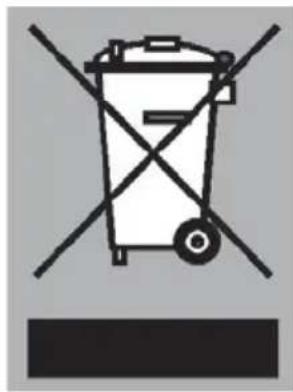
Symbol of a trash bin with crossed lines indicating no waste or discharge (no text or labels)The product bears the symbol of a crossed out waste bin to draw attention to the obligation regarding separate processing of electrical household appliances. This means that the appliance cannot be added to your normal household waste at the end of its lifecycle. The appliance must be taken to a special municipal waste collection centre, or to a sales outlet that offers this service.
Separate processing of household appliances prevents the potentially negative consequences for the environment and health that can arise as a result of inadequate processing. It ensures that the materials which the appliance is composed of can be reclaimed, allowing for considerable savings to be made in terms of energy and materials.

Note! The packaging material may be hazardous for children.