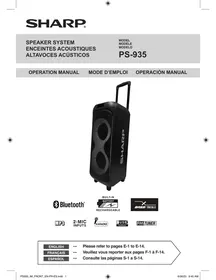
PS-935 - Audio System SHARP - Free user manual and instructions
Find the device manual for free PS-935 SHARP in PDF.


| Product type | Bluetooth Speaker System |
| Brand | Sharp |
| Model | PS-935 |
| Wireless technology | Bluetooth 2.4 - 2.48 GHz |
| Power supply | AC/DC power adapter (included) |
| Battery type | Built-in rechargeable lithium-ion battery |
| Operating temperature range | 5°C to 40°C |
| Humidity | Do not expose to humidity or rain |
| Maintenance | Clean with a soft, dry cloth; do not use chemicals |
| Safety | Do not open the enclosure; disconnect before maintenance; use only the supplied adapter |
| Spare parts and repairability | No user-serviceable parts; contact a Sharp authorized service center |
| Warranty (USA / Canada) | 1 year parts and labor |
| Certifications | FCC Part 15, ICES-003, Bluetooth SIG |
| Manufacturer | Sharp North Malaysia Sdn. Bhd. |
| Distributor (USA) | Mizari Enterprises, Inc., Los Angeles, CA |
| Distributor (Canada) | Mizari Enterprises, Inc., Newmarket, ON |
Frequently Asked Questions - PS-935 SHARP
User questions about PS-935 SHARP
0 question about this device. Answer the ones you know or ask your own.
Ask a new question about this device
Download the instructions for your Audio System in PDF format for free! Find your manual PS-935 - SHARP and take your electronic device back in hand. On this page are published all the documents necessary for the use of your device. PS-935 by SHARP.
USER MANUAL PS-935 SHARP
--- Please refer to pages E-1 to E-14.
FRANÇAIS
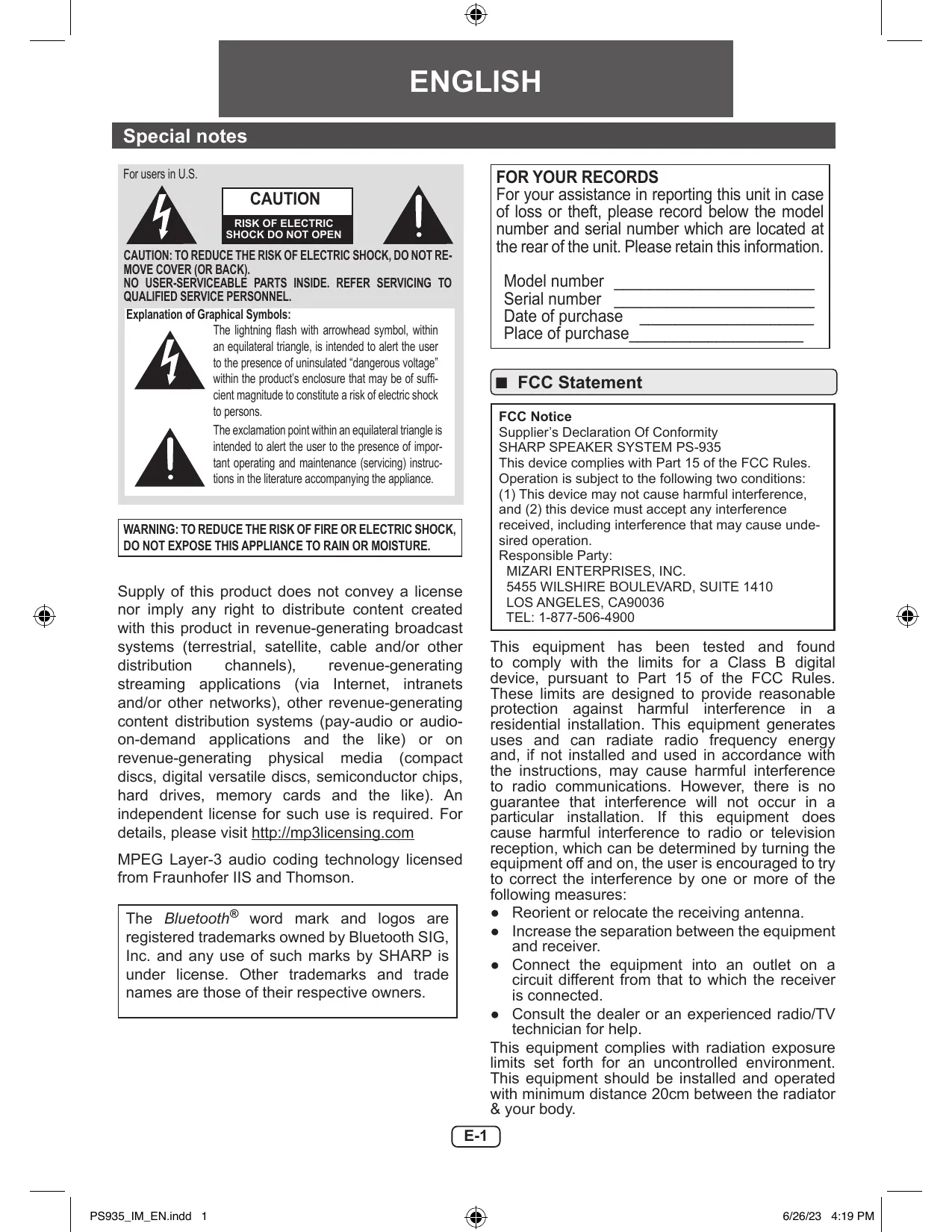
Explanation of Graphical Symbols:

The lightning flash with arrowhead symbol, within an equilateral triangle, is intended to alert the user to the presence of uninsulated "dangerous voltage" within the product's enclosure that may be of sufficient magnitude to constitute a risk of electric shock to persons.

The exclamation point within an equilateral triangle is intended to alert the user to the presence of important operating and maintenance (servicing) instructions in the literature accompanying the appliance.
WARNING: TO REDUCE THE RISK OF FIRE OR ELECTRIC SHOCK, DO NOT EXPOSE THIS APPLIANCE TO RAIN OR MOISTURE.
Supply of this product does not convey a license nor imply any right to distribute content created with this product in revenue-generating broadcast systems (terrestrial, satellite, cable and/or other distribution channels), revenue-generating streaming applications (via Internet, intranets and/or other networks), other revenue-generating content distribution systems (pay-audio or audio-on-demand applications and the like) or on revenue-generating physical media (compact discs, digital versatile discs, semiconductor chips, hard drives, memory cards and the like). An independent license for such use is required. For details, please visit http://mp3licensing.com
MPEG Layer-3 audio coding technology licensed from Fraunhofer IIS and Thomson.
The Bluetooth® word mark and logos are registered trademarks owned by Bluetooth SIG, Inc. and any use of such marks by SHARP is under license. Other trademarks and trade names are those of their respective owners.
FOR YOUR RECORDS
For your assistance in reporting this unit in case of loss or theft, please record below the model number and serial number which are located at the rear of the unit. Please retain this information.
Model number
Serial number
Date of purchase
Place of purchase
FCC Statement
FCC Notice
Supplier's Declaration Of Conformity SHARP SPEAKER SYSTEM PS-935
This device complies with Part 15 of the FCC Rules.
Operation is subject to the following two conditions
(1) This device may not cause harmful interference, and (2) this device must accept any interference received, including interference that may cause undesired operation.
Responsible Party:
MIZARI ENTERPRISES, INC.
5455 WILSHIRE BOUTEVARD, SUITE 1410
LOS ANGELES, CA90036
TEL: 1-877-506-4900
This equipment has been tested and found to comply with the limits for a Class B digital device, pursuant to Part 15 of the FCC Rules. These limits are designed to provide reasonable protection against harmful interference in a residential installation. This equipment generates uses and can radiate radio frequency energy and, if not installed and used in accordance with the instructions, may cause harmful interference to radio communications. However, there is no guarantee that interference will not occur in a particular installation. If this equipment does cause harmful interference to radio or television reception, which can be determined by turning the equipment off and on, the user is encouraged to try to correct the interference by one or more of the following measures:
- Reorient or relocate the receiving antenna.
- Increase the separation between the equipment and receiver.
- Connect the equipment into an outlet on a circuit different from that to which the receiver is connected.
- Consult the dealer or an experienced radio/TV technician for help.
This equipment complies with radiation exposure limits set forth for an uncontrolled environment. This equipment should be installed and operated with minimum distance 20cm between the radiator & your body.
Special notes (continued)
Warning: Changes or modifications to this unit not expressly approved by the party responsible for compliance could void the user's authority to operate the equipment.
FCC Radiation Exposure Statement
This device complies with the limits for a Class B digital device, pursuant to Part 15 of the FCC Rules.
It must not be co-located or operating in conjunction with any other antenna or transmitter.
Operation is subject to the following two conditions:
- This device may not cause harmful interference, and
- This device must accept any interference received, including interference that may cause undesired operation.
To maintain compliance with the FCC's RF exposure guidelines, place the product at least 20cm from nearby persons.
IC Radiation Exposure Statement (For Users In Canada)
This Class B digital apparatus complies with the Canadian ICES-003.
This device contains license-exempt transmitter(s)/ receiver(s) that comply with Innovation, Science and Economic Development Canada's license-exempt RSS(s).
Operation is subject to the following two conditions:
- This device may not cause interference, and
- This device must accept any interference, including interference that may cause undesired operation.
To maintain compliance with the RF exposure guidelines, place the product at least 20 cm from nearby persons.
IC Statement
This device contains license-exempt transmitter(s)/receiver(s) that comply with Innovation, Science and Economic Development Canada's license-exempt RSS(s). Operation is subject to the following two conditions:
- This device may not cause interference.
- This device must accept any interference, including interference that may cause undesired operation of the device.
To maintain compliance with the RF exposure guidelines, place the product at least 20cm from nearby persons.
The term "IC:" before the certifications/registration number only signifies that the Industry Canada technical specifications.
Warnings:
Use only power supply listed in the user manual.
- When the ON/OFF switch is set at OFF position, mains voltage is still present inside the unit.
- This unit contains no user serviceable parts. Never remove covers unless qualified to do so. This unit contains dangerous voltages, always remove mains plug from the socket before any service operation and when not in use for a long period.
■ Maintenance
- Unplug the AC/DC adaptor from the power source before cleaning the appliance.
- Use a soft and clean rag to clean the outside of the unit. Never clean it with chemicals or detergent.
Power adapter
- To disconnect the unit from the mains supply, unplug the AC/DC adaptor from the mains socket.
- Only use the supplied AC/DC adaptor as failure to do this may result in a safety risk and/or damage to the unit.
Important Safety Instructions
Electricity is used to perform many useful functions, but it can also cause personal injuries and property damage if improperly handled. This product has been engineered and manufactured with the highest priority on safety. However, improper use can result in electric shock and/or fire. In order to prevent potential danger, please observe the following instructions when installing, operating and cleaning the product. To ensure your safety and prolong the service life of this product, please read the following precautions carefully before use.
Additional Safety Information
1) Read these instructions.
2) Keep these instructions.
3) Heed all warnings.
4) Follow all instructions.
5) Do not use this apparatus near water.
6) Clean only with dry cloth.
7) Do not block any ventilation openings. Install in accordance with the manufacturer's instructions.
8) Do not install near any heat sources such as radiators, heat registers, stoves, or other apparatus (including amplifiers) that produce heat.
9) Do not defeat the safety purpose of the polarized or grounding-type plug. A polarized plug has two blades with one wider than the other. A grounding type plug has two blades and a third grounding prong. The wide blade or the third prong are provided for your safety. If the provided plug does not fit into your outlet, consult an electrician for replacement of the obsolete outlet.
10) Protect the power cord from being walked on or pinched particularly at plugs, convenience receptacles, and the point where they exit from the apparatus.
11) Only use attachments/accessories specified by the manufacturer.
12) Use only with the cart, stand, tripod, bracket, or table specified by the manufacturer, or sold with the apparatus. When a cart is used, use caution when moving the cart/apparatus combination to avoid injury from tip-over.
13) Unplug this apparatus during lightning storms or when unused for long periods of time.
14) Refer all servicing to qualified service personnel. Servicing is required when the apparatus has been damaged in any way, such as power-supply cord or plug is damaged, liquid has been spilled or objects have fallen into the apparatus, the apparatus has been exposed to rain or moisture, does not operate normally, or has been dropped.
15) Power Sources - This product should be operated only from the type of power source indicated on the marking label. If you are not sure of the type of power supply to your home, consult your product dealer or local power company. For product intended to operate from battery power, or other sources, refer to the operating instructions.
16) Overloading - Do not overload wall outlets, extension cords, or integral convenience receptacles as this can result in a risk of fire or electric shock.
17) Object and Liquid Entry - Never push objects of any kind into this product through openings as they may touch dangerous voltage points or short-out parts that could result in a fire or electric shock.
To prevent fire or shock hazard, do not expose this appliance to dripping or splashing. No objects filled with liquids, such as vases, shall be placed on the apparatus.
18) Damage Requiring Service - Unplug this product from the wall outlet and refer servicing to qualified service personnel under the following conditions:
a. When the AC cord or plug is damaged,
b. If liquid has been spilled, or objects have fallen into the product,
c. If the product has been exposed to rain or water,
d. If the product does not operate normally by following the operating instructions. Adjust only those controls that are covered by the operating instructions as an improper adjustment of other controls may result in damage and will often require extensive work by a qualified technician to restore the product to its normal operation,
e. If the product has been dropped or damaged in any way, and
f. When the product exhibits a distinct change in performance - this indicates a need for service.
19) Replacement Parts - When replacement parts are required, be sure the service technician has used replacement parts specified by the manufacturer or have the same characteristics as the original part. Unauthorized substitutions may result in fire, electric shock, or other hazards.
20) Safety Check - Upon completion of any service or repairs to this product, ask the service technician to perform safety checks to determine that the product is in proper operating condition.
21) Wall or ceiling mounting - When mounting the product on a wall or ceiling, be sure to install the product according to the method recommended by the manufacturer.
22) Power Lines - An outside antenna system should not be located in the vicinity of overhead power lines or other electric light or power circuits, or where it can fall into such power lines or circuits. When installing an outside antenna system, extreme care should be taken to keep from touching such power lines or circuits as contact with them might be fatal.
23) Protective Attachment Plug - The product is equipped with an attachment plug having overload protection. This is a safety feature. See Instruction Manual for replacement or resetting of protective device. If replacement of the plug is required, be sure the service technician has used a replacement plug specified by the manufacturer that has the same overload protection as the original plug.
24) Stand - Do not place the product on an unstable cart, stand, tripod or table. Placing the product on an unstable base can cause the product to fall, resulting in serious personal injuries as well as damage to the product. Use only a cart, stand, tripod, bracket or table recommended by the manufacturer or sold with the product. When mounting the product on a wall, be sure to follow the manufacturer's instructions. Use only the mounting hardware recommended by the manufacturer.
Statement
Radio frequency exposure
Speaker System PS-935 is a radio transmitter and receiver. When in operation it communicates with a Bluetooth® equipped mobile device by receiving and transmitting radio frequency (RF) electromagnetic fields (microwaves) in the frequency range 2.4 to 2.48 GHz. This product is designed to operate in compliance with the RF exposure guidelines and limits set by national authorities and international health agencies when using compatible mobile phone.
Battery information
- A rechargeable battery has a long service life if treated properly.
- A new battery or one that has not been used for a long period of time could have reduced capacity the first few times it is used. Do not expose the battery to extreme temperatures, never above 104^ (40^) or below 41^ (5^) .
- For maximum battery capacity, use the battery at room temperature.
- If the battery is used in low temperatures, the battery capacity will be reduced. The battery can only be charged in temperatures between 41^ (5^) and 104^ (40^) .
- RISK OF EXPLOSION IF BATTERY IS REPLACED BY AN INCORRECT TYPE.
DISPOSE OF USED BATTERIES ACCORDING TO THE INSTRUCTIONS.
Removal of waste batteries and accumulators (Product with embedded battery ONLY).
- In case this product contains a battery incorporated within the product which cannot be readily removed by end users, SHARP recommends that only qualified professionals remove the battery, either for replacement or for recycling at the end of this product's working life. To prevent damage to the product, and for their own safety, users should not attempt to remove the battery and should contact authorized independent service providers for advice or call 1-877-506-4900.
CAUTION:
Internal Lithium battery in the unit should not be replaced by end users due to danger of explosion if battery is incorrectly replaced and must be replaced with the exact type battery by authorized service providers.
Recycling lithium-ion batteries
Lithium- ion batteries are recyclable. You can help preserve our environment by returning your used rechargeable batteries to the collection and recycling location nearest you.
For more information regarding recycling of rechargeable batteries, call toll free
1-800-822-8837, or visit http://www.call2recycle.org/ CAUTION: Do not handle damaged or leaking Lithium-Ion batteries.
The RBRC^TM Battery Recycling Seal on the Lithium-ion (Li-ion) batteries/battery packs indicates SHARP is voluntarily participating in an industry program to collect and recycle these batteries/battery packs at the end of their useful life, when taken out of service in the United States or Canada. The RBRC^TM program provides a convenient alternative to placing Li-ion batteries into the trash or municipal waste stream, which is illegal in some areas. Please call1-800-822-8837 for information on Li-ion battery recycling in your area. SHARP's involvement in this program is part our commitment to preserving our environment and conserving our natural resources.
(RBRC™ is a trademark of the Rechargeable Battery Recycling Corporation.)
Precautions
General
- Please ensure that the equipment is positioned in a well ventilated area and ensure that there is a free space along the sides, top and back of the equipment as below.
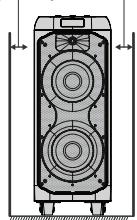
2^ (5cm) 2" (5 cm)
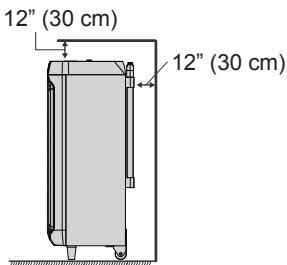
- Use the unit on a firm, level surface free from vibration.
- Keep the unit away from direct sunlight, strong magnetic fields, excessive dust, humidity and electronic/electrical equipment (home computers, facsimiles, etc.) which generate electrical noise.
- Do not place anything on top of the unit.
- Do not expose the unit to moisture, to temperatures higher than 104^ ( 40^ ) or to extremely low temperatures.
- If the unit does not work properly, switch off the unit and then switch it on again.
- In case of an electrical storm, unplug the unit for safety.
- Hold the AC/DC adaptor by the head when removing it from the wall socket, as pulling the lead can damage internal wires.
- The AC/DC adaptor is used as a disconnect device and shall always remain readily operable.
- Do not remove the outer cover, as this may result in electric shock. Refer internal service to your local SHARP service facility.
- The ventilation should not be impeded by covering the ventilation openings with items, such as newspapers, tablecloths, curtains, etc.
- No naked flame sources, such as lighted candles, should be placed on the apparatus.
- Attention should be drawn to the environmental aspects of battery disposal.
- Always follow basic safety precautions when using this appliance, especially when children are present.
- Children should be supervised to ensure that they do not play with the appliance.
- Do not disconnect or connect the power cord with wet hands. It may cause an electric shock.
- Ensure the product and its parts is not overhanging the edge of the supporting furniture.
- Do not install near any heat sources such as radiators, heat registers, stoves or other apparatus (including amplifiers) that produce heat.
- Don't mount this product on a wall or ceiling.
- Do not place the unit near TVs, speakers and other objects that generate magnetic fields.
-
Do not leave the unit unattended when it is in use.
-
Storms are dangerous for all electric appliances. If the mains or aerial wiring is struck by lightning, the appliance might get damaged, even if it is turned off. You should disconnect all the cables and connectors of the appliance before a storm.
- This unit should only be used within the range of 41^ - 104^ ( 5^ - 40^ ).
- To reduce the risk of fire or electric shock, do not expose this appliance to rain or moisture.
- SHARP are not responsible for damage due to improper use. Refer all servicing to a SHARP authorized service center.
Warning:
- The supplied AC/DC adaptor contains no user serviceable parts. Never remove covers unless qualified to do so. It contains dangerous voltages, always remove mains plug from the main outlet socket before any service operation or when not in use for a long period.
- The AC/DC adaptor supplied with the PS-935 must not be used with other equipment.
- Never use an AC/DC adaptor other than the one specified. Otherwise, problem or serious hazards may be created.
- The voltage used must be the same as that specified on this unit. Using a higher voltage is dangerous and may result in a fire or other type of accident causing damage. SHARP will not be held responsible for any damage resulting from such usage.
Volume control
The sound level at a given volume setting depends on speaker efficiency, location and various other factors. It is advisable to avoid exposure to high volume levels, which occurs while turning the unit on with the volume control setting up high, or while continually listening at high volumes.
CAUTION:
- Risk of explosion if the battery is replaced by an incorrect type
- High or low extreme temperatures that a battery can be subjected to during use, storage or transportation; and low air pressure at high altitude.
- Replacement of a battery with an incorrect type that can defeat a safeguard (for example, in the case of some lithium battery types);
- Disposal of a battery into fire or a hot oven, or mechanically crushing or cutting of a battery, that can result in an explosion;
- Leaving a battery in an extremely high temperature surrounding environment that can result in an explosion or the leakage of flammable liquid or gas;
- A battery subjected to extremely low air pressure that may result in an explosion or the leakage of flammable liquid or gas.
- Batteries (battery pack or batteries installed) shall not be exposed to excessive heat such as sunshine, file or the like.
CONSUMER LIMITED WARRANTY (Valid in the U.S. Only)
MIZARI ENTERPRISES, INC. warrants to the first consumer purchaser that this Sharp brand product (the "Product"), when shipped in its original container, will be free from defective workmanship and materials, and agrees that it will, at its option, either repair the defect or replace the defective Product or part thereof with a new or remanufactured equivalent at no charge to the purchaser for parts or labor for the period(s) set forth below.
This warranty does not apply to any appearance items of the Product nor to the additional excluded item(s) set forth below nor to any Product the exterior of which has been damaged or defaced, which has been subjected to improper voltage or other misuse, abnormal service or handling, or which has been altered or modified in design or construction. In order to enforce the rights under this limited warranty, the purchaser should follow the steps set forth below and provide proof of purchase to the servicer.
The limited warranty described herein is in addition to whatever implied warranties may be granted to purchasers by law. ALL IMPLIED WARRANTY INCLUDES THE WARRANTYES OF MERCHANTABILITY AND FITNESS FOR USE ARE LIMITED TO THE PERIOD(S) FROM THE DATE OF PURCHASE SET FORTH BELOW. Some states do not allow limitations on how long an implied warranty lasts, so the above limitation may not apply to you.
Neither the sales personnel of the seller nor any other person is authorized to make any warranties other than those described herein, or to extend the duration of any warranties beyond the time period described herein on behalf of MIZARI.
The warranties described herein shall be the sole and exclusive warranties granted by MIZARI and shall be the sole and exclusive remedy available to the purchaser. Correction of defects, in the manner and for the period of time described herein, shall constitute complete fulfillment of all liabilities and responsibilities of MIZARI to the purchaser with respect to the Product, and shall constitute full satisfaction of all claims, whether based on contract, negligence, strict liability or otherwise.
In no event shall MIZARI be liable, or in any way responsible, for any damages or defects in the Product which were caused by repairs or attempted repairs performed by anyone other than an authorized servicer. Nor shall MIZARI be liable or in any way responsible for any incidental or consequential economic or property damage. Some states do not allow the exclusion of incidental or consequential damages, so the above exclusion may not apply to you.
THIS LIMITED WARRANTY IS VALID ONLY IN THE FIFTY (50) UNITED STATES, THE DISTRICT OF COLUMBIA AND PUERTO RICO.
Model Specific Section
Your Product Model Number & Description:
PS-935
SPEAKER SYSTEM
Warranty Period for this Product: Additional Item(s) Excluded from Warranty Coverage (if any):
(Be sure to have this information available when you need service for your Product.)
One (1) year parts and labor from the date of purchase. Accessories, supplies, and consumable items.
What to do to Obtain Service:
Call Sharp toll free at 1-877-506-4900
TO OBTAIN SUPPLY, ACCESSORY OR PRODUCT INFORMATION, CALL 1-877-506-4900
SHARP is a registered trademarks of SHARP CORPORATION; used under license by SHARP Corporation
MARKETED BY: MIZARI ENTERPRISES, INC.
5455 WILSHIRE BOCULEVARD, SUITE 1410,
LOS ANGELES, CA 90036
Manufacturer address:
SHARP NORTH MALAYSIA SDN. BHD.
LOT 202, BAKAR ARANG INDUSTRIAL ESTATE,
08000 SUNGAI PETANI, KEDAH, WEST MALAYSIA.
CONSUMER LIMITED WARRANTY (Valid in Canada Only)
MIZARI ENTERPRISES, INC. warrants to the first purchaser for this Sharp brand product ("Product"), when shipped in its original container and sold or distributed in Canada by MIZARI or by an authorized MIZARI dealer, and Product was not sold "as is" or "sales final" that the Product will during the applicable warranty period, be free from defects in material and workmanship, and will within the applicable warranty period, either repair the defective Product or provide the first purchaser a replacement of the defective Product.
Conditions: This limited warranty shall not apply to:
(a) Any cosmetic damage to the Product surface or exterior that has been defaced or caused by normal wear and tear.
(b) Any defects caused or repairs required as a result of damage caused by any external or environmental conditions, including but not limited to, transmission line/power line voltage or liquid spillage or acts of God.
(c) Warranty claims for Products returned with illegible or without appropriate model, serial number and CSA/cUL markings.
(d) Any Products used for rental or commercial purposes.
(e) Any installation, delivery, setup and/or programming charges.
(f) Any defects caused or repairs required as a result of abusive operation, negligence, accident, improper installation or inappropriate use as outlined in the owner's manual or other applicable Product documentation.
(g) Any defects caused or repairs required as a result of any Product that has been tampered with, modified, adjusted or repaired by any person other than MIZARI, a Sharp authorized service center or a MIZARI authorized servicing dealer.
(h) Any defects caused or repairs required as a result of the use of the Product with items not specified or approved by MIZARI, including but not limited to, head cleaning tapes and chemical cleaning agents.
(1) Any replacement of accessories, glassware, consumable or peripheral items required through normal use of the Product, including but not limited to, earphones, remote controls, AC adapters, batteries, temperature probe, trays, filters, belts, ribbons, cables and paper.
How to get service: Warranty service information may be obtained calling 905-568-7140. No other person (including any MIZARI dealer or service centre) is authorized to extend, enlarge or transfer this warranty on behalf of MIZARI. The purchaser will be responsible for any and all removal, reinstallation, transportation and insurance costs incurred.
The express warranties in this limited warranty are, except for consumer purchasers domiciled in Quebec, in lieu of and, except to the extent prohibited by applicable law, MIZARI disclaims all other warranties and conditions, express or implied, whether arising by law, statute, by course of dealing or usage of non-infringement.
Limitations: (not applicable to consumer purchasers domiciled in Quebec to the extent prohibited under Quebec law): (a) MIZARI shall not be liable for any incidental, special, consequential, economic, exemplary or indirect damages of any kind or nature (including lost profits or damages for loss of time or loss of use or loss of data) arising from or in any connection with the use or performance of a Product or a failure of a Product, even if MIZARI is aware of or has been advised of the possibility of such damages; (b) the remedies described in this limited warranty constitute complete fulfillment of all obligations and responsibilities of MIZARI to the purchaser with respect to the Product and shall constitute full satisfaction of all claims, whether based on contract, negligence, strict liability or otherwise. Some provinces may not allow the exclusion or limitation of certain damages, or limits on the duration or voiding of implied warranties or conditions; in such provinces, the exclusions and limits herein may not apply. This limited warranty is, except for consumer purchasers domiciled in Quebec, governed by the laws of the Province in Canada in which the purchaser has purchased the Product. For consumer purchasers domiciled in Quebec this limited warranty is governed by the laws of Quebec.
WARRANTY PERIODS (calculated from the date of original purchase): Parts & Labour (exceeds noted)
Audio Product 1 year
To obtain the name and address of the nearest Authorized Mizari Service Center or Dealer, or for more information on this Limited Warranty, Mizari Extended Warranty Offers, Products or Accessory Sales, please contact Sharp:
- By calling Sharp Electronics Of Canada Ltd. at 905-568-7140
THIS LIMITED WARRANTY IS VALID ONLY IN CANADA
SHARP is a registered trademarks of SHARP CORPORATION; used under license by SHARP Corporation
TO OBTAIN SUPPLY, ACCESSORY OF PRODUCT INFORMATION, CALL 905-568-7140
MARKETED BY: MIZARI ENTERPRISES, INC.
1274 RINGWELL DRIVE, UNIT #2
NEWMARKET, ON L3Y 9C7
CANADA
Manufacturer address:
SHARP NORTH MALAYSIA SDN. BHD.
LOT 202, BAKAR ARANG INDUSTRIAL ESTATE
08000 SUNGAI PETANI, KEDAH, WEST MALAYSIA.
Introduction
Thank you for purchasing this SHARP product. To obtain the best performance from this product, please read this manual carefully. It will guide you in operating your SHARP product.
Accessories
The following accessories are included.
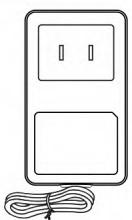
AC Adaptor x 1
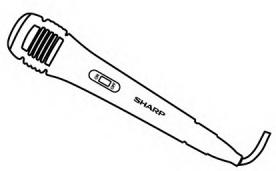
Microphone x 1 92LTHEPAPE002A
Contents
Page
Page
Special notes
General 1
FCC Statement. 1
IC Statement. 2
Maintenance 2
Power adapter. 2
Important Safety Instructions 3
Statements
Radio frequency exposure 4
Battery information 4
Precaution
General 5
Volume control 5
Warranty
Limited Warranty for the U.S. 6
Limited Warranty for Canada. 7
Introduction
Accessories 8
Contents 8
Controls and indicators
Top view. 9
Front and rear view 9
System connections
AC/DC connection 10
General control
To turn the power on or off 11
Input/Standby mode 11
Volume control 11
Microphone volume control 11
Bass and Treble control. 11
Microphone ECHO control 11
Microphone priority mode 11
Flashing light 11
Tuner operation
Tuning to a station 12
Auto preset memory /scan. 12
To tune a preset station 12
USB operation 12
Repeat play 12
Random play 12
Advanced function
Bluetooth operation 13
AUX IN operation. 13
MIC operation. 13
Troubleshooting chart
General. 13
Bluetooth 13
USB 13
Condensation 14
If problem occurs during operation 14
Reset to factory default. 14
Maintenance
Cleaning the cabinet. 14
Specifications
General 14
Bluetooth 14
USB 14
Top view
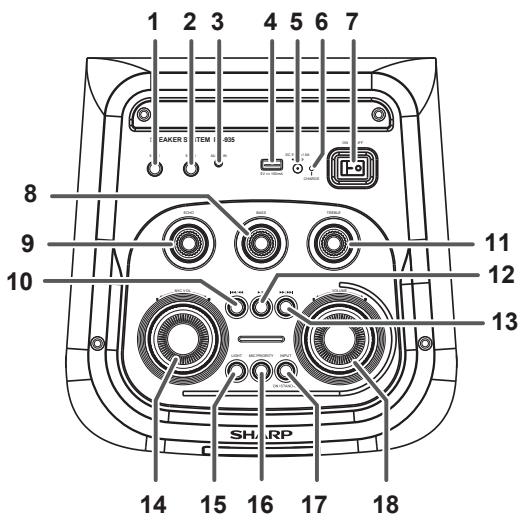
- 6.3mm MIC 1 Terminal
- 6.3mm MIC 2 Terminal
- 3.5mm AUDIO IN Terminal
- USB Terminal
- DC In Power Terminal
- CHARGE Indicator
- Power ON/OFF Switch
- BASS Control Knob
- Microphone ECHO Control Knob
- Previous/Skip/Tune Down Button
- TREBLE Control Knob
- Play/Pause/Auto Scan/Preset Station Button
- Next/Skip/Tune Up Button
- Microphone Volume Control Knob
- LIGHT Button
- MIC PRIORITY Button
- INPUT/STAND-BY Button
- VOLUME Control Knob
Front and rear view
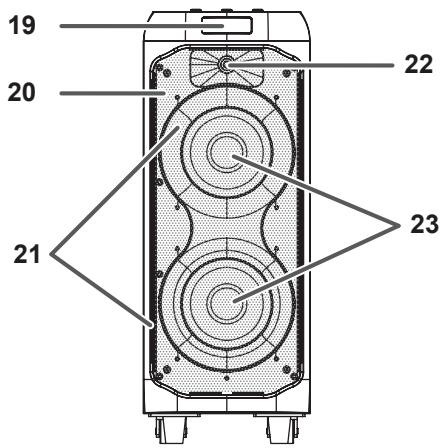
- LCD Display
- Speaker Grills
- Flashing Light
- Tweeter
- Speakers
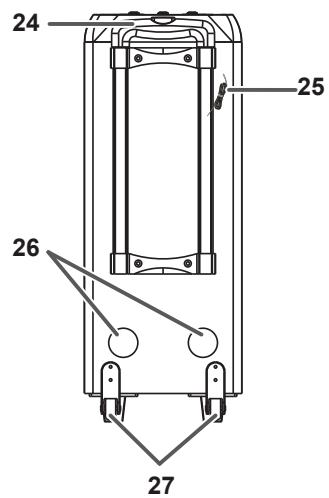
- Handle
- FM Aerial
- Duct port
- Wheels
System connections
AC/DC connection
① Plug the AC/DC adaptor cable into the DC IN socket on the rear of the unit.
② Plug the AC/DC adaptor into a wall socket.
Notes:
- Unplug the AC/DC adaptor from the wall socket if the system will not be used for a prolonged period of time.
- Use only the supplied AC/DC adaptor. Using other AC/DC adaptor may cause an electric shock or fire.
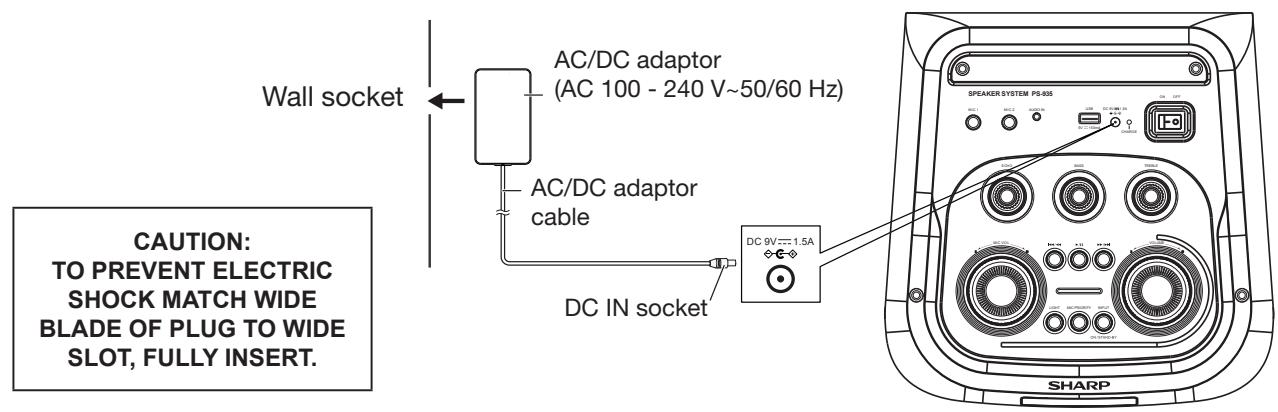

Before using this unit, it is recommended that the internal lithium-ion battery is fully charged. When fully charged, remove the AC/DC power adaptor from the AC socket. When the battery charge is low, the charge light will flash red.
Under Charging : LED indicator – Solid Red
Finish Charging : LED indicator - OFF
Low Battery level : LED indicator – flash
WARNING:
Do not attempt to change or replace the battery. This can only be carried out by a qualified technician.
General control
To turn the power on or off
Press the power ON/OFF switch to turn the unit on/off.
Note:
In USB / Bluetooth / AUDIO IN mode, when the unit is not receiving any signal for around 15 minutes, it will automatically switch into standby mode. Press the INPUT / STAND-BY button to turn on the unit again.
Please note that low volume setting in the audio source may be recognized as "no audio signal".
This will affect the capability of signal detection from the device and can also originate an automatic switch into standby mode. If this happens please reactivate the audio signal transmission or increase the volume setting on the audio source player in order to resume playback.
■ Input / Standby mode
To change the function modes, press the INPUT/STAND-BY button repeatedly.

Volume control
Rotate the VOLUME +/- knob on the unit to increase or decrease the music volume.
Microphone volume control
Rotate the MIC VOL.+/- knob on the unit to increase or decrease the microphone volume.
Bass and Treble level control
Rotate the BASS or TREBLE knob on the unit to increase or decrease the bass or treble effect.
Microphone ECHO control
Rotate the ECHO knob on the unit to increase or decrease the microphone echo level.
Microphone Priority mode
Press the button to enable the Microphone priority ON, the music would turn lower when voice is detected at the microphone.
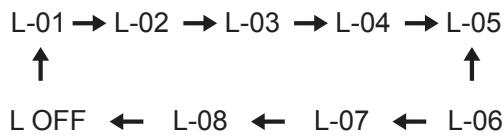
Flashing light
There are 8 modes for the DISCO LED lighting. Press the LIGHT button to choose the light modes
Tuner operation
Listen to FM radio broadcasts. Press the INPUT/STAND-BY button repeatedly on the unit until the display appears FM radio frequency.
Note:
Extend the wired aerial to its full length in order to get the best reception.
Tuning to a station
Tune to a station by pressing the / or / button repeatedly. Press and hold to search continuously. The station frequency is shown on the display.
Auto preset memory/scan
To scan for stations within reception range and save them to preset memory automatically, press /II and hold the button.
After the unit is finished scanning, the unit will automatically tune to preset number 1 (CH01). This unit can save up to 30 FM stations.
To tune to a preset station
To tune to the next preset station, press the / button.
USB operation
The unit will automatically switch to USB mode when the USB flash drive is plugged in. This unit provides one USB terminal for music playback.
- Press the INPUT / STAND-BY button repeatedly on the unit to select USB mode.
- Plug the USB flash drive into the USB PLAYBACK terminal on top of the unit. Playback will start automatically from Track 1.
- To pause playback, press the button on the unit.
- To resume playback, press the /II button again.
- To select a desired track, press the 144 / 144 or 144 / 144 button respectively during playing until the desired track appears on the display. The unit will start playing automatically.
- To fast forward or fast reverse during playback, press and hold the / or / button to scan the current playing track at high speed then release the button for normal playback mode.
Important:
The USB PLAYBACK terminal is intended for data transfer only, other devices cannot be used with this USB connection. The use of USB extension cords is not recommended. Do not unplug the USB from the unit when playing or reading the USB device.
Repeat play
You can play one track or all tracks on the USB repeatedly.
To repeat a single track
During playback, press and hold the / button repeatedly until "ONE" is displayed. The current track will be played over and over again.
To repeat all the tracks
During playback, press and hold the / button repeatedly until "RLL" is displayed. All tracks on the USB will be played over and over again.
To repeat the folder (only for USB which contains more than one folder)
During playback, press and hold the / button repeatedly until "FOLD" is displayed. The current folder will be repeated over and over again.
Random play
During playback, press and hold the / button repeatedly until "r-rr" is displayed. The random play will start from next track automatically.
Advanced functions
Bluetooth operation
- Press the INPUT / STAND-BY button on the unit to switch to the BLUETOOTH function. “blc” will be blinking on the display.
- Turn on the Bluetooth function on the source device, scan the unit "PS-935 SHARP" and connect, then input the password 0000 if required. The display will stop blinking once the connection is made.
- Rotate the VOLUME knob on the unit or adjust the volume on the source device to increase or decrease the music volume to your desired level.
- To skip up or down a track, press the 1 / or / button.
- To pause playback, press the button. Press again to resume playback.
- To disconnect Bluetooth, press and hold the / button until "disconnected" voice prompt is heard.
Note:
Bluetooth works best within 32 feet (10 meters) in open air.
■ AUDIO IN (Auxiliary input) operation
- Press the INPUT/STAND-BY button repeatedly until "RUN" is displayed.
- Connect your audio device to the AUDIO IN terminal on the top panel of the unit with an audio cable (audio cable is not included).
- Rotate the VOLUME knob on the unit or adjust the volume on the external device to increase or decrease the music volume to your desired level.
- Control the playback with your audio device.
MIC operation
Microphone input is available in all modes.
- Connect your microphone to the 6.3mm MIC terminal located on the top panel of the unit.
- Rotate the MIC VOL +/- knob on the unit to increase or decrease the microphone volume.
- Rotate the ECHO knob to turn on or off the echo effect of the microphone.
Troubleshooting chart
General
| Symptom | Possible cause |
| • No sound is heard. | • The input signal (selection) is not set properly. • The volume level is set to “00”. • Muting is activated at external device. |
| • Noise is heard during playback. | • Move the speaker away from any computers or mobile phones. |
| • The power is not turned on. | • The unit has not enough battery power. • The protection circuit may be activated. Switch off and on the unit again. • Battery is completely depleted. Recharge the battery. |
Bluetooth
| Symptom | Possible cause |
| • No sound is heard. | • The unit is too far from the Bluetooth audio source device. • The unit is not paired with the Bluetooth audio source device |
| • Bluetooth sound is interrupted or distorted. | • The unit is too near to a device that generates electromagnetic radiation. • There is an obstacle between the unit and the Bluetooth audio source device. |
USB
| Symptom | Possible cause |
| • Device cannot be detected. • Playback does not start. | • There is no MP3 file inside the device. • The device is not properly connected. • It is an MTP device. • The device contains AAC file only. • A false MP3 file is being played back. |
| • Wrong time display. | • A Variable Bitrate files are being played back. |
Troubleshooting chart (continued)
Condensation
Sudden temperature changes, storage or operation in an extremely humid environment may cause condensation inside the cabinet. Condensation can cause the unit to malfunction. If this happens, leave the product under room temperature for about 1 hour. Wipe off any condensation on the product with a soft cloth before operating the unit.
If problem occurs during operation
When this product is subject to strong external interference (mechanical shock, excessive static electricity, abnormal supply voltage due to lightning, etc.) or if it is operated incorrectly, it may malfunction.
If such a problem occurs, do the following:
- Switch off and on the unit again.
- If the unit is not restored in the previous operation, do the reset operation.
Reset to factory default
Press and hold the LIGHT button for more than 10 seconds until display shows 'Uxxx'. The unit will return to Bluetooth function (default) when the reset is completed.
Maintenance
- Cleaning the cabinet
Periodically wipe the cabinet with a soft cloth.
Caution:
- Do not use chemicals for cleaning (petrol, paint thinner, etc.). It may damage the cabinet finish.
- Do not apply oil to the inside of each component. It may cause malfunctions.
Specification
As part of our policy of continuous improvement, SHARP reserves the right to make design and specification changes for product improvement without prior notice. The performance specification figures indicated are nominal values of production units. There may be some deviations from these values in individual unit.
General
| Power source | DC IN 9 V = 1.5 A: AC/DC adaptor (AC 100-240 V~ 50/60 Hz) |
| DC 7.4 V, 5 Ah Rechargeable Battery | |
| Power consumption | Power on: 15 W |
| Dimensions | Width: 10 5/8 in (270 mm) Height: 27 1/2 in (698 mm) Depth: 12 in (305 mm) |
| Weight | 18.73 lb (8.5kg) |
| Output power | RMS: Total 50W (25W + 25W) (10% T.H.D.) |
| Type | 2-Way Speaker system 6 1/2 in (16.5 cm) Woofer 1.5 in (3.8 cm) Tweeter |
| Music playback time | (*1) Approx. 4.5 hours |
| Battery charging time | (*1) Approx. 4.5 hours |
(^*1) The time may vary depending on the ambient temperature and the conditions used.
Bluetooth
| Frequency bands | 2402 MHz ~ 2480 MHz |
| Compatible Bluetooth Profile | A2DP (Advanced Audio Distribution Profile), Bluetooth 5.0 |
USB
| MP3 Bitrate | 32 ~ 320kbps |
| File system support | Supports USB devices with FAT 16/FAT 32 up to 32GB |
FRANÇAIS
Notes particulières
RISQUE D'LECTROCU-TION. NE PAS OUVR.

ATTENTION : AFIN D'ÉVITER LES RISQUES D'ÉLECTROCUTION, NE PAS RETIRER LE CAPOT (OU L'ARRÊIRE). L'APPAREIL NE CONTIENT AUCUNE PIECE QUE L'UTILISATEUR PUISSE REMPLACER. CONFIER TOUTE RÉPARATION À UN PERSONNEL QUALIFIÉ
- FOR YOUR RECORDS
- FCC Statement
- FCC Notice
- Special notes (continued)
- FCC Radiation Exposure Statement
- IC Radiation Exposure Statement (For Users In Canada)
- IC Statement
- Warnings:
- ■ Maintenance
- Power adapter
- Important Safety Instructions
- Additional Safety Information
- Statement
- Radio frequency exposure
- Battery information
- CAUTION:
- Recycling lithium-ion batteries
- Precautions
- General
- Warning:
- Volume control
- CONSUMER LIMITED WARRANTY (Valid in the U.S. Only)
- CONSUMER LIMITED WARRANTY (Valid in Canada Only)
- Introduction
- Accessories
- Contents
- Page
- Special notes
- Important Safety Instructions 3
- Statements
- Precaution
- Warranty
- Controls and indicators
- System connections
- General control
- Tuner operation
- USB operation 12
- Advanced function
- Troubleshooting chart
- Maintenance
- Specifications
- Top view
- Front and rear view
- AC/DC connection
- Notes:
- To turn the power on or off
- Note:
- ■ Input / Standby mode
- Microphone volume control
- Bass and Treble level control
- Microphone ECHO control
- Microphone Priority mode
- Flashing light
- Tuning to a station
- Auto preset memory/scan
- To tune to a preset station
- USB operation
- Important:
- Repeat play
- To repeat a single track
- To repeat all the tracks
- To repeat the folder (only for USB which contains more than one folder)
- Random play
- Advanced functions
- Bluetooth operation
- ■ AUDIO IN (Auxiliary input) operation
- MIC operation
- Bluetooth
- USB
- Troubleshooting chart (continued)
- Condensation
- If problem occurs during operation
- Reset to factory default
- - Cleaning the cabinet
- Specification
- FRANÇAIS
- Notes particulières
Brand : SHARP
Model : PS-935
Category : Audio System