AKB868 - Keyboard TARGUS - Free user manual and instructions
Find the device manual for free AKB868 TARGUS in PDF.



| Product Type | Wireless Bluetooth Keyboard |
| Brand | Targus |
| Model | AKB868 |
| Product Name | Bluetooth® Multi-Device Full-Size Keyboard |
| Power Source | 2 AAA batteries (included) |
| Technology | Bluetooth |
| Operating Frequency | 2402-2480 MHz |
| Maximum EIRP Power (EU) | 1.0 dBm |
| Operating Range | 10 meters |
| Compatible Operating Systems | Windows, macOS, iOS, Android |
| Number of Bluetooth Channels | 3 |
| Low Battery Alert Function | Yes (flashing red indicator) |
| Power Saving Mode | Sleep after 30 minutes (paired) or 2 minutes (unpaired) |
| Multimedia Shortcuts | Yes (volume, playback, brightness, etc.) |
| Warranty | Limited 2 years |
| Box Contents | Keyboard, 2 AAA batteries, user manual |
| Care and Cleaning | Clean with a soft, dry cloth. Do not use chemical products. |
| Safety | Avoid placing metal objects between the keyboard and the receiver device. |
Frequently Asked Questions - AKB868 TARGUS
User questions about AKB868 TARGUS
0 question about this device. Answer the ones you know or ask your own.
Ask a new question about this device
Download the instructions for your Keyboard in PDF format for free! Find your manual AKB868 - TARGUS and take your electronic device back in hand. On this page are published all the documents necessary for the use of your device. AKB868 by TARGUS.
USER MANUAL AKB868 TARGUS
2 YEARS LIMITED WARRANTY
OR AS REQUIRED BY LOCAL LAWS
Targus is a registered trademark of Targus International LLC in the U.S. and in certain other countries. Windows is a registered trademark or trademark of Microsoft Corporation in the United States and/or other countries. macOS is a trademark of Apple Inc., registered in the U.S. and other countries. iOS is a trademark or registered trademark of Cisco in the U.S. and other countries and used by Apple Inc. under license. Android is a trademark of Google LLC. Bluetooth is a registered trademark of Bluetooth SIG, Inc. All logos and registered trademarks are the property of their respective owners. ©2022 Targus, 1211 North Miller Street, Anaheim, CA 92806. All rights reserved.
Australian customers: For complete warranty details see warranty statement enclosed.
GARANTIE LIMITÉE 2 ANS
2 staples here (saddle stitching)
Targus®
ENERGY HARVESTING
ECOSMART™
KEYBOARD
User Guide
Product Name : EcoSmart Solar Keyboard
Model: AKB868
SKU: AKB868US
Targus Energy Harvesting Ecosmart™ Keyboard
Sustainable material
| Grade: | ABS-M1 |
| PCR composition: | 15.0% Conventional Acrylonitrile Butadiene Styrene85.0% Recycled Post- Consumer Acrylonitrile Butadiene Styrene |
| PCR source: | made from recycled consumer electronics |
Solar
| Solar transfer efficiency: | 7-8% |
| Max lumen supported: | 20000 lux |
| Minimum lumen required: | 100lux |
| Normal light conditions: | more than 500 lux |
| Charge time to 1st use: | 4-6 hours (500 lux) |
Targus Energy Harvesting Ecosmart™ Keyboard
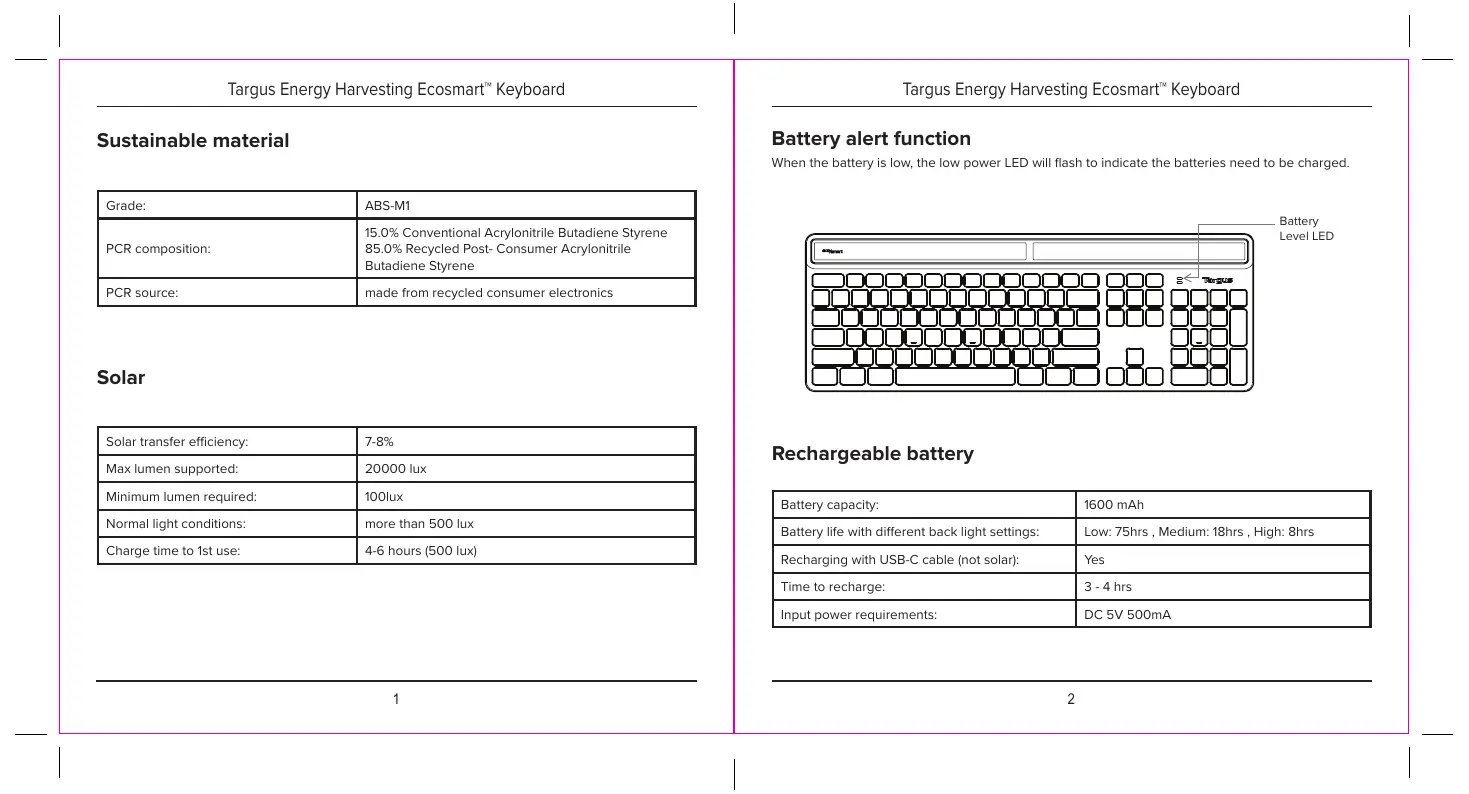
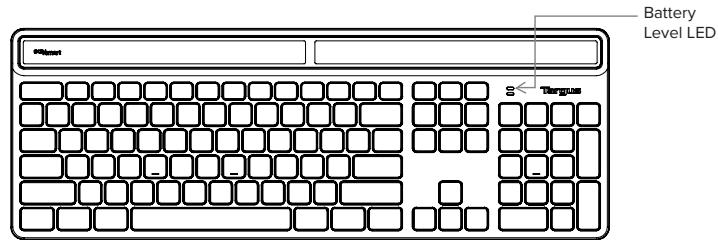
Battery alert function
When the battery is low, the low power LED will flash to indicate the batteries need to be charged.
Rechargeable battery
| Battery capacity: | 1600 mAh |
| Battery life with different back light settings: | Low: 75hrs, Medium: 18hrs, High: 8hrs |
| Recharging with USB-C cable (not solar): | Yes |
| Time to recharge: | 3 - 4 hrs |
| Input power requirements: | DC 5V 500mA |
Targus Energy Harvesting Ecosmart™ Keyboard
Contents
• EcoSmart Solar Keyboard
- User manual
• 1.5M USB C to USB A charging cable
System requirements
- Windows®
- macOS®
- iOS®
- Android™
- ChromeOS
| Product Name | Operation Frequency(MHz) | Maximum EIRP Power(dBm) (EU) | Working distance |
| EcoSmart Solar Keyboard : AKB868 | 2402-2480MHz | -6.3 | 10M |
Targus Energy Harvesting Ecosmart™ Keyboard
Establishing pairing
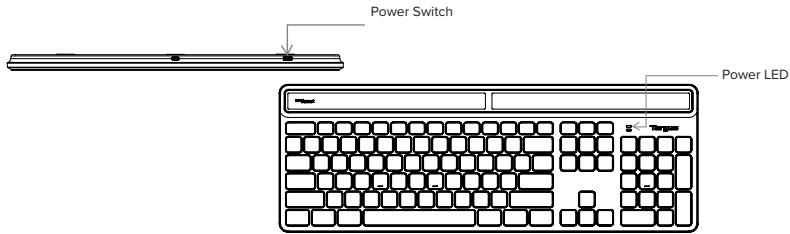
- Turn on the keyboard by sliding the power button to the ON position. The power LED will be lit for 3 seconds and the power LED will flash for up to 3 minutes for first Bluetooth channel entering pairing mode at initial use.
- Switch ON the Bluetooth function of your device and turn on Bluetooth search mode.
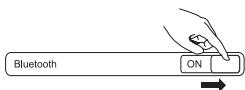
- Select "EcoSmart Keyboard" in the bluetooth menu on your device.
- Pairing will start automatically. Press the Bluetooth channel keys 1, 2, and 3 to switch between devices once multiple devices have been paired.
- The Targus EcoSmart Keyboard is now connected to your device and the blue light will stop flashing.
- If you want to change Bluetooth device of every Bluetooth channel connected, choose one of the 3 Bluetooth channels 1 2 3 and hold down the chosen key for 5 seconds to enable Bluetooth entering pairing mode, the Blue LED will flash for up to 3 minutes when the keyboard is in paring mode.
Targus Energy Harvesting Ecosmart™ Keyboard
Help with setup: Keyboard is not working
- Restart your device and Power off/on your keyboard.
- Press the Bluetooth channel keys 1 2 3 to select your Bluetooth device.
- After pairing for the first time, your device will automatically connect to the keyboard within 3-5 seconds the next time you turn on the keyboard.
- In case of connection failure, delete the keyboard from the bluetooth menu of your device, and try repairing the keyboard to your device.
Power saving mode
When paired, the keyboard will enter into sleep mode after being idle for 10 minutes. To activate the keyboard, press any key and wait 3 seconds. If unpaired, the keyboard will enter sleep mode after 2 minutes.
Targus Energy Harvesting Ecosmart™ Keyboard
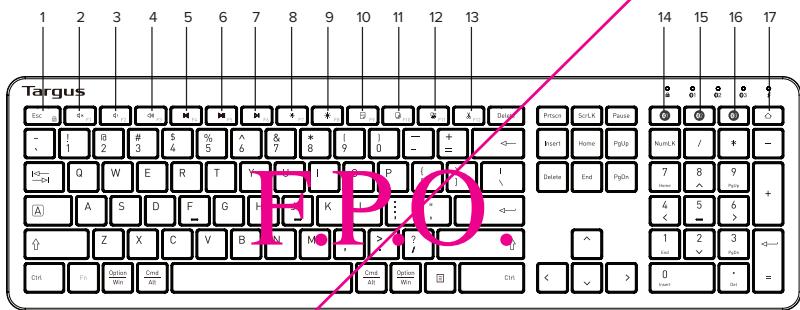
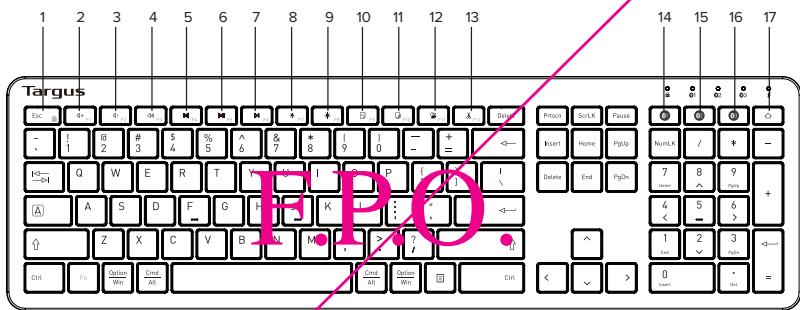
Function keys
| Key | iOS | mac | Android | Chrome | Windows (Fn lock) | Windows (no Fn lock) |
 | Mute | Mute | Mute | Mute | Mute | F1 |
 | Volume - | Volume - | Volume - | Volume - | Volume - | F2 |
 | Volume + | Volume + | Volume + | Volume + | Volume + | F3 |
 | Previous track | Previous track | Previous track | Previous track | Previous track | F4 |
 | Play/pause | Play/pause | Play/pause | Play/pause | Play/pause | F5 |
 | Next track | Next track | Next track | Next track | Next track | F6 |
 | Screen brightness - | Screen brightness - | Screen brightness - | Screen brightness - | Screen brightness - | F7 |
 | Screen brightness + | Screen brightness + | Screen brightness + | Screen brightness + | Screen brightness + | F8 |
Targus Energy Harvesting Ecosmart™ Keyboard
Function keys
| Key | iOS | mac | Android | Chrome | Windows (Fn lock) | Windows (no Fn lock) |
| Search | Search | Search | Search | Search | F9 | |
| N/A | N/A | Screenshot | PrtScn | PrtScn | F10 | |
| N/A | N/A | N/A | N/A | ScrLK | F11 | |
| N/A | N/A | N/A | N/A | Pause | F12 | |
| Fn lock/unlock | Fn lock/unlock | Fn lock/unlock | Fn lock/unlock | Fn lock/unlock | Fn lock/unlock | |
| Connect device 1 | Connect device 1 | Connect device 1 | Connect device 1 | Connect device 1 | Connect device 1 | |
| Connect device 2 | Connect device 2 | Connect device 2 | Connect device 2 | Connect device 2 | Connect device 2 | |
| Connect device 3 | Connect device 3 | Connect device 3 | Connect device 3 | Connect device 3 | Connect device 3 |
Targus Energy Harvesting Ecosmart™ Keyboard
Function keys
| Key | iOS | mac | Android | Chrome | Windows (Fn lock) | Windows (no Fn lock) |
| FN + space key = Turn on/off back light and adjust brightnessPress 1 time : back light level 1, 2 times : back light level 2, 3 times : max brightness,4 times : back light off | ||||||
Note:
- Number Lock = clear in macOS
- No function for ScrLK and Pause in mac/Android/ChromeOS/iOS
- PrtScn may not function in some Andriod systems/devices
- "ScrLK" "Pause" "Insert" "Numlock" will not function in ChromeOS.
Function key features may have variations depending on the Operation System version and devices.
Targus Energy Harvesting Ecosmart™ Keyboard
Targus
Declaration of Conformity

Manufactures
Targus International LLC
Tel: 1711 765 5555
Address
1311 North Miller Street,
Fax: 1-714-765-5900
Anaheim, CA 92806 USA
licenu: www.Turgus.com
Imposter.
Targus Europe Ltd.
Tel: 14102088312013
Address
Fargus EMEA Account Management
We have with confirm the following designated product Wacke-Rayland, Model No. 1
AKB862, AKB853, AKB864, AKB867. Bond terms: "TARCUS", implies with the Radin Equipment.
For the exclusion report, the show: Dimin, the following methods were applied
RED.20.45:EU
1731 N 401 - 29-1 5.1/2019-11
1751 H241-894-7024(2124)
RoHS Directive: 2011-05-24 and its announcement Directive (LTI) 2015:663
EN 1416900428
Yen to begin CE marking. 2021
Duretic Jargers Global sourcing Group
CP Ngo1
[Unreadable]
Note
4.20.2021
Hong Kong
Duke
·T ^2 (1)

Signal for and on behalf of Targus
Targus Energy Harvesting Ecosmart™ Keyboard
Targus
Declaration of Conformity
Mullinus.
Tayos International LLC
-
1-714-765-5555
611028
1711 North Malta Sinza
*20
2014年5月29日
A##, CA 92906 USA
[Unreadable]
www.1815.com
Impeller
Tirque Fu. (pc) 1.d.
Tel.
-4s 10:20 5831 2013
Südner:
New Sport, Boston, Lasas
Business Park, Peltham, Modlesev.
TASER
We have had been the following designated construct: Wumess Herbord, Model No.
AKB502.AKB853A<BN64.AKB857, Bond term: "TAPGE.S", composites with hek's UK gelviori
and may be said

for the evaluation regarding
below legislation, the following standards were applied:
Rafin Equipment Regulations
ETN EN 91439-152 (09-11)
RISMA 301-49-27 4(7:5)
ETSI EN 340 328 572 2 2(2)12-45
LN 02174:2010
EN 62163-1 2014A11 2017
The Restriction of the Use of Certain Hazardous Substances in Electrical and Electronic Equivalents.
Regula 2013
LN IDC 4500:2018
This calculation of refinuity is bound under the sole responsibility of the manufacturer.
Jawac, T mgus - Global Sourcing Group
C1250
Furclic Ti
_i=1^n
420212
: Hong Kong
2011
Pb+2c of b>0.1

Signal for and isolated of Targus

Targus Energy Harvesting Ecosmart™ Keyboard
Targus
Supplier's Declaration of Conformity

Amar L'fracturer!
Responsible Party
Access
Tergus Intametene LLC
121 North Mile or Street,
Anaham, CA 92005 LGA
Tel 1-714-765-6555
Fax: 1-714-766-0599
rtemet: www.bargus.com
However, declares that the Product
Trade name: Targu
Product name: Wireless Kiosk
Model number Reg A-0034
Coriunta to the following sentences: one
F.P.O.
FCC CFR Title 47 Part 15 Subpart B and ANSI C63.4-2014 standard limits
The best box & no.15- non infine to 1-10x exp. Kouha 21/61-4387N-00
Supplementary Information:
Take case to complete with part 13 of the PCC Rule Operation is subject to the following two
conditions; (1) This device may not cause harmful interference and (2) This device must assist
so, no subso, no end, 1000g for the end of the case which is
Director, Tangus International LLC
Function 11
Fig. 7.CF
Name
632021
[Unreadable]

Signed to and in detail of the
Targus Energy Harvesting Ecosmart™ Keyboard
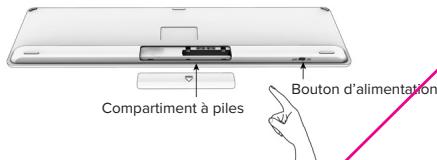
Installation des piles
Targus Energy Harvesting Ecosmart™ Keyboard
Establishing pairing
Targus Energy Harvesting Ecosmart™ Keyboard
Targus Energy Harvesting Ecosmart™ Keyboard
Touches de fonction
Targus Energy Harvesting Ecosmart™ Keyboard
Touches de fonction
Targus Energy Harvesting Ecosmart™ Keyboard
Touches de fonction
Targus Energy Harvesting Ecosmart™ Keyboard
TRENCH
Targus
Fabricant: Targas International LLC.
Address: 121 North Village Street
Amsterdam, CA 95906 USA
Impectaleum : Targus Europe Ltd.
Adress : Tungus EMEA Account Management Vir Hilsratant 19, 5145 RK Waswijk NEJEERLANDS

Tel: 1-314-65-5555
Fox: 1-714-05-229
Internet: www.Tarpus.com
Tel : +14 (0126 5831 2013
Salie Equipnol, 2015, 38-40, 10-10-13. Diverse: N1726-401 and is announced
Digital (E)
For example, the following table includes:
RED 2014SH
ETS EN 31.409-17221(202-11)
EIN10H 11-09-17 V124(M5-16)
EIN10.12.73575.768147
EN 6479 2510
EN6298-12014-3.1201?
Jellis Derivate: 2014, Jellis and its movement directions (J. A) vs 365
LN LOC 0102015
Director, Engric Global Sourcing Corp
Inoule de la structure
CTSCH
m
420-2021 : Hana Kau
Dus Lize

Targus Energy Harvesting Ecosmart™ Keyboard
Targus
Credent Credit Cardiology
argus interneal and LLC
Tire de la function
(7) K_
Hc…
E
1:KNI

Squashan p#e #n. 70168 1994
Targus Energy Harvesting Ecosmart™ Keyboard
Instalar la batería
Targus Energy Harvesting Ecosmart™ Keyboard
Targus Energy Harvesting Ecosmart™ Keyboard
Targus Energy Harvesting Ecosmart™ Keyboard
Teclas de función
Targus Energy Harvesting Ecosmart™ Keyboard
Teclas de función
Targus Energy Harvesting Ecosmart™ Keyboard
Teclas de función
Targus Energy Harvesting Ecosmart™ Keyboard
SPANISH
Targus
The following table provides the information in the English and Chinese.
(1) 2015-963
SAAE Directive: 2011-05 EU and its amendment Directive (the.) 2015-062
EN IEC 630.02
Afla a 201 del oce se la forma a 19. 202
Dias: Targas - Diar lus kera non diol CF Spah
Cargo Nozzb:
(2016) Teng Ke
Targus Energy Harvesting Ecosmart™ Keyboard
Technical support
For technical questions, please visit:
Internet
| US | Internet: http://targus.com/us/support |
| Canada | Internet: http://www.targus.com/ca/support |
| Australia | Internet: http://www.targus.com/au/supportEmail: infoaust@targus.com Telephone: 1800-641-645 |
| New Zealand | Telephone: 0800-633-222 |
| Latin America | Email: latam.soporte@targus.com |
| English | https://uk.targus.com/pages/support |
| French | https://fr.targus.com/pages/support |
| German | https://de.targus.com/pages/support |
| Spanish | https://es.targus.com/pages/support |
Phone (language answered in):
| Austria: 01 795 676 42 (German) |
| Belgium: 02-717-2451 (French) |
| Denmark: +45 35 25 87 51 (English) |
| Finland: +358 922948016 (English) |
| France: 01-6453-9151 (French) |
| Germany: 0211-6579-1151 (German) |
| Netherlands: 02 0504 0671 (English) |
| Norway: +4722577729 (English) |
| Portugal: +351 21 415 4123 (English) |
| South Africa: +27 211 003 270 (English) - Calls answered 10am-6pm South African time |
| Spain: 91 745 6221 (Spanish) |
| Sweden: 08-751-4058 (English) |
| Switzerland: +41 (0) 44 212 0007 (French or German) |
| UK: 020-7744-0330 (English) |
Eastern Europe and others not listed above:
+44 (0) 207 744 0330 (English)
Targus Energy Harvesting Ecosmart™ Keyboard
Warranty
2 YEAR LIMITED WARRANTY
OR AS REQUIRED BY LOCAL LAWS
We pride ourselves on the quality of our products. For complete warranty details and a list of our worldwide offices, please visit www.targus.com
Features and specifications are subject to change without notice. All trademarks and registered trademarks are the property of their respective owners. All rights reserved. ©2022 Manufacturer or Imported by Targus Europe Ltd., Fourth Floor, One London Road, Staines, TW18 4EX, UK
Australian And New Zealand Consumers Only
Thank you for your purchase. Targus warrants to the original purchaser that its products are free from defects in materials and workmanship and, during the specified warranty period, and lasts as long as the original purchaser owns the product. The warranty period is stated on the packaging or in the documentation provided with this Targus product. Targus' Limited Product Warranty excludes damage caused by accident, neglect, abuse, misuse, improper care, normal wear and tear, ownership transfer, or alteration. The limited warranty also excludes any product that is not manufactured by Targus (including, without limitation, laptops, smartphones, devices, tablets, or any other non-Targus item) that is used in connection with the Targus product.
In the event that the Targus product has a defect in materials or workmanship Targus will, after receiving a warranty claim and inspecting the product, at its discretion, do one of the following: repair, replace, or refund with the same or a similar product (or part) of no lesser quality and ship it to the original purchaser at Targus' expense. As part of this inspection, proof of purchase will be required. There is no charge for inspection. To make a warranty claim, please contact Targus Australia or New Zealand (see details below), or return the product to the place of purchase. The original purchaser must bear the cost of the delivery to Targus. Under Australian and/or New Zealand Consumer Laws, in addition to any warranty Targus gives, our products come with guarantees that cannot be excluded. You are entitled to a replacement or refund for a major failure and compensation for any other reasonably foreseeable loss or damage. You are entitled to have the products repaired or replaced if they fail to be of acceptable quality and the failure does not amount to a major failure.
For any warranty question, contact Targus Australia Pty. Ltd. (i) by mail at Suite 2, Level 8, 5 Rider Boulevard, Rhodes NSW 2138, by phone AUS 1800 641 645 or NZ 0800 633 222 or by Email: infoaust@targus.com. For additional information, check out our website at targus.com/au/warranty.
Targus Energy Harvesting Ecosmart™ Keyboard
Regulatory compliance (applicable to products with electronic circuitry/parts only)
This device complies with Part 15 of the FCC Rules. Operation is subject to the following two conditions: (1) This device may not cause harmful interference, and (2) this device must accept any interference received, including interference that may cause undesired operation.
FCC statement
Tested to Comply
This equipment has been tested and found to comply with the limits of a Class B digital device, pursuant to Part 15 of the FCC Rules. These limits are designed to provide reasonable protection against harmful interference in a residential installation. This equipment generates, uses, and can radiate radio frequency energy, and if not installed and used in accordance with the instructions may cause harmful interference to radio communications. However, there is no guarantee that interference will not occur in a particular installation. If this equipment does cause harmful interference to radio or television reception, which can be determined by turning the equipment off and on, the user is encouraged to try to correct the interference by one or more of the following measures:
- Reorient or relocate the receiving antenna;
- Increase the separation between the equipment and receiver;
- Connect the equipment into an outlet on a circuit different from that to which the receiver is connected;
- Consult the dealer or an experienced radio/TV technician for help
Changes or modifications not authorized by the party responsible for compliance could void the user's authority to operate this product.
Targus Energy Harvesting Ecosmart™ Keyboard
IC statement
This device contains licence-exempt transmitter(s)/receiver(s) that comply with Innovation, Science and Economic Development Canada's licence-exempt RSS(s). Operation is subject to the following two conditions:
- This device may not cause interference.
- This device must accept any interference, including interference that may cause undesired operation of the device.
Déclaration IC
Declaration of conformity
Hereby, Targus, declares that this device is in compliance with the essential requirements and other relevant provisions of Directive 2014/53/EU.
Targus recycling directive
At the end of this product's useful life please dispose at an appropriate recycling collection point provided in your country.
Targus Energy Harvesting Ecosmart™ Keyboard
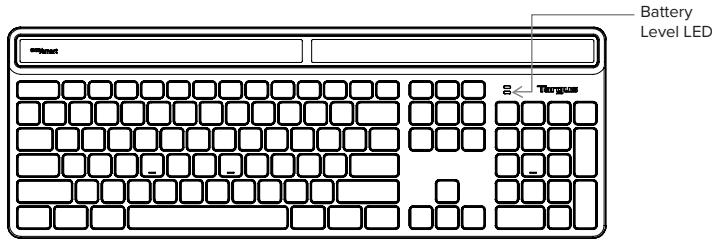
Battery alert function
When the battery is low, the low power LED will flash to indicate the batteries need to be charged.
Rechargeable battery
| Battery capacity: | 1600 mAh |
| Battery life with different back light settings: | Low: 75hrs, middle: 18hrs, high: 8hrs |
| Recharging with USB-C cable (not solar): | Yes |
| Time to recharge: | 3 - 4 hrs |
| Input power requirements: | DC 5V 500mA |
Targus Energy Harvesting Ecosmart™ Keyboard
Contents
• EcoSmart Solar Keyboard
- User manual
• 1.5M USB C to USB A charging cable
System requirements
- Windows®
- macOS®
• iOS® - Android™
- ChromeOS
| Product Name | Operation Frequency(MHz) | Maximum EIRP Power(dBm) (EU) | Working distance |
| EcoSmart Keyboard : AKB868 | 2402-2480MHz | 1.0 | 10M |

- Targus®
- ENERGY HARVESTING
- ECOSMART™
- KEYBOARD
- User Guide
- Targus Energy Harvesting Ecosmart™ Keyboard
- Battery alert function
- Contents
- System requirements
- Help with setup: Keyboard is not working
- Power saving mode
- Targus
- Installation des piles
- Establishing pairing
- Instalar la batería
- Technical support
- Warranty
- Australian And New Zealand Consumers Only
- Regulatory compliance (applicable to products with electronic circuitry/parts only)
- FCC statement
- Tested to Comply
- IC statement
- Déclaration IC
- Declaration of conformity
- Targus recycling directive
Brand : TARGUS
Model : AKB868
Category : Keyboard