ManualGo.com
 AMB586 - Mouse TARGUS - Free user manual and instructions
Find the device manual for free AMB586 TARGUS in PDF.


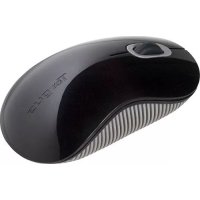
Download the instructions for your Mouse in PDF format for free! Find your manual AMB586 - TARGUS and take your electronic device back in hand. On this page are published all the documents necessary for the use of your device. AMB586 by TARGUS.
USER MANUAL AMB586 TARGUS
ERGOFLIP MOUSE SOURIS ERGOFLIP MOUSE ERGOFLIP User Guide Guide de l'utilisateur Guia del usuario
Material: 80g5m woodiree paper Moiut
Folded Size: 80mm (W) x 2mm (H)
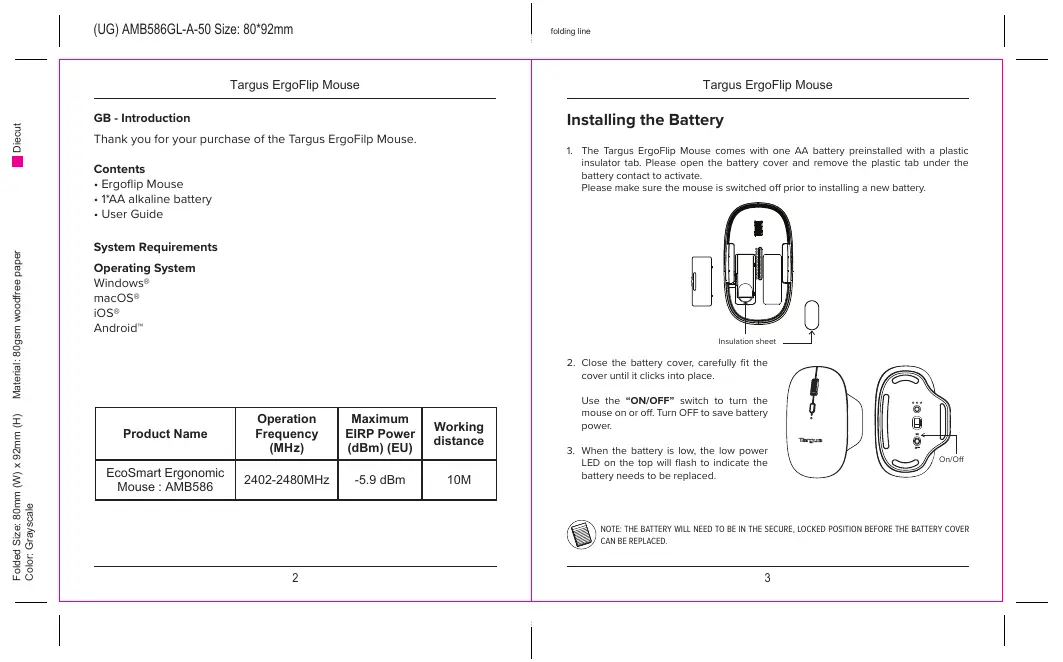
‘Thank you for your purchase of the Targus ErgoFilp Mouse.
ner ANBSeC | 2402-2480MHz | -5.9 dem 10M Installing the Battery
1. The Targus Ergoflip Mouse comes mit ane AA batery preinstalled th à plastic insulator tab. Please open the battery cover and remove {ne plastic tab under he battery contact to actvate Please make sure the mouse is suitched off prior oinstalng a new battery.
iraistonaneet TT Close the battery cover. careluly fit the cover until ik int place,
Use the “ONIOFF" suiteh to tum the | mouse on er of. um OFF save battery. C pouer
2. en te bte ions heu pour Dane eee | y re ere
Material: 80g5m woodiree paper Moiut
Folded Size: 80mm (W) x 2mm (H)
4.000 DPI: 4 LED flashes
Scroil Wheel / Button
DPI Button Press to scroll
through DPI settings. 2000/3000/4000/1000
Ergonomie design for left or right hand
Li the magnetic top and rotate 180degrees to reorient. Please make sure the mouse is smitched off prior to reorienting from rightllef hand!
Power Saving mod Hthe mouse is not used after 10 minutes, it will automatically enter power saving mode to conserve power. Click on any mouse button to resume normal operation. The mouse may take a few seconds to reconnect with your computer.
Material: 80g5m woodiree paper Boeut
Folded Size: 80mm (W) x 2mm (H)
Establish Pairing ur anthe mouse by sliding the povrer button t tre ON postion.
2. Suith ON tre Bluetoath function of your device and turn an the Bluetooth search mode.
2. Press the connect button on tre bottom ofthe mouse to select one ofthe 3 Bluetooth channels rt, then hold down the button for S seconde to enable Eetootn paring mode, the white LED vil flash far up to 3 minutes when tre mouse is in pag mode.
4. Select “EcoSmart Mouse” in the Bluetooth search menu on your device.
5. The paiing vil start automatcaly. Press the Bluetooth channel button to switch between devices ance muliple devices have been connecice,
6. The EcoSmart Mouse is now connected to your device and he white ght will stop sshing.
Help with setup: Mouse is not working
Resta your device and Power affon your mouse.
Press tre Bluetooth channel button 8 fo 2 seconds o select he palred device.
+ Aterpaiingforthe frsttime, your device wi automaticaly connect to the mouse thin 3:5 seconds the next time you tur on tre mouse.
In case of connection failure, delete the mouse fram the bluetooth menu af your device, and ty reparing the mouse to your device
Ike mouse is not worléng proper afer reorienting right han, use a clean dry ot to clean the pags pin.
Material: 80g5m woodiree paper Boeut
Folded Size: 80mm (W) x 2mm (H)
Material: 80g5m woodiree paper Moiut
Folded Size: 80mm (W) x 2mm (H)
Utilisez limerupteur « ONIOFF » (MARCHE / ARRÊT, pour activer où éteindre In souris. Désactiez Ia souris pour économiser l'énergie de Ia pie.
Material: 80g5m woodiree paper Moiut
Folded Size: 80mm (W) x 2mm (H)
Mode d'économie d'énergie : Sila souris n'estpas utilisée après 10 minutes, elle entrera automatiquement en mode d'économie d'énergie pour économiser l'énergie. Cliquez sur n'importe quel bouton de la souris pour reprendre le fonctionnement normal. La souris peut prendre quelques secondes pour se reconnecter à votre ordinateur.
Material: 80g5m woodiree paper Boeut
Folded Size: 80mm (W) x 2mm (H)
Material: 80g5m woodiree paper Boeut
Folded Size: 80mm (W) x 2mm (H)
Material: 80g5m woodiree paper
Folded Size: 80mm (W) x 2mm (H)
(UG) AMB586GL-A-50 Size: 80*92mm
Material: 80g5m woodiree paper Boeut
Folded Size: 80mm (W) x 2mm (H)
Material: 80g5m woodiree paper Boeut
Folded Size: 80mm (W) x 2mm (H)
For technieal questions, please visit
Latin America Emaitlatam soparteatargus com
Product Registration Targus recommends that you register vour Targus accessory short alter purchasing it
Mtpi/targus.comus/product_registration Yu vil need ta provide your full name, emal adress, country af residence and product information.
Two Year Warranty Vi pride ourseves on the quality four products. For complete warranty tal anda st of ourwoduide ffices, please vs uwitargus com. Targus product waranty does not over any device or produetthatis not manufacture by Targus ncuding, but not imite te. lptops, smartphones, devices, or any other produet that may be used in connection ie Targus product.
Targus is a registered trademark of Targus Imtemational LLC in te US. and in certain ether countries. Mcrosoh, Windows and Windows Vista are registered trademarks or trademarks of Microsoft Corporation in the United States andlor atner countries, Mac is a trademark of Apple Ie. regétered in the US. and oïer countries. Chromebook is a trademark of Google, Inc, A logos and registered acemarks are the property of their respective ouners. 22023 Manufacturer: Targus Iermaional LLC, 211 North Miler Sieet, Anaheim, CA 92606. Importer: Targus Europe Li, Fourlh Floo, One London
Rond, Staines, TWIS 4EX, UK Material: 80g5m woodiree paper Boeut
Folded Size: 80mm (W) x 2mm (H)
Targus ErgoFlip Mouse
Australian And New Zealand Consumers Only Thank you for your purchase, Targus warrants to the original purchaser that ts products are Fee from defects in materials and workmanship ané, duing the specified warranty period, and last as lang as the original purchaser ous the product The warranty period À stated on te packaging ar in the documentation provided with his Targus product Targus Limhed Product Warranty exclues damage caused by accident neglect. abuse, misuse,impraper are, normal wear and tea, umership transfer, or aeration. The Iimieci arransy ao excludes any produet that not manufacture by Targus (nciucing, without limitation, laptops, smartphones, devices, tablets, or any other non-Targus er) that Es used in connection it the Targus product
In the event at the Targus proguet has a defect in marins or orkmanship Targus wi ar receing a waranty caim and Inspecäng te product at discretion, do one of the following: repair, replace, or refund with the same or a simlar product (or part of 0 lesser qualfy and ship to the onginal purchaser at Targus” expense. AS part of his inspection, proof af purchase wi be required. There is no charge fr inspection, To make a warranty claim, please contact Targus Australla or New Zealand (see details below}, or return the produet to the place of purchase, The original purchaser munt bear the cost fine delery to Targus.
Under Austraian andfor New Zealand Consumer Lars in action to any warranty Targus gives, our products come win guarantees that cannat be excludeë. You are entiied to 2 replacement or refund for a major faiure and compensation for any other rensonably foreseenble loss or damage. You are entitled to have the products repaired or replace! Hfthey fil be of acceptable quality and the falure does not amount to a major failure. For any warranty question, comtact Targus Australia Pay. Li. {} by mail at Suite 2 Level 8, 5 Rder Boulevard, Rhodes NSW 2138, by phone AUS 1800 641 645 or NZ 0800 633 222 or by Email Ifoaustatarqus cam For adltional information, check out our website at argus comvauwarrany.
Regulatory Compliance is device complies vith Part 15 ofthe FCC Rules. Operation is subject to the following vo conditions:
(9 This device may not cause harmful interference, and (2) This device must accept any iterference received, including interference rat may cause undesied operation.
Technical Support For technical questions, please visit
English tpsuktargue com/pages/support
French Htps rtargus com pages/support
German tps ide targus comipages/suppert
Spanish ps es targus com/pagesaupport
Phone language answered in):
France: 016452 9181 French)
Germany. (0211-6578 118 (German)
Netherancs: (02 0504 067 (English)
Norway: +4722877729 (Engin)
Porugat 351 21 15 4122 (English)
South Afez +27 211 003 270 (English) - Cals answered 10am-6pm South African time
Spa. 1745 6221 (Spanish)
Sueden: (08.751.4058 (Engist)
Svitzeriancs +4 (0144 212 0007 (French or German)
(020-7744.0320 (English) Eastern Europe and atners not isted above: “aa (0) 207 744 0320 (English)
Regulatory Compliance (applicable to products with electronic cir- cuitry/parts only)
This device complies vith Part 15 ofthe FCC Rules. Operation is subject t tne folouing no conditions () This device may notcause hammful imerference, and (2) his device must accept any inerlerence received. including interference that maÿ cause undesired
Material: 80g5m woodiree paper Boeut
Folded Size: 80mm (W) x 2mm (H)
Targus ErgoFlip Mouse
FCC Statement Tested to Comply
his equioment has been tested an four 1o compiy with te His for a Casa E igal device, pursuant to Part 5 of îhe FCC Rules. These is are cesigned 19 pronde ressonable protection against hamfulimrerence in à resident instalation. This auipment genertes uses and can raciate rca Fequency energy an, # ot installed and used in accordance vit le Insruetions, may cause harmfulerfcrence 10 ra
Honever there is no guarantee that inteerence val not oceurin a paru installation. His equipment does cause hamfulinterference to racig or television reception, which an be determined by tuming the equipment of and on, the user encourage to try to correct he imerference by one or mare of tne following measures
: Reorient or relocate the receing antenna.
{Increase the separation between he equipment and receive.
: Comnect the equipment ins an outlet on à circuit éflerent from that to which tre recaiveris connected
: Corsuit the dealer ar an experlenced radio/TV technician for help.
Vaming: Changes or modifietons to his unit not express} approved by the party responsible for complance could void he users authority to opera te equipment
Targus hereby declares that this device is in complance with the essential requirements and other relevant provisions of Directive 20H/S3/EU
‘Targus Recycling Directive A the end of this produets useful lfe please dispose at an appropriate recycing ollction paint provided in your country.
Industry Canada statement
Mis device contains icence-exempt ransmiter(s)receiver(s) that comphy with innovation,
Science and Economie Development Canadas lcence-exempt RSS(s). Operation !s
Subject to the following so conditions:
1. This device may nat cause Imerference.
2. This device must accept any interlerence, including inteerence that may cause undesired operation of the device.
Lémeteurirécepteur exempt de licence contenu dans le présent appareil est conforme