AMB586 - Mouse TARGUS - Free user manual and instructions
Find the device manual for free AMB586 TARGUS in PDF.



| Product type | Ergonomic Bluetooth mouse |
| Brand | Targus |
| Model | AMB586 EcoSmart |
| Power source | 1 AA alkaline battery (pre-installed) |
| Connectivity | Bluetooth 5.0 (3 channels) |
| Wireless range | 10 meters |
| Operating frequency | 2402-2480 MHz |
| Maximum power (EIRP) | -5.9 dBm |
| Resolution (DPI) | 1000 / 2000 / 3000 / 4000 DPI (switchable) |
| System compatibility | Windows, macOS, iOS, Android |
| Ergonomic design | Adaptable for right or left hand (180° rotation) |
| Antimicrobial protection | Yes (nano silver phosphate) |
| Power saving mode | Automatic after 10 minutes of inactivity |
| Low battery indicator | Flashing LED |
| Buttons | DPI button, Bluetooth connection button, on/off switch |
| Care and cleaning | Clean pogo pins with a dry cloth |
| Warranty | 2 years limited (3 years for some countries) |
| Package contents | Mouse, AA battery, user guide |
| Certifications | FCC, CE, ISED |
| Repairability | User-replaceable battery |
Frequently Asked Questions - AMB586 TARGUS
User questions about AMB586 TARGUS
0 question about this device. Answer the ones you know or ask your own.
Ask a new question about this device
Download the instructions for your Mouse in PDF format for free! Find your manual AMB586 - TARGUS and take your electronic device back in hand. On this page are published all the documents necessary for the use of your device. AMB586 by TARGUS.
USER MANUAL AMB586 TARGUS
Targus Antimicrobial Protection is a protective finish creating a cleaner surface. Unlike topically applied sprays, it works continuously to protect the device by preventing the growth of microorganisms. Keep your mouse safer with Targus Antimicrobial Protection.
**Antimicrobial product protection is limited to the device itself.
This mouse has been treated with an antimicrobial additive. Active ingredient: Silver Phosphate Glass (nano-). EPA Est. 99234-CA-1
PORTUGAL and SPAIN CUSTOMERS: 3 YEARS LIMITED WARRANTY
OR AS REQUIRED BY LOCAL LAWS
Tangus, DefenseGuard, and EcoSmart are trademarks or registered trademarks of Taurus International LLC in the U.S. and in certain other countries. Windows is a registered trademark of Microsoft Corporation. This is an open source software distributed under the terms of the Creative Commons Attribution License (http://creativecommons.org/licenses/by/4.0/), which permits use, distribution, and reproduction in any medium, provided the original work is properly cited. The use of this material is permitted for research, teaching, and private study purposes.
GARANTIE LIMITEE DE 2 ANS
CLIENTS DU PORTUGAL ET DE L'ESPagne: GARANTIE LIMITEE DE 3 ANS
Wireless Mouse FCC ID:
QXM000146
Wireless Mouse IC:
27357-00015







Targus
ERGOFLIP MOUSE
SOURIS ERGOFLIP
MOUSE ERGOFLIP
User Guide
EcoSmart Ergonomic Mouse
Model:AMB586
SKU:AMB586GL
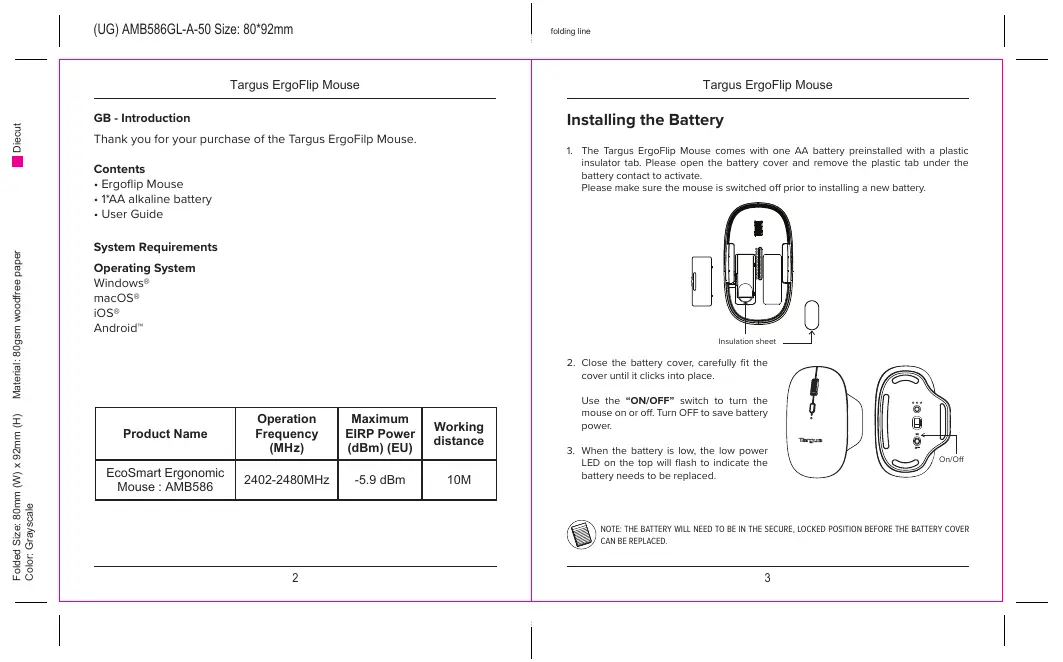
Targus ErgoFlip Mouse
GB-Introduction
Thank you for your purchase of the Targus ErgoFilp Mouse.
Contents
Ergoflip Mouse
- 1*AA alkaline battery
- User Guide
System Requirements
Operating System
Windows®
macOS
iOS®
Android
| Product Name | Operation Frequency (MHz) | Maximum EIRP Power (dBm) (EU) | Working distance |
| EcoSmart Ergonomic Mouse : AMB586 | 2402-2480MHz | -5.9 dBm | 10M |
Targus ErgoFlip Mouse
Installing the Battery
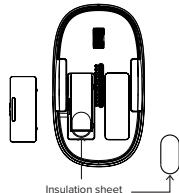
- The Targus ErgoFlip Mouse comes with one AA battery preinstalled with a plastic insulator tab. Please open the battery cover and remove the plastic tab under the battery contact to activate.
Please make sure the mouse is switched off prior to installing a new battery.
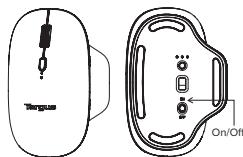
- Close the battery cover, carefully fit the cover until it clicks into place.
Use the "ON/OFF" switch to turn the mouse on or off. Turn OFF to save battery power.
- When the battery is low, the low power LED on the top will flash to indicate the battery needs to be replaced.

NOTE: THE BATTERY WILL NEED TO BE IN THE SECURE, LOCKED POSITION BEFORE THE BATTERY COVER CAN BE REPLACED.
Targus ErgoFlip Mouse
Change DPI sensitivity by toggling the DPI button:
- 1000 DPI: 1 LED flash
- 2000 DPI: 2 LED flashes
- 3000 DPI: 3 LED flashes
- 4000 DPI: 4 LED flashes
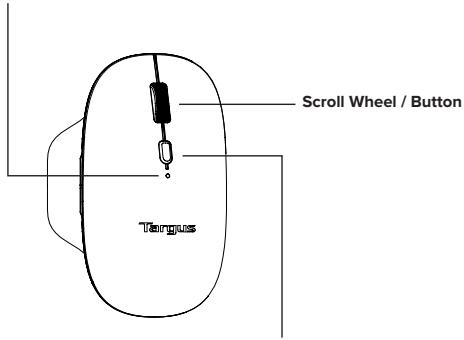
DPI Button
Press to scroll
through DPI settings
2000/3000/4000/1000
Targus ErgoFlip Mouse
Ergonomic design for left or right hand
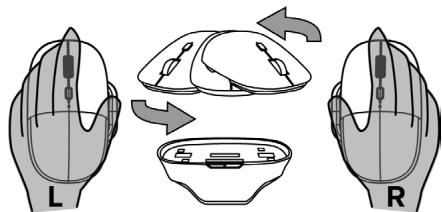
Lift the magnetic top and rotate 180degrees to reorient.
Please make sure the mouse is switched off prior to reorienting from right/left hand.
Power Saving mode:
If the mouse is not used after 10 minutes, it will automatically enter power saving mode to conserve power. Click on any mouse button to resume normal operation. The mouse may take a few seconds to reconnect with your computer.
Targus ErgoFlip Mouse
Bluetooth Connection
Establish Pairing
- Turn on the mouse by sliding the power button to the ON position.
- Switch ON the Bluetooth function of your device and turn on the Bluetooth search mode.
- Press the connect button on the bottom of the mouse to select one of the 3 Bluetooth channels first, then hold down the button for 5 seconds to enable Bluetooth pairing mode, the white LED will flash for up to 3 minutes when the mouse is in pairing mode.
- Select "EcoSmart Mouse" in the Bluetooth search menu on your device.
- The pairing will start automatically. Press the Bluetooth channel button to switch between devices once multiple devices have been connected.
- The EcoSmart Mouse is now connected to your device and the white light will stop flashing.
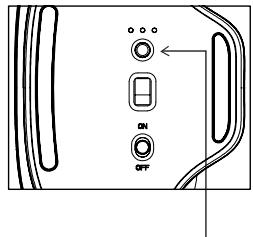
Bluetooth button
Targus ErgoFlip Mouse
Help with setup: Mouse is not working
- Restart your device and Power off/on your mouse.
- Press the Bluetooth channel button for 2 seconds to select the paired device.
After pairing for the first time, your device will automatically connect to the mouse within 3-5 seconds the next time you turn on the mouse. - In case of connection failure, delete the mouse from the bluetooth menu of your device, and try repairing the mouse to your device.
- If the mouse is not working properly after reorienting right/left hand, use a clean dry cloth to clean the pogo pins.
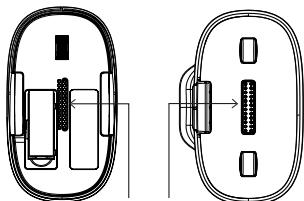
Pogo pins
Targus ErgoFlip Mouse
Targus
Declaration of Conformity
Manufacturer: Targus International LLC
Address: 1211 North Miller Street,
Anaheim, CA 92806 USA
Imperer: Targus Europe Ltd.
Address: Targus EMEA Account Management
We houwith confirm the following designated product ExSmart Ergonomics Mouse, Model No.
AM856, Brand name "TARGUS", complie with the Radio Equipment Directive 2014/33 EU, EUI
2015/063
For the evaluation regarding the above Desirves, the following standards were applied
2016年5月14日
ETSIEN8409-1V22.3(2019-11)
DRAFT ETSI EN 360 489-17 V3.2.5 (2022-08)
ETSIN 100128V2.2(2009-07)
EN 95812 2045-AI 2840:EN IEC 61000-3-2009-A1 2021
EN558352017=A1120201 EN639003-3-2013+A2221
18624792010185966-2043
EN IEC 6248-1-2020-A11-2020
KoHS Dective: 2011/65/LU and its amendment Directive (LU) 2015/863
E.N.托C6000281X
Year to begin CE marking 2023
Director, Tangus - Global Sourcing Group
Function Title
CT Npoh
Name

411/2023
Date
Signed for and on behalf of Tangus
Targus ErgoFlip Mouse
Targus
Supplier's Declaration of Conformity

Manufacture!
Targus International LLC
1211 North Miller Street.
Anahheim, CA 92066 USA
Tel 1-714-765-5255
Fax1-754-785-5299
internet: www.tangus.com
Hereby declares that the Product
Trade name: Targa
Product name: EcoSmart Ergonomic Mouse
Model number(Rag#:AM058)
Conforms to the following specifications
FCC CFR Title 47 Part 15 Subpart D and ANSI C63.4-2014 standard limits
The data & Results are named to the report Number: 2011 HRS 5862
Supplementary Information
This device complies with part 15 of the FCC Rules. Operation is subject to the following two requirements: (i) This device may not be used in conjunction with other devices; and (ii) This device must operate
any interference received, including interference that may cause undesired operation.
Director: Taqus International LLC
Function Time
4112023
Date
Nghsh/CF
Name
Signed for and on behalf of Tansys
Targus
Declaration of Conformity
Materials
A
Taygon International LLC
1230 North Miller Avenue
Alhazmi, CA 92806 USA
Imporor: Taliyan Europe L.M.
特此公告。
1
1

续表
f.
- 1
图5
图1
基金名称:
- 有丝分裂
We hereby confirm the following designated product: EcoSmart, Exponential Mouse Model No.
AMR*6. Brand name "Taypa", complies with below UK legislation and relevant standards.
For the evaluation regarding the below legislation, the following standards were applied:
Radio Equipment Regulations 2047
TENEN 400.6 V2.1@200.5pp
DRAJTETN101-499-17N2.3(202)88
The Restriction of the Use of Certain Hazardous Substances in Electrical and Electronic Equipment
Regulations 2012
EN IEC 6/3000.2018
This declaration of conformity is issued under the sole responsibility of the manufacturer.
Director, Target: Global Sourcing Group
Function Title
411252(BongKong)
Date
Global Sounding Group
图5
face of him
Group

CTNp
X
Signed her and en behalf of Taryna.
Targus ErgoFlip Mouse
FR - Introduction
Adress: 121 North Miller Street,
Anaheim, CA 92806 USA
Important: Targus Europe Ltd.
Adress: Targus EMEA Account Management
RoHS Directive: 2041/65/EU and its amendment Directive (EU) 2045/83
EN IEC 63002-2018
Tangus International LLC
Tel:1-714-765-5555
1211 North Miller Street
Tel:1-714-765-5599
Anaheim, CA 92806 USA
Internet www.targus.com
Celt applet is often labelled as a part of 15th deputation of the FC. CC: Its patronement is the Royal Society of Chemistry, and its author is John H. Doolen (1689-1743). The Celt applet contains numerous, if not all, pictures and illustrations of various colours, but it's dated applet lacks such interference under use, compares its resemblance to other versions of the applet.
Targus International LLC
For technical questions, please visit:
| US | Internet: http://targus.com/us/support |
| Canada | Internet: http://www.targus.com/ca/support |
| Australia | Internet: http://www.targus.com.au/support |
| Email: infoaust@targus.com | |
| Telephone: 1800-641-645 | |
| New Zealand | Telephone: 0800-633-222 |
| Latin America | Email: latam.soporte@targus.com |
Product Registration
Targus recommends that you register your Targus accessory shortly after purchasing it. Go to:
http://targus.com/us/productregistration
You will need to provide your full name, email address, country of residence and product information.
Two Year Warranty
We pride ourselves on the quality of our products. For complete warranty details and a list of our worldwide offices, please visit www.targus.com. Targus product warranty does not cover any device or product that is not manufactured by Targus (including, but not limited to, laptops, smartphones, devices, or any other product that may be used in connection with the Targus product).
Targus is a registered trademark of Targus International LLC in the U.S. and in certain other countries. Microsoft, Windows and Windows Vista are registered trademarks or trademarks of Microsoft Corporation in the United States and/or other countries. Mac is a trademark of Apple Inc., registered in the U.S. and other countries. Chromebook is a trademark of Google, Inc. All logos and registered trademarks are the property of their respective owners. ©2023 Manufacturer: Targus International LLC, 1211 North Miller Street, Anaheim, CA 92806; Importer: Targus Europe Ltd., Fourth Floor, One London Road, Stanies, TW18 4EX, UK
Targus ErgoFlip Mouse
Australian And New Zealand Consumers Only
Thank you for your purchase. Targus warrants to the original purchaser that its products are free from defects in materials and workmanship and, during the specified warranty period, and lasts as long as the original purchaser owns the product. The warranty period is stated on the packaging or in the documentation provided with this Targus product. Targus' Limited Product Warranty excludes damage caused by accident, neglect, abuse, misuse, improper care, normal wear and tear, ownership transfer, or alteration. The limited warranty also excludes any product that is not manufactured by Targus (including, without limitation, laptops, smartphones, devices, tablets, or any other non-Targus item) that is used in connection with the Targus product.
In the event that the Targus product has a defect in materials or workmanship Targus will, after receiving a warranty claim and inspecting the product, at its discretion, do one of the following: repair, replace, or refund with the same or a similar product (or part) of no lesser quality and ship it to the original purchaser at Targus' expense. As part of this inspection, proof of purchase will be required. There is no charge for inspection. To make a warranty claim, please contact Targus Australia or New Zealand (see details below), or return the product to the place of purchase. The original purchaser must bear the cost of the delivery to Targus.
Under Australian and/or New Zealand Consumer Laws, in addition to any warranty Targus gives, our products come with guarantees that cannot be excluded. You are entitled to a replacement or refund for a major failure and compensation for any other reasonably foreseeable loss or damage. You are entitled to have the products repaired or replaced if they fail to be of acceptable quality and the failure does not amount to a major failure.
For any warranty question, contact Targus Australia Pty. Ltd. (i) by mail at Suite 2, Level 8, 5 Rider Boulevard, Rhodes NSW 2138, by phone AUS 1800 641 645 or NZ 0800 633 222 or by Email: infoaudit@targus.com. For additional information, check out our website at targus.com/au/warranty.
Regulatory Compliance
This device complies with Part 15 of the FCC Rules. Operation is subject to the following two conditions:
(1) This device may not cause harmful interference, and (2) This device must accept any interference received, including interference that may cause undesired operation.
Targus ErgoFlip Mouse
Technical Support
For technical questions, please visit:
Internet
English https://uk.targus.com/pages/support
French https://fr.targus.com/pages/support
German https://de.targus.com/pages/support
Phone (language answered in):
Austria: 0179567642 (German)
Belgium: 02-717-2451 (French)
Denmark: +45 35 25 87 51 (English)
Finland: +358 922948016 (English)
France: 01-6453-9151 (French)
Germany: 0211-6579-1151 (German)
Netherlands: 02 0504 0671 (English)
Norway: +4722577729 (English)
Portugal: +351 21 415 4123 (English)
South Africa: +27 211 003 270 (English) - Calls answered 10am-6pm South
African time
Spain: 917456221 (Spanish)
Sweden: 08-751-4058 (English)
Switzerland: +41 (0) 44 212 0007 (French or German)
UK: 020-7744-0330 (English)
Eastern Europe and others not listed above:
+44 (0) 207 744 0330 (English)
Regulatory Compliance (applicable to products with electronic circuitry/parts only)
This device complies with Part 15 of the FCC Rules. Operation is subject to the following two conditions: (1) This device may not cause harmful interference, and (2) this device must accept any interference received, including interference that may cause undesired operation.
Targus ErgoFlip Mouse
FCC Statement
Tested to Comply
This equipment has been tested and found to comply with the limits for a Class B digital device, pursuant to Part 15 of the FCC Rules. These limits are designed to provide reasonable protection against harmful interference in a residential installation. This equipment generates, uses and can radiate radio frequency energy and, if not installed and used in accordance with the instructions, may cause harmful interference to radio communications.
However, there is no guarantee that interference will not occur in a particular installation. If this equipment does cause harmful interference to radio or television reception, which can be determined by turning the equipment off and on, the user is encouraged to try to correct the interference by one or more of the following measures:
- Reorient or relocate the receiving antenna.
- Increase the separation between the equipment and receiver.
- Connect the equipment into an outlet on a circuit different from that to which the receiver is connected.
- Consult the dealer or an experienced radio/TV technician for help.
Warning: Changes or modifications to this unit not expressly approved by the party responsible for compliance could void the user's authority to operate the equipment.
Declaration of Conformity
Targus hereby declares that this device is in compliance with the essential requirements and other relevant provisions of Directive 2014/53/EU.
Targus Recycling Directive
At the end of this product's useful life please dispose at an appropriate recycling collection point provided in your country.
Targus ErgoFlip Mouse
Industry Canada statement
This device contains licence-exempt transmitter(s)/receiver(s) that comply with Innovation, Science and Economic Development Canada's licence-exempt RSS(s). Operation is subject to the following two conditions:
- This device may not cause interference.
- This device must accept any interference, including interference that may cause undesired operation of the device.

- Targus
- ERGOFLIP MOUSE
- SOURIS ERGOFLIP
- MOUSE ERGOFLIP
- Targus ErgoFlip Mouse
- GB-Introduction
- Contents
- System Requirements
- Operating System
- Installing the Battery
- Change DPI sensitivity by toggling the DPI button:
- Ergonomic design for left or right hand
- Power Saving mode:
- Bluetooth Connection
- Establish Pairing
- Help with setup: Mouse is not working
- Declaration of Conformity
- Supplier's Declaration of Conformity
- Supplementary Information
- FR - Introduction
- Product Registration
- Two Year Warranty
- Australian And New Zealand Consumers Only
- Regulatory Compliance
- Technical Support
- Internet
- Phone (language answered in):
- Regulatory Compliance (applicable to products with electronic circuitry/parts only)
- FCC Statement
- Tested to Comply
- Targus Recycling Directive
- Industry Canada statement
Brand : TARGUS
Model : AMB586
Category : Mouse