KLIK3C-BK2 - Universal remote CHAMBERLAIN - Free user manual and instructions
Find the device manual for free KLIK3C-BK2 CHAMBERLAIN in PDF.


User questions about KLIK3C-BK2 CHAMBERLAIN
0 question about this device. Answer the ones you know or ask your own.
Ask a new question about this device
Download the instructions for your Universal remote in PDF format for free! Find your manual KLIK3C-BK2 - CHAMBERLAIN and take your electronic device back in hand. On this page are published all the documents necessary for the use of your device. KLIK3C-BK2 by CHAMBERLAIN.
USER MANUAL KLIK3C-BK2 CHAMBERLAIN
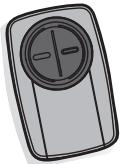
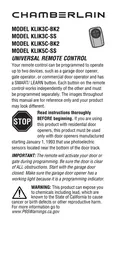
Your remote control can be programmed to operate up to two devices, such as a garage door opener, gate operator, or commercial door operator and has a SMART/ LEARN button. Each button on the remote control works independently of the other and must be programmed separately. The images throughout this manual are for reference only and your product may look different.

Read instructions thoroughly
BEFORE beginning. If you are using this product with residential door openers, this product must be used only with door openers manufactured
starting January 1, 1993 that use photoelectric sensors located near the bottom of the door track.
IMPORTANT: The remote will activate your door or gate during programming. Be sure the door is clear of ALL obstructions. Start with the garage door closed. Make sure the garage door opener has a working light because it is a programming indicator.

WARNING: This product can expose you to chemicals including lead, which are known to the State of California to cause
cancer or birth defects or other reproductive harm.
For more information go to www.P65Warnings.ca.gov
- Close the garage door.
IMPORTANT: The remote activates the garage door during programming. Ensure the door is clear of all obstructions.
- Look for a Wi-Fi or a Powered by myQ® logo to determine if your garage door opener is myQ® compatible. If not, proceed to programming.


- To start on monitoring the garage door movements, scan the QR code to download the myQ® app.

- To add your remote and name, follow the in-app instructions in order.
- After completing setup in the app, you can control the garage door opener and to receive notices ever time your garage door opens and closes.
GETTING STARTED
Determine if the product you are programming the remote control to has a SMART/LEARN button or DIP Switches. The SMART/LEARN button or DIP Switches are located either on the product or in an external receiver on or near the product. The following instructions are for a garage door opener with a SMART/LEARN Button. For DIP Switch programming instructions or additional help, see support.chamberlaingroup.com.
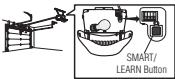
NOTE: DIP Switch is only available in KLIK3cmodels manufactured before 11/2020.
PROGRAM TO GARAGE DOOR OPENERS WITH A YELLOW LEARN BUTTON
If your remote was previously programmed to another type of opener, follow the programming instructions on the next page to reprogram to a yellow LEARN button.
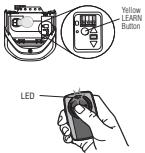
- Start with the garage door closed.
- Press and immediately release the yellow LEARN button. The Learn LED glows steady for 30 seconds. Within 30 seconds...
- Press and hold the button on the remote control you wish to use.
- Release the button when the garage door opener lights blink or two clicks are heard.
- Test by pressing the button you just programmed. The opener activates.
To program the remote to Chamberlain accessories, refer to the manual provided with the accessory.
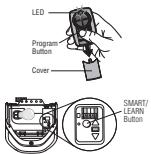
- Remove the remote control cover. Press and hold the program button until the LED turns on.
- Press and release the SMART/LEARN button on your garage door opener.
- Select a button to program on the remote control. Press and release the button the specified number of times according to the following chart. NOTE: Make sure the LED stops flashing between each press of the button. The garage door opener will respond by clicking, blinking or activating.
| Garage Door Opener Brand | Type/Color of SMART/LEARN button | Year | Times to press remote button |
| Linear® | Mega-Code | 1997-Current | 1 |
| Chamberlain®* | Orange/Red | 1997-2003 | 2 |
| Chamberlain®* | Purple | 2005-Current | 3 |
| Chamberlain®* | Green | 1993-1996 | 4 |
| Genie®** Overhead Door® | Intellicode | 2005-Current | 5 |
| Genie®Overhead Door® | Intellicode | 1995-Current | 6 |
| Stanley® | Secure Code | 1998 | 7 |
| Chamberlain®* | Yellow | 2011-Current | 8 |
| Wayne Dalton® | Rolling Code | 1999 | 9 |
| Xtreme Garage®*** Guardian®*** | Black | 2016-Current | 10 |
| Sommer*** | Black | 2013-Current | 11 |
| Ryobi | Rolling Code | 2016-Current | 12 |
-
Chamberlain, LiftMaster, Sears Craftsman, Do-It Master Mechanic, Raynor, True Value and Sears Craftsman are compatible with Chamberlain technology.
Find Genie Intellelic code II instructions at support.chamberlainggroup.com.
* Compatible with KLIK5U-BK2 and KLIK5U-SS only.. -
Press the program button on the remote control to save.
- Test by pressing the button you just programmed. The opener activates.
To program the remote to Chamberlain accessories, refer to the manual provided with the accessory.

WARNING
To prevent possible SERIOUS INJURY or DEATH:
NEVER allow small children near batteries.
If battery is swallowed, immediately notify doctor.
To reduce risk of fire, explosion or chemical burn:
- Replace ONLY with 3V CR2032 coin batteries.
DO NOT recharge, disassemble, heat above 212^ (100^) or incinerate.
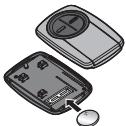
Dispose of batteries properly.
Replace ONLY with 3V CR2032 coin batteries.
Go to support.chamberlaingroup.com for more information.
NOTICE: This device complies with part 15 of the FCC rules and Innovation, Science and Economic Development Canada license-exempt RSSs. Operation is subject to the following two conditions: (1) This device may not cause harmful interference, and (2) this device must accept any interference received, including interference that may cause undesired operation. Any changes or modification not expressly approved by the party responsible for compliance could void the user's authority to operate the equipment.
All trade names used herein are trademarks of respective manufacturers listed.
CHAMBERLAIN
MODELE KLIK3C-BK2
MODELE KLIK3C-SS
MODELE KLIK5C-BK2
MODELE KLIK5C-SS