B0BVM1PSYN - Headphones Amazon Basics - Free user manual and instructions
Find the device manual for free B0BVM1PSYN Amazon Basics in PDF.



| Product Type | Bluetooth Wireless Headphones |
| Brand | Amazon Basics |
| Model | B0BVM1PSYN |
| Bluetooth Version | 5.1 |
| Bluetooth Range | 10 m |
| Frequency Response | 20 Hz to 20 kHz |
| Max Sound Pressure Level | 96 dB |
| Microphone Sensitivity | -16 dBV at 1 kHz/Pa |
| Power Supply | 5 V DC, 1 A via USB-C |
| Battery Type | Lithium-ion 3.7 V / 400 mAh |
| Charging Time | Less than 2 hours |
| Music Playback Time | 35 hours |
| Multipoint Connection | Yes (up to two devices) |
| Control Buttons | On/Off, Volume +/-, Multifunction |
| LED Indicators | White (On), Blue (Pairing/Connected), Red (Charging/Low Battery) |
| Cleaning | Dry cloth only |
| Max Operating Temperature | 40 °C |
| Spare Parts and Repairability | Integrated battery not user-replaceable; repair by qualified personnel |
| Package Contents | Headset, USB-C charging cable, user manual, quick start guide |
Frequently Asked Questions - B0BVM1PSYN Amazon Basics
User questions about B0BVM1PSYN Amazon Basics
0 question about this device. Answer the ones you know or ask your own.
Ask a new question about this device
Download the instructions for your Headphones in PDF format for free! Find your manual B0BVM1PSYN - Amazon Basics and take your electronic device back in hand. On this page are published all the documents necessary for the use of your device. B0BVM1PSYN by Amazon Basics.
USER MANUAL B0BVM1PSYN Amazon Basics
Bluetooth Wireless On-Ear Headphones, Black
Safety Instructions 3
Package Contents 4
Parts Overview. 5
Charging the Headphones 7
Using the Headphones 7
Troubleshooting 9
Symbol Explanation 10
Specifications 10
Legal Notices 11
Feedback and Help. 14
2

EN
Safety Instructions
- Read these instructions.
- Keep these instructions.
- Heed all warnings.
- Follow all instructions.
- Do not use the headphones near water.
- Clean only with a dry cloth.
- Do NOT wear the headphones while charging.
- Do not place the headphones near any heat sources such as radiators, heat registers, stoves, or other equipment (including amplifiers) that produce heat.
- Protect the power cord from being walked on or pinched.
- Use only attachments/accessories specified by the manufacturer.
- Do not use your headphones outdoors during a thunderstorm. Doing so may result in electric shock or device malfunction.
- Refer all servicing to qualified service personnel. Servicing is required when the headphones have been damaged in any way, such as when the power-supply cord or plug is damaged, liquid has been spilled, or objects have fallen into the headphones, or the headphones has been exposed to rain or moisture, does not operate normally, or has been dropped.
- Do not expose the headphones to dripping or splashing, and ensure that no objects filled with liquids, such as vases, are placed on the headphones.
- The mains plug of the power-supply cord shall remain readily operable.
- These headphones are intended to be used only with the power supply and/or charging cable provided by the manufacturer.
- Do not use these headphones near water.
EN
WARNING TO REDUCE THE RISK OF FIRE OR ELECTRIC SHOCK, DO NOT EXPOSE THESE HEADPHONES TO RAIN OR MOISTURE.
WARNING/CAUTIONS

Do NOT use the headphones at a high volume for any extended period.
To avoid hearing damage, use your headphones at a comfortable, moderate volume level.
- Turn the volume down on your device before placing the headphones on your ears, then turn the volume up gradually until you reach a comfortable listening level.
Do NOT use your headphones while driving for phone calls or any other purpose. For the headphones with noise cancelling, DO NOT use it on at any time the inability to hear surrounding sounds may present a danger to yourself or others, e.g., while riding a bicycle or walking in or near traffic, a construction site or railroad, etc., and follow applicable laws regarding headphone use.
- Remove the headphones, or use the headphones with noise cancelling off and adjust your volume, to ensure you can hear surrounding sounds, including alarms and warning signals.
Package Contents
Bluetooth wireless headphones
USB-C charging cable
User Manual
Quick Setup Guide

EN
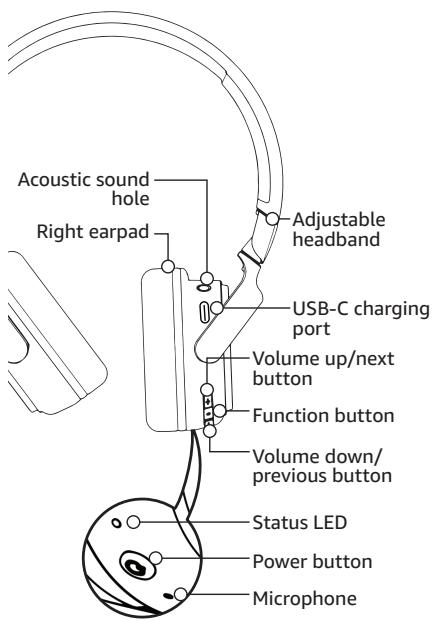
Parts Overview

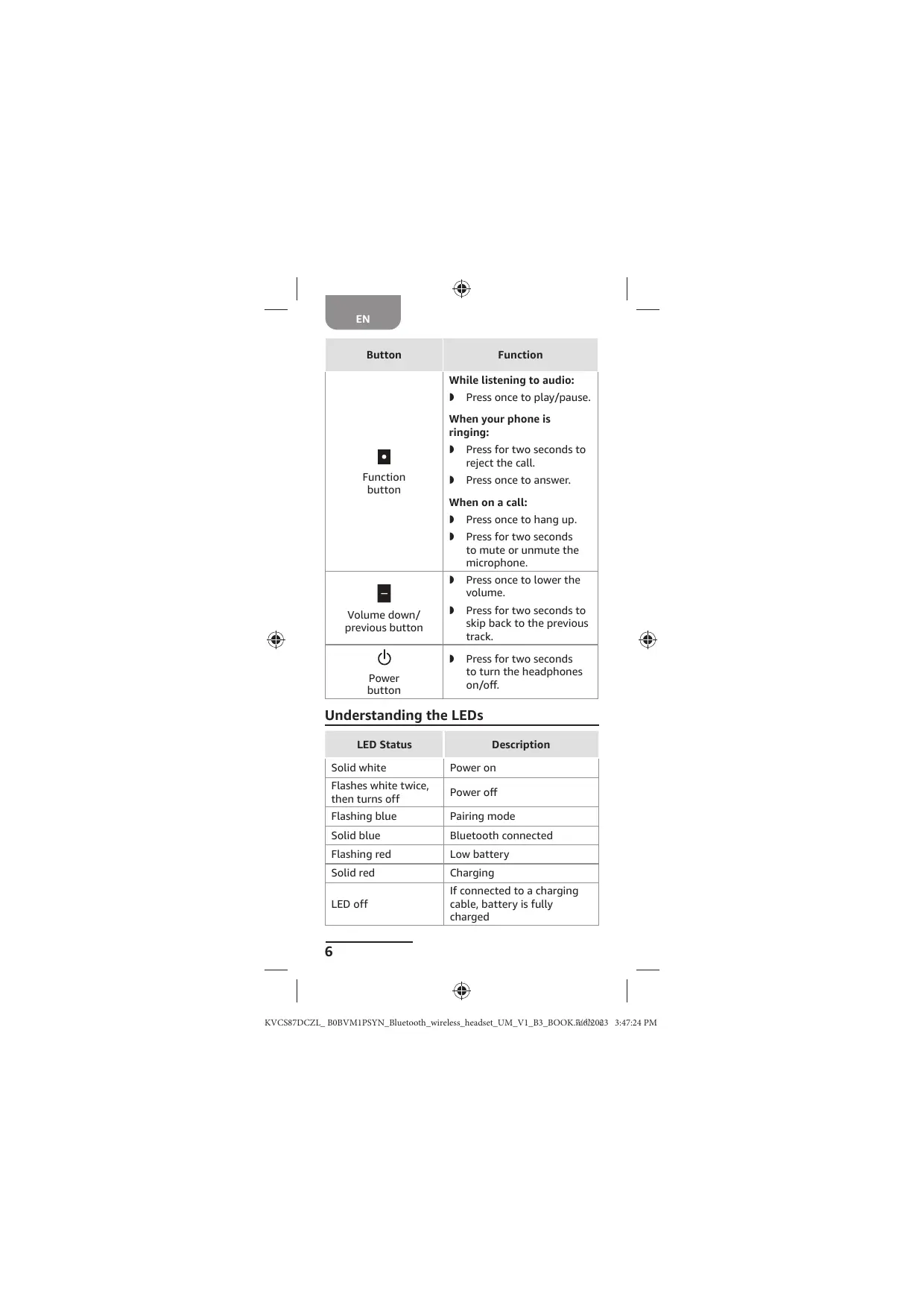
Understanding Headphone Controls
| Button | Function |
| + Volume up/ next button | Press once to raise the volume. Press for two seconds to skip forward to the next track. |
5
EN
Button

Function button

Volume down/ previous button

Power button
Function
While listening to audio:
Press once to play/pause.
When your phone is ringing:
Press for two seconds to reject the call.
Press once to answer.
When on a call:
Press once to hang up.
Press for two seconds to mute or unmute the microphone.
Press once to lower the volume.
Press for two seconds to skip back to the previous track.
Press for two seconds to turn the headphones on/off.
Understanding the LEDs
| LED Status | Description |
| Solid white | Power on |
| Flashes white twice, then turns off | Power off |
| Flashing blue | Pairing mode |
| Solid blue | Bluetooth connected |
| Flashing red | Low battery |
| Solid red | Charging |
| LED off | If connected to a charging cable, battery is fully charged |


EN
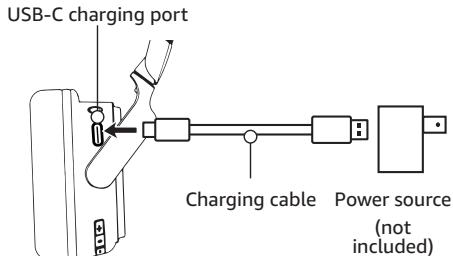
Charging the Headphones
Connect the charging cable from the headphones' USB-C port to a power source (not included).
Notes:
Do not use the headphones while charging.
To preserve the battery, make sure that the headphones are charged at least once every three months.

Using the Headphones
Pairing to a New Device
- Make sure that your headphones and Bluetooth device are within 3.3 ft. (1 m) of each other.
- Press and hold (power) for two seconds. The headphones turn on and enter pairing mode for two minutes. The status LED flashes blue, and the headphones say "Pairing."
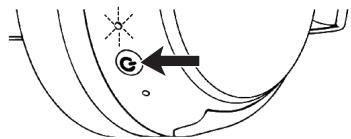
- With your Bluetooth device, turn on Bluetooth and select Amazon Basics BT Headset from the pairing list. The status LED turns solid blue, and the headphones say "Connected."
7
EN
Note: If pairing fails, repeat these steps to pair again. See "Troubleshooting" on page 9 for more help.
Automatically Connect to a Previous Device
- Make sure that your headphones and Bluetooth device are within 3.3 ft. (1 m) of each other.
- Press and hold (power) for two seconds. The headphones turn on and reconnect to the last connected device.
Switching Between Two Bluetooth Devices
You can pair to and switch between two audio sources.
- Make sure that your headphones and Bluetooth devices are within 3.3 ft. (1 m) of each other.
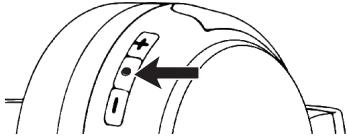
- While paired to your first Bluetooth device, press and hold (function) and (volume up) for two seconds. A tone sounds and multi-point connection turns on.
- Select Amazon Basics BT Headset from the pairing list on your second Bluetooth device.
- To switch between audio sources, press (function) to pause your current audio device, then press play on your second Bluetooth device.
Notes:
If one of your Bluetooth devices goes out of range or turns off, you may need to reconnect the remaining device.
- Phone calls take priority when connected to two Bluetooth devices.

EN
Troubleshooting
Problem
The headphones won't pain.
Solutions
- Move the headphones and Bluetooth device closer together.
Make sure your Bluetooth device is not paired to another device.
If your headphones are not reconnecting to a previously paired device, press the (power) button to turn off your headphones, then press and hold the (power) button for five seconds to re-pair.
Make sure your Bluetooth device supports Bluetooth.
Problem
The headphones are not on the Bluetooth device list
Solutions
- Move the headphones and Bluetooth device closer together.
Press (power) for five seconds to put your headphones into pairing mode, then refresh your list of Bluetooth devices.
Problem
No power
Solutions
Charge the headphones' battery.
Make sure that your headphones are turned on.
Problem
No sound or volume is too low
9
EN
Solutions
Press to raise the headphones' volume.
Raise the volume using your Bluetooth device.
Make sure your Bluetooth device is not muted.
Make sure your Bluetooth device and headphones are not paired to different devices.
Symbol Explanation
| CE | This symbol stands for "conformité Européenne", which means "Conformity with EU-directives". With the CE marking the manufacturer confirms that this product complies with applicable European directives and regulations. |
| UKCA | This symbol stands for "United Kingdom Conformity Assessed". With the UKCA-marking, the manufacturer confirms that this product complies with applicable regulations and standards within Great Britain. |

Specifications
| Importer's Name/Trademark,CommercialRegistration Number& Address | UK: AMAZON EU SARL, UK Branch, 1 Principal Place,Worship St, London EC2A 2FA, United Kingdom,BR017427EU: Amazon EU S.à r.l., 38 Avenue John F. Kennedy,L-1855 Luxembourg00134248 |
| Power Supply | DC 5V, 1A |
| Headphones Battery Type | Lithium-ion battery(3.7V/400mAh) |
| Charging Time | Less than 2 hrs. |
| Music Playtime withBluetooth On | 35 hrs. |
10

EN
| Frequency Band | 2,402–2,480MHz |
| Frequency Response | 20Hz–20kHz |
| Maximum SPL | 96dB |
| Microphone Sensitivity | -16dBV @ 1kHz/Pa |
| Bluetooth Version | 5.1 |
| Maximum Operation Temperature | 104°F (40°C) |
| Bluetooth Range | 30 ft. (10 m) |
Legal Notices
Disposal
The Waste Electrical and Electronic Equipment (WEEE) Directive aims to minimize the impact of electrical and electronic goods on the environment, by increasing re-use and recycling and by reducing the amount of WEEE going to landfill. The symbol on
this product or its packaging signifies that this product must be disposed separately from ordinary household wastes at its end of life. Be aware that this is your responsibility to dispose of electronic equipment at recycling centers in order to conserve natural resources. Each country should have its collection centers for electrical and electronic equipment recycling. For information about your recycling drop off area, please contact your related electrical and electronic equipment waste management authority, your local city office, or your household waste disposal service.
Battery Disposal
Do not dispose of used batteries with your household waste. Take them to an appropriate disposal/ collection site.
Trademarks
Bluetooth® The Bluetooth® word mark and logos are registered trademarks owned by Bluetooth SIG, Inc. and any use of such marks by Amazon.com Services LLC is under license. Other trademarks and trade names are those of their respective owners.
EN
Correct disposal of this product (Waste Electrical & Electronic Equipment)
This symbol means the product must not be discarded as household waste, and should be delivered to an appropriate collection facility for recycling. Proper disposal and recycling helps protect natural resources, human health and the
environment. For more information on disposal and recycling of this product, contact your local municipality, disposal service, or the shop where you bought this product.
This product is RoHS compliant.
This product is in compliance with Directive 2011/65/EU and UK The Restriction of the Use of Certain Hazardous Substances in Electrical and Electronic Equipment Regulations 2012, and its amendments, on the restriction of the use of certain hazardous substances in electrical and electronic equipment.
Instructions for Users on Removal, Recycling and Disposal of Used Batteries
For products with a built-in battery that lasts for the lifetime of the product, removal may not be possible for the user. In this case, recycling or recovery centers handle the dismantling of the product and the removal of the battery. If, for any reason, it becomes necessary to replace such a battery, this procedure must be performed by authorized service centers. In the European Union and other locations, it is illegal to dispose of any battery with household trash. All batteries must be disposed of in an environmentally sound manner. Contact your local waste-management officials for information regarding the environmentally sound collection, recycling and disposal of used batteries.
WARNING: Danger of explosion if battery is incorrectly replaced. To reduce risk of fire, explosion or leakage of flammable liquid/gas, don't disassemble, crush, puncture, short external contacts, expose to temperature above 60^ (140^) , sunshine or like, expose to extremely low air pressure or dispose of in fire or water. Replace only with specified batteries. The symbol indicating 'separate collection' for all batteries and accumulators shall be the crossed-out wheeled bin shown below:

Canada IC Notice
This device contains license-exempt transmitter(s) / receiver(s) that comply with Innovation, Science and Economic Development Canada's License-exempt RSS(s). Operation is subject to the following two conditions:
12


EN
(1) this device may not cause interference, and (2) this device must accept any interference, including interference that may cause undesired operation of the device.
This equipment complies with Industry Canada radiation exposure limits set forth for an uncontrolled environment.
This Class B digital apparatus complies with Canadian CAN ICES-003(B) / NMB-003(B) standard.
FCC/ISED RF Exposure Statement:
This equipment complies with the FCC/ISED RF radiation exposure limits set forth for an uncontrolled environment.
CAUTION FCC AND IC STATEMENT FOR USERS (USA AND CANADA ONLY)
This device complies with part 15 of the FCC Rules. Operation is subject to the following two conditions: (1) This device may not cause harmful interference, and (2) this device must accept any interference received, including interference that may cause undesired operation.
Federal Communication Commission Interference Statement
This equipment has been tested and found to comply with the limits for a Class B digital device, pursuant to Part 15 of the FCC Rules. These limits are designed to provide reasonable protection against harmful interference in a residential installation. This equipment generates, uses and can radiate radio frequency energy and, if not installed and used in accordance with the instructions, may cause harmful interference to radio communications.
However, there is no guarantee that interference will not occur in a particular installation. If this equipment does cause harmful interference to radio or television reception, which can be determined by turning the equipment off and on, the user is encouraged to try to correct the interference by one or more of the following measures:
Reorient or relocate the receiving antenna.
- Increase the separation between the equipment and receiver.
- Connect the equipment into an outlet on a circuit different from that to which the receiver is connected.
Consult the dealer or an experienced radio/TV technician for help.
Caution: Changes or modifications not expressly approved by AMAZON could void the user's authority to operate the equipment.

EN
Simplified EU Declaration of Conformity
Hereby, Amazon EU S.Å R.L. declares that the radio equipment type B0BVM1PSYN is in compliance with Directive 2014/53/EU.
The full text of the EU declaration of conformity is available at the following internet address: https://www.amazon.co.uk/ amazon_private_brand_EU_compliance.
Simplified UK Declaration of Conformity
Hereby, Amazon EU SARL, UK Branch declares that the radio equipment type BOBVM1PSYN is in compliance with The Radio Equipment Regulations 2017.
The full text of the UK declaration of conformity is available at the following internet address: https://www.amazon.co.uk/ amazon_private_brand_EU_compliance.
Feedback and Help
We would love to hear your feedback. To ensure we are providing the best customer experience possible, please consider writing a customer review.
Scan the QR Code below with your phone camera or QR reader:
US:

UK: amazon.co.uk/review/review-your-purchases
If you need help with your Amazon Basics product, please use the website or number below.

US: amazon.com/gp/help/customer/ contact-us
UK: amazon.co.uk/gp/help/customer/ contact-us

+1 877-485-0385 (US Phone Number)
14

FR
Contenu
FR: amazon.fr/review/review-your-purchases#
CA: amazon.com/review/review-your-purchases#
CA: amazon.ca/gp/help/customer/ contact-us
27
ES
Contenido
ES: amazon.es/review/review-your-

purchases#
MX: amazon.com.mx/review/review-your-purchases#
ES: amazon.es/gp/help/customer/ contact-us

MX: amazon.com.mx/gp/help/customer/ contact-us


DE
Inhalt
amazon.de/review/review-your-purchases#
amazon.de/gp/help/customer/contact-us

IT
Indice
amazon.it/review/review-your-purchases#
VOORZORGSGMAATREGELEN

KVCS87DCZL_B0BVM1PSYN_Bluetooth_wireless_HEADset_UM_V1_B3.Book.642086 3:47:34 PM

NL
amazon.nl/review/review-your-purchases#
amazon.nl/gp/help/customer/contact-us
日本語
目次
安全の問題注意事項 83
八味一内容. 85
構成部品の概要 85
HoppDfOnの充電 87
HoppdFonnc 使用 88
トラルシャーネインガ 89
記号の説明 90
仕樣 91
法定通知 92
F1-12V8K&t50 95

安全の注意事項
amazon.jp/review/review-your-purchases#
amazon.jp/gp/help/customer/contact-us
販壳元:アマソングヤVBUN合同会社
URL: https://www.amazon.co.jp/


amazon basics


amazon.com/AmazonBasics
MADE IN CHINA
FABRIQUE EN CHINA
HECHO EN CHINA