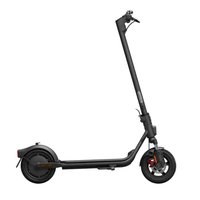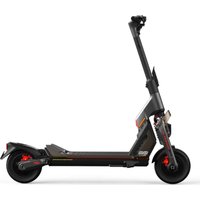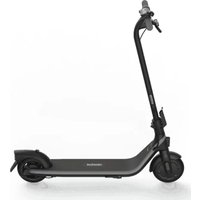
Ninebot KickScooter - Electric scooter SEGWAY - Free user manual and instructions
Find the device manual for free Ninebot KickScooter SEGWAY in PDF.


User questions about Ninebot KickScooter SEGWAY
0 question about this device. Answer the ones you know or ask your own.
Ask a new question about this device
Download the instructions for your Electric scooter in PDF format for free! Find your manual Ninebot KickScooter - SEGWAY and take your electronic device back in hand. On this page are published all the documents necessary for the use of your device. Ninebot KickScooter by SEGWAY.
USER MANUAL Ninebot KickScooter SEGWAY
text_image
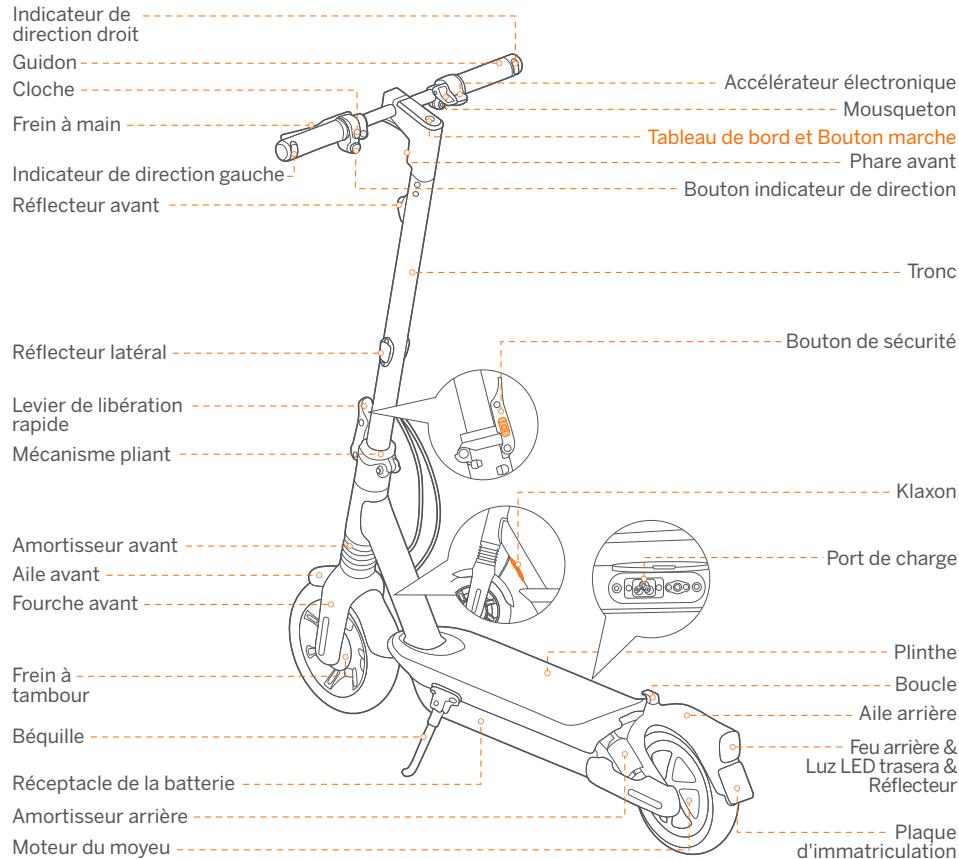
Right Direction Indicator Handlebar Horn Button Brake Lever Left Direction Indicator Front Reflector Electronic Throttle Snap Hook Dashboard & Power Button Headlight Direction Indicator Switch Stem Side Reflector Safety Button Quick-release Lever Folding Mechanism Horn Front Shock Absorber Front Fender Front Fork Charge Port Drum Brake Footboard Buckle Rear Fender Tail light & Brake Light & Reflector Kickstand Insurance Plate Area Battery Compartment Rear Shock Absorber Hub MotorDashboard & Power Button
text_image
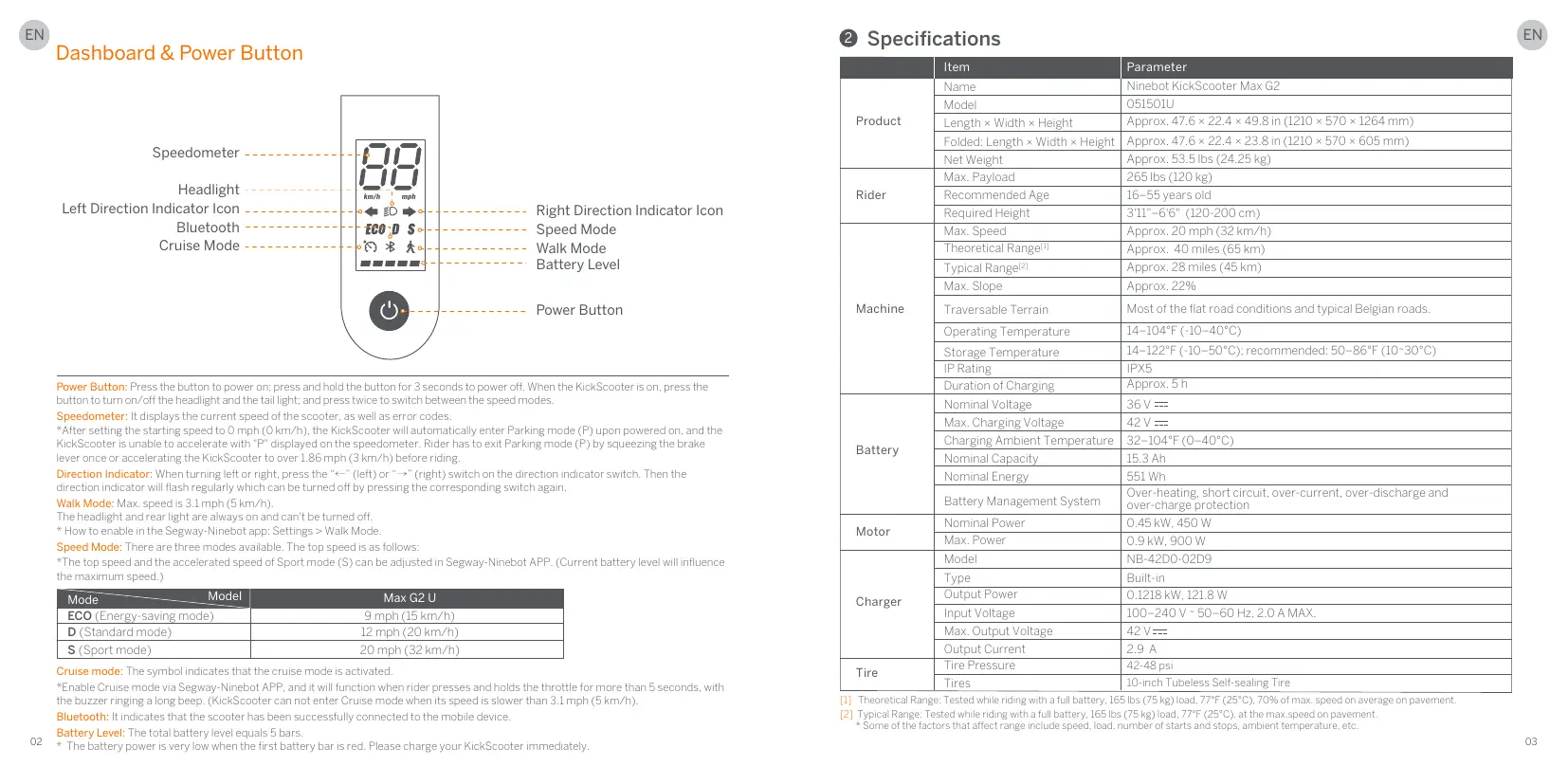
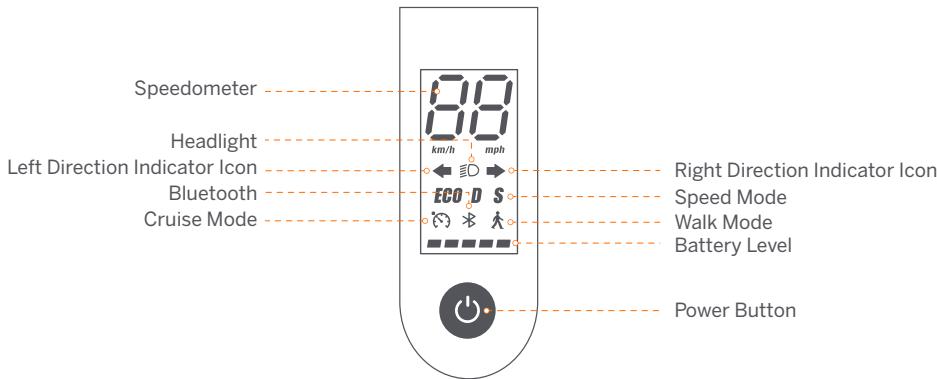
Speedometer Headlight Left Direction Indicator Icon Bluetooth Cruise Mode 8.0 km/h mph ECO D S Right Direction Indicator Icon Speed Mode Walk Mode Battery Level Power ButtonPower Button: Press the button to power on; press and hold the button for 3 seconds to power off. When the KickScooter is on, press the button to turn on/off the headlight and the tail light; and press twice to switch between the speed modes.
Speedometer: It displays the current speed of the scooter, as well as error codes.
*After setting the starting speed to 0 mph (0 km/h), the KickScooter will automatically enter Parking mode (P) upon powered on, and the KickScooter is unable to accelerate with "P" displayed on the speedometer. Rider has to exit Parking mode (P) by squeezing the brake lever once or accelerating the KickScooter to over 1.86 mph (3 km/h) before riding.
Direction Indicator: When turning left or right, press the “←” (left) or “→” (right) switch on the direction indicator switch. Then the direction indicator will flash regularly which can be turned off by pressing the corresponding switch again.
Walk Mode: Max. speed is 3.1 mph (5 km/h).
The headlight and rear light are always on and can't be turned off.
* How to enable in the Segway-Ninebot app: Settings > Walk Mode.
Speed Mode: There are three modes available. The top speed is as follows:
*The top speed and the accelerated speed of Sport mode (S) can be adjusted in Segway-Ninebot APP. (Current battery level will influence the maximum speed.)
| Mode | Model | Max G2 U |
| ECO (Energy-saving mode) | 9 mph (15 km/h) | |
| D (Standard mode) | 12 mph (20 km/h) | |
| S (Sport mode) | 20 mph (32 km/h) | |
Cruise mode: The symbol indicates that the cruise mode is activated.
*Enable Cruise mode via Segway-Ninebot APP, and it will function when rider presses and holds the throttle for more than 5 seconds, with the buzzer ringing a long beep. (KickScooter can not enter Cruise mode when its speed is slower than 3.1 mph (5 km/h).
Bluetooth: It indicates that the scooter has been successfully connected to the mobile device.
Battery Level: The total battery level equals 5 bars.
* The battery power is very low when the first battery bar is red. Please charge your KickScooter immediately.
② Specifications
| Item | Parameter | |
| Product | Name | Ninebot KickScooter Max G2 |
| Model | 051501U | |
| Length × Width × Height | Approx. 47.6 × 22.4 × 49.8 in (1210 × 570 × 1264 mm) | |
| Folded: Length × Width × Height | Approx. 47.6 × 22.4 × 23.8 in (1210 × 570 × 605 mm) | |
| Net Weight | Approx. 53.5 lbs (24.25 kg) | |
| Rider | Max. Payload | 265 lbs (120 kg) |
| Recommended Age | 16-55 years old | |
| Required Height | 3'11"-6'6" (120-200 cm) | |
| Machine | Max. Speed | Approx. 20 mph (32 km/h) |
| Theoretical Range[1] | Approx. 40 miles (65 km) | |
| Typical Range[2] | Approx. 28 miles (45 km) | |
| Max. Slope | Approx. 22% | |
| Traversable Terrain | Most of the flat road conditions and typical Belgian roads. | |
| Operating Temperature | 14-104°F (-10-40°C) | |
| Storage Temperature | 14-122°F (-10-50°C); recommended: 50-86°F (10-30°C) | |
| IP Rating | IPX5 | |
| Duration of Charging | Approx. 5 h | |
| Battery | Nominal Voltage | 36 V === |
| Max. Charging Voltage | 42 V === | |
| Charging Ambient Temperature | 32-104°F (0-40°C) | |
| Nominal Capacity | 15.3 Ah | |
| Nominal Energy | 551 Wh | |
| Battery Management System | Over-heating, short circuit, over-current, over-discharge and over-charge protection | |
| Motor | Nominal Power | 0.45 kW, 450 W |
| Max. Power | 0.9 kW, 900 W | |
| Charger | Model | NB-42D0-02D9 |
| Type | Built-in | |
| Output Power | 0.1218 kW, 121.8 W | |
| Input Voltage | 100-240 V ~ 50-60 Hz, 2.0 A MAX. | |
| Max. Output Voltage | 42 V === | |
| Output Current | 2.9 A | |
| Tire | Tire Pressure | 42-48 psi |
| Tires | 10-inch Tubeless Self-sealing Tire |
[1] Theoretical Range: Tested while riding with a full battery, 165 lbs (75 kg) load, 77°F (25°C), 70% of max. speed on average on pavement.
[2] Typical Range: Tested while riding with a full battery, 165 lbs (75 kg) load, 77°F (25°C), at the max.speed on pavement.
* Some of the factors that affect range include speed, load, number of starts and stops, ambient temperature, etc.
③ Certifications
This product is certified to ANSI/CAN/UL-2272.
The battery complies with UN/DOT 38.3.
The battery complies with ANSI/CAN/UL-2271.
Federal Communications Commission (FCC) Compliance Statement for USA
This device complies with part 15 of the FCC rules. Operation is subject to the following two conditions: (1) This device may not cause harmful interference, and (2) this device must accept any interference received, including interference that may cause undesired operation.
Any Changes or modifications not expressly approved by the party responsible for compliance could void the user's authority to operate the equipment.
NOTE
This equipment has been tested and found to comply with the limits for a Class B digital device, pursuant to part 15 of the FCC Rules. These limits are designed to provide reasonable protection against harmful interference in a residential installation. This equipment generates, uses and can radiate radio frequency energy and, if not installed and used in accordance with the instructions, may cause harmful interference to radio communications. However, there is no guarantee that interference will not occur in a particular installation. If this equipment does cause harmful interference to radio or television reception, which can be determined by turning the equipment off and on, the user is encouraged to try to correct the interference by one or more of the following measures:
—Reorient or relocate the receiving antenna.
—Increase the separation between the equipment and receiver.
—Connect the equipment into an outlet on a circuit different from that to which the receiver is connected.
—Consult the dealer or an experienced radio/TV technician for help.
Industry Canada (IC) Compliance Statement for Canada
This device complies with Industry Canada license-exempt RSS standard (s). Operation is subject to the following two conditions: (1) this device may not cause interference, and (2) this device must accept any interference, including interference that may cause undesired operation of the device.
CANICES-3 (B)/NMB-3(B)
Neither Segway Inc. nor Ninebot is responsible for any changes or modifications not expressly approved by Segway Inc. or Ninebot. Such modifications could void the user's authority to operate the equipment.
Model: 051501U
FCC ID: 2ALS8-KS0013
IC ID: 22636-KS0013
4 Trademark
Ninebot is the trademark of Ninebot (Beijing) Tech Co., Ltd; Segway and the Rider Design are the registered trademarks of Segway Inc., App Store®/App Store, Apple logo®/Apple logo, iPadOS®/iPadOS, macOS®/macOS, Find My™/Find My and Works with Apple Find My logo™/Works with Apple Find My logo are registered trademarks/trademarks of Apple Inc., registered in the U.S. and other countries. IOS is a trademark or registered trademark of Cisco in the U.S. and other countries and is used under license. Google Play and the Google Play logo are trademarks of Google LLC. The Bluetooth® word mark and logos are registered trademarks owned by Bluetooth SIG, Inc. and any use of such marks by Segway-Ninebot is under license. Other trademarks and trade names are those of their respective owners.
The KickScooter is covered by relevant patents. For patent information, go to http://www.segway.com
We have attempted to include descriptions and instructions for all the functions of the KickScooter at the time of printing. However, due to constant improvement of product features and changes of design, your KickScooter may differ slightly from the one shown in this document. Scan the QR code or visit the Apple App Store (iOS) or the Google Play Store (Android) to download and install the App.
Please note that there are multiple Segway and Ninebot models with different functions, and some of the functions mentioned herein may not be applicable to your unit. The manufacturer reserves the right to change the design and functionality of the KickScooter product and documentation without prior notice.
© 2022 Ninebot (Beijing) Tech Co., Ltd. All rights reserved.
(※The Segway-Ninebot App can support KickScooter with built-in Bluetooth)
⑤ Recommended Maintenance Schedule
To ensure safe riding, day to day care and regular maintenance are essential. You, the owner, have control and knowledge of how often you use your scooter, how hard you use it and where you use it. It is the owner's responsibility to perform regular checks and bring your scooter to authorized service center for inspection and service. Please refer to the maintenance schedule below.
Note: This maintenance schedule charges a service fee.
| Item | Component | Maintenance Method | Every 3 months | Every 6 months or every 310 miles (500 km) | Every 1 year or every 621 miles (1,000 km) | Every 3 years or every 6,214 miles (10,000 km) |
| Mainframe maintenance | Mainframe parts | Use a soft, wet cloth to wipe the mainframe clean. | √ | √ | √ | √ |
| Tire pressure | Inflate tires to 42-48 psi | √ | √ | √ | √ | |
| Tire wear | Check if the tires are cracked, deformed, or significantly worn. | √ | √ | √ | ||
| Screws on the stem top | Tighten the screws fixed with the handlebar and the stem. The suggested torque is 5.5 ± 0.5 N·m. | √ | √ | √ | √ | |
| Tighten the screw on the throttle. The suggested torque is 0.9 ± 0.06 N·m.Tighten the screws on the brake lever. The suggested torque is 6 ± 1 N·m.Tighten the screws on the stem top. The suggested torque is 8.5 ± 0.5 N·m. | √ | √ | √ | |||
| Screws on the folding mechanism | Tighten the fixing screws of the folding handle and the front fork, Two lateral screws at the side, the recommended torque is 15 ± 1 N·mFold and unfold, the upper vertical screw, the recommended torque is 15 ± 1 N·mFold the connecting rod, and fasten the connecting rod screws when rocking on the bike. The folding is smooth without shaking. | √ | √ | √ |
| Item | Component | Maintenance Method | Every 3 months | Every 6 months or every 310 miles (500 km) | Every 1 year or every 621 miles (1,000 km) | Every 3 years or every 6,214 miles (10,000 km) |
| Function inspection | Hub motor | To accelerate and decelerate, check if the hub motor is stalled or has abnormal sounds. | √ | √ | ||
| Front wheel maintenance | Check if the front wheel is stalled or gets shaky, or the axis shaft is unbalanced. | √ | √ | |||
| Brake adjustment | If the brake is too tight/loose, use the 4 mm Allen key to loosen the screw on the caliper. Then slightly adjust the brake line (decrease/increase the exposed length), and tighten the screw again. Test standard: the riding speed is 12.4 mph (20 km/h), and the braking distance is within 6m | √ | √ | √ | ||
| Drum brake | Front wheel can rotate normally without abnormal sound. Front wheel can be braked after squeezing the brake lever. | √ | √ | √ | ||
| Taillight | Squeeze the brake lever, the tail light works normally. | √ | √ | √ | ||
| Headlight | Check the headlight and see if it lights brightly. | √ | √ | √ | ||
| Direction indicators | Toggle the direction indicator button to the left/right respectively, check if the direction indicators on the left/right side flash normally. | √ | √ | √ | ||
| Dashboard | Power on the scooter, the dashboard works properly. | √ | √ | √ | ||
| Horn | Press the horn button and the sound is loud. | √ | √ | √ | ||
| Throttle | Press and hold the throttle then release it, checking for acceleration and deceleration. Note: Release it, check if the throttle will back to the position. | √ | √ | √ | ||
| Function inspection | Fault detection | After connecting with the Segway-Ninebot app:1) Update the firmware to the latest version.2) Check if the notification of the corresponding error code and possible causes will prompt when the scooter detects an error | √ | √ | √ | |
| Charging | Charge the scooter:1) Check if the current battery power displays on the dashboard.2) Check the LED indicator on the battery charger.Charging: red, Fully charged: green. | √ | √ | √ | ||
| Control buttons | Press or toggle the button 3 times without failure. | √ | √ | √ | ||
| Turning | Test with left turns and right turns (the steering angle is 60). No resistance or lag when turning. | √ | √ | |||
| Important parts | Battery assembly | The battery need to be replaced when it is charged and discharged for 500 times or the total mileage is more than 6,214 miles (10,000 km).Note: It is recommended to charge once every 60 days for long-term storage. | √ | |||
| Controller | After 3 years' or 6,214 miles' (10,000 km's) riding, the abnormal parts of the kickscooter have to be replaced immediately. | |||||
| Hub motor | ||||||
| Functional parts | Rear wheel assembly | |||||
| Throttle & Brake lever | ||||||
| Front fork assembly | ||||||
| Folding mechanism | ||||||
| Drumbrake | ||||||
| Dashboard Cover |
1 Diagramme