CA20701 - Laptop ASUS - Free user manual and instructions
Find the device manual for free CA20701 ASUS in PDF.



| Product type | ROG portable gaming console |
| Brand | ASUS |
| Model | CA20701 |
| Display | 7-inch touchscreen (estimated) |
| Power supply | 65 W AC adapter (input 100-240 V, 50-60 Hz, output 20 V, 3.25 A) |
| Battery | Internal non-removable lithium-ion |
| Operating temperature | 5°C to 35°C |
| Connectors | 1x USB 3.2 Gen 2 Type-C (DisplayPort 1.4 / power), 1x headphone/microphone combo jack, 1x ROG XG Mobile interface |
| Expandable storage | microSD card slot (UHS-II) |
| Control buttons | Left/right analog sticks, D-pad, A/B/X/Y, L/R triggers, macro buttons (2), volume buttons, power button with fingerprint sensor |
| Audio | Stereo speakers, microphone array |
| Sensors | Fingerprint sensor (on power button), accelerometer (not specified but likely) |
| LED indicators | Power indicator, bi-color battery charge indicator |
| System compatibility | Windows (pre-installed, version not specified) |
| Security | Fingerprint sensor for quick login |
| Repairability | Non-removable battery, replacement only by ASUS authorized technician |
| Compliance | EU (2014/53/EU), FCC, ISED Canada, SAR max 1.6 W/kg |
| Weight | Approximately 608 g (estimated) |
| Dimensions (L x W x H) | Approximately 28 x 11.1 x 2.1 cm (estimated) |
Frequently Asked Questions - CA20701 ASUS
User questions about CA20701 ASUS
0 question about this device. Answer the ones you know or ask your own.
Ask a new question about this device
Download the instructions for your Laptop in PDF format for free! Find your manual CA20701 - ASUS and take your electronic device back in hand. On this page are published all the documents necessary for the use of your device. CA20701 by ASUS.
USER MANUAL CA20701 ASUS
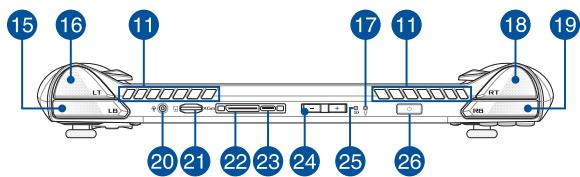
14 Macro 2 button
15 Left bumper
16 Left trigger
17 Power indicator
18 Right trigger
19 Right bumper
20 Headphone/Headset/Microphone jack
21 MicroSD card slot (supports up to UHS-II)
22 ROG XG Mobile interface
USB 3.2 Gen 2 Type-C/DisplayPort 1.4/Power (DC) input combo port
24 Volume buttons
25 Two-color battery charge indicator
26 Power button/Fingerprint sensor
Vue de dessus
1. Charge your ROG Handheld Console
A. Connect the DC power connector into the ROG Handheld Console's power (DC) input port.
B. Plug the AC power adapter into a 100V~240V power source.
IMPORTANT! Use only the bundled power adapter to charge the battery pack and supply power to your ROG Handheld Console.
NOTE: The power adapter may vary in appearance, depending on models and your region.
Safety notices for your ROG Handheld Console
CAUTION!
- This device should only be used in environments with ambient temperatures between 5^ ( 41^ ) and 35^ ( 95^ ).
IMPORTANT!
- Ensure that your device is connected to the power adapter before turning it on for the first time. Always plug the power cord into a wall socket without using any extension cords. For your safety, connect this device to a properly grounded electrical outlet only.
-
Never attempt to disassemble and reassemble the device.
Power supply specifications: -
Input voltage: 100-240Vac
- Input frequency: 50-60Hz
Rating output current: 3.25A (65W)
Rating output voltage: 20V
WARNING!
Read the following precautions for your device's battery:
- Only ASUS-authored technicians should remove the battery inside the device (for non-removable battery only).
- The battery used in this device may present a risk of fire or chemical burn if removed or disassembled.
- Follow the warning labels for your personal safety.
- Risk of explosion if battery is replaced by an incorrect type.
-
Do not dispose of in fire.
-
Never attempt to short-circuit your device's battery.
- Never attempt to disassemble and reassemble the battery (for non-removable battery only).
- Discontinue usage if leakage is found.
- This battery and its components must be recycled or disposed of properly.
- Keep the battery and other small components away from children.
Copyright Information
You acknowledge that all rights of this Manual remain with ASUS. Any and all rights, including without limitation, in the Manual or website, are and shall remain the exclusive property of ASUS and/or its licensors. Nothing in this Manual intends to transfer any such rights, or to vest any such rights to you.
ASUS PROVIDES THIS MANUAL "AS IS" WITHOUT WARRANTY OF ANY KIND. SPECIFICATIONS AND INFORMATION CONTAINED IN THIS MANUAL ARE FURNISHED FOR INFORMATIONAL USE ONLY, AND ARE SUBJECT TO CHANGE AT ANY TIME WITHOUT NOTICE, AND SHOULD NOT BE CONSTRUED AS A COMMITMENT BY ASUS.
Copyright © 2023 ASUSTeK COMPUTER INC. All Rights Reserved.
Limitation of Liability
Circumstances may arise where because of a default on ASUS' part or other liability, you are entitled to recover damages from ASUS. In each such instance, regardless of the basis on which you are entitled to claim damages from ASUS, ASUS is liable for no more than damages for bodily injury (including death) and damage to real property and tangible personal property; or any other actual and direct damages resulted from omission or failure of performing legal duties under this Warranty Statement, up to the listed contract price of each product.
ASUS will only be responsible for or indemnify you for loss, damages or claims based in contract, tort or infringement under this Warranty Statement.
This limit also applies to ASUS' suppliers and its reseller. It is the maximum for which ASUS, its suppliers, and your reseller are collectively responsible.
UNDER NO CIRCUMSTANCES IS ASUS LIABLE FOR ANY OF THE FOLLOWING: (1) THIRD-PARTY CLAIMS AGAINST YOU FOR DAMAGES; (2) LOSS OF, OR DAMAGE TO, YOUR RECORDS OR DATA; OR (3) SPECIAL, INCIDENTAL, OR INDIRECT DAMAGES OR FOR ANY ECONOMIC CONSEQUENTIAL DAMAGES (INCLUDING LOST PROFITS OR SAVINGS), EVEN IF ASUS, ITS SUPPLIERS OR YOUR RESELLER IS INFORMED OF THEIR POSSIBILITY.
Prevention of Hearing Loss
To prevent possible hearing damage, do not listen at high volume levels for long periods.

FCC RF Exposure Information
This device meets the government's requirements for exposure to radio waves. This device is designed and manufactured not to exceed the emission limits for exposure to radio frequency (RF) energy set by the Federal Communications Commission of the U.S. Government. The exposure standard employs a unit of measurement known as the Specific Absorption Rate, or SAR. The SAR limit set by the FCC is 1.6W / kg . Tests for SAR are conducted using standard operating positions accepted by the FCC with the EUT transmitting at the specified power level in different channels. The FCC has granted an Equipment Authorization for this device with all reported SAR levels evaluated as in compliance with the FCC RF exposure guidelines. SAR information on this device is on file with the FCC and can be found under the Display Grant section of www.fcc.gov/oet/ea/fccid.
FCC RF Caution Statement
WARNING! Any changes or modifications not expressly approved by the party responsible for compliance could void the user's authority to operate this equipment.
The antenna used with this transmitter must not be colocated or operated in conjunction with any other antenna or transmitter subject to the conditions of the FCC Grant.
FCC Wi-Fi 6E Caution Statement
FCC regulations restrict the operation of this device to indoor use only. The operation of this device is prohibited on oil platforms, cars, trains, boats, and aircraft, except that operation of this device is permitted in large aircraft while flying above 10,000 feet.
UL Safety Notices
- DO NOT use this device near water, for example, near a bath tub, wash bowl, kitchen sink or laundry tub, in a wet basement or near a swimming pool.
- DO NOT use this device during an electrical storm. There may be a remote risk of electric shock from lightning.
- DO NOT use this device in the vicinity of a gas leak.
Radiation Exposure Statement
The product comply with the FCC portable RF exposure limit set forth for an uncontrolled environment and are safe for intended operation as described in this manual. The further RF exposure reduction can be achieved if the product can be kept as far as possible from the user body or set the device to lower output power if such function is available.
Simplified EU Declaration of Conformity
ASUSTek Computer Inc. hereby declares that this device is in compliance with the essential requirements and other relevant provisions of Directive 2014/53/EU. Full text of EU declaration of conformity is available at https://www.asusc.com/support/.
The WiFi operating in the band 5150-5350 MHz shall be restricted to indoor use for countries listed in the table below:
| AT | BE | BG | CZ | DK | EE | FR |
| DE | IS | IE | IT | EL | ES | CY |
| LV | LI | LT | LU | HU | MT | NL |
| NO | PL | PT | RO | SI | SK | TR |
| FI | SE | CH | HR | UK(NI) |
C E
ISED Wi-Fi 6E Caution Statement (RLAN devices)
Devices shall not be used for control of or communications with unmanned aircraft systems.
Compliance Statement of Innovation, Science and Economic Development Canada (ISED)
This device complies with Innovation, Science and Economic Development Canada license exempt RSS standard(s). Operation is subject to the following two conditions: (1) this device may not cause interference, and (2) this device must accept any interference, including interference that may cause undesired operation of the device.
Operation in the band 5150-5250 MHz is only for indoor use to reduce the potential for harmful interference to co-channel mobile satellite systems.
CAN ICES-003(B)/NMB-003(B)
ISED SAR Information
This EUT is compliant with SAR for general population/uncontrolled exposure limits in IC RSS-102. This equipment should be installed and operated with a minimum distance of 0 cm between the radiator and your body. This equipment complies with ISED radiation exposure limits set forth for an uncontrolled environment. The end user must follow the specific operating instructions to satisfy RF exposure compliance. This transmitter must not be co-located or operating in conjunction with any other antenna or transmitter. The portable device is designed to meet the requirements for exposure to radio waves established by the ISED. These requirements set a SAR limit of 1.6W / kg averaged over one gram of tissue.
Federal Communications Commission Interference Statement
This equipment has been tested and found to comply with the limits for a Class B digital device, pursuant to part 15 of the FCC Rules. These limits are designed to provide reasonable protection against harmful interference in a residential installation. This equipment generates, uses and can radiate radio frequency energy and, if not installed and used in accordance with the instructions, may cause harmful interference to radio communications. However, there is no guarantee that interference will not occur in a particular installation. If this equipment does cause harmful interference to radio or television reception, which can be determined by turning the equipment off and on, the user is encouraged to try to correct the interference by one or more of the following measures:
- Reorient or relocate the receiving antenna.
- Increase the separation between the equipment and receiver.
- Connect the equipment into an outlet on a circuit different from that to which the receiver is connected.
- Consult the dealer or an experienced radio/TV technician for help.
FCC COMPLIANCE INFORMATION
Per FCC Part 2 Section 2.1077

Responsible Party: Asus Computer International
Address: 48720 Kato Rd., Fremont, CA 94538
Phone/Fax No: (510)739-3777/(510)608-4555
hereby declares that the product
Product Name: Handheld Console PC
Model Number: RC71L
compliance statement:
This device complies with part 15 of the FCC Rules. Operation is subject to the following two conditions: (1) This device may not cause harmful interference, and (2) this device must accept any interference received, including interference that may cause undesired operation.
Var. 180125