
WHISPER FLEX ULTIMATE - Fan DUUX - Free user manual and instructions
Find the device manual for free WHISPER FLEX ULTIMATE DUUX in PDF.



User questions about WHISPER FLEX ULTIMATE DUUX
0 question about this device. Answer the ones you know or ask your own.
Ask a new question about this device
Download the instructions for your Fan in PDF format for free! Find your manual WHISPER FLEX ULTIMATE - DUUX and take your electronic device back in hand. On this page are published all the documents necessary for the use of your device. WHISPER FLEX ULTIMATE by DUUX.
USER MANUAL WHISPER FLEX ULTIMATE DUUX
Thank you for choosing Duux.
We're so glad you decided to read the instruction to your new Duux fan! Many users casually dismiss instructions and seek to figure it out on their own. But studies show that people who read instructions will get up to speed more quickly and efficiently than those who poke around with trial and error.
At Duux we believe in the importance of a comfortable and healthy living environment. Enhancing your wellbeing by designing appealing, functional and effective products is the passion that drives us every day. With our range of innovative air treatment products we aim to provide you the best possible indoor air quality.
Meet the cooling fan that surprises you with a gentle breeze, a vigorous gust of wind and everything in between. The Duux Whisper Flex Ultimate has no less than 30 speed settings. In this way you can always find the perfect airflow environment. Thanks to the horizontal and vertical oscillation function, the Duux Whisper Flex Ultimate provides a pleasant coolness throughout any room. Choose yourself, which mode you prefer; fixed speed, natural wind or perhaps the night mode, by which you are lulled in sleep by the whispering breeze. The separately available dock and battery pack allows you to freely move the devise without wires. Read the manual carefully to get to most out of your Duux Whisper Flex Ultimate.
Box contents
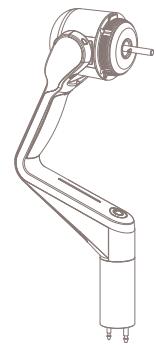
Motor
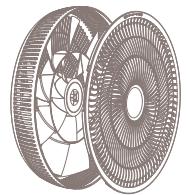
Grill with fan blades
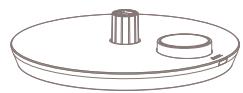
Base unit

Remote control

Extension tube

Tools
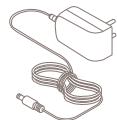
Power adapter

User guide
Table of contents
- Product overview
- Installation and use
- Maintenance
- Functions
5 Technical specifications
1. Product overview
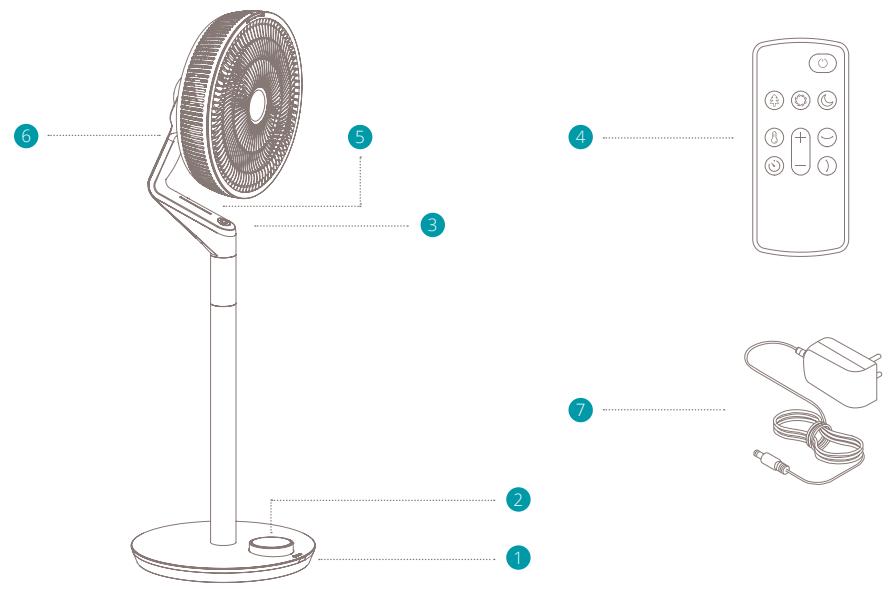
Parts
Remote control receiver
2 Display & Control panel
3 Power button
Remote control
Remote control position 1
Remote control position 2
7 Power adapter
2. Installation and use
Read before installation:
- When using electrical appliances, basic precautions should always be followed to reduce the risk of fire, electric shock and injury.
- Before using the device, please carefully read the entire instruction manual.
General cautions
- For indoor use only. Do not use in commercial, industrial or outdoor environments.
- Do not use the device in the vicinity of flammable or explosive substances or fuels. Never use any paint, cleaning sprays, anti-insect sprays or similar near the unit; this could deform the plastic or cause electrical damage.
- Always turn off and unplug the power cord when not in use, servicing, cleaning or moving the device.
- Do not route the power cord or adaptor under rugs, carpets or furniture. This may damage the cord/adaptor or cause it to overheat creating a fire hazard.
- Do not route the power cord in or through doorways or areas where the cord may be damaged or create a tripping hazard.
- Only use the device in the upright position on a
flat level surface (even during transport) and at least 50cm from any objects.
- Never insert or allow fingers or objects to enter grill openings while the device is operating to prevent injury and/or damage to the device.
- Do not block, cover or obstruct the air inlet/outlet while the device is operating.
- Never use a single extension cord to operate more than one electrical device.
- Do not use the device near a window opening. Rain may create an electrical hazard.
- Do not use this device when it is damaged or not functioning properly.
- Do not operate the device with a damaged cord or plug.
- Do not mount the device on walls or ceiling.
- Do not operate the device when the housing is removed or damaged.
- Do not use the device in swimming pools, washrooms or similar wet areas.
- Do not use the device in a potentially explosive environment containing combustible liquids, gases or dusts.
- Ensure that there is at least 50cm between the sides of the device and any flammable, heating materials.
-
Closely supervise any children and pets when the device is in use.
-
Keep children away from playing with the device.
- Do not pull the unit along by the cord.
If the supplied power cord is damaged it must be replaced by an electrician or qualified person to avoid any hazard. - The mains supply must confirm to the specification shown on the rating label on the back of the device.
- Close doors and windows for optimal efficiency.
- Keep curtains or blinds closed during the sunniest hours of the day.
- Do not turn on the device if you have discovered damage to the appliance, cord or plug or if the device is malfunctioning or if there are signs of any other defect. Return the complete product to the point of purchase or to a certified electrician for inspection and/or repair. Always ask for original parts. The device (incl. cord and plug) may only be opened and/or repaired by properly authorized and qualified persons.
Only a licensed professional is allowed to dismantle or modify the device. - This device is to be used only for its prescribed purpose. Any other use is deemed to be a cause of misuse. The user/operator, not the manufacturer will be liable for any damage or injuries of any kind caused as a result of this
Installing the product
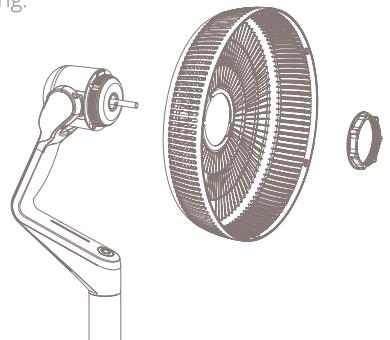
Install and secure rear grill: Place the rear grill over the motor and tighten with the locking ring.
Note: Make sure the pins on the motor axis align with the groove on the fan blade
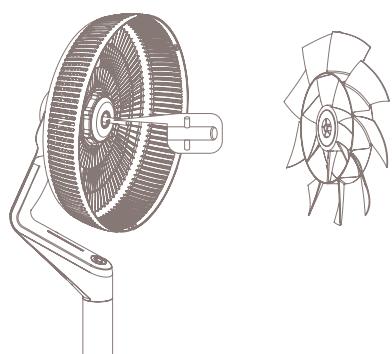
3 Secure fan blade: Use the plastic nut to secure the fan blade to the motor.
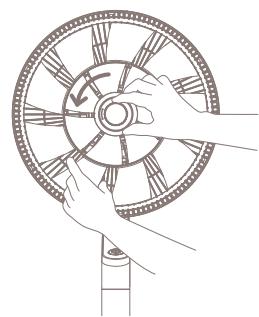
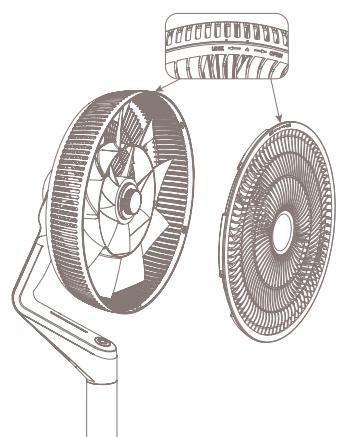
4 Install front grill: Place the front grill on the back grill. While doing so, make sure to align arrow on the front grill with the right-side marker. Rotate it counter clockwise until it aligns with the left-side marker.
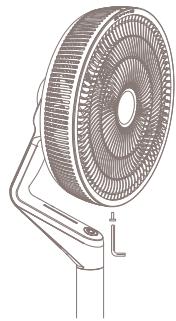
Fit the supplied screw (part 6) to the underside of the grill and connect the two halves firmly together.
6 Assemble table fan: Attach the motor to the base by fitting the two metal pins of the motor connector to the designated holes in the base connector.
Note: The largest of the two pins must align with the largest of the two holes. The pins are not identical in size to ensure proper connection in only one orientation.
Disassemble table fan: Disconnect the motor from the base by lifting the fan and squeezing the locking mechanism on the bottom of the base. Simultaneously pull the motor from the base.
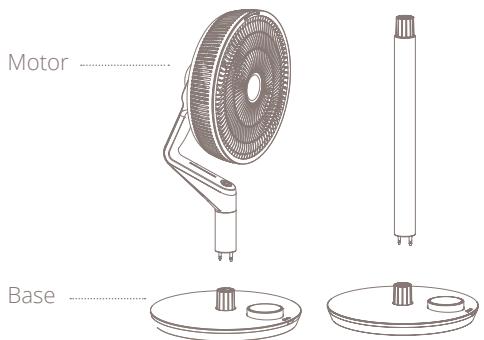
Assembly standing fan: To extend the height of the fan, insert the extension tube by fitting the two metal pins of the extension tube connector to the designated holes in the base connector. Similarly match the metal pins of motor connector to the top of the extension tube.
Disassemble standing fan: Disconnect the motor from the extension tube by squeezing the locking mechanism at the top of the tube. Pull the motor away from the extension tube at the same time. Disconnect the extension tube by lifting the fan and squeezing the locking mechanism on the bottom of the base. Simultaneously pull the motor from the base.
Installing the remote control
1 Open battery compartment: Slide the battery tray out of the remote
Place battery: Look for the correct orientation of the polarity (+ and -).
3 Close the battery compartment: Slide the battery tray back into the remote until it snaps in place.
Installing the dock + battery pack
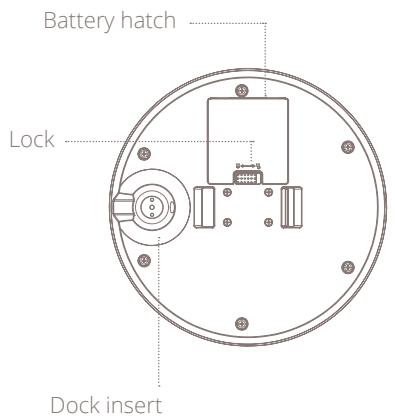
Open battery compartment: Open the battery hatch on the bottom of the base by sliding the lock to "unlock" and remove the lid.
Place battery: Place the battery in the battery compartment.
3 Close battery compartment: Place the lid back on the compartment and push to close. You should hear and audible click.
3. Maintenance
Important: Always unplug the device from the mains before cleaning. To maximize the efficiency of the device, clean regularly
Cleaning the fan
Use a soft, damp cloth to wipe the fan clean. Never use aggressive chemicals, gasoline, detergents, chemically treated cloths, or other cleaning solutions. These all could possible damaging the casing material.
1
2
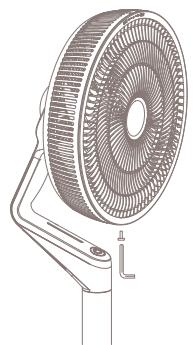
Use the screwdriver to remove the screw located at the bottom of the grill.
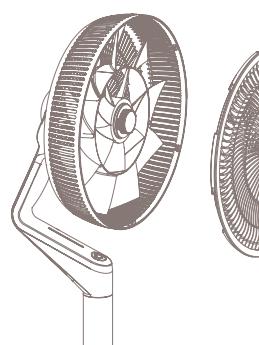
2 Turn the front grill clockwise and remove it.
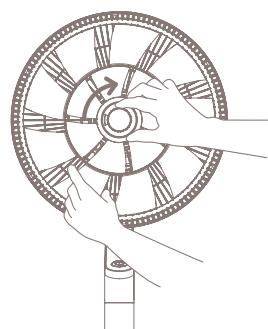
3 Unscrew the plastic nut and remove the fan blade from the motor.
Use a soft, damp cloth to wipe the fan blade clean.
3
4. Functions
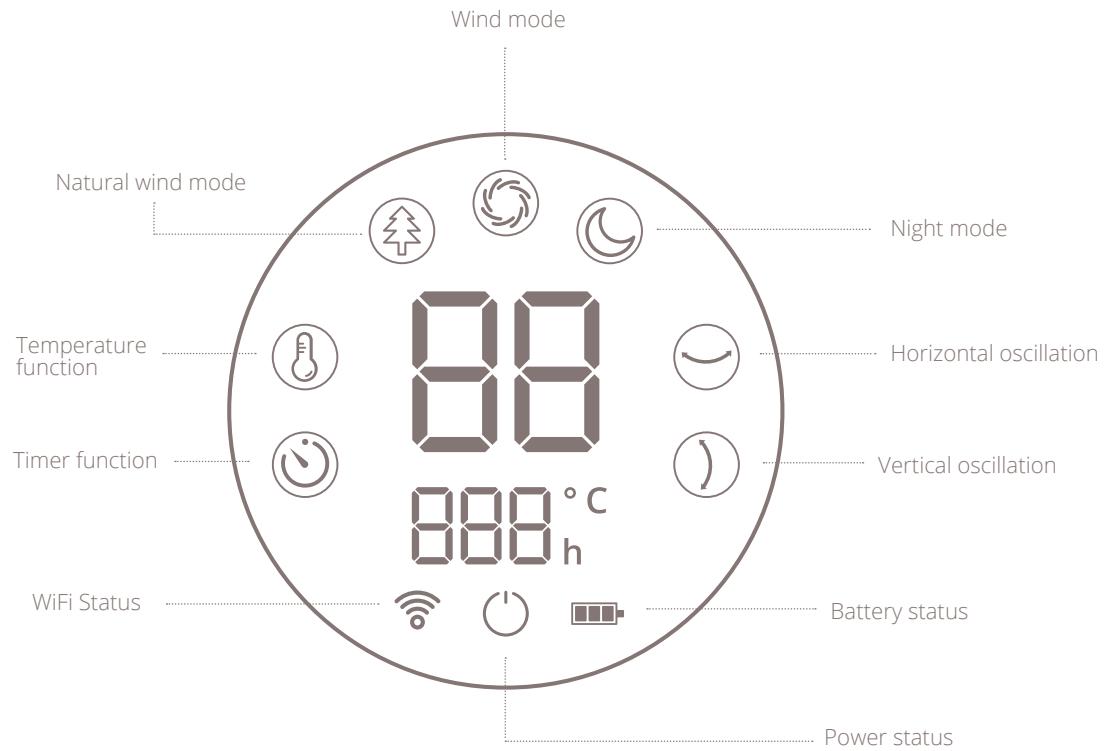
Instructions for use
WiFi status
Only visible when WiFi is connected
Power status
Only visible when fan is off
Battery status
Shows the battery status in 3 levels.
Regular mode
Choose from 30 speed settings for a consistent air flow.
Natural wind mode
Variable wind speeds and oscillation in both directions to simulate natural wind conditions.

Night mode
By selecting this mode, the LED display will automatically turn off after 10 seconds for an undisturbed night's sleep

Temperature function
Set a temperature goal. When this setting is active, the fan will measure ambient temperature and will decrease its when speed when the goal is reached.

Timer function
Set a timer to switch the fan off automatically. Choose a time between 0 and 12 hours.
Horizontal oscillation function
Set an oscillation angle to rotate the fan horizontally from left to right. There are three preset angles; 30, 60 and 90 degrees.

Vertical oscillation function
Set an oscillation angle to rotate the fan vertically from top to bottom. There are two preset angles; 90 and 105 degrees.
Battery operation
Note: In battery mode the fan speed is limited to position 15. Depending on the settings, the battery will last max.12 hours. Lower the ventilation speed and activate night mode to increase battery life. See below comparison chart for reference:
| Fan speed | Oscillation | Battery life* |
| 1 | Off | 12:00 H |
| Horizontal or Vertical | 07:30 H | |
| Horizontal & Vertical | 05:00 H | |
| 5 | Off | 10:00 H |
| Horizontal or Vertical | 06:00 H | |
| Horizontal & Vertical | 04:10 H | |
| 10 | Off | 08:00 H |
| Horizontal or Vertical | 04:30 H | |
| Horizontal & Vertical | 03:20 H | |
| 15 | Off | 06:00 H |
| Horizontal or Vertical | 03:00 H | |
| Horizontal & Vertical | 02:30 H |
- For reference only. Test environment conditions: 21,5°C, 35% humidity.
Operating instructions
1 Assemble the fan according to chapter "Installing the product" of this manual.
Plug the power adapter in an available power
socket and plug the connector into the base of the product. The display will light up and show the power icon.
Press the power button to turn the product on.
The fan will start in default setting or resume operation according to the most recent setting.
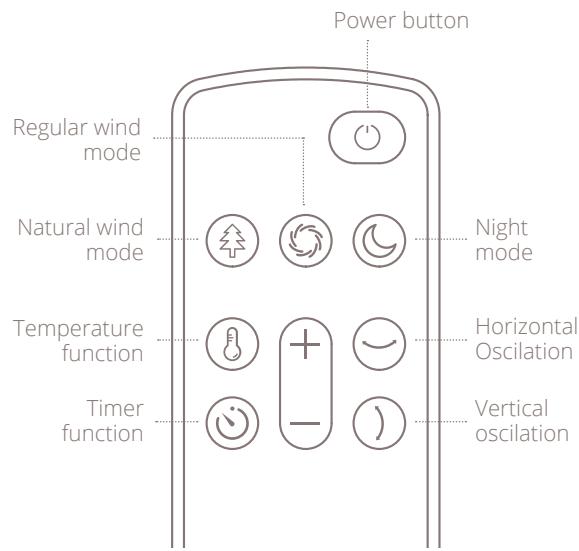
The control panel allows for two actions by the user:
- pressing the control ring
- rotating the aluminum ring; both clockwise and counter clockwise.
2 Rotate the ring to select different
functionalities. A flashing icon indicates what mode or setting is currently selected. Press the display to confirm the selected functionality.
3 Modes: Activate a mode by selecting the
corresponding icon and pressing to confirm.
Next, choose the desired wind speed by
rotating the ring and press to confirm.
4 Functions: Activate a function by selecting
the corresponding icon and press to confirm. Next, choose the desired value (hours, angle or degree Celsius) by rotating and pressing to confirm. Deactivate a setting by selecting it first and then pressing the control ring and holding it for 3 seconds.
5 Flashing display: When setting a fan speed or
functionality, the display will flash to indicate
that you are making changes. The display will
stop flashing once a value has been confirmed
or when no input is received for 8 seconds.
WiFi mode
To activate the WiFi mode make sure the fan is off, meaning that the blades aren't spinning and the power icon is on. Press and hold the control ring for 5 seconds. When successful the WiFi- icon will start flashing. The fan will actively search for devices to pair with while a timer counts down from 99 to 0. Once connected, the WiFi- icon will turn solid.
WiFi and APP operation
Scan below QR code to download the Duux APP or search DUUX APP in the App Store or Google Play Store to start the procedure to download the APP. Once installed, enter your e-mail address and complete the registration.

APP STORE

PLAYSTORE
Connect to WiFi
Once registered, click "add duux device" on the main screen or use the "+" button in the top right corner to add a new device.
Search for "Whisper Flex Ultimate" and press to continue
3 Connect to your preferred WiFi network and enter the corresponding password
4 Follow the instructions in the app to complete the pairing process.
Note: If you experience any problems with connecting or using the app, please refer to the FAQ in the app menu.
5. Technical specifications
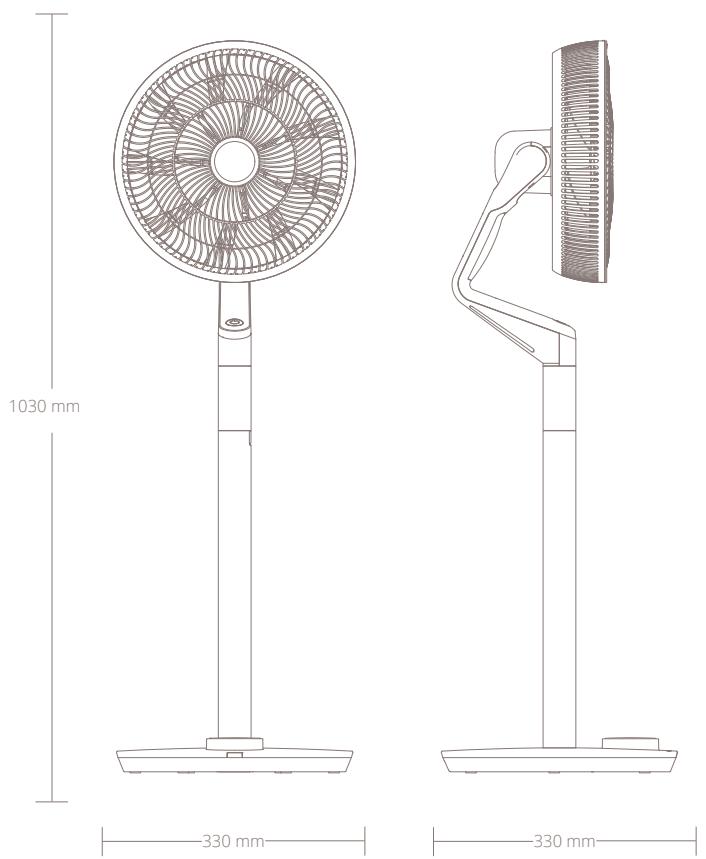

Weight:
5 kg

Noise level:
13-50dBa

Airflow:
820 m3/h

Power consumption:
3-32W

Fan speed:
30 speeds

Adjustable height:
58-103 cm

Display:
Digital LCD
display

Main material types:
ABS,PP

Model no.
DXCF14/15
Disposal
The European directive 2012 / 19 / CE on Waste Electrical and Electronic Equipment (WEEE), requires that old household electrical appliances must not be disposed in the normal unsorted municipal waste stream. Old appliances must be collected separately in order to optimize the recovery and recycling of the materials they contain and reduce the impact on human health and the environment. The crossed out "wheeled bin" symbol on the product reminds you of your obligation, that when you dispose of the appliance it must be separately collected. Consumers should contact their local authority or retailer for information concerning the correct disposal of their old appliance.

Notes
Simplified EU declaration of conformity
Hereby, Duux declares that this environmental control radio equipment is in compliance with Directive 2014/53/EU. The full text of the EU Declaration of Conformity is available at the following internet address: www.duux.com/doc
Designed in The Netherlands bij Duux BV. Made in P.R.C. Duux BV, P.O. Box 145, 5400 AC Uden Netherlands, www.duux.com
© 2021 Duux. All rights reserved.
DUUX® is a trademark of Duux BV,
registered in the EU and other countries.
The brand cited belongs exclusively to the respective owners.
Specifications are subject to modification without notice.