USER MANUAL IC 5060 3MC W701T VALBERG
This product has a 2-year warranty as of the date of purchase*, covering any fault resulting from a manufacturing or material defect. This warranty does not cover defects or damage resulting from incorrect installation, improper use or abnormal wear of the appliance.
*upon presentation of the sales receipt.
WARRANTY CONDITIONS
FR
Thank you for choosing this VALBERG product. Selected, tested and recommended by ELECTRO DEPOT, VALBERG brand products are easy to use, reliable and known for their impeccable quality. With this appliance, you can be sure of complete satisfaction every time you use it.
Welcome to ELECTRO DEPOT.
Visit our website: www.electrodepot.fr

Preview of the appliance
Features of the Product

Using the appliance
Installation and preparation for use Using the appliance

Useful information
Cleaning and maintenance Troubleshooting and transport
Features of the Product
IMPORTANT
Product specifications vary and your appliance may look different from those that appear in the figures below.
List of components
1 Hob Control panel 3 Oven door handle Oven door 5 Adjustable feet
Control panel
6 Timer Oven thermostat knob 8 Function control
Installation and preparation for use
WARNING
This appliance must be fitted by an authorised professional or qualified technician in accordance with the instructions in this manual and the applicable installation standards.
- Incorrect installation will invalidate the warranty and may result in damage or injury for which the manufacturer cannot be held liable.
- Before fitting, make sure that the local power supply conditions (voltage and current frequency and/or type and pressure of the gas) and the settings of the appliance are compatible. The setting conditions for this appliance are shown on the label.
- The laws, regulations, decrees and standards applicable in the country of installation must be observed (safety regulations, recycling in accordance with regulations, etc.).
- If the product contains guides for the removable racks (wire racks) and the user manual includes recipes like yoghurt, the wire racks must be removed and the oven must operate using the set cooking mode. Information on removing the wire rack is included in the CLEANING AND MAINTENANCE section.
Instructions for the installer
General instructions
- After removing the packaging from the appliance as well as its accessories, check the appliance for damage. If the appliance appears to be damaged, do not use it and immediately contact an authorised professional or qualified technician.
- Check that there are no combustible or flammable objects or materials, e.g. curtains, oil, cloth, etc., in the immediate vicinity.
- The worktop and furniture units surrounding the appliance must be able to withstand temperatures of over 100°C.
- This appliance must not be fitted directly above a dishwasher, refrigerator, freezer, washing machine or tumble dryer.
- The appliance can be fitted next to a furniture unit, provided that the height of the unit does not exceed the height of the hob in the installation area.
Cooker installation
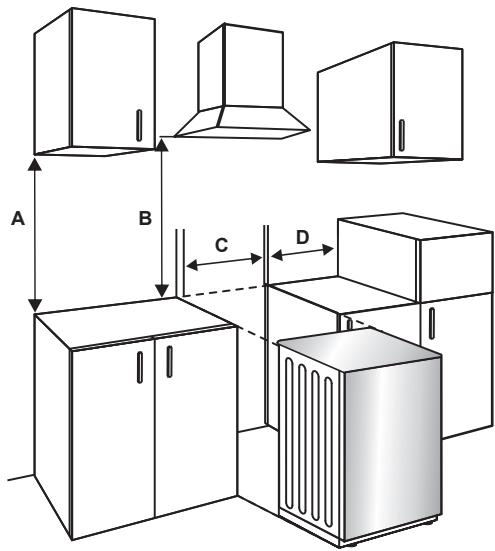
- If the kitchen units are higher than the hob, there must be a gap of at least 10 cm between the units and the sides of the appliance so that air can flow freely in between.
- If an extractor fan or cupboard is to be fitted above the appliance, the safety distance between the hob and the cupboard or extractor fan must respect the gap shown on the diagram below.
A (mm) 420
Furniture
B (mm) 650/700
Extractor fan
C (mm) Product width
D [mm] 50
Electrical connection and safety
WARNING
This appliance must be connected to the power supply by an authorized professional or qualified technician in accordance with the instructions in this manual and the applicable installation standards.
WARNING
The appliance must be grounded.
- Before connecting to the power supply, check that the rated voltage of the appliance (marked on the nameplate of the appliance) matches the voltage of the power supply. The rated voltage of the power cable must also be at least equal to the nominal voltage of the appliance (also stated on the appliance's rating plate).
- When fitting, be sure to use appropriately insulated cables. Incorrect connection may damage your appliance. If the power cable is damaged and needs to be replaced, this should be done by a qualified person.
- Do not use adapters, power strips or extension cords.
- The power cable should be kept away from the hot parts of the appliance and should not be bent or crushed. Failure to do so may result in damage to the cable and cause a short circuit.
- If the appliance is not connected to the mains supply by a plug, fit a multi-pole isolator (with a contact spacing of at least 3 mm) in accordance with the safety regulations.
- This appliance is designed for a 220-240 V~.380-415 3N~ power supply. If your power supply is different, contact an authorized professional or qualified electrician.
- The power cable (H05VV-F) must be long enough to connect to the appliance.
- This fused disconnect switch must be easily accessible once the appliance is installed.
- Check that all connections are properly tightened.
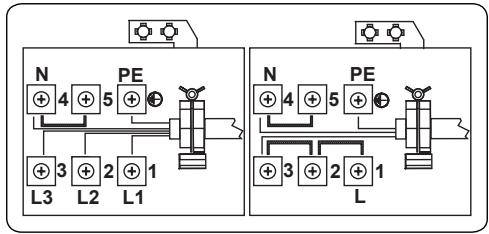
- Attach the power cable to the terminal block and close the cover.
- The junction box connection is placed on the junction box.
Anti-tip kit
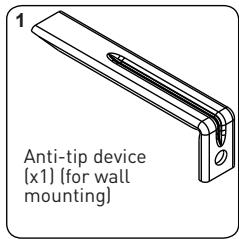
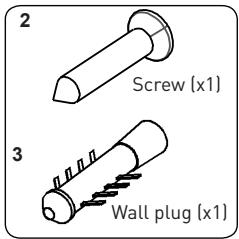
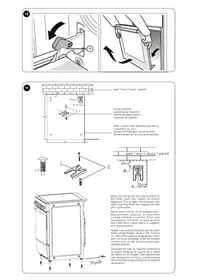
The documentation bag contains an anti-tip kit. Fasten the anti-tip device (1) to the wall using the screw (2) and the wall plug (3), in accordance with the dimensions in the illustration and table below. Adjust the height of the anti-tip device so that it is aligned with the groove on the cooker, then tighten the screw (2). Push the appliance towards the wall, making sure that the anti-tip device fits into the groove at the back of the appliance.
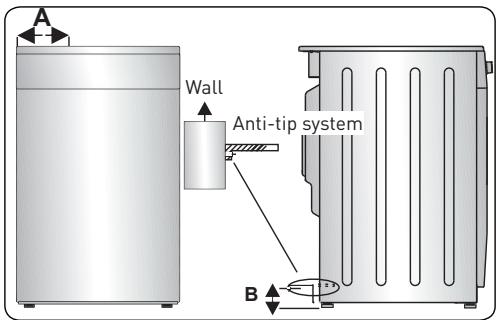
| Product dimensions
(width X depth X height) (cm) | A (mm) | B (mm) |
| 60 x 60 x 90 (double cavity oven) | 297.5 | 52 |
| 50 x 60 x 90 (double cavity oven) | 247.5 | 52 |
| 90 x 60 x 85 | 430 | 107 |
| 60 x 60 x 90 | 309.5 | 112 |
| 60 x 60 x 85 | 309.5 | 64 |
| 50 x 60 x 90 | 247.5 | 112 |
| 50 x 60 x 85 | 247.5 | 64 |
| 50 x 50 x 90 | 247.5 | 112 |
| 50 x 50 x 85 | 247.5 | 64 |
Adjusting the feet
Your appliance stands on adjustable feet. For safe operation, it is important to check the balance of the appliance. Check that the appliance is level before you start cooking. To raise the appliance, turn the feet anti-clockwise. To lower the appliance, turn the feet clockwise. The height of the appliance can be increased by up to 30 mm by adjusting the feet. The appliance is very heavy and we recommend that it should be handled by at least two people. Never pull the appliance.

Using the appliance
Hob controls
Induction zone
The information in the following table is provided for information purposes only.
| Settings | Use |
| 0 | Disabled element |
| 1-3 | Heating on low heat |
| 4-5 | Simmering gently, heating up slowly |
| 6-7 | Heating up and simmering quickly |
| 8 | Boiling, frying and searing |
| 9 | Maximum temperature |
| P | Booster function |
Cookware
- Use good-quality pots and pans with thick, flat, smooth bases made of steel, enamelled steel, cast iron or stainless steel. The quality and composition of the cookware directly affects cooking performance.
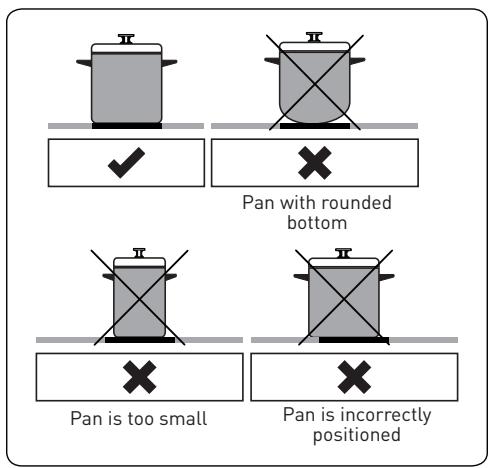
- Do not use pots or pans with concave or convex bottoms. Cookware made of aluminium and stainless steel cookware with a non-ferromagnetic, glass, copper, brass, ceramic or porcelain base are not suitable for induction cooking.
- To check whether the pots or pans are suitable for induction cooking, you can place a magnet on their base. If the magnet sticks to the surface, the pot or pan is usually compatible. Then, you can heat up a small amount of water on a cooking zone set to the highest level. The water should heat up within a few seconds.
- When using certain pots or pans, a slight noise may be heard during cooking. This is because of the design of the pot or pan, and does not affect the performance or safety of the cooking zones.
- For best cooking performance, the pot or pan should be placed in the centre of the cooking zone.
- The symbol flashes when the power level is selected on the cooking zone display and an incompatible pot or pan is on that cooking zone or there is no pot or pan on it. The cooking zone will turn off automatically after 2 minutes.
- If a suitable pot or pan is placed on the cooking zone, the symbol will disappear and cooking will continue at the selected power level.
- For the best possible energy transfer, the base of the pot or pan should have the same diameter as the cooking zone.
- The minimum diameter of the pot or pan should be 120 mm for the 160 mm cooking zone, 140 mm for the 210 mm cooking zone, and 160 mm for the 290 mm cooking zone.
| Diameter of the hob | Minimum detection diameter of pot or pan |
| Back left cooking zone | 16 cm | 12 cm |
| Front left cooking zone | 16 cm | 12 cm |
| Right cooking zone | 21 cm | 14 cm |
The appliance is controlled by buttons and its functions are confirmed by displays and beep sounds.
Touch-sensitive controls
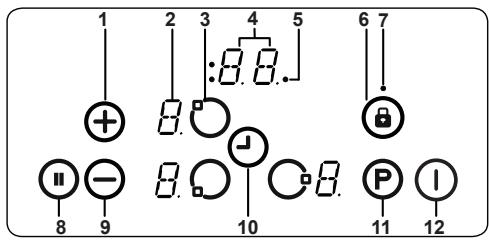
1 - Increase heat level/timer, 2 - Heat level display, 3 - Cooking zone selection, 4 - Timer display, 5 - Cooking zone and timer function indicators, 6 - Lock, 7 - Lock indicator, 8 - Pause, 9 - Decrease heat/timer, 10 - Timer selection, 11 - Booster function, 12 - On/Off
- Use utensils that are compatible with induction cooking zones.
- When the power is switched on, all the displays will briefly light up. After this, the hob is in Standby mode and is ready to use.
- The hob is controlled using electronic buttons. When a button is pressed, it makes a beep sound.
Switching on the appliance
Turn on the hob by pressing the On/Off button ①. All the heat level displays will show a stable "0" and the dots in the lower right corner will flash. (If no cooking zone is selected within 20 seconds, the hob will automatically turn itself off.)
Switching off the appliance
The hob can be stopped at any time by pressing ①.
The On/Off button ① always takes priority over the stop function.
Switching on the cooking zones
- Press the selection button for the heating element you would like to use. A solid dot appears on the display of the selected heat level and the flashing dots on all the other heat level displays no longer light up.
- Adjust the temperature using the heat level up button or the heat level down button . The element is ready to use. For faster boiling, select the required heat level, then press the "P" button to activate the Booster function.
Turning off the cooking zones
- Select the element to turn off using the element selection button. Use the button to reduce the temperature to "0". (Pressing the and buttons at the same time will also lower the temperature to 0.)
- If the cooking zone is hot, "H" is displayed instead of "0".
Switching off all the cooking zones
To turn off all the cooking zones at once, press the ① button.
When in Standby mode, "H" is displayed on all the cooking zones that are hot.
Residual heat indicator
- The residual heat indicator indicates that the temperature of the glass-ceramic zone makes it dangerous to touch.
- After the cooking zone has been turned off, the corresponding displays show "H" until the temperature level of the corresponding cooking zone is no longer hazardous.
Pause
- The Pause function reduces the power of all the cooking zones that are turned on.
- If pause is deactivated, the elements automatically return to the previous temperature level.
- If the pause is not deactivated, the hob turns off after 30 minutes.
- Press to activate the pause function. The power of the active heating elements drops to level 1 and a "II" appears on all the displays.
- Press again to deactivate the pause function. The "II" symbol disappears and all the heating elements return to the previously set level.
Safety stop function
- The cooking zone switches off automatically if no heat settings have been changed for a while.
- Any changes to the heat setting of a cooking zone will reset the time to its original value. This initial value depends on the temperature level selected, as shown below.
| Heat setting | Safe shutdown after |
| 1-2 | 6 hours |
| 3-4 | 5 hours |
| 5 | 4 hours |
| 6-9 | 1.5 hours |
Child lock
- Once the appliance is switched on, the Child Lock function can be activated. To activate the child lock, simultaneously press the heat level up button and the heat level down button , then press the heat level up button again. "L" for LOCKED appears on all the heat level displays and the controls can no longer be used. (If a cooking zone is hot, the "L" and "H" symbols are displayed alternately.)
- The hob remains locked until it is unlocked, even if the appliance is switched off and then on again.
- To deactivate the child lock function, first switch on the hob. Simultaneously press the heat level up button and the heat level down button , then press the heat level down button again. "L" is no longer displayed and the hob turns off.
Lock
- The lock function turns on the safety mode of the appliance during use. It is then no longer possible to make any adjustments using the buttons (e.g. to set the heat level). You can only switch off the appliance.
- The lock function is active when the lock button is pressed for at least 2 seconds. This is confirmed by a beep sound. If the operation is successful, the lock indicator flashes and the heating element is locked.
Timer function
There are two versions of the Timer function, as follows.
Kitchen timer (1 to 99 min)
- The kitchen timer can be used if the cooking zones are switched off. The timer display shows "00" with a flashing dot.
- Press to increase the time or to decrease the time. The range goes from 0 to 99 minutes. If no adjustment is made to the displayed time within 10 seconds, the kitchen timer is set and the flashing dot disappears. Once the timer is set, it starts counting down.
- When the timer reaches zero, there will be a beep sound and the timer display will flash. The beep stops automatically after 2 minutes and/or if one of the buttons is pressed.
- The kitchen timer can be reset or stopped at any time using the timer setting button and/or the timer down button . Switching off the hob at any time using the ① button also stops the kitchen timer.
Cooking zone timer [1 to 99 min]
- When the hob is switched on, a separate timer can be programmed for each cooking zone.
- Select a cooking zone, choose the temperature setting, then activate the timer setting button. The timer can be programmed to turn off a cooking zone. Four LED lights are arranged around the timer to indicate the cooking zone whose timer has been set.
- 10 seconds after the last action, the next timer that is due to expire will appear in the timer display. (in case of multiple timers for the cooking zones).
- When the timer ends, there is a beep sound, the timer display will show "00" and the timer LED of the relevant cooking zone will flash. The cooking zone turns off and "H" is displayed if the cooking zone is hot.
- The beep sound stops and the timer LED stops flashing automatically after 2 minutes and/or if one of the buttons is pressed.
Beep sound
When the hob is in operation, the following operations may be indicated by a beep sound.
- With every normal press on one of the buttons, there will be a brief beep sound.
- A long press on one of the buttons (10 seconds) will produce a long intermittent beep sound.
Booster function
- To use this function, select a cooking zone and set the required heat level, then press the "P" (Booster) button.
- The Booster function can only be activated if the selected cooking zone can use it. If the Booster function is active, a "P" appears in the corresponding display.
- Activating the Booster function may exceed the maximum power, in which case the integrated heat management system automatically turns on.
- In order to indicate the required reduction in power, the corresponding cooking zone display will flash.
- The flashing lasts for 3 seconds so that the settings can be changed before the power is reduced.
Error codes
| In the event of an error, an error code appears on the cooking level displays. |
| E0 | The amperage limitation function must be selected when the product is powered on. Otherwise, the error E0 appears. At the same time, this function must be selected on the screen and the motherboard. If there is an error in a card's software, the product will display an error. This error cannot be resolved by the customer. It is necessary to call an authorised service. |
| E1 | The cooling fan is deactivated. Contact a qualified technician. |
| E2 | This error appears when the radiator gets too hot. In this case, the radiator must be left to cool down. It can only start working again when it has cooled down. |
| E3 | The supply voltage does not match the nominal value. Press ① to stop the hob, wait until "H" disappears for all the zones, press ① to turn on the hob and continue using it. If the same error is displayed again, contact a qualified technician. |
| E4 | The supply frequency does not match the nominal value. Press ① to stop the hob, wait until "H" disappears for all the zones, press ① to turn on the hob and continue using it. If the same error appears again, switch off the appliance at the plug and switch it back on again. Press ① to turn on the hob and continue using it. If the same error is displayed again, contact a qualified technician. |
| E5 | The internal temperature of the hob is too high. Press ① to switch off the hob and let the heating elements cool down. |
| E6 | Communication error between the touch-sensitive controls and the heating element. Contact a qualified technician. |
| Error codes |
| In the event of an error, an error code appears on the cooking level displays. |
| E7 | The thermal safety feature of the heating element is deactivated. Contact a qualified technician. |
| E8 | The cooler safety feature is deactivated. Contact a qualified technician. |
| EA | Large coil saturation error. Switch the hob off by pressing the on/off button, switch the hob on by pressing and on/off button and continue to use it. If the same error is displayed again, call an authorised service agent. |
| EC | Supply voltage error. Switch the hob off by pressing the on/off button, switch the hob on by pressing and on/off button and continue to use it. If the same error is displayed again, call an authorised service agent. |
| C1-C8 | Mcroprocessor alert. Following this alert, switch off the power to the product and switch it back on again. If the same error is displayed again, call an authorised service agent. |
Oven controls
Function control
Turn the button to the symbol of the function you want. For the details of the different functions, refer to "Oven functions".
Oven temperature control
Once the cooking function is selected, turn this button to adjust the temperature. The oven temperature light turns on whenever the thermostat is working to heat the oven or maintain it at the required temperature setting.
Oven functions
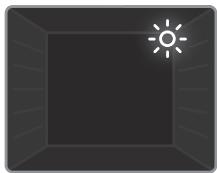
- Oven light: Only the oven light comes on. It remains on throughout the cooking process.
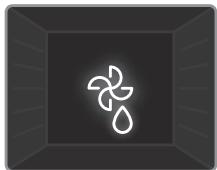
- Defrost function: The oven warning lights come on and the fan starts. To use the Defrost function, place the frozen food in the oven on a tray/rack inserted on the third level from
the bottom. Put a drip pan under the defrosting food to catch the water from the melting ice. This function does not cook food, it simply defrosts food more quickly.
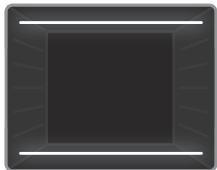
- Natural convection function: The thermostat light and the oven indicator light will come on and the upper and lower heating elements will start to heat up. The Static heat function emits heat that cooks the food evenly. It is ideal for pastries, cakes, pasta gratins, lasagne and pizzas. It is recommended to preheat the oven for 10 minutes and to use only one level at a time in this mode.
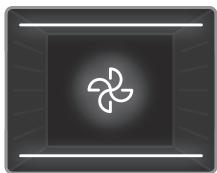
- Fan function: The temperature light and the oven warning lights come on, the top and bottom heating elements start to heat up and the fan starts to turn. This function is suitable for baking pastries. The cooking is done by the upper and lower heating elements of the oven and by the fan which circulates the air, giving the food a slightly "grilled" appearance. It is recommended to preheat the oven for about 10 minutes.
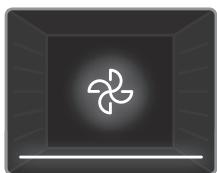
- Fan with bottom heat function: The temperature light and the oven warning lights come on, the bottom heating element starts to heat up and the fan starts to turn. The Fan with bottom heat function is suitable for evenly cooking food like pizza with a short cooking time. The fan distributes the heat evenly throughout the oven, while the bottom element cooks the food. It is recommended to preheat the oven for about 10 minutes.
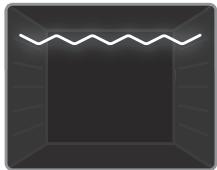
- Grill function: The thermostat light and the oven indicator light come on and the grill element starts to heat up. This function is used to toast and broil food placed on the upper levels of the oven. Lightly oil the wire rack with a brush to prevent food from sticking, then put the food in the centre of the rack. Always place a drip pan under the grill to catch oil or grease. It is recommended to preheat the oven for about 10 minutes.
WARNING
When broiling, the oven door must be closed and the oven temperature set to 190°C.
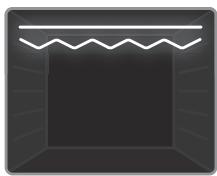
- Express Grill function: The thermostat light and the oven warning lights come on and the grill and top heater start to heat up. This function is recommended for grilling food more quickly over a larger surface area (e.g.: meat). Use the top level. Lightly oil the wire rack with a brush to prevent food from sticking, then put the food in the centre of the rack. Always place a drip pan under the grill to catch oil or grease. It is recommended to preheat the oven for about 10 minutes.
WARNING
When broiling, the oven door must be closed and the oven temperature set to 190°C.
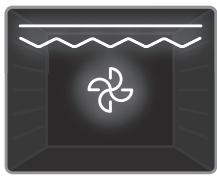
- Double grill with fan function: The temperature light and oven warning lights come on, the grill and upper heating elements start to heat up, and the fan starts to turn. This function is recommended for grilling thicker food faster and over a larger area. The upper heating elements and the grill work simultaneously with the fan to ensure even cooking. Use the top level. Lightly oil the wire rack with a brush to prevent food from sticking, then put the food in the centre of the rack. Always place a drip pan under the grill to catch oil or grease. It is recommended to preheat the oven for about 10 minutes.
WARNING
When broiling, the oven door must be closed and the oven temperature set to 190°C.
Cooktop
| Function | Dishes | | | |
| Static | Puff pastry | 1-2 | 170-190 | 35-45 |
| Cake | 1-2 | 170-190 | 30-40 |
| Cookies | 1-2 | 170-190 | 30-40 |
| Beef stew | 2 | 175-200 | 40-50 |
| Chicken | 1-2 | 200 | 45-60 |
| Fan | Puff pastry | 1-2 | 170-190 | 25-35 |
| Cake | 1-2-3 | 150-170 | 25-35 |
| Cookies | 1-2-3 | 150-170 | 25-35 |
| Beef stew | 2 | 175-200 | 40-50 |
| Chicken | 1-2 | 200 | 45-60 |
| Function | Dishes | | | min. |
| Grill | Grilled meatballs | 4 | 200 | 10-15 |
| Chicken | * | 190 | 50-60 |
| Chops | 3-4 | 200 | 15-25 |
| Steak | 4 | 200 | 15-25 |
*If available, use the roasting spit.
Using the mechanical timer
| Description of the function |
| M | Manual operation |
| 0............100 | With the timer setting |
Manual operation
When the timer button is set to the "M" position, the oven runs continuously. When the timer button is set to the "0" position, the oven does not work.
With the timer setting
Set the required cooking time by turning the timer button to a value between 0 and 100 minutes. Once the time has elapsed, the oven will automatically turn off and an audible alarm will sound.
Accessories
Shallow tray
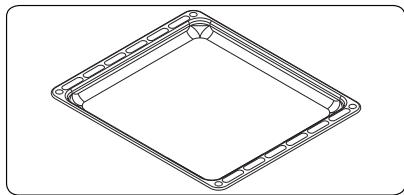
The shallow tray is used for pastries like quiche, etc.
To position the tray properly in the cavity, place it on any rail and push it to the back.
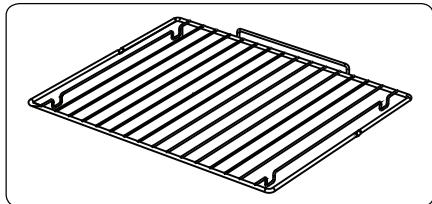
Wire rack
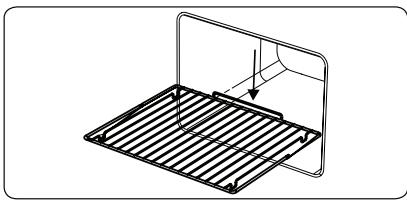
The wire mesh is used for grilling or preparing food in other containers.
WARNING
Correctly place the oven rack in the oven cavity by pushing it all the way in.
Cleaning and maintenance
Cleaning
WARNING
Turn off the appliance and allow it to cool before cleaning.
General instructions
- Check that the cleaning products are suitable and recommended by their manufacturer before using them on the appliance.
- Use particle-free cream or liquid cleaners. Do not use caustic (corrosive) creams, abrasive cleaning powders, rough steel wool or hard tools, as they may damage the cooker's surfaces.
WARNING
Do not use cleaners that contain particles, as they could scratch the glass, or the enamelled and/or painted parts of the appliance.
- If some liquid spills over, immediately wipe it up to avoid damaging the parts.
WARNING
Do not use a steam cleaner to clean any part of this appliance.
Cleaning the inside of the oven
- Preferably clean the inside of the enamelled oven when it is hot.
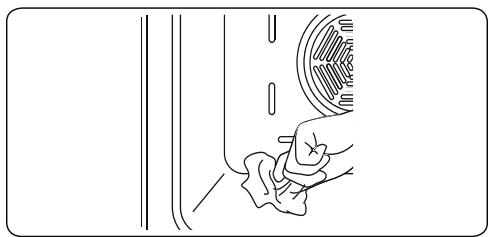
- Wipe the oven with a soft cloth soaked in soapy water after each use. Then, wipe the oven again with a damp cloth and dry it.
- You may need to occasionally use a liquid cleaning product to completely clean the oven.
Catalytic cleaning
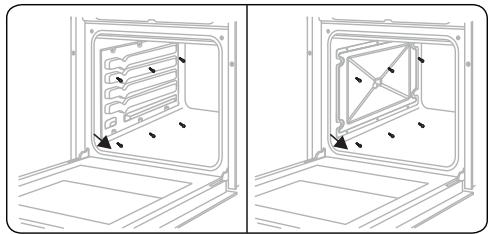
- The oven has catalytic panels installed inside the cavity. These are the light coloured matte panels on the sides and/or the matte panel at the back of the oven. They work by collecting any grease and oil residues during cooking.
- The liner self-cleans by absorbing the grease and oil, and burning them to ashes, which can then be easily removed from the bottom of the oven with a damp cloth. The liner must be porous to remain effective. The liner may discolour with age.
- If a large amount of grease has been spilled on the liner, it may diminish its effectiveness. To overcome this problem, set the oven to maximum heat for about 20 to 30 minutes. Once the oven has cooled down, wipe the bottom of the oven.
- It is not advisable to clean the catalytic liners manually. Using a pad of steel wool filled with soap or any other abrasive product will damage the product. Furthermore, we do not recommend using spray cleaners on the liners. The walls of a catalytic coating can become ineffective when covered with too much grease. Excess grease can be removed with a soft cloth or sponge moistened with warm water, and the cleaning can be done as described above.
Removing the catalytic coating
To remove the catalytic coating, remove the screws that secure each catalytic panel to the oven.
Cleaning the ceramic glass
Ceramic glass can bear the weight of heavy utensils but may break when struck by a sharp object.
WARNING
Ceramic hobs: If the surface is cracked, turn off the appliance to avoid the risk of an electric shock and contact the maintenance department.
- Use a cream or liquid cleaner to clean the ceramic glass. Then, rinse and dry the glass thoroughly with a dry cloth.
WARNING
Do not use steel cleaning products as these may damage the glass.
- If substances with a low melting point are used in the base or on the coatings, they can damage the ceramic hob. If any plastic, aluminium foil, sugar or sweet food items fall onto the ceramic hob while it is hot, remove it as quickly and as safely as possible. If these substances melt, they can damage the ceramic hob. When cooking very sweet dishes, like jam, cover the hob with a suitable protective product beforehand if possible.
- Dust on the surface should be wiped off with a damp cloth.
- Any change in the colour of the ceramic glass will not affect the structure or durability of the ceramic and is not the result of a change in the material.
A change in the colour of the ceramic glass can be caused by a number of factors:
- Spilled food that was not wiped off the surface.
- Using incorrect dishes on the hob will wear out the surface.
- Using unsuitable cleaning products.
Cleaning the glass parts
- Regularly clean the enamelled parts of the appliance.
- Use a window cleaner to clean the inside and outside of the glass parts. Then, rinse and dry the glass thoroughly with a dry cloth.
Cleaning the enamelled parts
- Regularly clean the enamelled parts of the appliance.
- Wipe the enamelled parts with a soft cloth dipped in soapy water. Then, wipe them again with a damp cloth and dry them.
WARNING
- Do not clean the enamelled parts that are still hot after cooking.
- Do not leave any vinegar, coffee, milk, salt, water, lemon or tomato juice on the enamel for too long.
Cleaning the stainless steel parts (if applicable)
- Regularly clean the stainless steel parts of the appliance.
- Wipe the stainless steel parts with a soft cloth dampened with water only. Then, dry the glass thoroughly with a dry cloth.
WARNING
- Do not clean the stainless steel parts while they are still hot after cooking.
- Do not leave any vinegar, coffee, milk, salt, water, lemon or tomato juice on the stainless steel for too long.
Cleaning the painted surfaces (if applicable)
- Stains from tomatoes, tomato paste, ketchup, lemon, oil derivatives, milk, sugary foods, sugary drinks and coffee should be wiped off immediately with a cloth dipped in warm water. If these stains are not wiped away and dried from the surfaces they are on, do NOT scrub them with hard objects (sharp objects, steel and plastic scrubbers, dish sponge which will damage the surface) or cleaning products containing high levels of alcohol, stain removers, grease removers or abrasive surface chemicals. Otherwise, corrosion may occur on the powder-coated surfaces, and stains may appear. The manufacturer will not be held responsible for any damage caused by the use of inappropriate products or cleaning methods.
Removing the oven door
Before cleaning the glass of the oven door, the internal glass must be removed as follows:
- Open the oven door.
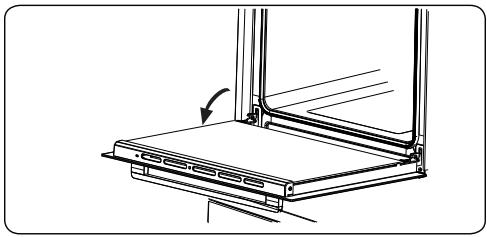
- Fully open the saddle support (a) (with a screwdriver) until it stops.
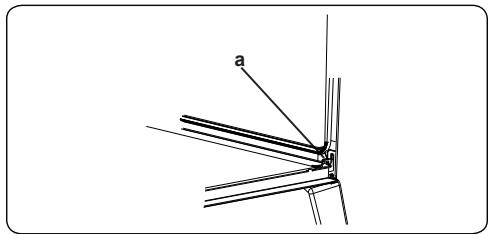
- Close the door until it is almost fully closed and remove it by pulling it towards you.
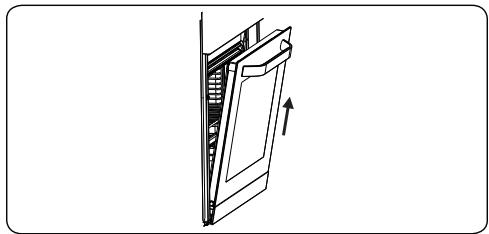
Maintenance
WARNING
This appliance should be maintained by an authorised person or qualified technician.
Replacing the oven lamp
WARNING
Turn off the appliance and let it cool down before cleaning.
- Remove the glass cover, then remove the bulb.
- Insert the new bulb (resistant to 300°C) to replace the one you removed [230 V, 15 - 25 Watt, Type E14].
- Replace the glass cover. The oven is now ready to operate.
- This product contains a light source with an energy efficiency rating of G.
- The light source cannot be replaced by the end user. After-sales servicing is required.
- The included light source cannot be used for other applications.
Light source replaceable by a professional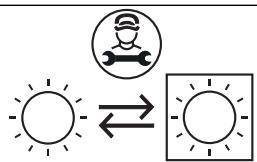
WARNING
The light is made exclusively for use in household cooking appliances. It is not suitable for lighting up a room.
Repair and transport
Troubleshooting
WARNING
If the problem persists with your appliance after following these basic repairs, contact an authorized professional or qualified technician.
| Problem | Possible cause | Solution |
| The hob's control display is off. The hob or cooking zones cannot be switched on. | There is no power. | Check the fuse for the appliance in the fuse box.
Check that the power supply is not cut by trying to turn on other electronic appliances. |
| The hob turns off when in use and the letter "F" flashes on every display. | The controls are wet or something is placed on top of them. | Dry the controls or remove the object. |
| The hob turns off during use. | One of the cooking zones has remained on for too long. | To use it again, turn the cooking zone back on. |
| The hob's controls do not work and the child lock LED indicator is turned on. | The child lock function is activated. | Deactivating the child lock. |
| The pans make some noise during cooking or the hob rattles during cooking. | This is normal with induction cookware. The noise is generated when energy is transferred between the hob and the pan. | This is normal. There is no risk to the hob or to the cookware. |
| The "U" symbol lights up in the display of a cooking zone. | No pot/pan is placed on the cooking zone or the pot/pan is incompatible. | Use a compatible pot/pan. |
| The power level 9 or "P" drops automatically if it is selected simultaneously on two cooking zones on the same side of the hob. | Both zones have reached their maximum power level. | • Using both zones on power level "P" or 9 exceeds the maximum power level allowed for both zones. |
| The oven does not switch on. | The power supply is off. | • Check that the power supply is connected. Also check that other kitchen appliances are working. |
| No heat is generated or the oven does not preheat. | The oven temperature setting is incorrect.
The oven door is open. | • Check that the oven temperature control is set correctly. |
| Uneven cooking in the oven. | The plates/racks are incorrectly positioned. | • Check that the recommended temperatures and levels are being followed.
• Do not open the door frequently unless the food being cooked needs to be turned. Opening the door too often causes the temperature in the oven to drop, which can affect the cooking result. |
| The oven light is not working. | The bulb does not work.
The power supply is switched off or disconnected. | • Replace the bulb according to the instructions.
• Check the plug is connected to the power socket. |
| The oven fan (if present) is noisy. | The oven trays/ racks vibrate. | • Check that the oven is level.
• Check that no trays/racks or dishes are vibrating or touching the rear panel of the oven. |
Transport
- If the appliance has to be moved, pack it in its original packaging and cardboard box. Follow the transport guidelines indicated on the packaging. Tape moving parts to the appliance to prevent any damage during transport.
- If the original packaging is not available, use a cardboard box to protect the appliance - especially the external surfaces - from external hazards.
Thank you!