USER MANUAL SCD-69 DAB+ LENCO
CAUTION: TO PREVENT AN ELECTRICAL SHOCK, DO NOT REMOVE ANY COVER SCREWS. THERE ARE NO USER SERVICEABLE PARTS INSIDE. REQUEST A QUALIFIED SERVICE PERSON TO PERFORM SERVICING.
This symbol indicates that there are important operating maintenance instructions in the user manual accompanying this device.
This symbol indicates that dangerous voltage is present within this device, constituting a risk of electric shock or personal injury.
Keep these instructions in mind:
Do not use this device near water.
Clean only with a slightly damp cloth.
- Do not cover or block any ventilation opening. When placing the device on a shelf, leave 5 cm (2") free space around the whole device.
Install in accordance with the supplied user manual.
- Don't step on or pinch the power cord. Be very careful, particularly near the plugs and the cable's exit point. Do not place heavy items on the power cord, which may damage it.
- Keep the entire device out of children's reach! When playing with the power cable, they can seriously injure themselves.
Unplug this device during lightning storms or when unused for a long period.
- Keep the device away from heat sources such as radiators, heaters, stoves, candles and other heat-generating products.
Avoid using the device near strong magnetic fields.
- Electrostatic interference may interfere with the normal use of this device. If this occurs, reset the device and restart it according to the instructions in the user manual. During file transfer, handle with care and in a static-free environment.
WARNING! NEVER INSERT AN OBJECT INTO THE PRODUCT THROUGH THE VENTS OR OPENINGS. HIGH VOLTAGE FLOWS THRU THE PRODUCT AND INSERTING AN OBJECT CAN CAUSE ELECTRIC SHOCK AND/OR SHORT CIRCUIT INTERNAL PARTS. FOR THE SAME REASON, DO NOT SPILL WATER OR LIQUID ON THE PRODUCT.
- Do NOT use in wet or moist areas such as bathrooms, steamy kitchens or near swimming pools.
Do not use this device when condensation may occur.
This device is produced according to all current safety regulations. The following safety tips should safeguard users against careless use and dangers involved with such use.
Although this device is manufactured with the utmost care and checked several times before leaving the factory, it is still possible that problems may occur, as with all electrical appliances. If you notice smoke, an excessive build-up of heat or any other unexpected phenomena, you should disconnect the plug from the main power socket immediately.
This device must be well ventilated at all time!
This device must operate on a power source as specified on the specification label. If you are not sure of the type of power supply used in your home, consult your dealer or local power company.
The socket outlet must be installed near the equipment and must be easily accessible.
- Do not overload AC outlets or extension cords. Overloading can cause fire or electric shock.
Devices with a Class II adaptor do not need a earthed connection.
- Keep away from rodents. Rodents enjoy biting on power cords.
Always hold the plug when pulling it out of the main supply socket. Do not pull the power cord. This can cause a short circuit.
The screen is made of plastic and can break when damaged. When broken, be careful with sharp edged plastic splinters to avoid injury.
Avoid placing the device on any surfaces that may be subject to vibrations or shocks.
To protect the device during a thunderstorm, unplug the AC power cable.
- When the device is not in use for long periods, unplug the AC power cable for safety reasons.
- Do NOT knock on, press, hit or shake the screen as you may damage the internal circuits.
To clean the device, use a soft dry cloth. Do NOT use solvents or petrol based fluids. To remove severe stains, you may use a damp cloth with dilute detergent.
WARNING: Long-term exposure to loud sounds may lead to temporary or permanent hearing impairment.
Products with the CE marking comply with the Radio Equipment Directive(RED) 2014/53/EU issued by the Commission of the European Community.
Do not distribute copyright
Do not distribute copyright-protected material without the permission of the content owners. Doing this may violate copyright laws. The manufacturer is not liable for any legal issues caused by the user's illegal use of copyrighted material.
Keep your personal and important data safe
When you want to dispose of your device reset your device to prevent misuse of your personal information.
Disclaimer
Some content and services accessible through this device belong to third parties and are protected by copyright, patent content and services are solely provided for your personal and non may not use any content or services in a manner that has not been authorized by the content owner or service provider. Without limiting the foregoing, unless expressly authorized by the applicable content owner or service provider, you may not modify, copy, repub post, transmit, translate, sell, or create derivative works, exploit, or distribute in any manner or medium any content or services displayed through this device.
THIRD PARTY CONTENT AND SERVICES ARE PROVIDED 'AS IS.' LENO
DOES NOT WARRANTY CONTENT OR SERVICES SO PROVIDED, NEITHER EXPRESSLY NOR IMPLIED, FOR ANY PURPOSE. LENCO EXPRESSLY DISCLAIMS ANY IMPLIED WARRANTYES, INCLUDING BUT NOT LIMITED TO, WARRANTYIES OF MERCHANTABILITY OR FITNESS FOR A PARTICULAR PURPOSE. LENCO DOES NOT GUARANTEE THE ACCURACY, VALIDITY, TIMELINESS, LEGALITY, OR COMPLETENESS OF ANY CONTENT OR SERVICE MADE AVAILABLE THROUGH THIS DEVICE. UNDER NO CIRCUMSTANCES, INCLUDING NEGLIGENCE, SHALL LENCO BE LIABLE. NEITHER IN CONTRACT, NOR TORT, FOR ANY DIRECT, INDIRECT, INCIDENTAL, SPECIAL OR CONSEQUENTIAL DAMAGES, ATTORNEY FEES, EXPENSES, OR ANY OTHER DAMAGES ARISING OUT OF, OR IN CONNECTION WITH, ANY INFORMATION CONTAINED IN, OR AS A RESULT OF THE USE OF ANY CONTENT OR SERVICE BY YOU OR ANY THIRD PARTY, EVEN IF ADVISED OF THE PO OF SUCH.
Third party services may be terminated or interrupted at any time, and Lenco makes no representation or warranty that any content or service will remain available for any period. Content and services are transmitted by third parties by means of networks and transmission facilities over which Lenco has no control. Without limiting the generality of this disclaimer, Lenco expressly disclaims any responsibility or liability for any interruption or suspension of any content or service made available through this device. Lenco is neither responsible nor liable for customer service related to the content and services. Any question or request for service relating to the content or services should be made directly to the respective content and service providers.
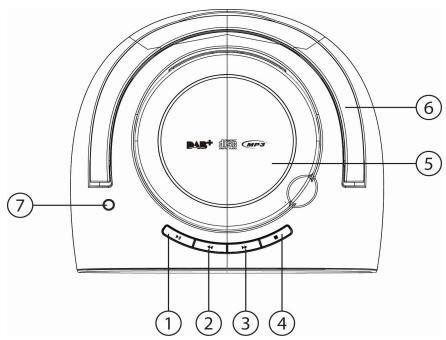
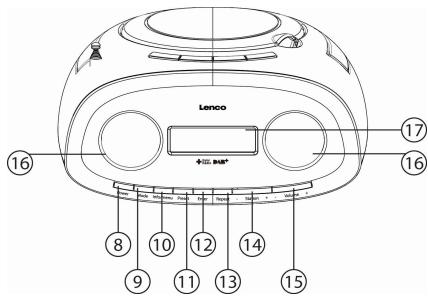
Exploring the device
- Play/Pause
- Backward
- Forward
- Stop
- Disc compartment cover
- Handle
- Antenna
- Power
- Mode
- Info/Menu
- Preset
- Enter
- Repeat
- Station (-) and (+)
- Volume (-) and (+)
- Speakers
- LCD
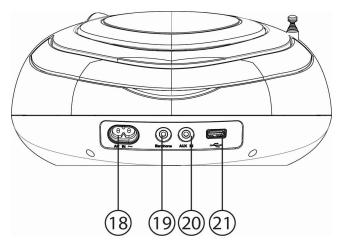
- Power cord socket
- Earphone
- AUX IN
- USB port
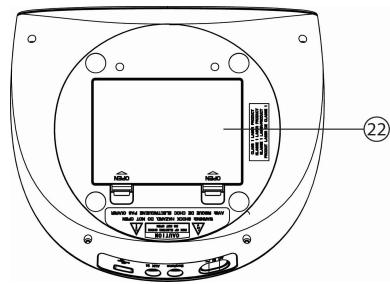
- Battery compartment
Getting Started
Never place the player in direct sunlight. For comfortable viewing, we recommend a soft light. Place it on a sturdy platform of which the surface should be flat and steady, so the product can't fall or hit by any objects. Make sure the product is placed in such a manner that nothing can fall on top of it, as pressure will damage or break the product. Prevent insertion of objects into the ventilation slots, or openings in the cabinet at all time.
Connecting the power cord
Connect the power cord to the player by connecting the small flat end of the cable to the power connection on the rear of the player. Connect the wide flat end of the cable to the power outlet.

The power outlet must be easily accessible, so that the power cord can be easily disconnected from the outlet when there is a problem with the device.
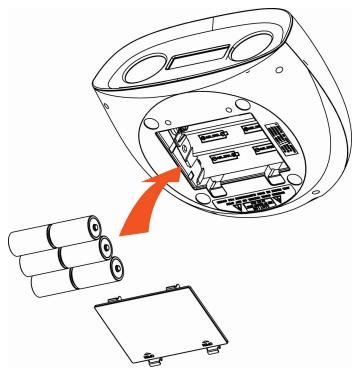
Installing the batteries
- Open the battery door
- Follow the polar mark in battery compartment and insert 6 × C size batteries
- Close the battery door
Battery maintenance
To maximize the battery and remote control lifetime, please follow these instructions:
- Remove the battery from the player if it is not used longer than a week.
Always keep the player away from heat sources.
- Lenco recommends the use of A-brand batteries. Do not use rechargeable batteries.
Basic operation
Playing a music disc
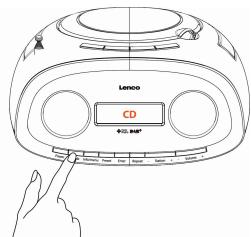
- Press "Mode" to choose CD mode
- Open CD compartment cover, place a disc in and close it. Once disc is loaded, and play automatically.
Other operation
| TO | Do this |
| Pause | Press▶once. To return to playback, press this button again |
| Stop | Press■ once |
| Select previous/next folder(only available in MP3 CD or USB) | Press“Station (-)/(+)” once |
| Select a track/file | Press〈or〉 once |
| Repeat play(Repeat mode appear every 10 secs on display when enabled) | Press“Repeat” button to select between Normal/Repeat One/Repeat Folder/Repeat All/Shuffle |
Note: Resume play is cancelled when (1)you open the CD compartment or (2)you turn off the power
Listening to music on a USB device
You can listen to audio files stored on a USB device (a digital music player or USB storage media). Audio files in MP3 and WMA can be played on this unit.
- Connect the USB device to the USB port
- Press "Mode" to choose USB mode
- Once USB is loaded, it will play automatically.
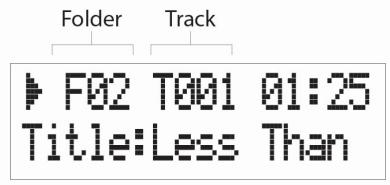
USB/MP3 CD display information
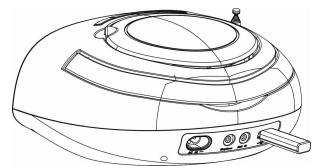
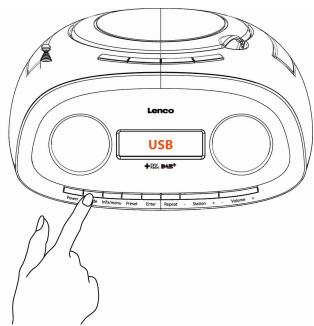
Program Play
In CD/USB Stop mode, press "Preset", to enter
program play menu.
Use and to select track number, or press "Station (-)/(+) to select folder, then press "enter" to confirm.
Press to confirm and store the whole program list, then it will start to play automatically.
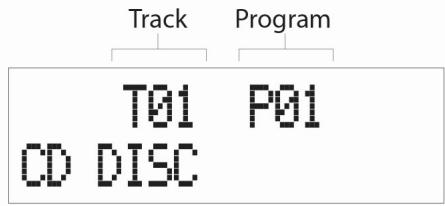
Audio CD
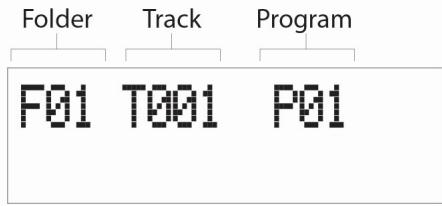
MP3 CD/ USB
AUX IN
Use the AUX IN connection to connect external audio sources. Press "mode" button to choose "Auxiliary Input", then connect external device via AUX IN socket at the back, then you could play the audio file on the external device.
Listening to DAB radio
- Extend the antenna.
-
Press "Mode" to choose DAB mode. (If this is your first time to use, it will scan station automatically.)
-
Press "Station" button to choose available DAB stations, press "Enter" to change station.
Listening to FM radio
- Extend the antenna.
- Press "Mode" to choose FM mode.
- Press "Station" button to move every 0.05MHz
- Press and hold "Station" button for 2 seconds and then release the button, it will scan and stop at next broadcast station.
Other Operations
Store Stations
- Select the station you wish to presets.
- Press and hold "Preset" button until the LCD display Preset Store.
- Press "Station" buttons to select which preset number you like.
- Press "Enter" button to confirm.
Recall Preset Stations
- Press "Preset" button once, the LCD display Preset Recall.
- Press "Station" buttons to select which preset station you would recall.
- Press "Enter" button to confirm.
Volume control
You could press volume (-) or (+) to adjust the speaker loudness.
Using the Info control
It is possible to change the information that is displayed on the LCD at each mode. To change the information display, press "Info/menu" button once.
Audio CD/AUX mode
Information cycling through: Power source, time and date.
MP3 CD/USB mode
Information cycling through: Power source, time, date, album, artist and title.
DAB mode
Information cycling through: DLS, signal strength, programme type(PTY), Ensemble name, channel number/frequency, signal error rate, bit rate, power source, time and date.
FM mode
Information cycling through: Radio text, programme type(PTY), frequency, Mono/Stereo, power source, time and date.
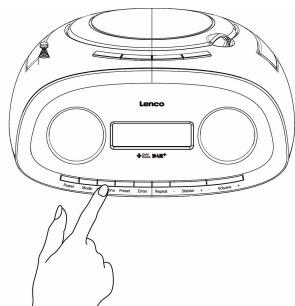
It let you to configure some system option or this product. To change the menu setting, press and hold "Info/menu" button until entered to menu mode, use "Station(-)/(+) and "Enter" to choose and confirm your selection correspondingly.
^ 念 Full scan - it will scan available DAB stations.
Manual tune – manually select a particular channel/frequency for DAB station.
DRC - This function reduces the difference between the loudest and quietest audio being broadcast.
DRC options: off(default)/high/low
Note: DRC only works if it is enabled by the broadcaster for a specific station.
*Prune - This removes all invalid stations indicated in the station list with a ‘?’ in front of the station name.
- ^Scan setting - select the method of scans and stop at FM mode.
Scan options: Strong stations (default)/All stations
^Audio setting - By default, all stereo stations are reproduced in stereo.
Audio options: Stereo allowed (default)/Forced mono)
Remarks: * DAB mode only, ^ FM mode only
You could tailor different functions in System menu. Press and hold "Info/menu" and select "System", then press "Enter" to login to. Use "Station (-)/(+) and "Enter" to choose and confirm your selection correspondingly.
- Equaliser - There are 7 options in equalizer. You could also create your own EQ, by select "My EQ" and adjust (Treble/Bass) from -7 to +7 level.
EQ Options:
My EQ Normal Jazz (Treble/Bass)
Classic Pop Rock
Speech
- Time - You could tailor your time and date format.
Set Time/Date
Auto update - You could choose the update method of time and date.
Update options:
Update from Any(default)
Update from DAB
Update from FM
No update
Set 12/24 hour - You could change the time format on the display.
Time format options:
Set 24 hour(default)
Set 12 hour
Set date format - You could change the date format on the display. Date format options:
DD-MM-YYYY(default)
MM-DD-YYYY
- Backlight - You could adjust the level of backlight in different scenarios.
Timeout-LCD backlight will switch off in corresponding duration. Timeout options:On(default)/10/20/30/45/60/90/120/180 seconds
- On level - It represents the LCD backlight level during working.
On Level options: High(default)/Medium/Low
Dim level - It represents the LCD backlight level during standby mode. Dim Level options: High(default)/Medium/Low
Language - There have 4 languages option. Language options: English/French/Dutch/Italian
- Factory Reset - A factory reset clears all user defined settings, replacing them with the original default values, so time/date, preferences/settings, DAB station list and preset stations are all lost.
- SW version - It shows the software version of the player.
Trouble Shooting
| Problem: | Solutions: |
| The device does not turn on | Make sure the AC power cord is connected to the correctly. |
| The CD player does not play even when a CD is in place | Place the CD with label side up.
Clean the CD. |
| FM Hiss/DAB Burbling/intermittent cut-out/DAB No stations available message | Check/move antenna. Move radio. Rescan local (high-strength) stations only. (For DAB, check local coverage at www.ukdigitalradio.com/coverage then rescan stations). |
Error messages
| Error messages | Meaning |
| ‘Service not available’ | No DAB reception. |
| ‘Signal error’ | The DAB signal has been interrupted. |
| ‘No DAB Station’ | The listed station cannot be found. (No Name): The current station does not broadcast an identity name. |
| ‘No stations found’ | No DAB stations are available, check aerial. |
| ‘No Radio Text’ | No RDS text information is available on this station. |
| ‘No PTY’ | No RDS programme type information is available. |
| ‘No Name’ | No RDS station name is being broadcast. |
Specifications
| Description: | CD/MP3/DAB/FM Digital Radio |
| Speaker: | 2 x 1W rms |
| Frequency Ranges: | FM: 87.5-108MHz; DAB/DAB+: 174.928-239.200 MHz |
| LCD Display: | 16 x 2 lines display |
| Power Requirements: | 110-240V AC, 50/60Hz (AC power supply)
1.5V x 6 C-size batteries(not included)
(please use our provided power cord) |
| Approx. Dimensions: | 241mm x 120mm x 219mm |
| USB: | USB2.0 Full Speed |
Guarantee
Lenco offers service and warranty in accordance with the European law, which means that in case of repairs (both during and after the warranty period) you should contact your local dealer.
Important note: It is not possible to send products that need repairs to Lenco directly.
Important note: If this unit is opened or accessed by a non-official service center in any way, the warranty expires.
This device is not suitable for professional use. In case of professional use, all warranty obligations of the manufacturer will be voided.
Disclaimer
Updates to Firmware and/or hardware components are made regularly. Therefore some of the instruction, specifications and pictures in this documentation may differ slightly from your particular situation. All items described in this guide for illustration purposes only and may not apply to particular situation. No legal right or entitlements may be obtained from the description made in this manual.
Disposal of the Old Device
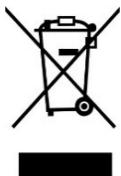
This symbol indicates that the relevant electrical product or battery should not be disposed of as general household waste in Europe. To ensure the correct waste treatment of the product and battery, please dispose them in accordance to any applicable local laws of requirement for disposal of electrical equipment or batteries. In so doing, you will help to conserve natural resources and improve standards of environmental protection in treatment and disposal of electrical waste (Waste Electrical and Electronic Equipment Directive).
CE Marking

Products with the CE marking comply with the Radio Equipment Directive(RED) 2014/53/EU issued by the Commission of the European Community.
The declaration of conformity may be consulted via techdoc@lenco.com
Service
For more information and helpdesk support, please visit www.lenco.com
Lenco Benelux BV, Thermiekstraat 1a, 6361 HB, The Netherlands.
Let op:
My EQ (aigus/basses)
Normal
Jazz
Classique
Pop
Rock
Discours