USER MANUAL KDTIF 2ZS 7200 KING D HOME
EN 1Warnings and personal safety
- Do not operate your cooktop by means of an external timer or separate remote-control system.
- Caution: The cooking process has to be supervised. A short term cooking process has to be supervised continuously.
- WARNING: If the surface is cracked, switch off the appliance to avoid the risk of electric shock.
Hot surface hazard
- Warning: Danger of fire: do not store items on the cooking surface.
- This appliance is not intended to be operated by means of an external timer or separate remote-control system.
- Warning: Use only hob guards designed by the manufacturer of cooking appliance or indicated by the manufacturer of the appliance in the instruction for use as suitable hob guards incorporated in the appliance. The use of inappropriate guards can cause accidents.
- During use, accessible parts of this appliance become hot and can cause burns.
- Beware: Metallic objects such as knives, forks, spoons and lids must not be placed on the hob surface since they can get hot.
- After use, always turn off the cooking zones and the hob as described in this manual. Do not rely on the pan detection feature to turn off the cooking zones when you remove the pans.
- This appliance can be used by children aged from 8 years and above and persons with reduced physical, sensory or mental capabilities or lack of experience and knowledge if they have been given supervision or instruction concerning use of the appliance in a safe way and understand the hazards involved. Children shall not play with the appliance. Cleaning and user maintenance shall not be made by children without supervision.
- If the supply cord is damaged, it must be replaced by the manufacturer, its service agent or similarly qualified technician to avoid a hazard.
- WARNING: Unattended cooking on a hob with fat or oil can be dangerous and may result in fire. In case of fire DO NOT extinguish the fire with water. First switch off the appliance and then cover flame with a lid or a fire blanket.
1 General warnings
Read all the instructions and warnings carefully before using this product. Failure to follow warnings and instructions can result in severe injury, death, or property damage. Before installation, check if all accessories are complete and without damage. If not, contact customer service. Keep these instructions in a safe place for future reference. Use this product with its original parts only. Cannot be held responsible in the event of damage or injury due to incorrect use of this product. The information contained in this manual is believed to be correct at the time of printing. However, reserve the right to change or modify any of the specifications without notice or obligation to update existing units. Repairs should only be carried out by a specialist or a professional and experienced technician. Never attempt to repair the product yourself.
2Warnings and personal safety
Your safety is important to us. Please read below information carefully before installing or using your Hob.
2.1 Installation
-
Electrical Shock Hazards
-
Disconnect the appliance from the mains electric supply before carrying out any work or it.
- Connection to a good earth wiring system is essential and mandatory.
- Alterations to the domestic wiring system must be made by an experienced electrician ONLY.
-
Failure to follow this advice may result in electric shock or even death.
-
Important safety instructions.
- Read these instructions carefully before installing or using this appliance.
- No combustible material or products should be placed on this appliance at any time.
- Please make this information available to the person installing the hob as it could reduce your installation costs.
- In order to avoid a hazard, this appliance must be installed according to these instructions for installation.
- This appliance is to be properly installed and earthed only by a suitably qualified person.
- This appliance must be connected to a circuit with an isolating switch providing full disconnection from the power supply.
- Failure to install the appliance correctly could void the
warranty or liability claims.
2.2 Operation and Maintenance
-
Electrical Shock Hazards
-
Do not cook on a broken or cracked hob. If the hob surface breaks or cracks, switch the appliance off immediately at the mains power supply (wall switch) and contact a qualified technician.
- Switch the hob off at the wall before cleaning or maintenance.
-
Failure to follow this advice may result in electric shock or death.
-
Health hazard
-
This appliance complies with electromagnetic safety standards.
However, the persons with cardiac pacemakers or other electrical implants such as insulin pumps must consult the doctor or implant manufacturer before using this product to make sure their implants will not be affected by the electromagnetic field.
-
Failure to follow this advice may result in death.
-
Hot surface hazard
-
Do not let your body, clothing or any item other than suitable cookware come in contact the ceramic glass until the surface is cool down.
- Keep the children away.
- Handles of the saucepans may become hot. Check the saucepan handles and ensure they do not hang over the cooking zones. Keep the handles out of the reach of children.
-
Failure to follow this advice could result in burns and scalds.
-
Cutting Hazard
-
The razor-sharp blade of a hob scraper is exposed when the safety cover is retracted. Use with extreme care and always store safely and out of reach of children.
-
Failure to use caution could result in serious injury or cuts.
-
Important safety instructions.
-
Never leave the appliance unattended when in use. Boil over causes smoking and greasy spill overs that may ignite.
- Never use your appliance as a work or storage surface.
- Never leave any objects or utensils on the appliance.
- Do not place or leave any magnetic sensitive objects such as credit cards, memory cards or electronic devices such as computers, MP3 players, near the product, as they may be affected by the electromagnetic field.
DO NOT use your appliance for warming or heating the room.
- Do not allow children to play with the appliance. Do not let
children sit, stand, or climb on the appliance.
- Do not store toys and similar objects in cabinets above the hob. Children climbing on the hob could be seriously injured.
- Do not leave children alone or unattended in the area where the appliance is in use.
- This appliance can be used by children aged from 8 years and above and persons with reduced physical, sensory or mental capabilities or lack of experience and knowledge if they have been given supervision or instruction concerning use of the appliance in a safe way and understand the hazards involved. Children shall not play with the appliance. Cleaning and user maintenance shall not be made by children without supervision.
- Do not repair or replace any part of the appliance unless specifically recommended in the manual. All other servicing should be done by a qualified technician.
- Do not use a steam cleaner to clean hob.
- Do not place or drop heavy objects on the hob.
Do not stand on your hob.
- Do not use pans with jagged edges or drag pans across the ceramic glass surface as this can scratch the glass.
- Do not use any scrubs or harsh abrasive cleaning agents to clean the electric hob to avoid scratches on the ceramic glass.
- If the power supply cable is damaged, it must only be replaced by a qualified technician.
- This appliance is intended to be used in household and similar applications such as: -staff kitchen areas in shops, offices and other working environments; -farm houses; -by clients in hotels, motels and other residential type environment; -bed and breakfast type environment.
3 Installation instructions
The appliance must be installed and connected in accordance with the standard current regulations.
After unpacking t he appliance, ensure there is no visible damage. If the appliance has been damaged during transit, DO NOT USE. Contact the dealer immediately.
- Selection of installation equipment
Cut the work surface according to the sizes as shown.
Minimum 5 cm space must be preserved around the hole for the installation purpose.
Be sure the thickness of the work surface is at least 30mm . Please select heat-resistant work surface material to avoid larger deformation caused by the heat radiation from the hotplate. (measure by unit: mm)
| Model | L | W | H | D | A | B | X |
| 50788 | 590 | 520 | 56 | 52 | 555+5
555-0 | 495+5
495-0 | 50 mini |
Under any circumstances, make sure the electric hob is well ventilated and the air inlet and outlet are not blocked. Ensure the electric hob is in a good work state.
A Note: The safety distance between the hotplate and the cupboard above the hotplate should be at least 760mm
| A(mm) | B(mm) | C(mm) | D | E |
| 760mm | 50mm minimal | 20mm minimal | Air intake | Air exit 5mm |
2. Before locating the fixing brackets
The unit should be placed on a stable, smooth surface (use the packaging). Do not apply force onto the controls protruding from the hob.
Easy Fit kits
There is one easy fit kits package for each hob, include fixing clips and screws (for ceramic hob total 2 pcs clip and 2 pcs screw, for induction hob total 4 pcs clip and 4 pcs screw). Find the easy fit kit package first.
Fix clips to hob
Insert the fixing clips into fixing holes reserved on 2 sides of the housing, fix a clip to the housing with a screw, then insert hob into cabinet/work surface.
Fix hob to cabinet
Insert the hob into the cabinet/work surface, the mounting clips on the sides can secure your hob sturdily.
3. Connecting the hob to the mains power supply
The power supply should be connected in compliance with the
relevant standard, or a single-pole circuit breaker. The appliance has a large power rating. Contact a qualified electrician for connection.
i Notes
- If the cable is damaged or needs replacing, this should be done by a qualified technician using the proper tools, to avoid any accidents.
- If the appliance is connected directly to the mains an omnipolar circuit-breaker must be installed with a minimum opening of 3mm between the contacts.
- Ensure that the electrical connection is in compliant with safety regulations.
- Do not bend or compress the cable.
- The cable must be checked regularly and only replaced by a qualified technician.
A Cautions
- The hob must be installed by qualified personnel or technicians. Do not try to install by yourself unless you are qualified.
- The electric hob must not be mounted to cooling equipment, dishwashers and rotary dryers.
- The electric hob must be installed such that better heat radiation can be ensured to enhance its reliability.
- The wall and induced heating zone above the work surface must withstand heat.
- To avoid any damage, the sandwich layer and adhesive must be heat resistant.
- Do not use a steam cleaner.
- This electric hob can be connected only to supply with system impedance no more than 0.427 ohms. In case necessary, please consult your dealer for system impedance information.
1 Note: For some of the models, there might be applied system impendence with a power code with plug. If so, you can directly plug the appliance to the socket. Please keep power code plug out after use, for those model power code with plug.
The method of connections as shown.
| A | Input | E | Blue |
| B | Black | F | Yellow/green |
| C | Brown | G | Junction Box |
| D | Gray | H | Electric hob |
4 Operation Guide
4.1 Before using your New Hob
- Read this guide thoroughly for instructions and the SafetyWarnings.
- Remove any protective film that may still be on your new
electric hob.
4.1.1 Using the touch controls
- The controls respond to touch. Do not apply any pressure.
Use the ball of your finger instead of a finger tip. You will hear a beep each time a touch is registered.
- Make sure the controls are always clean, dry without any object covering them. Even a thin layer of water may make the controls unresponsive.
4.1.2 Choose the right Cookware
- Use a cookware with a base suitable for the induction cooking. Look for the induction symbol on the packaging or on the bottom of the pan.
- You can check whether your cookware is suitable by carrying out a magnet test. Move a magnet towards the base of the pan. If it is attracted, the pan is suitable for induction hob.
If you do not have a magnet:
- Put some water in the pan you want to test.
- If does not flash in the display and the water is heating, the pan is suitable.
- Cookware made from the following materials is not suitable: pure stainless steel, aluminium or copper without a magnetic base, glass, wood, porcelain, ceramic and earthenware.
- Induction hob are made from smooth, ceramic glass, the heat comes from a magnetic induction coil which heats the cookware but not the cooking surface. The heat from the cookware is transferred to the food.
- It's important that you use only metal pans specifically designed and/or approved for use on induction hobs. Do not allow melamine or plastic containers to come in contact with the heat zones.
- A pan which diameter less than 140mm may not be detected by the induction hob.
- Do not use the cookware with jagged edges or a curved base.
- Make sure that the base of your pan is smooth, sits flat against the glass, and is the same size as the cooking zone. If you use smaller pot efficiency will be lesser than expected. Always centre your pan on the cooking zone.
- Always lift pans off the Induction hob. Do not slide to avoid scratches on the glass.
1 Notes: You can not use any kind of pot or pan for Ceramic Hob.
Suggested Pan dimensions for induction hob
The cooking zones are, up to a limit, automatically adapted to
the diameter of the pan. However, the bottom of this pan is suggested to have a minimum of diameter according to the corresponding cooking zone. To obtain the best efficiency of your hob, please place the pan in the centre of the cooking zone.
Base diameter of the pots:
| Cooking zone | Minimum (mm) | Maximum (mm) |
| 160mm | 140 | 160 |
| 180mm | 140 | 180 |
| 210mm | 160 | 210 |
| 280mm | 230 | 280 |
| Flexible zones (only for 50788) | 200 | 400x200 |
4.2 Using your Induction Hob
4.2.1 To Start Cooking
- After the hob is connected to the power supply and turned on.
Press and hold the ON/OFF control button for about 3 seconds till you hear a "beep" to turn the hob on. Now the hob enters into Standby mode, all heat setting indicators and Timer setting indicators show "-".
- Place a suitable pan on the cooking zone.
Make sure the bottom of the pan and the surface of the cooking zone are clean and dry.
-
Set heating level of the cooking zone.
-
There is a separate "-" and "+" heat level control button for each cooking zone for these models. Set heat setting by touching "-" or "+" button for the corresponding cooking zone.
- Press and hold either of the two buttons, the value will adjust down or up rapidly, from 0 to 9 in repeat mode.
2) For all models
before adjust heating level, n eed to touch t he heating zone selection control button to select and activate the cooking zone you wish to use. When the heat setting indicator of the selected zone flashing is active, then you could adjust its heat level by below:
- Adjust heat setting by sliding the slider control.
i Notes
After turning the power on, the buzzer of hob beeps once, all indicators light up for 1 second then go out.
- When the hob is in Standby mode, if there is no activity within 1 minute, the electric hob will turn off automatically, and the buzzer beeps once.
- To turn on the hob, press the ON/OFF control button and hold for about 3 seconds. To turn it off, press ON/OFF button again.
- The power level can be adjusted from 0 to 9, the default setting is level 5.
- The heat setting indicator of the selected zone flashes when adjusting. After adjusting, it flashes 5 seconds then stop flashing, then the setting is confirmed.
4.2.2 To turn off the hob
- You can turn the cooking zone off by adjusting heat setting to level 0, which indicator shows "-".
- You can also turn the whole hob off by pressing ON/OFF control button.
1 Note: If there is a power cut during cooking, all setting will be cancelled.
1 Note: The cooling fan of induction hob will remain on for about 1 minute after the hob is turned off.
4.4 Using Booster Function-Induction Hob
It's with Booster function for all cooking zones. You can use the "Booster" function to boost the power of the relevant cooking zone for a maximum power rating for 5 minutes. This function could reduce the cooking time, which is convenient for cooking when in a hurry!
To use booster function when the hob is working, follows below:
- To activate the cooking zone and to use booster function: Touch the heating zone selection control button to select the cooking zone you want to use with boost function.
- Touch the Booster function control button [B], the heating zone indicator will show "B" and flashes for 5 seconds then stops, the Booster function is activated.
i Note
- When using booster function, if the other cooking zone is also working and the power setting is higher than level 2, the programmer will auto turn the power setting of the other zone to level 2.
After booster finishes, the cooking zone will return to the original setting.
Cancel the Booster function
- Repeat above steps deactivate Booster function.
- You can also cancel Booster function by adjusting the power level setting.
4.5 Flexible Areas-Induction Hob
Model has Flexible cooking areas. The Flexible cooking areas can each be used as a single zone or as two independent zones, according to the cooking needs.
Flexible areas are each made of two independent inductors that can be controlled separately. When working as a single zone, cookware is moved from one zone to the other one within the flexible area keeping the same power level of the zone where the cookware originally was placed, and the part that is not covered by cookware is automatically switched off.
A Important: Make sure to place the cookware centred on the single cooking zone. In case of big pot, oval, rectangular and elongated pans make sure to place the pans centred on the cooking zone covering both crosses.
4.5.1 Active the flexible induction area
To activate a flexible area as a single big zone, first press either
of the two cooking zone selection buttons of this flexible area, then press the flexible area control button. When flexible area works, the indicator above corresponding flexible area control button lights up, the power level indicator flashes. You can adjust the power level of the flexible area by slide the slider.
4.5.2 Deactivate the flexible induction area
To deactivate the flexible area when it works, press either of the two cooking zone selection buttons of this flexible area, when power level indicator flashing, press the flexible control button again. The indicator will turn off.
4.6 Child Lock Safety Control
You can lock the controls to prevent unintended use (for example children accidentally turning the cooking zones on) by active Child Lock function.
When the controls are locked, except the ON/OFF control button and Child Lock control button, disables rest of the touch control buttons.
4.6.1 To lock the controls
| Child Lock control button | ◎ | ON/OFF control button | ① |
Touch the Child Lock control button once. The timer indicator will show "Lo" and Child Lock function is active.
4.6.2 To unlock the controls
- Make sure the electric hob is turned on.
-
Touch and hold the Child Lock control button for 3 seconds, the buzzer beeps once, and "Lo" disappears in timer indicator, the Child Lock is deactivated.
-
You can now start using your electric hob.
Under the child lock mode, all controls button are disabled except the ON/OFF button and child lock button.
You can always turn the hob off with the ON/OFF control in an emergency, but you must unlock the hob first in the next operation.
1 Note: Under Child Lock function, if turn the hob off without inactive the Child Lock function. When turning on the hob later, the Child Lock function will be still active.
4.7 Stop and Start function
Make cooking easy! When cooking, your doorbell rings, phone rings. Need to step out of the kitchen?
The Stop and Start function can turn off all zones. When you
are back, with one touch of the button, hob restarts to carry on cooking.
- Activate Stop and Start function
To activate Stop and Start function, you can press the Stop and Start function button once. Then all programmes setting is paused and hob stops heating, all heat setting indicators show "P".
- Inactive Stop and Start function
To cancel the Stop and Start function, you can press the Stop and Start function again. All programmer setting will return to previous settings, Stop and Start indicator "P" disappears from all indicators.
When Stop and Start function activates, all control buttons are disabled except the ON/OFF and Stop and Start button.
1 Note: The hob will turn off automatically, if Stop and Start function last more than 10 minutes.
4.8 Using the Timer
When the hob is turned on, you can use the timer in two different ways:
- You can use it as a minute minder. In this case, the timer will not turn off any cooking zone when the set time is up.
- You can set it to turn either or more than one cooking zones off.
- You can set the minute minder/timer for up to 99 minutes. Timer overview
| A | Timer control |
| B | Minute display shows the number of minutes. |
4.8.1 Using the timer as a minute minder
If you are not selecting any cooking zone.
- Touch the timer control button, the number in timer indicator flashes.
- Then adjust Minute Minder setting follows below:
- Touch the timer control button once, a single digit timer indicator flashes. Adjust single digit of minute minder setting by sliding the slider control.
- Press the timer control button again, the number of tens digit in timer indicator flashes. Adjust tens digit of minute minder setting by sliding the slider control.
1 Note: By continuous touch the timer control button, the slider works in the following sequence: "Single Digit-Tens Digit -Confirm Setting-Single Digit...
- When the minute minder is set, it will begin to count down
immediately, the display will show the remaining time.
- The buzzer will beep for 30 seconds and timer indicator shows " - - " when the setting time finished. Any incorrect touching of control buttons during the setting, will make the buzzer beep.
4.8.2 Setting the timer to turn the cooking zone off
-
Touch the heating zone selection control button to select the cooking zone you wish to set the timer for.
-
Touch the timer control button once, a single digit timer indicator flashes. Adjust single digit of minute minder setting by sliding the slider control.
- Press the timer control button again, the number of tens digit in timer indicator flashes. Adjust tens digit of minute minder setting by sliding the slider control.
1 Note: By continuous touch the timer control button, the slider works in the following sequence: "Single Digit-Tens Digit -Confirm Setting-Single Digit...
- When the minute minder is set, it will begin to count down immediately, the display will show the remaining time.
1 NOTE: The red dot next to power level indicator will illuminate for the zones with the timer. You can check the timer setting of different cooking zones which set with the timer, by activating this cooking zone.
NOTE: If more than one heating zone has timer setting, the timer indicator will show the lowest time. The red dot next to power level indicator will flash.
- When the cooking timer expires, the corresponding cooking zone will be switched off automatically.
Note: The default setting of minute reminder and timer is 30 minutes.
Note: After setting, the timer indicator will flash for 5 seconds and then stop flashing, then the setting is confirmed.
Note: The minute reminder and timer can be used at the same time, timer indicator shows the lowest time setting. If the lowest setting is the minute reminder, the red dot next to timer indicator will flash. If the lowest setting is timer setting, the red dot of the corresponding cooking zone power level indicator will flash.
Note: If the indicator shows timer setting of the cooking zone. To check minute reminder setting, press the timer control button, the indicator will show minute reminder.
4.9 Detection of Pan and Small Articles
For induction hob, if display flashes "U" alternately with heat setting:
You have not placed the pan on the cooking zone.
The pan you're using is not suitable for induction cooking.
- The pan is too small or not properly centred on the cooking zone.
Notes
- There is no heating unless a suitable pan is placed on the cooking zone.
- The display will automatically turn off after 2 minutes if no suitable pan is placed.
- When an unsuitable size or non-magnetic pan (e.g., aluminium), or some other small item (e.g., knife, fork, key) has been left on the hob, the corresponding cooking zone will automatically turn off in 1 minute.
4.10 Residual heat warning
Beware of hot surfaces.
When the hob has been operating for some time, there will be some residual heat. The letter "H" appears in power indicator to warn you to stay away from the appliance.
It can also be used as an energy saving function:
If you want to heat further pans, use the hotplate that is still hot.
4.11 Auto shutdown
Another safety feature of the hob is auto shutdown. This occurs whenever you forget to switch off a cooking zone. The default shutdown timing are shown below:
Power level
Default working timer (hour)
4.12 Over-heat Protection
A temperature sensor equipped with the appliance can monitor the temperature inside the hob. When a high temperature is recognised, the hob will turn off automatically.
4.13 Over-flow Protection
For your safety, the programmer will shut down the power automatically if there is a boil over, spills or wet cloth over the touch control panel. All control buttons will be inactive except ON/OFF and Child Lock button until you wipe the touch control area dry.
4.14 Cooking Guidelines
Take care when frying as the oil and fat heat up quickly, particularly if you are using Booster function. At extremely high-temperature oil and fat will ignite spontaneously, causing a risk of fire.
4.14.1 Cooking Tips
- Allow the food to boil in lower setting.
- Using a lid will reduce cooking times and save energy by retaining the heat.
- Minimise the amount of liquid or fat to reduce cooking times.
- Start cooking on a high setting and reduce the setting when the food is heated.
4.14.4For stir-frying
Serve immediately.
4.15 Heat Settings
The settings below are guidelines only. The exact setting depends on the several factors, including the cookware and the amount of food you are cooking. Follow the safety guidelines and experiment with the induction hob to find the suitable settings.
| Heat | Suitability |
| 1 - 2 | Delicate warming for small amounts of food.
Melting chocolate, butter, and foods that burn quickly.
Gentle simmering.
Slow warming. |
| 3 - 4 | Reheating
Rapid simmering.
Cooking rice. |
| 5 - 6 | Pancakes |
| 7 - 8 | Pan-fried steak
Cooking pasta. |
| 9 | Stir-frying
Searing
Bringing soup to the boil.
Boiling water. |
5 Maintenance and cleaning
A Important: Before any maintenance or cleaning work is carried out, DISCONNECT the appliance from power supply and ensure the appliances is completely cool down.
5.1 Cleaning the Hob Surface
Clean spillages from the hob surface as soon as possible after use. Always ensure the surface is cool enough before cleaning.
Use a soft cloth or paper towel to clean the surface. If the spillage has dried on the surface, you may need to use a specialist vitro-ceramic glass cleaner, which is available in most supermarkets.
Do not use other abrasive cleaners and/or wire wool ect., as it may scratch the ceramic glass surface of your hob.
5.2 Hints and Tips
| What? | How? | Important! |
| Everyday soiling on the glass (fingerprints, marks, stains left by food or non-sugary spillovers). | • Switch OFF the power.
• Apply a vitro-ceramic glass cleaner while the glass is still warm (but not hot)!
• Rinse and wipe dry with a clean cloth or a paper towel.
• Switch ON the power. | • When turning off the power supply of hob, there will be no 'hot surface' indication, but the cooking zone may still be hot! Take extreme care.
• Heavy-duty scourers, some nylon scourers and harsh/abrasive cleaning agents may scratch the glass. Read the label of the cleaner or scourer before use.
• Do not leave cleaning residue on the glass surface: the glass may become stained. |
| Boilovers, melts, and hot sugary spills on the glass. | Remove these immediately with a scraper suitable for a ceramic glass of hob. Beware of hot cooking zone surfaces:
• Switch OFF the power. | • Remove stains left by melts and sugary food or spillovers as soon as possible. If left to cool on the glass, they may be difficult to remove or even permanently damage the glass surface. |
| • Hold the blade or utensil at a 30° angle and scrape the soiling or spill to a cool area of the hob.
• Clean the soiling or spill with a dish cloth or a paper towel.
• Follow steps 2 to 4 of 'Everyday soiling on the glass' above. | • Cut hazard: When the safety cover is retracted, the blade in a scraper is razor-sharp. Use with extreme care and always store safely and out of reach of children. |
| Spillovers on the touch controls. | • Switch OFF the power.
• Soak the spill.
• Wipe the touch control area with a clean damp sponge or a cloth.
• Wipe again with a dry paper towel.
• Switch on the power supply to the hob. | • The hob may beep and turn Off automatically, and the touch controls may not function while there is liquid on them. Make sure you wipe the touch control area dry before turning the hob back on. |
5.3 Maintenance of the Hob
If you find something goes wrong for your hob, please check whether below:
There is no power supply to the appliance.
- Check whether there is a power cut of your department.
- Check whether the appliance is connected to the socket properly.
-
Has the timer setting elapsed.
If it reaches the longest cooking time setting and the appliance shuts down automatically.
If there is a boil over on the touch control panel and overflow protection devices shuts down the appliance automatically.
-
The touch control panel buttons will be deactivated.
-
Under Child Lock "Lo" is on timer display.
If liquid/wet cloth touches control panel.
After cooking there is "H" shows on display.
- This is normal. The hob is designed with Residual Heat Warning safety features. It will remain on until the surface is cool enough for touch.
After turning the appliance off, the induction fan remains working for a while.
- This is normal, this helps the appliance to completely cool down.
- Some pans make crackling or clicking noises during the use of induction hob.
- This is normal, it's the sound of induction coils during working, and for a different construction of your cookware, the clicking might be slightly different.
The glass is being scratched.
Using unsuitable cookware, like rough-edged cookware.
Using unsuitable, abrasive scourers or cleaning products being used.
5.4 Failure Inspection for induction hob
In case of any defect, the induction hob will enter the protective state automatically and display the corresponding protective codes:
| Problem | Possible causes | What to do |
| E1/E2 | Abnormal supply voltage. | Check if the power supply is normal. Turn off and turn on after the power supply is normal. |
| E3 | High temperature of the pan sensor. | Check if there is water/liquid in the pan. If dried, fill with water/ liquid then restart. |
| E5 | High temperature of the IGBT temperature sensor. | Restart the induction hob once it cools down. |
For all other error codes, switch off the appliance and call your service provider.
6 Technical specifications
| Model No. | KDTIF2ZS7200 / 50788 |
| Voltage/Frequency | 220-240V~50/60Hz |
| Total Power | 7000W |
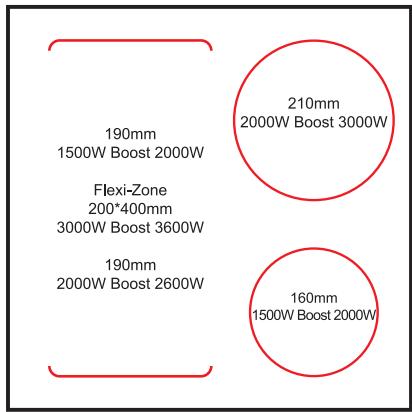
| Left Front Zone | 180mm,2000W booster 2600W |
| Left Rear Zone | 180mm,1500W booster 2000W |
| Right Rear Zone | 210mm,2000W (Optional: Booster 3000W) |
| Right Front Zone | 160mm,1500W (Optional: Booster 2000W) |
| Flexi/Bridge Zone | 400*200mm Flexi zone, 3000W Booster 3600W |
| Symbol | Vale | Unit |
| Model | | KDTIF2ZS7200/50788 | |
| Plate type | | Induction | |
| Number of cooking zones and / or areas | | 3 | |
| Heating technology (induction cooking zones and areas, conventional cooking zones, electric hobs) | | Induction cooking zones | |
| For circular cooking zones or areas: diameter of the useful surface per electric cooking zone, rounded to the nearest 5 mm. | Ø | Zone 1 : 16 Zone 2 : 21 | cm |
| For non-circular cooking zones or areas: diameter of the useful surface per electric cooking zone or area, rounded to the nearest 5 mm. | L W | 40 19 | cm |
| Energy consumption per cooking zone or area, calculated per kg | EC electric cooking | Zone 1 : 189,6 Zone 2 : 193,7 Zone 2 : 193,4 | Wh/kg |
| Energy consumption of the hob, calculated per kg | EC plate cooking | 192,2 | Wh/kg |
Disposal and respect for the environment
If you want to get rid of your electrical appliance because it needs to be replaced or is no longer in use, consider protecting the environment.
Ask local authorities for advice, as there are many environmentally friendly waste reception centers.
If this logo appears on the product, it means disposal of the appliance is covered by directive 2012/19/EU dated 4 July 2012 concerning waste electrical and electronic equipment (WEEE).
Any dangerous substances contained in electric and electronic equipment may have potential effects on the environment and human health during reprocessing.
As a result, at the end of the useful life of this appliance it should not be disposed of with unsorted municipal waste.
Your role as end consumer is essential in terms of reusing, recycling or obtaining other types of value-creation from it. You have a choice of systems for collection and trade-in organised by local authorities (recycling centres) and distributors.
You are obliged to make use of these choices.
The warranty does not cover the wear parts of the product, nor the problems or damage resulting from:
(1) surface deterioration due to normal wear and tear of the product;
(2) defects or deterioration due to contact with liquids and corrosion caused by rust or the presence of insects;
(3) any incident, abuse, misuse, alteration, disassembly or unauthorized repair
(4) improper maintenance, improper use concerning the product or connection to an incorrect voltage;
(5) any use of accessories not supplied or not approved by the manufacturer.
The guarantee will be cancelled if the nameplate and / or serial number of the product are removed.