Bulbby Eco E27 - Smart bulb LOGICOM - Free user manual and instructions
Find the device manual for free Bulbby Eco E27 LOGICOM in PDF.


User questions about Bulbby Eco E27 LOGICOM
0 question about this device. Answer the ones you know or ask your own.
Ask a new question about this device
Download the instructions for your Smart bulb in PDF format for free! Find your manual Bulbby Eco E27 - LOGICOM and take your electronic device back in hand. On this page are published all the documents necessary for the use of your device. Bulbby Eco E27 by LOGICOM.
USER MANUAL Bulbby Eco E27 LOGICOM
CHARACTERISTIQUES DU PRODUIT
You can revoke permission at any time.
https://www(logicom-europe.com/ce-doc
GARANTIE
Made in PRC © 2018 Logicom SA.
Logicom Home | User Manual
Model name: Bulbby
READ BEFORE USE
Thank you for buying a Logicom Home product. Please note that this user manual comes with your product and that you must read it entirely before use. Please note that you'll also be able to find an up-to-date PDF version of this manual online on our website: www_logiccom-europe. com
A more comprehensive guide to use Tuya's app is also available on this website.
PRODUCT OVERVIEW
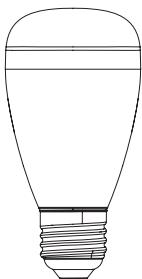
Logicom Home's Bulbby is a smart LED light bulb that can be controlled wirelessly over Wi-Fi thanks to the Tuya Automation cloud system. This way, users can turn on and off the light, change color and set color cycles from their phone or tablet effortlessly. User can control all connected devices with the voice (when product is connected to a smart assistant) as well as monitor the on/off status of the plugged devices on mobile devices from anywhere.
PRODUCT FEATURES
Your new companion is full of useful features and is compatible with almost all smart assistants (Google ; Amazon ; IFTT and more to come). Here's a list of your product's features :
- Amazon Alexa and Google Assistant compatible
Wi-Fi connection - Encrypted wireless communication
- RGB (Red/Green/Blue) colors or white light
- Light scenarios (blinking lights, color switch, etc)
Scheduled actions - Automatical Over The Air Firmware update
PACKAGE CONTENT
2x Bulbby Smart Bulbs (VZ-P0655)
1x French/English User Manual
EN
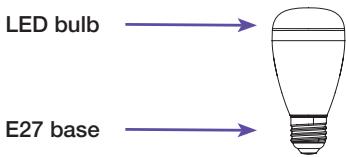
PRODUCT DESCRIPTION
PRECAUTIONS FOR USE AND SAFETY INSTRUCTIONS
- Always respect usage conditions indicated in this manual.
- The product must strictly be used indoors.
- Bulbby does not contain any part that requires customer manipulation. Never open the product and never try to unmount some internal elements or try to modify some parts in any way. If product shows signs of dysfunction, take it immediately out of the socket and have it checked by a qualified specialist.
- Do not use Bulbby if it is broken, damaged (outside shell or any other part) or if it makes abnormal noise.
- Do no put any object, even light, over Bulbby.
- Do not leave Bulbby close to any heat source, like heaters or warm elements.
- Do not let Bulbby under the rain and do
not use it near a water source or humid environment. Do not put any container nearby (like vases, bottle or glass) that contains liquid that could infiltrate through the bulb's apertures. If any liquid leaks into the product, take it immediately out of the socket and have it checked by a qualified specialist.
Only use the required voltage for this product which is indicated on the product and in this manual.
- Do not twist, bend or damage Bulbby's base.
- Do not try to remove Bulbby from the socket with humid or wet hands.
- Do not connect Bulbby to an electrical dimmer.
- Verify regularly that the plug's pins and socket are in good condition, dust and clean your product afterwards. Only use a smooth cloth to clean your product when cold.
- Do not touch Bulbby when connected to a
socket.
- When not in use, keep Bulbby in a dry and fresh area.
After a long period of non-use, always check your product's integrity and clean the product before powering it. - To replace Bulbby, cut off the power and let it cool down before handling it.
- This product is not a toy and must not be handled by children.
INSTALLATION AND CONFIGURATION
EN
OFF-LINE USAGE
Turning the product On and Off
To turn ON the bulb you just need to plug it into a E27 light socket and power it on.
Bulbby will keep the previous setting when powered on, otherwise it will blink in a white light (configuration mode).
ON-LINE USAGE
Resetting the product
To reset the product to the factory settings, you need to rapidly power it ON and OFF 3 times in a row. The light will blink in a white light to tell you it's ready to be reconfigured.
NB: Wait for the light to be on before turning it off again.
App download and account creation
Your Logicom Home smart product uses Tuya to let you remotely control it.
In order to use it, you have to use the Tuya software. This manual will only cover the Tuya's smartphone application. For other platforms, please go on Tuya's website (https://en.tuya.com/) for more information.
To install the app on your phone, scan the QR code below (Android and iOS).

You can also search on your device's application store "TuyaSmart" to download and install the app.
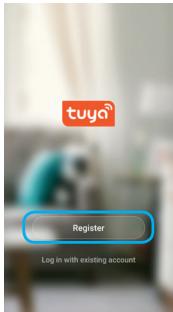
Once installed, start the APP and register an account with your email address or your mobile number and then log in APP with the registered account to start your connected home experience.
EN
Add your device to your home
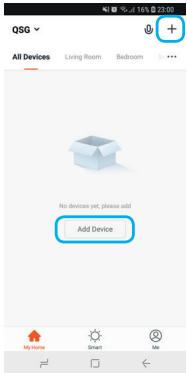
To add your device to your home, please click on the « Add device » or the « + » icon in the top-right of the screen.
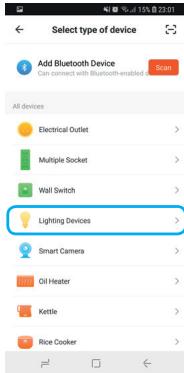
Select the device type "Lighting Devices".
Connection to Bulbby
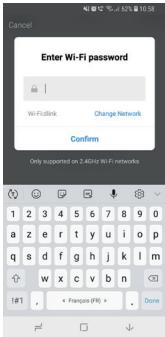
After selecting the «Lightning Devices» in the list of devices compatible with Tuya system, input the password of the designated Wi-Fi network to
include the device to Cloud and make it remotely controllable from Tuya's cloud.
EN
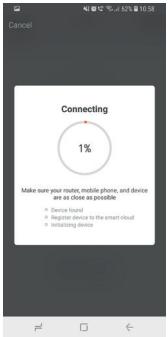
Complete pairing of the product takes about 30 seconds. A wheel will be displayed to show you the current state of pairing (please wait for it to reach 100% ).
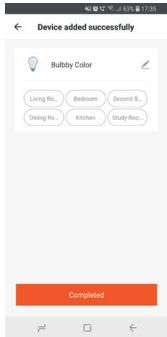
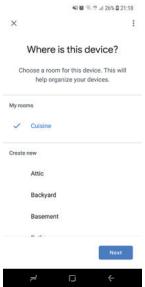
After successful pairing, Tuya will ask you to change the name of the device (useful to identify quickly your product and mandatory if you plan on using voice-control systems) and also to choose a room for the device (Tuya offers some default rooms, but more can be added if needed). Rooms are the Tuya's equivalent to a real room; meaning you will be able to control all Tuya's products within a room at the same time (especially when voice-controlling your products).
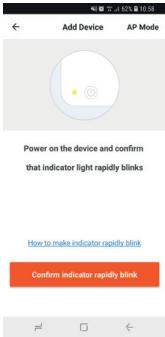
Once pairing is finished, rename the device and set it to a room.

Controlling the product remotely
Once paired and added to a room, you'll be able to find your product in the default screen of Tuya app:
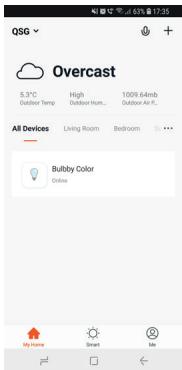
You can now tap on the product to open the control interface :
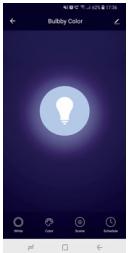
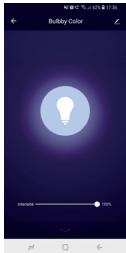
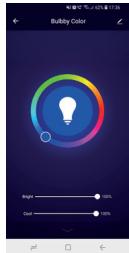
When the bulb is ON
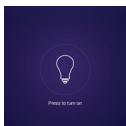
When the bulb is OFF
To turn the light ON and OFF, tap anywhere on the screen.
Tap on « white » to turn the WHITE mode ON. In this mode you can set the brightness as you like.
Touch every where you want on the color wheel to set the desired color. You can set brightness and coolness of the light with the sliders.
Tap on « Scene » to activate the animated color switches. Once tapped, a pop-up menu will be displayed. Tap on the scene you want to activate it.
Tap on « Schedule » to let you create some scheduled switches of the Bulb (like turn OFF everyday at 11PM).
NOTE:
- This product is intended for indoor use only.
CONNECTION TO SMART SYSTEMS
AMAZON ALEXA / AMAZON ECHO Introduction
Before using Amazon Alexa to control your smart devices, please make sure that the following conditions are met:
Wi-Fi Network
- An Echo device, such as Echo, Echo Tap, or Echo Dot
- A valid Amazon Alexa account
- Amazon Alexa app installed and configured on your phone
- TuyaSmart app installed and configured on your phone
- At least one device under your TuyaSmart Connect account
Link TuyaSmart account to Alexa
To use Alexa's voice-control features, please pair your Tuya account to your Amazon Alexa account, to do so, please proceed as follow :
1) Tap «Skills» in the hamburger menu (menu that's hidden at the left of the screen)
2) Search «TuyaSmart»
3) Select «TuyaSmart» and tap «ENABLE» to download, install and activate the Skill
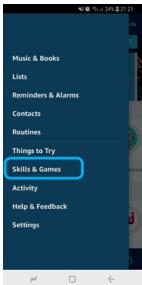
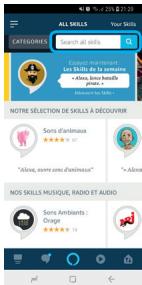
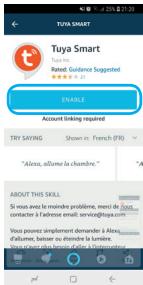
4) You will be re-directed to the Tuya account login page. Type in your TuyaSmart account and password, don't forget to select your country from the drop-down list.
5) Tap «Link Now» to link your TuyaSmart account. The country/region, the account, and the password must match exactly the same with the TuyaSmart account.
6) Close the window when "Alexa has been successfully linked with TuyaSmart" notice is prompted out.
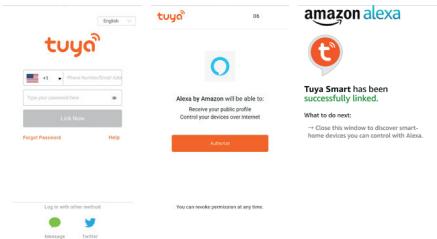
Control your smart device
You are now a few steps away from controlling your device with your voice.
Now, your Echo needs to discover your smart devices within your tuya account. It will do it automatically.
Please note that after the first account link, Amazon Alexa will discover devices which have already been added in your Tuya account.
Discovered devices will be shown in the list.
NOTE:
- If the Echo cannot find the devices added in TuyaSmart APP, please disable the TuyaSmart skill first and go through the TuyaSmart skill "ENABLE", log to your Tuya account again and device discovery again to make Echo voice control work.
Available commands
EN
You can now control your smart devices through Echo. Here below is an example of how to voice control the device renamed "John" with Echo:
=> Alexa, turn on "John"
=> Alexa, turn off "John"
=> Alexa, change the color of "John" to blue
GOOGLE ASSISTANT / GOOGLE HOME Introduction
Before using Google Home to control your devices, make sure the following conditions are met:
Wi-Fi Network
A Google account
- Google Home app installed and configured on your phone
- A Google Home device, such as Google Home or Google Home Mini already configured and paired to your Google account
- TuyaSmart app installed and configured on your phone
- At least one device under your TuyaSmart Connect account
Link TuyaSmart account in Home Control
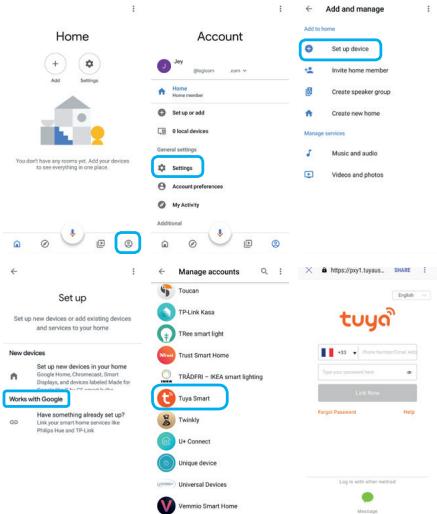
Like with Amazon, Google Home also needs to be linked to your Tuya account in order to let you control your Logicom Home products with the voice. To do so :
1) Tap on the «Account» icon in the right corner at the bottom of the homepage
2) Tap the «+» button to «Set up or add», then again «Set up device» and just below «Works with Google»
3) Find «TuyaSmart» in the list
4) In the new window, log-in to your TuyaSmart then tap «Link Now»
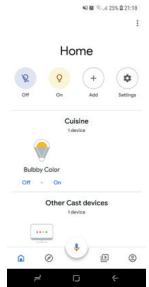
5) After you assign rooms for devices, your devices will be listed in the Home Control page. You can now proceed with voice command.
Control your smart device
You can now control your smart devices through Google Home. Here below is an example of how to voice control the device renamed "BedroomJohn" in the room « Bedroom » with Google Assistant:
=> Ok Google, turn on "BedroomJohn"
=> Ok Google, turn off "BedroomJohn"
=> Ok Google, change the color of "BedroomJohn" to blue
=> Ok Google, turn off Bedroom (will turn off every smart device linked to the room "Bedroom")
Please note that you can use both Alexa and Google Home systems at the same time to control all your Logicom Home products.
EN
SPECIFICATIONS
Please find below the specifications of your product:
| Model Name | Logicom Home Bulbby |
| Constructor Reference | VZ-P0655 |
| Power supply | AC 110-240V,50HZ/60HZ |
| Nominal input voltage | 200-240V |
| Standby power loss | <=1W |
| Rated current | 0.026A |
| Wireless transmitting and receiving frequency (Wi-Fi) | 2.412GHz - 2.484GHz |
| Network protocol supported | 802.11 b/g/n |
| Encryption type | WPA/WPA2 |
| Transmitting power | <20dbm |
| Receiving sensitivity | -72dbm |
| Max power consumption | 6W (equivalent to a 60W incandescent bulb) |
| Energy consumption | 6kWh/1000h (A+) |
| Luminous flux | 470 lumens (lm) |
ENVIRONMENTAL RESTRICTIONS
Use your product only under the following environmental restrictions:
| Model Name | Logicom Home Bulbby |
| Working temperature and storage | 32°F to 95°F |
| Relative humidity | 8% to 80%RH |
SIGNAGE
EN
Please find below all explanations regarding the symbols / logos:
- Conformity to European directives (CE)

- Green point, indicates adherence to a system of contribution to waste recycling

Conformity to Waste Electrical and Electronic Equipment (WEEE ou W3E) Directive 2012/19/EU product recycling guideline

- Product compliant with the IEC 60417
- 5957;indoors use only

- Bulb not compatible with an electric dimmer
DATA PROTECTION
Tuya Smart App. complies with the General Data Protection Regulation (GDPR). More information on https://auth.tuya.com/legal/.
TRADEMARKS
All brands and commercial brands are the sole properties of their owners.
Google, Google Home, Google Assistant, Google logo and Google Assistant logo are trademarks of Google LLC.
Amazon, Amazon Echo, Amazon Alexa and all associated logos are trademarks of Amazon. com, Inc. or its subsidiaries.
IFTTT and IFTTT logo are trademarks of IFTTT Inc.
Tuya, Tuya Smart, Tuya Smart logo are trademarks of Tuya Inc.
All screenshots of applications are not contractual and may need to be modified without prior notice, by their owners named hereafter: Tuya, Google, Amazon.
SIMPLIFIED DECLARATION OF CONFORMITY
We, LOGICOM SA - 55 rue de Lisbonne - 75008 PARIS, hereby declare that the "WiFi smart bulb" electrical radio equipement type product Bulbby (VZ-P0655) is in compliance with Directive 2014/53/UE.
The full text of the EU declaration of conformity is available at the following internet address:
https://www_logiccom-europe.com/ce-doc
WARRANTY SCOPE
If you encounter any problems, a contact form and complete FAQ are available on our website:
www(logicom-europe.com
If none of these platforms does solve your problem, contact your retailer.
The LOGICOM supplier warranty is valid for normal use of the device as defined in the instructions. This warranty excludes damage caused by external circumstances.
Specifically, the warranty does not apply if the device is damaged as a result of a bump or drop, an operating error, a connection that does not comply with these instructions, lightning, a surge, or inadequate protection against heat, humidity, or freezing temperatures.
The warranty is applicable only in metropolitan France.
- The warranty does not cover user manuals or applications, settings, content or data of any kind.
- The warranty does not cover normal usury of the product.
-
The warranty does not cover damage to the product due to misuse, including in particular those caused by objects, a pressure drop.
-
The warranty does not cover defects caused to the product with another product connected or used with an accessory or software not provided by LOGICOM.
-
The warranty does not cover the product or its accessories if it has been disassembled or modified in any way.
- The warranty does not cover any unidentifiable product by serial number or batch number. If its elements have been removed, altered or defaced, the warranty does not apply.
- The warranty does not cover damage done to the product caused by exposure to moisture, extreme heat or cold conditions, corrosion, oxidation, with any liquid whatsoever.
The legal warranty for hidden defects applies in compliance with Articles 1641 et seq. of the French Civil Code.
Made in PRC © 2018 Logicom SA.