SP-1120N - To scan FUJITSU - Free user manual and instructions
Find the device manual for free SP-1120N FUJITSU in PDF.


User questions about SP-1120N FUJITSU
0 question about this device. Answer the ones you know or ask your own.
Ask a new question about this device
Download the instructions for your To scan in PDF format for free! Find your manual SP-1120N - FUJITSU and take your electronic device back in hand. On this page are published all the documents necessary for the use of your device. SP-1120N by FUJITSU.
USER MANUAL SP-1120N FUJITSU
FUJITSU Image Scanner
SP-1120N/SP-1125N/SP-1130N
Operator's Guide
Introduction 6
About This Product 6
Manuals 6
Trademarks 8
Manufacturer 8
Safety Information 8
Symbols Used in This Manual 9
Abbreviations Used in This Manual 10
Arrow Symbols in This Manual 12
Screen Examples in This Manual 12
Notice 12
13
Main Features. 13
Parts and Functions 14
About the Indicators. 17
Scanner Setup 18
Overview of the Bundled Software 18
System Requirements 21
Connecting the Scanner via a Wired LAN (When Obtaining an IP Address Automatically) 22
Connecting the Scanner via a Wired LAN (When Assigning an IP Address Manually) 25
Connecting the Scanner to the Computer via the USB Cable 29
Basic Operations 31
Turning the Power ON/OFF 31
How to Turn the Power ON 31
How to Turn the Power OFF 31
Entering and Resuming from Power Saving Mode 32
Setting Up the ADF Paper Chute (Feeder) 33
Opening/Closing the ADF 34
How to Open the ADF 34
How to Close the ADF 35
Setting Up the Stacker 36
How to Perform a Basic Scan 39
Performing a Scan with an Image Scanning Application 39
Pressing a Button on the Scanner in order to Start an Image Scanning Application and Perform a Scan 42
Button Settings (For USB Connection) 45
How to Load Documents 47
Loading Documents 47
Preparation 47
How to Load Documents 49
Documents for Scanning 52
Paper Size 52
Document Type 52
Paper Weight (Document Thickness) 52
Documents That May Not Be Scanned Successfully 52
Documents That Must Not Be Scanned 53
Precautions 54
Loading Capacity 56
Area Not to Be Perforated 57
Conditions Required to Accurately Detect Overlapped Documents (Multifeed) 58
Conditions for Mixed Batch Scanning 59
Conditions for Automatic Page Size Detection 61
Various Ways to Scan 62
Scanning Documents with Different Widths 62
Scanning Long Page Documents 65
Daily Care 66
Cleaning Materials 66
Location and Frequency 68
Cleaning the Outside of the Scanner 69
Cleaning the Inside of the Scanner (ADF) with Cleaning Paper 70
Cleaning the Inside of the Scanner (ADF) with a Cloth 72
Replacing the Consumables 77
Consumables and Replacement Cycles 77
Replacing the Roller Set. 79
Troubleshooting
87
When a Paper Jam Occurs 87
Errors 89
Paper Jam. 91
Multifeed. 92
Cover Open 92
Sensor Error 93
Optical error (ADF Front) 93
Optical error (ADF Back) 93
Being Used by Others 94
No Document Has Been Loaded 94
Scanning Has Been Stopped by the User 94
Troubleshooting 95
The Scanner Cannot Be Powered ON 96
Cannot Connect the Scanner and a Computer with the Network 97
Cannot Connect the Scanner and a Computer via the USB Cable 102
Scanning Does Not Start 103
Scanning Takes a Long Time 104
The Scanned Image of a Picture or Photo is Rough/Image Noise Appears 105
Quality of Scanned Text or Lines Is Unsatisfactory 106
Images Are Distorted or Not Clear 107
Vertical Streaks Appear on the Images 108
Overlapped Documents Are Frequently Fed into the Scanner 109
Situation in Which the Document Is not Fed into the ADF Occurs Frequently 111
Paper Jams/Pick Errors Occur Frequently 112
Images Turn Out Elongated 114
A Shadow Appears at the Top or the Bottom of the Image 115
There Are Black Traces on the Document. 116
Before You Contact the Scanner Service Provider 117
Actions to Take Before You Contact the Scanner Service Provider 117
Items to Check Before You Contact the Scanner Service Provider 117
Checking the Product Label 119
Scanner Settings (Software Operation Panel)
120
Starting Up the Software Operation Panel 120
Setting the Software Operation Panel to [View Only mode] 122
Setting [View Only mode] 123
Exiting [View Only mode] 125
Setting a Password 127
Changing the Password 128
Clearing the Password 130
Resetting the Password 132
Setting Item 134
Device Setting 134
Settings Related to Sheet Counters 135
Checking the Sheet Counters 135
Clearing the Sheet Counters 137
Message for Replacing Consumables 138
Settings Related to Waiting Time 139
Waiting Time for the Scanner to Enter Power Saving Mode [Power saving] 139
Appendix 141
Basic Specification 141
Installation Specification 143
Outer Dimensions 144
Uninstalling the Software 145
Customer Support 147
Troubleshooting 147
Contact for Inquiries. 147
Contact for Purchasing Consumables or Cleaning Materials 147
Thank you for purchasing this product.
About This Product
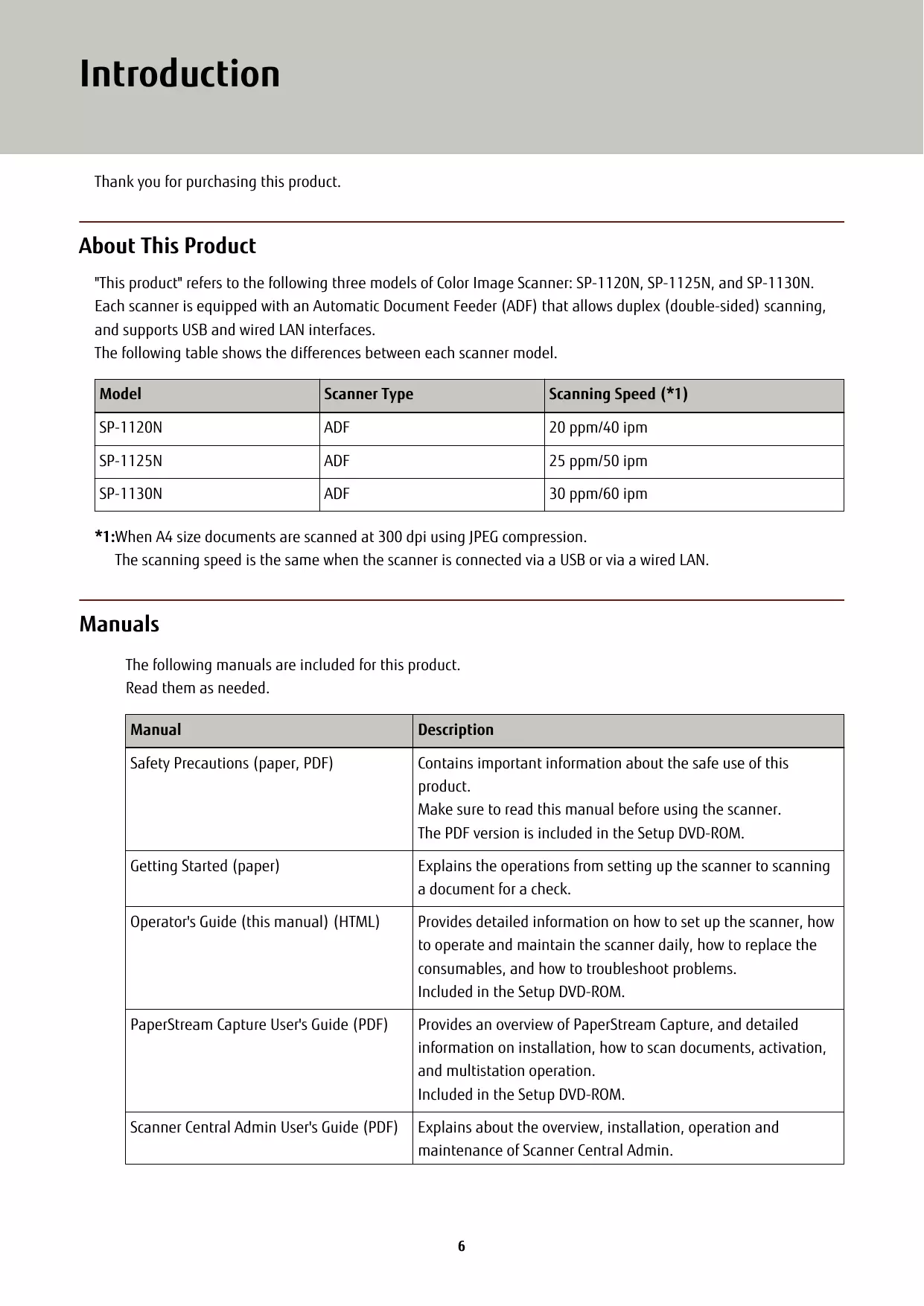
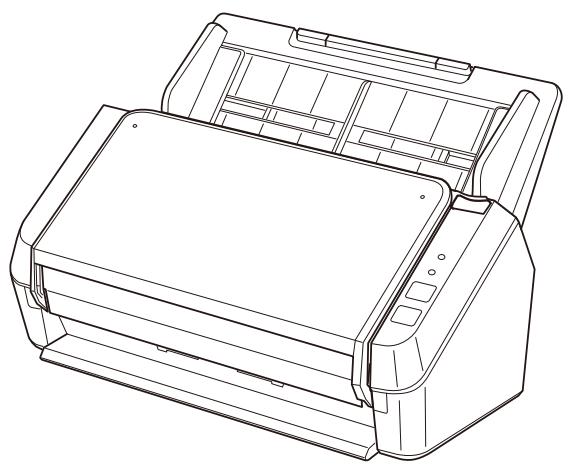
"This product" refers to the following three models of Color Image Scanner: SP-1120N, SP-1125N, and SP-1130N. Each scanner is equipped with an Automatic Document Feeder (ADF) that allows duplex (double-sided) scanning, and supports USB and wired LAN interfaces.
The following table shows the differences between each scanner model.
| Model | Scanner Type | Scanning Speed (*1) |
| SP-1120N | ADF | 20 ppm/40 ipm |
| SP-1125N | ADF | 25 ppm/50 ipm |
| SP-1130N | ADF | 30 ppm/60 ipm |
*1:When A4 size documents are scanned at 300 dpi using JPEG compression.
The scanning speed is the same when the scanner is connected via a USB or via a wired LAN.
Manuals
The following manuals are included for this product.
Read them as needed.
| Manual | Description |
| Safety Precautions (paper, PDF) | Contains important information about the safe use of this product. Make sure to read this manual before using the scanner. The PDF version is included in the Setup DVD-ROM. |
| Getting Started (paper) | Explains the operations from setting up the scanner to scanning a document for a check. |
| Operator's Guide (this manual) (HTML) | Provides detailed information on how to set up the scanner, how to operate and maintain the scanner daily, how to replace the consumables, and how to troubleshoot problems. Included in the Setup DVD-ROM. |
| PaperStream Capture User's Guide (PDF) | Provides an overview of PaperStream Capture, and detailed information on installation, how to scan documents, activation, and multistation operation. Included in the Setup DVD-ROM. |
| Scanner Central Admin User's Guide (PDF) | Explains about the overview, installation, operation and maintenance of Scanner Central Admin. |
| Included in the Setup DVD-ROM. | |
| PaperStream IP Help | Explains how to use and configure the settings for the PaperStream IP driver. Included in the Setup DVD-ROM. |
| Network Setup Tool for SP Series Help | Explains how to use various tools to connect the scanner to a network and make it available so that it can be used from an image scanning application. Included in the Setup DVD-ROM. |
| SP Series Online Update Help | Explains how to use and configure the settings for SP Series Online Update. Included in the Setup DVD-ROM. |
Depending on the software that you want to use refer to the manual of the software (Other than the softwares above).
For details about the software, refer to Overview of the Bundled Software (page 18).
Trademarks
ISIS is a trademark of Open Text.
Intel, Pentium, and Intel Core are trademarks of Intel Corporation or its subsidiaries in the U.S. and/or other countries.
ABBYY FineReader Engine © ABBYY. OCR by ABBYY
ABBYY and FineReader are trademarks of ABBYY Software, Ltd. which may be registered in some jurisdictions.
ABBYY FineReader Sprint
© 2014-2018 ABBYY, All rights reserved.
ABBYY and FineReader are trademarks of ABBYY Software, Ltd. which may be registered in some jurisdictions.
Besides the software authored by the product developer (PFU Limited), this product contains open source software created by third parties. For details concerning the conditions of the licenses for the open source software, refer to "License Terms and Conditions and Liability Provisions for the Open Source Software" (file name: OSS_License.pdf) that is stored in the License folder on the Setup DVD-ROM.
ScanSnap and PaperStream are registered trademarks or trademarks of PFU Limited in Japan.
Other company names and product names are the registered trademarks or trademarks of the respective companies.
Manufacturer
PFU Limited
YOKOHAMA i-MARK PLACE, 4-4-5 Minatomirai, Nishi-ku, Yokohama, Kanagawa, 220-8567, Japan
PFU Limited 2020
Safety Information
The attached "Safety Precautions" manual contains important information about the safe and correct use of this product.
Make sure that you read and understand it before using the scanner.
Symbols Used in This Manual
The following indications are used in this manual to obviate any chance of accident or damage to you, people near you, and your property.
Warning labels consist of a symbol indicating the severity and a warning statement.
The symbols and their meanings are as follows.

WARNING
This indication alerts operators of an operation that, if not strictly observed, may result in severe injury or death.

CAUTION
This indication alerts operators of an operation that, if not strictly observed, may result in safety hazards to personnel or damage to the product.
For notational convention, the following symbols are used in this manual:
ATTENTION
This symbol alerts operators to particularly important information. Be sure to read this information.
HINT
This symbol alerts operators to helpful advice regarding operations.
Abbreviations Used in This Manual
The following abbreviations are used in this manual.
| Name | Indication |
| Windows Server® 2008 R2 Standard (64-bit) | Windows Server 2008 R2 (*1) |
| Windows® 7 Professional (32-bit/64-bit) | Windows 7 (*1) |
| Windows® 7 Enterprise (32-bit/64-bit) | |
| Windows Server® 2012 Standard (64-bit) | Windows Server 2012 (*1) |
| Windows Server® 2012 R2 Standard (64-bit) | Windows Server 2012 R2 (*1) |
| Windows® 8.1 (32-bit/64-bit) | Windows 8.1 (*1) |
| Windows® 8.1 Pro (32-bit/64-bit) | |
| Windows® 8.1 Enterprise (32-bit/64-bit) | |
| Windows® 10 Home (32-bit/64-bit) | Windows 10 (*1) |
| Windows® 10 Pro (32-bit/64-bit) | |
| Windows® 10 Enterprise (32-bit/64-bit) | |
| Windows® 10 Education (32-bit/64-bit) | |
| Windows Server® 2016 Standard (64-bit) | Windows Server 2016 (*1) |
| Windows Server® 2019 Standard (64-bit) | Windows Server 2019 (*1) |
| Windows® Internet Explorer® | Internet Explorer |
| Internet Explorer® | |
| Microsoft® Word | Word |
| Microsoft® Office Word | |
| Microsoft® Excel® | Excel |
| Microsoft® Office Excel® | |
| ABBYY™ FineReader™ Sprint | ABBYY FineReader Sprint |
| ABBYY FineReader for ScanSnap™ | ABBYY FineReader for ScanSnap |
| PaperStream IP (TWAIN) for SP Series | PaperStream IP driver |
| PaperStream IP (TWAIN x64) for SP Series | |
| PaperStream IP (ISIS) for SP Series | |
| Scanner Selection Tool for SP Series | Scanner Selection Tool |
| IP Address Setting Tool for SP Series | IP Address Setting Tool |
| Button Event Manager for SP Series | Button Event Manager |
*1:Where there is no distinction between the different versions of the above operating system, the general term "Windows" is used.
Arrow Symbols in This Manual
Right-arrow symbols () are used to separate icons or menu options which should be selected in succession.
Example: Click [Start] menu [Control Panel].
Screen Examples in This Manual
Microsoft product screenshots are reprinted with permission from Microsoft Corporation.
The screen examples in this manual are subject to change without notice in the interest of product development.
If the actual displayed screen differs from the screen examples in this manual, operate by following the actual displayed screen while referring to the user's manual of the scanner application that you are using.
The screenshots used in this manual are of Windows 10. The actual windows and operations may differ depending on the operating system. Also note that the screens and operations may differ from this manual after the scanner application software is updated. In that case, refer to the manual provided upon updating the software.
Notice
- The contents of this manual are subject to change without notice.
- PFU Limited assumes no liability for incidental or consequential damages arising from the use of this product, and any claims by a third party.
- Copying of the contents of this manual, in whole or in part, as well as the scanner applications is prohibited under the copyright law.
Issue date: April 2020
Issued by: PFU Limited
This section explains the main features of this product, the names of parts and their functions.
Main Features
The scanner is equipped with the following features:
High speed scanning
Realizes a scanning speed of 20 ppm/40 ipm (SP-1120N) (1), 25 ppm/50ipm (SP-1125N) (1), or 30 ppm/60 ipm (SP-1130N) (1). Furthermore, up to 50 sheets of documents (2) can be loaded for continuous scanning which enables you to quickly digitize a large volume of documents.
Network connection
The scanner can be connected via a wired LAN.
Even with a network connection, the scanning speed is equivalent to that of a USB connection.
During a network communication, in order to prevent information leaks due to interception of communications, you can encrypt scanned images. For details, refer to the Network Setup Tool for SP Series Help.
- Improved efficiency for pre-scan work
The scanner can perform "mixed batch scanning" which allows you to scan documents with different paper sizes at once.
This simplifies the process of sorting the documents before scanning.
- Reduced work loss caused by multifeeds
The scanner has ultrasonic multifeed sensors that accurately detect "multifeed" errors where two or more sheets are fed through the scanner at once.
This detection for overlapped documents is reliable even when scanning a mixed batch of documents with different paper sizes, avoiding potential work loss.
Centralized management of multiple scanners
With Scanner Central Admin Server, multiple scanners can be managed together.
For example, the application can be used to update the setting information and scanner drivers for all scanners at once, and can be used to check the operating status of each scanner.
For details, refer to the Scanner Central Admin User's Guide.
1:When A4 size documents are scanned at 300 dpi using JPEG compression.
2: When the paper weight is 80g / m^2 (20 lb).
Parts and Functions
This section shows the names of the scanner parts.
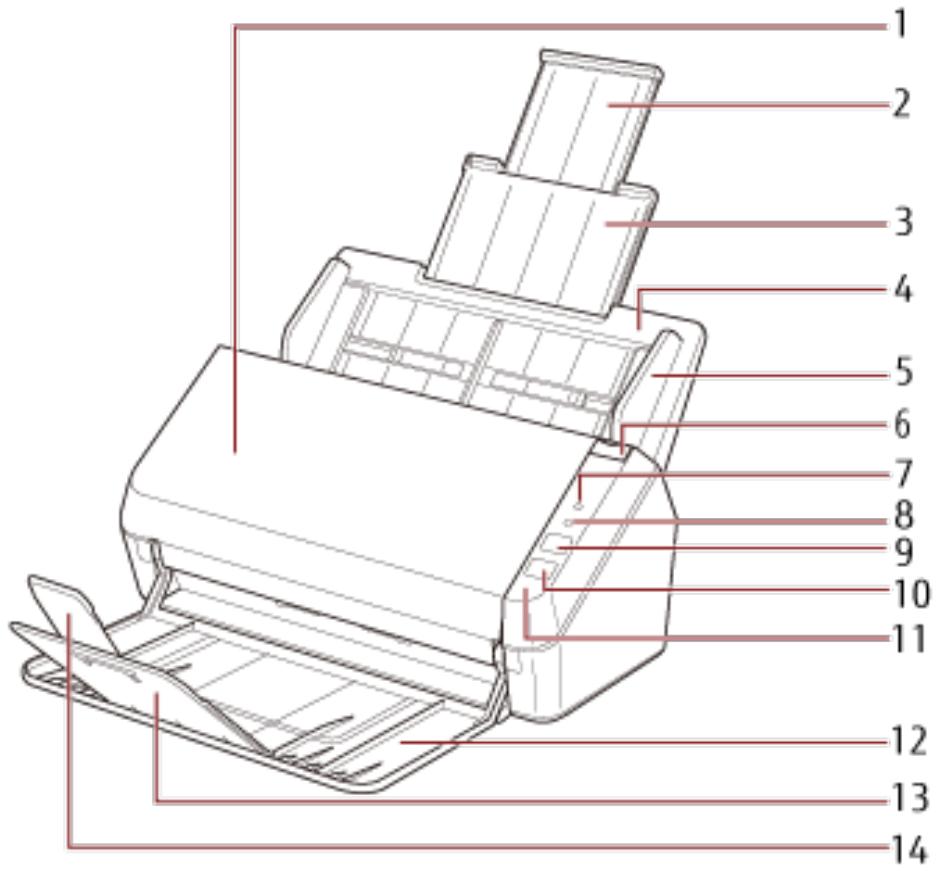
- Front
| No. | Name | Function |
| 1 | ADF (Automatic Document Feeder) | Pulls and feeds the documents one sheet at a time from the ADF paper chute (feeder). Open this to replace consumables or to clean the inside of the scanner. |
| 2 | Chute extension 2 | Pull out to adjust to the document length. |
| 3 | Chute extension 1 | Pull out to adjust to the document length. |
| 4 | ADF paper chute (feeder) | Holds the documents to be scanned. |
| 5 | Side guide | Positions the documents in place when the documents are loaded in the ADF paper chute (feeder) as they are fed into the scanner. |
| 6 | ADF release tab | Pull this tab to open the ADF. |
| 7 | Check Indicator | Lights, flashes in orange, or turns off when an error occurs. |
| For details, refer to About the Indicators (page 17). | ||
| 8 | Power Indicator | Lights in green when the scanner is on. Flashes in the following cases: • Immediately after the scanner is turned on • Just before the scanner turns off after pressing the power button • When the ADF paper chute (feeder) is closed |
| 9 | Scan/stop button | Launches the linked application software. Stops a scan immediately in the middle of a scan. Clears the temporary error indicated on the check indicator. |
| 10 | Power Button | Turn on/off the scanner. |
| 11 | Operator Panel | Consists of the check indicator, power indicator, scan/stop button, and power button. |
| 12 | Stacker | Stacks up the ejected documents. |
| 13 | Stacker extension 1 | Lift up towards you to adjust to the document length. |
| 14 | Stacker extension 2 | Lift up towards you to adjust to the document length. |
Back
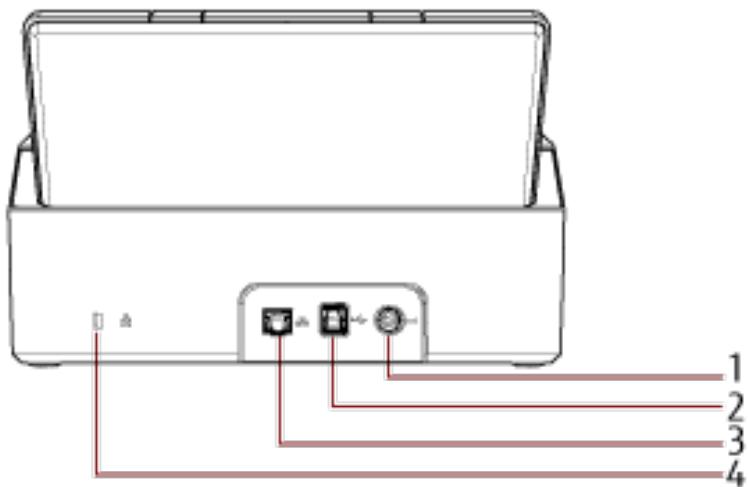
| No. | Name | Function |
| 1 | Power connector | Used to connect a power cable. "Power cable" refers to the plug and AC adapter connected together. |
| 2 | USB connector | Used to connect the USB cable. |
| 3 | LAN connector | Used to connect a LAN cable. |
| 4 | Security cable slot | Used to connect an anti-theft security cable (commercially available). |
- Removable Parts
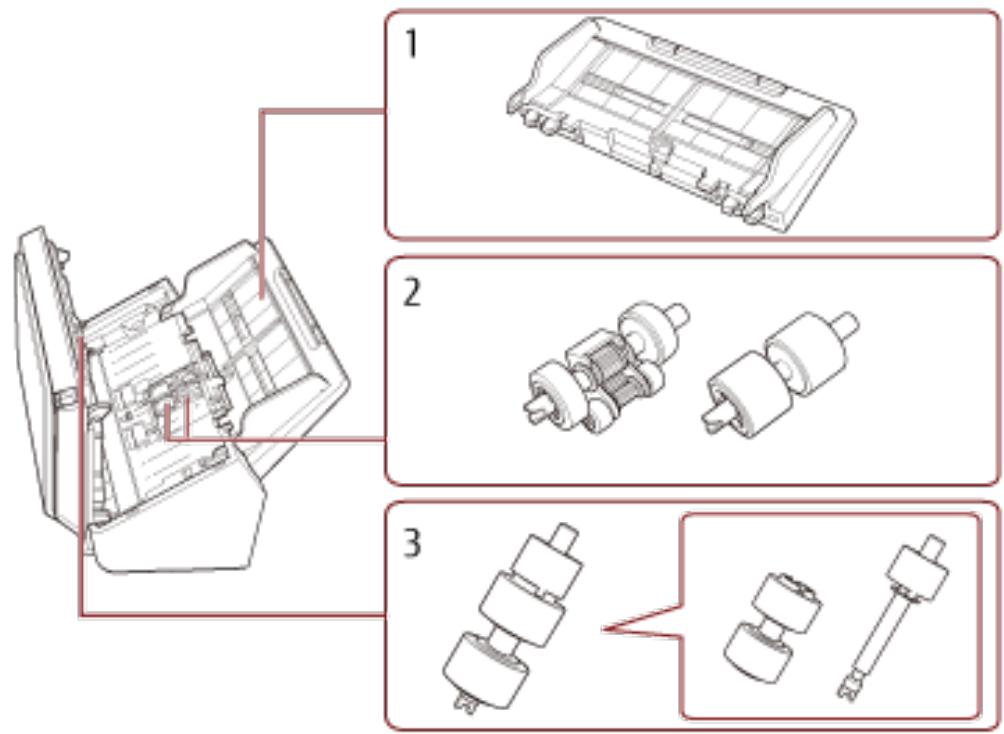
| No. | Name | Function |
| 1 | ADF paper chute (feeder) | Holds the documents to be scanned. |
| 2 | Pick roller | A roller which feeds documents loaded on the ADF paper chute (feeder) into the ADF. |
| 3 | Brake roller | A roller that prevents more than one sheet of documents to be fed into the ADF at once. |
About the Indicators
| Check Indicator | Power Indicator | Description |
| Off | Flashes (green) | Processing initialization. Continues until the scanner is ready after closing the ADF. |
| Off | On (green) | The scanner is ready to be used. Indicates that the initialization is successfully complete. The indicators operate in the same way when the scanner is in power saving mode. |
| On (orange)/Off | On (green) | Indicates that a recoverable error occurred during scanning. For details about errors, refer to Errors (page 89). |
| Flashes (orange) | On (green) | Indicates that a device error occurred during initialization or scanning. For details about errors, refer to Errors (page 89). |
This section describes the software that is required for the computer you want to connect the scanner to, the system requirements, and the scanner setup method.
The scanner setup procedure depends on the connection method of the scanner.
Check the reference page for each method to set up the scanner.
- Connecting the Scanner via a Wired LAN (When Obtaining an IP Address Automatically) (page 22)
- Connecting the Scanner via a Wired LAN (When Assigning an IP Address Manually) (page 25)
- Connecting the Scanner to the Computer via the USB Cable (page 29)
When using Scanner Central Admin, refer to the Scanner Central Admin User's Guide.
Overview of the Bundled Software
This section describes the software that is required for the computer you want to connect the scanner to. This product is bundled with the following software.
HINT
The software can be installed from the bundled Setup DVD-ROM or downloaded from the download site and then installed.
- Paperback IP driver
The PaperStream IP driver is a scanner driver that conforms to the TWAIN/ISIS standard. It supports scanners connected to a network.
There are three types of PaperStream IP drivers.
- Paperback IP (TWAIN) for SP Series
Conforms to the TWAIN standard. Used when you operate the scanner using TWAIN-compliant 32-bit applications.
- Paperback IP (TWAIN x64) for SP Series
Conforms to the TWAIN standard. Used when you operate the scanner using TWAIN-compliant 64-bit applications.
Regardless of your operating system, if the image scanning application that you are using is a 32-bit application, use PaperStream IP (TWAIN) for SP Series.
- Paperback IP (ISIS) for SP Series
Conforms to the ISIS standard. Used when you operate the scanner using ISIS-compliant applications.
For details, refer to the PaperStream IP driver Help.
Network Setup Tool for SP Series
The following applications are included.
These applications are used to connect the scanner to a network to make the scanner available.
- Scanner Selection Tool
Use this application to set a computer to be able to use the scanner connected to a network.
- IP Address Setting Tool
Use this application to set a scanner's IP address and scanner name.
- Button Event Manager
Use this application to specify an image scanning application to be launched when the scan/stop button is pressed.
For details, refer to the Network Setup Tool for SP Series Help.
- Software Operation Panel
You can configure settings that are related to scanning documents and managing consumable parts.
It is installed together with the PaperStream IP driver.
For details, refer to Scanner Settings (Software Operation Panel) (page 120).
- Error Recovery Guide
Use this application to display the status of the scanner and a solution for a problem if an error occurs in the scanner.
It is installed together with the PaperStream IP driver.
Solutions for problems can also be checked in Troubleshooting (page 87).
- Error Recovery Guide (manual)
This is a manual which describes solutions for errors notified by Error Recovery Guide.
- Paperback Capture
An image scanning application which supports Paperback IP (TWAIN) for SP Series/PaperStream IP (ISIS) for SP Series.
By defining scan settings as document profiles, you can customize the settings according to your preference.
For details, refer to the PaperStream Capture User's Guide.
- Paperback Capture Pro (Trial)
An image scanning application which supports PaperStream IP (TWAIN) for SP Series.
It is the trial version of PaperStream Capture Pro.
To use the full version, purchase and activate a license.
In addition to the functions in PaperStream Capture, PaperStream Capture Pro also allows you to perform multistation operations and advanced meta data settings.
For details, refer to the PaperStream Capture User's Guide.
- ABBYY FineReader for ScanSnap
This application converts images into files for applications such as Word (1) or Excel (1).
It can be used when you scan documents with Paperback Capture/PaperStream Capture Pro.
Download it from the download site and install it.
ABBYY FineReader Sprint
This application supports PaperStream IP (TWAIN) for SP Series. WIA driver is not supported. You can convert images that you scanned into Word (1) or Excel (1) files.
For details, refer to ABBYY FineReader Sprint Help.
- Manuals
Safety Precautions and the Operator's Guide are installed.
- Scanner Central Admin Agent
Use this application to update the firmware for multiple scanners with a single operation, and to manage and monitor multiple scanners. You can monitor scanner operations status and check scanner information.
The applications that are required will differ with each operation mode.
For details, refer to the Scanner Central Admin User's Guide.
SP Series Online Update
This application checks for the latest updates for the software that is installed on the computer, checks for firmware updates for the scanner that is connected to the computer, and applies them.
For details, refer to the SP Series Online Update Help.
*1:Microsoft® Office products need to be installed.
System Requirements
The system requirements for the computer on which software is to be installed are as follows.
| Operating system | • Windows Server® 2008 R2 Standard (64-bit) (Service Pack 1) (*1) • Windows® 7 Professional (32-bit/64-bit) (Service Pack 1) • Windows® 7 Enterprise (32-bit/64-bit) (Service Pack 1) • Windows Server® 2012 Standard (64-bit) (*1)(*2) • Windows Server® 2012 R2 Standard (64-bit) (*1)(*2) • Windows® 8.1 (32-bit/64-bit) (update including) (*2) • Windows® 8.1 Pro (32-bit/64-bit) (update including) (*2) • Windows® 8.1 Enterprise (32-bit/64-bit) (update including) (*2) • Windows® 10 Home (32-bit/64-bit) (*2) • Windows® 10 Pro (32-bit/64-bit) (*2) • Windows® 10 Enterprise (32-bit/64-bit) (*2) • Windows® 10 Education (32-bit/64-bit) (*2) • Windows Server® 2016 Standard (64-bit) (*1)(*2) • Windows Server® 2019 Standard (64-bit) (*1)(*2) |
| CPU | Intel® Pentium® 4 1.8 GHz or higher (Recommended: Intel® Core™ i5 2.5 GHz or higher, excluding those for mobile devices) |
| Memory | 1 GB or more (Recommended: 4 GB or more) |
| Hard disk drive | 5,400 rpm or more (Recommended: 7,200 rpm or more) |
| Display resolution | 1024 × 768 pixels or more, 65,536 colors or more (Text size: up to 125%) |
| Hard disk space | 12 GB or more of free hard disk space (*3) |
| DVD drive | Required for installing software |
| Interface | USB 3.2 Gen 1x1 (USB 3.0)/USB 2.0/USB 1.1 |
1:ABBYY FineReader Sprint is not supported.
2:The bundled software operates as a desktop application.
*3:Required disk space for scanning documents varies according to the file size of the scanned images.
Connecting the Scanner via a Wired LAN (When Obtaining an IP Address Automatically)
This section explains about the setup procedure for you to connect the scanner to a network device via a wired LAN and automatically obtain an IP address for the scanner from the DHCP server.
For the procedure to unpack the scanner, refer to Getting Started.
ATTENTION
If an old version of the software is installed, uninstall it first.
For the procedure to uninstall the software, refer to Uninstalling the Software (page 145).
HINT
The factory default setting for obtaining an IP address for the scanner is set to obtain the IP address automatically.
1 Turn on the computer and log onto Windows as a user with administrator privileges.
2 Insert the Setup DVD-ROM into the DVD drive.
The [SP Series Setup] window appears.
HINT
If the [SP Series Setup] window does not appear, double-click "Setup.exe" in the Setup DVD-ROM via [File Explorer] or [Computer].
3 Click the [Install software] button.
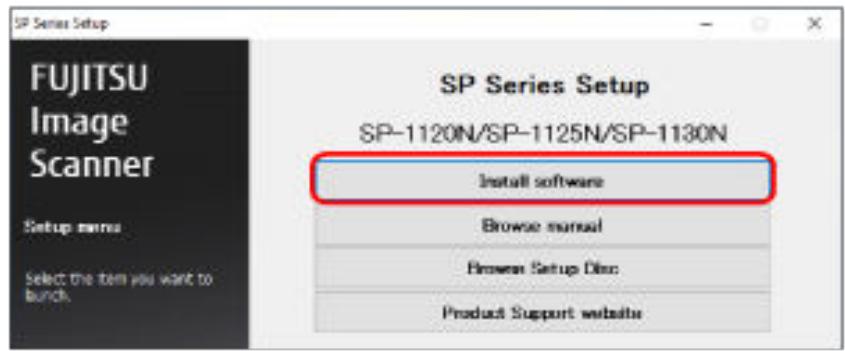
The software information window appears.
4 Check the information and click the [Next] button.
5 Click the [Scanner software] button.
6 Install the software by following the instructions displayed in the window. The [How to Connect the Scanner] window appears when the installation of the software is complete.
7 Select [Wired LAN] and connect the scanner to the computer as follows.
![FUJITSU SP-1120N - Select [Wired LAN] and connect the scanner to the computer as follows. - 1](/content/2024/12/319016/images/514d5b0abbc068bf9ef01f3db64700e95f80c31856d42640b4f7952a61034a47.jpg)
![FUJITSU SP-1120N - Select [Wired LAN] and connect the scanner to the computer as follows. - 2](/content/2024/12/319016/images/898e937ddb3677a7226af9ec21658f062ec7ce381c188b0c41801416c71d192d.jpg)
a Connect the computer to a network device via a wired LAN or Wi-Fi (1).
For details about how to connect the computer to the network, refer to the computer manual.
b Connect the scanner to the network device via a wired LAN (2).
c Connect the power cable to the scanner and the AC outlet (3,4) .
d Turn on the scanner.
For details, refer to How to Turn the Power ON (page 31).
8 Click the [Select a Scanner] button in the [How to Connect the Scanner] window.
The [Scanner Selection Tool] window appears.
9 In the scanner list, select the scanner that you want to use, and then click the [OK] button.
In the scanner list, the serial number of the scanner is displayed as the default scanner name.
The serial number is printed on the label on the back of the scanner. For details, refer to Checking the Product Label (page 119).
For details about Scanner Selection Tool, refer to the Network Setup Tool for SP Series Help.
10 Click the [Exit] button in the [SP Series Setup] window.
11 Start an image scanning application, and select the scanner to be used for scanning.
The scanner name depends on the scanner driver type and the scanner connection method.
Select the scanner name that is used for a wired LAN connection. For details, refer to the help for the scanner driver.
12 Check whether the scanner is ready to start scanning.
For details, refer to How to Perform a Basic Scan (page 39).
HINT
If Scanner Selection Tool does not start up, follow the procedure below to start it up.
- Windows Server 2008 R2/Windows 7
Click [Start] menu [All Programs] [SP Series] [Scanner Selection Tool for SP Series].
- Windows Server 2012
Right-click the Start screen, and select [All apps] on the app bar [Scanner Selection Tool for SP Series] under [SP Series].
- Windows Server 2012 R2/Windows 8.1
Click [] on the lower left side of the Start screen and select [Scanner Selection Tool for SP Series] under [SP Series].
To display [] , move the mouse cursor.
- Windows 10/Windows Server 2016/Windows Server 2019
Click [Start] menu [SP Series] [Scanner Selection Tool for SP Series].
Connecting the Scanner via a Wired LAN (When Assigning an IP Address Manually)
This section explains about the setup procedure for you to connect the scanner to a computer via a wired LAN and manually assign an IP address to the scanner.
For the procedure to unpack the scanner, refer to Getting Started.
ATTENTION
If an old version of the software is installed, uninstall it first.
For the procedure to uninstall the software, refer to Uninstalling the Software (page 145).
1 Turn on the computer and log onto Windows as a user with administrator privileges.
2 Insert the Setup DVD-ROM into the DVD drive.
The [SP Series Setup] window appears.
HINT
If the [SP Series Setup] window does not appear, double-click "Setup.exe" in the Setup DVD-ROM via [File Explorer] or [Computer].
3 Click the [Install software] button.
The software information window appears.
4 Check the information and click the [Next] button.
5 Click the [Scanner software] button.
6 Install the software by following the instructions displayed in the window.
The [How to Connect the Scanner] window appears when the installation of the software is complete.
7 Select [Wired LAN] and connect the scanner to the computer as follows.
![FUJITSU SP-1120N - Select [Wired LAN] and connect the scanner to the computer as follows. - 1](/content/2024/12/319016/images/3848840c5ac2158c69f646d9a59ee3abf18eaf87e00237f7cdccf91d481e4377.jpg)
![FUJITSU SP-1120N - Select [Wired LAN] and connect the scanner to the computer as follows. - 2](/content/2024/12/319016/images/0c6c58500fad9f341208193b1e5eeb319e3f6f7fe665f8cea921b868645594ee.jpg)
a Connect the computer to a network device via a wired LAN or Wi-Fi (1).
For details about how to connect the computer to the network, refer to the computer manual.
b Connect the scanner to the network device via a wired LAN (2).
c Connect the power cable to the scanner and the AC outlet (3,4) .
d Turn on the scanner.
For details, refer to How to Turn the Power ON (page 31).
8 Click the [Select a Scanner] button in the [How to Connect the Scanner] window.
The [Scanner Selection Tool] window appears.
9 Click the [Set an IP Address] button.
A message appears, prompting you to connect the scanner to the computer via the USB cable.
10 Connect the scanner to the computer by using the USB cable that is supplied, and click the [OK] button in the message window.
The [IP Address Setting Tool] window appears.
HINT
You do not need to disconnect the LAN cable from the scanner when connecting the USB cable.
11 Set the IP address and the scanner name, and then click the [OK] button.
For details about the IP Address Setting Tool, refer to the Network Setup Tool for SP Series Help.
HINT
The scanner name and the IP address that you set are displayed in the scanner list in Scanner Selection Tool.
12 Disconnect the USB cable from the scanner.
13 Click the [Search] button in the [Scanner Selection Tool] window to search for the scanner that you want to use.
The scanner is not displayed in the scanner list right after setting the IP address. Search for the scanner by clicking the [Search] button.
For details about Scanner Selection Tool, refer to the Network Setup Tool for SP Series Help.
14 In the scanner list, select the scanner that you want to use, and then click the [OK] button.
15 Click the [Exit] button in the [SP Series Setup] window.
16 Start an image scanning application, and select the scanner to be used for scanning.
The scanner name depends on the scanner driver type and the scanner connection method.
Select the scanner name that is used for a wired LAN connection. For details, refer to the help for the scanner driver.
17 Check whether the scanner is ready to start scanning.
For details, refer to How to Perform a Basic Scan (page 39).
HINT
-
If Scanner Selection Tool does not start up, follow the procedure below to start it up.
-
Windows Server 2008 R2/Windows 7
Click [Start] menu [All Programs] [SP Series] [Scanner Selection Tool for SP Series].
- Windows Server 2012
Right-click the Start screen, and select [All apps] on the app bar [Scanner Selection Tool for SP Series] under [SP Series].
- Windows Server 2012 R2/Windows 8.1
Click [] on the lower left side of the Start screen and select [Scanner Selection Tool for SP Series] under [SP Series].
To display [] , move the mouse cursor.
-
Windows 10/Windows Server 2016/Windows Server 2019 Click [Start] menu [SP Series] [Scanner Selection Tool for SP Series].
-
If IP Address Setting Tool does not start up, follow the procedure below to start it up.
-
Windows Server 2008 R2/Windows 7 Click [Start] menu [All Programs] [SP Series] [IP Address Setting Tool for SP Series].
- Windows Server 2012 Right-click the Start screen, and select [All apps] on the app bar [IP Address Setting Tool for SP Series] under [SP Series].
- Windows Server 2012 R2/Windows 8.1
Click [↓] on the lower left side of the Start screen and select [IP Address Setting Tool for SP Series] under [SP Series].
To display [↓], move the mouse cursor. - Windows 10/Windows Server 2016/Windows Server 2019 Click [Start] menu [SP Series] [IP Address Setting Tool for SP Series].
Connecting the Scanner to the Computer via the USB Cable
This section explains about the setup procedure for connecting the scanner to the computer by using the USB cable.
For the procedure to unpack the scanner, refer to Getting Started.
ATTENTION
If an old version of the software is installed, uninstall it first.
For the procedure to uninstall the software, refer to Uninstalling the Software (page 145).
1 Turn on the computer and log onto Windows as a user with administrator privileges.
2 Insert the Setup DVD-ROM into the DVD drive.
The [SP Series Setup] window appears.
HINT
If the [SP Series Setup] window does not appear, double-click "Setup.exe" in the Setup DVD-ROM via [File Explorer] or [Computer].
3 Click the [Install software] button.
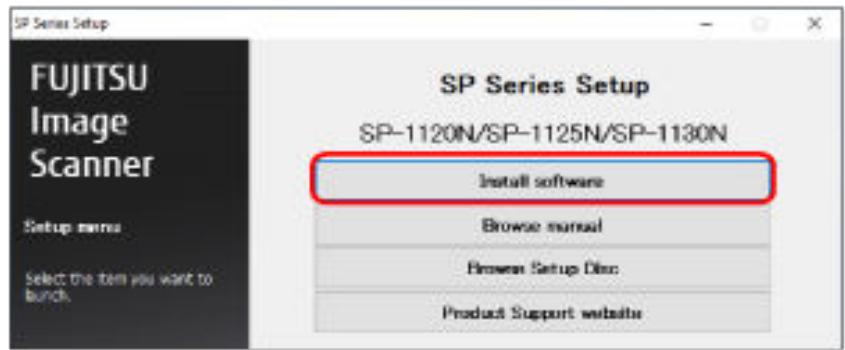
The software information window appears.
4 Check the information and click the [Next] button.
5 Click the [Scanner software] button.
6 Install the software by following the instructions displayed in the window.
The [How to Connect the Scanner] window appears when the installation of the software is complete.
7 Select [USB] and connect the scanner to the computer as follows.
![FUJITSU SP-1120N - Select [USB] and connect the scanner to the computer as follows. - 1](/content/2024/12/319016/images/a28d5ef6757da0f3525b4b3ca914d0cb6720c9ffdd8dc41ac051194ab3b9fe22.jpg)
![FUJITSU SP-1120N - Select [USB] and connect the scanner to the computer as follows. - 2](/content/2024/12/319016/images/e666c0151bea40bf6da8f5ef185cebdf6c490c451f05a044da7600b95397982a.jpg)
a Connect the scanner to the computer by using the USB cable that is supplied (1).
b Connect the power cable to the scanner and the AC outlet (2, 3).
c Turn on the scanner.
For details, refer to How to Turn the Power ON (page 31).
8 Click the [OK] button in the [How to Connect the Scanner] window.
9 Click the [Exit] button in the [SP Series Setup] window.
10 Start an image scanning application, and select the scanner to be used for scanning.
The scanner name depends on the scanner driver type and the scanner connection method.
Select the scanner name that is used for a USB connection. For details, refer to the help for the scanner driver.
11 Check whether the scanner is ready to start scanning.
For details, refer to How to Perform a Basic Scan (page 39).
This section explains how to operate the scanner.
Turning the Power ON/OFF
This section explains how to power on/off the scanner.
How to Turn the Power ON
1 Press the power button on the operator panel.
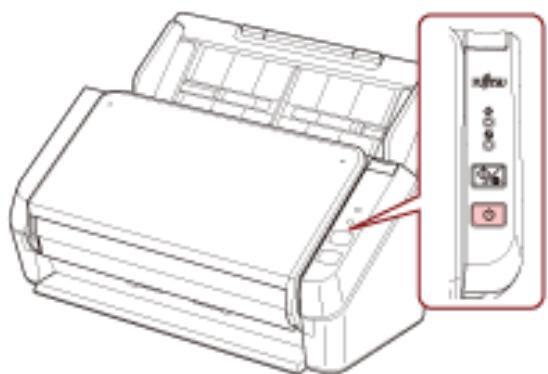
The scanner is turned on, and during initialization, the power indicator flashes in green.
When the power indicator lights up in green, the scanner is ready to scan. This is referred to as "ready" status.
HINT
When the scanner is ready to be used, the check indicator turns off and the power indicator turns on.
How to Turn the Power OFF
1 Press the power button on the operator panel for more than 2 seconds.
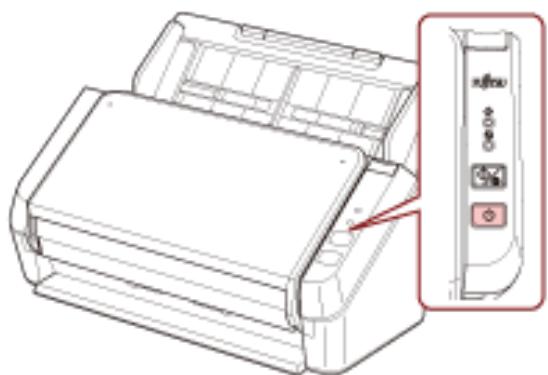
After the power indicator flashes for a while, the scanner is turned off and the power indicator switches off.
Entering and Resuming from Power Saving Mode
The scanner enters power saving mode when it is left on without being used for a certain period of time.
Power saving mode keeps the power consumption low when the scanner has not been used for a certain period of time.
If the scanner is left powered on for 10 minutes (factory default setting) or longer without being used, it automatically enters power saving mode.
Even after the scanner enters power saving mode, the power indicator remains on.
To resume from power saving mode, perform one of the following:
- Load a document in the ADF paper chute (feeder).
- Press the scan/stop button on the operator panel.
- Scan a document with the image scanning application.
If the scanner is not operated for a certain period of time, it turns off automatically to reduce power consumption while the scanner is in standby.
To disable this function, clear the [Power off after a certain period of time] check box in [Device Setting] of the Software Operation Panel. For details, refer to Waiting Time for the Scanner to Enter Power Saving Mode [Power saving] (page 139).
To turn the scanner back on after it has turned off automatically, press the power button on the operator panel.
For details, refer to How to Turn the Power ON (page 31).
ATTENTION
- The scanner may not enter power saving mode if there was a document remaining on the paper path. For details about how to remove a document, refer to When a Paper Jam Occurs (page 87).
- Depending on the image scanning application being used, the scanner might not turn off even if the [Power off after a certain period of time] check box is selected.
- If the scanner is automatically turned off while you are using the image scanning application, exit the application, and then turn the scanner back on.
HINT
The waiting time for entering power saving mode can be changed in the Software Operation Panel. For details, refer to Waiting Time for the Scanner to Enter Power Saving Mode [Power saving] (page 139).
Setting Up the ADF Paper Chute (Feeder)
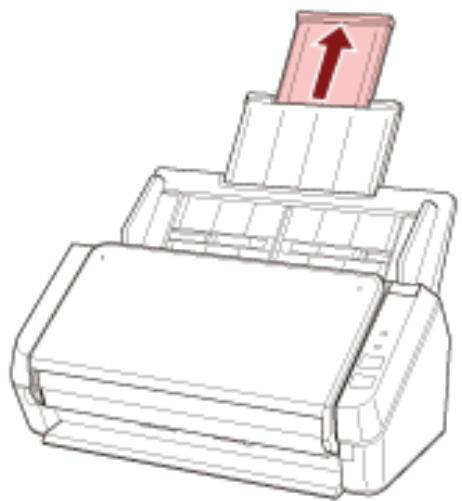
Documents loaded in the ADF paper chute (feeder) are fed into the ADF one by one when scanning starts. Using the chute extensions 1 and 2 as described in the following procedure will feed documents smoothly.
1 Pull out the chute extension 1.
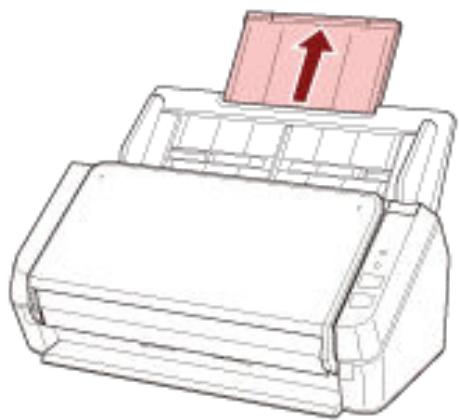
HINT
Make sure you hold the ADF paper chute (feeder) while pulling out the chute extension 1.
2 Pull out the chute extension 2.
HINT
Make sure you hold the ADF paper chute (feeder) while pulling out the chute extension 2.
Opening/Closing the ADF
This section describes how to open and close the ADF.
How to Open the ADF
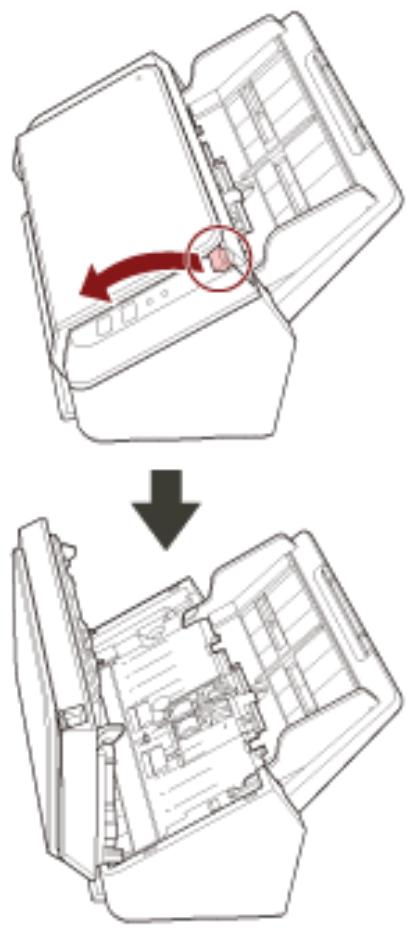
1 Remove any documents from the ADF paper chute (feeder).
2 Pull the ADF release tab towards you to open the ADF.

CAUTION
When the ADF is open, it might close accidentally. Be careful not to get your fingers caught.
How to Close the ADF
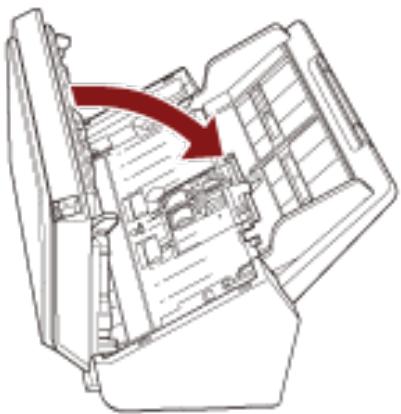
1 Close the ADF.
Push the center of the ADF until it locks in place.

CAUTION
Be careful not to get your fingers caught when closing the ADF.
ATTENTION
Make sure there is no foreign matter caught inside the ADF when closing the ADF.
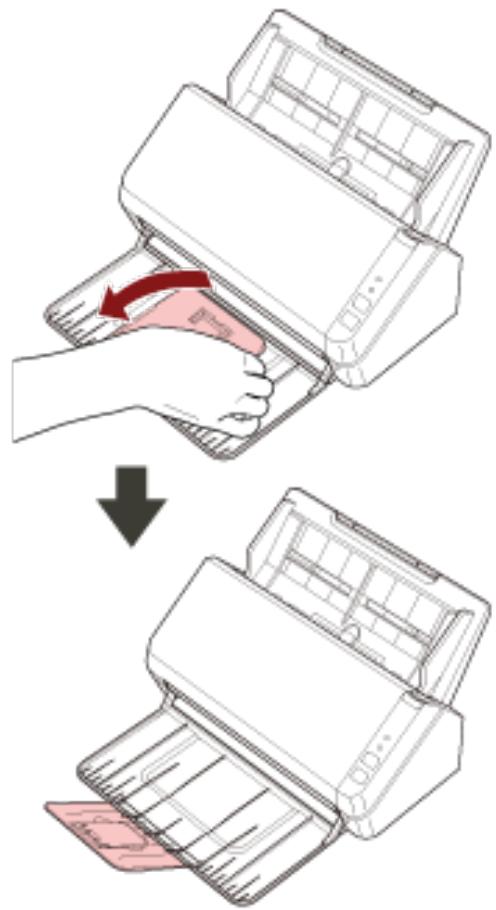
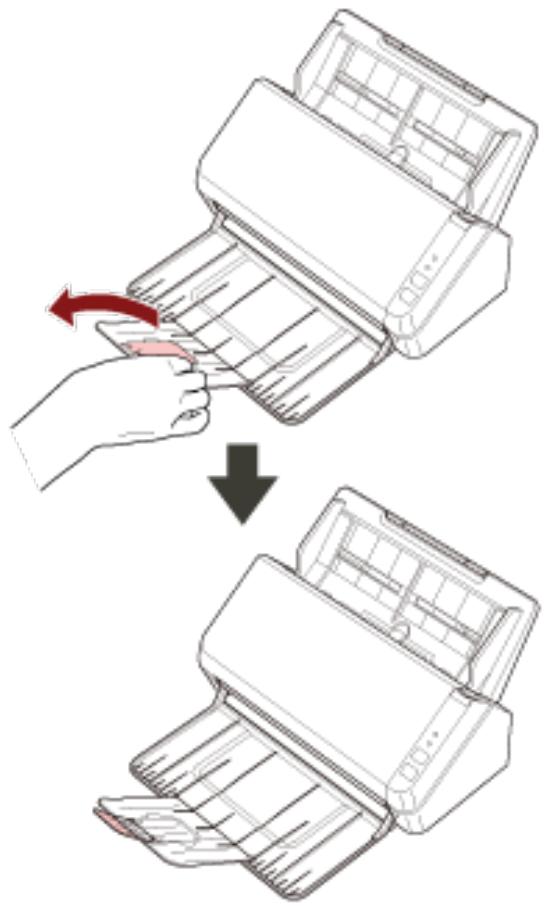
Setting Up the Stacker
Documents loaded in the ADF paper chute (feeder) are ejected onto the stacker one by one when scanning starts. Using the stacker and stacker extension as described in the following procedure will keep the documents straight and feed them smoothly.
1 Hold the top side of the stacker and open it towards you.
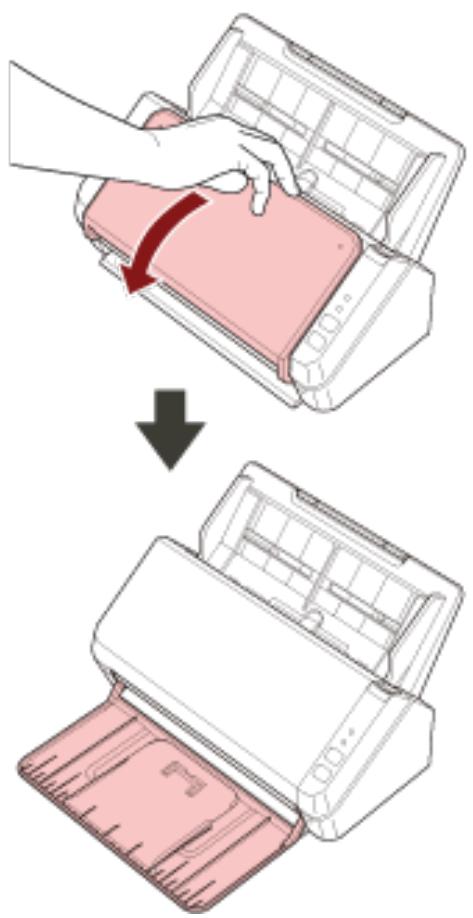
2 Lift up the stacker extension 1 towards you.
3 Lift up the stacker extension 2 towards you.
This section explains how to perform a basic scan.
Performing a Scan with an Image Scanning Application
This section explains about the basic flow of performing a scan using an image scanning application on the computer.
In this case, a scanner driver and an image scanning application that supports the scanner driver must be installed on the computer.
The following scanner driver and image scanning applications are bundled with the scanner:
- Scanner driver
- Paperback IP driver
- Image scanning application
- Paperback Capture
- ABBYY FineReader Sprint
HINT
- For details about the scanner driver and image scanning applications, refer to Overview of the Bundled Software (page 18).
- Scanning procedures, operations, and scan setting items slightly vary depending on the image scanning application and the scanner driver.
For details, refer to the help for the image scanning application and the scanner driver.
- Depending on the connection method of the scanner, use only the USB cable to connect to a computer or use only a LAN cable to connect to a network device. Do not use both cables at the same time.
1 Turn on the scanner.
For details, refer to How to Turn the Power ON (page 31).
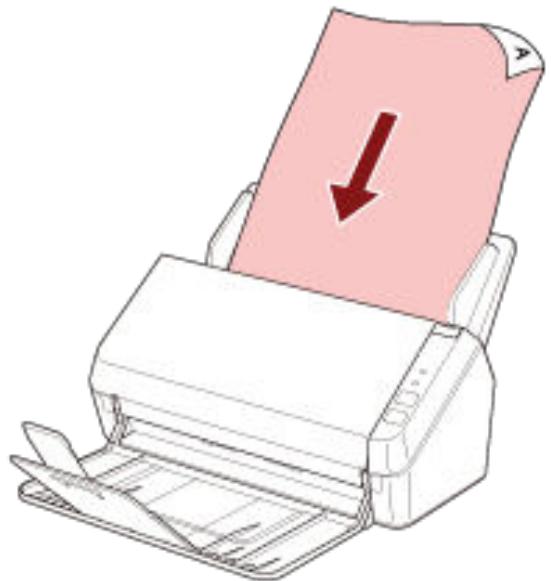
2 Load a document in the ADF paper chute (feeder).
Load the document face-down in the ADF paper chute (feeder).
For details, refer to How to Load Documents (page 49).
3 Start an image scanning application.
4 Select a scanner driver to be used for scanning.
For some image scanning applications, selection of a scanner driver may not be needed.
5 Select the scanner to be used for scanning.
The scanner name depends on the scanner driver type and the scanner connection method. For details, refer to the help for the scanner driver.
For some image scanning applications, selection of the scanner may not be needed.
To use the scanner connected to a network, you need to select the scanner in Scanner Selection Tool beforehand.
Scanner Selection Tool can be started up in the following procedure.
- Windows Server 2008 R2/Windows 7
Click [Start] menu [All Programs] [SP Series] [Scanner Selection Tool for SP Series].
- Windows Server 2012
Right-click the Start screen, and select [All apps] on the app bar [Scanner Selection Tool for SP Series] under [SP Series].
- Windows Server 2012 R2/Windows 8.1
Click [] on the lower left side of the Start screen and select [Scanner Selection Tool for SP Series] under [SP Series].
To display [] , move the mouse cursor.
- Windows 10/Windows Server 2016/Windows Server 2019
Click [Start] menu [SP Series] [Scanner Selection Tool for SP Series].
6 In the setup window for the scanner driver, configure the scan settings.
For some image scanning applications, the setup window for the scanner driver may not appear.
7 Scan the document with the image scanning application.
ATTENTION
Do not perform an operation to disconnect the connection between the scanner and the computer such as the following:
- Disconnecting the USB cable
- Connecting the LAN cable
- Connecting the network
- Logging off
Pressing a Button on the Scanner in order to Start an Image Scanning Application and Perform a Scan
This section explains about the basic flow of starting an image scanning application and performing a scan by pressing the scan/stop button on the scanner.
In this case, you need to configure the settings for the button in advance in order to perform a scan.
HINT
Depending on the connection method of the scanner, use only the USB cable to connect to a computer or use only a LAN cable to connect to a network device. Do not use both cables at the same time.
1 Configure the scan settings in the image scanning application.
For details about the procedure, refer to Performing a Scan with an Image Scanning Application (page 39).
2 Configure the settings for the button.
Configure the settings on the computer for the scan/stop button on the scanner. Specify an image scanning application for the button so that the application can be used to scan documents.
The button setting procedure varies depending on the connection method of the scanner.
When establishing a connection via a USB cable
Display the [Devices and Printers] setting window for Windows, and set the buttons in [Scan properties] for the scanner. For details, refer to Button Settings (For USB Connection) (page 45).
When establishing a connection via a wired LAN
Use Button Event Manager to set the button. For details about Button Event Manager, refer to the Network Setup Tool for SP Series Help.
You can view the details of the button setting procedure by referring to the Button Event Manager Help in the following procedure.
a Start up Button Event Manager.
- For Windows Server 2008 R2/Windows 7
Select [Start] menu [All Programs] [SP Series] [Button Event Manager for SP Series].
For Windows Server 2012
Right-click the Start screen, and select [All apps] on the app bar [Button Event Manager for SP Series] under [SP Series].
For Windows Server 2012 R2/Windows 8.1
Select [] on the lower left side of the Start screen [Button Event Manager for SP Series] under [SP Series].
To display [] , move the mouse cursor.
- For Windows 10/Windows Server 2016/Windows Server 2019
Select [Start] menu [SP Series] [Button Event Manager for SP Series].
When Button Event Manager is started, appears in the notification area located at the far right of the task bar.
b Right-click

Click [Help] on the menu that appears.
HINT
When PaperStream Capture is installed, it has been set (by default) to launch when the scan/stop button is pressed. For details, refer to the manual for PaperStream Capture.
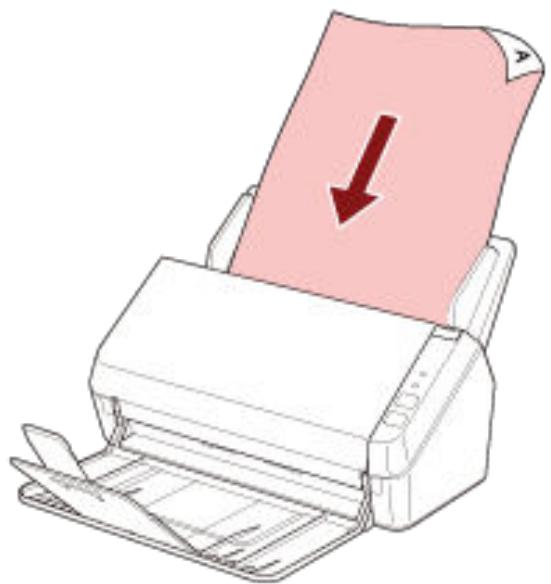
3 Load a document in the ADF paper chute (feeder).
Load the document face-down in the ADF paper chute (feeder).
For details, refer to How to Load Documents (page 49).
4 Press the scan/stop button.
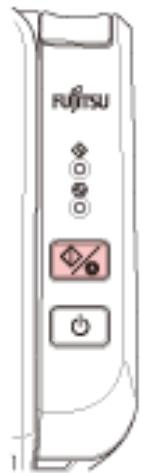
The image scanning application specified for the button on the scanner is started up.
HINT
When pressing the scan/stop button with PaperStream Capture specified for the button on the scanner, it will also start a scan.
5 Scan the document with the image scanning application as needed.
ATTENTION
Do not perform an operation to disconnect the connection between the scanner and the computer such as the following:
- Connecting the USB cable
- Disconnecting the LAN cable
- Connecting the network
- Logging off
Button Settings (For USB Connection)
Specify an image scanning application to be launched when the scan/stop button is pressed.
HINT
When Paperback Capture is installed, it is set to a computer as the default image scanning application.
The procedure when the scanner is connected via a USB cable is as follows.
1 Turn on the scanner and confirm that the scanner is connected to the computer via the USB cable. For details about how to turn on the scanner, refer to How to Turn the Power ON (page 31).
2 Display the [Control Panel] window.
- Windows Server 2008 R2/Windows 7 Click [Start] menu [Control Panel].
- Windows Server 2012 Right-click the Start screen, and select [All apps] on the app bar [Control Panel] under [Windows System].
- Windows Server 2012 R2/Windows 8.1
- Click [↓] on the lower left side of the Start screen → [Control Panel] under [Windows System].
- To display [↓], move the mouse cursor.
- Windows 10/Windows Server 2016/Windows Server 2019 Click [Start] menu [Windows System] [Control Panel].
3 Click [View devices and printers].
The [Devices and Printers] window appears.
4 Right-click on the scanner icon, and select [Scan properties] from the displayed menu.
The properties window of the scanner appears.
5 Click the [Events] tab and check that [Scan Button] is specified for [Select an event].
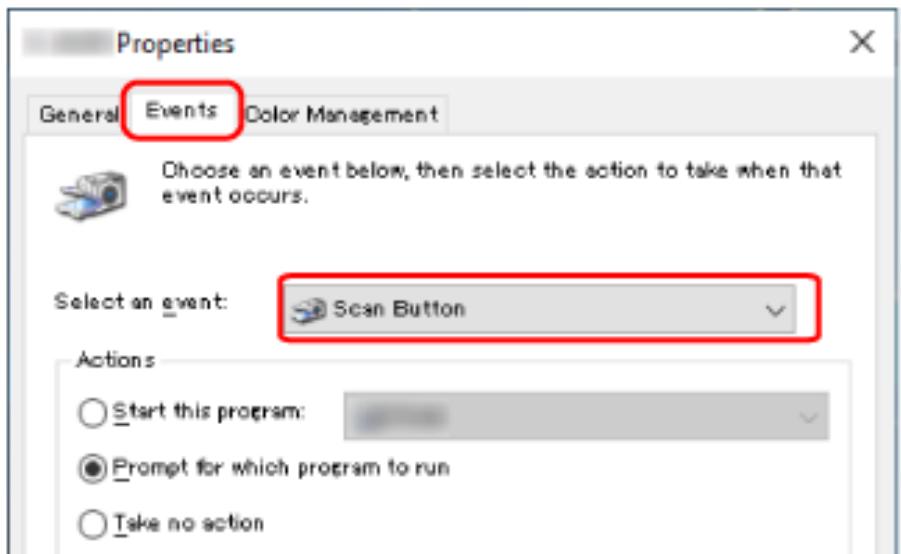
6 Select an image scanning application to be launched when the button is pressed.
Click [Start this program] under [Actions], and select an image scanning application from the program list.
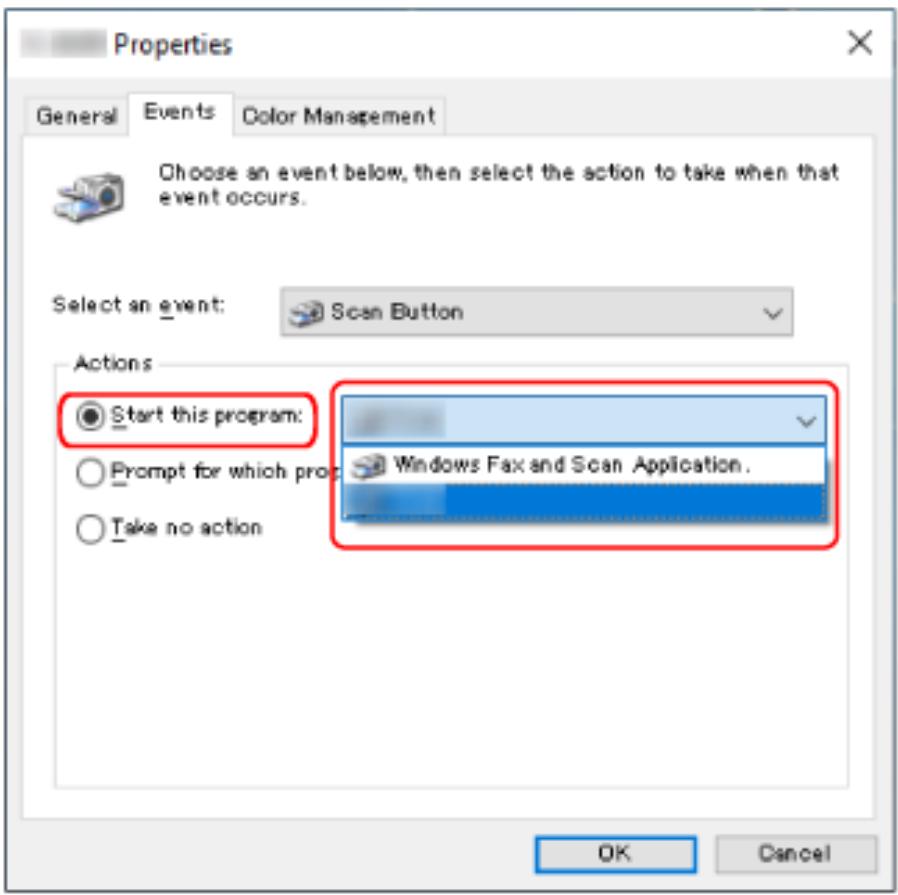
7 Click the [OK] button.
This section explains how to load documents on the scanner.
Loading Documents
This section explains how to load documents of normal paper.
Preparation
When you load multiple documents in the ADF paper chute (feeder), make the following preparations.
HINT
For details about the paper size and quality required for normal operations, refer to Documents for Scanning (page 52).
1 Check the documents.
a Check whether the documents to be loaded are of the same width or not.
Ways to load documents differ depending on whether the documents are of the same width or not. If the documents are of different width, refer to Conditions for Mixed Batch Scanning (page 59) or Scanning Documents with Different Widths (page 62).
b Check the number of sheets.
Up to 50 sheets can be loaded (with paper weight of 80~g / m^2 [20 lb] and thickness of the document stack under 5mm ).
For details, refer to Loading Capacity (page 56).
2 Fan the documents.
a Grab a stack of documents, which should be 5mm or less.
b Hold both ends of the documents and fan them a few times.
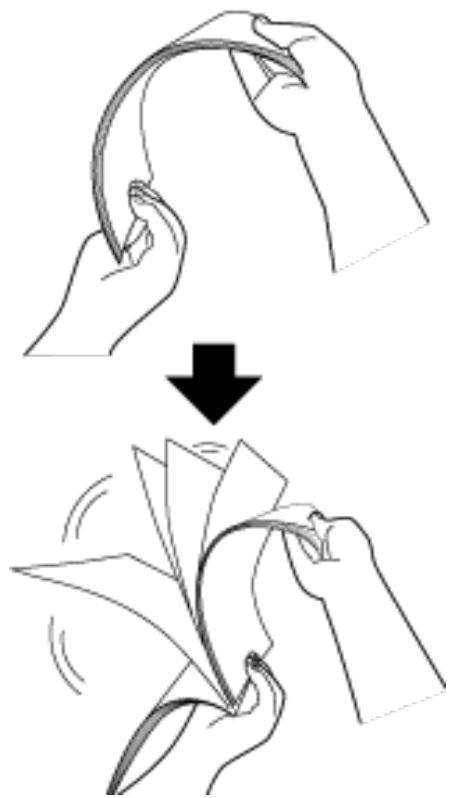
c Rotate the documents by 90 degrees and fan them in the same manner.
d Perform steps a to c for all documents.
e Align the top of the documents.
How to Load Documents
1 Pull out the chute extensions according to the length of the document.
For details, refer to Setting Up the ADF Paper Chute (Feeder) (page 33).
2 Lift the stacker and stacker extension according to the length of the document.
For details, refer to Setting Up the Stacker (page 36).
3 Load the document in the ADF paper chute (feeder).
Load the document face-down in the ADF paper chute (feeder).

ATTENTION
- Remove all paper clips and staples.
- Reduce the number of documents when documents are not fed into the scanner or overlapped documents are fed.
4 Adjust the side guides to the width of the documents.
Move the side guides so that there is no space between the side guides and the documents.
When there is a space between the side guides and the documents, the documents may be fed skewed.
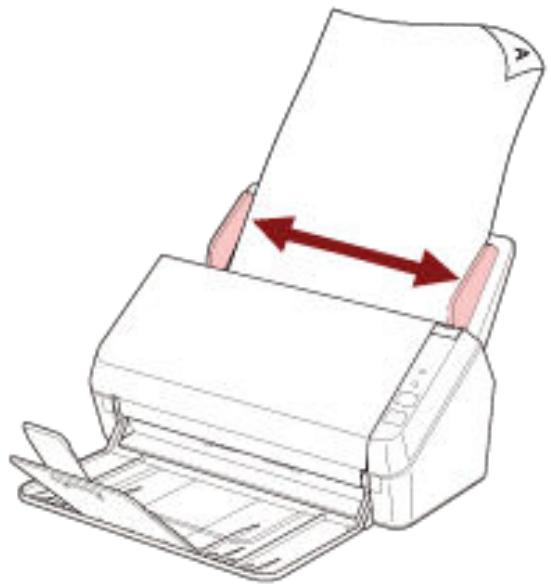
ATTENTION
When you scan long page documents, be sure to do the following:
- When loading a document
Support the loaded document with your hand so it does not fall out of the ADF paper chute (feeder).
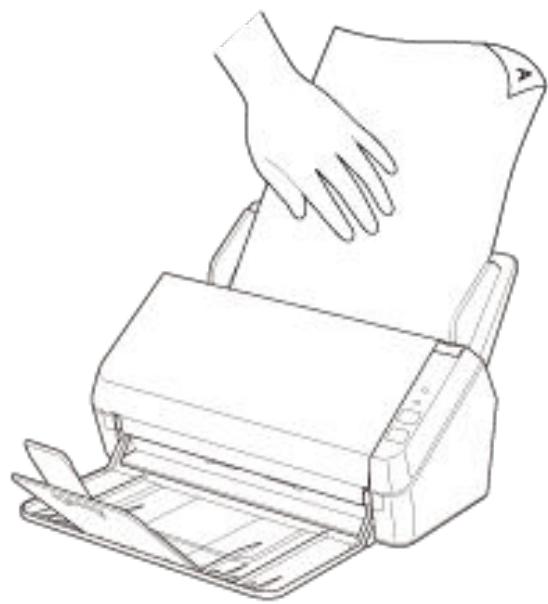
- When the document is ejected
Secure enough space around the stacker and catch the ejected sheet so that it does not fall off the stacker.
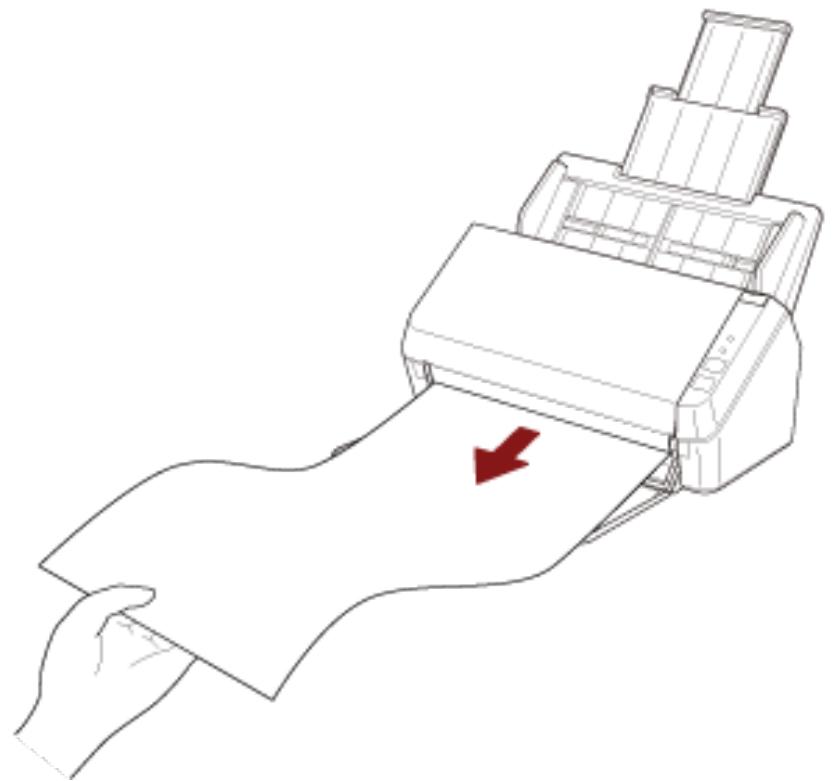
Be careful not to cut your finger on the edge of the document.
Documents for Scanning
Paper Size
The following paper sizes can be scanned:
| Maximum size (width × length) | ·A4 (portrait) (210 × 297 mm/8.3 × 11.7 in.) ·Legal (portrait) (8.5 × 14 in.) ·Long page(*1) (216 × 863 mm/8.5 × 34 in., 210 × 3,048 mm/8.3 × 120 in.) |
| Minimum size (width × length) | A8 (52 × 74 mm/2 × 2.9 in.) |
*1: Depending on the image scanning application or the scan setting of the scanner driver, the memory may be insufficient to perform scanning.
To scan documents that are longer than 355.6 mm (14 in.) but are within 863 mm (34 in.), set the resolution to 300 dpi or lower.
To scan documents longer than 863mm (34 in.), set the resolution to 200 dpi or lower.
Document Type
The following document types (paper types) are recommended:
Wood-free paper
Wood-containing paper
- PPC paper (recycled)
- Plastic card
When scanning a document in a type other than the above, perform a test on the same type of document (paper) first to check whether it can be scanned.
Paper Weight (Document Thickness)
Documents with the following thickness (paper weight) can be scanned:
- 50 to 209 g/m^2 (13.4 to 56 lb)
- For A8 size or smaller, 127 to 209g / m^2 (34 to 56 lb)
- 0.76 ~mm or less for plastic cards (Embossed cards allowed (ISO7810 ID-1 type compliant))
Documents That May Not Be Scanned Successfully
The following types of documents may not be scanned successfully:
- Tracing paper
- Documents that are not square or rectangular
- Very thin paper
Documents That Must Not Be Scanned
The following types of documents must not be scanned:
- Paper-clipped or stapled documents
- Documents on which the ink is still wet
- Documents smaller than A8 size
- Documents other than paper/plastic card (such as fabric, metal foil and OHP film)
- Important documents such as certificates and cash vouchers which must not be damaged
- Documents of non-uniform thickness (such as envelopes or documents with attachments)
- Wrinkled or curled documents
- Folded or torn documents
Coated paper - Carbon paper
- Carbonless paper
- Photosensitive paper
Perforated documents
Photographs (photographic paper)
ATTENTION
Since carbonless paper contains chemical substances that may harm the brake roller and rollers for feeding documents (such as the pick roller), the scanner may fail.
Precautions
Notes on the documents to be scanned
Depending on the documents to be scanned, take note of the following.
- When scanning wood containing papers, the life of the brake roller and pick roller may end sooner compared to scanning wood-free papers.
- The brake roller and pick roller may be damaged when a photo/sticky note on a document comes into contact with these parts during scanning.
- The surface of the document may be damaged when gloss papers such as photographs are scanned.
- When scanning semi-transparent documents, set [Brightness] higher in the scanner driver to avoid bleed-through.
- When you scan documents written in lead pencil, there may be black traces left on the document, which may cause feeding errors.
Clean the rollers frequently.
For details about cleaning, refer to Daily Care (page 66).
- If documents are not fed, or documents are fed overlapped or jammed frequently, refer to Troubleshooting (page 95).
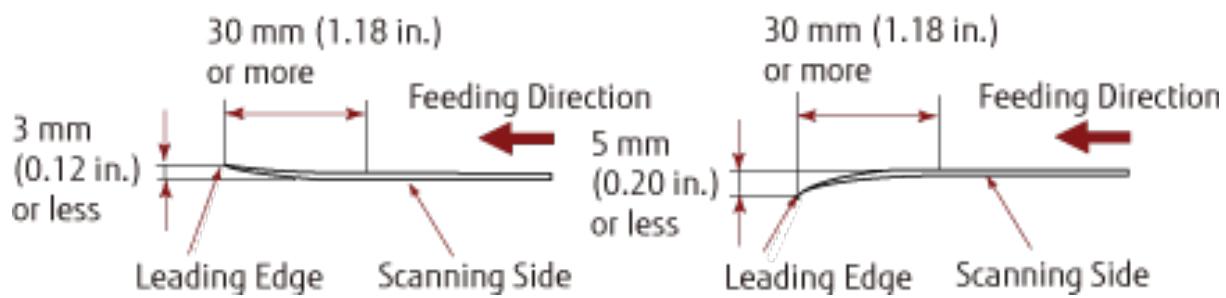
- All documents must be flat on the leading edge.
Make sure that curls on the leading edge of the documents are kept within the following range.
Notes on plastic cards
When you scan plastic cards, take note of the following.
-
Make sure you use a card that contains the following specifications, and check if the card can be fed before scanning it.
-
Type: Compliant with the ISO7810 ID-1 type
- Size: 85.6 × 53.98 mm( 3.37 × 2.13in.)
- Thickness: 0.76 mm (0.03 in.) or less (Embossed cards allowed)
-
Material: PVC (polyvinyl chloride) or PVCA (polyvinyl chloride acetate)
-
Load plastic cards one at a time in the ADF paper chute (feeder).
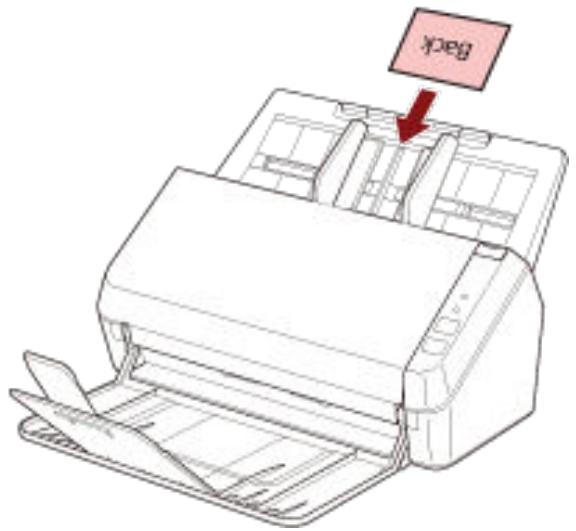
- It is recommended to place the card face-down in the ADF paper chute (feeder).
- Rigid cards may not be fed properly.
- If there is dirt on the surface of the card, such as grease marks (fingerprints), perform scanning after wiping the dirt off.
- Scanning a thick document such as a plastic card will always be falsely detected as overlapped documents. In such a case, disable the setting in the image scanning application or scanner driver so that overlapped documents (multifeeds) are not detected, and then try scanning again.
Loading Capacity
The number of sheets that can be loaded in the ADF paper chute (feeder) is determined by the paper size and paper weight.
See the graph below.
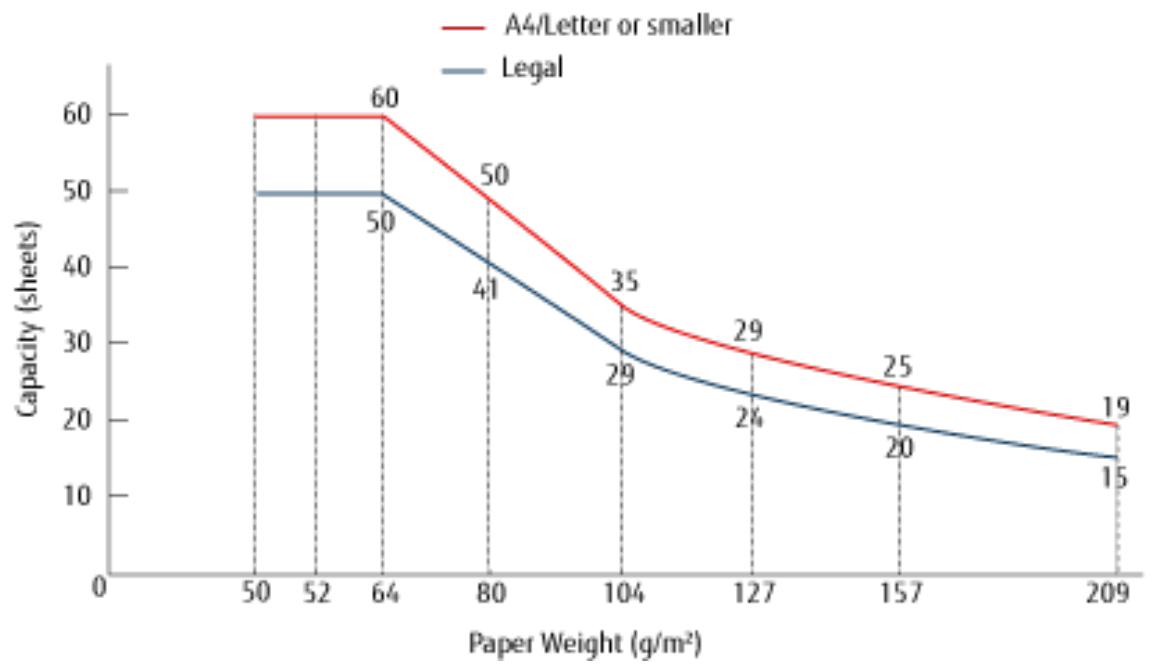
| Unit | g/m2 | lb |
| Conversion | 50 | 13.4 |
| 52 | 14 | |
| 64 | 17 | |
| 75 | 20 | |
| 80 | 21 | |
| 90 | 24 | |
| 104 | 28 | |
| 127 | 34 | |
| 157 | 42 | |
| 209 | 56 |
Area Not to Be Perforated
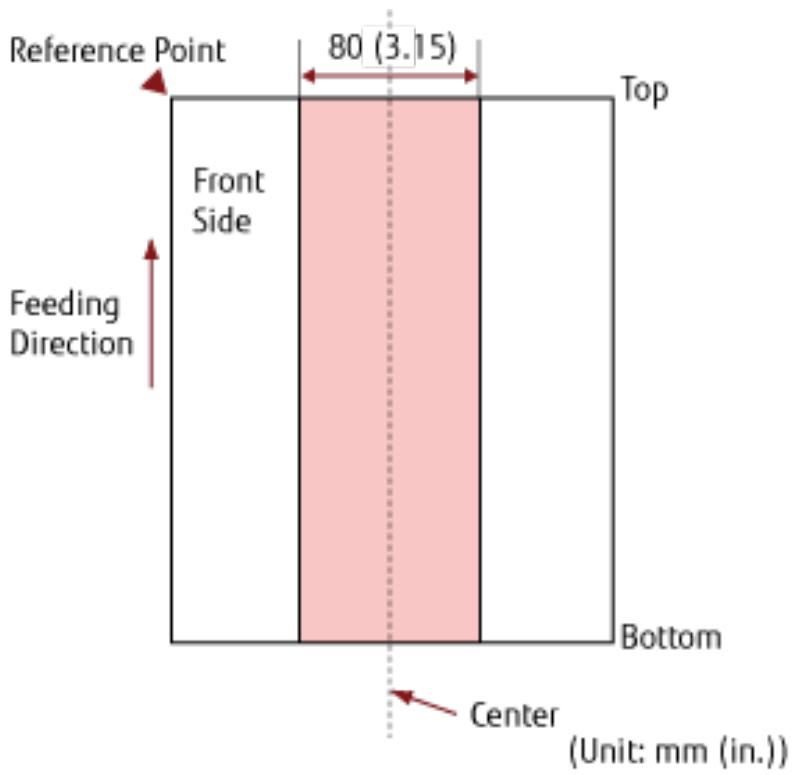
An error may occur when there are punched holes in the area colored in light pink in the Figure 1.
Fig. 1
ATTENTION
The above condition applies when the document is set to the center of the pick roller width.
HINT
If there are any holes in the 80~mm (3.15 in.) wide central column, you can move the document to the left or right to avoid an error.
Conditions Required to Accurately Detect Overlapped Documents (Multifeed)
Multifeed is an error that occurs when two or more sheets are overlapped and fed at once.
For documents that are loaded, the following conditions are required for overlapped documents to be detected accurately.
- Paper weight: 50 to 209g / m^2 (13.4 to 56 lb) (0.06 to 0.26mm )
- Do not punch holes within 80~mm (3.15 in.) over the center of the document. Refer to Fig. 1 in Area Not to Be Perforated (page 57).
- Do not attach other documents with glue or other adhesive within 80~mm (3.15 in.) over the center of the document. Refer to Fig. 1 in Area Not to Be Perforated (page 57).
ATTENTION
- The above condition applies when the document is set to the center of the pick roller width.
- Scanning a thick document such as a plastic card will always be falsely detected as overlapped documents. In such a case, disable the setting in the image scanning application or scanner driver so that overlapped documents are not detected, and then try scanning again.
HINT
The accuracy of detection for overlapped documents may drop depending on the document type. Overlapping cannot be detected for the top 30~mm (1.18 in.) of a document in the feeding direction.
Conditions for Mixed Batch Scanning
The following conditions apply when a mixed batch of documents with different paper sizes is scanned.
Make sure to test a few sheets first to check if the mixed batch of documents can be fed.
For details about scanning, refer to Scanning Documents with Different Widths (page 62).
ATTENTION
You cannot scan a mixed batch of documents with different paper weights/friction coefficients.
Paper Direction
Align the direction of the paper fiber with the feed direction.
Document Position
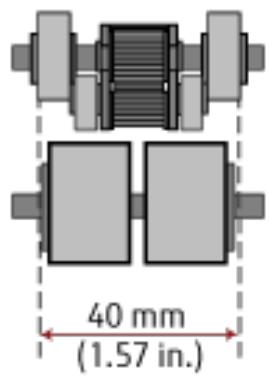
Load all documents covering the width of the pick roller (approx. 40 mm (1.57 in.) wide).
For a guideline for mixed batch scanning, refer to Combinations of Standard Paper Sizes in a Mixed Batch (page 60) in Paper Size (page 60).
HINT
When the smallest document covers the width of the pick roller even when it is loaded towards one side as shown in the image below, load documents aligned on one side. So that it prevents documents from skewing when being fed.
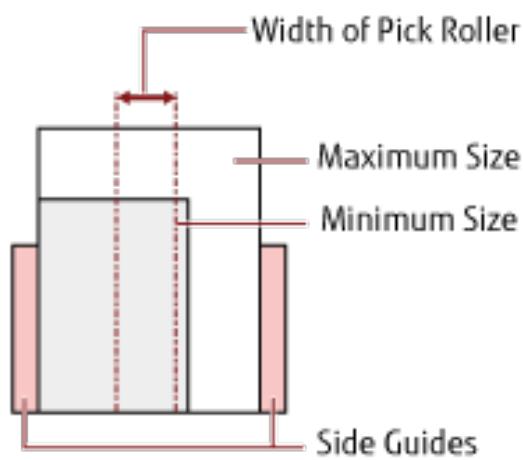
Paper Size
When a mixed batch with different sizes is scanned, not feeding the documents straight may cause troubles such as paper jams or part of the image to appear missing.
It is recommended that you check the scanned images if the documents were fed skewed.
ATTENTION
When a mixed batch with different sizes is scanned, documents are more likely to skew because the side guides do not fit every sheet properly.
Combinations of Standard Paper Sizes in a Mixed Batch
Refer to the table below for a guideline of the range available for mixed batch scanning.
| Document Size Width (mm) {*1} | Maximum Size | ||||||
| LTR(P) | A4(P) A5(L) | B5(P) B6(L) | A5(P) A6(L) | B6(P) B7(L) | |||
| 216 | 210 | 182 | 149 | 129 | |||
| Minimum Size | LTR(P) | 216 | |||||
| A4(P) A5(L) | 210 | ||||||
| B5(P) B6(L) | 182 | ||||||
| A5(P) A6(L) | 149 | ||||||
| B6(P) B7(L) | 129 | ||||||

Available Range
LTR:Letter size
*1: The following figure shows how to set the widest and the narrowest documents of the batch between the side guides.
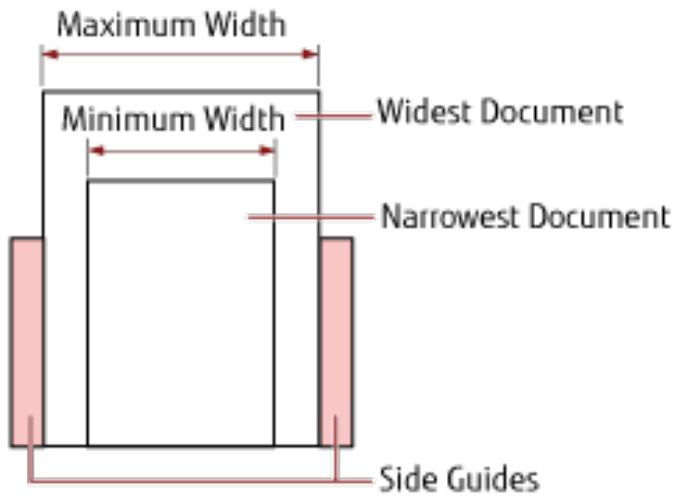
ATTENTION
A6 (portrait) and A7 (landscape) or less cannot be scanned with other paper sizes.
Documents That Cannot Be Scanned in a Mixed Batch
The following types of documents cannot be mixed in the same batch:
Bond paper
- Tracing paper
Conditions for Automatic Page Size Detection
[Automatic Page Size Detection] does not work with the following type of documents:
Non-rectangular documents
[Automatic Page Size Detection] may not work with the following types of documents:
- Thin paper (50g / m^2 [13.4 lb] or less)
- White documents with glossy edges
- Documents with darkish (gray) edges
This section explains how to configure the scanner settings and scan different types of documents with the image scanning application.
For information on other ways to scan which are not explained here, refer to the manual or help for the image scanning application, and the help for the scanner driver.
Scanning Documents with Different Widths
ATTENTION
When you scan a mixed batch with different widths, some of the narrower documents may be skewed or not fed into the ADF.
In that case, separate the documents by their widths, and scan them in different batches.
HINT
For details about document requirements for scanning a mixed batch of documents, refer to Conditions for Mixed Batch Scanning (page 59).
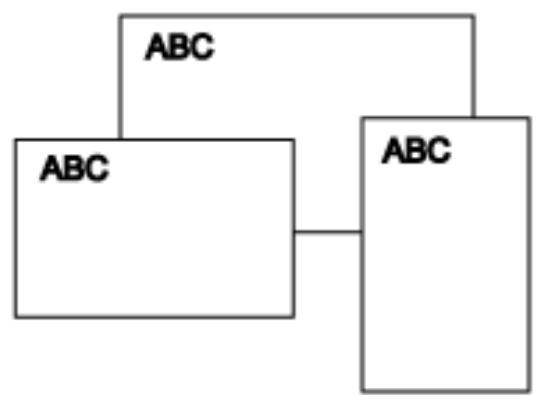
1 Align the top of the documents.

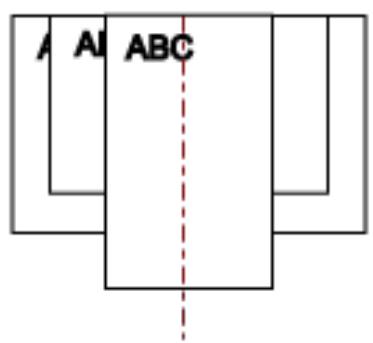
2 Place the documents at the center of the ADF paper chute (feeder), and adjust the side guides to the widest document in the batch.
ATTENTION
Load all documents above the center of the pick roller. If documents are loaded outside of the pick roller width, they may be fed skewed or not fed into the ADF.
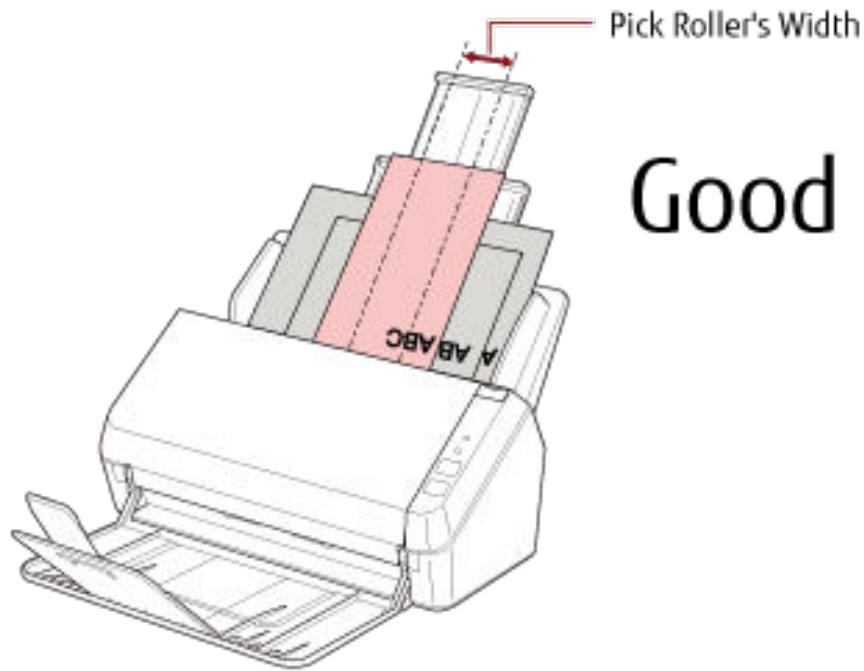
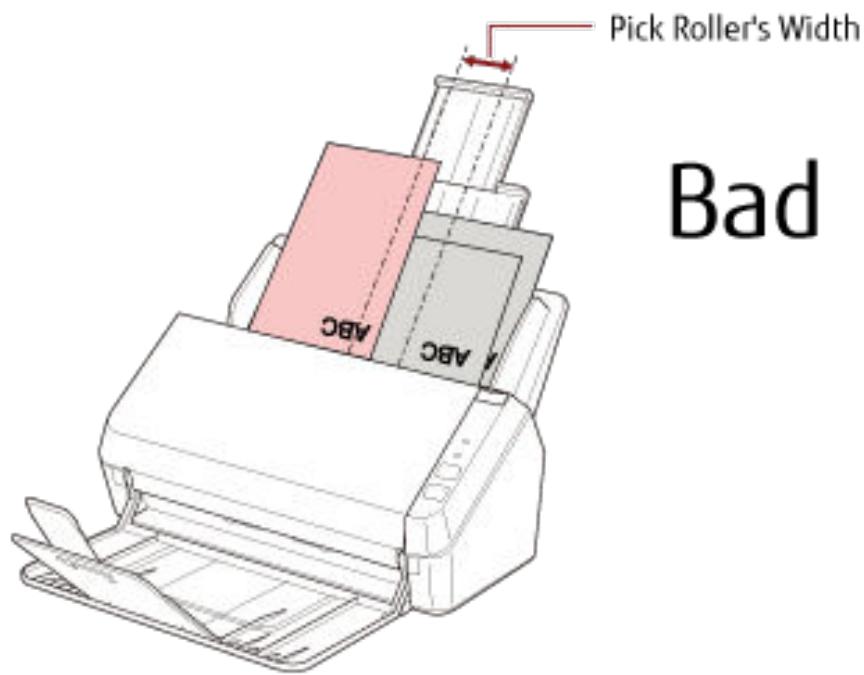
3 Adjust the stacker to fit the longest document.
For details, refer to Setting Up the Stacker (page 36).
4 In the scanner driver, configure the scan settings to detect the paper size automatically.
For details, refer to the help for the scanner driver.
5 Scan documents with the image scanning application.
For details, refer to the manual for your image scanning application.
Scanning Long Page Documents
Documents with a length up to 3,048 mm (120 in.) can be scanned by long page scanning.
Depending on the resolution setting or the image scanning application, the document sizes that can be scanned may differ.
For details, refer to the manual for your scanner driver and image scanning application.
1 Pull out the chute extensions all the way.
For details, refer to Setting Up the ADF Paper Chute (Feeder) (page 33).
2 Lift the stacker and stacker extension towards you.
For details, refer to Setting Up the Stacker (page 36).
3 Load the document in the ADF paper chute (feeder).
For details, refer to How to Load Documents (page 49).
ATTENTION
Long page documents should be loaded one sheet at a time in the ADF paper chute (feeder).
4 In the scanner driver, configure the scan settings to scan the paper size of the long page.
For details, refer to the help for the scanner driver.
For some image scanning applications, the setup window for the scanner driver may not appear.
5 Scan the document with the image scanning application.
For details, refer to the manual for your image scanning application.
ATTENTION
When scanning a long page document, support the document with your hand so that it does not fall off or is not fed again.
For details, refer to How to Load Documents (page 49).
This section describes how to clean the scanner.

CAUTION
- Do not use aerosol spray or spray that contains alcohol. Paper dust blown up by strong air from the spray may enter inside the scanner which may cause the scanner to fail or malfunction.
Also note that sparks generated by static electricity may cause a fire.
- The inside of the ADF becomes very hot when the scanner is being used.
Before you start cleaning the inside of the ADF, make sure to turn off the power, unplug the power cable and wait for at least 15 minutes for the inside of the ADF to cool down.
Cleaning Materials
| Name | Part No. | Notes |
| Cleaner F1 | PA03950-0352 | 100 ml Liquid cleaner to use for removing dirt and stains |
| Cleaning Paper | CA99501-0012 | 10 sheets Used to clean the inside of the scanner with ease. Spray it with Cleaner F1 and scan it with the scanner in the same way as a document. |
| Cleaning Wipe | PA03950-0419 | 24 packets Pre-moistened with Cleaner F1. It can be used instead of moistening a cloth with Cleaner F1. |
| Cotton swab | Commercially available | Used to clean a tiny part such as the ultrasonic sensor. |
| Dry cloth | Used to wipe off dirt and stains. Moisten it with Cleaner F1 for cleaning. |
ATTENTION
In order to use the cleaning materials safely and correctly, read the precautions on each product thoroughly.
For more information about the cleaning materials, contact the distributor/dealer where you purchased this product. Refer to the contact information in the Contact List if supplied with this product, or refer to the contact
information in the Contact for Inquiries section if provided in Safety Precautions supplied with this product, and then make an inquiry.
Location and Frequency
| Cleaning Location | Frequency | |
| Inside of the scanner (ADF) | Brake roller | Every 3,000 sheets |
| Pick roller | ||
| Plastic idler roller | ||
| Glass | ||
| Ultrasonic sensor | ||
| Feed roller | ||
| Eject roller | ||
ATTENTION
Cleaning cycles may vary depending on the condition of the documents. Also, cleaning must be performed more frequently when the following types of documents are scanned:
- Smooth-faced documents such as coated paper
- Documents with printed text/graphics that almost cover the entire surface
- Documents containing a large amount of calcium carbonate
- Documents written in lead pencil
- Documents on which the toner is not sufficiently fused
Cleaning the Outside of the Scanner
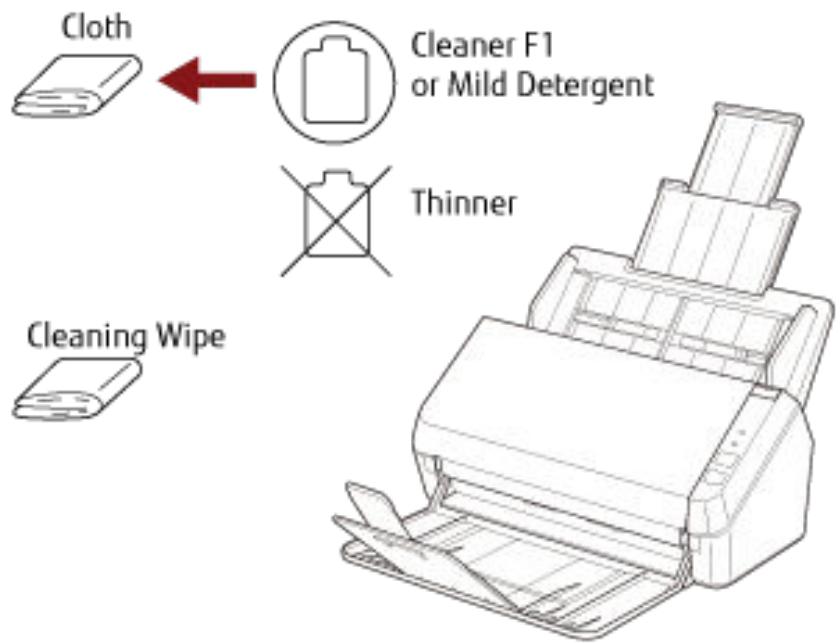
The scanner including the ADF paper chute (feeder) and the stacker should be cleaned with either a piece of dry cloth, a cloth moistened with Cleaner F1/mild detergent, or a sheet of Cleaning Wipe.
ATTENTION
- To avoid deformation and discoloration, never use paint thinner or any other organic solvents.
- Be careful not to let any moisture or water inside the scanner during cleaning.
- It may take a long time to dry if an excessive amount of Cleaner F1/mild detergent is used. Use only a small amount. Wipe off the cleaner completely to leave no residue on the cleaned parts.
Cleaning the Inside of the Scanner (ADF) with Cleaning Paper
The inside of the ADF can be cleaned with a sheet of Cleaning Paper moistened with Cleaner F1.
As the scanner continues to feed the documents, paper dust will accumulate inside the ADF and it may cause scanning errors. Cleaning should be performed approximately every 3,000 sheets scanned. Note that this guideline varies depending on the types of documents you scan. For instance, it may be necessary to clean the scanner more frequently when you scan documents on which the toner is not sufficiently fused.
ATTENTION
- Do not use water or mild detergent to clean the ADF.
- It may take a long time to dry if an excessive amount of Cleaner F1 is used. Use only a small amount.
1 Turn on the scanner.
For details, refer to How to Turn the Power ON (page 31).
2 Spray the Cleaning Paper with Cleaner F1.
3 Pull out the chute extensions according to the length of the Cleaning Paper.
For details, refer to Setting Up the ADF Paper Chute (Feeder) (page 33).
4 Lift the stacker and stacker extension according to the length of the Cleaning Paper.
For details, refer to Setting Up the Stacker (page 36).
5 Load the Cleaning Paper in the ADF paper chute (feeder).
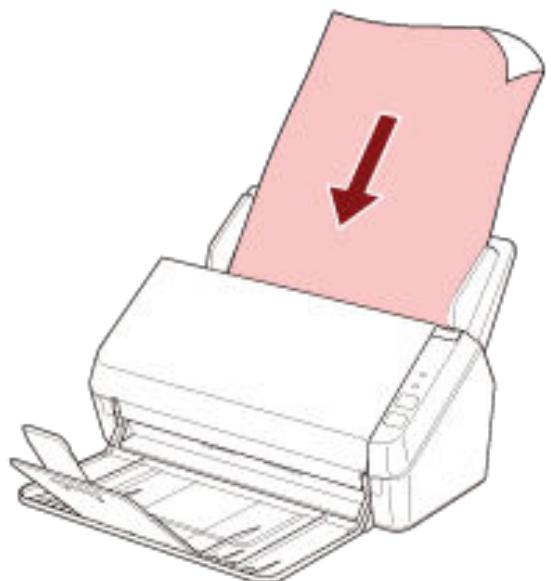
6 Adjust the side guides to the width of the Cleaning Paper.
Move the side guides so that there is no space between the side guides and the Cleaning Paper.
Otherwise, the Cleaning Paper may be fed skewed.
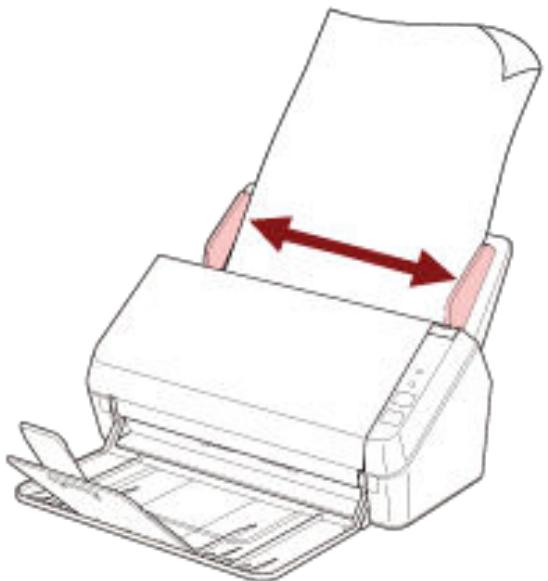
7 Start an image scanning application and scan the Cleaning Paper.
Cleaning the Inside of the Scanner (ADF) with a Cloth
The inside of the ADF can be cleaned with a piece of cloth moistened with Cleaner F1, or a sheet of Cleaning Wipe. As the scanner continues to feed the documents, paper dust will accumulate inside the ADF and it may cause scanning errors. Cleaning should be performed approximately every 3,000 sheets scanned. Note that this guideline varies depending on the types of documents you scan. For instance, it may be necessary to clean the scanner more frequently when you scan documents on which the toner is not sufficiently fused.

CAUTION
The inside of the ADF becomes very hot when the scanner is being used.
Before you start cleaning the inside of the ADF, make sure to turn off the power, unplug the power cable and wait for at least 15 minutes for the inside of the ADF to cool down.
ATTENTION
- Do not use water or mild detergent to clean the ADF.
- It may take a long time to dry if an excessive amount of Cleaner F1 is used. Use only a small amount. Wipe off the cleaner completely to leave no residue on the cleaned parts.
1 Turn off the scanner and wait for at least 15 minutes.
For details, refer to How to Turn the Power OFF (page 31).
2 Open the ADF.
For details, refer to How to Open the ADF (page 34).

CAUTION
When the ADF is open, it might close accidentally. Be careful not to get your fingers caught.
3 Clean the following locations with a cloth moistened with Cleaner F1, or a sheet of Cleaning Wipe.
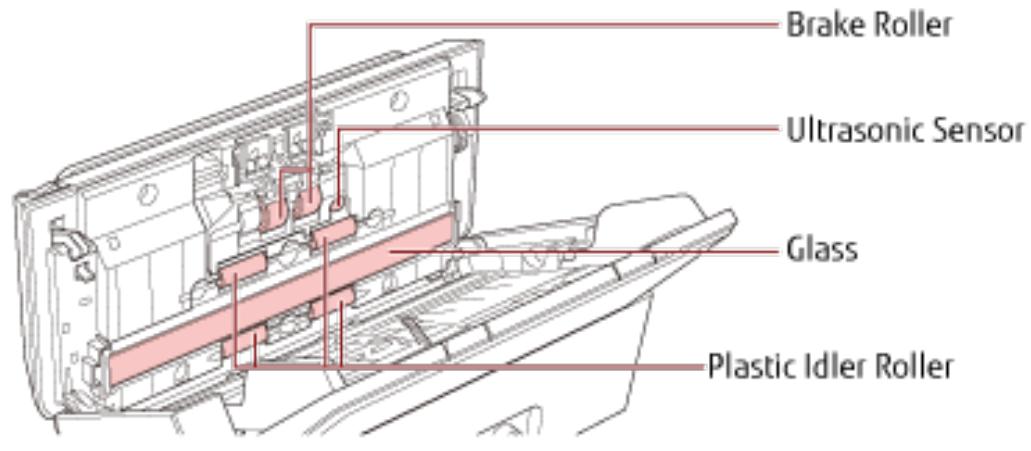
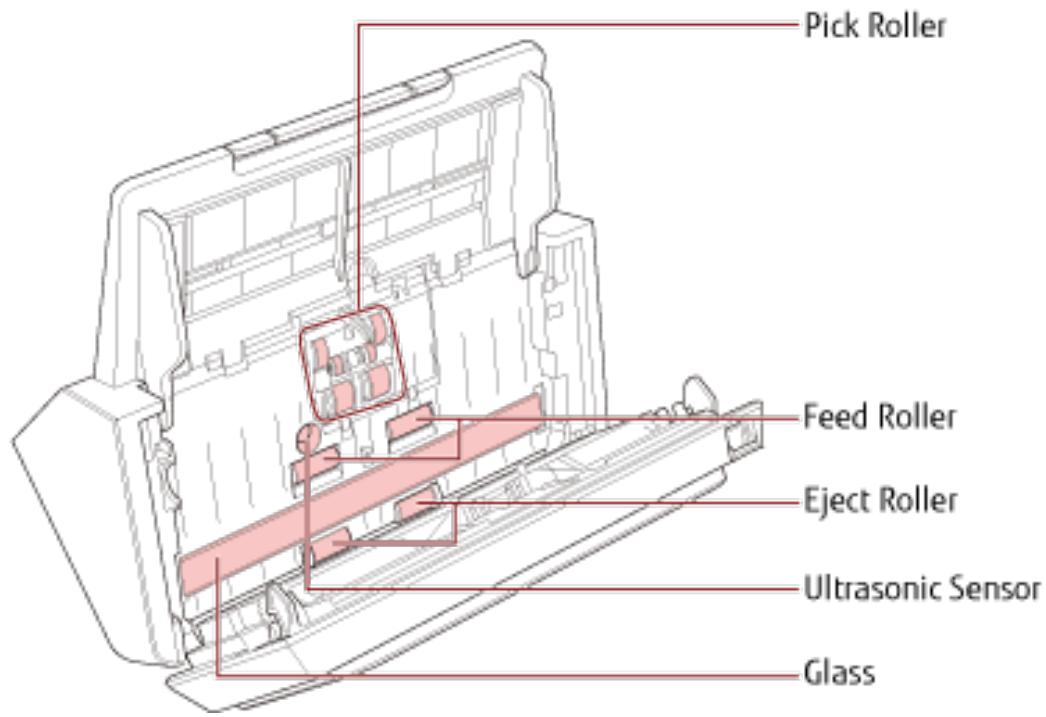
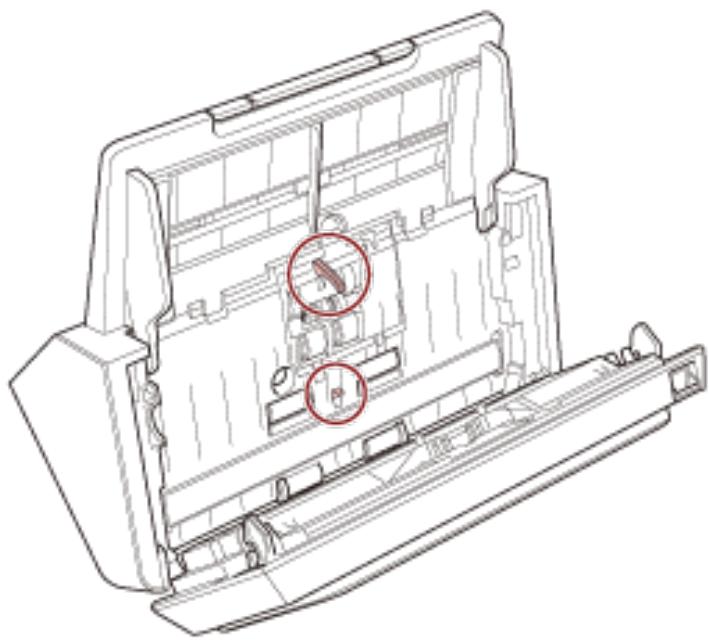
ATTENTION
Make sure that the cloth does not get caught and damage the document sensors.
Brake roller (× 2)
Remove the brake roller from the scanner.
For details about removing the brake roller, refer to Replacing the Roller Set (page 79).
Gently wipe dirt and dust off the roller, taking care not to damage the roller surface.
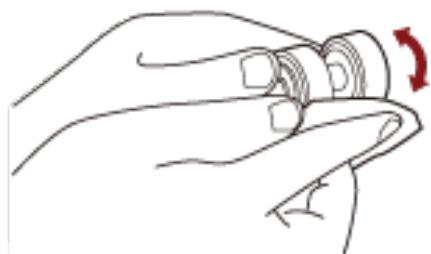
Pick roller (× 6)
Gently wipe dirt and dust off the roller as you rotate the roller manually, taking care not to damage the roller surface. Make sure that it is wiped properly because black residue on the roller will affect the feeding performance.
Plastic idler roller (× 4)
Gently wipe dirt and dust off the roller as you rotate the roller manually, taking care not to damage the roller surface. Make sure that it is wiped properly because black residue on the roller will affect the feeding performance.
Glass (× 2)
Gently wipe dirt and dust off the glass sections.
ATTENTION
Vertical streaks may appear on images if the glass section is dirty.
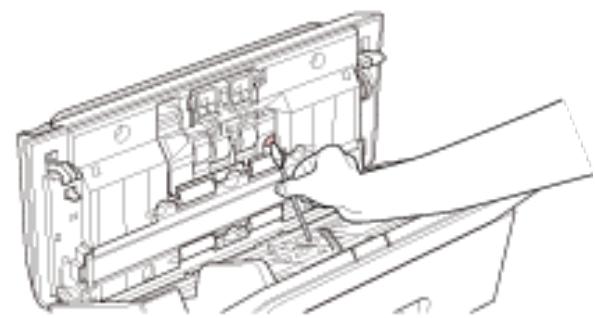
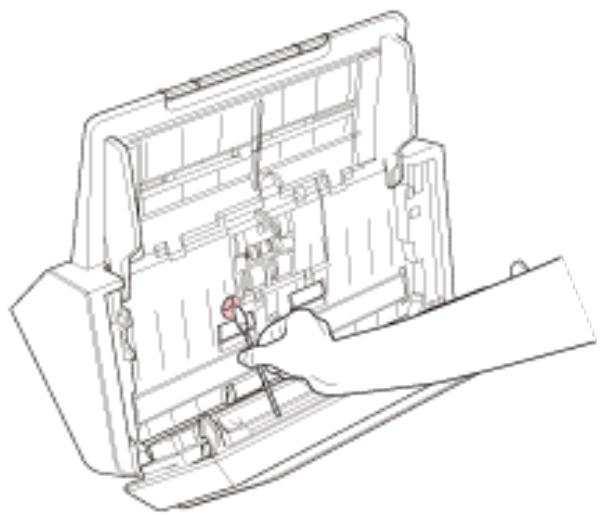
Ultrasonic sensor (× 2)
Gently wipe dirt and dust off the surface of the ultrasonic sensors.
HINT
If it is difficult to clean, use a cotton swab.
Feed roller (× 2) /Eject roller (× 2)
The power must be turned on to rotate the feed/eject rollers for cleaning.
a Turn on the scanner.
For details, refer to How to Turn the Power ON (page 31).
b When the operator panel is in ready status, open the ADF.
For details, refer to How to Open the ADF (page 34).
Press the scan/stop button on the operator panel for 2 seconds or more.
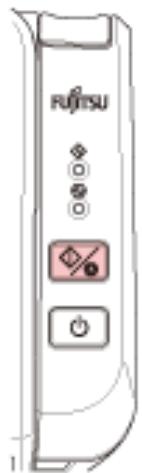
The feed/eject rollers rotate at the same time.

CAUTION
Be careful not to touch the rollers with your hand while they are rotating.
d Put a piece of cloth moistened with Cleaner F1 or a sheet of Cleaning Wipe against the surface of the feed/eject roller, and wipe horizontally to clean dirt and dust off the whole surface. Make sure that it is wiped properly because black residue on the roller will affect the feeding performance.
4 Close the ADF.
For details, refer to How to Close the ADF (page 35).

CAUTION
Be careful not to get your fingers caught when closing the ADF.
ATTENTION
Confirm that the ADF is closed properly. Otherwise, documents may not be fed into the ADF.
This section explains how to replace the consumables for the scanner.

CAUTION
The inside of the ADF becomes very hot when the scanner is being used.
Before you replace the consumables, make sure to turn off the power, unplug the power cable and wait for at least 15 minutes for the inside of the ADF to cool down.
Consumables and Replacement Cycles
| Name | Part No. | Suggested Replacement Cycle |
| ROLLER SET • Brake roller Pick roller | PA03708-0001 | 100,000 sheets or one year |
Consumables need to be replaced periodically. It is recommended that you keep a stock of new consumables and replace them before it reaches the end of the consumable life. Also, the scanner records the number of sheets scanned, which allows you to determine when to replace the consumables.
For information on how to check the number of sheets scanned, refer to Settings Related to Sheet Counters (page 135).
Note that the suggested replacement cycles are guidelines for using A4 (80 g/m² [20 lb]) wood-free or wood-containing paper, as these cycles vary depending on the type of documents scanned and how often the scanner is used and cleaned.
HINT
Only use the specified consumables.
For information on purchasing the consumables, contact the distributor/dealer where you purchased this product. Refer to the contact information in the Contact List if supplied with this product, or refer to the contact information in the Contact for Inquiries section if provided in Safety Precautions supplied with this product, and then make an inquiry.
Replacing the Roller Set
The roller set consists of a brake roller and a pick roller.
Replace each roller in the following procedure.
1 Remove all documents from the ADF paper chute (feeder).
2 Open the ADF.
For details, refer to How to Open the ADF (page 34).

When the ADF is open, it might close accidentally. Be careful not to get your fingers caught.
3 Remove the brake roller.
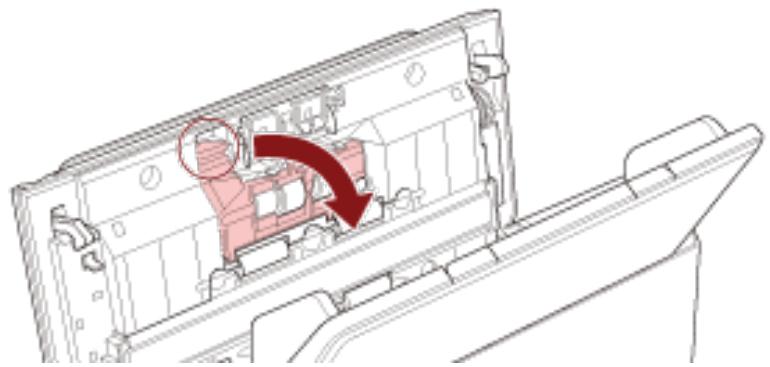
a Press the cover bushing of the brake roller to open the cover in the direction of the arrow.
b Pull out the left side of the brake roller shaft, and then pull out the right side of the shaft from the hole.
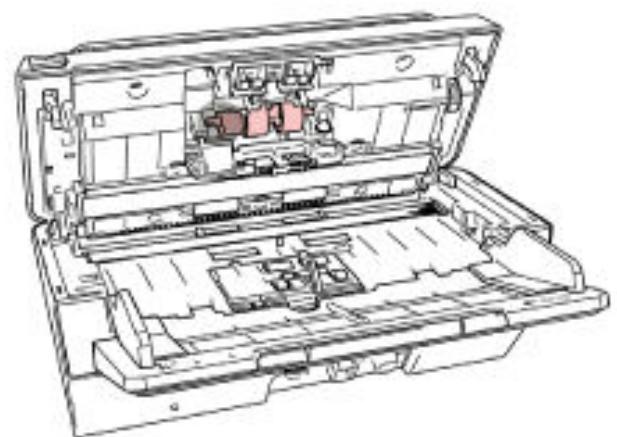


4 Remove the brake roller from its shaft.
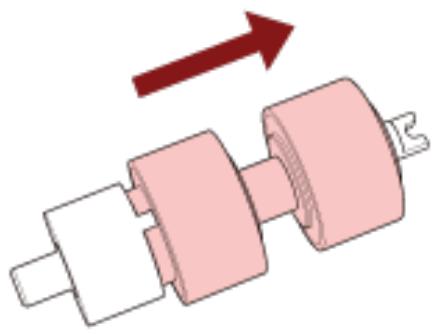
5 Attach a new brake roller on the shaft.
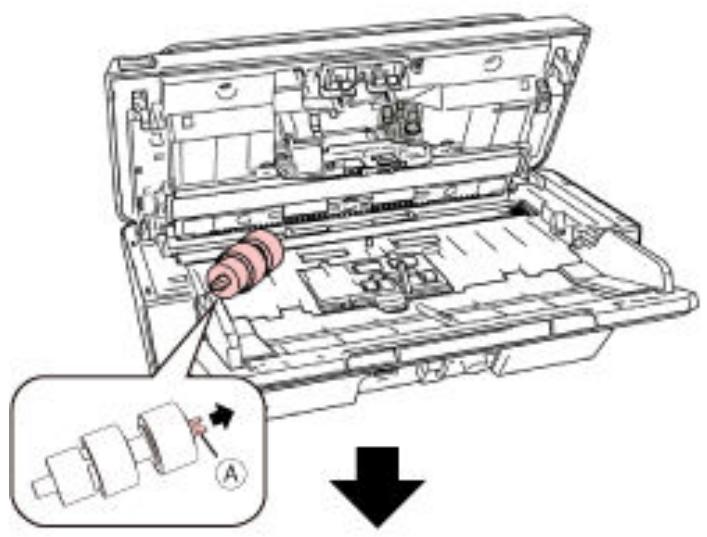
Insert the protrusion (A) on the shaft into the slot.

6 Attach the shaft.
a Attach the notch () , which is on the brake roller shaft, to the slot on the right then attach the left side of the shaft.
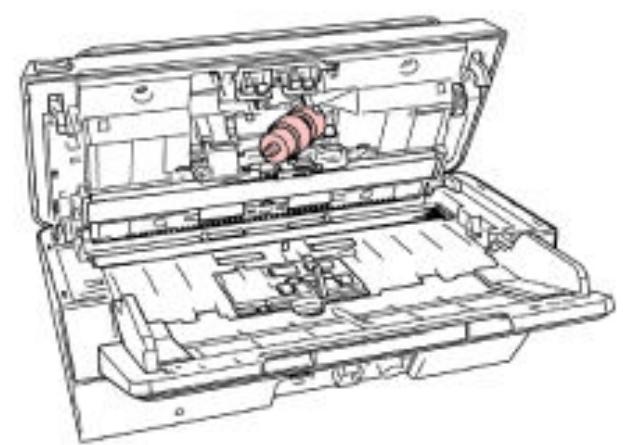
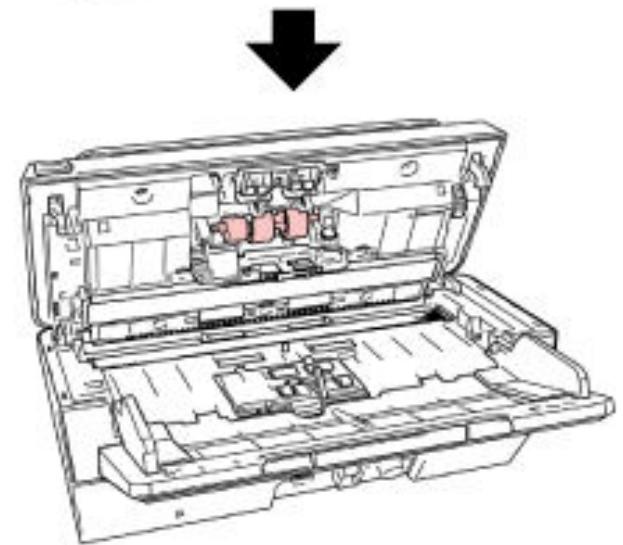
b Close the brake roller cover.
ATTENTION
Confirm that the brake roller is installed properly. Otherwise, paper jams or other feeding errors may occur.
7 Remove the pick roller.
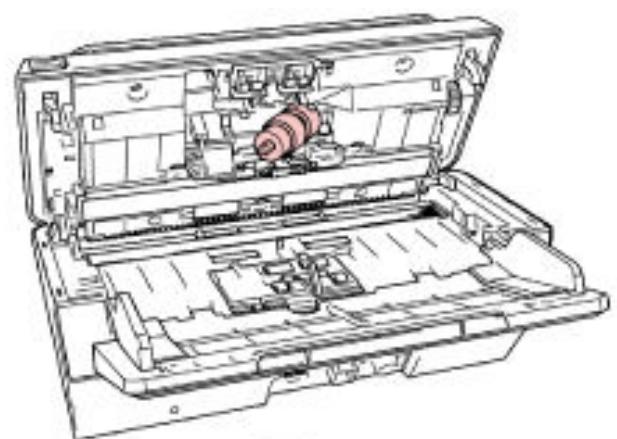
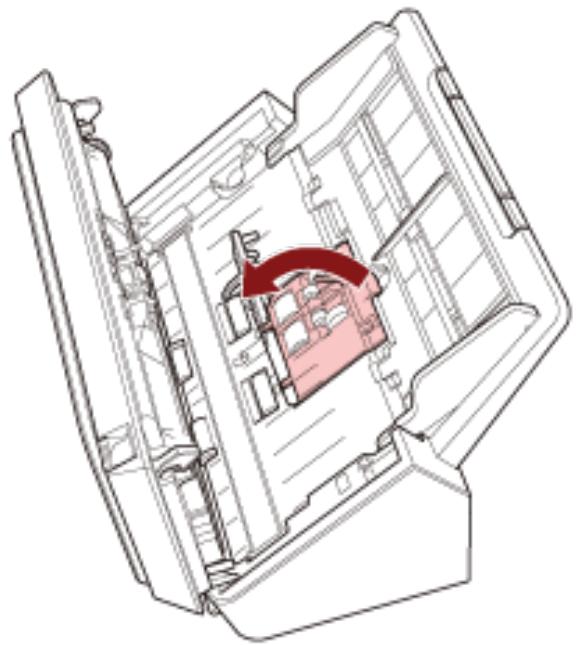
a Open the side guides fully to both sides. Then place your finger into the depression and open the sheet guide in the direction of the arrow.
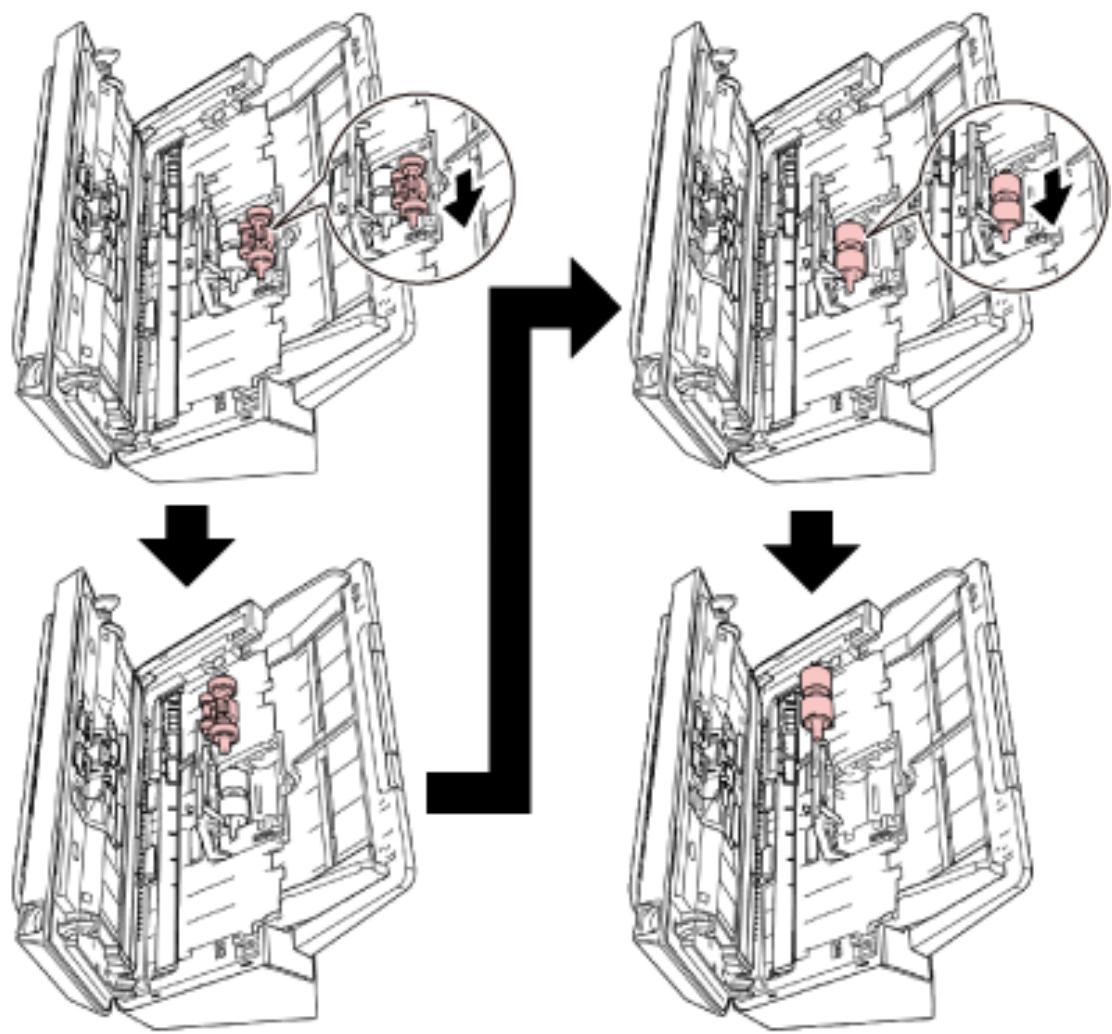
b Slide the pick roller and remove it from the top.
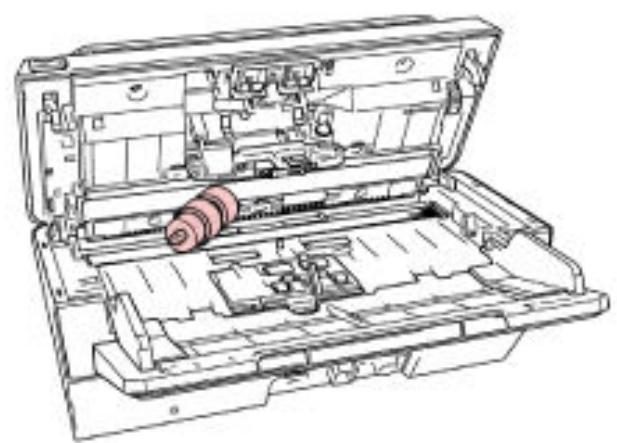
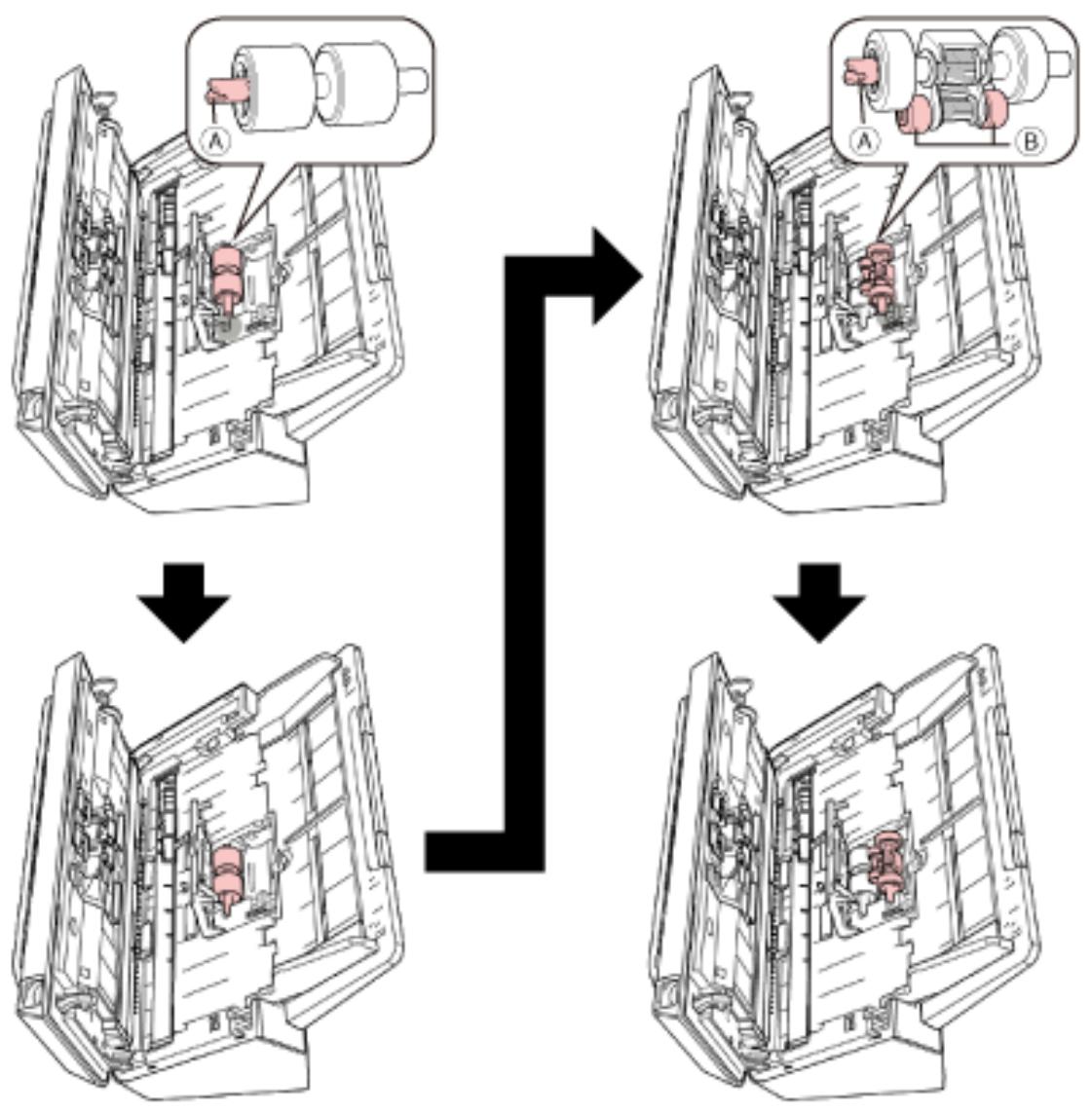
8 Attach a new pick roller from the bottom.
a Check the direction of the notch (A) on the pick roller and of the small roller (B), and insert it in the hole.
b Close the sheet guide.
ATTENTION
Confirm that the pick roller is installed properly. Otherwise, paper jams or other feeding errors may occur.
9 Close the ADF.
For details, refer to How to Close the ADF (page 35).

CAUTION
Be careful not to get your fingers caught when closing the ADF.
10 Reset the roller set counter.
Start up the Software Operation Panel and clear the counter.
For details, refer to Clearing the Sheet Counters (page 137).
This section explains about the countermeasures against paper jams and other troubles, items to check before contacting your scanner service provider, and how to read the product label on the scanner.
ATTENTION
For details about other errors/troubles that are not covered in this section, refer to the scanner driver's Help.
When a Paper Jam Occurs
Remove the documents that are left in the ADF in the following procedure:

CAUTION
- Do not use force to pull out jammed documents, and make sure to open the ADF first.
- Be careful not to touch any sharp parts upon removing jammed documents.
- Be careful not to get things such as hair, a tie or necklaces caught inside the scanner when removing jammed documents.
- The inside of the ADF may become extremely hot during operation. Be careful not to burn yourself.
1 Remove all documents from the ADF paper chute (feeder).
2 Open the ADF.
For details, refer to How to Open the ADF (page 34).

CAUTION
When the ADF is open, it might close accidentally. Be careful not to get your fingers caught.
3 Remove the jammed document.
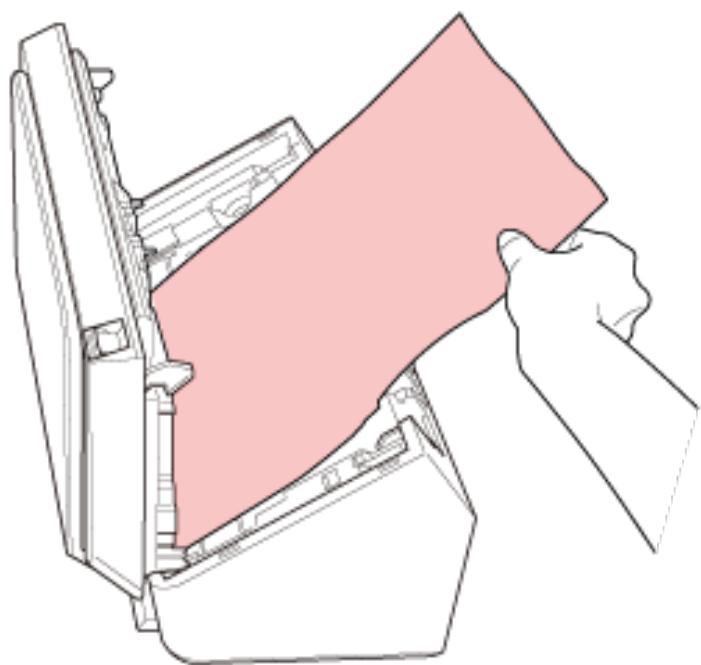
ATTENTION
- Make sure to check the documents and the paper path thoroughly. Remove any metal objects such as staples or paper clips to prevent paper jams.
- Be careful not to damage the glass surface and the guides when removing documents with metal objects such as staples or paper clips.
4 Close the ADF.
For details, refer to How to Close the ADF (page 35).

Be careful not to get your fingers caught when closing the ADF.
ATTENTION
- Confirm that the ADF is closed properly. Otherwise, documents may not be fed into the ADF.
- Occasionally when scanning is complete or canceled, documents may remain in the ADF without any error message displayed. In that case, follow steps 1 through 4 above to remove the documents.
- To continue scanning, check which page you want to resume from, and load the document in the ADF paper chute (feeder) again.
Errors
Error Indication
If an error occurs while the scanner is used, the indicators on the operator panel light up as follows.
- For temporary errors
The check indicator turns on or turns off.
The power indicator stays on.
- For device errors
The check indicator flashes.
The power indicator stays on.
Temporary errors can be recovered by the operator, whereas device errors may require troubleshooting by a service engineer.
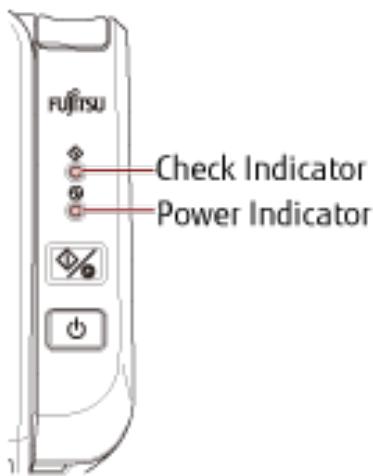
HINT
Error Recovery Guide is started up and the icon is displayed in the notification area located at the far right of the task bar when you logged onto Windows.
When an error occurs on the scanner, the error name and code number is displayed in the Error Recovery Guide window.
Take note of the displayed information and click the [More Info] button to check the troubleshooting procedure.
Error Recovery Guide

The following information was transmitted by the scanner.
[038001,31]
Document jam
Page count
Error
More Info...
- Error List
| Check Indicator | Power Indicator | Error Description | Refer to |
| On | On | Paper jam | Paper Jam (page 91) |
| Multifeed | Multifeed (page 92) | ||
| ADF open | Cover Open (page 92) | ||
| Flashes once | On | Sensor error | Sensor Error (page 93) |
| Flashes 2 times | On | Optical error (ADF Front) | Optical error (ADF Front) (page 93) |
| Flashes 3 times | On | Optical error (ADF Back) | Optical error (ADF Back) (page 93) |
| Off | On | Being used by others | Being Used by Others (page 94) |
| No document has been loaded | No Document Has Been Loaded (page 94) | ||
| Scanning has been stopped by the user | Scanning Has Been Stopped by the User (page 94) |
Paper Jam
If a paper jam occurs, the indicators on the operator panel light up as follows.
| Check Indicator | Power Indicator |
| On | On |
Take the following measures.
- When a paper jam occurs inside the scanner, refer to When a Paper Jam Occurs (page 87) to remove jammed documents.
- Refer to Documents for Scanning (page 52) in order to check if the document is suitable for scanning. A paper jam also occurs when the bottom edge of a document is detected before the designated area is scanned.
Example:
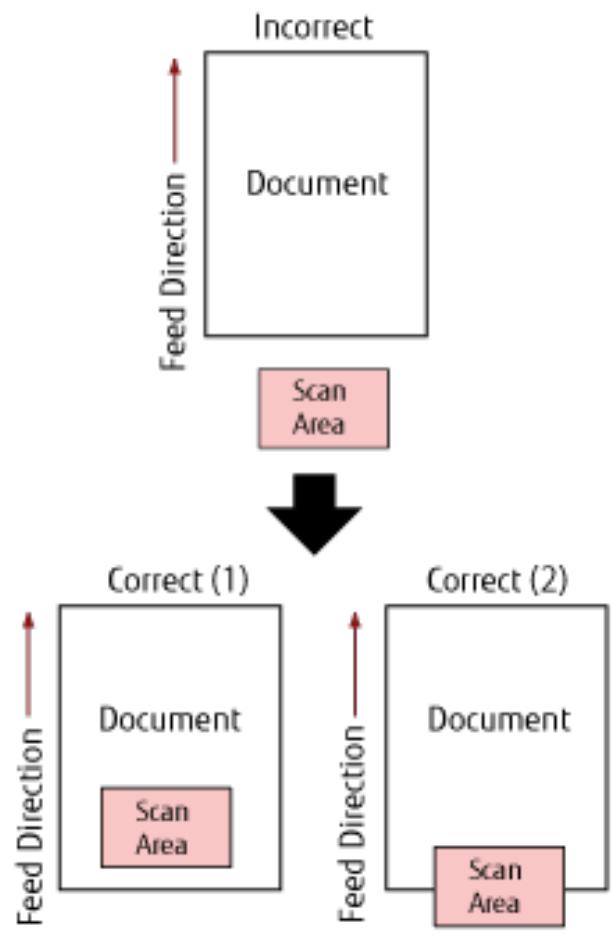
Outside of the document may have been scanned because the scanned document is shorter than the specified paper size.
In this case, take one of the following measures, and then scan again.
- Load a document of the specified paper size in the ADF paper chute (feeder).
- Change the scan settings so that the scanning area is set inside of the document.
ATTENTION
Ways to designate the scanning area differ depending on the image scanning application or the scanner driver. For details, refer to the manual for the image scanning application or the help for the scanner driver.
If paper jams occur frequently, take measures according to Paper Jams/Pick Errors Occur Frequently (page 112). If the problem still persists, write down the status of the indicators, check each item in Before You Contact the Scanner Service Provider (page 117) and then contact the distributor/dealer where you purchased this product. Refer to the contact information in the Contact List if supplied with this product, or refer to the contact information in the Contact for Inquiries section if provided in Safety Precautions supplied with this product, and then make an inquiry.
Multifeed
If a multifeed occurs, the indicators on the operator panel light up as follows.
| Check Indicator | Power Indicator |
| On | On |
When you press the scan/stop button on the operator panel, the overlapped documents are ejected.
If documents remain in the scanner, remove the documents by referring to When a Paper Jam Occurs (page 87).
If documents are overlapped and fed into the scanner frequently, take measures according to Overlapped Documents Are Frequently Fed into the Scanner (page 109).
If the problem still persists, write down the status of the indicators, check each item in Before You Contact the Scanner Service Provider (page 117) and then contact the distributor/dealer where you purchased this product. Refer to the contact information in the Contact List if supplied with this product, or refer to the contact information in the Contact for Inquiries section if provided in Safety Precautions supplied with this product, and then make an inquiry.
Cover Open
If you open the ADF during a scan, the indicators on the operator panel light up as follows.
| Check Indicator | Power Indicator |
| On | On |
HINT
Note that operations on the operator panel are disabled while the ADF is open.
Remove the document from the ADF, and close the ADF.
Confirm that the ADF is closed properly.
To check whether or not it is closed completely, open the ADF and then close it again.
For more details about opening and closing the ADF, refer to Opening/Closing the ADF (page 34).
Sensor Error
If a sensor error occurs, the indicators on the operator panel lights up as follows.
| Check Indicator | Power Indicator |
| Flashes once | On |
Take the following measures.
- Clean the ultrasonic sensors by referring to Cleaning the Inside of the Scanner (ADF) with a Cloth (page 72).
- Turn the scanner off then back on.
If the problem still persists, write down the status of the indicators, check each item in Before You Contact the Scanner Service Provider (page 117) and then contact the distributor/dealer where you purchased this product. Refer to the contact information in the Contact List if supplied with this product, or refer to the contact information in the Contact for Inquiries section if provided in Safety Precautions supplied with this product, and then make an inquiry.
Optical error (ADF Front)
If an optical error occurs in the front of the ADF, the indicators on the operator panel light up as follows.
| Check Indicator | Power Indicator |
| Flashes 2 times | On |
Take the following measures.
- Refer to Cleaning the Inside of the Scanner (ADF) with a Cloth (page 72) and clean the glass.
- Turn the scanner off then back on.
If the problem still persists, write down the status of the indicators, check each item in Before You Contact the Scanner Service Provider (page 117) and then contact the distributor/dealer where you purchased this product. Refer to the contact information in the Contact List if supplied with this product, or refer to the contact information in the Contact for Inquiries section if provided in Safety Precautions supplied with this product, and then make an inquiry.
Optical error (ADF Back)
If an optical error occurs in the back of the ADF, the indicators on the operator panel light up as follows.
| Check Indicator | Power Indicator |
| Flashes 3 times | On |
Take the following measures.
- Refer to Cleaning the Inside of the Scanner (ADF) with a Cloth (page 72) and clean the glass.
- Turn the scanner off then back on.
If the problem still persists, write down the status of the indicators, check each item in Before You Contact the Scanner Service Provider (page 117) and then contact the distributor/dealer where you purchased this product. Refer to the contact information in the Contact List if supplied with this product, or refer to the contact
information in the Contact for Inquiries section if provided in Safety Precautions supplied with this product, and then make an inquiry.
Being Used by Others
The indicators on the operator panel light up as follows.
| Check Indicator | Power Indicator |
| Off | On |
The scanner is already being used.
- Make sure that another application is not using the scanner.
- Make sure that the connection method of the scanner is correct.
- Make sure that no operations are being performed on the operator panel of the scanner.
No Document Has Been Loaded
The indicators on the operator panel light up as follows.
| Check Indicator | Power Indicator |
| Off | On |
No document has been loaded.
Load a document in the ADF paper chute (feeder).
Scanning Has Been Stopped by the User
The indicators on the operator panel light up as follows.
| Check Indicator | Power Indicator |
| Off | On |
Scanning has been stopped by the user.
When you press the scan/stop button on the operator panel during scanning, scanning stops immediately. If documents remain in the ADF, open the ADF and remove the documents before resuming a scan.
Troubleshooting
This section describes examples of troubles that you may encounter when using the scanner and also describes the solutions to them.
Before you request for a repair, take measures by looking through the examples of the troubles and solutions. If the problem still persists, check each item in Before You Contact the Scanner Service Provider (page 117) first, then contact the distributor/dealer where you purchased this product. Refer to the contact information in the Contact List if supplied with this product, or refer to the contact information in the Contact for Inquiries section if provided in Safety Precautions supplied with this product, and then make an inquiry. The following are examples of troubles that you may encounter.
Power of the scanner
- The Scanner Cannot Be Powered ON (page 96)
- Connection of the scanner
- Cannot Connect the Scanner and a Computer with the Network (page 97)
- Cannot Connect the Scanner and a Computer via the USB Cable (page 102)
- Scanning operations
- Scanning Does Not Start (page 103)
- Scanning Takes a Long Time (page 104)
- Overlapped Documents Are Frequently Fed into the Scanner (page 109)
- Situation in Which the Document Is not Fed into the ADF Occurs Frequently (page 111)
- Paper Jams/Pick Errors Occur Frequently (page 112)
- Scanning results
- The Scanned Image of a Picture or Photo is Rough/Image Noise Appears (page 105)
- Quality of Scanned Text or Lines Is Unsatisfactory (page 106)
Images Are Distorted or Not Clear (page 107)
Vertical Streaks Appear on the Images (page 108)
Images Turn Out Elongated (page 114) - A Shadow Appears at the Top or the Bottom of the Image (page 115)
- There Are Black Traces on the Document (page 116)
The Scanner Cannot Be Powered ON
Check the following points
- Is the power cable connected properly? (page 96)
- Did you press the power button on the scanner? (page 96)
If the problem still persists, check each item in Before You Contact the Scanner Service Provider (page 117) first, then contact the distributor/dealer where you purchased this product. Refer to the contact information in the Contact List if supplied with this product, or refer to the contact information in the Contact for Inquiries section if provided in Safety Precautions supplied with this product, and then make an inquiry.
Is the power cable connected properly?
Solution
Connect the power cable properly. For details, refer to Getting Started
- Did you press the power button on the scanner?
Solution
Press the power button on the scanner.
For details, refer to How to Turn the Power ON (page 31).
Cannot Connect the Scanner and a Computer with the Network
Check the following points
- Is the scanner connected to a network device (such as a switch, a hub, or a router) via a LAN cable? (page 97)
- Is the network device (such as a switch, a hub, or a router) turned on? (page 97)
- Is the firmware version for the network device the latest? (page 98)
- Is the computer connected to a network device (such as a switch, a hub, or a router)? (page 98)
- Did you configure the settings related to communication conditions on a network device (such as a switch, a hub, or a router)? (page 98)
- Are there any security limitations in the network? (page 98)
Is the network stable? (page 98) - Did you select the scanner in Scanner Selection Tool? (page 99)
- Is the communication status between the scanner and the computer stable? (page 99)
Is the scanner connected to another computer? (page 100) - Is the scanner's IP address correct? (page 100)
- Is the IP address of the scanner used for other communication devices? (page 100)
- Is the correct scanner name set for the image scanning application? (page 100)
If the problem still persists, check each item in Before You Contact the Scanner Service Provider (page 117) first, then contact the distributor/dealer where you purchased this product. Refer to the contact information in the Contact List if supplied with this product, or refer to the contact information in the Contact for Inquiries section if provided in Safety Precautions supplied with this product, and then make an inquiry.
- Is the scanner connected to a network device (such as a switch, a hub, or a router) via a LAN cable?
Solution
Connect the scanner to a network device (such as a switch, a hub, or a router) via a LAN cable. Also, connect the LAN cable properly.
When the LAN cable is connected properly, take the following measures:
- Replace the LAN cable.
- Change the port on the network device, which the LAN cable is connected to.
- Change the transmission method for the network device to "full-duplex" or "half-duplex".
- Is the network device (such as a switch, a hub, or a router) turned on?
Solution
Turn on the network device (such as a switch, a hub, or a router).
Also, check that there is no error or malfunction on the network device.
For errors that occur on the network device, refer to the manual of your network device.
Is the firmware version for the network device the latest?
Solution
If the firmware version for the network device is not the latest, unexpected operations may occur.
Contact the network administrator to check the firmware version, and consider updating it to the latest version.
For details about how to update the firmware for the network device, refer to the manual of your network device.
- Is the computer connected to a network device (such as a switch, a hub, or a router)?
Solution
Connect the computer to a network device (such as a switch, a hub, or a router).
For details, refer to the manual of your computer.
- Did you configure the settings related to communication conditions on a network device (such as a switch, a hub, or a router)?
Solution
When the following are set on the network device (such as a switch, a hub, or a router), take measures accordingly.
- Protocol filter function is enabled.
Allow the protocol which is to be used for communication.
- MAC address filtering is enabled.
Configure the network device (such as a switch, a hub, or a router) with the MAC address of the scanner.
Check the MAC address which is printed on the label on the back of the scanner. For details, refer to
Checking the Product Label (page 119).
For the settings on the network device, refer to the manual of your network device.
- Are there any security limitations in the network?
Solution
The access limitations for users may be configured in the network.
For details, contact the network administrator.
Is the network stable?
Solution
Connect to the network after it becomes stable.
A network can be unstable by the following events:
- A network monitoring program is running.
- A file is transferring.
If the network is unstable, restart the network devices. However, before restarting them, make sure that communications with other devices are not affected if the network devices are restarted. The network devices may become unstable.
- Did you select the scanner in Scanner Selection Tool?
Solution
Start up Scanner Selection Tool, and check whether the scanner that you want to connect the computer to is displayed in the list.
Scanner Selection Tool can be started up in the following procedure:
- Windows Server 2008 R2/Windows 7
Click [Start] menu [All Programs] [SP Series] [Scanner Selection Tool for SP Series].
- Windows Server 2012
Right-click the Start screen, and select [All apps] on the app bar [Scanner Selection Tool for SP Series] under [SP Series].
- Windows Server 2012 R2/Windows 8.1
Click [] on the lower left side of the Start screen and select [Scanner Selection Tool for SP Series] under [SP Series].
To display [ ] , move the mouse cursor.
- Windows 10/Windows Server 2016/Windows Server 2019
Click [Start] menu [SP Series] [Scanner Selection Tool for SP Series].
- Is the communication status between the scanner and the computer stable?
Solution
Check the communication status between the scanner and the computer.
Start up the command prompt on your computer, specify the scanner's IP address by using the PING command, and then check the communication status.
Check the scanner's IP address in IP Address Setting Tool.
IP Address Setting Tool can be started up in the following procedure:
- Windows Server 2008 R2/Windows 7
Click [Start] menu [All Programs] [SP Series] [IP Address Setting Tool for SP Series].
- Windows Server 2012
Right-click the Start screen, and select [All apps] on the app bar [IP Address Setting Tool for SP Series] under [SP Series].
- Windows Server 2012 R2/Windows 8.1
Click [] on the lower left side of the Start screen and select [IP Address Setting Tool for SP Series] under [SP Series].
To display [] , move the mouse cursor.
- Windows 10/Windows Server 2016/Windows Server 2019
Click [Start] menu [SP Series] [IP Address Setting Tool for SP Series].
Is the scanner connected to another computer?
Solution
The scanner can be connected to only one computer at a time. Wait until the other computer is disconnected from the scanner, and then connect the computer to be used again.
Is the scanner's IP address correct?
Solution
Check whether the scanner's IP address is correct by using IP Address Setting Tool.
For details, refer to the Network Setup Tool for SP Series Help.
IP Address Setting Tool can be started up in the following procedure:
- Windows Server 2008 R2/Windows 7
Click [Start] menu [All Programs] [SP Series] [IP Address Setting Tool for SP Series].
- Windows Server 2012
Right-click the Start screen, and select [All apps] on the app bar [IP Address Setting Tool for SP Series] under [SP Series].
- Windows Server 2012 R2/Windows 8.1
Click [] on the lower left side of the Start screen and select [IP Address Setting Tool for SP Series] under [SP Series].
To display [] , move the mouse cursor.
- Windows 10/Windows Server 2016/Windows Server 2019
Click [Start] menu [SP Series] [IP Address Setting Tool for SP Series].
When specifying an IP address manually, specify the correct IP address.
When setting the IP address automatically, check whether the DHCP server functions normally.
Even when the DHCP server functions normally, an IP address may not be assigned correctly depending on the settings for the DHCP server. Check the operation status and the settings for the DHCP server.
- Is the IP address of the scanner used for other communication devices?
Solution
If there are multiple communication devices using the same IP address on the same network, communication may fail. Avoid duplicates in IP addresses.
Is the correct scanner name set for the image scanning application?
Solution
Check whether the scanner name for a wired LAN connection is set for the image scanning application. Depending on the scanner driver, the scanner name that you select differs as follows.
- For Paperback IP (TWAIN) for SP Series/PaperStream IP (TWAIN x64) for SP Series Paperback IP xxx Net
- For Paperback IP (ISIS) for SP Series
- Paperback_IP xxx Net
The scanner model name is shown in [xxx]. For details, refer to the help for the scanner driver.
Cannot Connect the Scanner and a Computer via the USB Cable
Check the following points
Is the USB cable connected properly? (page 102)
- Is the connector on the USB cable broken or damaged? (page 102)
- Is the correct scanner name set for the image scanning application? (page 102)
If the problem still persists, check each item in Before You Contact the Scanner Service Provider (page 117) first, then contact the distributor/dealer where you purchased this product. Refer to the contact information in the Contact List if supplied with this product, or refer to the contact information in the Contact for Inquiries section if provided in Safety Precautions supplied with this product, and then make an inquiry.
Is the USB cable connected properly?
Solution
Use the USB cable that is supplied.
Check whether the scanner and computer are connected via the USB cable.
For details, refer to Getting Started.
- Is the connector on the USB cable broken or damaged?
Solution
Use a new USB cable and connect it properly.
Is the correct scanner name set for the image scanning application?
Solution
Check whether the scanner name for a USB connection is set for the image scanning application. Depending on the scanner driver, the scanner name that you select differs as follows.
- For PaperStream IP (TWAIN) for SP Series/PaperStream IP (TWAIN x64) for SP Series PaperStream IP xxx
- For Paperback IP (ISIS) for SP Series
- Paperback_IP xxx
The scanner model name is shown in [xxx]. For details, refer to the help for the scanner driver.
Scanning Does Not Start
Check the following points
- Is the document loaded in the ADF paper chute (feeder) correctly? (page 103)
Is the ADF closed properly? (page 103) - Are the scanner and the computer properly connected? (page 103)
If the problem still persists, check each item in Before You Contact the Scanner Service Provider (page 117) first, then contact the distributor/dealer where you purchased this product. Refer to the contact information in the Contact List if supplied with this product, or refer to the contact information in the Contact for Inquiries section if provided in Safety Precautions supplied with this product, and then make an inquiry.
- Is the document loaded in the ADF paper chute (feeder) correctly?
Solution
Reload the document in the ADF paper chute (feeder).
Is the ADF closed properly?
Solution
Close the ADF firmly.
If the document is caught in the ADF, remove the document and close the ADF.
- Are the scanner and the computer properly connected?
Solution
- For a wired LAN
Check whether the scanner is connected to a network.
- In Scanner Selection Tool, make sure that the scanner that you want to use is selected.
For details about Scanner Selection Tool, refer to the Network Setup Tool for SP Series Help.
- If the scanner that you want to use is not displayed in the Scanner Selection Tool window, check the network settings in IP Address Setting Tool.
For details about IP Address Setting Tool, refer to the Network Setup Tool for SP Series Help.
- If the scanner that you want to use has been selected in Scanner Selection Tool but is not able to connect to the computer, refer to Cannot Connect the Scanner and a Computer with the Network (page 97).
For USB
Check whether the scanner and computer are connected via the USB cable.
If you still cannot connect the scanner to the computer, refer to Cannot Connect the Scanner and a Computer via the USB Cable (page 102).
Scanning Takes a Long Time
Check the following points
- Does the computer meet the recommended requirements? (page 104)
- If a USB connection is used, is the USB cable connected to the USB 1.1 port on the computer? (page 104)
- Did you start a scan while the computer was unstable (for example, immediately after computer start-up or logon)? (page 104)
- Are the rollers clean? (page 104)
If the problem still persists, check each item in Before You Contact the Scanner Service Provider (page 117) first, then contact the distributor/dealer where you purchased this product. Refer to the contact information in the Contact List if supplied with this product, or refer to the contact information in the Contact for Inquiries section if provided in Safety Precautions supplied with this product, and then make an inquiry.
- Does the computer meet the recommended requirements?
Solution
Use a computer that meets the recommended CPU, memory, and other requirements. For details, refer to System Requirements (page 21).
- If a USB connection is used, is the USB cable connected to the USB 1.1 port on the computer?
Solution
If a USB connection is used, connect the USB cable to the USB 3.2 Gen 1x1 (USB 3.0)/USB 2.0 port.
- Did you start a scan while the computer was unstable (for example, immediately after computer start-up or logon)?
Solution
When you start or log onto the computer, wait a while before starting a scan.
Are the rollers clean?
Solution
Clean the rollers.
For details, refer to Daily Care (page 66).
The Scanned Image of a Picture or Photo is Rough/Image Noise Appears
Check the following points
- Did you configure the settings in the scanner driver to scan in black & white mode? (page 105)
- Are the glass and rollers inside the ADF clean? (page 105)
If the problem still persists, check each item in Before You Contact the Scanner Service Provider (page 117) first, then contact the distributor/dealer where you purchased this product. Refer to the contact information in the Contact List if supplied with this product, or refer to the contact information in the Contact for Inquiries section if provided in Safety Precautions supplied with this product, and then make an inquiry.
- Did you configure the settings in the scanner driver to scan in black & white mode?
Solution
Use a scanner driver to configure the scan settings that do not "binarize" (output in black and white), and then perform a scan.
The scanned image may differ from the original image significantly if you simply "binarize" (output in black & white) a picture or a photo.
- Are the glass and rollers inside the ADF clean?
Solution
Clean the dirty parts.
For details, refer to Daily Care (page 66).
Quality of Scanned Text or Lines Is Unsatisfactory
Check the following points
- Are the glass and rollers inside the ADF clean? (page 106)
Is the resolution appropriate? (page 106) - Did you configure the settings in the scanner driver to scan in grayscale or color mode? (page 106)
- Is there any foreign matter (such as dust or paper dust) on the document? (page 106)
If the problem still persists, check each item in Before You Contact the Scanner Service Provider (page 117) first, then contact the distributor/dealer where you purchased this product. Refer to the contact information in the Contact List if supplied with this product, or refer to the contact information in the Contact for Inquiries section if provided in Safety Precautions supplied with this product, and then make an inquiry.
- Are the glass and rollers inside the ADF clean?
Solution
Clean the dirty parts.
For details, refer to Daily Care (page 66).
Is the resolution appropriate?
Solution
Specify a higher resolution in the scanner driver.
- Did you configure the settings in the scanner driver to scan in grayscale or color mode?
Solution
Configure the settings in the scanner driver to scan in black & white mode.
When you scan in grayscale or in color mode, the scanned image may not become sharp and clear.
Is there any foreign matter (such as dust or paper dust) on the document?
Solution
Remove any foreign matter off the document.
Foreign matter may get on the glass that is inside the ADF, and cause the image to appear dirty.
Images Are Distorted or Not Clear
Check the following points
- Are the glass and rollers inside the ADF clean? (page 107)
- Is the ADF being pushed down during scanning? Or, is there a heavy object on top of the ADF? (page 107)
- Is a scan performed on a place that is unstable or vibrates? (page 107)
- Is the scanner placed on a flat, level surface? Are the rubber pads attached on the bottom of the scanner? (page 107)
- Are there any wrinkles or curls on the document? (page 107)
If the problem still persists, check each item in Before You Contact the Scanner Service Provider (page 117) first, then contact the distributor/dealer where you purchased this product. Refer to the contact information in the Contact List if supplied with this product, or refer to the contact information in the Contact for Inquiries section if provided in Safety Precautions supplied with this product, and then make an inquiry.
- Are the glass and rollers inside the ADF clean?
Solution
Clean the dirty parts.
For details, refer to Daily Care (page 66).
- Is the ADF being pushed down during scanning? Or, is there a heavy object on top of the ADF?
Solution
Do not push down the top of the ADF, or place any heavy objects on the ADF during scanning.
Is a scan performed on a place that is unstable or vibrates?
Solution
Perform a scan on a place that is stable and does not vibrate.
- Is the scanner placed on a flat, level surface? Are the rubber pads attached on the bottom of the scanner?
Solution
Place the scanner on a flat and level surface.
Or, attach the rubber pads on the bottom of the scanner.
- Are there any wrinkles or curls on the document?
Solution
Smooth out the wrinkles or curls on the document.
Vertical Streaks Appear on the Images
Check the following points
- Are the glass and rollers inside the ADF clean? (page 108)
- Is there any foreign matter (such as dust or paper dust) on the document? (page 108)
- Is [Vertical Streaks Reduction] enabled in the scanner driver for a scan? (page 108)
If the problem still persists, check each item in Before You Contact the Scanner Service Provider (page 117) first, then contact the distributor/dealer where you purchased this product. Refer to the contact information in the Contact List if supplied with this product, or refer to the contact information in the Contact for Inquiries section if provided in Safety Precautions supplied with this product, and then make an inquiry.
- Are the glass and rollers inside the ADF clean?
Solution
Clean the dirty parts.
For details, refer to Daily Care (page 66).
Is there any foreign matter (such as dust or paper dust) on the document?
Solution
Remove any foreign matter off the document.
Foreign matter may get on the glass that is inside the ADF, and cause the image to appear dirty.
- Is [Vertical Streaks Reduction] enabled in the scanner driver for a scan?
Solution
Enable [Vertical Streaks Reduction] in the scanner driver, and then perform a scan.
Overlapped Documents Are Frequently Fed into the Scanner
Check the following points
- Do the documents meet the paper requirements? (page 109)
- If the setting to detect overlapped documents is enabled, do the documents fulfill the conditions to detect overlapped documents accurately? (page 109)
- Did you scan a thick document such as a plastic card? (page 109)
- Did you fan the documents before loading them? (page 110)
- Have the documents just been printed out from a copy machine or a laser printer? (page 110)
- Is the document stack thinner than 5 ~mm ? (page 110)
- Is the roller set (the brake roller and pick roller) installed correctly? (page 110)
- Is the roller set (the brake roller and pick roller) clean? (page 110)
- Is the roller set (the brake roller and pick roller) worn out? (page 110)
If the problem still persists, check each item in Before You Contact the Scanner Service Provider (page 117) first, then contact the distributor/dealer where you purchased this product. Refer to the contact information in the Contact List if supplied with this product, or refer to the contact information in the Contact for Inquiries section if provided in Safety Precautions supplied with this product, and then make an inquiry.
- Do the documents meet the paper requirements?
Solution
Use documents that meet the requirements.
For details, refer to Documents for Scanning (page 52).
- If the setting to detect overlapped documents is enabled, do the documents fulfill the conditions to detect overlapped documents accurately?
Solution
Some documents may be detected as overlapped documents accidentally.
For details, refer to Conditions Required to Accurately Detect Overlapped Documents (Multifeed) (page 58).
In such a case, disable the setting in the image scanning application or scanner driver so that overlapped documents are not detected.
- Did you scan a thick document such as a plastic card?
Solution
Disable the setting in the image scanning application or scanner driver so that overlapped documents are not detected.
For details about scanning plastic cards, refer to Precautions (page 54).
- Did you fan the documents before loading them?
Solution
Fan the documents.
For details, refer to Preparation (page 47).
- Have the documents just been printed out from a copy machine or a laser printer?
Solution
Fan the documents a few times to remove static electricity.
For details, refer to Preparation (page 47).
Is the document stack thinner than 5mm ?
Solution
Up to 5mm in thickness of the document stack can be loaded. Reduce the number of sheets to make the document stack thinner than 5mm .
Is the roller set (the brake roller and pick roller) installed correctly?
Solution
Install the roller set (the brake roller and pick roller) correctly.
For details, refer to Replacing the Roller Set (page 79).
Is the roller set (the brake roller and pick roller) clean?
Solution
Clean the roller set (the brake roller and pick roller).
For details, refer to Daily Care (page 66).
Is the roller set (the brake roller and pick roller) worn out?
Solution
Start up the Software Operation Panel to check the counter for the roller set (the brake roller and pick roller), and if necessary, replace the roller set.
For details about how to check the counter, refer to Checking the Sheet Counters (page 135).
For details about how to replace the roller set, refer to Replacing the Roller Set (page 79).
Situation in Which the Document Is not Fed into the ADF Occurs Frequently
Check the following points
- Do the documents meet the paper requirements? (page 111)
- Did you fan the documents before loading them? (page 111)
- Is the roller set (the brake roller and pick roller) installed correctly? (page 111)
- Is the roller set (the brake roller and pick roller) clean? (page 111)
- Is the roller set (the brake roller and pick roller) worn out? (page 111)
If the problem still persists, check each item in Before You Contact the Scanner Service Provider (page 117) first, then contact the distributor/dealer where you purchased this product. Refer to the contact information in the Contact List if supplied with this product, or refer to the contact information in the Contact for Inquiries section if provided in Safety Precautions supplied with this product, and then make an inquiry.
- Do the documents meet the paper requirements?
Solution
Use documents that meet the requirements.
For details, refer to Documents for Scanning (page 52).
- Did you fan the documents before loading them?
Solution
Fan the documents.
For details, refer to Preparation (page 47).
Is the roller set (the brake roller and pick roller) installed correctly?
Solution
Install the roller set (the brake roller and pick roller) correctly.
For details, refer to Replacing the Roller Set (page 79).
Is the roller set (the brake roller and pick roller) clean?
Solution
Clean the roller set (the brake roller and pick roller).
For details, refer to Daily Care (page 66).
Is the roller set (the brake roller and pick roller) worn out?
Solution
Start up the Software Operation Panel to check the counter for the roller set (the brake roller and pick roller), and if necessary, replace the roller set.
For details about how to check the counter, refer to Checking the Sheet Counters (page 135).
For details about how to replace the roller set, refer to Replacing the Roller Set (page 79).
Paper Jams/Pick Errors Occur Frequently
Check the following points
- Do the documents meet the paper requirements? (page 112)
- Is there any foreign matter in the ADF? (page 112)
- Is there a document remaining in the ADF? (page 112)
- Is the roller set (the brake roller and pick roller) installed correctly? (page 112)
- Is the roller set (the brake roller and pick roller) clean? (page 112)
Is the roller set (the brake roller and pick roller) worn out? (page 113)
If the problem still persists, check each item in Before You Contact the Scanner Service Provider (page 117) first, then contact the distributor/dealer where you purchased this product. Refer to the contact information in the Contact List if supplied with this product, or refer to the contact information in the Contact for Inquiries section if provided in Safety Precautions supplied with this product, and then make an inquiry.
- Do the documents meet the paper requirements?
Solution
Use documents that meet the requirements.
For details, refer to Documents for Scanning (page 52).
Is there any foreign matter in the ADF?
Solution
Clean the ADF.
Remove any foreign matter from the ADF.
For details, refer to Daily Care (page 66).
Is there a document remaining in the ADF?
Solution
Remove the document from the ADF.
For details, refer to When a Paper Jam Occurs (page 87).
Is the roller set (the brake roller and pick roller) installed correctly?
Solution
Install the roller set (the brake roller and pick roller) correctly.
For details, refer to Replacing the Roller Set (page 79).
Is the roller set (the brake roller and pick roller) clean?
Solution
Clean the roller set (the brake roller and pick roller).
For details, refer to Daily Care (page 66).
Is the roller set (the brake roller and pick roller) worn out?
Solution
Start up the Software Operation Panel to check the counter for the roller set (the brake roller and pick roller), and if necessary, replace the roller set.
For details about how to check the counter, refer to Checking the Sheet Counters (page 135).
For details about how to replace the roller set, refer to Replacing the Roller Set (page 79).
Images Turn Out Elongated
Check the following points
- Are the rollers clean? (page 114)
- Do the documents meet the paper requirements? (page 114)
- Is the roller set (the brake roller and pick roller) worn out? (page 114)
If the problem still persists, check each item in Before You Contact the Scanner Service Provider (page 117) first, then contact the distributor/dealer where you purchased this product. Refer to the contact information in the Contact List if supplied with this product, or refer to the contact information in the Contact for Inquiries section if provided in Safety Precautions supplied with this product, and then make an inquiry.
Are the rollers clean?
Solution
Clean the rollers.
For details, refer to Daily Care (page 66).
- Do the documents meet the paper requirements?
Solution
Use documents that meet the requirements.
For details, refer to Documents for Scanning (page 52).
Is the roller set (the brake roller and pick roller) worn out?
Solution
Start up the Software Operation Panel to check the counter for the roller set (the brake roller and pick roller), and if necessary, replace the roller set.
For details about how to check the counter, refer to Checking the Sheet Counters (page 135).
For details about how to replace the roller set, refer to Replacing the Roller Set (page 79).
A Shadow Appears at the Top or the Bottom of the Image
Check the following points
- Did you use the page edge filler function to fill in the shadow around the edge? (page 115)
If the problem still persists, check each item in Before You Contact the Scanner Service Provider (page
117) first, then contact the distributor/dealer where you purchased this product. Refer to the contact
information in the Contact List if supplied with this product, or refer to the contact information in the
Contact for Inquiries section if provided in Safety Precautions supplied with this product, and then make an inquiry.
- Did you use the page edge filler function to fill in the shadow around the edge?
Solution
A shadow of a document that occurred while the document was fed may appear on the image.
In the scanner driver, use the page edge filter function to fill out the shadow around the edge.
For details, refer to the help for the scanner driver.
There Are Black Traces on the Document
Check the following points
- Are you scanning documents written in lead pencil or carbon paper? (page 116)
- Are the glass and rollers inside the ADF clean? (page 116)
If the problem still persists, check each item in Before You Contact the Scanner Service Provider (page 117) first, then contact the distributor/dealer where you purchased this product. Refer to the contact information in the Contact List if supplied with this product, or refer to the contact information in the Contact for Inquiries section if provided in Safety Precautions supplied with this product, and then make an inquiry.
- Are you scanning documents written in lead pencil or carbon paper?
Solution
When you scan documents written in lead pencil, make sure you clean the rollers frequently. For details, refer to Daily Care (page 66).
- Are the glass and rollers inside the ADF clean?
Solution
Clean the dirty parts.
For details, refer to Daily Care (page 66).
Before You Contact the Scanner Service Provider
This section explain about actions to take and items to check before contacting the distributor/dealer where you purchased this product.
Actions to Take Before You Contact the Scanner Service Provider
If you encounter any errors or troubles while using the scanner, take the following measures before you contact the scanner service provider:
- Make sure that sufficient power is supplied. Do not use an extension cable.
- Use the plug and AC adapter that are supplied.
- Clean the inside of the scanner by referring to Daily Care (page 66).
- Turn the scanner off then back on.
If the problem still persists, check each item in Items to Check Before You Contact the Scanner Service Provider (page 117) first, then contact the distributor/dealer where you purchased this product. Refer to the contact information in the Contact List if supplied with this product, or refer to the contact information in the Contact for Inquiries section if provided in Safety Precautions supplied with this product, and then make an inquiry.
Items to Check Before You Contact the Scanner Service Provider
- General
| Item | Findings |
| Scanner name | Example: SP-1120N For details, refer to Checking the Product Label (page 119). |
| Serial No. | Example: XXXX000001 For details, refer to Checking the Product Label (page 119). |
| Date of manufacture | Example: 20XX-01 (January 20XX) For details, refer to Checking the Product Label (page 119). |
| Date of purchase | |
| Symptom | |
| Frequency of trouble | |
| Warranty |
- Error Status
Computer Connection Issues
| Item | Findings |
| Operating system (Windows) | |
| Error message | |
| Interface | Example: USB interface |
| Interface controller | Example: A LAN board is used. |
| Connection method | Example: USB, Wired LAN |
Feeding Issues
| Item | Findings |
| Paper type | |
| Main purpose of use | |
| Date of last cleaning | |
| Date of consumable replacement | |
| Operator panel status |
Image Quality Issues
| Item | Findings |
| Scanner driver and version | |
| Interface controller | Example: A LAN board is used. |
| Operating system (Windows) | |
| Application | Example: Paperback Capture |
| Scanning sides | Example: front, both |
| Resolution | Example: 600 dpi, 75 dpi |
| Image mode | Example: color, grayscale, black & white |
Other
| Item | Findings |
| Can you send the output image and a photo that shows the paper condition by e-mail or fax? |
Checking the Product Label
This section explains about the product label on the scanner.
The label is located on the place indicated in the following figure:
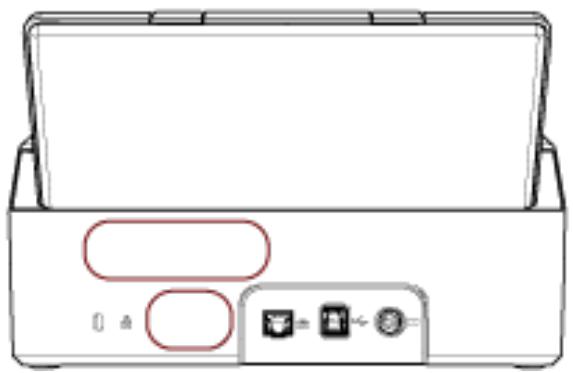
Label (example): Shows the scanner information.
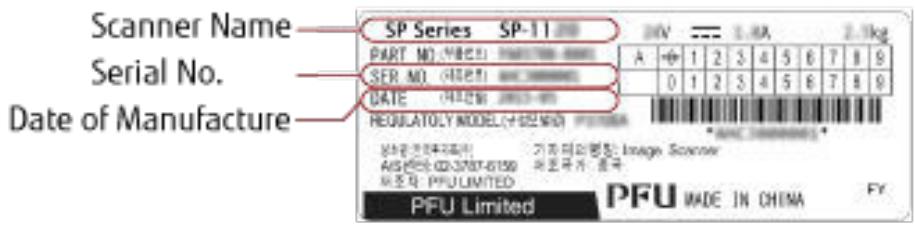
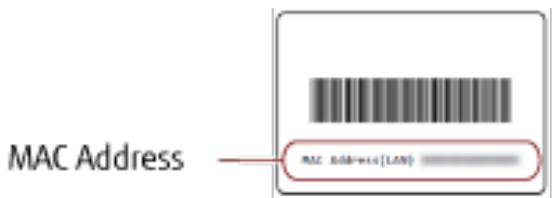
Scanner Settings (Software Operation Panel)
This section explains how to use the Software Operation Panel to configure the scanner settings.
Starting Up the Software Operation Panel
With the Software Operation Panel, you can configure settings used to manage consumable parts and manage the power of the scanner.
ATTENTION
- Do not start up the Software Operation Panel during scanning.
- Do not use the operator panel while the Software Operation Panel is running.
1 Confirm that the scanner is connected to the computer via the USB cable, then turn on the scanner.
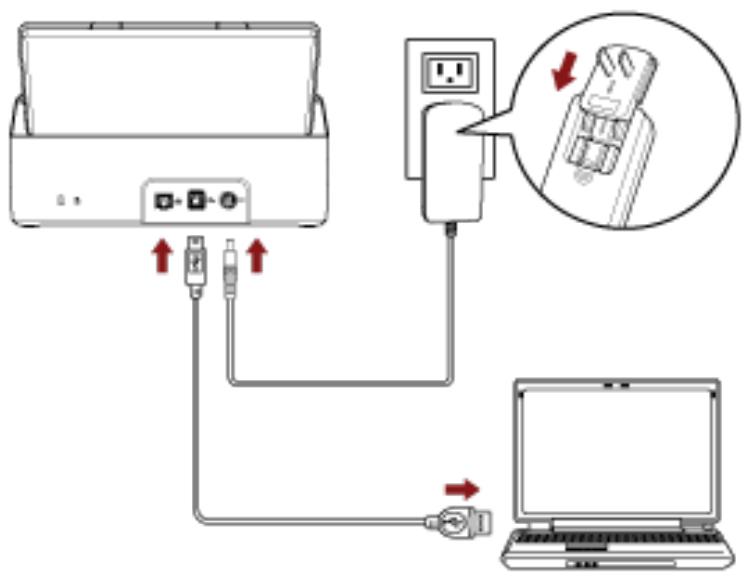
For details about how to turn on the scanner, refer to How to Turn the Power ON (page 31).
2 Display the [Software Operation Panel] window.
- Windows Server 2008 R2/Windows 7
Click [Start] menu [All Programs] [SP Series] [Software Operation Panel].
- Windows Server 2012
Right-click the Start screen, and select [All apps] on the app bar [Software Operation Panel] under [SP Series].
- Windows Server 2012 R2/Windows 8.1
Click [] on the lower left side of the Start screen and select [Software Operation Panel] under [SP Series]. To display [] , move the mouse cursor.
- Windows 10/Windows Server 2016/Windows Server 2019
Click [Start] menu [SP Series] [Software Operation Panel].
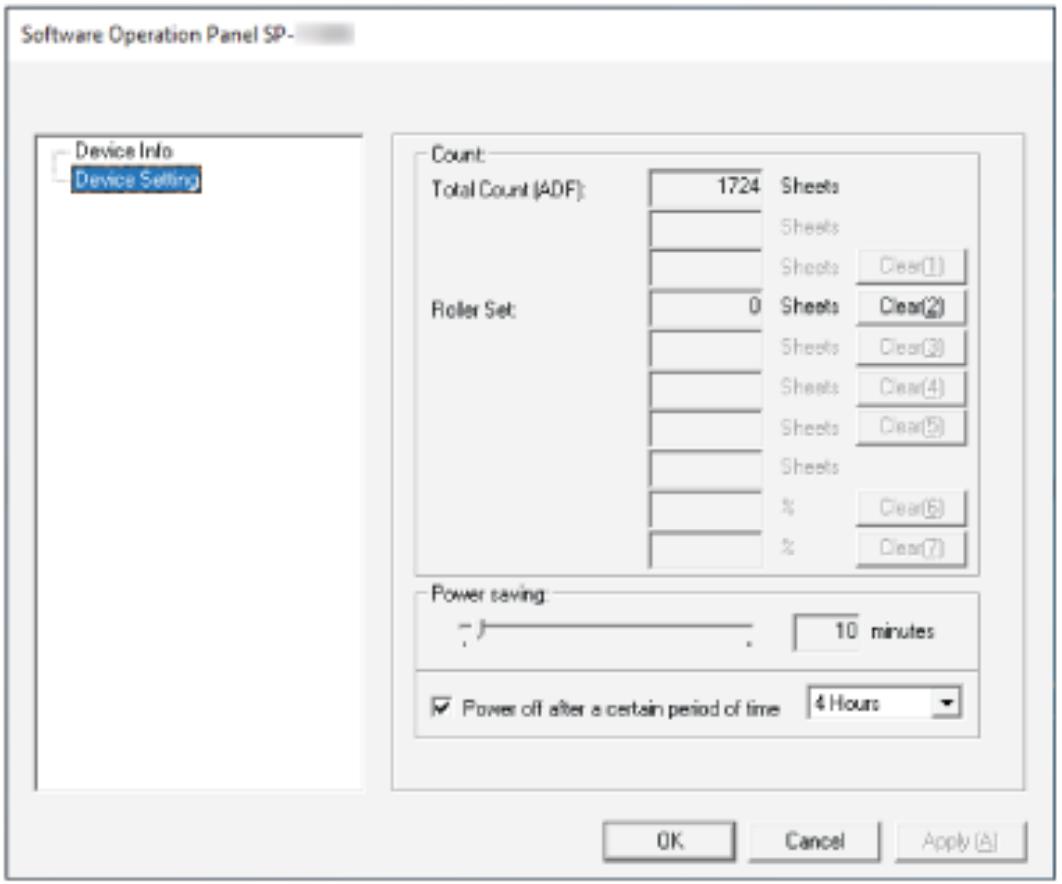
The Software Operation Panel icon is displayed in the menu that appears when you click in the notification area located at the far right of the task bar.
To have the Software Operation Panel icon always displayed in the notification area, drag and drop the icon onto the notification area.
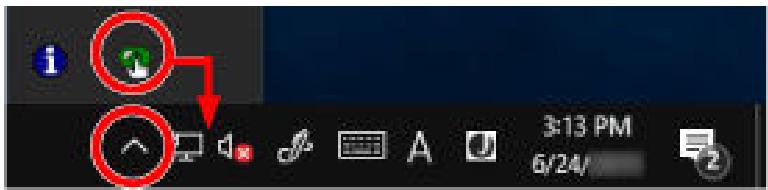
Setting the Software Operation Panel to [View Only mode]
By setting a password, the Software Operation Panel can run in [View Only mode] which allows users to only view the scanner settings.
The scanner settings can be configured if no password is set.
In order to prevent unnecessary changes to the settings, a password can be used to restrict user operations.
Setting [View Only mode]
Set the Software Operation Panel to [View Only mode].
1 Set a password.
For details, refer to Setting a Password (page 127).
2 Right-click the Software Operation Panel icon in the notification area located at the far right of the task bar, and select [View Only mode] from the menu.
![FUJITSU SP-1120N - Setting [View Only mode] - 1](/content/2024/12/319016/images/76aa4455bf7e2d6c11dbc8a2889629519f80c69ecd1ddee7696e686afd432549.jpg)
The Software Operation Panel enters [View Only mode].
![FUJITSU SP-1120N - Setting [View Only mode] - 2](/content/2024/12/319016/images/73ada306fd667628170199fe98425a83c65cfef56bc587f166443b6dc076e5d2.jpg)
HINT
In [View Only mode], a check mark appears next to [View Only mode] in the menu that is displayed by right-clicking the Software Operation Panel icon in the notification area.
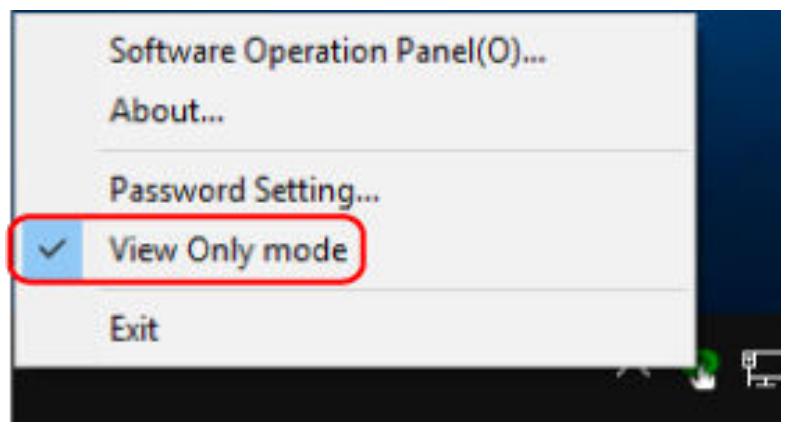
Exiting [View Only mode]
Exit [View Only mode] on the Software Operation Panel in the following procedure.
1 Right-click the Software Operation Panel icon in the notification area located at the far right of the task bar, and select [View Only mode] from the menu.
![FUJITSU SP-1120N - Exiting [View Only mode] - 1](/content/2024/12/319016/images/b4dddf8ec6c160250d00bb2f83fa2b8c31700b035f6470f9d96b16386ec1f4d5.jpg)
The [Password setting] window appears.
2 Enter the current password and click the [OK] button.
![FUJITSU SP-1120N - Exiting [View Only mode] - 2](/content/2024/12/319016/images/c0a11c3aa427c4d3f3e01668e870aeb444c44068ebd3a9c986b1f7b7aea0e9cb.jpg)
The Software Operation Panel exits [View Only mode], and the scanner settings can now be changed.
![FUJITSU SP-1120N - Exiting [View Only mode] - 3](/content/2024/12/319016/images/3b866b5262803fb9790c02c59f9e040f74e5a1c57001c412851cdc796a1b6d2b.jpg)
HINT
When the Software Operation Panel exits [View Only mode], the check mark next to [View Only mode] disappears from the menu that is displayed by right-clicking the Software Operation Panel icon in the notification area.
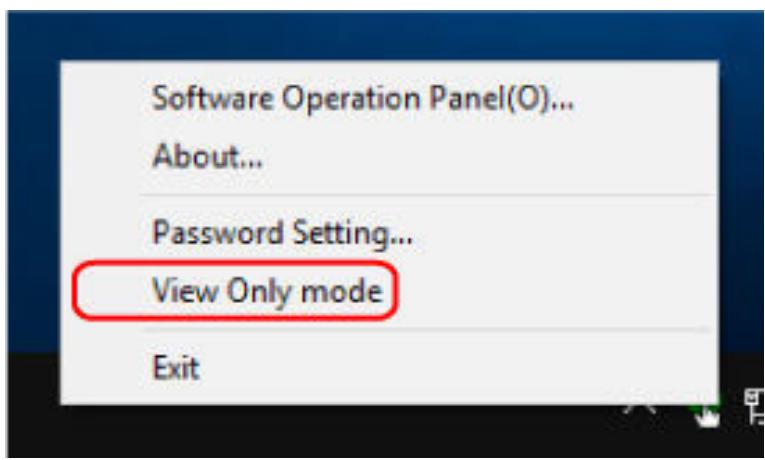
Setting a Password
Set a password in the following procedure.
1 Right-click the Software Operation Panel icon in the notification area located at the far right of the task bar, and select [Password Setting] from the menu.
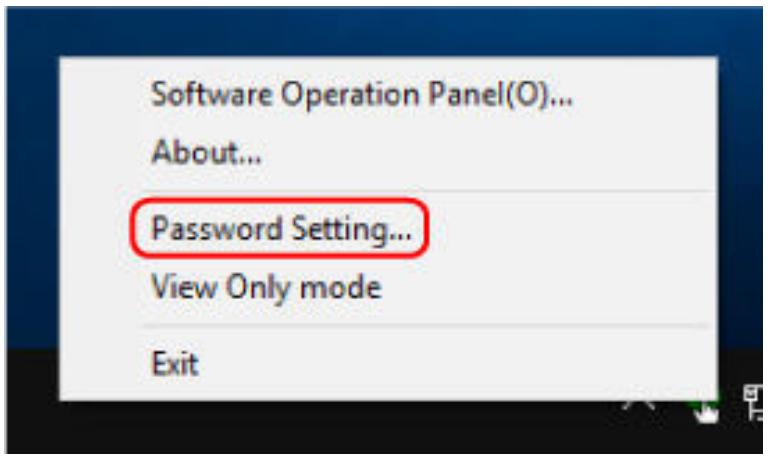
The [Password setting] window appears.
2 Enter a new password then again to confirm, and click the [OK] button.
Up to 32 characters can be used for the password.
Note that only alphanumeric characters (a to z, A to Z, 0 to 9) are allowed.
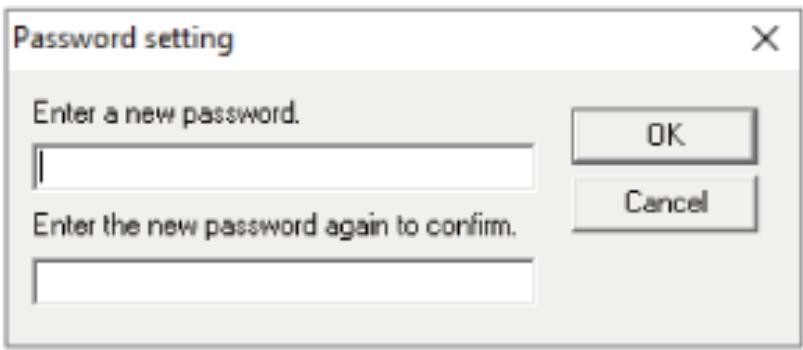
A message window appears.
3 Click the [OK] button.
The password is set.
Changing the Password
Change the password in the following procedure.
1 Right-click the Software Operation Panel icon in the notification area located at the far right of the task bar, and select [Password Setting] from the menu.
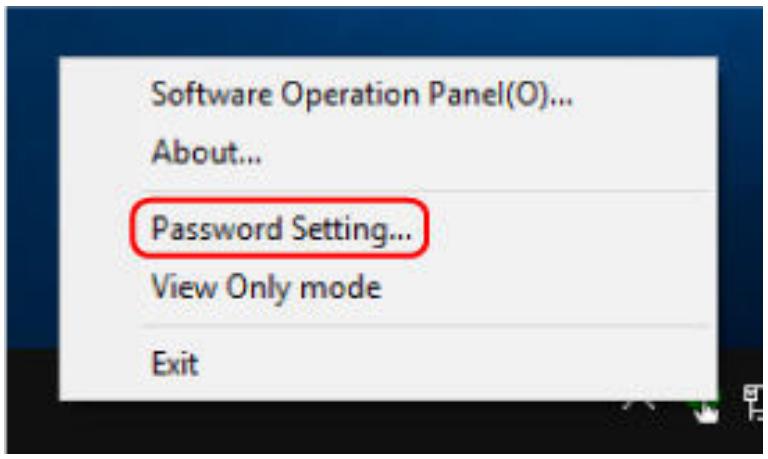
The [Password setting] window appears.
2 Enter the current password and click the [OK] button.
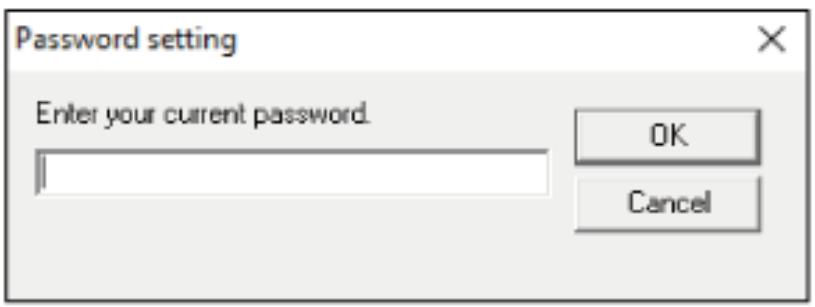
The [Password setting] window appears.
3 Enter a new password then again to confirm, and click the [OK] button.
Up to 32 characters can be used for the password.
Note that only alphanumeric characters (a to z, A to Z, 0 to 9) are allowed.
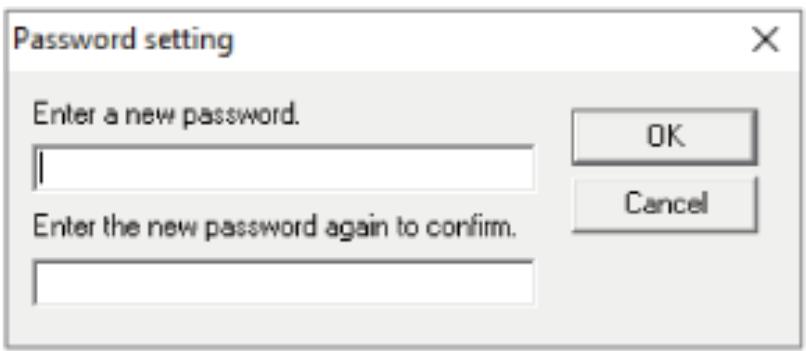
A message window appears.
4 Click the [OK] button.
The password is set.
Clearing the Password
Clear the password in the following procedure.
1 Right-click the Software Operation Panel icon in the notification area located at the far right of the task bar, and select [Password Setting] from the menu.
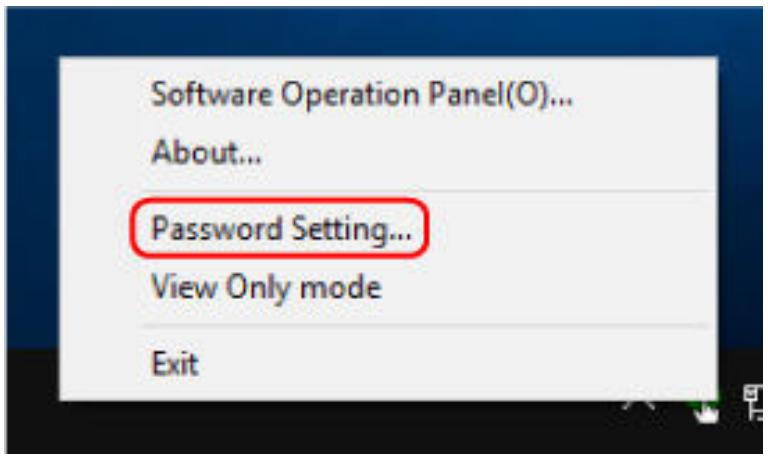
The [Password setting] window appears.
2 Enter the current password and click the [OK] button.
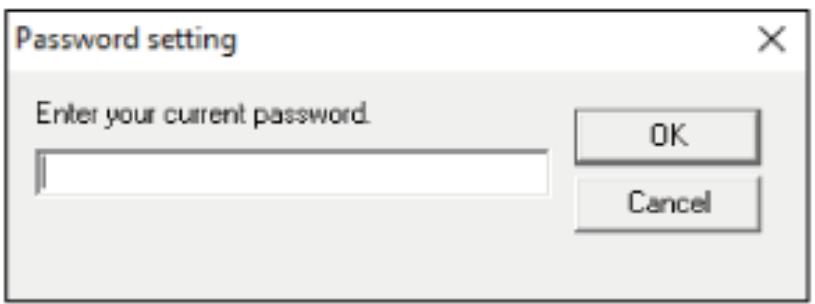
The [Password setting] window appears.
3 Leave both fields blank and click the [OK] button.
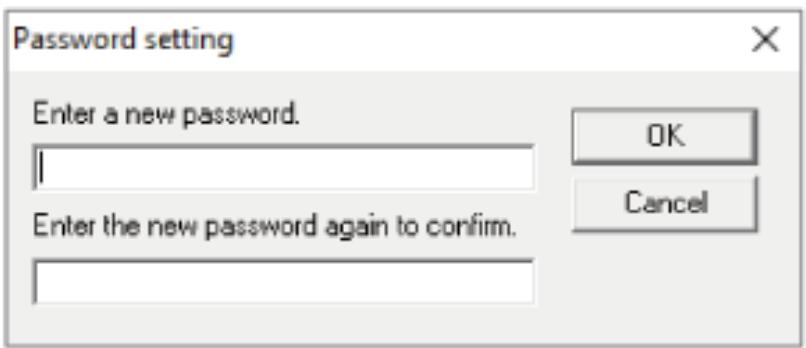
A message window appears.
4 Click the [OK] button.
The password is cleared.
Resetting the Password
If you forgot your password, reset it.
1 Right-click the Software Operation Panel icon in the notification area located at the far right of the task bar, and select [Password Setting] from the menu.
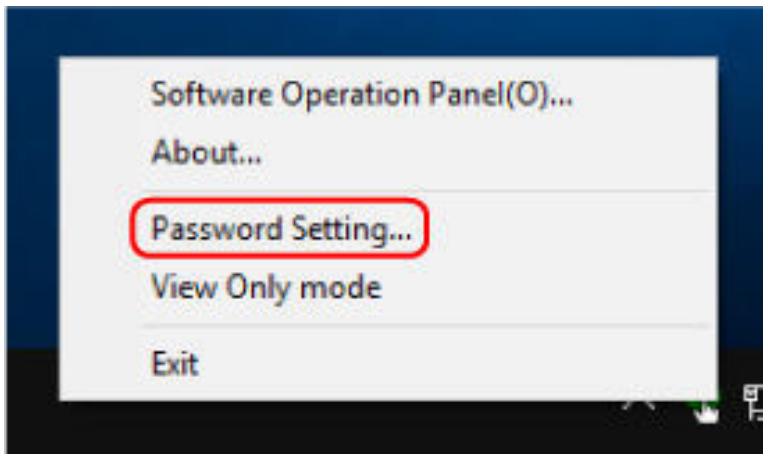
The [Password setting] window appears.
2 Enter the default password which is "SP-scanner", and click the [OK] button.
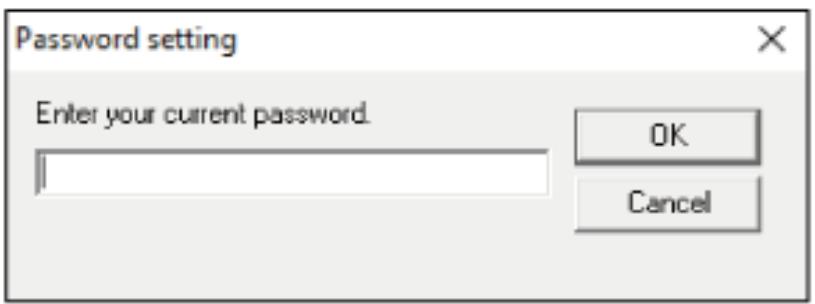
The [Password setting] window appears.
3 Enter a new password then again to confirm, and click the [OK] button.
Up to 32 characters can be used for the password.
Note that only alphanumeric characters (a to z, A to Z, 0 to 9) are allowed.
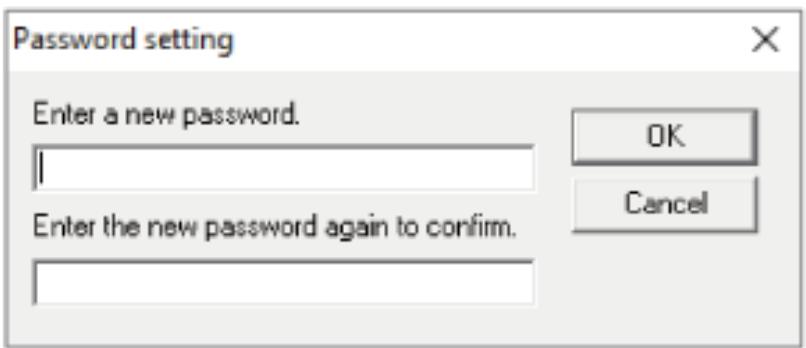
A message window appears.
4 Click the [OK] button.
The password is set.
Setting Item
The Software Operation Panel enables you to manage consumable parts for the scanner connected to the computer or the power of the scanner.
Device Setting
1 Start up the Software Operation Panel.
For details, refer to Starting Up the Software Operation Panel (page 120).
2 From the list on the left, select [Device Setting].
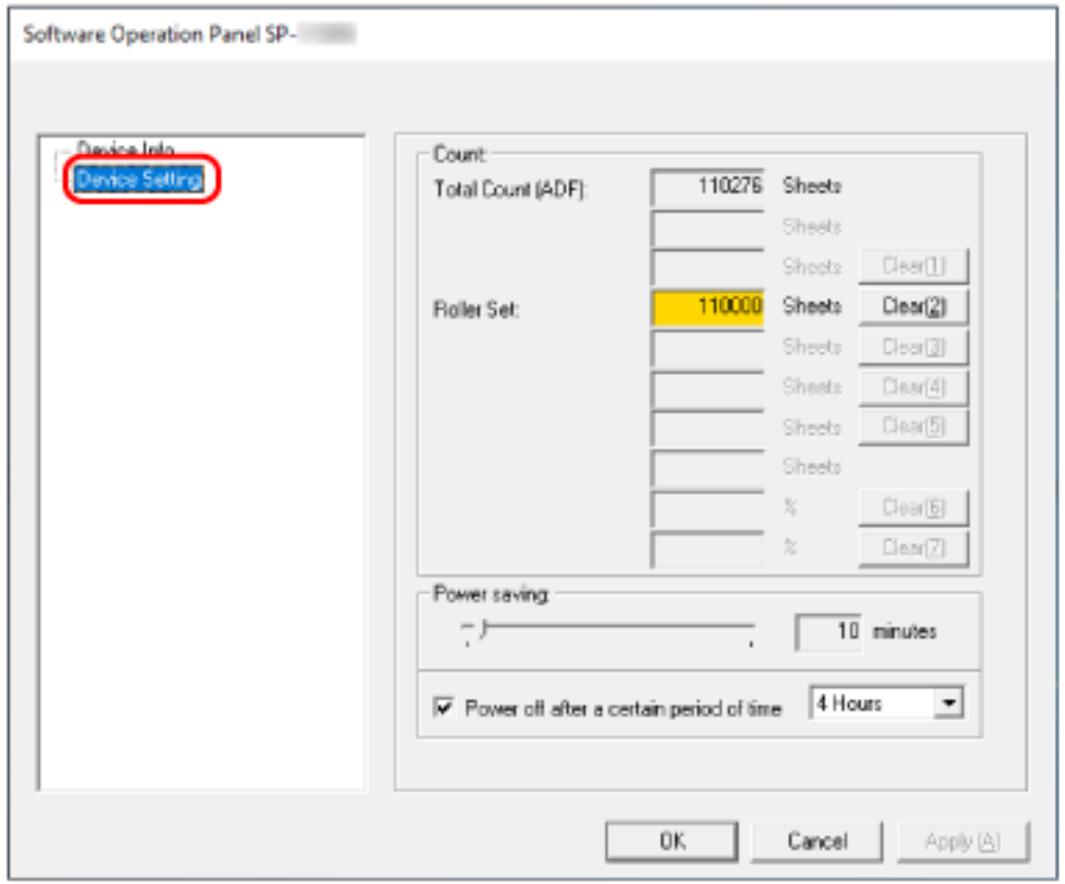
Items that can be configured in this windows are as follows:
| Setting Item | Description |
| Count (Checking/Clearing) | The status of each consumable part can be viewed to determine when to replace the consumables. When you have replaced a consumable part, clear the corresponding counter. |
| Power saving | Specify the waiting time before the scanner enters power saving mode. |
Settings Related to Sheet Counters
Checking the Sheet Counters
The status of each consumable part can be viewed to determine when to replace the consumables.
The background color of the counter changes as it gets closer to the time to replace the consumables.
The background color of the roller set counter turns light yellow when the number of sheets scanned reaches 95,000, and turns yellow when it reaches 100,000.
For details about replacement cycles, refer to Consumables and Replacement Cycles (page 77).
1 Start up the Software Operation Panel.
For details, refer to Starting Up the Software Operation Panel (page 120).
2 From the list on the left, select [Device Setting].
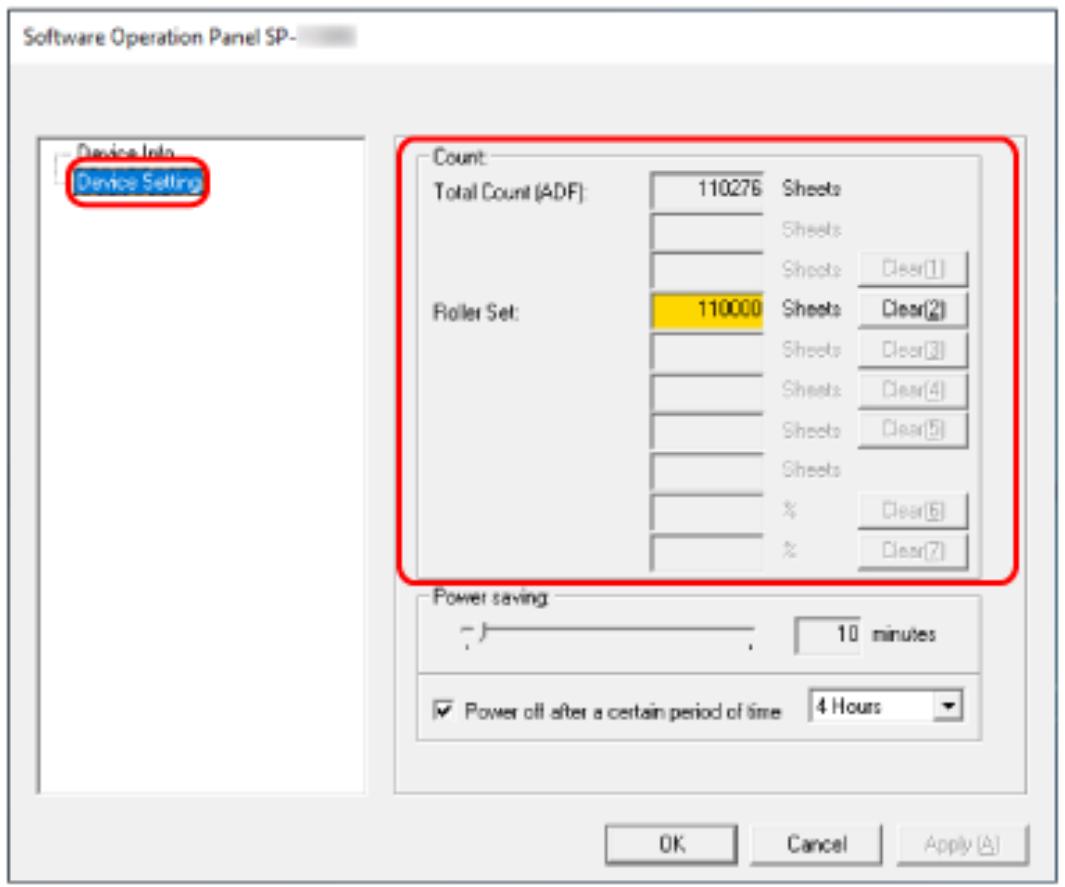
In this window, you can check the following items:
Total Count (ADF)
Total number of sheets scanned using the ADF
Roller Set
Displays the number of sheets scanned after the roller set is replaced.
The number increases in increments of 500 sheets.
The factory default setting for each counter is "0".
ATTENTION
If the scanner was turned off by unplugging the power cable, the number of sheets may not be counted in [Total Count (ADF)].
Clearing the Sheet Counters
When you have replaced a consumable part, clear the corresponding counter.
1 Start up the Software Operation Panel.
For details, refer to Starting Up the Software Operation Panel (page 120).
2 From the list on the left, select [Device Setting] and click the [Clear] button for the consumable that you replaced.
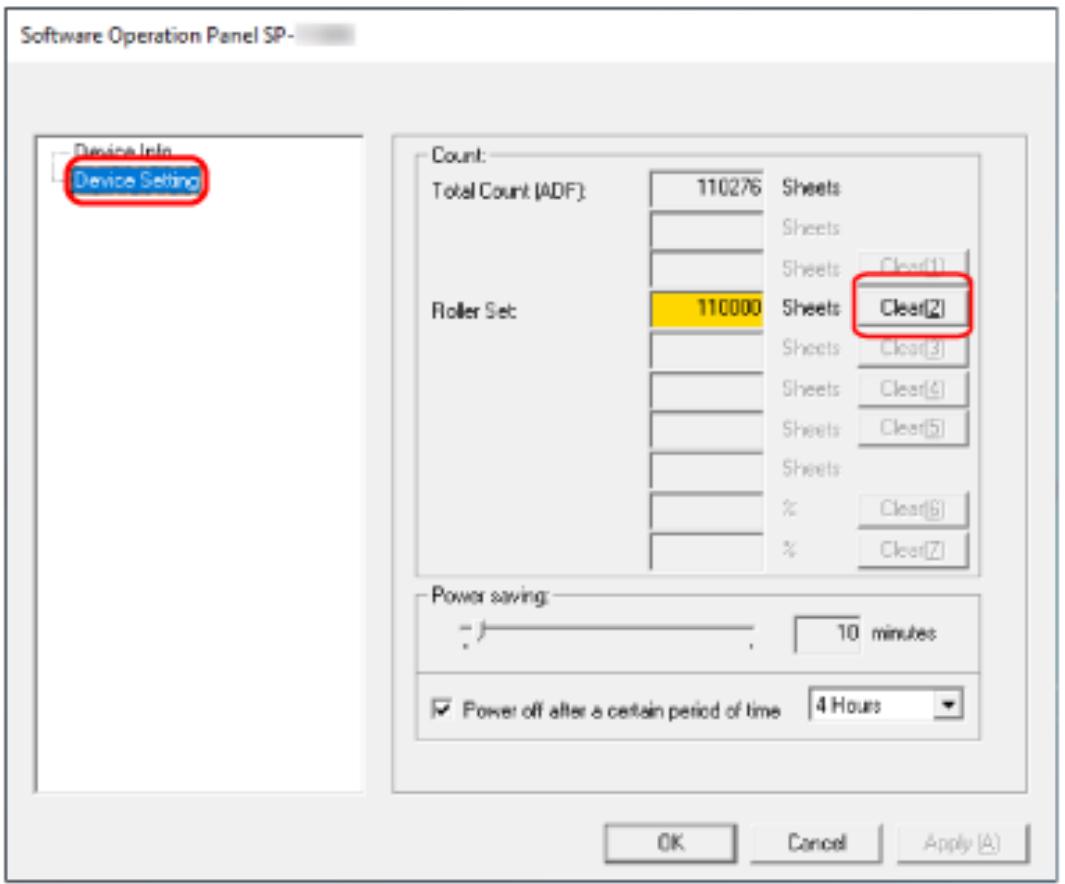
The counter is reset to "0".
3 Click the [OK] button.
A message window appears.
4 Click the [OK] button.
The settings are saved.
Message for Replacing Consumables
The following message may appear on the computer while the scanner is in use.
Example: Message for replacing consumables
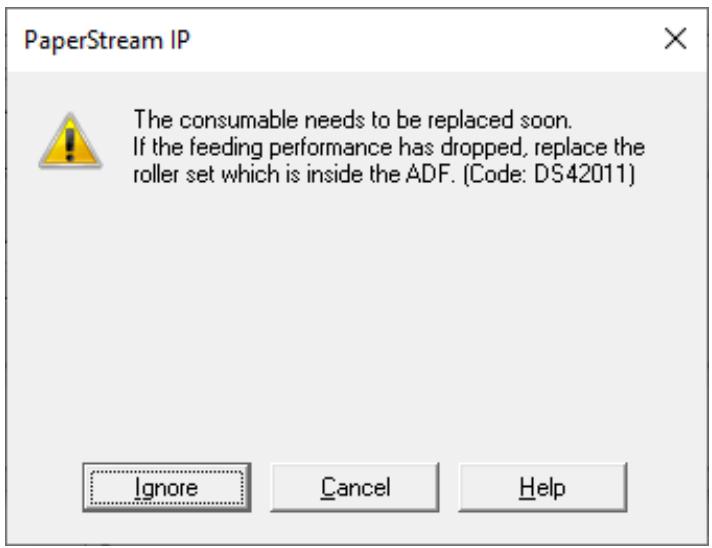
Check the message, and replace the consumable accordingly.
If you click the [Ignore] button, the message disappears and the scan can be continued. However, it is recommended that you replace the consumable as soon as possible.
To stop the scan and replace the consumable right away, click the [Cancel] button.
For details about replacing consumables, refer to Replacing the Roller Set (page 79).
Settings Related to Waiting Time
Waiting Time for the Scanner to Enter Power Saving Mode [Power saving]
Specify the waiting time before the scanner enters power saving mode.
1 Start up the Software Operation Panel.
For details, refer to Starting Up the Software Operation Panel (page 120).
2 From the list on the left, select [Device Setting].
![FUJITSU SP-1120N - Waiting Time for the Scanner to Enter Power Saving Mode [Power saving] - 1](/content/2024/12/319016/images/ed8c00c88e07022ec1442660a507241d15220adbdd6622de5cec884549ffa0e2.jpg)
3 Specify the waiting time for the scanner to enter power saving mode.
Power saving
Use the slider to specify the waiting time before entering power saving mode in the range from 5 to 115 minutes (in increments of 5).
The factory default setting is "10" minutes.
Power off after a certain period of time checkbox
Select this when you turn off the scanner automatically.
When this is selected, the scanner is turned off automatically if it is left on without being used for a certain period of time.
The check box is selected for the factory default setting.
You can select the timeout period for the scanner to be automatically turned off by [1 Hour]/[2 Hours]/[4 Hours]/[8 Hours].
The factory default setting is "4 Hours".
Basic Specification
| Item | Specification | |
| Scanner type | ADF (Automatic Document Feeder) | |
| Image sensor | Single line CMOS-CIS × 2 (front, back) | |
| Light source | RGB LED × 2 (front, back) | |
| Scanning area (width × length) | Minimum size | 52 × 74 (mm)/2.05 × 2.91 (in.) |
| Maximum size (*1) | 216 × 355.6 (mm)/8.5 × 14 (in.) | |
| Paper weight (document thickness) | 50 to 209 g/m² (13.4 to 56 lb) For A8 size or smaller, 127 to 209 g/m² (34 to 56 lb) 0.76 mm or less for plastic cards (Embossed cards allowed (ISO7810 ID-1 type compliant) | |
| Scanning speed (A4, Portrait, 300 dpi) (*2) | Binary (black & white) | • SP-1120N Simplex: 20 sheets/min, Duplex: 40 pages/min • SP-1125N Simplex: 25 sheets/min, Duplex: 50 pages/min • SP-1130N Simplex: 30 sheets/min, Duplex: 60 pages/min |
| Grayscale | ||
| Color | ||
| Loading capacity (*3) | 50 sheets Paper weight: 80 g/m² (20 lb) Total thickness: 5 mm or less | |
| Optical resolution | 600 dpi | |
| Output resolution | Binary (black & white) | 50 to 600 dpi (configurable in 1 dpi increments) 1,200 dpi can be set from the scanner driver |
| Grayscale | ||
| Color | ||
| Grayscale level | 8-bit for each color For internal processing, 16-bit for each color | |
| Interface | • USB USB 3.2 Gen 1x1 (USB 3.0)/USB 2.0/USB 1.1 (*4) Type B • Wired LAN IEEE802.3 Ethernet 10BASE-T/100BASE-TX/1000BASE-T RJ-45 | |
| Item | Specification | |
| Network protocol (wired LAN) | IPv4(*5), TCP, UDP, ICMP, DHCP | |
| Other | Hardware real-time JPEG compression | |
*1:Long page scanning supports documents with a length up to 3,048 mm (120 in.).
To scan documents that are longer than 355.6mm (14 in.) but are within 863mm (34 in.), set the resolution to 300 dpi or lower.
To scan documents longer than 863mm (34 in.), set the resolution to 200 dpi or lower.
*2: Note that this is the hardware limitation, and the software's processing time such as data transfer time is added to the actual time of scanning.
The scanning speed is the same when the scanner is connected via a USB or via a wired LAN.
*3:The capacity varies depending on the paper weight.
For details, refer to Documents for Scanning (page 52).
^*4 Use the USB cable that is supplied.
When connecting the USB cable to a USB hub, make sure you connect it to a USB hub that is connected to the USB port of a computer.
Connection with USB 3.2 Gen 1x1 (USB 3.0)/USB 2.0 requires the USB port and the hub to support USB 3.2 Gen 1x1 (USB 3.0)/USB 2.0.
Also note that the scanning speed slows down when USB 1.1 is used.
If you connect the USB cable to the scanner, connect the USB cable with the USB logo on the head of the cable facing upwards.
*5:IPv6 is not supported.
Installation Specification
| Item | Specification | |
| Outer dimensions (W × D × H) (*1) | 298 × 135 × 133 mm/11.7 × 5.3 × 5.2 in. | |
| Installation space (W × D × H) (*2) | 400 × 670 × 380 mm/15.7 × 26.4 × 15 in. | |
| Weight | 2.5 kg (5.5 lb) or less | |
| Input power | Voltage range | AC 100 to 240 V ±10% |
| Phase | Single phase | |
| Frequency range | 50/60 Hz ±3 Hz | |
| Power consumption | Operating | 18 W or less |
| Power saving | 2.0 W or less | |
| Power off | 0.4 W or less | |
| Ambient conditions | Temperature | Operating: 5 to 35°C (41 to 95°F) Not operating: -20 to 60°C (-4 to 140°F) |
| Humidity | Operating: 20 to 80% Not operating: 10 to 90% | |
| Calorific value | Operating | 15.5 kcal/h or less |
| Power saving | 1.72 kcal/h or less | |
| Power off | 0.35 W or less | |
| Shipping weight (*3) | Approx. 4 kg (8.8 lb) | |
| Consumable replacement cycle | 100,000 sheets or one year | |
| Durability | 360,000 sheets | |
1:The depth indicates the size of the scanner without the ADF paper chute (feeder) and the stacker.
2:The required installation space is a reference for scanning A4 size documents.
*3:Includes the package weight.
Outer Dimensions
The outer dimensions are as follows:
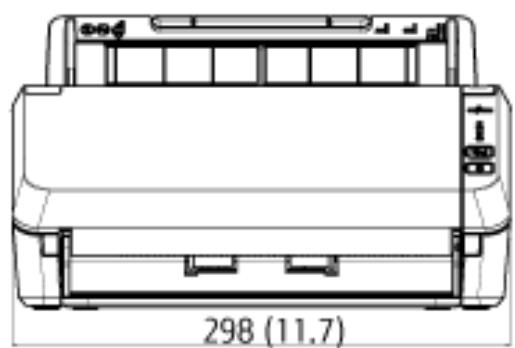
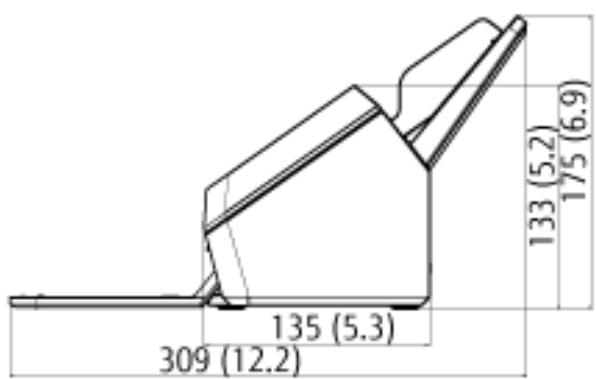
(Unit: mm (in.)
Uninstalling the Software
1 Turn on the computer and log onto Windows as a user with administrator privileges.
2 Exit all running software.
3 Display the [Control Panel] window.
- Windows Server 2008 R2/Windows 7 Click [Start] menu [Control Panel].
- Windows Server 2012 Right-click the Start screen, and select [All apps] on the app bar [Control Panel] under [Windows System].
- Windows Server 2012 R2/Windows 8.1
- Click [↓] on the lower left side of the Start screen → [Control Panel] under [Windows System]. To display [↓], move the mouse cursor.
- Windows 10/Windows Server 2016/Windows Server 2019 Click [Start] menu [Windows System] [Control Panel].
4 Select [Uninstall a program].
The [Programs and Features] window appears with a list of the currently installed software.
5 Select a software to uninstall.
-
When uninstalling the PaperStream IP driver Select one of the following:
-
Paperback IP (TWAIN) for SP Series
- Paperback IP (TWAIN x64) for SP Series
-
Paperback IP (ISIS) for SP Series
-
When uninstalling Network Setup Tool for SP Series Select [Network Setup Tool for SP Series].
- When uninstalling Software Operation Panel/Error Recovery Guide Select [Software Operation Panel].
- When uninstalling Error Recovery Guide (manual) Select [Error Recovery Guide for SP Series].
- When uninstalling Paperback Capture/PaperStream Capture Pro (Trial) Select [PaperStream Capture].
- When uninstalling ABBYY FineReader for ScanSnap Select [ABBYY FineReader for ScanSnap(TM)].
- When uninstalling ABBYY FineReader Sprint Select [ABBYY FineReader XX Sprint]. XX represents the version.
- When uninstalling manuals
-
Select [SP Series manuals for SP-1120N/SP-1125N/SP-1130N].
-
When uninstalling Scanner Central Admin Agent Select [Scanner Central Admin Agent].
- When uninstalling SP Series Online Update Select [SP Series Online Update].
6 Click the [Uninstall] button or the [Uninstall/Change] button.
7 If a confirmation message appears, click the [OK] button or the [Yes] button. The software is uninstalled.
Troubleshooting
For scanner related problems, such as paper jams, refer to Troubleshooting (page 87) for solutions.
Contact for Inquiries
ABBYY FineReader for ScanSnap
For details about ABBYY FineReader for ScanSnap, refer to "Technical Support" in the ABBYY FineReader for ScanSnap User's Guide. Follow the procedure below to display the ABBYY FineReader for ScanSnap User's Guide:
- Windows Server 2008 R2/Windows 7
Select [Start] menu [All Programs] [ABBYY FineReader for ScanSnap (TM)] [User's Guide].
- Windows Server 2012
Right-click the Start screen, select [All apps] on the app bar, and then select [User's Guide] under [ABBYY FineReader for ScanSnap (TM)].
- Windows Server 2012 R2/Windows 8.1
Click [] on the lower left side of the Start screen, and then select [User's Guide] under [ABBYY FineReader for ScanSnap(TM)].
To display [] , move the mouse cursor.
- Windows 10/Windows Server 2016/Windows Server 2019
Select [Start] menu [ABBYY FineReader for ScanSnap (TM)] [User's Guide].
ABBYY FineReader Sprint
For ABBYY FineReader Sprint, refer to the following web page:
https://www.abbyy.com
- Image Scanner SP series
For inquiries regarding the scanner, refer to the following web page:
http://imagescanner.fujitsu.com/sps.html
If the solution to your problem cannot be found on the above web page, refer to the contact information for your Fujitsu office on the following web page:
https://www.fujitsu.com/global/about/resources/shop/computing/peripheral/scanners/index.html
Contact for Purchasing Consumables or Cleaning Materials
https://www.fujitsu.com/global/support/products/computing/peripheral/scanners/contacts/fi-series-contact.html