
D-M39 BKBK - Hi-Fi System DENON - Free user manual and instructions
Find the device manual for free D-M39 BKBK DENON in PDF.


| Product Type | Compact Hi-Fi system (micro system) |
| Brand | DENON |
| Model | D-M39 BKBK |
| Color | Black (BKBK) |
| Amplifier/Tuner dimensions (W x H x D) | 210 x 115 x 308.5 mm |
| Amplifier/Tuner weight | 4.3 kg |
| Speaker dimensions (W x H x D) | 145 x 238 x 234 mm (each) |
| Speaker weight | 3.5 kg (each) |
| Output power | 2 x 30 W (at 6 Ω, 1 kHz) |
| Power supply | 230 V, 50 Hz |
| Power consumption | 80 W (max), 0.3 W standby |
| Playable media types | CD, CD-R/RW, MP3/WMA (CD and USB) |
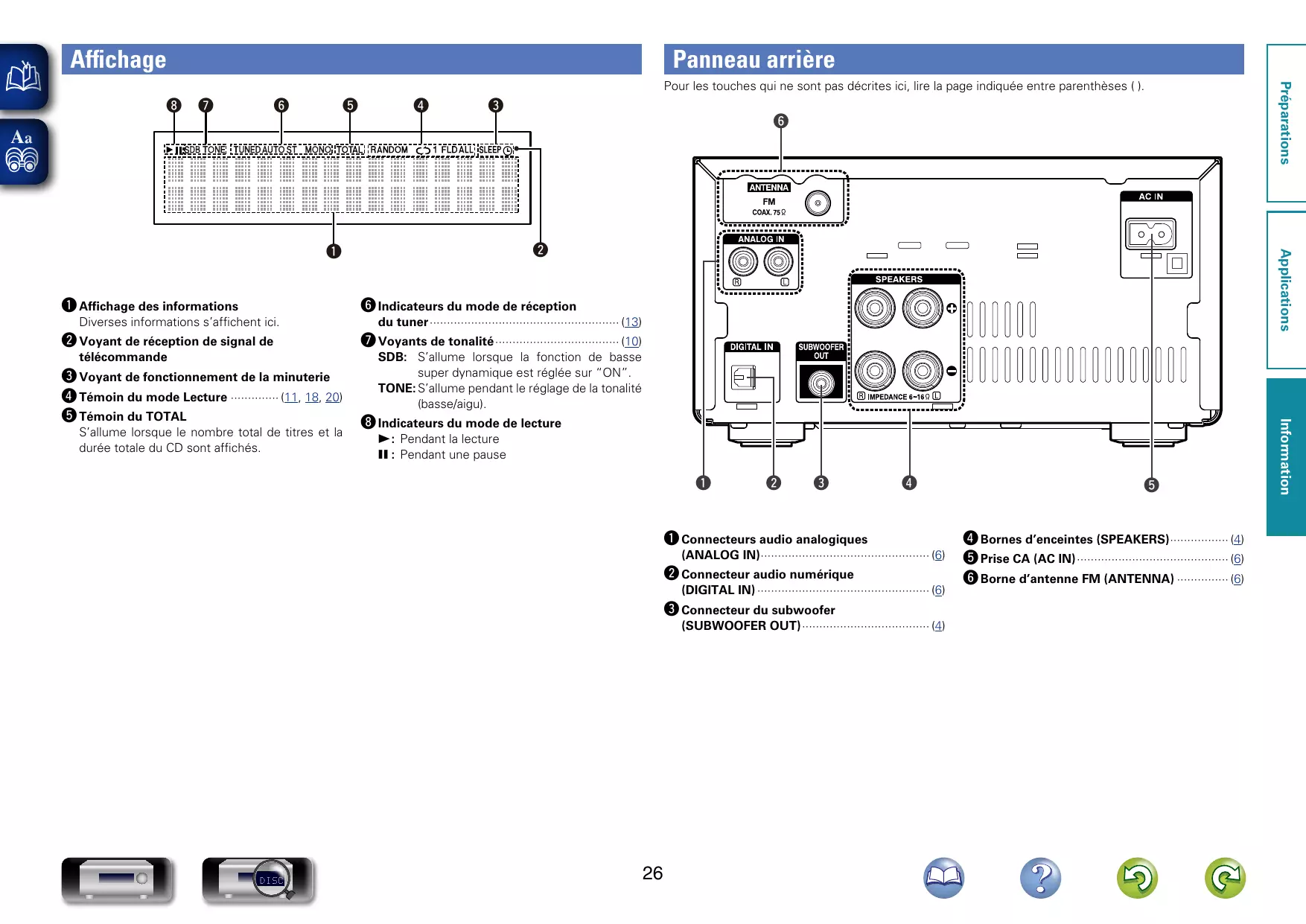
| Connections | 2 RCA analog inputs, 1 optical digital input, 1 subwoofer output, 1 headphone jack, 1 front USB port |
| FM tuner | 87.5 - 108 MHz, 40 presets, RDS |
| Special features | Direct iPod/iPhone/iPad playback via USB, Triple noise reduction, Speaker Optimizer circuit, Timer (daily/one-time/Sleep), Auto standby |
| Sound adjustments | Bass/Treble, Balance, Super Dynamic Bass (SDB), Source Direct |
| Display | 2-line fluorescent, adjustable dimmer |
| Remote control | Yes (RC-1162) with large buttons |
| Care and cleaning | Use a soft, dry cloth. Do not use benzene, solvents, or insecticides. |
| Safety | Do not expose to moisture, condensation. Disconnect during prolonged absence. |
| Spare parts and repairability | Contact an authorized DENON service center for any repairs. |
| General information | Warranty and after-sales service included. 'Simple and direct' design for sound purity. |
Frequently Asked Questions - D-M39 BKBK DENON
User questions about D-M39 BKBK DENON
0 question about this device. Answer the ones you know or ask your own.
Ask a new question about this device
Download the instructions for your Hi-Fi System in PDF format for free! Find your manual D-M39 BKBK - DENON and take your electronic device back in hand. On this page are published all the documents necessary for the use of your device. D-M39 BKBK by DENON.
USER MANUAL D-M39 BKBK DENON
consumption eco friendly


MP3

WMA
RDS
Radio TEXT

LA MICRO-CHAINE D-M39 AVEC AMPLI-TUNER/LECTEUR DE CD OFFRE UN SON DE HAUTE QUALITÉ DEPUIS UNE MULTITUDE DE SOURCES.

iPod nano 3rd generation (video) 4GB 8GB

iPod nano 4th generation (video) 8GB 16GB

iPod nano 5th generation (video camera) 8GB 16GB

iPod nano h generation 8GB 16GB
- iPod touch

iPod touch 1st generation 8GB 16GB 32GB

iPod touch 2nd generation 8GB 16GB 32GB

iPod touch 3rd generation 32GB 64GB

iPod touch 4th generation 8GB 32GB 64GB
iPhone

iPhone 4GB 8GB 16GB

iPhone 3G
8GB 16GB

iPhone 3GS 8GB 16GB 32GB

iPhone4 8GB16GB32GB

iPhone 4S 16GB 32GB 64GB
VOLUME 00 - 49, VOLUME MAX


"Made for iPod" and "Made for iPhone" mean that an electronic accessory has been designed to connect specifically to iPod, or iPhone, respectively, and has been certified by the developer to meet Apple performance standards.
Apple is not responsible for the operation of this device or its compliance with safety and regulatory standards.
DIGITAL IN ANALOG IN
AAC (Advanced Audio Coding)
Manuelle delie isuzio1000000000000000000000000000000000000000000000000000000000
Redignungsanleitung
Manual del usuario.
Gebruiksanawijizing
Bruksanyisning
Connect to amplifier's side: Plain core
Thank you for purchasing this DENON product. To ensure proper operation, please read this owner's manual carefully before using the product. After reading them, he sure to keep them for future reference.
After reading them, be sure to keep them for future reference.
Acc
10
②Service station list
3Speaker cable.
④Foam plug
⑤ Anti-slip pads (8 pcs. / 1 sheet)
Before using
Note on uses
Note on use
The quality of the sound produced from the speaker is affected by the size and type of the room, as well as by the method of installation. Consider the points listed below before installing the speaker.
If the bass sound is overemphasized when the speakers are imaged distally on the floor, set them on concrete blocks and lift them.
- Note that placing the speaker on the same stand or shelf as a record player may result in howling.
- Also note that if there is a magnet or any device generating the same color of the TV, it will be the same color. The speakers can cause the colors on the TV to become blotchy.
WARNING
- Be sure to fasten the speaker cables to a wall, etc., to prevent people from tripping over them or otherwise pulling on them accidentally, causing the speakers to fall.
- Be sure to check for safety after installing the speakers. Afterwards, perform safety inspections at regular intervals to be sure there is no danger that the speakers will fail. DENON will not be liable for damages or accidents caused by inappropriate choice of equipment.
□Cleaning - Use a dry wiping cloth and wipe lightly to remove dirt from the cabinet and operation panel.
- When using chemically treated cloths, follow the precautions provided for them.
- Do not use benzene, thinners, or other organic solvents or insecticides on the speakers since they may cause a change in quality or color.
□Other cautions
- Raising the amplifier's volume excessively and playing with distorted sound could damage the amplifier and speakers. Enjoy this technique!
- When moving the unit, note that applying strong force to the surface of the speaker through the saran net could damage the speaker.
Removing the Speaker Net
The net on the front of the speakers can be removed.
- To remove, grasp both sides of the net and pull forward.
- To mount, line up the projecting pieces in the four corners of the
speaker net with the holes in the four corners of the cabinet and press in.
Acoustic Sponge
When installing on a desktop or in the corner of your room, the bass may emphasized. Insert sound foam plug in the bass-reflex duct at the back of the SC-M39. (kA)
You can adjust the bass sound with the amount of sound foam, plug you insert.
NOTE
- Do not insert the foam plug too deep. The foam plug could fall in and get stuck inside.
- If the foam plug cannot be removed or falls inside, stop using the unit immediately and consult your store of purchase or your nearest repair and inquiry center.
How to Install
Attach four of the included anti-slip pads to the bottom of the unit. (1)
Connections
When connecting the speakers to an amplifier, be sure to read the
amplifier's owner's manual carefully and connect properly. Connect the input terminals on the rear panel of the speaker with the speaker output terminals on the amplifier, using the included speaker cables.
-
Connect the speaker for the left channel to the "L" terminal on the amplifier, the speaker for the right channel to the "R" terminal on the amplifier, making sure to check the polarities (^+ + ^-) and (-)^+
-
Amplifiers have various speaker output terminals. Check the owner's manual of the amplifier you are using for
details.
NOTE
-
Be sure to turn the amplifier's power off before connecting the speakers to the amplifier.
-
If the polarities are inverted, the phase may be off and the sound may have no bass component, making it seem unnatural. Be sure to connect the polarities properly.
-
Twist firmly the wires by hand so that they do
not stick out and cause short-circuits. (D)
2 Loosen the terminal by turning to the left and insert the speaker cable through the hole in the speaker terminal.
Tighten the terminal by turning to the right.
3 Tighten the terminal by turning to the right and check that the core wire is not protruding from the hole.
Once connections are completed, pull gently on the speaker cables to check that they are securely connected.
NOTE
- Do not let the core wires of two speaker cables touch each other. Doing so will short-circuit the amplifier circuitry and damage the amplifier.
Specifications
Type. 2-Way·2
Frequency range: 45 Hz ~ 40 kHz
Input impedance: 6 Ω/ohm
Max. input: 60 W (IEC), 120 W (PEAK)
Sensitivity
Crossover frequency: 3 kHz
Speakers: 12 cm (4-3/4") cone bass-mid x 1
2.5 cm (1") soft dome high range x 1
Maximum external
Dimensions: 145 (V) x 26 (H) x 234 (D) mm (5.45" x 4" x 0.38" x 0.7/23")
Weight: 3.5 kg (7 lbs 11.5 oz)
For improvement purposes, specifications and design are subject to change without notice.
louely be surprising and fascinating . Find out
(5-45/64" × 9-3/8" × 9-7/32")
Poids: 3,5 kg (7 lbs 11.5 oz)
Brand : DENON
Model : D-M39 BKBK
Category : Hi-Fi System