
XL-FP10B - Television JVC - Free user manual and instructions
Find the device manual for free XL-FP10B JVC in PDF.



| Product type | Portable TV with CD player |
| Brand | JVC |
| Model | XL-FP10B |
| Power supply | 2 AA 1.5V batteries (not included) |
| Playable formats | Audio CD, MP3 CD |
| Playback functions | Play, pause, stop, track skip, forward/backward search, programming (up to 20 CD tracks, 99 MP3 tracks), repeat (track, all, folder), random, intro |
| Anti-shock protection | ESP (Electronic Shock Protection) |
| Audio output | Headphone jack (PHONES) 3.5 mm |
| Volume control | Volume buttons (12 levels, beep from level 12) |
| Dimensions (approx.) | 140 x 25 x 140 mm (estimated from photo) |
| Weight (approx.) | 200 g with batteries (estimate) |
| Maintenance | Soft dry cloth, no chemicals |
| Disc cleaning | Soft cloth, from center to edge, no circular motion |
| Safety instructions | Do not expose to water, do not block ventilation, do not place lit candles, respect battery polarity, do not mix new and used batteries, do not short-circuit, do not throw into fire |
| Operating temperature | Max 50 °C |
| Auto power off | After 30 seconds in stop mode |
| Included accessories | Headphones |
| After-sales service | Darty (0978 970 970), Vanden Borre (+32 2 334 00 00), Fnac (0 969 324 334) |
| Recycling | Drop off at store or recycling center, follow local guidelines |
Frequently Asked Questions - XL-FP10B JVC
User questions about XL-FP10B JVC
0 question about this device. Answer the ones you know or ask your own.
Ask a new question about this device
Download the instructions for your Television in PDF format for free! Find your manual XL-FP10B - JVC and take your electronic device back in hand. On this page are published all the documents necessary for the use of your device. XL-FP10B by JVC.
USER MANUAL XL-FP10B JVC
CLASS 1 LASER PRODUCT
KLASSE 1 LASER PRODUCT
CLASS 1 APPAREL LASER
CLASS 1 PRODUCTO LASER
ETIQUETTE:PRODUIT LASER DE CLASSE1
SOURCE D'ALIMENTATION
Hotline Darty France
CLASS 1 LASER PRODUCT
KLASE 1 LASER PRODUCT
CLASS 1 APPARELL LASER
CLASS 1 PRODUCTZ LASER
LABEL KLASSE 1 LASERPRODUCT
CLASS 1 LASER PRODUCT
KLASE 1 LASER PRODUCT
CLASS 1 APPAREL LASER
CLASS 1 PRODUCTO LASER
ETIQUETA DE PRODUCTO LÁSER DE CLASE 1 -
CLASS 1 LASER PRODUCT
KLASSE 1 LASER PRODUCT
CLASS 1 APPAREL LASER
CLASS 1 PRODUCTO LASER
ETIQUETA DO PRODUTO LASER DE CLASSE 1 -
This appliance is intended for domestic household use only and should not be used for any other purpose or in any other application, such as for non domestic use or in a commercial environment.
- Ventilation
Allow at least a 10cm gap all around the product.
- The ventilation should not be impeded by covering the ventilation openings with items, such as newspapers, table-cloths, curtains, etc.
- No naked flame sources, such as lighted candles, should be placed on the apparatus.
- Attention should be drawn to the environmental aspects of battery disposal. Don't throw used batteries in dustbin. Please contact your retailer in order to protect the environment.
This apparatus is not suitable for use in a tropical climate.
- The apparatus shall not be exposed to dripping or splashing and that no objects filled with liquids, such as vases, shall be placed on the apparatus.
- To protect the environment, use local recycling facilities for battery disposal.
- Batteries (battery pack or batteries installed) shall not be exposed to excessive heat such as sunshine, fire or the like.
- Disposal of a battery into fire or a hot oven, or mechanically crushing or cutting of a battery or expose to excessive heat such as sunshine, fire or the like that can result in an explosion.
- Leaving a battery in an extremely high temperature surrounding environment that can result in an explosion or the leakage of flammable liquid or gas.
- A battery subjected in extremely low air pressure that may result in an explosion or the leakage of flammable liquid or gas.
- Different types of batteries or new and used batteries are not to be mixed. Batteries are to be inserted with the correct polarity. Exhausted batteries are to be removed from the product. The supply terminal are not to be short-circuited.
IMPORTANT SAFETY INSTRUCTIONS
- Read all the safety and operating instructions before operating the appliance. Retain them for furture reference.
- The appliance should not be used near water, for example, near a bathtub, washbowl, kitchen sink, laundrytub, swimming pool or in a wet basement.
- Power supply cords should be routed so that they are not likely to be walked on or pinched by items placed upon or against them.
- Do not put any heavy object on top of the player. The player may be damaged.
To keep the CD clean, handle it by its edge. Do not touch the surface. - Do not stick paper or tape onto the CD.
- Do not expose the CD to direct sunlight or heat sources such as hot air ducts. Do not leave the CD in a car parked under direct sunlight.
- Do not use headphones/earphones while driving, cycling, or operating any motorized vehicle. It may create a traffic hazard and is illegal in some areas.

To prevent possible high sound pressure and hearing damage risk, do not listen at high volume levels for long periods.

This mark is applied to show the equipment conforms to European safety and electro-magnetic compatibility standards.
CLASS 1 LASER PRODUCT
KLASSE 1 LASER PRODUCT
CLASS 1 APPAREL LASER
CLASS 1 PRODUCTO LASER
CLASS 1 LASER PRODUCT LABEL -
This label is attached to the place as illustrated to inform that the apparatus contains a laser component.
This unit is designed only for use with discs bearing the symbol not work properly.

Other types of discs may not be compliant and may
The maximum operating ambient temperature is 50^
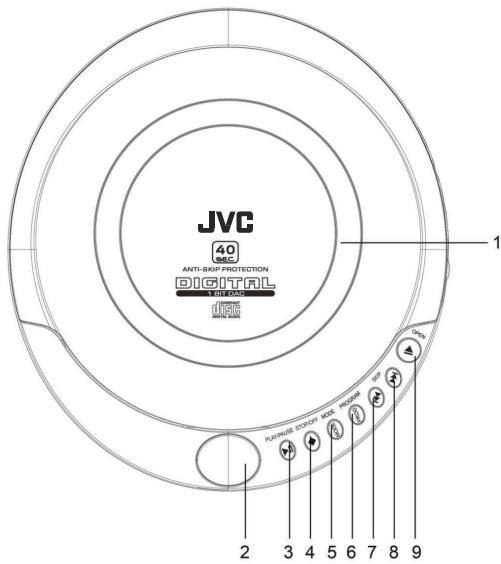
- CD Door
- Display
- PLAY/PAUSE Button
- STOP/OFF Button
-
MODE Button
6.PROG PROGRAM/ +10 Button -
Skip-/Search Button
- Skip +/Search Button
- CD Door Open Butoon
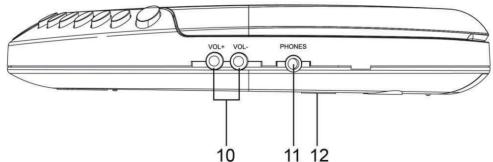
- Volume Buttons
- PHONESJack
- Battery Compartment
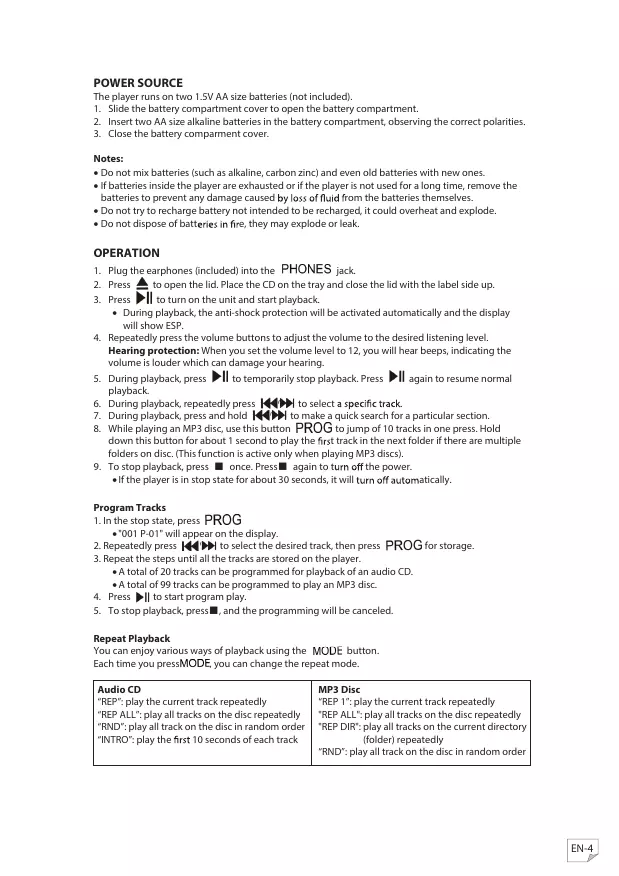
POWER SOURCE
The player runs on two 1.5V AA size batteries (not included).
- Slide the battery compartment cover to open the battery compartment.
- Insert two AA size alkaline batteries in the battery compartment, observing the correct polarities.
- Close the battery compartment cover.
Notes:
- Do not mix batteries (such as alkaline, carbon zinc) and even old batteries with new ones.
- if batteries inside the player are exhausted or if the player is not used for a long time, remove the batteries to prevent any damage caused by loss of fluid from the batteries themselves.
- Do not try to recharge battery not intended to be recharged, it could overheat and explode.
- Do not dispose of batteries in fire, they may explode or leak.
OPERATION
- Plug the earphones (included) into the PHONES jack.
- Press to open the lid. Place the CD on the tray and close the lid with the label side up.
-
Press to turn on the unit and start playback.
-
During playback, the anti-shock protection will be activated automatically and the display will show ESP.
-
Repeatedly press the volume buttons to adjust the volume to the desired listening level.
Hearing protection: When you set the volume level to 12, you will hear beeps, indicating the volume is louder which can damage your hearing. - During playback, press to temporarily stop playback. Press again to resume normal playback.
- During playback, repeatedly press to select a specific track.
- During playback, press and hold to make a quick search for a particular section.
- While playing an MP3 disc, use this button PROG to jump of 10 tracks in one press. Hold down this button for about 1 second to play the first track in the next folder if there are multiple folders on disc. (This function is active only when playing MP3 discs).
-
To stop playback, press once. Press again to turn off the power.
-
If the player is in stop state for about 30 seconds, it will turn off automatically.
Program Tracks
- In the stop state, press PROG
- "001 P-01" will appear on the display.
- Repeatedly press to select the desired track, then press PROG for storage.
- Repeat the steps until all the tracks are stored on the player.
A total of 20 tracks can be programmed for playback of an audio CD.
- A total of 99 tracks can be programmed to play an MP3 disc.
- Press to start program play.
- To stop playback, press , and the programming will be canceled.
Repeat Playback
You can enjoy various ways of playback using the MODE button.
Each time you pressMODE, you can change the repeat mode.
Audio CD
"REP": play the current track repeatedly
"REP ALL": play all tracks on the disc repeatedly
"RND": play all track on the disc in random order
"INTRO": play the first 10 seconds of each track
MP3 Disc
"REP 1": play the current track repeatedly
"REP ALL": play all tracks on the disc repeatedly
"REP DIR": play all tracks on the current directory (folder) repeatedly
"RND": play all track on the disc in random order
CLEANING AND MAINTENANCE
To clean the player casing, use a slightly damp cloth.
Clean discs regularly with a soft, dry cloth.
Do not use abrasive or chemical cleaning detergents.
If necessary, use only a kit for cleaning discs. Wipe from the center to the edge of the disc itself, never use a circular motion.
Store discs in their protective cases.
TROUBLE SHOOTING
| Symptom | Possible Cause | Possible Solution |
| player will not turn on. | Weak or dead batteries | Replace the batteries with new ones. |
| Batteries not inserted correctly | Make sure the batteries are inserted correctly. | |
| The disc will not play. | Disc compartment lid not closed | Close the lid. |
| Disc inserted incorrectly | Check that the disc is inserted with the label side up. | |
| The disc is dirty or defective. | Clean or change it. | |
| Moisture condensation has occurred. | Wipe the disc with a soft dry cloth. | |
| No sound, or noise is heard. | Earphones plug not inserted correctly | Connect the earphones plugs firmly. |
| Volume set to minimum | Increase the volume. | |
| Weak batteries | Replace the batteries with new ones. | |
| Defective disc | Change the disc. |
SPECIFICATIONS
Battery: 3V = 2 × Size AA
Direct Current
DISPOSAL

As a responsible retailer we care about the environment.
As such we urge you to follow the correct disposal procedure for the product, packaging materials and if applicable, accessories and batteries. This will help conserve natural resources and ensure that the materials are recycled in a manner that protects health and the environment.
You must follow laws and regulations about disposal. Waste electrical products and batteries must be disposed of separately from household waste when the product reaches the end of its life. Contact the store where you bought the product and your local authority to learn about disposal and recycling.
The batteries must be disposed of at your local recycling point.
We apologise for any inconvenience caused by minor inconsistencies in these instructions, which may occur as a result of product improvement and development.
EU Declaration of Conformity
Product Description:
The object of the declaration described above is in conformity with the relevant Union
harmonisation legislation:
Low Voltage Directive (LVD)
Eco design requirements for energy-related products (ErP)
RoHS
EMC:
EN 55032:2015+A1:2020, CLASS B
EN 55035:2017+A11:2020
LVD:
EN 50332-1: 2013
EN 50332-2: 2013
IEC 62368-1:2018 or EN IEC 62368-1:2020+A11 clause 10.6
This declaration of conformity is drawn up under the sole responsibility of the manufacturer.
The person responsible for this declaration is:
Place, Date / Lieu :
Ivry-sur-Seine, mai 6, 2022


JVC
- ETIQUETTE:PRODUIT LASER DE CLASSE1
- SOURCE D'ALIMENTATION
- Hotline Darty France
- LABEL KLASSE 1 LASERPRODUCT
- ETIQUETA DE PRODUCTO LÁSER DE CLASE 1 -
- ETIQUETA DO PRODUTO LASER DE CLASSE 1 -
- - Ventilation
- IMPORTANT SAFETY INSTRUCTIONS
- CLASS 1 LASER PRODUCT LABEL -
- POWER SOURCE
- Notes:
- OPERATION
- Program Tracks
- Repeat Playback
- Audio CD
- MP3 Disc
- CLEANING AND MAINTENANCE
- SPECIFICATIONS
- DISPOSAL
- EMC:
- LVD:
- JVC
Brand : JVC
Model : XL-FP10B
Category : Television