
AMP-F10 - Audio Amplifier EVERSOLO - Free user manual and instructions
Find the device manual for free AMP-F10 EVERSOLO in PDF.



| Product Type | Stereo Power Amplifier |
| Brand | Eversolo |
| Model | AMP-F10 |
| Amplification Class | Class AB with Class A bias |
| Output Power (8 Ω) | 200 W RMS per channel |
| Output Power (4 Ω) | 320 W RMS per channel |
| Output Power (2 Ω) | 450 W RMS per channel |
| Bridged Mode Power (8 Ω) | 650 W RMS |
| Bridged Mode Power (4 Ω) | 950 W RMS |
| Total Harmonic Distortion + Noise (THD+N) | 0.008% at 1 kHz |
| Signal-to-Noise Ratio (SNR) | ≥ 113 dB (A-weighted) |
| Frequency Response | 10 Hz – 30 kHz (±0.5 dB) |
| Crosstalk | ≤ -95 dB at 200 W/8 Ω/1 kHz |
| Damping Factor | > 600 at 8 Ω/1 kHz |
| Input Impedance (XLR and RCA) | 10 kΩ |
| Input Sensitivity | XLR 23 dB: 5.2 V / XLR 29 dB: 2.4 V RCA 23 dB: 2.65 V / RCA 29 dB: 1.3 V |
| Inputs | 1 x XLR balanced, 1 x RCA unbalanced |
| Speaker Outputs | 2 pairs of binding posts (left and right channels) |
| Operating Mode | Stereo or bridged (switchable) |
| Power Supply | 110-120 V 60 Hz or 220-240 V 50 Hz (manual selection) |
| Maximum Power Consumption | 1200 W |
| Dimensions (W × D × H) | 430 × 310 × 147 mm (including feet) |
| Net Weight | 18 kg |
| Included Accessories | Power cable, trigger cable, user manual |
| Protection | Overcurrent, overheating, short circuit |
| Cooling | Fin-type heat sink |
| Safety | Class I device – mandatory grounding |
| Maintenance and Cleaning | Dust with a soft, dry cloth. Do not use liquids. |
| Spare Parts and Repairability | Internal fuse (replacement by a professional). Repair by a qualified technician. |
Frequently Asked Questions - AMP-F10 EVERSOLO
User questions about AMP-F10 EVERSOLO
0 question about this device. Answer the ones you know or ask your own.
Ask a new question about this device
Download the instructions for your Audio Amplifier in PDF format for free! Find your manual AMP-F10 - EVERSOLO and take your electronic device back in hand. On this page are published all the documents necessary for the use of your device. AMP-F10 by EVERSOLO.
USER MANUAL AMP-F10 EVERSOLO
Eversolo Audio Technology Co.,Ltd
深圳市艾索洛声学科技有限公司
Content/目录
01 Introduction P3
02 Specifications P4
03 Hardware P5
04 Downloads P9
Thank you for choosing Eversolo AMP-F10 power amplifier!
The AMP-F10 is a Class AB power amplifier with Class A bias, striking the ideal balance between audio quality and energy efficiency. It delivers pure, dynamic sound while avoiding the high power consumption typical of traditional Class A amplifiers. It's well-suited for high-fidelity systems, home theaters and professional audio setups, providing rich detail and a warm listening experience.
Product Features
- Class AB with Class A Bias: Operates in Class A mode at low power to provide high-fidelity sound quality; switches to Class AB mode during high dynamic power demands to ensure energy efficiency and strong output.
- High-Fidelity Sound: Combines the warmth of Class A with the high dynamic range of Class AB for a refined, vibrant audio experience.
- Overcurrent, Overheat, and Short-Circuit Protection: Multiple protection designs ensure stability and safety under various operating conditions.
- Efficient Cooling: Large heat sink design ensures stability during extended use, enhancing the amplifier's durability.
- Independent Left and Right Channels: Ensures high stereo separation, delivering clear layering and precise sound positioning.
Specifications
| Continuous Output Power 120V/240V AC | 200W RMS@8Ω/per channel 320W RMS@4Ω/per channel 450W RMS@2Ω/per channel 650W RMS@8Ω/in bridge mode 950W RMS@4Ω/in bridge mode |
| Operating Mode | Class AB with Class A bias |
| THD+N | 0.008%@1KHz |
| SNR | ≥ 113dB @A-wt |
| Inputs | XLR Balanced *1, RCA Unbalanced *1 |
| Input Impedance | XLR Balanced: 10KΩ RCA Unbalanced: 10KΩ |
| Input Sensitivity 200W@8Ω/1KHz | XLR Input GAIN:23dB: 5.2V XLR Input GAIN:29dB: 2.4V RCA Input GAIN:23dB: 2.65V RCA Input GAIN:29dB: 1.3V |
| Frequency Response@1W/8Ω | 10Hz-30KHz: ±0.5dB |
| Crosstalk 200W@8Ω/1KHz | ≤ -95dB |
| Damping Factor@8Ω 1KHz | >600 |
| Power Requirement | 110-120V 60Hz/220V-240V 50Hz, 1200W MAX |
| Weight | Net Weight: 18KG Gross Weight: 21.5KG |
| Dimensions | W 430mm*L 310mm*H 147mm(including feet) |
| Accessories | Power Cable *1, Trigger Cable *1, User Manual *1 |
Note:
The AC voltage switch (115V/230V) is located on the bottom of the AMP-F10. Before powering on, please confirm the AC specification for your country and ensure the switch is set correctly.
Front Panel
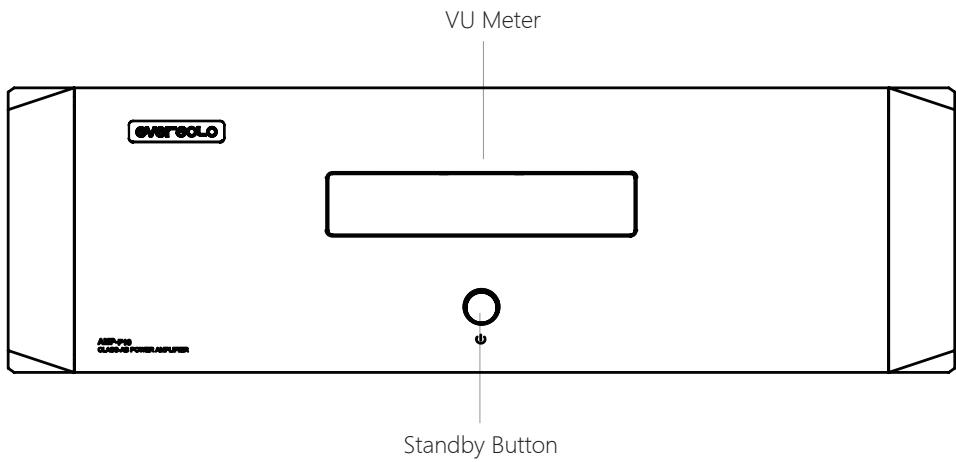
Control

This button can turn the device's main power on or off. It functions as a standby button and can also be used with the trigger function. When the Trigger In port detects an inserted trigger cable, the standby button is disabled, and the device is powered on or off via the trigger function.
There is a bi-color LED ring that indicates the operating status of the AMP-F10 through changes in color.
White: The main power of the AMP-F10 is on, and the amplifier is in working mode.
Orange: The power of the AMP-F10 is in standby mode.
Rear Panel
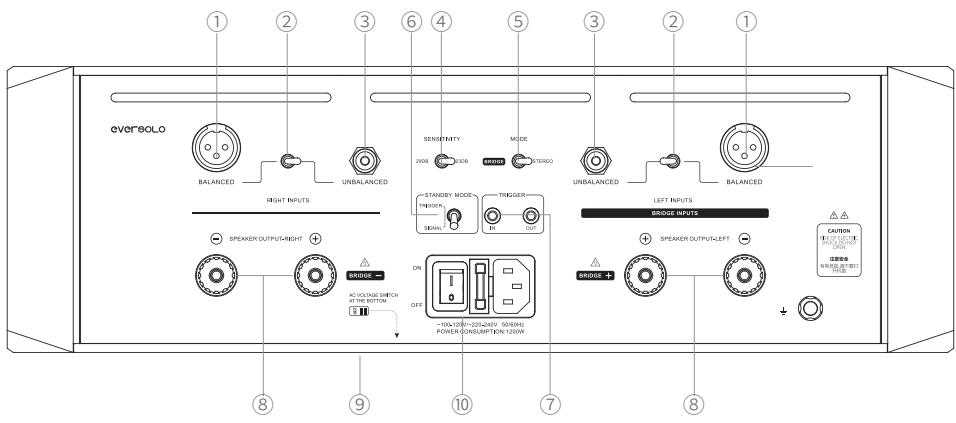
Interface Descriptions:
① Balanced XLR Input
Connect this balanced XLR port to your preamp or other audio source device to provide the signal to the amplifier module. We strongly recommend using the balanced XLR input to connect your signal source, because compared to the unbalanced RCA input, the balanced XLR input offers better noise resistance.
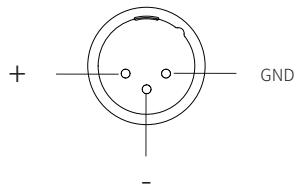
The wiring method for the balanced XLR signal port is as follows:
② Signal Input Mode Switch
Selects your signal input type(RCA or XLR) by this switch.
③ Unbalanced RCA Input
Connect this unbalanced RCA port to your preamp or other audio source device to provide the signal to the amplifier module.
④ Sensitivity Switch
The AMP-F10 offers two gain options: 23dB and 29dB, which can be selected based on your speaker sensitivity.
⑤ Stereo and Bridge Mode Switch
Switching between stereo and bridge modes to accommodate different application needs.
MODE

Notes:
- Power Off: Before switching modes, ensure the amplifier is powered off and all connected speakers are disconnected for safe operation.
- Load Requirements in Bridge Mode: Ensure that the speaker impedance meets the power output requirements for bridge mode to avoid damage to the amplifier and speakers due to excessively low load.
- Speaker Power Matching: In bridge mode, confirm that the speaker's power handling is compatible with the bridge output to avoid damage from excessive power.
⑥ Standby Mode
Trigger Mode: If no trigger cable is connected to the Trigger In port, you can use the standby button to turn the main power on or off. When a trigger cable is detected in the Trigger In port, the standby button is disabled, and the main power is controlled by the trigger signal from the preamp or another signal source, with a trigger voltage of 5-12V.
Signal Mode: If no signal or only a very low signal is detected from the preamp or other signal source, the AMP-F10 will automatically enter standby mode after 20 minutes to conserve energy. The AMP-F10 will reactivate upon detecting an audio signal or an increase in volume.
⑦ External Trigger Input and Output
Trigger In: Connect to the Trigger Out of a preamp or other signal source.
Trigger Out: When the AMP-F10 operates in bridge mode, connect Trigger Out to the Trigger In of another AMP-F10 using a trigger cable to synchronize multiple devices.
Speaker Output Terminals
In Stereo Mode: The red terminal is the positive output, connecting to the positive terminal of the speaker, while the black terminal is the negative output, connecting to the negative terminal of the speaker.
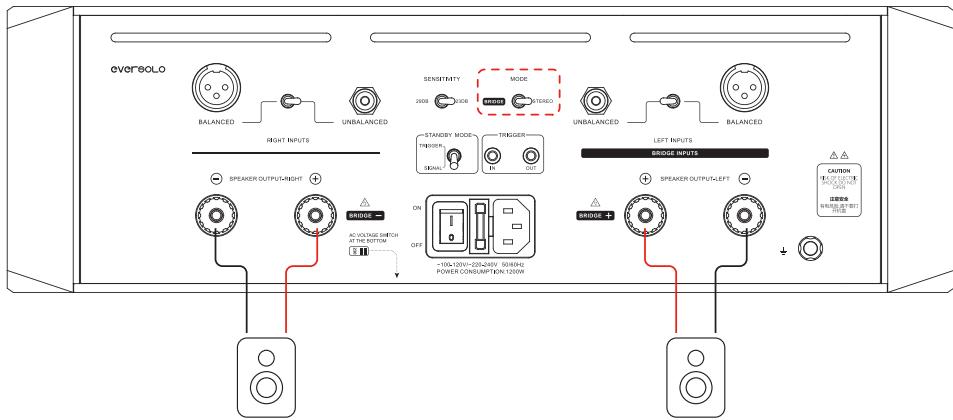
In Bridge Mode: Connect the red terminal of the left channel to the positive terminal of the speaker and the red terminal of the right channel to the negative terminal of the speaker.
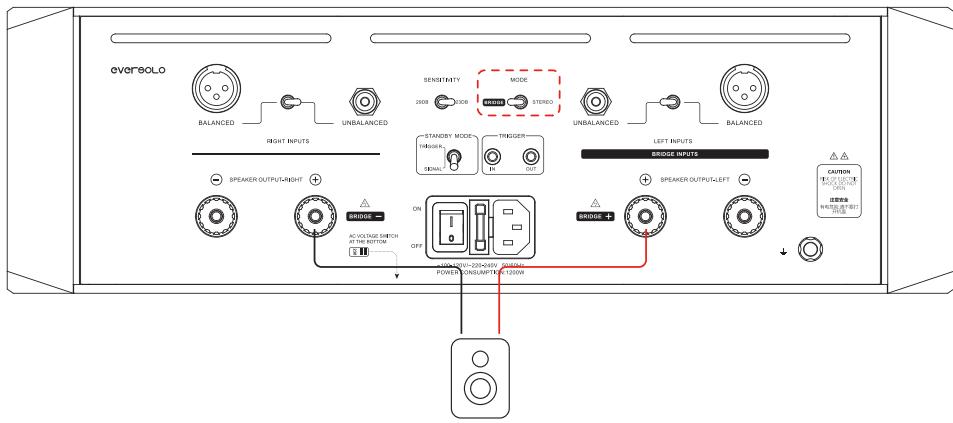
⑨ AC Voltage Switch
10 AC Outlet, Power Switch, and Fuse
Downloads
For more tutorials, please visit www.eversolo.com, please visit the Downloads page on official website and scan QR code.

Wechat Subscription
Special Note:
To enhance the user experience, the content of this manual may differ from the actual product usage. Any adjustments to the device's functions or parameters will be made without prior notice.
For more information, please visit the official website: www.eversolo.com.
Safety Warning:
- No water splashing or dripping, do not put objects with liquid like vase on the device.
- The power plug and the power switch are used to disconnect power supply, which cannot be blocked by other objects.
- It is Class I device, there must be grounding measures inside the box when using.