EasyManual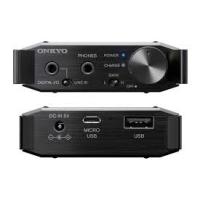
DAC-HA300 - Audio Amplifier ONKKYO - Free user manual and instructions
Find the device manual for free DAC-HA300 ONKKYO in PDF.


User questions about DAC-HA300 ONKKYO
0 question about this device. Answer the ones you know or ask your own.
Ask a new question about this device
Download the instructions for your Audio Amplifier in PDF format for free! Find your manual DAC-HA300 - ONKKYO and take your electronic device back in hand. On this page are published all the documents necessary for the use of your device. DAC-HA300 by ONKKYO.
USER MANUAL DAC-HA300 ONKKYO
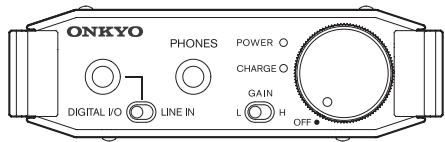
D/A Converter/Headphones Amplifier/SD Audio Player
DAC-HA300
INSTRUCTION MANUAL MODE D'EMPLOI
MANUAL DE INSTRUCCIONES
MANUALE DI ISTRUZIONI
BEDIENUNGSCANLEITUNG
GEBRUKSAANWIZING
BRUKSANVISNING
取拔說明書
Made for

iPod

iPhone

iPad

ENGLISH
FRANÇAIS
ESPANOL
ITALIANO
DEUTSCH
NEDERLANDS
SVENSKA
日本語
INSTRUCTIONS DE SÉCURITÉ IMPORTANTES
Touche Lecture/Pause (▶/II)
Débit binaire 32 kbit/s, 64 kbit/s, 96 kbit/s, 128 kbit/s, 192 kbit/s,
256 kbit/s, 320 kbit/s, débit binaire VBR (variable)
WMA
40 mW + 40 mW (600Ω, 1 kHz, 10%, JEITA)
(L× P× H ,hors saillies)
Poids 280g
18 Park Way, Upper Saddle River, N.J. 07458, U.S.A.
For Dealer, Service, Order and all other Business Inquiries:
Tel: 201-785-2600 Fax: 201-785-2650
http://www.us.onkyo.com/
For Product Support Team Only:
1-800-229-1687
http://www.us.onkyo.com/
Europe
Onkyo Europe Electronics GmbH
Liegnitzerstrasse 6, 82194 Groebenzell, GERMANY
Tel: +49-8142-4401-0 Fax: +49-8142-4208-213
http://www.eu.onkyo.com/
Onkyo Europe Electronics GmbH (UK Branch)
Meridien House, Ground floor, 69 - 71 Clarendon Road, Watford,
Hertfordshire,WD17 1DS,United Kingdom
Tel: +44 (0)8712-00-19-96 Fax: +44 (0)8712-00-19-95
SN 29402008
(C) Copyright 2015 Onkyo Corporation Japan. All rights reserved.
China
Onkyo China Limited (Hong Kong)
Unit 1033, 10/F, Star House, No 3, Salisbury Road,
Tsim Sha Tsui Kowloon, Hong Kong.
Tel: 852-2429-3118 Fax: 852-2428-9039
http://www.hk.onkyo.com/
Onkyo Ching PRC (Mainland)
1301, 555 Tower, No.555 West NanJing Road, Jing'an District,
Shanghai, China 200041,
Tel: 86-21-52131366 Fax: 86-21-52130396
http://www.cn.onkyo.com/
Asia, Oceania, Middle East, Africa
Please contact an Onkyo distributor referring to Onkyo SUPPORT site.
http://www.intl.onkyo.com/support/
The above-mentioned information is subject to change without prior notice.
Visit the Onkyo web site for the latest update.
F1501-0
Onkyo HF Player
MusicPlayback Software for
DAC-HA300/DAC-HA200
OWNER'S MANUAL
ASIO
Overview 3
Supported products and OS 3
KEY FEATURES 4
Easy-to-use and high quality-sound 4
Simplified screen design reduces CPU load
and enhances sound quality. 4
Other functions 4
Settings in Windows (1). 5
Starting the software 5
Deleting the software 5
Setting up the connected device. 5
To playback in finer audio quality (Advanced settings) . . . 6
Settings in Mac OS (1) 7
Starting the software 7
Deleting the software 7
Setting up the connected device. 7
To playback in finer audio quality (Advanced settings) 8
Making settings (1) 9
Preparing the music files. 9
Play back the music files. 10
Managing the Playlists 11
"DSD" is a registered trademark.
"Direct Stream Digital", DSD and their logos are trademarks of Sony Corporation.
ASIO is a trademark and software of Steinberg Media Technologies GmbH.
Microsoft, Windows and Windows Vista are either registered trademarks or trademarks of Microsoft Corporation in the United States and/or other countries.
Apple, Macintosh, Mac and Mac OS are trademarks of Apple Inc., registered in the U.S. and other countries. Other company names and product names in this document are the trademarks or registered trademarks of their respective owners.
Other company names, product names and logos in this document are the trademarks or registered trademarks of their respective owners.
Providing a high-resolution audio experience for everyone!
DSD 5.6 MHz / PCM 384 kHz audio file playback application for Windows/Mac
(Format support depends on the specifications of the connected equipment.)
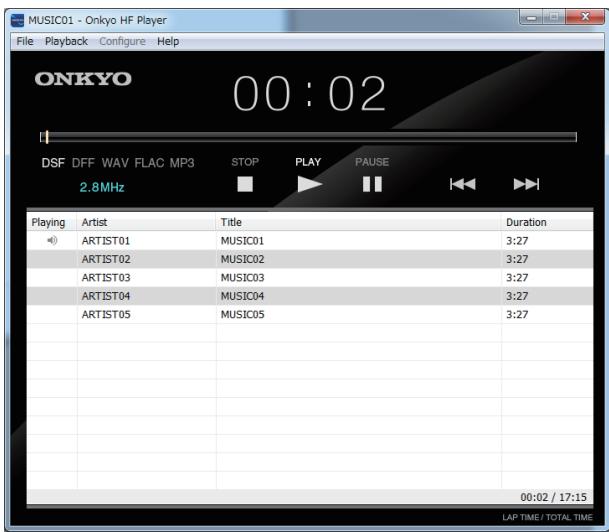
The new Onkyo HF Player is a high-quality music player application for Windows and Mac OS, with high-resolution audio data processing capabilities. Combining new high-res audio DAC-HA300/DAC-HA200 will allow uncomplicated high-res audio listening for everyone.
While conventional DSD file playback applications require professional know-how and deep digital music format understanding, the Onkyo HF Player allows you to listen to your audio as soon as you plug in your unit and install the application. Simply drag-and-drop your music files onto the window of the application, sit-back and enjoy.
In order to maximize the connected unit's performance, a simplified screen of the Onkyo HF Player helps reduce CPU load time while data processing. Choose between ASIO2.1 and DoP modes when playing back DSD files from your Windows PC. Furthermore, the RAM Buffer Playback mode that stores the audio data onto the internal memory is supported for the ultimate digital audio playback conditions.
The Onkyo HF Player is a free application software download to help you playback and enjoy your high-res-audio files with ease.
Supported products and OS
Playback supported
DAC-HA300, DAC-HA200*1
Windows: Windows Vista (32/64-bit)*2
Windows 7 (32/64-bit)
Windows 8 (32/64-bit)
Windows 8.1 (32/64-bit)
Mac OS: OS X Lion (10.7)
OS X Mountain Lion (10.8)
OS X Mavericks (10.9)
(As of January, 2015)
*1 DAC-HA200 does not support DSD file playback.
*2 DAC-HA300 does not support Windows Vista.
- For information about the operating systems that each product supports, see their operation manuals and our website.
Easy-to-use and high quality-sound
Anyone can playback high-res audio files just by installing the Onkyo HF Player. Unlike other professional audio playback applications, the Onkyo HF Player is simple to use, and doesn't require additional plug-ins for use.
ASIO 2.1 and DoP modes for DSD 2.8/5.6 MHz playback
DSD
Direct Stream Digital
DSD
Disc Format
A combination of the DAC-HA300 and a Windows PC supports DSD Native playback, processing DSD data into analog audio signal directly, without prior PCM conversion. Both ASIO 2.1 and DoP (DSD Audio over PCM Frames) modes, as well as both 5.6MHz and 2.8MHz DSD files are also supported with this configuration.
Various high-res-audio file formats other than DSD are supported
Not only 2.8 MHz/5.6 MHz DSD file, both PCM and FLAC files are supported as well, up to 384kHz .
Supported file formats (extension)
DSF (.dsf) 2.8/5.6 MHz
DSDIFF (.dff) 2.8/5.6 MHz
PCM (.wav) 44.1 kHz - 384 kHz,16 bit - 32 bit
FLAC (.flac) 44.1 kHz - 384 kHz,16 bit - 32 bit
MP3 (.mp3) 32 kbps - 320 kbps
- DSD file playback is limited to models that support it. Moreover, playback of files with formats that exceed the supported specifications of the equipment is not possible. For details, see the operation manual for the model being used.
DSD file playback on Mac
DoP mode playback is supported on Mac, for perfectly matched stylish designs like the DAC-HA300.
Simplified screen design reduces CPU load and enhances sound quality
The Onkyo HF Player achieves the finest sound quality through high-res audio and operates with ease. A modest but sufficient screen design allows the CPU to concentrate on the extremely large digital audio data processing, and the RAM Buffer Playback function storing digital audio data on the PC memory. The Onkyo HF Player was designed specifically as an ideal digital audio delivery system.
Other functions
- Supports Playlists (Creating, Saving and Loading playlists)
- Repeat play by playlist or track
- Shuffle play by playlist
Starting the software
Decompress the file you have downloaded and double-click "Onkyo HF Player Installer.exe" to start the installer. Follow the installer's instructions to install.
After installation, click [Onkyo HF Player] in the Start menu to start.
NOTE: Start this software after connecting the DAC-HA300/ DAC-HA200.
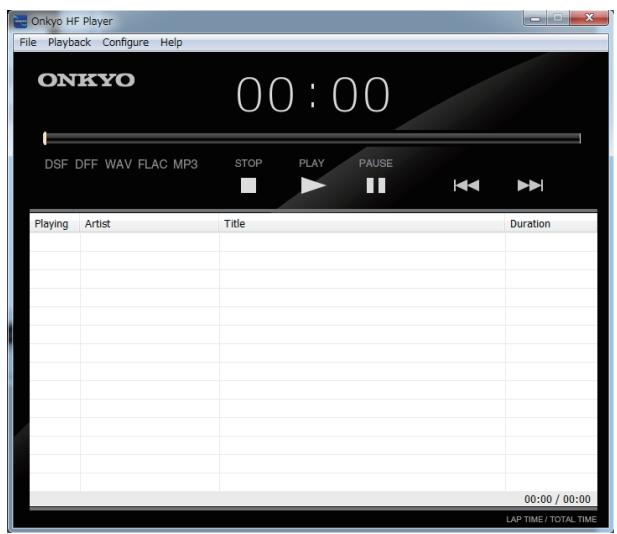
The Main screen appears when the Onkyo HF Player is launched.
Deleting the software
To delete Onkyo HF Player, go to the [Control Panel] and select [Onkyo HF Player] in [Uninstall a Program] and uninstall.
Setting up the connected device
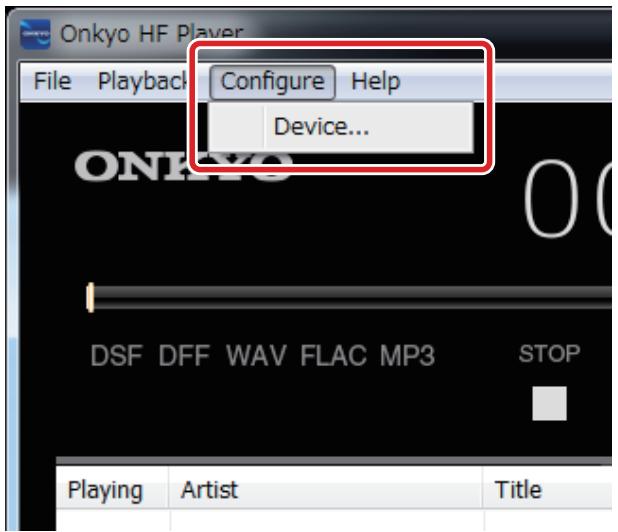
Select [Device...] from the [Configure] menu.
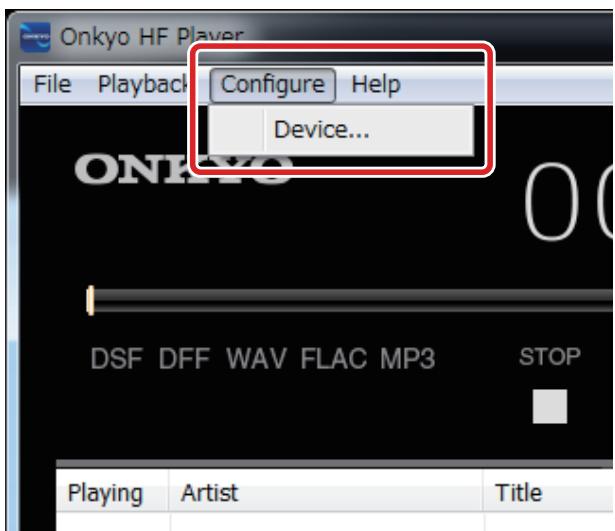
The [Configure] window appears. In the [Device] item, select the model name for the device you have connected.
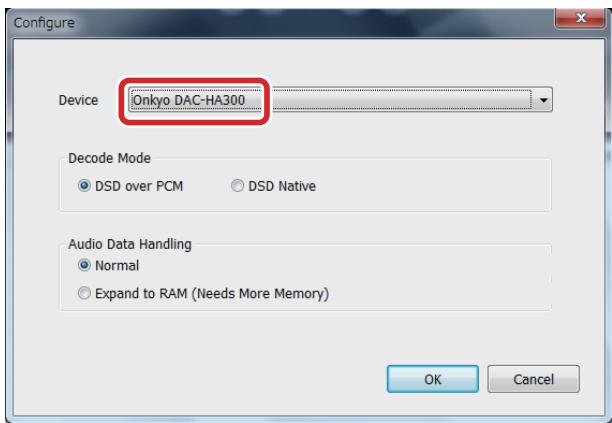
This allows the PC to output the audio signal to connected device.
- If you start this software without DAC-HA300/DAC-HA200 connected, device settings may be deleted. If this occurs, connect DAC-HA300/DAC-HA200 before starting this software and setup the device again.
To playback in finer audio quality
(Advanced settings)
Selecting DSD decoding mode (DAC-HA300 only)
On the Onkyo HF Player Windows version, you are able to choose decoding mode.
Select [Device...] from the [Configure] menu.
A [Configure] window appears, and choose [DSD over PCM] or [DSD Native] from the [Decode Mode] menu, as you prefer.
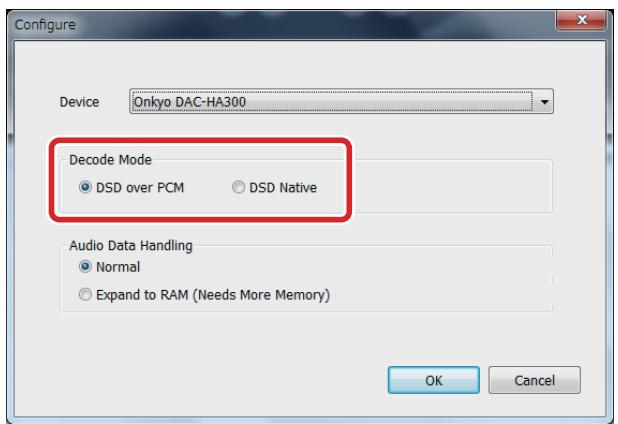
[DSD over PCM]
This is a playback method called DoP (DSD Audio over PCM Frames). The DSD data is embedded into PCM format for transfer.
[DSD Native]
Thanks to the ASIO 2.1 driver, the DSD data is directly transferred, without prior PCM conversion.
Selecting data loading method
File accessing methods are selectable for music file playback.
Select [Device...] from the [Configure] menu. A [Configure] window appears.
Choose [Normal] or [Expand to RAM] from the [Audio Data Handling] menu.
Tip: To playback a finer audio quality, choose the [Expand to RAM].
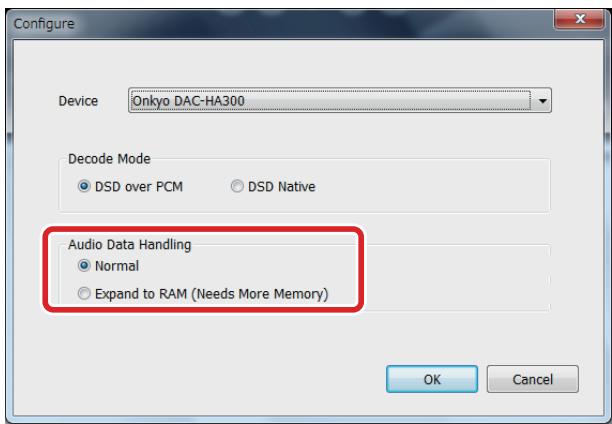
[Normal]
Reading digital audio data by normal file access mode.
[Expand to RAM]
Storing digital audio data on to the RAM (Random Access Memory) of your PC. This allows your PC to process stored data on the RAM by canceling file access during playback, and allowing the system to playback in the finest audio quality.
- When the [Expand to RAM] mode is selected, it may take extra time to start playback on a slower PC.
Starting the software
Decompress the file you have downloaded and double-click "Setup Onkyo HF Player.pkg" to start the installer. Follow the installer's instructions to install.
After installation, double-click [Onkyo HF Player] in the [Application] display of [Finder].
NOTE: Start this software after connecting the DAC-HA300/ DAC-HA200.
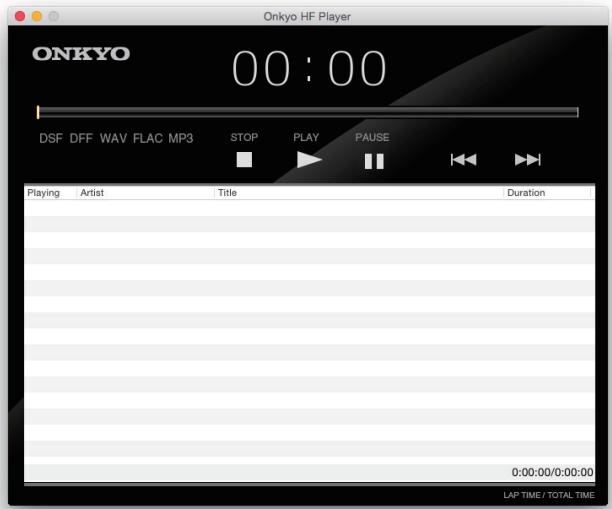
The Main screen appears when the Onkyo HF Player is launched.
Deleting the software
To delete Onkyo HF Player, move the Onkyo HF Player icon to the Trash.
Setting up the connected device
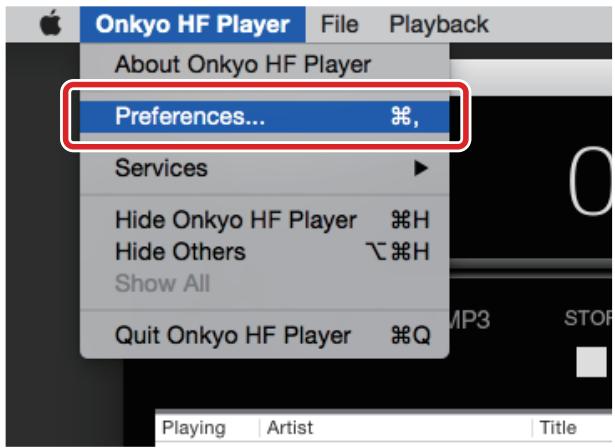
Select [Preferences...] from the [Onkyo HF Player] menu.
The [Preferences] window appears. In the [Device] item, select the model name for the device you have connected.
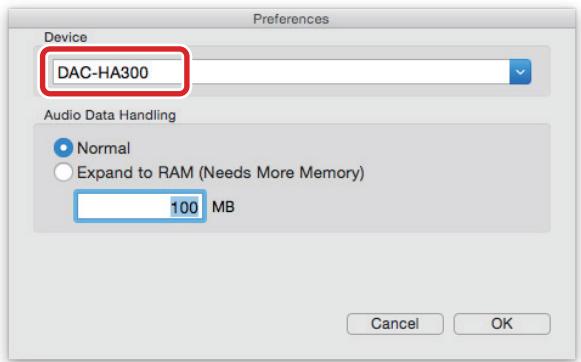
This allows the PC to output the audio signal to connected device.
- If you start this software without DAC-HA300/DAC-HA200 connected, device settings may be deleted. If this occurs, connect DAC-HA300/DAC-HA200 before starting this software and setup the device again.
To playback in finer audio quality
(Advanced settings)
Selecting data loading method
File accessing methods are selectable, to playback music files.
Select [Preferences...] from the [Onkyo HF Player] menu. A [Preferences] window appears.
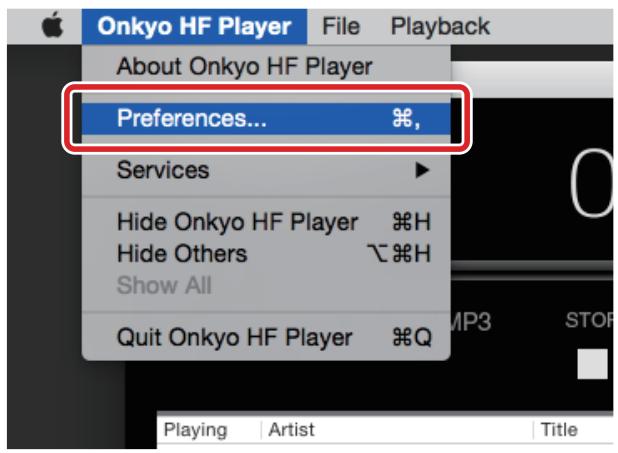
Choose [Normal] or [Expand to RAM] from the [Audio Data Handling] menu.
Tip: To playback in a finer audio quality, choose [Expand to RAM].
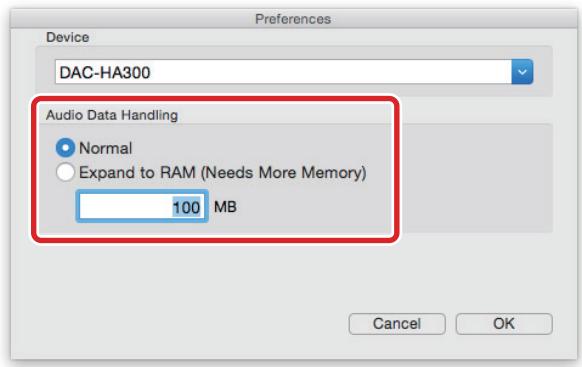
[Normal]
Reading digital audio data by normal file access mode.
[Expand to RAM]
Storing digital audio data on to RAM (Random Access Memory) allows your PC to process stored data on the RAM by canceling file access during playback, allowing the system to playback the finest audio quality. When [Extend to RAM] is selected, you can allocate maximum size of memory as you need, to load entire data of the music file you listen to.
- When the [Expand to RAM] mode is selected, it may take extra time to start playback, on a slower PC.
Settings are made in the same way for both the Windows and Mac OS versions. In this manual, we explain these procedures using the Windows version.
Preparing the music files
Prepare the music files that you want for playback using Onkyo HF Player.
In the lower part of the main window, the " Playlist," add your music files by following the steps listed below.
- You can also add your music files by dragging and dropping your music files directly into the Playlist.
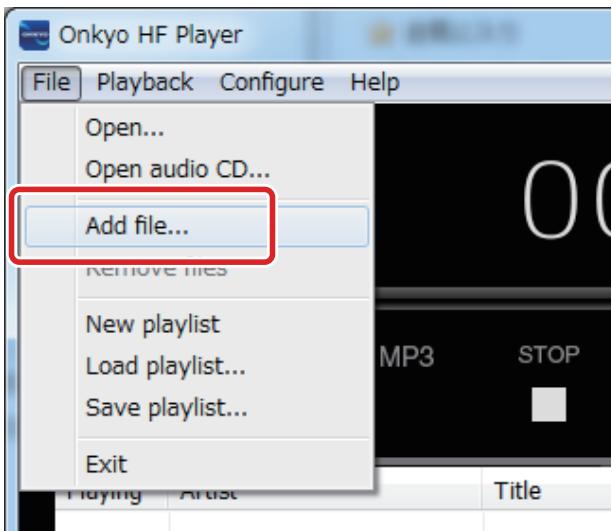
Select [Add file...] from the [File] menu at the top-left of the main window. An [Add file] window appears.
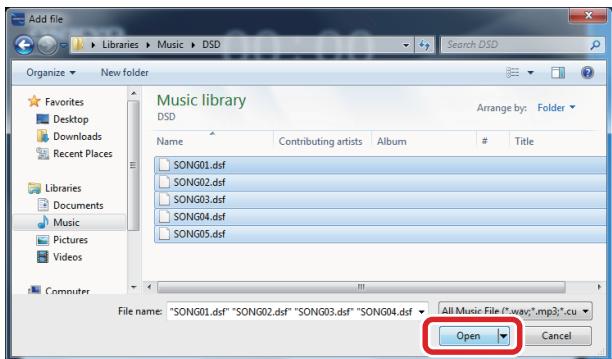
Browse and select target files, then click the [Open] button to add them to the Playlist of the Onkyo HF Player. Multiple files can be selected at once.
Play back the music files
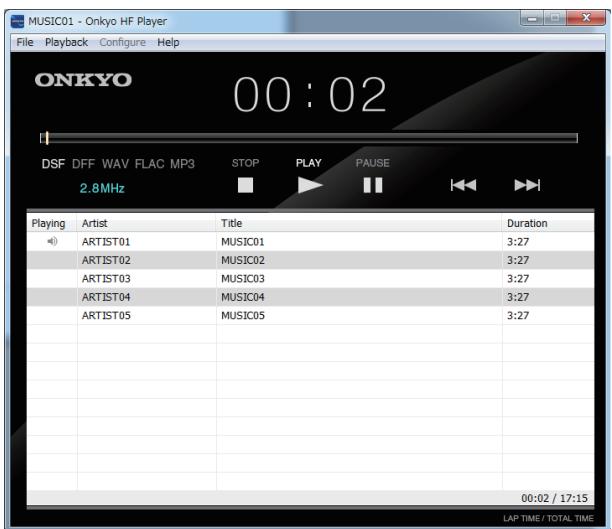
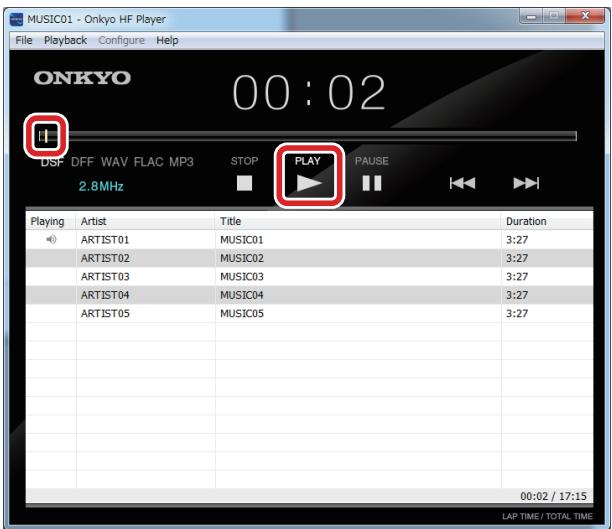
After creating a playlist, click the [PLAY] button to start playback from the beginning of the list.
Click the [Stop] button to stop, or click the [Pause] button to pause.
After stopping playback with the [STOP] button, press the [PLAY] button again to start playback from the beginning of the file where playback was stopped.
To start playback of any specific file, double-click that file's line in the list.
During playback, you can use the mouse to move the slider below the time display to change the playback position as desired.
Alternatively, the following controls are accessible from the [Playback] menu at the top-left.
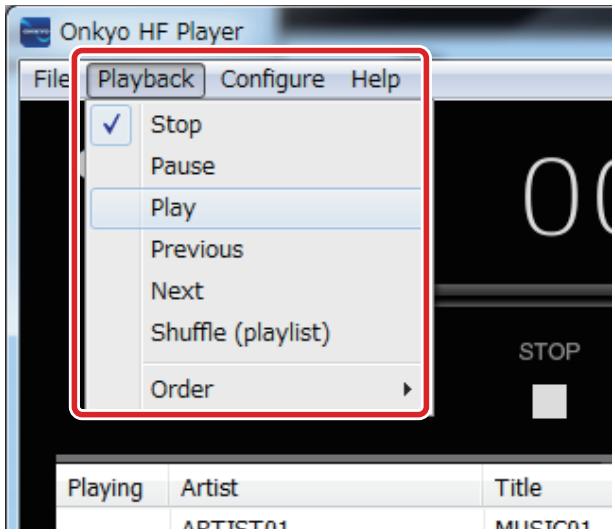
[Stop]
Stop the music.
[Pause]
Pause the music.
[Play]
Start playback.
[Previous]
Go back to the previous music file in the Playlist.
[Next]
Go to the next music file in the Playlist.
[ShufflePLAYlist]
Start shuffle play in the Playlist.
[Order]
Select type of repeat play from this menu.
[Order] > [Default]
No repeat playback
[Order] [Repeat(playlist)]
Repeat all music files in the Playlist.
[Order]>[Repeat(title)]
Repeat the selected music file.
Managing the Playlists
The added music files to the Playlist can be saved. It is convenient to save your favorite music files as a Playlist.
- Unless you save the Playlist, added music files in the list will disappear when the Onkyo HF Player is shut down.
Saving the Playlist
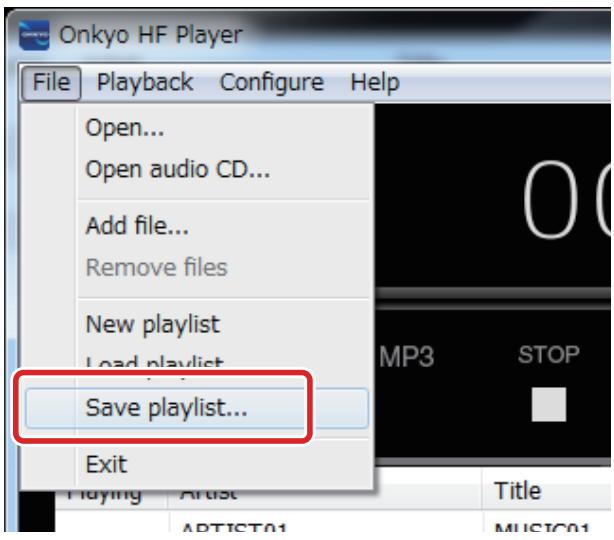
Select [Save playlist...] from the [File] menu, after you added music files to the Playlist. A [Save playlist] windows appears, then click the [Save] button after you choose an appropriate location, to save the Playlist on your PC.
Loading a Playlist
After the Onkyo HF Player is launched, the main window shows nothing in the Playlist. By loading the previously saved Playlist you are ready to playback your favorite music files. Alternatively, you are able to switch to another Playlist, when music files are displayed in the Playlist. It is recommended to create multiple Playlist by genre or file formats, to switch between them quickly.
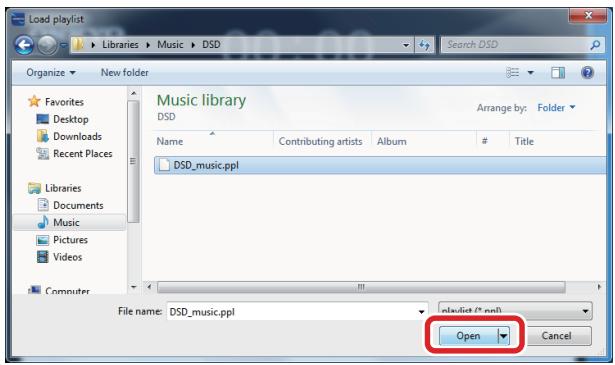
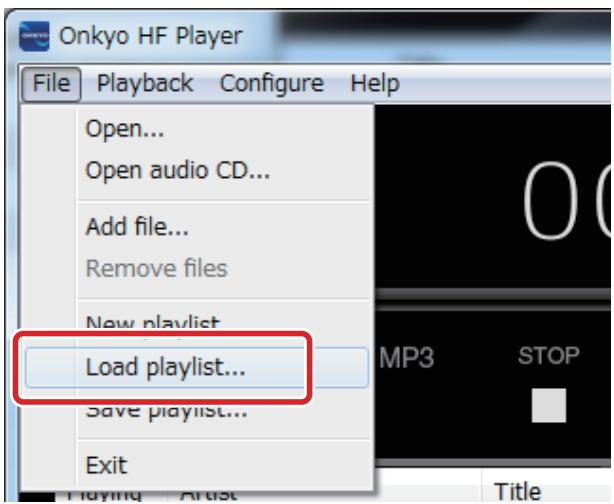
Select [Load playlist...] from the [File] menu.
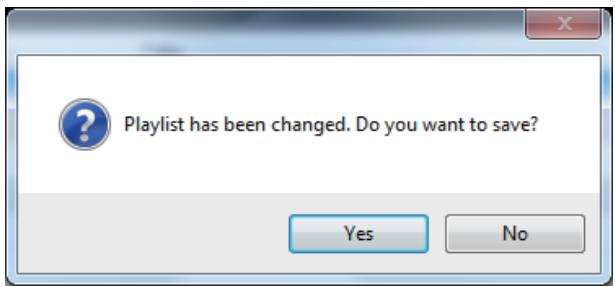
If music files are added to the Playlist (or another Playlist is loaded), an alert window appears. To save the current music file list in the Playlist, click [Yes] to save. To discard the current music file list in the Playlist, click [No] to discard.
A [Load playlist] windows appears. Choose a target Playlist (".ppl" extension on Windows or ".xml" extension on Mac OS) from the appropriate location on your PC, and click the [Open] button to load the selected Playlist.