AZEAc - Fan AIR NATUREL - Free user manual and instructions
Find the device manual for free AZEAc AIR NATUREL in PDF.


| Product type | Pedestal fan |
| Brand | Air Naturel |
| Model | AZEAc |
| Dimensions (H x W x D) | 1080 x 225 x 209 mm |
| Net weight | 5.2 kg |
| Supply voltage | 220-240 V ~ 50/60 Hz |
| Power consumption | 40 W |
| Number of speeds | 3 (low, medium, high) |
| Maximum efficiency area | 20 m² |
| Oscillation function | Yes, controlled by button |
| Timer | From 0.5 to 7.5 hours in 30-minute steps (15 settings) |
| Ventilation modes | Normal, Natural, Silent Night |
| Remote control | Yes, with same functions as the control panel |
| LED indicator | Yes, on the front panel |
| Assembly required | Yes, assembling the base and attaching the grilles |
| Cleaning and maintenance | Unplug, clean with a damp cloth, dry thoroughly |
| Safety precautions | Do not use near water, do not insert metallic objects, keep out of reach of children |
| Body material | Not specified, assumed plastic and metal |
| Warranty | 1 year from the date of purchase upon presentation of the receipt |
| Disposal (WEEE) | Do not dispose of with household waste, recycle at an appropriate collection point |
| Customer service | info@airnaturel.com |
Frequently Asked Questions - AZEAc AIR NATUREL
User questions about AZEAc AIR NATUREL
0 question about this device. Answer the ones you know or ask your own.
Ask a new question about this device
Download the instructions for your Fan in PDF format for free! Find your manual AZEAc - AIR NATUREL and take your electronic device back in hand. On this page are published all the documents necessary for the use of your device. AZEAc by AIR NATUREL.
USER MANUAL AZEAc AIR NATUREL
Thank you for having purchased the Azéa fan, an Air Naturel product. We hope that it will bring you complete satisfaction and improve your indoor air comfort.
As with all electrical appliances, it is important to maintain the device properly in order to avoid any damage or injury. Please read carefully these instructions before switching the device on and keep them for further reference.
Important safety instructions
Never place the fan in an area where it is accessible to children. Do not let children use the appliance as a toy. Do not let children play with the packaging (plastic bag, etc.).
Children must stay under parental supervision, so that they do not play with the appliance.
This product is not suitable for people (including children) with reduced physical, sensorial or mental abilities as well as people who lack knowledge of the product, except under supervision or if they have received prior instructions from the person responsible for their safety.
This unit works on 240 volts. Please check this is suitable for the electrical installation on which it will be plugged.
The appliance should be placed on a dry and flat surface. Avoid flammable or nylon-based surfaces. Avoid placing the appliance near an heater or another heat source.
Always unplug or disconnect the device from the mains during cleaning and maintenance operation.
To avoid any electrical shock, do not expose the power cord to water or humid surfaces.
Do not use the device if damaged.
Do not introduce metallic objects inside the device.
Do not wet the device. Clean it with a moist cloth and dry it carefully before plugging it back in and switching it on.
Domestic injury prevention
The safety of this product conforms to the relevant norms and regulations in force in the EU.
For any further information, please visit our website: www.airnaturel.com
Our customer service department is available at the following email address: info@airnaturel.com
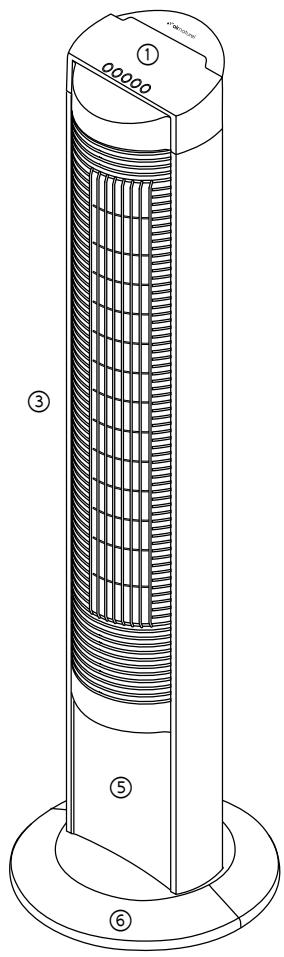
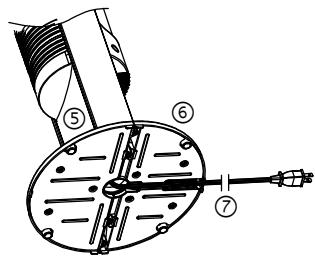
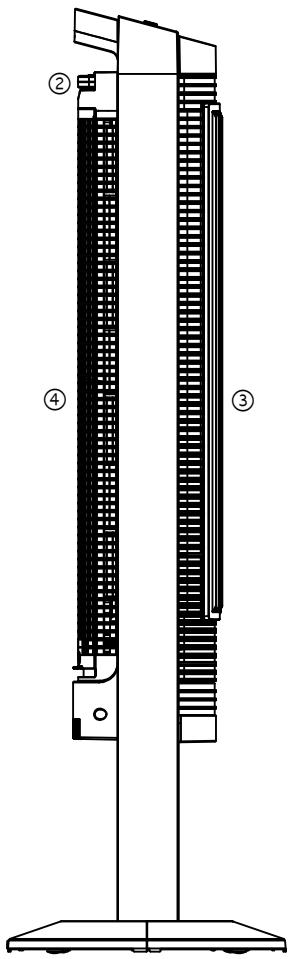
① Control panel
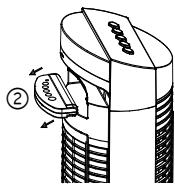
② Remote control
③ Front housing
④ Rear housing
⑤ Plate
⑥ Fan base
⑦ Power cord
Remote control ②
Both the remote control and the control panel provide the same functions.
Specifications
Voltage
220-240 V
Product size 1080 x 225 x 209 mm (h x w x d)
Net weight 5.2 kg
Power 40 W
Speeds 3
Suitable for rooms up to 20m^2
Assembly method
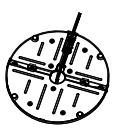
Fig. 1
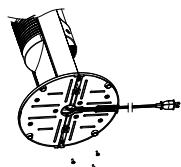
Fig. 2
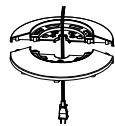
Fig. 3
- Assemble the front and rear base and the power cord through the center of the base. (Fig.1)
- Fasten the base to the fan by inserting and tightening the screws at the bottom of the base.(Fig.2)
- Place the power cord securely in the power cord holding brackets and secure them. (Fig.3)
Control panel
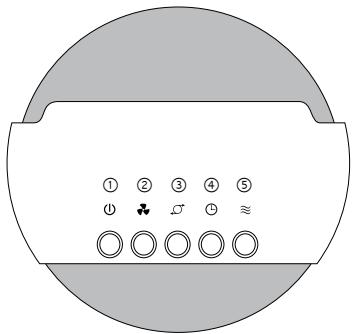
① On / Off
② Speed setting
③ Oscillation
(4) Timer
⑤ Wind mode
Operating instructions
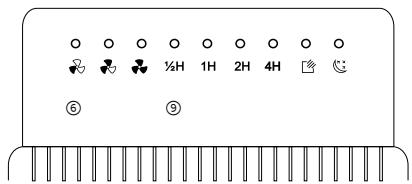
- Connect to the mains, and press the On/Off button. The fan will turn on with LED indicator. The desired program can now be set.
- On / off ①: starts and stops the fan.
- Speed setting ②: shown by the following LEDs: low ⑥ - middle ⑦ - high ⑧.
- Oscillation ③: starts and stops the oscillation mode.
- Timer ④: there are 15 settings - from 12 hour to 7 hours and a half. Each press will increase the time by half an hour.
-
Wind mode ⑤: normal wind mode, natural wind mode, sleeping wind mode:
-
Normal mode: the fan will run according to the selected wind speed (low, middle, high),
-
Natural mode: the fan will run according to the selected wind speed, its blow reproducing a natural wind. By selecting a different wind speed (low, middle, high), the breeze will have the chosen power,
- Sleeping mode: when the user falls asleep, the body temperature decreases slowly. By selecting the sleeping wind mode, the fan will reduce the wind speed slowly too, in order to avoid the user catching a chill.
When the wind speed is set on "high", the fan will blow at high power for half an hour, then at middle power for half an hour and at low power natural mode until the end of the setted time or the fan is turned off.
When the wind speed is set on "middle", the fan will blow at middle power for half an hour then at low power until the end of the setted time or the fan is turned off.
When the wind speed is set on "low", the fan will blow at low power until the end of the settled time or the fan is turned off.
Warranty
The appliances are under warranty for a 1-year period from the purchase date. The warranty covers all failures resulting from hidden manufacturing or raw material defects. This warranty does not cover failures or damages resulting from an inadequate setup or usage, or from the normal wear and tear of the product.
Air Naturel cannot be held liable in case of an inadequate or dangerous use of the products.