
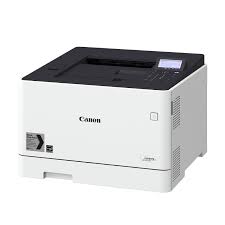
I-SENSYS LBP653CDW - Laser printer CANON - Free user manual and instructions
Find the device manual for free I-SENSYS LBP653CDW CANON in PDF.


Pick your language and provide your email: we'll send you a specifically translated version.
| Product type | Color laser printer |
| Brand | Canon |
| Model | I-SENSYS LBP653CDW |
| Dimensions (W × D × H) | 430 × 440 × 280 mm |
| Weight | Approx. 18.5 kg (with cartridges) |
| Power supply | 220-240 V AC, 50/60 Hz |
| Print resolution | 600 × 600 dpi |
| Print speed (A4) | Up to 27 ppm color and black |
| Automatic duplex | Yes |
| Standard paper capacity | 250 sheets (cassette) + 1 sheet (multi-purpose tray) |
| Display | Monochrome LCD |
| Network connectivity | Ethernet 10/100/1000, Wi-Fi 802.11 b/g/n |
| Main functions | Secure printing, USB direct printing, AirPrint, remote user interface |
| Maintenance and cleaning | External cleaning, fixing assembly, transfer belt |
| Security | Auto shut-off, password protection, IP filtering, TLS encryption |
| Spare parts and repairability | Toner cartridges (black, cyan, magenta, yellow), drum, fixing assembly |
| General information | User manual available for download (629 pages) |
Frequently Asked Questions - I-SENSYS LBP653CDW CANON
How to connect my Canon I-SENSYS LBP653CDW via Wi-Fi?
Use the control panel: go to Settings > Network > Wireless. You can use WPS mode (push button or PIN code) or configure manually by entering the SSID and network key.
How to load paper in the cassette?
Pull the cassette out of the printer, adjust the guides to the paper size, insert the stack of paper (print side down), then reinsert the cassette by pushing it until it clicks.
What to do in case of a paper jam?
Turn off the printer and unplug it. Open the front cover and carefully remove the jammed paper following the insertion direction. Also check the multi-purpose tray and internal units. Refer to the Clearing Paper Jams chapter in the manual.
How to perform secure printing?
In the print driver, select Output Method > Secure Print and set a PIN code. Send the document, then on the printer control panel, go to Secure Print and enter the PIN code to start printing.
What types of paper are compatible?
The printer accepts plain, recycled, letterhead, envelopes, labels, and transparencies. Sizes from A4, A5, A6, B5, Letter, Legal, and custom (76.2 x 127 mm to 216 x 356 mm). See the Available Paper section in the manual.
How to replace a toner cartridge?
Open the front cover, remove the used cartridge by pulling it toward you. Unpack the new cartridge, remove the sealing tape, insert it until it clicks, and close the cover. Follow on-screen instructions if necessary.
How to clean the printer?
Before cleaning, turn off and unplug the device. Clean the exterior with a soft, slightly damp cloth (water only). For the interior, use a dry cloth to remove dust. Never use alcohol or solvents.
How to print from a smartphone with AirPrint?
Make sure the printer and iPhone/iPad are on the same Wi-Fi network. Open the document, tap the share icon, select Print, choose your Canon LBP653CDW, and adjust settings before printing.
What to do if the printer does not print after an IP address change?
Check the current IP address in Settings > Network > IPv4. On the computer, go to Devices and Printers, right-click the printer, select Printer Properties > Ports tab, add a new TCP/IP port with the new IP address.
How to reset to factory settings?
On the control panel, go to Settings > System Management > Reset > Reset All. Confirm the operation. This will restore all default settings, including network settings.
User questions about I-SENSYS LBP653CDW CANON
0 question about this device. Answer the ones you know or ask your own.
Ask a new question about this device
No questions yet. Be the first to ask one.
Download the instructions for your Laser printer in PDF format for free! Find your manual I-SENSYS LBP653CDW - CANON and take your electronic device back in hand. On this page are published all the documents necessary for the use of your device. I-SENSYS LBP653CDW by CANON.
USER MANUAL I-SENSYS LBP653CDW CANON
LBP654Cx / LBP653Cdw / LBP613Cdw / LBP611Cn
Manual assistant
Powered by Anthropic
Waiting for your message
Product information
Brand : CANON
Model : I-SENSYS LBP653CDW
Category : Laser printer